301 Redirects – Redirect Manager

301 Redirects – Redirect Manager
Description
301 Redirects helps you manage and create 301, 302, 307 redirects for WordPress site to improve SEO & visitor experience. 301 Redirects is easy to use. Perfect for new sites or repairing links after reorganizing your old content, or when your site has content that expires and you wish to avoid sending visitors to a 404 error page and want to create redirection instead. Use the 404 error log to identify problematic links & create new redirections.
301 Redirects GUI is located in WP Admin – Settings – 301 Redirects
404 Error Log widget can be found in the WP Admin – Dashboard
Features
- Choose from Pages, Posts, Custom Post types, Archives, and Term Archives from dropdown menu to create redirection
- Or, set a custom destination URL!
- Retain query strings across redirects
- Super-fast redirection
- 404 error log
- 404 error log widget
- Import/Export feature for bulk redirects management
- Simple redirect stats so you know how much a redirection is used
- Fully compatible with translation plugins (Weglot, TranslatePress, Gtranslate, Loco Translate) that use lang prefix in URL
Need more features?
WP 301 Redirects PRO offers wildcard & regular expression URL matching, auto-typo fixing in URLs, complete redirect and 404 log, link scanner, and a centralized SaaS dashboard to monitor redirects on all your sites from one place.
What is a 301 Redirect?
A redirect is a simple way to re-route traffic coming to a Requested URL to different Destination URL.
A 301 redirect indicates that the page requested has been permanently moved to the Destination URL, and helps pass on the Requested URLs traffic in a search engine friendly manner. Creating a 301 redirect tells search engines that the Requested URL has moved permanently, and that the content can now be found on the Destination URL. An important feature is that search engines will pass along any clout the Requested URL used to have to the Destination URL.
When Should I use 301 Redirects?
* Replacing an old site design with a new site design
* Overhauling or re-organizing your existing WordPress content
* You have content that expires (or is otherwise no longer available) and you wish to redirect users elsewhere
Is the 404 error log GDPR friendly?
The 404 error log does not collect user IPs. It collects the following data: timestamp of the event, the (404) URL that was opened, and the user-agent string.
Having problems with SSL? Moving a site from HTTP to HTTPS?
Install our free WP Force SSL plugin. It’s a great way to enable SSL and fix SSL problems.
External libraries used in the project
* PHP User Agent Parser
Installation
- Upload the
eps-301-redirectsfolder to the/wp-content/plugins/directory - Activate the plugin through the ‘Plugins’ menu in WordPress
- Begin adding redirects in the Settings -> 301 Redirects menu item
Screenshots
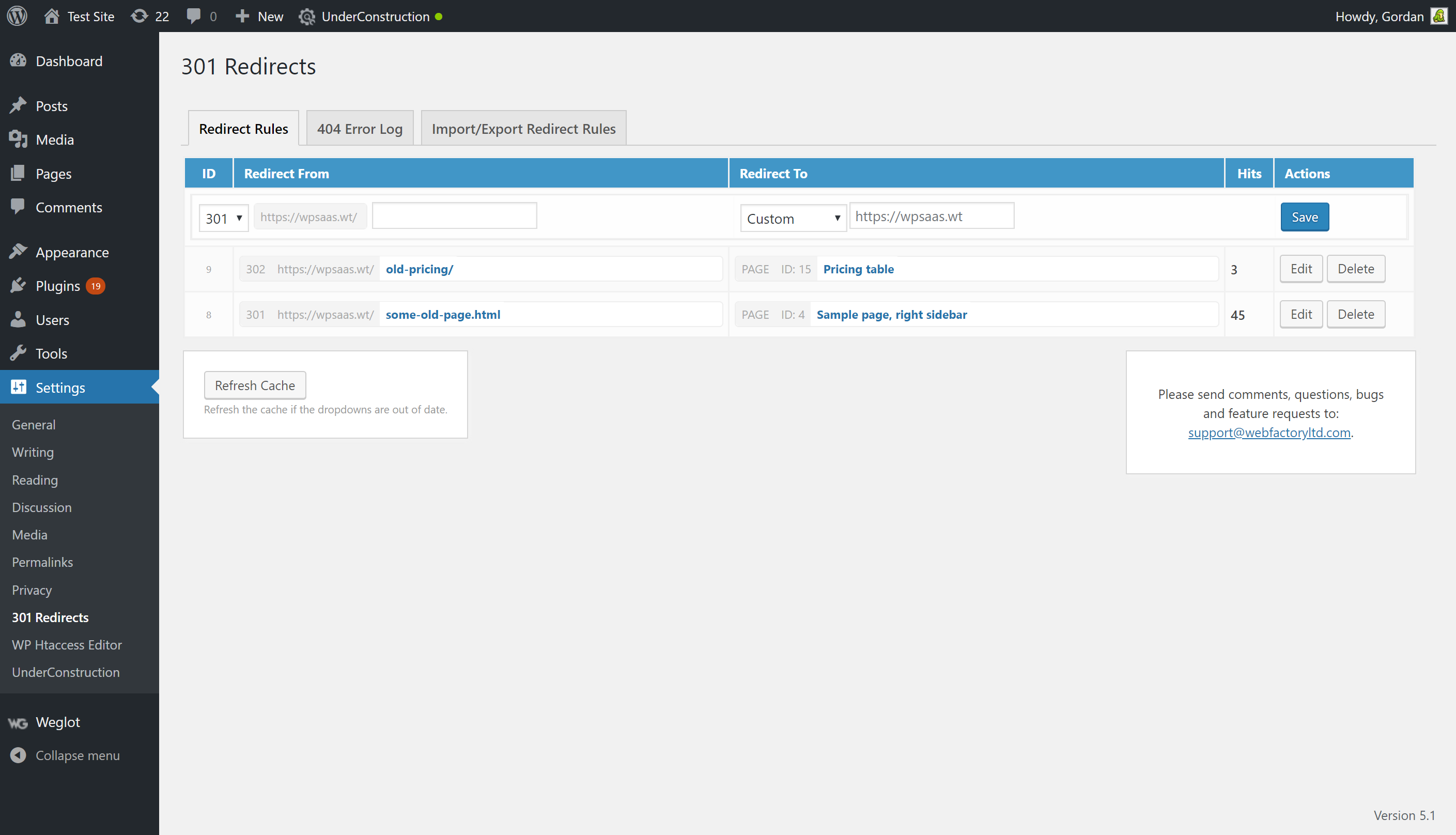
301 Redirects admin area
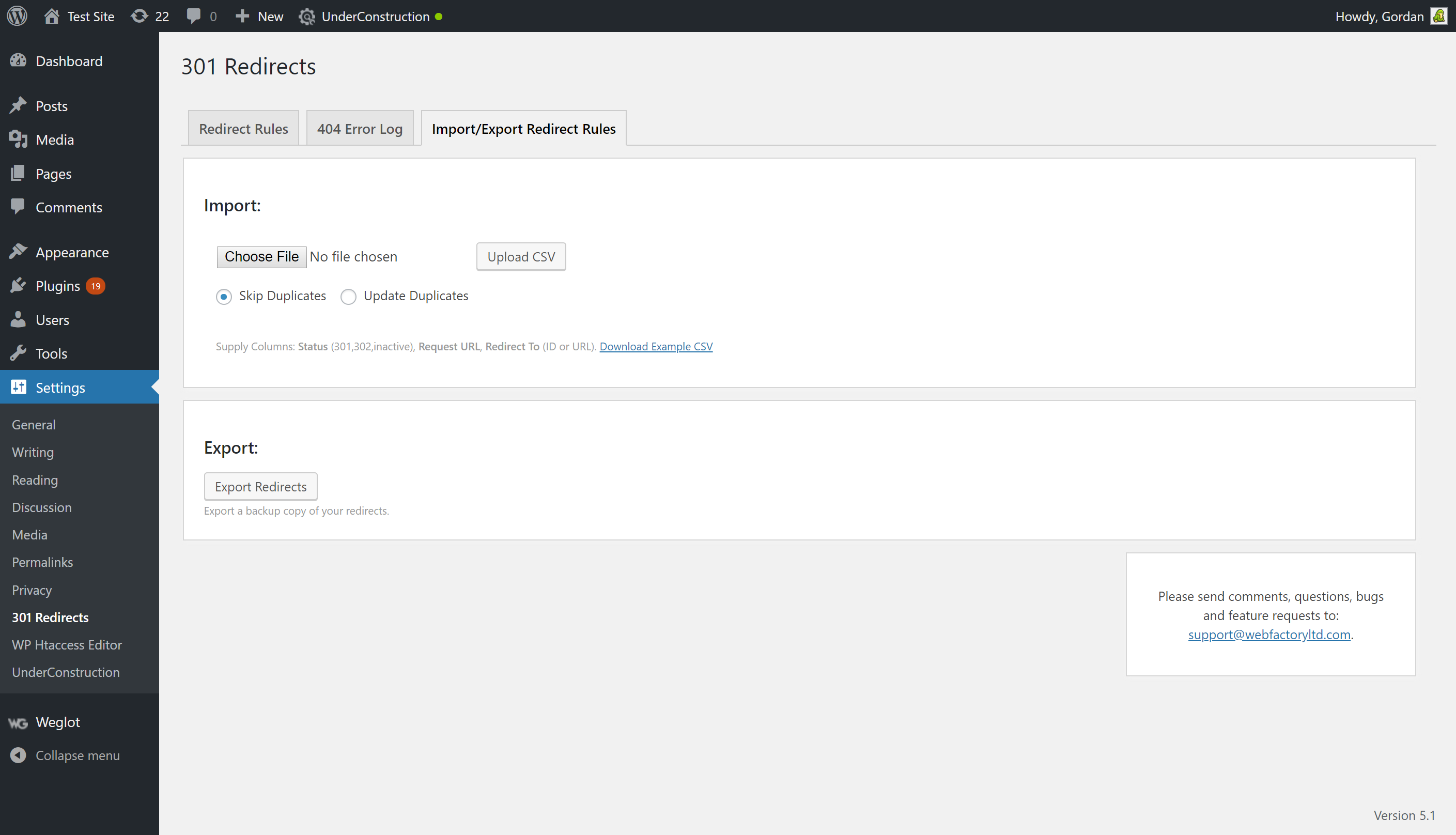
301 Redirects import/export options
Faq
A redirect is a simple way to re-route traffic coming to a Requested URL to different Destination URL.
A 301 redirect indicates that the page requested has been permanently moved to the Destination URL, and helps pass on the Requested URLs traffic in a search engine friendly manner. Creating a 301 redirect tells search engines that the Requested URL has moved permanently, and that the content can now be found on the Destination URL. An important feature is that search engines will pass along any clout the Requested URL used to have to the Destination URL.
301 Redirects requires that you use anything but the default permalink structure.
This could be caused by many things, but please ensure that you are supplying valid URLs. Most common are extra spaces, extra slashes, spelling mistakes and invalid characters. If you’re sure they’re right, chances are your browser has cached the 301 redirect (in an attempt to make the redirection faster for you), but sometimes it doesn’t refresh as fast as we would like. Clear your browser cache, or wait a few minutes to fix this problem.
My redirects aren’t working – the old .html page still shows
For this plugin to work, the page must be within the WordPress environment. If you are redirecting older .html or .php files, you must first delete them. The plugin can’t redirect if the file still exists, sorry! You should look into .htaccess redirects if you want to keep these files on your server.
Your Request or Redirect URLS may be incorrect; please ensure that you are supplying valid URLs. Check slashes. Try Viewing the page by clicking the Request URL – does it load correctly?
Click the small X beside the redirect you wish to remove.
Unfortunately this is not supported. You should look into WP 301 Redirects PRO for these advanced features.
By default, any URL with a query string is considered unique, and will redirect to a unique page (if you so wish). The query string will be added to the Destination URL, which allows you to keep your tracking codes, affiliate codes, and other important data! If you want to have full control over query strings, ignore them, add or remove them consider upgrading to WP 301 Redirects PRO.
When you deactivate the plugin, obviously, redirects stop working. But, they are not deleted from your database. When you delete the plugin then the redirects are permanently deleted from the database along with any other data stored by the plugin in your database.
By default, the 404 error log is limited to the last (chronologically) fifty 404 errors. Since the log doesn’t use a custom database table for storage but rather an array saved in WP options, 50 is a safe number that ensures the log works on all sites, that it doesn’t take up too much space in the database and that it doesn’t slow down the site.
The code imposes no limits on the log size and you can easily overwrite the default limit by using the eps_301_max_404_logs filter or by using the following code snippet to raise the limit to 200:
add_filter(‘eps_301_max_404_logs’, function($log_max) { return 200; });
You can report security bugs through the Patchstack Vulnerability Disclosure Program. The Patchstack team help validate, triage and handle any security vulnerabilities. Report a security vulnerability.
Reviews
Simple and Super useful
By 
very decent tool
Frustrated with Pro version
By 
When it works, it works. When it doesn't... well, good luck.
I am a paying customer and, after a recent update, the plugin sends new users trying to log in to a "page not found" page even though such a redirect does not exist. Also, there are redirects created a year ago that now go to a Page not Found error -- roughly 900 of them. Seems that there was a change to whether the link the plugin created started with a slash ("/") or not.
This is definitely the most frustrating plugin I have ever dealt with. To make it work today, I have to deactivate the PRO version that I am paying for. Just so potential clients can add their info. No idea just now as to how this affects all the current redirects...
Nice Plugin!
By 
Really good one! I used it for creating 301 Redirections. It does it's job perfectly!
Works Great!
By 
Easy 301 redirect plugin.
Amazing
By 
Effective, sufficient, and necessary. The plugin helped me a lot.
So Clutch During a Site Transition
By 
Very helpful when our site structure changed to a primary website with subdomain AMS. Having redirects in place to get people to the right content was so helpful. And being able to stay aware of wrong URLs users are still going to so we can address those more proactively.
Finally an Easy Plug-in
By 
Great plug-in if you're short on time. Quick and easy to use.
Excellent plugin
By 
Excellent plugin, really easy to use.
OK
By 
It works well
attaches old URL to new URL
By 
I wanted to redirect "/?page_id=259" to "/pagename", but the plugin creates a redirect to "/pagename/?page_id=259" - very funny. Silly plugin.
Changelog
2.83
- 2026/01/09
- increased maximum URL length to 1024 characters
- added ‘eps_301_redirects_capability’ filter to change the capability required to manage redirects. If set to anything other than ‘manage_options’ 301 Redirects will show under its own menu page instead of under Settings
2.82
- 2026/01/03
- fixed minor user agent detection bug
2.81
- 2025/11/07
- fixed whitespace in From URLs issue
2.80
- 2025/07/30
- minor code tweaks
2.79
- 2025/03/18
- fixed issues with some non-latin characters in URLs
2.78
- 2025/02/25
- code enhancements for PCP
2.77
- 2024/10/18
- security fixes
- code enhancements
2.76
- 2024/06/30
- security fixes
2.75
- 2024/03/25
- WordPress 6.5 compatibility
2.74
- 2024/02/20
- PHP v8.2 compatibility fix
2.73
- 2023/03/08
- security fixes
2.72
- 2021/11/11
- security fixes
- added “Reset Redirect Hits” tool
2.70
- 2021/05/01
- 404 error log widget is now visible only to users with manage_options permission
- added “Delete all redirect rules” tool
2.67
- 2021/03/16
- fixed a small security issue with redirection
2.66
- 2021/02/23
- fixed compatibility issue with Rank Math
2.65
- 2021/02/22
- added 404 error log Dashboard widget
- fixed some bugs
- added support for Cache Enabler plugin
2.60
- 2021/02/13
- added 404 error log
- fixed some bugs
- made sure all DB queries use prepare() function
- PRO version is now available for purchase from free
2.55
- 2021/01/30
- Removed promo campaign for WP 301 Redirects PRO version
- Added flyout menu
2.53
- 2020/09/29
- More issues fixed related to redirections with translation plugins
- Fixed issue with encoding source & target URLs in some situations.
- Added promo campaign for WP 301 Redirects PRO version in November
2.52
- 2020/09/07
- Fixed issue with URL prefix on translate plugins like Weglot, TranslatePress, Gtranslate, Loco Translate
2.51
- 2020/08/13
- security fixes – thank you Erin
2.50
- 2020/08/10
- added support for 307 Temporary Redirect
- 100k installs hit on 2020/07/22 with about 365,000 downloads
2.45
- 2019/12/17
- security fixes – big thank you to Chloe from Wordfence
- WP-CLI fix
2.40
- 2019/03/25
- bug fixes
- rating notification
2.3.5
- 2019/03/11
- WebFactory took over development
- 50,000 installations; 151,500 downloads
- bug fixes
- compatibility fixes for new versions of PHP and WP
1.0
- 2013/05/01
- initial Release
- for a complete changelog please visit https://wp301redirects.com/old-changelog.txt