eSherpa Login Guard
eSherpa Login Guard
Description
eSherpa Login Guard effectively and intelligently protects your WordPress site from brute-force attacks – Swiss precision, completely without external dependencies.
Key Features:
- Honeypot-first bot defense: JavaScript Honeypot detects non-browser bots and triggers immediate lockout logic.
- Protected username trap: Immediate lockout for defined usernames (e.g., “admin”, “test”), independent of the regular counter.
- Proactive User-Agent blocking: Block known bot signatures before login processing (exact match or substring mode).
- Blocked User-Agent attempt log: Separate log table for blocked User-Agent requests including matching pattern.
- WordPress hardening options: Disable XML-RPC (with fake-user honeypot response), hide REST user endpoint, and block author archive enumeration.
- Optional bot password capture: Store attempted passwords from detected JS-honeypot bots for incident analysis.
- Neutral login error option: Hide username enumeration by using neutral WordPress login error responses.
- Live security visibility: Live alarm in admin, lockout badge in menu, and detailed failed-attempt logs with IP/User-Agent filters.
- Progressive lockout durations: Lockout time increases on repeat offenses (e.g., 15 30 60 120 minutes).
- Login page guidance: Clear countdown and “X attempts remaining” notice for transparent lock state.
- Privacy-compliant: IPs stored only as anonymized hashes.
- Automatic cleanup of old failed attempts (configurable).
- Mobile-friendly admin tables: Horizontal scrolling for wide security tables on small screens, including swipe hint.
- Email notification to admin on attacks against existing users.
Developed in Switzerland – fast, clean, performant, and multilingual ready.
Compatible with WordPress 6.9 and tested up to PHP 8.5.3.
Installation
- Search for the plugin in “Plugins Add New ‘esherpa login guard'” or upload and activate.
- Optional: Adjust settings under “Login Guard” in the admin menu (e.g., max failed attempts, base lockout time, protected usernames).
- Done – protection runs automatically.
Screenshots

Lockout message with large countdown and plugin credit

Early warning on login page with remaining attempts

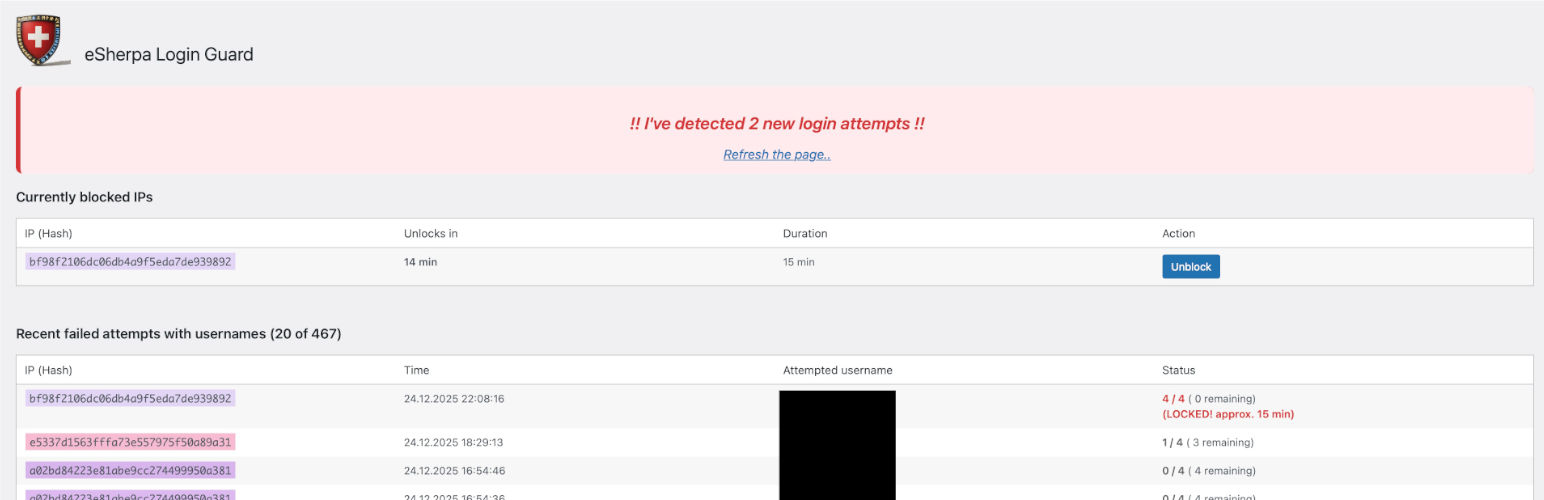
Admin overview with currently locked IPs, live alarm, and unblock option

Detailed logs of failed attempts (including attempted username)

Successful logins & logouts in separate view
Faq
Only as anonymized MD5 hashes – no plain-text IPs in the database (GDPR-compliant).
Yes – directly in the admin overview with one click (counter is reset).
Yes – protection hooks early on wp-login.php, before caching.
All counters and locks for that IP are immediately cleared.
Yes – simply disable the option. When enabled, XML-RPC is fully disabled and a honeypot is activated.
Reviews
Changelog
3.0.0
- Release: Version bump to 3.0.0 for the current major feature set.
- UI (Mobile): Admin log tables are now horizontally scrollable on small screens.
- UI (Mobile): Added a visible swipe/scroll hint for wide tables.
- UI: Reduced “blocked User-Agent attempts” list in admin overview from 50 to 20 entries for better readability.
- Docs: Expanded README feature list (proactive User-Agent blocking, blocked-UA logs, neutral login errors, bot password capture, mobile table UX).
2.7.0
- Feature: JavaScript Honeypot for automatic bot detection with progressive lockout (like protected usernames)
- UI: Visual bot indicators (🤖 emoji) in both locked IPs and failed attempts tables
- UI: Clickable User-Agent filtering in all log tables (like IP filtering) – optimized display to 100 chars
- Security: Enhanced bot detection combining multiple methods
- Fix: XML-RPC Honeypot now generates properly formatted XML without double-escaping
2.6.0
- Security: Fixed critical IP address handling vulnerability – now properly supports proxy headers
- Feature: Added comprehensive User-Agent logging to all login attempts and successful logins
- Feature: Added JavaScript Honeypot for automatic bot detection (1-hour lockout)
- Performance: Optimized admin menu badge query with caching
- Security: Enhanced input validation with reasonable limits on all settings
- UI: Visual bot indicators in admin tables with 🤖 emoji
- Code: Improved code formatting and consistency throughout
2.5.4
- Fix: Immediate lockout for protected usernames (honeypot usernames) was setting back attemts and multipliers
- Sort by IP -> Better overview for single IP hashs.
- Improved design for mobile
2.5.1
- Immediate lockout for protected usernames (honeypot usernames)
- Live alarm for new failed attempts on admin page
- Email notification on attacks against existing users
- Extended XML-RPC honeypot with configurable fake users
- Automatic cleanup of old failed attempts
- Improved design and many detail enhancements
2.1.1
- Full multilingual support (DE/EN/FR/IT)
- Confirmed compatibility with WordPress 6.9 and PHP 8.3
- Minor optimizations
2.0
- Introduced progressive lockout times
- Admin menu with red badge for active locks
- Improved user guidance
1.0
- Initial stable release