Show Eventbrite Events – Event Feed for Eventbrite
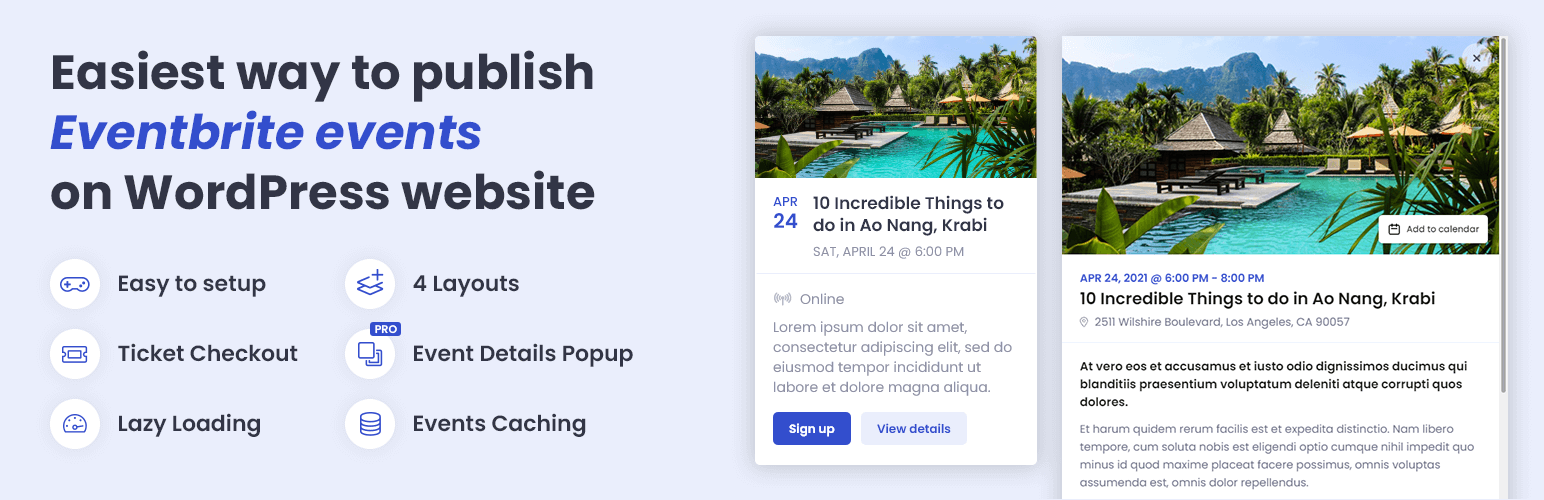
Show Eventbrite Events – Event Feed for Eventbrite
Description
🚀 No imports or complicated setup. Show Eventbrite events easily and attractively with just a few clicks.
📅 Try Demo | ⚡ Pro Version | 📃 Check Documentation
💎 The most user-friendly Eventbrite plugin
Event Feed for Eventbrite takes events from your Eventbrite organization and lets you display them on your WordPress website in various ways. Need a list of upcoming events? Choose from List, Grid, or Cards layout. Want to show your events as a Widget? No problem, we got you covered.
Customize from WordPress Dashboard – Customize event feed’s layout, color, font family, and displayed information to ensure it perfectly matches your website design. Control how your events are showing on mobile devices without the need to touch the code.
Integrated Ticket Checkout – Ticket Checkout seamlessly integrated into a popup lets users get their tickets from Eventbrite without leaving your website. Pro version goes even further, showing all necessary event details in a popup, so there is absolutely no need for a user to navigate away to the Eventbrite website.
Manage events on Eventbrite – The plugin is reading data directly from Eventbrite, which means less work from your side. You can manage your events on Eventbrite, how you are used to, and all the changes made there will be automatically synced to your event feeds.
🎉 Free Features
- Display an unlimited number of event feeds
- Display events in List or Widget layout
- Customize the color of the event feed
- Limit number of displayed events in the event feed (separately for a mobile, small tablet, large tablet, and desktop)
- Control which event details you want to show/hide – show title, image, date & time, price, location, description, and more
- Limit event title length
- Limit event description length
- Change the text of Buy tickets/Sign up, and View details buttons
- Open external links in the same/new window
- Open Ticket Checkout in a popup/on the Eventbrite website
- Choose Eventbrite organization from whose events are loaded
- Add a unique CSS ID to the event feed
- Add CSS classes to the event feed
- Cache-control for increased performance (specify cache period; you can use the button in the admin bar to manually clear the cache)
- Image placeholder (used when the event has no image on Eventbrite)
- Option to use Google Fonts instead of the theme’s default font
- Set event date and time format
- Set event address format
⚡ PRO Features
- Display events in Grid or Cards layout
- Specify the number of columns (separately for a mobile, small tablet, large tablet, and desktop breakpoints)
- Display Event Details in a popup
- Fully formatted event description, including images and videos
- Add to calendar button (import to Google Calendar, Outlook, Office365, Yahoo or download ICS file)
- Event location map using Google Maps
- Event organizer information (photo, name, description, social links, website link)
- Link to Eventbrite (useful if you are using the popup solution but still want a user to have the option to go to Eventbrite)
- Shareable popup URLs – each popup has a unique URL, making it easy to share event details with others
- Time Filter – display future/past events
- Privacy Filter – display only public/private events
- Venue Filter – display only online events/events with the venue
- Name Filter – display only events whose name contains specific text
- Location Filter – display only events whose location contains specific text
- Description Filter – display only events whose description contains specific text
- Organizer Filter – display only events organized by a specific organizer
Installation
From within WordPress’ dashboard:
- Go to Plugins -> Add New
- Search for Event Feed for Eventbrite
- Click Install
- Click Activate
- Enter your Eventbrite API key.
Screenshots

You can use the List layout in any area on your website with enough horizontal space.

Widget layout is optimized for a sidebar or area with limited horizontal space.

Grid layout can fit any place on your website thanks to its high flexibility. You can use it in full-width areas, areas with limited horizontal space, as well as in the sidebar.

Cards layout is also highly flexible and works really well when placed on a 'non-white background' (the white cards will stand out).
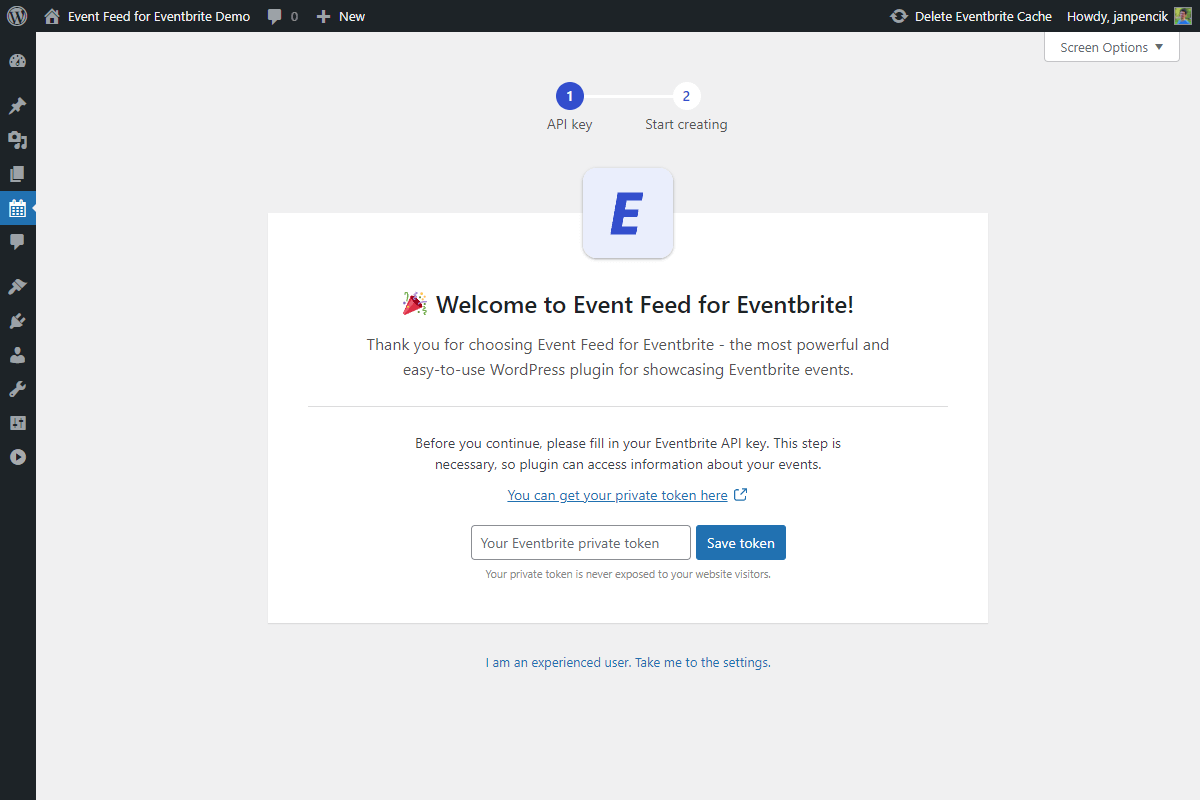
Installation wizard to help you get your Eventbrite token.

Managing event feeds is similar to managing regular WordPress posts.
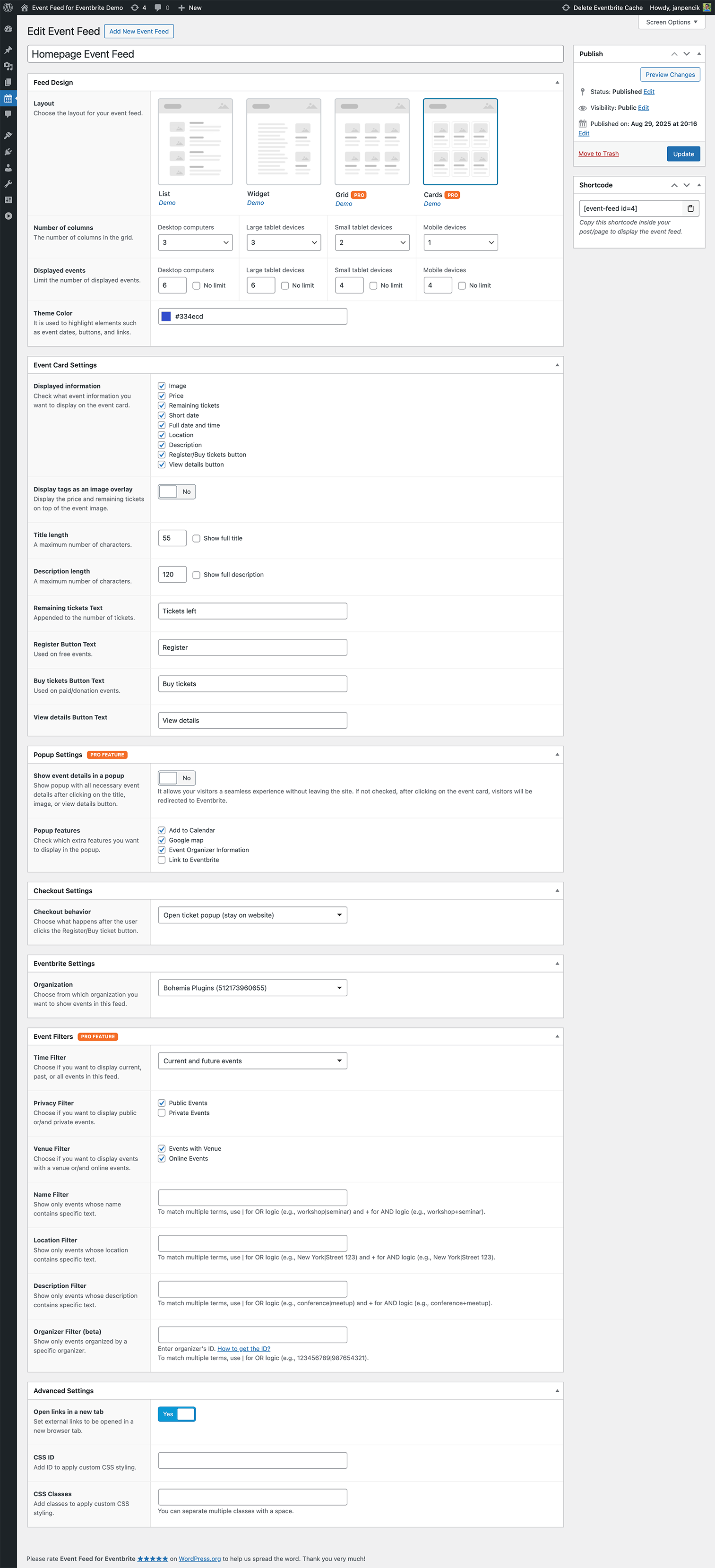
Event Feed Settings.

You can change your Eventbrite token in the Settings. You can also specify for how long your events will be cached.

If you are not happy with the font provided by your theme, you can use any other font from Google fonts. You can also set the image placeholder for your events.
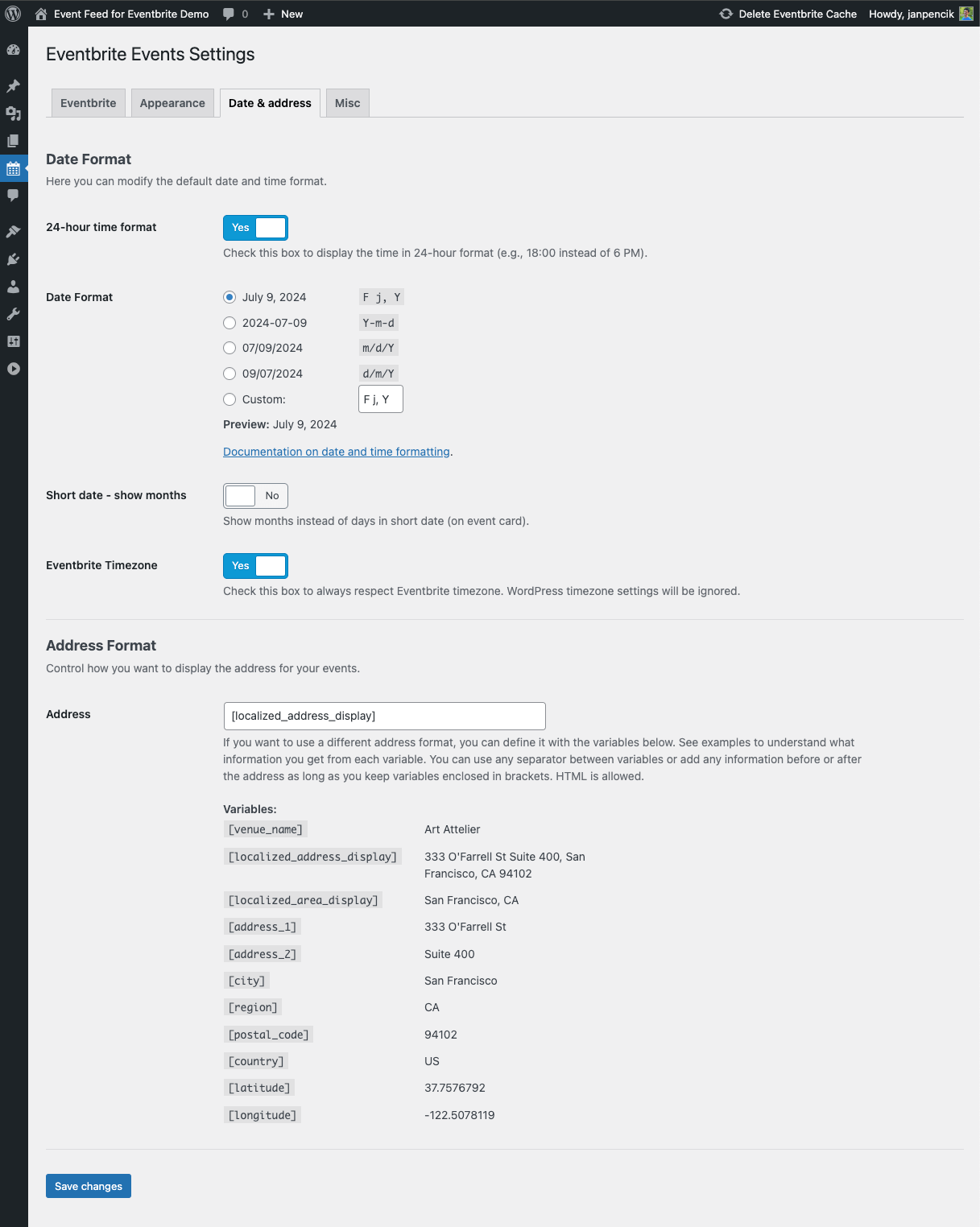
Choose the date and time format and set the address format for your Eventbrite events.

Miscellaneous Settings.
Faq
You can publish an unlimited number of event feeds with any number of events in both the Free and Pro version of the plugin.
You can also display more than one event feed on the same page.
With the Free version, you can use the List and Widget layout. With the Pro version, you get access to two additional layouts – Grid and Cards.
Ticket Checkout embedded into a popup works in both Free and Pro versions. However, you need to upgrade to the Pro version if you want to show the event details in the popup.
Event Filters are another feature only available in the Pro version. Except that, everything works in a Free version without any limits.
Navigate to this link or copy this URL to your web browser:
https://www.eventbrite.com/platform/api-keys
If you are not logged to Eventbrite, click on the Get a Free API Key button and log in.
When logged in, you should now be able to see your private token. Copy it to the clipboard by clicking on the Copy button.
You can find the detailed documentation here.
Our plugin uses caching to speed up loading of the events for the user. That means that if you have published your events on Eventbrite after setting up the event feed on your website, there is a chance you see the cached state of Eventbrite when there were no events published. You can manually clear the cache from the WordPress admin bar – see the article in our documentation for more details.
This is caused by a different timezone setting on Eventbrite and your WordPress website. If you want to respect the Eventbrite timezone, go to Eventbrite Events -> Settings -> Date & address tab and turn on the Eventbrite Timezone option.
Sometimes your WordPress theme can overwrite the styling of the event feed we bundled with the plugin. Luckily, this is usually easy to fix. If this has happened to you, please let us know — we will look at that for you and provide a fix.
If you use the Free version of the plugin, you can get help on the plugin’s WordPress.org forum. If you are the Pro version user, please use Priority Support on our official website.
You need a valid SSL certificate for the Ticket Checkout to work correctly in the popup. If your website address begins with https://, your SSL certificate is active, and you are good to go. However, if it starts with http://, we recommend contacting your web hosting company and getting a fresh SSL certificate.
It also applies to local development. Ticket Checkout Popup will only work when accessing the website using the secure HTTPS protocol.
If you can’t get the SSL certificate to work, don’t worry, you can still use the plugin. Just change the Ticket Checkout behavior to Link to Eventbrite. After clicking on the Buy button, visitors will be redirected to the Eventbrite website instead and be able to get the tickets there.
If you use the Free version of the plugin, you can get help on the plugin’s WordPress.org forum. If you are the Pro version user, please use Priority Support on our official website.
Reviews
Lack of Support
By 
I find this plugin to be one of the best in terms of visuals/ use for Eventbrite integration, however as a paid Professional user the 'Priority Support' is non existent. I've submitted 2x tickets now via the Bohemia Plugins user dashboard and none of them have been answered or even acknowledged. It's been almost 2 months. Not good.
stopped working. Eventbrite API change?
By 
Great plugin which truly looks amazing
By 
Works well
By 
Excellent Plugin
By 
Excellent, Immediate Support
By 
Excellent
By 
Supersonic Support Response Speed
By 
Great plugin!
By 
Changelog
1.4.0
- Feature – Added multiple terms filtering capability
- Feature – Added “All events” option to display both past and future events
- Tweak – Improved UI for responsive settings in admin
- Tweak – Improved high-quality image handling for better performance
- Tweak – Added sales status CSS classes for better event styling
- Tweak – Enhanced compatibility with various WordPress themes and plugins
- Tweak – Removed minute cache period option and added alert for hour cache values
- Tweak – Updated Google Fonts list with latest available fonts
- Tweak – Updated Freemius SDK to the latest version
- Fix – Removed draft events from past events display
- Security – Improved security
1.3.2
- Tweak – Updated Freemius SDK to the latest version
1.3.1
- Feature – Added unique URL for each popup, you can now share a link to a popup with others
1.3.0
- Feature – Added WPML compatibility – event feeds are now translatable
- Feature – Better compatibility with WP Rocket and SiteGround Optimizer
- Tweak – Added explicit width and height to main images to improve Cumulative Layout Shift (CLS) metric
1.2.5
- Fix – Corrected price formatting to display two decimal places
- Tweak – Improved debugging
- Security – Improved security
1.2.4
- Fix – Remove deprecation warnings when PHP 8.2 or higher is used
1.2.3
- Feature – Added option to show months instead of days in short time (on event card)
- Tweak – Google Fonts list updated
1.2.2
- Feature – Added Description Filter
1.2.1
- Fix – Compatibility with Siteground Optimizer
1.2.0
- Feature – Added Organizer Filter
- Tweak – Code improvements on admin screens
- Fix – Datetime is now localized when used in combination with Eventbrite timezone
1.1.3
- Fix – Compatibility with WordPress 6.5
1.1.2
- Security – Improved security
1.1.1
- Fix – Compatibility with WordPress 6.2
1.1.0
- Feature – Added option to respect Eventbrite timezone (instead of following WordPress timezone settings)
- Feature – Added option to display remaining tickets
- Tweak – Make the option to respect the Eventbrite timezone a default option for new plugin activations
- Tweak – Updated list of supported Google Fonts
- Tweak – Improved popup styles on Mac
- Fix – Name and location filter bug fix for PHP 8.0 and PHP 8.1
- Fix – ICS file download fixed in Chrome (Mac)
1.0.8
- Feature – Plugin is now compatible with Full site editing introduced in WordPress 5.9
- Feature – Added time filter allowing to display past events
- Tweak – Increased z-index of the popup (decreasing the risk that other elements on the page will be overflowing the popup)
1.0.7
- Security – Improved security
1.0.6
- Fix – Fixes the bug causing the “No upcoming events…” message to appear in the Pro version
1.0.5
- Fix – Admin columns styles are now loaded only on the relevant admin page
- Fix – Improved responsive styles both for front-end and back-end
1.0.4
- Tweak – Buttons on Cards Layout are now aligned to the end of card
- Tweak – Added better reset styles (to avoid some themes overriding event feed styles)
- Tweak – Improved internationalization
- Fix – Date is now displayed in the language which is set sitewide in the WordPress admin
- Fix – Fixed problem of custom date format not being saved to database when set for the first time
1.0.3
- Feature – The event organizer info box now contains links to Facebook, Twitter, and the organizer’s website
- Tweak – Improved buttons accessibility
- Tweak – Improved links and buttons hover effects
- Tweak – Improved event description formatting
- Tweak – Event organizer description now shows rich formatting
- Tweak – Images and videos in the event description now use the full width
1.0.2
- Security – Better data sanitizing
1.0.1
- Fix – Eventbrite trademark removed
1.0
- Initial release