Event Monster – Event Manager, Event Booking, Event Ticket & Registration

Event Monster – Event Manager, Event Booking, Event Ticket & Registration
Description
Event Monster is a feature-rich WordPress event manager designed for event booking, event registration, and event ticket management. Whether you host conferences, workshops, webinars, sports activities, or community meetups, Event Monster gives you complete control over your event schedule, venue maps, attendee sign-ups, and calendar displays.
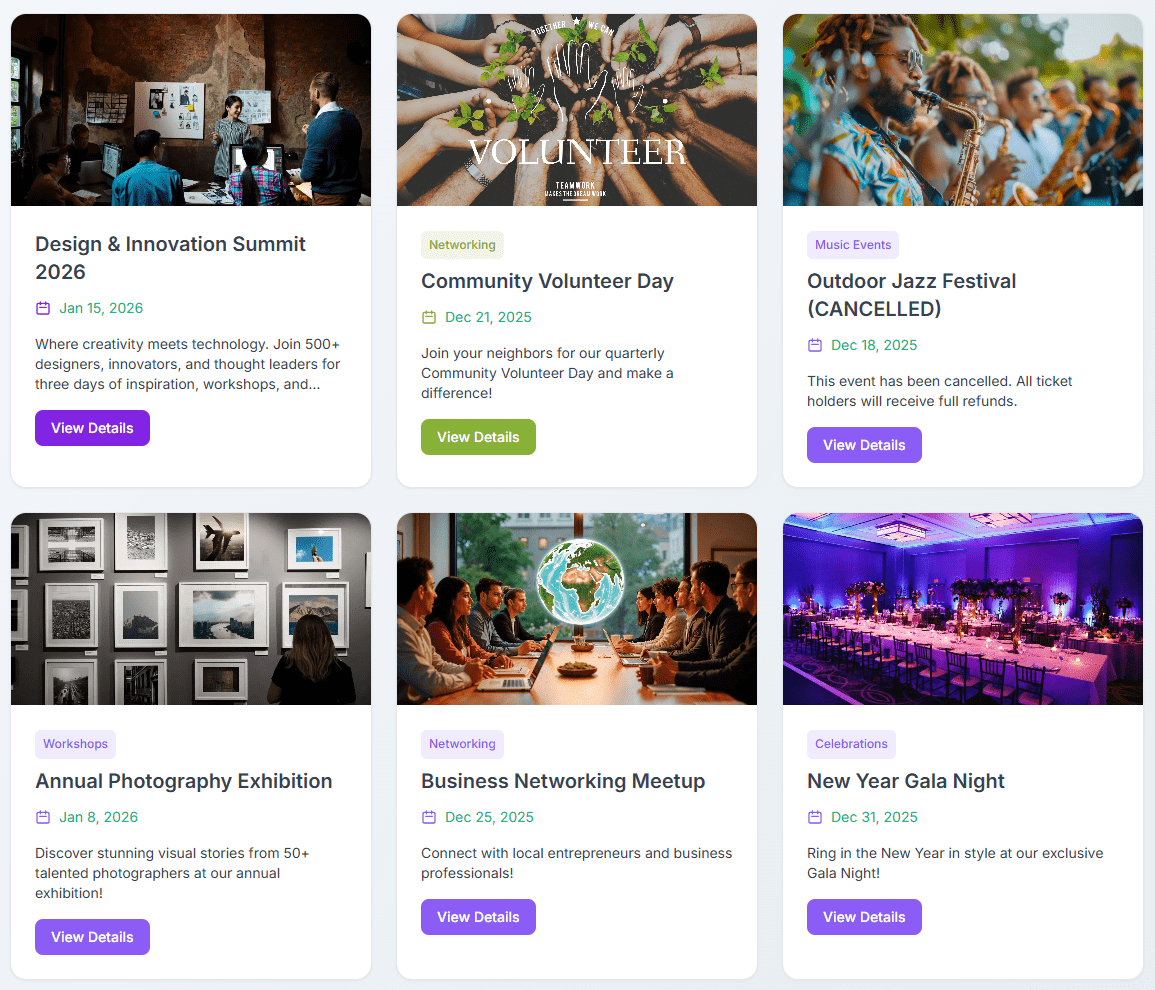
With Event Monster, you can publish detailed event pages in minutes. Visitors can easily browse upcoming schedules using an interactive event calendar or modern card listing, submit registrations, select assigned seats, and receive automated email confirmations.
Pro Demo Links
- Pro Demo: Event Monster Premium Demo
- Pro Features: Event Monster Premium Details
- Purchase Pro: Get Event Monster Premium
Core Features of Event Monster
- Complete Event Manager Dashboard: Easily create and manage unlimited events with custom dates, start and end times, descriptions, venue locations, and organizer details.
- Event Booking and Registration: Allow visitors to register for events directly on your site with instant attendee management in the WordPress admin panel.
- Seat Allocation and Seat Selection: Set up a custom seat grid (Rows A-Z, Columns 1-50) so attendees can choose their preferred seats during event registration.
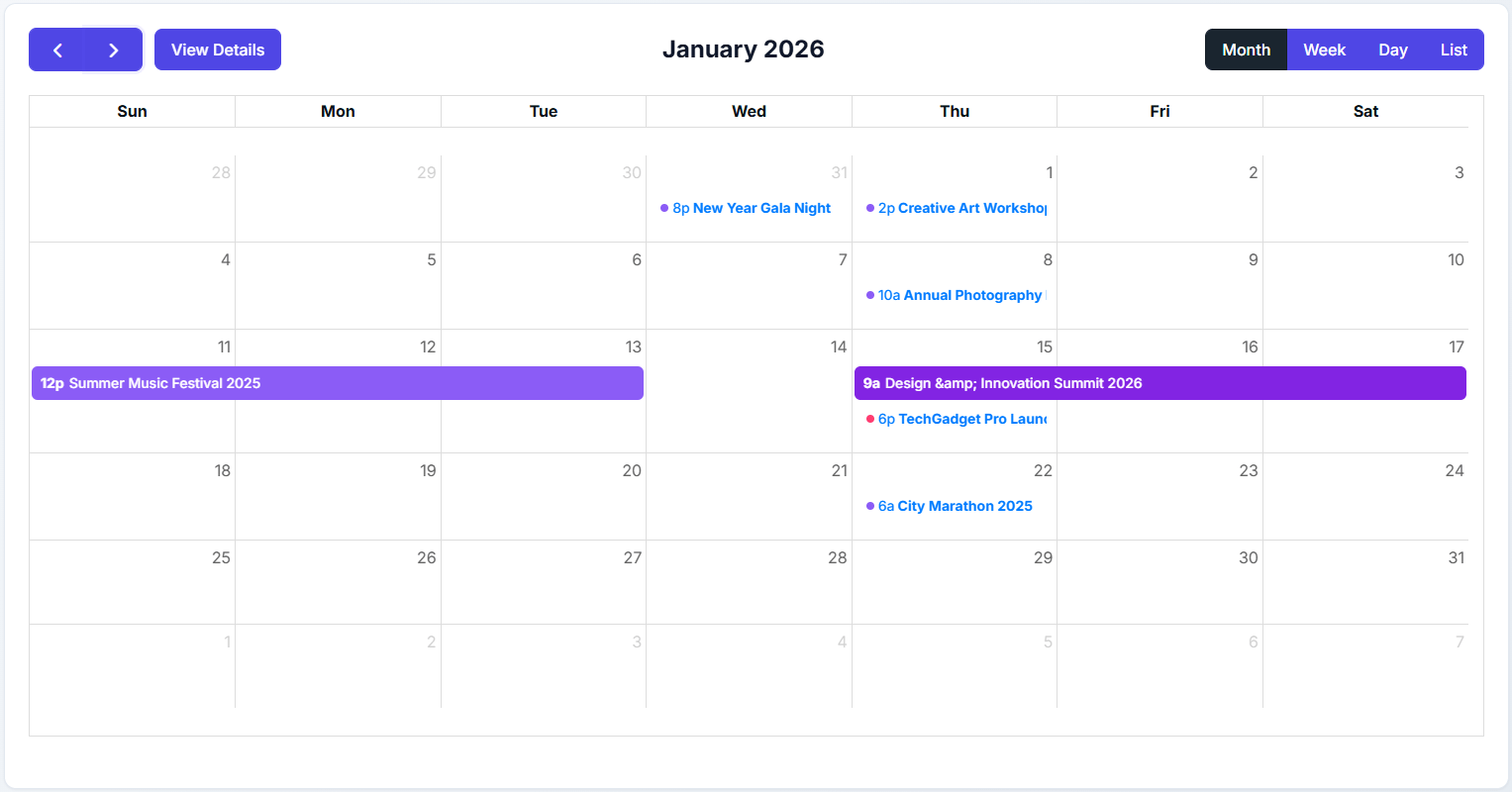
- Interactive Event Calendar: Display events on a clean calendar with month, week, day, and list view toggles powered by FullCalendar.
- OpenStreetMap Integration: Display venue locations on responsive maps automatically without needing a Google Maps API key.
- Event Countdown Timers: Build excitement with real-time countdown timers leading up to the start of each event.
- Automated Confirmation Emails: Automatically send branded registration notices to attendees and notification emails to site administrators.
- Search and Category Filtering: Let users filter events by custom categories or search keywords for fast navigation.
- Mobile-Responsive Design: Works across smartphones, tablets, and desktop displays.
Available Shortcodes
[EM-CALENDAR]– Displays the interactive event calendar with month, week, day, and list views.[EM-LIST]– Shows all published events in a card layout with search and category filters.[EM id="123"]– Displays a single specific event page (replace 123 with your event ID).[EM]– Displays the default event list.
Free Version Features
- Unlimited event creation
- Interactive event calendar view (
[EM-CALENDAR]) - Free event booking and registration form
- Interactive seat selection map with grid allocation
- Attendee tracking and management dashboard
- Automatic email confirmations for registrations
- OpenStreetMap venue location display
- Real-time event countdown timer
- Custom event categories and search filter
- Social sharing buttons for event pages
- Organizer profile display with contact information
- Gallery photos (up to 3 images per event)
- Speaker profile (up to 1 speaker per event)
- Sponsor logos (up to 3 sponsors per event)
- Schedule items (up to 3 schedule entries per event)
- Two responsive layout templates (Default and Magazine)
Pro Version Features
Event Monster Pro unlocks advanced event manager and ticket booking tools:
- Unlimited gallery photos, speakers, sponsors, and schedule items
- Paid ticket booking with multiple ticket types and pricing tiers
- Integrated payment gateways (PayPal, Stripe, Razorpay, and Square)
- Promotional coupon codes and discounts for event booking
- Drag-and-drop custom layout builder for event pages
- Customizable email templates with custom branding and SMTP support
- QR Code venue check-in system for scanning attendee tickets
- Priority customer support
Suitable for All Types of Events
- Conferences, summits, and seminars
- Workshops, classes, and training sessions
- Webinars and virtual online events
- Concerts, shows, and musical performances
- Community, school, and university gatherings
- Corporate meetings, networking, and business functions
- Fundraisers and charity events
- Sports tournaments and fitness activities
Resources
Installation
Dashboard Installation
- Log in to your WordPress admin panel.
- Navigate to Plugins > Add New.
- Search for Event Monster.
- Click Install Now, then click Activate.
- Go to the Event Monster menu in your WordPress dashboard to start creating events.
Manual Installation
- Download the plugin ZIP file from WordPress.org.
- Log in to your WordPress admin panel and go to Plugins > Add New > Upload Plugin.
- Choose the ZIP file and click Install Now.
- Activate the plugin after installation completes.
Getting Started
- Go to Event Monster > Add New Event in your admin panel.
- Enter your event title, description, date, time, location, and registration settings.
- Paste the shortcode
[EM-CALENDAR]into any page or post to display the event calendar. - Use
[EM-LIST]to show a searchable card list of all events.
Screenshots
Interactive Event Calendar - Month, week, day, and list views for event browsing.
Event List - Modern card layout featuring category filters and keyword search.
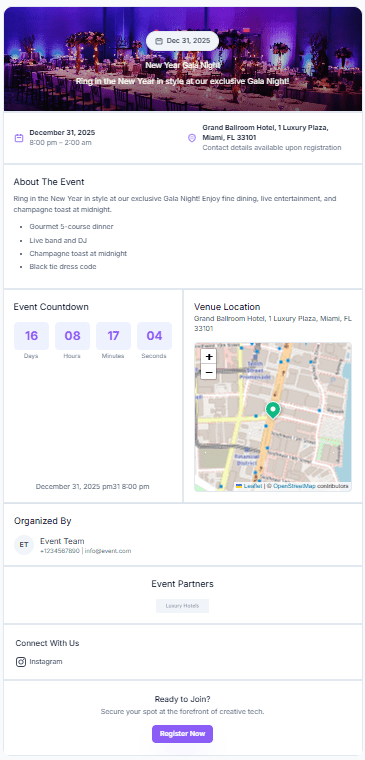
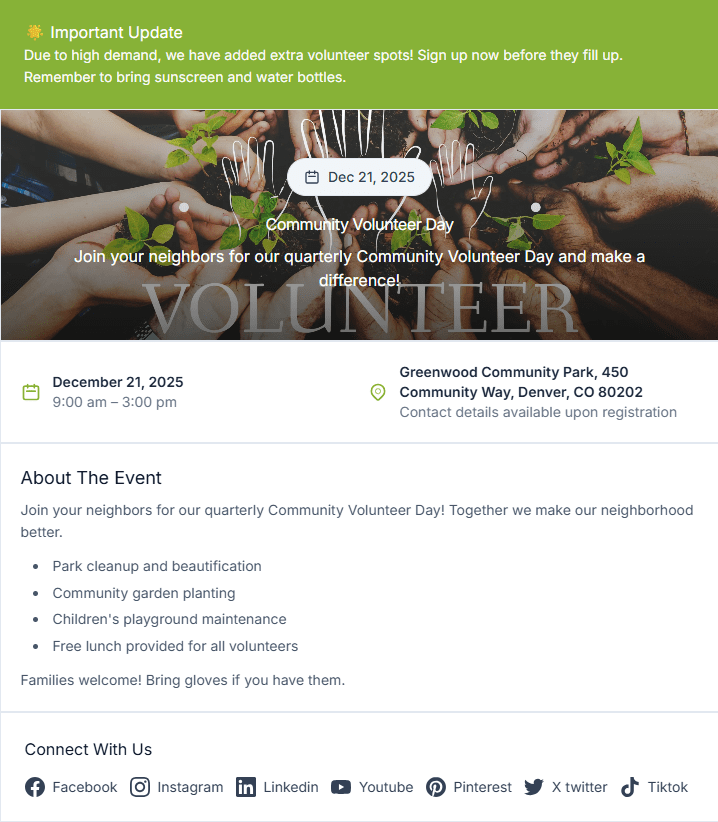
Event Details Page - Clean presentation of schedule, venue map, speakers, and countdown timer.
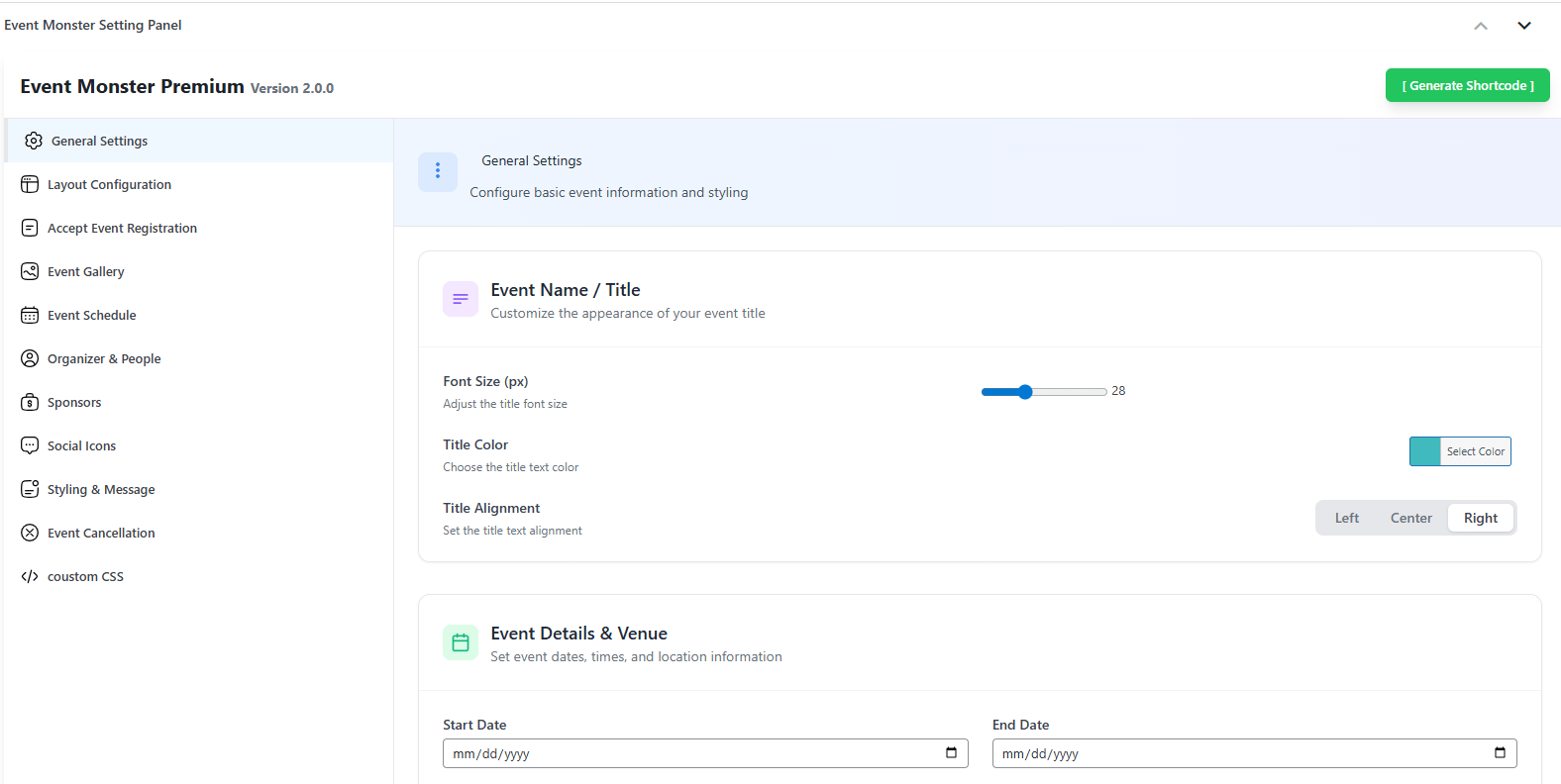
Admin Dashboard - Simple panel to manage events and configure seat allocation.
Registration and Seat Selection Form - Frontend form allowing attendees to select seats and register.
Faq
Go to Event Monster > Add New Event in your WordPress dashboard. Fill in the event title, start and end times, venue address, schedule, speakers, and seat allocation grid, then click Publish.
Yes. Event Monster includes a free event registration system that allows visitors to fill out a registration form, pick assigned seats, and receive automated confirmation emails.
The free version handles free event registrations and ticket reservations. To sell paid tickets using PayPal, Stripe, Razorpay, or Square, you can upgrade to Event Monster Pro.
Yes. Add the shortcode [EM-CALENDAR] to any page or post. Visitors can switch between month, week, day, and list views.
When creating or editing an event, set up the row count (A-Z) and column count (1-50) in the Seat Allocation settings. Visitors can select their preferred seats on an interactive seat map when submitting their event booking.
No API key is required. Event Monster uses OpenStreetMap integration out of the box, displaying venue maps instantly without configuration.
Yes. Add the shortcode [EM-LIST] to display your events in a modern card format. Visitors can search by keyword or filter events by category.
No. You can create unlimited events in both the free and pro versions of Event Monster.
Event Monster is built according to WordPress coding standards and works with any well-coded theme. CSS styles are scoped to prevent theme conflicts.
Yes. You can review and export registered attendee details from the Event Monster Visitors panel in your WordPress admin dashboard.
You can post questions on the official WordPress.org Support Forum. Pro users receive direct helpdesk support.
Reviews
Event Monster
By 
I've found this a very straightforward plugin to use, my requirement has been simply for an event registration tool, it has been perfect for this purpose
excellent plugin and support!
By 
Really good plugin for event management.
I had some problems with the plugin the support helped me with everything.
awesome experience
By 
Great Add In. Great Support Service.
By 
Good job
By 
"Ticket Quantity" does not work properly
By 
Excellent Plugin!
By 
Incredibly simple and convenient free event management plugin
By 
Great Event Plugin!
By 
Excellent Event plugin
By 
Changelog
2.1.2
- Date: 23 July 2026
- Added Seat Allocation feature for event registrations (Grid configuration, Rows A-Z & Columns 1-50).
- Added interactive Seat Selection Map with center seat auto-picker for frontend inline and modal booking forms.
- Added assigned seat numbers to Visitor / Attendee admin views, details modal, and confirmation email notifications.
- Fixed Registration Popup Modal conflict CSS and optimized seat grid overflow scrolling.
- Enforced free ticket filtering for registration components in free version.
2.1.1
- Date: 30 May 2026
- Fixed Cross-Site Request Forgery (CSRF) vulnerabilities by enforcing nonces in AJAX handlers.
- Fixed SQL Injection vulnerability in admin settings and prepared database queries using wpdb::prepare.
- Added open redirect URL validation for back-navigation redirects.
- Cleaned up database activation code to run natively with dbDelta updates.
2.1.0
- Date: 26 May 2026
- Added Payment and QR Check-In tabs to settings page.
- Added Pro upgrade banners and feature previews.
- Fixed banner styling and upgrade links.
2.0.1
- Date: 2 January 2026
- Added Payment and QR Check-In tabs to settings page.
- Added Pro upgrade banners and feature previews.
- Fixed banner styling and upgrade links.
2.0.0
- Date: 20 December 2026
- Major Update – Complete Redesign.
- Redesigned admin interface with modern look.
- New list template with card layouts.
- Interactive calendar shortcode [EM-CALENDAR].
- OpenStreetMap integration (no API key needed).
- Drag-and-Drop layout builder (Pro).
- Improved mobile responsiveness.
- Search and category filtering.
1.4.9
- Added major update notification.
- Preparing for version 2.0.0 release.
1.4.8
- Tested with latest version.
- Bug fixes and improvements.
1.4.7
- Security updates.
- Minor bug fixes.