Event post

Event post
Description
Adds some meta-data to posts to convert them into full calendar events.
Each event can be exported into ical(.ics), outlook(vcs), or Google Calendar.
Geolocation works thanks to openstreetmap.
It can also fetch the weather, but doesn’t bring the sun 🙂
Follow @wpeventpost on Twitter for latest news.
Examples on event-post.com
Post metas
Date attributes
- Begin Date
- End Date
- Color
- Event Status
- Event Attendance Mode
Location attributes
- Address
- GPS coordinates
- Event Virtual Location
WooCommerce compliant
You can enable event features on Woocommerce products. The event will be displayed on the product page. Moreover, the product price will be displayed in event list, calendar, map and timeline.
This, way, you can sell tickets for your events, effortlessly and without any additional plugin.
Weather attribute (for a given location and date if possible)
- Weather
- Temperature
- Weather
Usage
Plugins/themes developpers documentation
Blocks & Shortcodes
The plugin comes with several blocks/shortcodes which allows to:
[events_list]: display a list of events[events_map]: display a map of events[events_cal]: display a calendar of events[event_details]: display a detail of the current event[event_term]: display the date range of a given term based on all events it contains
[events_list]
Query parameters
- nb=5 (number of post, -1 is all, default: 5)
- future=1 (boolean, retrieve, or not, events in the future, default = 1)
- past=0 (boolean, retrieve, or not, events in the past, default = 0)
- cat=” (string, select posts only from the selected category, default=null, for all categories)
- tag=” (string, select posts only from the selected tag, default=null, for all tags)
- tax_name=” (string, custom taxonomy name)
- tax_term=” (string, the term for above taxonomy)
- geo=0 (boolean, retreives or not, only events which have geolocation informations, default=0)
- order=”ASC” (string (can be “ASC” or “DESC”)
- orderby=”meta_value” (string (if set to “meta_value” events are sorted by event date, possible values are native posts fields : “post_title”,”post_date” etc…)
Display parameters
- thumbnail=” (Bool, default:false, used to display posts thumbnails)
- thumbnail_size=” (String, default:”thmbnail”, can be set to any existing size : “medium”,”large”,”full” etc…)
- excerpt=” (Bool, default:false, used to display posts excerpts)
- style=” (String, add some inline CSS to the list wrapper)
- type=”div” (string, possible values are : div, ul, ol default=div)
- title=” (string, hidden if no events is found)
- before_title='<h3>’ (string (default <h3>)
- after_title='</h3>’ (string (default </h3>)
- container_schema=” (string html schema to display list)
- item_schema=” (string html schema to display item)
example:
<!-- wp:eventpost/list {"nb":10,"future":true,"past":true,"thumbnail":false,"excerpt":false,"pages":true} /-->

[events_list future=1 past=1 cat="actuality" nb=10]
container_schema default value:
<%type% class=”event_loop %id% %class%” id=”%listid%” style=”%style%” %attributes%>
%list%
</%type%>
item_schema default value:
<%child% class=”event_item %class%” data-color=”%color%”>
<a href=”%event_link%”>
%event_thumbnail%
<h5>%event_title%</h5>
</a>
%event_date%
%event_cat%
%event_location%
%event_excerpt%
</%child%>
[events_map]
- nb=5 (number of post, -1 is all, default: 5)
- future=1 (boolean, retreive, or not, events in the future, default = 1)
- past=0 (boolean, retreive, or not, events in the past, default = 0)
- cat=” (string, select posts only from the selected category, default=null, for all categories)
- tag=” (string, select posts only from the selected tag, default=null, for all tags)
- tax_name=” (string, custom taxonomy name)
- tax_term=” (string, the term for above taxonomy)
- tile=” (string (default@osm.org, OpenCycleMap, mapquest, osmfr, 2u, satelite, toner), sets the map background, default=default@osm.org)
- title=” (string (default)
- zoom=” (number or empty (default, means fit to points)
- before_title='<h3>’; (string (default <h3>)
- after_title='</h3>’ *(string (default </h3>)**
- thumbnail=” * (Bool, default:false, used to display posts thumbnails)*
- excerpt=” (Bool, default:false, used to display posts excerpts)
- list=” (String (“false”, “above”, “below”, “right”, “left”) default: “false”, Display a list of posts)
example:
<!-- wp:eventpost/map {"nb":-1,"future":true,"past":true,"tile":"toner","list":"below","map_position":false,"disable_mousewheelzoom":true} /-->

[events_map future=1 past=1 cat="actuality" nb="-1"]
[events_cal]
- cat=” (string, select posts only from the selected category, default=null, for all categories)
- date=” (string, date for a month. Absolutly : 2013-9 or relatively : -1 month, default is empty, current month
- datepicker=1 (boolean, displays or not a date picker)
- mondayfirst=0 (boolean, weeks start on monday, default is 0 (sunday)
- display_title=0 (boolean, displays or not events title under the day number)
- tax_name=” (string, custom taxonomy name)
- tax_term=” (string, the term for above taxonomy)
example:
<!-- wp:eventpost/calendar {"date":"-2 months","color":true,"display_title":true,"mondayfirst":"1","choose":false} /-->

[events_cal cat="actuality" date="-2 months" mondayfirst=1 display_title=1]
[event_details]
attribute string (date, start, end, address, location). The default value is NULL and displays the full event bar
[event_details attribute=”address”]
Hooks
Filters
- eventpost_add_custom_box_position
- event_post_class_calendar_link
- eventpost_columns_head
- eventpost_contentbar
- eventpost_default_list_shema
- eventpost_get
- eventpost_get_items
- eventpost_get_post_types
- eventpost_get_single
- eventpost_getsettings
- eventpost_item_scheme_entities
- eventpost_item_scheme_values
- eventpost_list_shema
- eventpost_listevents
- eventpost_maps
- eventpost_multisite_get
- eventpost_multisite_blogids
- eventpost_params
- eventpost_printdate
- eventpost_printlocation
- eventpost_bulk_edit_fields
- eventpost_quick_edit_fields
- eventpost_retreive
- event-post-rich-result
- eventpost_shortcode_slug
Actions
- evenpost_init
- eventpost_add_custom_box
- eventpost_custom_box_date
- eventpost_custom_box_loc
- after_eventpost_generator
- eventpost_getsettings
- eventpost_settings_form
- eventpost_after_settings_form
Installation
- Upload
event-postto the/wp-content/plugins/directory - Activate the plugin through the ‘Plugins’ menu in WordPress admin
- You can edit defaults settings in Settings > Event post
Screenshots

Map in single page
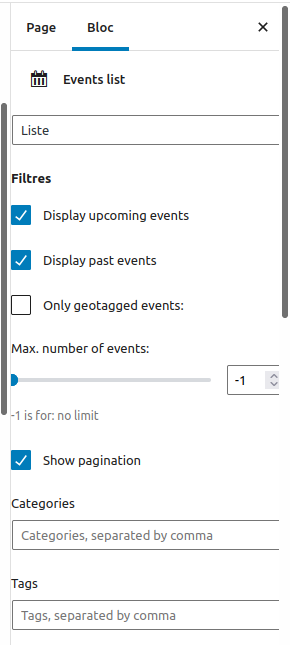
Editor interface for the List Block
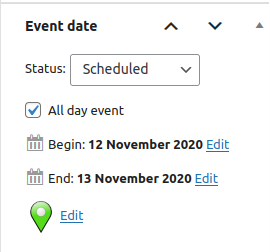
Editor interface for event data
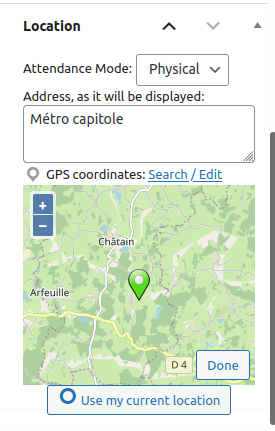
Editor interface for location data
Faq
You can report security bugs through the Patchstack Vulnerability Disclosure Program. The Patchstack team help validate, triage and handle any security vulnerabilities. Report a security vulnerability.
Yes, and it uses only open-sources : openstreetmap, openlayer, jquery
Weather feature uses openweathermap.org api.
You have to create an account and generate an API key at http://openweathermap.org/price
I have no interest in openweathermap.org, I personally use the free plan.
Openweathermap.org provides a free plan limited to 60 requests per minute.
You can also subscribe to paid plan, I don’t care.
Reviews
A good idea, needs polishing
By 
For many websites with simple event needs, this plugin could be a better approach because it doesn't require the user to learn an entirely new interface -- instead, you just create a post in the usual way and add date and location.
However, the plugin will need more polish to make it a true replacement for dedicated event plugins. The method for adding venue addresses is awkward, and it would help to have a way to store frequently-used addresses.
Event Post
By 
Event Post - TOP!!
Excellent plugin that fits into WordPress.
Many thanks to the developers - it is used with enthusiasm on websites.
Great, simple plugin
By 
I was looking for a simple solution to post and archive events that were previously only on Facebook. Thanks to this plugin, it was easy to do.
Thanks for your work so far
Works perfectly and very simple
By 
Simple and efficient!
By 
Un plugin qui ne va plus droit au but !
By 
Thank you!
By 
Date picker does not work.
By 
very good plugin
By 
le selecteur de mois s'arrête à novembre
By 
Changelog
5.10.4
- Fix geocoding with Nominatim: use HTTPS, add User-agent and referer for API calls
- Add explicit Nominatim attribution in geocoding tool
- Fix XSS vulnerability when the HTML tag in event_type was forced, reported by Muhammad Yudha – DJ
5.10.3
- Fix broken HTML for
container_schema
5.10.2
- Security: Fix XSS vulnerability in
events_listshortcode foritem_schemaandcontainer_schemaattributes, reported by Peter Thaleikis - Update dependencies
5.10.1
- Ensure script is loaded in shortcode context
- Fix “undefined” price in map
5.10.0
- Add support for organization / remote offer in rich event data
- Manage multiple maps on single page
- Security: Escape attributes in custom boxes
- Fix too much escaped HTML in
eventpost/detailsblock - Fix missing script for single map link
- Disambiguate
event_categoryclass - Remove deprecated
FILTER_SANITIZE_STRING - Moves Weather to EventPost namespace
- Re-order hooks, fix warnings
5.9.11
- fix save_bulkdatas(): Add nonce verification for security, reported by Francesco Carlucci
- fix
ltrim()Passing null to parameter 1, reported by ov3rfly
5.9.10
- Security: Authenticated (Contributor+) Stored Cross-Site Scripting, reported by Peter Thaleikis
5.9.9
- Security: Sanitize GPS coordinates, fixes Cross Site Scripting, reported by preo
5.9.8
- Security: Fix Cross Site Scripting, reported by Peter Thaleikis
5.9.7
- Security: Fix vulnerability to XSS in
[events_cal]shortcode, reported by Peter Thaleikis - Ensure that date is well formated in
[events_cal]shortcode
5.9.6
- Security: Fix vulnerability to local file inclusion
5.9.5
- Fixed a bug that display html as string in event calendar blocks
- Fixed javascript warning in event map block
5.9.4
Security:
- Fix authenticated (Contributor+) Stored Cross-Site Scripting via shortcode
- Uses bulk_edit_posts hook, fixes lack of verification in bulk edit
- Escape some outputs
- Fix missing jQuery dependency in timeline-block
Misc:
- Deindex inexisting “Event-post front” and “Event-post admin” blocks
- Add main global EventPost object for JS variables
- Allows to skip deprecation error
- Adds instructions for translators
- Limit number of tags in plugin README
Now requires WordPress 6.3
5.9.3
- Fix quick edit fields
5.9.2
- Fix call of Wp_Query in EventPost\Children
- Fix display of hours in timepicker for AM/PM format
- Fix saving of timeline schemas settings
- Use wp_json_encode instead of json_encode
- Use rawurlencode instead of urlencode
- Adds instructions for translators
5.9.1
- Fix doing_it_wrong calls in legacy widgets
- Escape HTML & outputs
5.9.0
Security:
- Fixes XSS vuln in event metadata (https://patchstack.com/database/report-preview/8edeb59a-59e6-42aa-8ed4-5f79cdedf820)
Features:
- Adds “Completed” event status
Misc:
- Refactor source of blocks with wordpress-scripts
- Improves WordPress’s PHPCS compliance
- Fix deprecated gmt_offset
- Mark legacy widgets as deprecated
- Fix warnings in PHP8+
5.8.6
- Fix December month on native datepicker
5.8.5
- Dissociate event description from post excerpt
- Remove double line breaks and   in description