EventAdmin – Volunteer Management
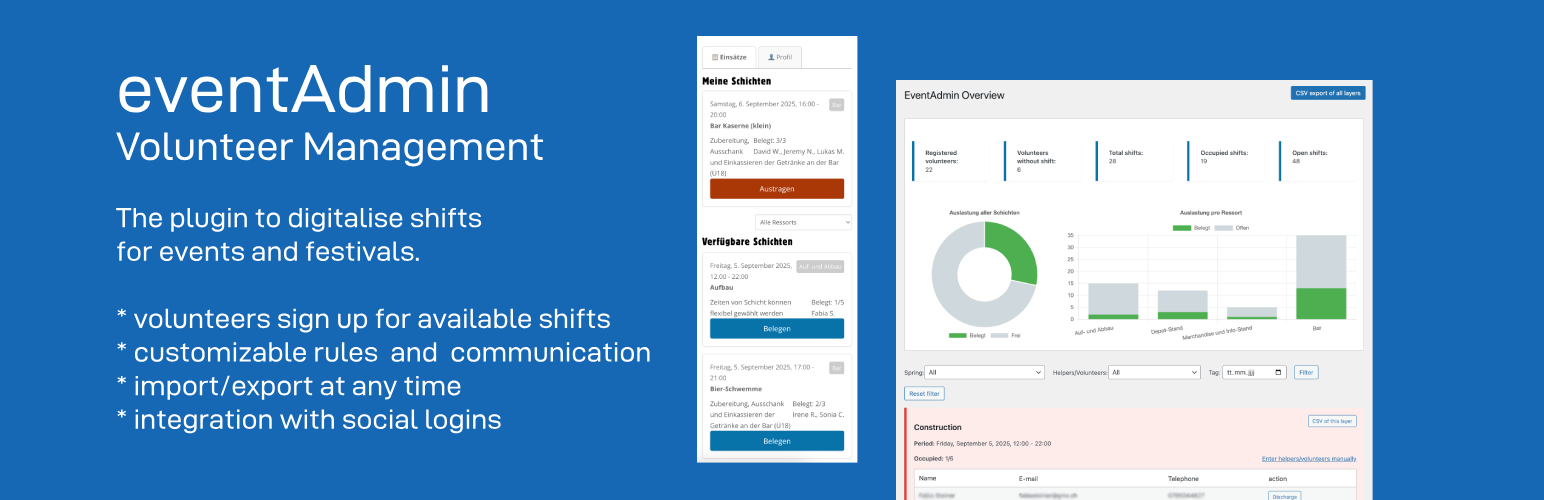
EventAdmin – Volunteer Management
Description
EventAdmin turns a WordPress page into a self-service volunteer roster for an event. You create the shifts; volunteers register and sign themselves up; you keep the overview.
How it works:
- Set up shifts. Each shift has a time slot, a department, and a minimum/maximum number of volunteers. Departments can be nested and colour-coded.
- One page for volunteers. Put the
[eventadmin]shortcode on a page. Visitors who are not logged in see a short registration form. Once registered, the same page becomes their dashboard: open shifts to join, the shifts they have taken, and their profile. - Volunteers manage themselves. They sign up and cancel on their own, up to an optional deadline. Limits you set — shifts per day, week, month or year, and optional overlap prevention — are enforced automatically.
- You stay in control. The admin overview shows who signed up and which shifts are understaffed, as a Dashboard, Cards, a Table, or a drag-to-reschedule Timeline. Assign or create volunteers by hand, import or export CSV, and send bulk emails to chase the gaps.
- Delegate without giving out Administrator. Two extra roles — Shift Manager and Volunteer Manager — hand off day-to-day work (shifts, volunteers, announcements) to other organizers without full admin access.
- Reach people by department. Link a volunteer to one or more departments to target them with announcements — even before a single shift in that department exists yet.
- Recruit in public. An optional
[eventadmin_open_positions]list shows visitors where help is still needed before they register — no login required.
Built for clubs, street festivals, and community events. Everything runs in your own WordPress install — no page builder and no external service required. Emails are sent through WordPress; social login works via the free Nextend Social Login plugin. New installs get a step-by-step “Getting started” checklist right on the dashboard.
Features:
- Create shifts with a time period, a department, and a minimum/maximum number of volunteers
- Nested, colour-coded departments; a department (and its shifts) can be hidden from volunteers
- Public frontend on one page: volunteers register, sign up for shifts, and manage their profile
- Volunteers sign up and cancel themselves, with an optional cancellation deadline
- Configurable limits: maximum shifts per day, week, month, or year, plus optional overlap prevention
- Optional “Full shifts” section so volunteers can still see fully booked shifts (disabled by default)
- Public “open positions” overview (
[eventadmin_open_positions]) — a no-login list of where volunteers are still needed, grouped by department, for a recruitment page - Two delegated roles — Shift Manager (shifts, departments, volunteers) and Volunteer Manager (volunteers, announcements) — for handing off work without full Administrator access
- Link volunteers to one or more departments, independent of shift history, to target them with department-specific announcements
- CSV import for volunteers (name, email, phone) and for shifts (title, description, time, department, capacity, organizer) under Tools EventAdmin Data
- Manual creation and assignment of volunteers by admins — pick an existing volunteer from a dropdown or create a new account on the fly, including offline volunteers without an email address
- Per-shift organizer — override the notification sender for a single shift with a linked WordPress user and/or a manual name and email
- Assignment, cancellation, and reminder emails (reminders a configurable number of days before a shift), plus a separate, fully customizable notification to the shift’s organizer on every sign-up and cancellation
- Registration form protected by a honeypot plus optional CAPTCHA (Google reCAPTCHA v2/v3, hCaptcha, or Cloudflare Turnstile); blocked attempts are logged
- CSV export per shift or for all shifts
- Admin overview with Dashboard, Cards, Table, and Timeline views — drag shifts on the Timeline to reschedule them, or copy a whole day’s shifts (and optionally its volunteers) to a new date
- Dashboard statistics: registered volunteers, upcoming shifts, and open spots split into required (below the minimum) vs. optional openings
- A “Getting started” checklist on the dashboard for new installs — tracks initial setup and surfaces less obvious features, then disappears once everything’s done
- Bulk email tool: announcements to all, opted-in, department-, shift-, or upcoming-shift-based recipient groups — batched, with a progress bar, delivery-failure tracking, a live HTML preview, an optional PDF attachment, and a confirmation email to the sender
- Customisable email design: rich-text templates, header colour, header title/subtitle, footer, and custom CSS
- Volunteers can opt out of announcements on their profile page
- Send history log with subject, message preview, recipient count, and failure count
- Integration with Nextend Social Login
- Fully translatable; ships with German (informal & formal), French, Dutch, and Norwegian translations
External services
The plugin does not send your data anywhere on its own. Two optional features rely on third-party services, and only when you switch them on:
- Spam protection on the registration form. If you enable a CAPTCHA under Settings General Security, the chosen provider’s script is loaded on the registration page and the visitor’s CAPTCHA response and IP address are sent to that provider for verification:
- Google reCAPTCHA — Privacy Policy, Terms
- hCaptcha — Privacy Policy, Terms
- Cloudflare Turnstile — Privacy Policy, Terms
- Social login. If the separate Nextend Social Login plugin is installed and configured, volunteers can sign in through the provider you set up there (e.g. Google, Facebook). That exchange is handled by Nextend Social Login and the provider, under their terms.
With none of these enabled, the plugin makes no external requests.
Privacy
EventAdmin stores volunteer data in your own WordPress database: name, email address, and phone number on the user account, plus which shifts each person signed up for. Passwordless login uses a short-lived token in user meta. When CAPTCHA spam protection is enabled, blocked or suspicious registration attempts are logged with a timestamp, the submitted email, and the IP address.
The plugin does not yet integrate with WordPress’s personal-data export and erase tools, and it does not remove its data on uninstall (see the FAQ). To delete a volunteer’s data, delete their WordPress user — their shift assignments are removed automatically.
License
This plugin is free software under the GPLv3 or later.
Installation
- Install the plugin via the WordPress backend or upload the ZIP file
- Activate the plugin
- Go to Pages Add New and insert the
[eventadmin]shortcode — this is the main volunteer page (registration for new visitors, shift selector + profile for logged-in volunteers) - Create your departments under Shifts Categories (optionally give each a colour)
- Create your first shifts under Shifts Add New
- Optional: follow the “Getting started” checklist on Shifts Overview — it tracks these same steps and points out a few more things worth trying
- Optional: create separate pages for
[eventadmin_profile]or[eventadmin_shiftselector]if you want dedicated pages for those features - Optional: add
[eventadmin_open_positions]to a public recruitment page to show non-registered visitors where volunteers are still needed - Optional: assign the Shift Manager or Volunteer Manager role (Users All Users) to delegate work without giving out full Administrator access
Screenshots

Timeline view — every shift across the event on one chart, colour-coded by department; drag a shift to reschedule it

The volunteer view — browse open shifts by department and sign up in one click

Click a volunteer on the Timeline for quick actions — edit the shift, view their profile, move or remove them

Edit shift — title, department, time, min/max volunteers, and a rich-text description

Add a volunteer on the spot — pick an existing one or create a new account without leaving the shift

Settings — registration options and shift-limit rules (per day/week/month/year, overlap prevention)

Email design — shared placeholders and a live preview of exactly what volunteers receive

Send Announcement — target a recipient group and see a live preview of the email

Registration page — one-click sign-in via Google, Facebook, or X through the free Nextend Social Login plugin, or a password-free magic email link for everyone else
Faq
Yes — they need to be logged in to join or cancel a shift, but there is no password to remember. On the registration form they enter their name, email, and phone; they then get a magic login link by email that signs them in. Admins can also create accounts manually, including “offline” volunteers with no email address (added by hand, no login).
Just one: a page with the [eventadmin] shortcode. It shows the registration form to logged-out visitors and the full dashboard (open shifts, my shifts, profile) to logged-in volunteers. [eventadmin_open_positions], [eventadmin_shiftselector], and [eventadmin_profile] are optional extras for dedicated pages.
Open Shifts Overview. In the Table view use the “Add volunteer” button on a shift, or click an open slot in the Timeline view. You can pick an existing volunteer or create a new account (with or without an email address) on the spot.
By default, full shifts disappear from the volunteer page. You can optionally enable a “Full shifts” section under Settings Display so volunteers still see them, read-only with a disabled button.
It marks how many volunteers a shift really needs. The dashboard flags shifts below the minimum and splits their open spots into “required” (up to the minimum) and “optional” (up to the maximum). It is informational — nothing is blocked based on the minimum.
Yes. Under Settings General you can cap the number of shifts per volunteer per day, week, month, and year (0 = no limit), and optionally forbid overlapping shifts. These rules are enforced when a volunteer tries to sign up.
It ships with German (informal and formal), Swiss German, Austrian German, French (FR and BE), and Dutch (informal and formal). All strings are translatable, and the bundled translations take priority over community language packs.
Deactivating only stops the scheduled reminder and cleanup jobs. Uninstalling does not delete anything — volunteer accounts, shifts, settings, and the “Volunteer” role stay in the database, so nothing is lost if you reinstall. Remove them by hand (or with a cleanup plugin) if you want a clean slate.
Yes. Put the [eventadmin_open_positions] shortcode on any public page (for example a “become a helper” page). It lists each department that still has unfilled slots in upcoming shifts, with the number of open spots, and needs no login. By default it shows a compact summary (one line per department); add style="list" for the full list of individual open shifts. Further attributes: category="slug,slug" limits it to certain departments, show_intro="0" hides the intro line, hide_past="0" includes shifts that already ended.
Reviews
Great Tool
By 
I am using this tool to organize around 80 volunteers for a street fair and it keeps everything simple and organized. It does exactly what we need.
The developer responds quickly to change requests and fixes, which makes this a great tool for organizing volunteers or staff for events.
Really nice!
By 
Very intuitive and gets the job done!
Very nice app
By 
I for sure like this plugin. I’m building a site to register volunteers as tour guides in a small holocaust museum. I researched at least 10 event management options and all were to complex, pricey or not up for the simple tasks. I love to see this plugin grow in the wp community.
Great App
By 
Using this app with a community charity group to help manage volunteers and events. Simple app, and the author is quick to respond with fixes and updates! Check it out!
Changelog
Version 3.6.0
- New: The EventAdmin MCP tools can now see who is assigned to a shift, and a new “notify_shift” tool can email a shift’s roster directly
- New: “list_departments”, “get_settings”, and “get_documentation” MCP tools/endpoints — resolve a department name to its ID, check the active sign-up rules (limits, overlap, cancellation deadline), and answer “how does this work” questions from the real Documentation page instead of guessing
- Fix: The “Connect an MCP client” screen’s “Copy to clipboard” button silently did nothing on non-HTTPS sites (the most common case for local development) — added the same fallback the Volunteers list’s own copy buttons already use
- Fix: Importing volunteers or shifts from a CSV file could silently blank out names containing accented or Nordic letters (é, ø, å, æ, ü, and similar) when the file was saved as Windows-1252 (Excel’s default “CSV” export on Windows) instead of UTF-8
Version 3.5.0
- New: The Manager view’s shift popover gained a “Duplicate” action — pre-fills the Add Shift form with the same time, department, capacity and organizer, so you only need to adjust the date
- New: An optional REST API (Settings General API access “Allow API access”) exposing shifts and dashboard data at /wp-json/eventadmin/v1/, for use with MCP or other external integrations — off by default, and limited to Administrator and Shift Manager accounts
- New: A “Connect an MCP client” button that uses WordPress’s own “Authorize Application” screen to set up an AI assistant connection, with a ready-to-paste configuration shown once — no manual password copying needed
- New: A “Connecting an AI Assistant (MCP)” section on the Documentation page explaining what this is and how to set it up, for anyone unfamiliar with MCP
Version 3.4.0
- New: A “EventAdmin – Volunteer Management” widget on wp-admin’s own Dashboard (Dashboard Home, not just the plugin’s own Overview page) shows the KPI numbers that need attention, the next few upcoming shifts (flagging any still short on volunteers), and the same “Recent activity” feed — visible right after login
- New: Export the Volunteers list to CSV
- New: A copy-to-clipboard button next to each volunteer’s e-mail and phone number in the Volunteers list, now that both are truncated to keep rows from growing tall when a volunteer is linked to several departments
- New: The plugin’s own logo now appears as the “Shifts” admin menu icon and in the update notice, instead of a generic calendar icon
- Fix: Filtering the Volunteers list by department now also includes volunteers explicitly linked to that department (via “Edit” on their Departments badges), not just those with a shift assigned to it
- Fix: Department links can now also be edited from the “View profile” popup, not only from the Volunteers list’s Departments column
- Fix: The Volunteers list’s Email and Remove-role actions are now one compact “Actions” column instead of two, and a volunteer linked to several departments no longer stretches their whole row
- Fix: The “Recent activity” panel (Overview dashboard and the new widget) shows 5 entries by default with a “Show more” toggle, instead of always listing up to 20
- Fix: Plugin assets (CSS/JS) now bust the browser cache automatically whenever they change, instead of a fixed version number that could leave an old cached copy in place after an update
Version 3.3.0
- New: The Overview dashboard has a “Recent activity” panel showing the most recent shift sign-ups, cancellations, and admin actions across every volunteer — separate from each volunteer’s own email-notification history, so it also covers offline volunteers and actions sent without a notification
- New: Clicking a shift anywhere in the admin area (a volunteer’s Upcoming/Past shifts, the new activity feed) opens the same shift modal used in the Manager view — showing who else is on it, with each name linking to that volunteer’s own profile, and back again
- New: The Volunteers admin profile (and its “View profile” popup) shows an at-a-glance summary — badges, phone, registration date, departments, and announcement subscription — and lets you edit the phone number, toggle the announcement subscription, or remove the volunteer role right there
- New: Phone numbers throughout the admin area are click-to-call links
- New: “Documentation” now also appears as a link on the plugin’s row on the Plugins screen, next to “Settings”
- Fix: Volunteer badges (Offline/Unverified/Social/Manual) now show their tooltip instantly instead of relying on the browser’s native, slow and inconsistent title-attribute tooltip
Version 3.2.0
- New: Two new roles — “Shift Manager” (shift/department CRUD, manage volunteers) and “Volunteer Manager” (manage volunteers, send announcements) — for delegating day-to-day work without handing out full Administrator access. See the in-plugin Documentation page for exactly what each role can do
- New: Volunteers can be linked to one or more departments — from the Volunteers page (“Edit” next to their department badges) or by the volunteer themselves on their own profile page — independent of any shift they’ve actually signed up for
- New: Send Announcement gained a “Volunteers linked to a department” recipient option, so you can notify just that department (e.g. “new shifts are up”) without emailing everyone
- New: Tools EventAdmin Data “Import shifts” — bulk-create shifts from a CSV file (columns for title, details, start/end date and time, department, min/max volunteers, and organizer user/name/email)
- New: A “Getting started” checklist appears on the Overview dashboard for sites still finishing setup — walks through the essentials and points out less obvious features (drag-to-reschedule, email template customization, delegating roles, and more); disappears once everything’s done, or can be hidden manually
- New: A “Settings” link now appears directly on the plugin’s row on the Plugins screen
- Fix: Hiding “All Shifts”/”Add Shift”/”Departments” from the admin menu (Settings General) now uses CSS instead of removing the items from WordPress’s own menu structure — removing them could incorrectly deny the new Shift Manager role access to “Add Shift”
- Fix: Editing a volunteer’s department links no longer requires the broad
edit_userscapability — the control moved from the native user-edit screen onto the Volunteers list itself, so the Volunteer Manager role can use it
Version 3.1.1
- Fix: CSV export (per shift and for all shifts) now includes a UTF-8 byte-order mark, so Excel correctly displays accented and non-Latin characters (e.g. ø, å, é) instead of garbled text
Version 3.1.0
- New: Departments can have a description that assignment, cancellation, and reminder emails pull in automatically — use the {department} and {department_desc} placeholders in the email templates (Settings Communication) instead of writing a description on every shift
- New: Tools EventAdmin Data “Import volunteers” — bulk-create volunteer accounts from a CSV file (columns first_name, last_name, email, phone; comma or semicolon delimiter). Only first_name is required; a row with no email address creates an offline volunteer; a row whose email already belongs to a user is reported and skipped. No notification emails are sent
Version 3.0.0
- New: Shift overview split into two separate admin pages — “Overview” (Dashboard stats only) and a new “Manager” page (with the drag-and-drop timeline, Table, and Cards tabs), each with its own sidebar menu item
- New: Settings General “Admin menu” section can hide the classic “All Shifts”, “Add Shift”, and “Departments” menu items from the sidebar — all three are hidden by default on new installs, since Manager’s own buttons cover the same tasks
- New: “Departments” management moved from its own sidebar item into the Manager page’s “+ Add shift” dropdown, next to “Copy shifts to another day”
- New: CSV export for all shifts moved into the Table tab
- New: On narrow screens, the filter row collapses behind a “Show filter” / “Hide filter” toggle instead of showing every dropdown at once
- New: Advanced, collapsible “Organizer” section (linked user, name, email) in the Timeline’s Add/Edit Shift modal — previously only available on the classic shift edit screen
- New: Hidden departments are now marked “(hidden from volunteers)” in every admin category dropdown
- New: Deleting a shift, or removing a volunteer from one, now offers a “Notify affected volunteer(s)” option at confirmation time instead of a separate always-visible checkbox
- Improvement: Timeline tab renamed to “Manager”; tab order is now Manager, Table, Cards (old)
- Improvement: Timeline’s click-to-act popover now shows the shift’s date and time directly in the header
- Fix: New, edited, or deleted shifts, and volunteer assignments, could take up to 5 minutes to appear due to a caching bug
- Fix: The plugin’s admin footer credit line no longer eats horizontal space on mobile
- Fix: Historical bulk-announcement sends are now reflected in each volunteer’s notification log (applied automatically on update), excluding volunteers with no email address on file
Version 2.1.1
- Maintenance: refreshed the screenshots and description on WordPress.org. No changes to the plugin itself.
Version 2.1.0
- New:
[eventadmin_open_positions]shortcode — a public, no-login overview of where volunteers are still needed, grouped by department, for a recruitment page. Two styles: a compact per-department summary (default) or a full list of individual open shifts (style="list"), pluscategory,show_intro,show_full, andhide_pastattributes - Improvement: In-plugin Documentation page brought up to the 2.x feature set — new sections on departments, the Dashboard/Cards/Table/Timeline overview, reminder & notification emails, and e-mail design settings
- Improvement: Rewritten readme with a “How it works” overview, an expanded FAQ, and External services / Privacy sections
- Fix: Formal address (“Sie”, “u”) had leaked into several strings in the informal German and Dutch translations; the informal locales now use the informal register throughout
Version 2.0.1
- Fix: The “What’s new” admin notice still described the 1.8.0 Cloudflare Turnstile feature instead of what’s new in 2.0.0
Version 2.0.0
- New: Shift categories (departments) — hidden departments now show a badge and their color swatch in the department list, and Quick Edit gained color, hidden, parent, and description fields so all of this can be changed without opening the full edit screen
- New: Shift list (Shifts All Shifts) can now be filtered and sorted by department, with the department shown as a colored badge
- New: Volunteers page reorganized — “Create volunteer” and “Grant role” now open as modals, blocked registration attempts and auto-deleted unverified accounts moved to their own tabs, filters apply instantly without a “Filter” button, and the whole toolbar (buttons, filters, search) fits on one row
- New: Shift overview reorganized into Dashboard, Cards, Table, and Timeline tabs (previously a single filtered view); each tab only shows the filters relevant to it
- New: Timeline view supports dragging a shift’s bar to move or resize it directly on the chart, with an Undo option after saving and a matching “Edit Shift” modal for precise changes
- New: Dashboard statistics split each shift’s open spots into “required” (below minimum) vs. “optional” (up to maximum)
- New: Send Announcement redesigned into a two-column layout with a real, live HTML preview of the email, and hovering the recipient count shows who will receive it and which shift(s) they’re signed up for
- New: E-Mail design settings — pick a header color, set a header title/subtitle shown together with the logo, format the e-mail footer with rich text, and (advanced) add custom CSS applied to every e-mail
- New: All e-mail texts in Settings Communication (assignment, cancellation, reminder) now use the same rich-text editor as the footer, and the Communication tab is split into General / Shift Confirmations / Reminders sub-tabs
- New: Every modal in the plugin now closes via a small “×” in the top-right corner instead of a full-width button
- Fix: Shift categories marked “Hide from volunteers” lost their HTML badge styling in the department list and rendered as plain text
- Fix: Editing a shift’s time via the Timeline (drag or Edit Shift modal) could shift the saved time by a couple of hours on sites where WordPress’s timezone setting differs from the server’s PHP default
- Removed: “Empty shifts” and “Understaffed shifts” dashboard counters (redundant with the required/optional open-spot numbers)
Version 1.10.0
- New: Send Announcement can now attach a PDF from the media library to every email in the batch
- New: {shifts} placeholder in Send Announcement lists each recipient’s own upcoming shifts in the message body
- New: Shift overview has two additional views alongside Cards — a flat, exportable-looking Table view and a Timeline view showing a per-volunteer Gantt-style chart of shift start/end times
- New: Timeline view shows open (unfilled) slots as red (below the shift’s minimum) or grey (optional, up to maximum) bars, with a toggle to show or hide them, hour-aligned time axis, and the shift name drawn directly on each bar
- New: Click an open slot in the Timeline, or use the new “Add volunteer” button in the Table view, to assign a volunteer without leaving the page
- New: Table and Timeline views show each shift’s capacity (assigned/max, plus minimum when set)
- Fix: Shift-selection dropdowns (Send Announcement, Volunteers filter) were sorted as plain strings and could be scrambled by differing date formats between admin-entered and imported shifts; now sorted correctly and by shift name, then time
- Fix: Those same dropdowns showed a bogus end time (whatever time the page happened to load) instead of the shift’s real end time, or none at all
- Fix: The “Add volunteers manually” dropdown sorted by a WordPress field this plugin never sets, unrelated to the names actually shown; now sorted by the same name
- Fix: Shift overview no longer paginates at 20 shifts per page — a full event’s shift list now renders on one page
- Fix: A negative value (e.g. “-1”) in the reminder-days setting was silently turned into a positive reminder day instead of being ignored; clarified that leaving the field empty disables reminder emails entirely
Version 1.9.0
- New: Send Announcement now shows a live recipient count for a selected shift or category, not just for “All”/”Subscribed”
- New: Two more Send Announcement recipient filters — volunteers without any upcoming shift, and volunteers with at least one upcoming shift
- New: Volunteers list now shows “Registered” and “Last shift” columns, both sortable
Version 1.8.1
- Tested up to WordPress 7.1
Version 1.8.0
- New: Cloudflare Turnstile added as a CAPTCHA provider option (Settings General Security) — reuses the site key and secret key already configured in the Simple Cloudflare Turnstile plugin, no separate keys needed
Version 1.7.1
- New: “Clear log” button on the Volunteers page to clear the auto-deleted unverified accounts log
- Fix: Administrators who also held the Volunteer role could lose access to wp-admin menu items on sites using a non-default database table prefix or in multisite — the previous fix for this wrote to the wrong option name and never actually took effect on those sites
- Fix: Completed missing and corrected several inaccurate French and Dutch translations
Version 1.7.0
- New: Selecting a parent department in the volunteer shift filter now also shows shifts tagged only with one of its child departments
- New: “Hide from volunteers” option on shift categories — hides the department from the frontend filter and labels; shifts are also hidden from volunteers when every department they’re assigned to is hidden (shifts a volunteer is already signed up for are never hidden this way)
- New: Volunteer shift filter dropdown shows open/total slot counts per department and indents child departments under their parent
- New: “Category filter” toggle under Settings Display Volunteer shift filters, to hide the department dropdown if it’s not needed
- New: Tools EventAdmin Data explains how to use WordPress’s native Export/Import to bring over a department & shift setup from another site (volunteer sign-ups are excluded from the export)
- Fix: Registration form is now hidden after a successful or duplicate registration — only the confirmation message is shown
- Fix: Assigning/unassigning a shift now updates the open-slots count live, without needing a page reload
Version 1.6.0
- New: CAPTCHA support on the volunteer registration form — choose between Google reCAPTCHA v2, Google reCAPTCHA v3 (invisible), or hCaptcha via Settings General Security
- New: Honeypot bot detection on the registration form (always active, no configuration needed)
- New: Blocked registration attempts are logged with timestamp, email, IP, provider, and reason — visible in WP Admin Volunteers
- New: State filter on the admin shift overview — filter by Empty, Understaffed, or Heavily understaffed
- Fix: Registration form handler now guards on the nonce field instead of the submit button, ensuring JavaScript-submitted forms (reCAPTCHA v3) are processed correctly
- Tested up to WordPress 7.0
Version 1.5.1
- Fix: Department color picker circle turned black after adding the first department in the same session — it now correctly resets to the default grey after each addition
- Fix: Department colors were never saved due to a nonce action mismatch (created with one action name, verified with another)
- Fix: Volunteer names from deleted users showed as invisible entries in the shift selector — non-existent users are now silently skipped in the display name list
- New: Tools EventAdmin Data now shows a count of orphaned shift assignments (assignments referencing deleted users) and allows cleaning them up with one click
Version 1.5.0
- Fix: Shift assignment count shown in the frontend could be higher than in the admin when a WordPress user was deleted without being unassigned first — orphaned meta is now skipped by the count function
- Fix: Deleting a WordPress user now automatically removes their shift assignments, preventing orphaned data from inflating shift counts in future
- New: “CSV export all shifts” now includes shifts with no volunteers assigned — previously those shifts were silently omitted from the export
Version 1.4.2
- Fix: Settings page now shows a confirmation notice after saving
- Fix: Email placeholders {start} and {end} showed empty in emails when the date/time format setting had been wiped to an empty string
- Fix: {days} placeholder appeared literally in assign/unassign emails — it is now available in all email template types, not just reminders
- Fix: Shift times displayed correctly in the frontend and admin even when the date format option is empty
- Fix: Plugin upgrade routine now restores missing or wiped settings to their defaults on version update, preventing silent data loss after updates
Version 1.4.1
- Fix: Settings were not saved correctly when using the tabbed settings page — each tab’s options are now registered in their own settings group, preventing cross-tab data loss on save
Version 1.4.0
- New: Reminder emails for assigned Volunteers X days before a shift starts, configurable under Settings Communication
- New: Settings cleanup — single Settings menu entry with General, Display, and Communication tabs
- New: Organizer user link on shifts — use a linked staff-side WordPress user as the email sender fallback, while keeping organizer name/email as manual overrides
- Improvement: Frontend shift buttons now switch with translated labels instead of hardcoded English text
- Improvement: Transactional emails use a shared HTML wrapper for a more professional appearance
- Improvement: Documentation now explains email template customization inline in the admin area
- Fix: German locale updates for new settings, reminders, organizer-user flow, and communication UI
Version 1.3.0
- Fix: Confirmation emails now use the date/time format configured in Settings Display instead of a hardcoded format
- Fix: Email live preview in settings now reflects the configured date format in real time (AJAX-powered, locale-aware)
- New: “Create new volunteer” form on the Volunteers page — create online or offline volunteers directly without going via a shift
- New: Configurable volunteer shift filters — admin can enable a text search and/or date picker on the shift selector (Settings Display)
Version 1.2.0
- New: Shift card layout — date/time and category labels now in a stable flex row; multiple or long categories no longer displace the date
- New: Configurable date format for shift start and end time (Settings Display)
- New: Custom CSS field in settings — integrators can store theme-specific overrides directly in the plugin without editing theme files
- Improvement: Date format fields show a live preview and a collapsible token cheat sheet for easier configuration
Version 1.1.0
- New: Send Announcement page — send emails to all volunteers, opted-in volunteers, a specific shift, a specific category, or an individual volunteer
- New: Overridable From name and From email per announcement
- New: HTML formatting support in announcement emails with live preview (subject, body, sender)
- New: Send history log — collapsible table with filter and sortable columns; shows subject, recipients, sent/failed counts, and full message body
- New: Volunteers page — filter by category, text search, and sortable columns
- New: “Email” button on volunteer rows links directly to Send Announcement with that volunteer pre-selected
- New: Offline volunteers (no email address) are clearly indicated in the Volunteers list
- New: Chart labels on the Overview page are now fully translated
- New: Send Announcement section added to the Documentation page
- Fix: Settings and Documentation menu items now always appear last in the Shifts submenu
Version 1.0.1
- Fix: Settings and Documentation menu items now always appear last in the Shifts submenu
- Improvement: Removed duplicate bulk email form from Volunteers page — use Send Announcement for bulk emails; offline volunteers (no email address) are visually indicated in the table
Version 1.0.0
- Fix: Social badge now correctly detects Nextend Social Login users via the wp_social_users table instead of wrong meta key
Version 0.9.9
- Fix: Manually added volunteers (via admin form or role grant) are now protected from auto-deletion and shown with a green Manual badge
- New: Unverified volunteer accounts (registered but magic link never clicked) are auto-deleted daily after the link expires; deletion log visible on the Volunteers page
- New: Unverified, Social Login, and Manual badges shown per volunteer in the admin Volunteers list
- Fix: Admin users who also hold the volunteer role no longer lose access to the WordPress backend (explicit false caps removed from volunteer role definition)
Version 0.9.7
- New: Admins can grant or remove the volunteer role from existing WordPress users directly on the Volunteers page — includes an upcoming-shift warning before removal
- Fix: Category filter dropdown no longer overlaps shift cards on themes with non-standard heading sizes (replaced fragile negative margin with a flex layout)
Version 0.9.5
- Fix: Bundled translations now always take priority over language packs from translate.wordpress.org, preventing incomplete community translations from overriding the plugin’s own strings
Version 0.9.4
- New: Assign existing volunteers directly from a dropdown when adding manually to a shift
- New: Offline volunteers — add volunteers without an email address; a placeholder is created silently, no notifications sent
- New: Per-shift organizer name and email — overrides the global notification address for both admin and volunteer emails on that shift
- Fix: Duplicate assignment no longer possible when the same email is submitted twice (pre-check added)
Version 0.9.3
- Fix: New strings from 0.9.2 (update notice, support section, plugin row links) now fully translated in all 8 bundled languages
Version 0.9.2
- New: Donation and review links added to the plugin row in the Plugins list
- New: “Support EventAdmin” section added to the Documentation page
- New: Dismissible update notice shown to admins after plugin updates
Version 0.9.1
- New: Translations added for German (de_DE, de_AT), Dutch (nl_NL, nl_NL_formal), French (fr_FR, fr_BE), and German Switzerland formal (de_CH)
- Fix: Several translation errors corrected in de_CH and de_DE_formal
Version 0.9.0
- New: Admin overview defaults to upcoming shifts — add “Show: Upcoming / Past / All” filter to see past or all shifts
- New: Admin overview sortable by date or name, ascending or descending
- New: Admin overview stats now include empty shifts and understaffed shifts
- New: Bulk email tool — send custom announcements to all or opted-in volunteers, with real-time progress bar, batch processing (25 per request), failed delivery tracking, and a confirmation email to the sender
- New: Email send history log on the announcement page (subject, message preview, recipients, failures, sent by)
- New: Volunteers can opt out of announcements via their profile page (opted-in by default, existing users unaffected)
Version 0.8.0
- Fix: Quick edit fields (start time, end time, max. volunteers) now pre-populate correctly when opening the quick edit row
- Fix: “Period” column in the shift list is now sortable by start date/time
- New: Optional “Full shifts” section on the volunteer shift selector page (disabled by default, enable under Settings)
- New: Minimum volunteers field on shifts – admin dashboard shows an understaffed warning when the minimum has not been reached
Version 0.7.2
- Bugfix release
Version 0.7.1
- Tested up to WP 7.0
- 1.6.0: CAPTCHA support, state filter, registration logging
Version 0.7
- restrict access to shifts and departments for non-logged in users (and SEO)
Version 0.6
- missing .pot file added to support translations
Version 0.5
- Review Feedback 2.0
Version 0.4
- i18n – Support Multilanguage
Version 0.3
- Extension of admin interface
Version 0.2
- Notification extensions
0.1
- Initial release
- Shift management, volunteer registration, dashboard, export, rules