Eventful for Elementor – Events Showcase for The Events Calendar

Eventful for Elementor – Events Showcase for The Events Calendar
Description
Eventful for Elementor is an Elementor addon for The Events Calendar plugin. It gives you five Elementor widgets — Grid, Carousel, Slider, Minimal List and Timeline — so you can showcase your events in fully customizable layouts without writing a single line of code.
Design your event sections visually inside the Elementor editor, see changes in real time, and deliver a polished event display on every device.
Plugin Demo | Pro Version | Support | Rate this Plugin
WHAT’S NEW IN 2.0
- Three new widgets — Eventful Slider, Eventful Minimal List and Eventful Timeline.
- Ready-made designs for Minimal List — three pre-made templates, ready to use or override from your theme.
- Scroll-animated Timeline — the centre line fills as visitors scroll, with optional month/year labels between event groups.
- Turn any widget on or off under Eventful For Elementor Widgets.
- Pro layouts in the Elementor panel — Masonry, List, Table and Accordion appear in the Eventful category with a padlock, so you can see what Pro adds.
FIVE ELEMENTOR WIDGETS
1. Eventful Grid
Display your events in a responsive multi-column grid with independent column and row gaps. Use the Custom layout or switch to one of three ready-made designs.
2. Eventful Carousel
Turn your events into a touch-friendly carousel powered by Swiper.js, with per-breakpoint columns and rows, autoplay, arrows and dots.
3. Eventful Slider — New in 2.0
One event per slide, with the image running the full width of the slide. Ideal for hero sections and featured-event banners.
4. Eventful Minimal List — New in 2.0
A compact row with the image beside the event details. Pick the Custom layout or one of three ready-made designs.
5. Eventful Timeline — New in 2.0
Events alternate either side of a centre line that fills as the page scrolls. Add an optional month and year label between event groups, and set the colour and thickness of the line, the dot and the date badge.
Each widget can be switched off individually from the plugin’s admin panel.
CORE FEATURES
Event Query Control
- Latest or Featured — show the latest events, or only events marked as featured in The Events Calendar
- Upcoming events — show events that have not happened yet, optionally judged by start date
- Include or Exclude specific events
- Exclude by event type — hide the current (ongoing) event or password-protected events
- Hide Free Events — hide events with no price or a price of 0
- Hide Events Without Images — keep your layout clean by hiding imageless events
- Order By ID, title, event start date, slug or random, in ascending or descending order
- Limit — control how many events are shown
AJAX Live Filters
Add a styled filter bar above your events so visitors can narrow results without a page reload:
- Category and Tag filters — with IN / AND / NOT IN operators and AND / OR relation between filters
- Button-style filter tabs — with event counts, hide-empty option, renamed “All” label, icon and alignment
- Live keyword search — with custom label, placeholder, width and alignment
- Reset button — clears all active filters in one click
Ready-Made Designs
- Switch any widget from the Custom layout to one of three pre-made templates with one click
- Theme colour scheme for featured and non-featured events
- Date strip background and gradient controls
- Every design is a template file, so it can be overridden from your theme
Sortable Event Elements
Drag to reorder the parts of each event — thumbnail, title, event meta, content and social share — or remove a part to leave it out.
Image Display
- Show or hide the featured image
- Choose any registered image size
- Retina display — load 2x resolution images on high-DPI screens
- Thumbnail overlay — show a category badge or date label over the image
Event Meta Fields
Choose which event details appear and configure each independently:
- Taxonomy — event category or tag with a custom icon
- Venue — address, city, state, country, postal code, phone number; optional Google Maps link
- Organizer — organizer name with a custom icon
- Price — ticket price with a custom icon
- Event Time — start date, end date, or a “Start to End” range in preset formats or your own PHP date format
Title & Content
- Show or hide the title; set HTML tag (H1–H6, div, span, p); character limit and alignment
- Show excerpt, content with a word or character limit, or full content; control HTML tag stripping; custom ellipsis text
Read More & Social Share
- Read More as a styled button or a plain text link, with custom label
- Text Link style controls — typography, colour, hover colour, padding, margin, and a Keep on One Line option
- Share buttons for Facebook, Twitter, LinkedIn, Email and WhatsApp
Pagination
- Load More button (AJAX) — with custom button label and end-of-results message
Carousel & Slider Controls
- Autoplay with configurable speed and pause-on-hover
- Infinite loop and lazy loading
- Left-to-Right or Right-to-Left direction
- Per-breakpoint columns, rows and slides to scroll (large desktop, desktop, tablet, mobile landscape, mobile)
- Navigation arrows and dot pagination, with mobile visibility control and dynamic bullets
- Adaptive height, touch swipe, mouse drag, mouse wheel, and tab/keyboard navigation
Accessibility
- Visible keyboard focus ring on the live search box
- Carousel slides that are off screen can’t be tabbed into or read out by screen readers
- Default event meta, venue and excerpt colours meet WCAG AA contrast (4.5:1 or higher)
Full Style Control Inside Elementor
Every element has its own Style section — section title, event box, image, title, event meta, category labels, content, Read More button, filter bar, pagination, and carousel arrows and dots.
Link Options
- Link events to their single event page or disable links entirely
- Choose link target: Same Tab, New Tab, Parent, or Top
- Option to add
rel="nofollow"to event links
Developer Friendly
- Every template can be overridden from your theme
- Loads only what each widget needs — the slider library loads only on pages with a Carousel or Slider
- Fully compatible with right-to-left languages — a dedicated RTL stylesheet loads automatically
- Bundled libraries load under unique names, so they never clash with Elementor or other plugins
PRO FEATURES
Eventful for Elementor Pro unlocks:
- Four more widgets — Masonry, List, Table and Accordion
- Past and All events, not only upcoming
- More filter styles — Dropdown, Radio and Checkbox
- More pagination — AJAX number pagination, infinite scroll and standard pagination
- Carousel modes — Center and Ticker, plus Fade, Coverflow, Cube and Flip effects, and number pagination
- Timeline extras — horizontal timeline and four more vertical styles (Staggered, Two Columns, Line on Left, Line on Right)
- Image effects — zoom on hover, grayscale modes, lazy load, and video or audio in place of the image
- Layout options — overlay content, right-side image and same-height items
- Per-field show/hide on the ready-made designs
- More share networks — Pinterest, Instagram, VK, Digg, Tumblr, Reddit, Pocket and Xing
WHO IS THIS PLUGIN FOR?
Elementor Designers — Build beautiful event sections inside the drag-and-drop editor with zero code.
Event Managers — Display upcoming conferences, concerts, community events, or classes and let visitors filter by category, tag or keyword.
Web Developers — Drop in a production-ready events widget in minutes. Override any template from your theme.
Educational Institutions — Organize school events, workshops, and open days on a clean timeline or list.
Non-profits & Community Organizations — Promote fundraisers, volunteer opportunities, and local gatherings with clarity.
REQUIREMENTS
- WordPress 6.0 or higher
- PHP 7.4 or higher
- Elementor (free) 3.5.0 or higher
- The Events Calendar (free version works)
OTHER PLUGINS FROM THEMEATELIER
- Eventful – Shortcode Version — Showcase The Events Calendar events with simple shortcodes.
- ChatHelp – WhatsApp Chat Support — Add a WhatsApp chat bubble with Gutenberg, Elementor, and shortcode support.
- Darkify Dark Mode — Lightweight, customizable dark mode for WordPress frontend and admin.
- Domain For Sale — Professional domain-for-sale landing page with a built-in contact form.
-
Greet – Video Bubble Welcome Plugin — Engage visitors with a dynamic video bubble on page load.
-
Better Chat Support For Messenger — Add a customizable Messenger chat bubble to your site for instant conversations, smart pre-filled messages, and availability control.
Installation
Method 1 — From the WordPress Plugin Directory (Recommended)
- In your WordPress admin, go to Plugins > Add New.
- Search for Eventful for Elementor.
- Click Install Now, then Activate.
Method 2 — Manual Upload
- Download the plugin ZIP file.
- In your WordPress admin, go to Plugins > Add New > Upload Plugin.
- Choose the ZIP file and click Install Now, then Activate.
Method 3 — Via FTP
- Unzip the downloaded file.
- Upload the
eventful-for-elementorfolder to/wp-content/plugins/. - In your WordPress admin, go to Plugins and click Activate.
After Activation
- Make sure The Events Calendar plugin is installed and active.
- Make sure Elementor (free) is installed and active.
- Open any page or post in the Elementor editor.
- Search for “Eventful” in the widget panel — you will find the Eventful Grid, Eventful Carousel, Eventful Slider, Eventful Minimal List and Eventful Timeline widgets.
- Drag a widget into your layout and configure it using the left-hand panel.
Screenshots
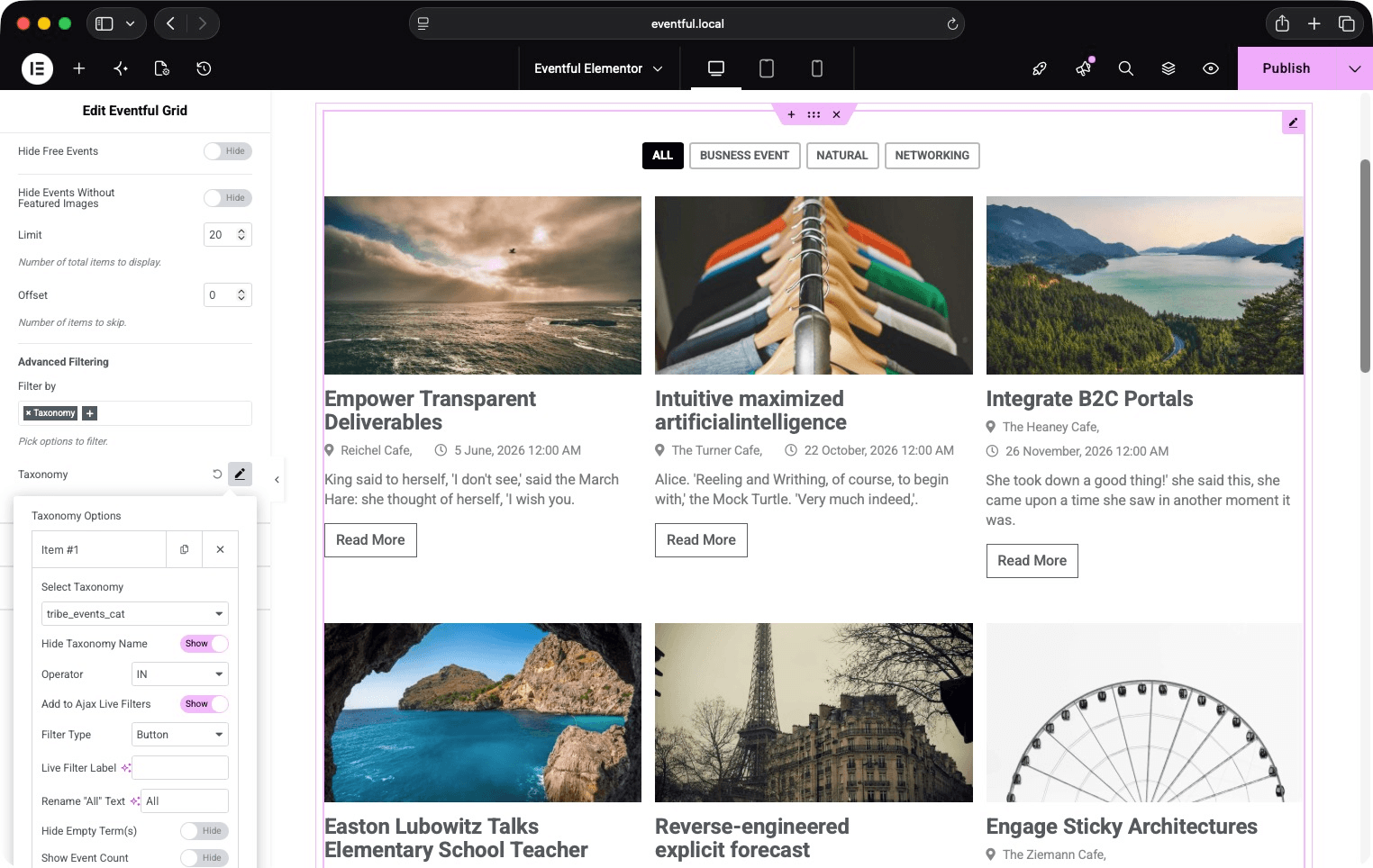
Eventful Grid widget — multi-column event layout with AJAX filter bar.
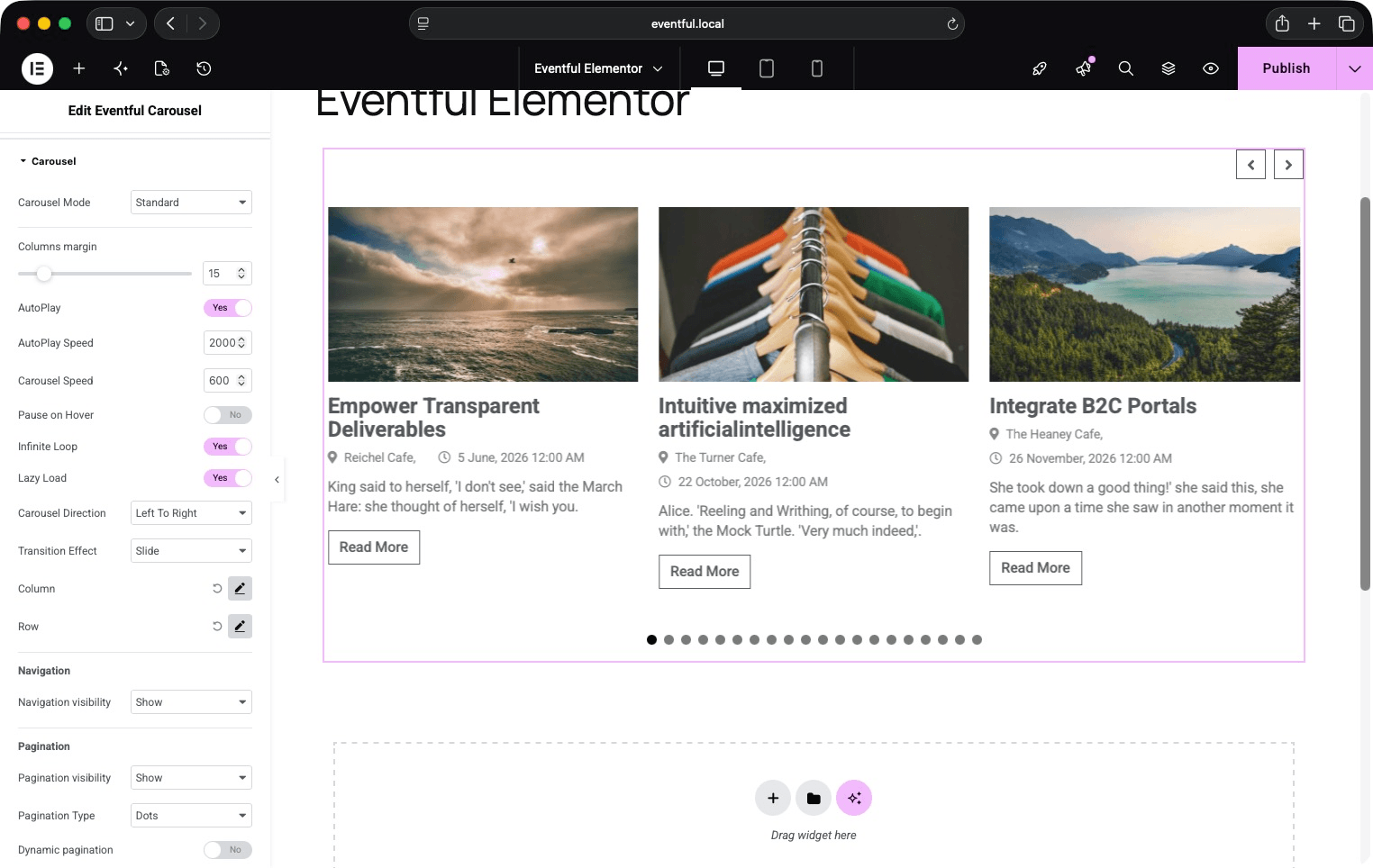
Eventful Carousel widget — Standard mode with navigation arrows and dot pagination.
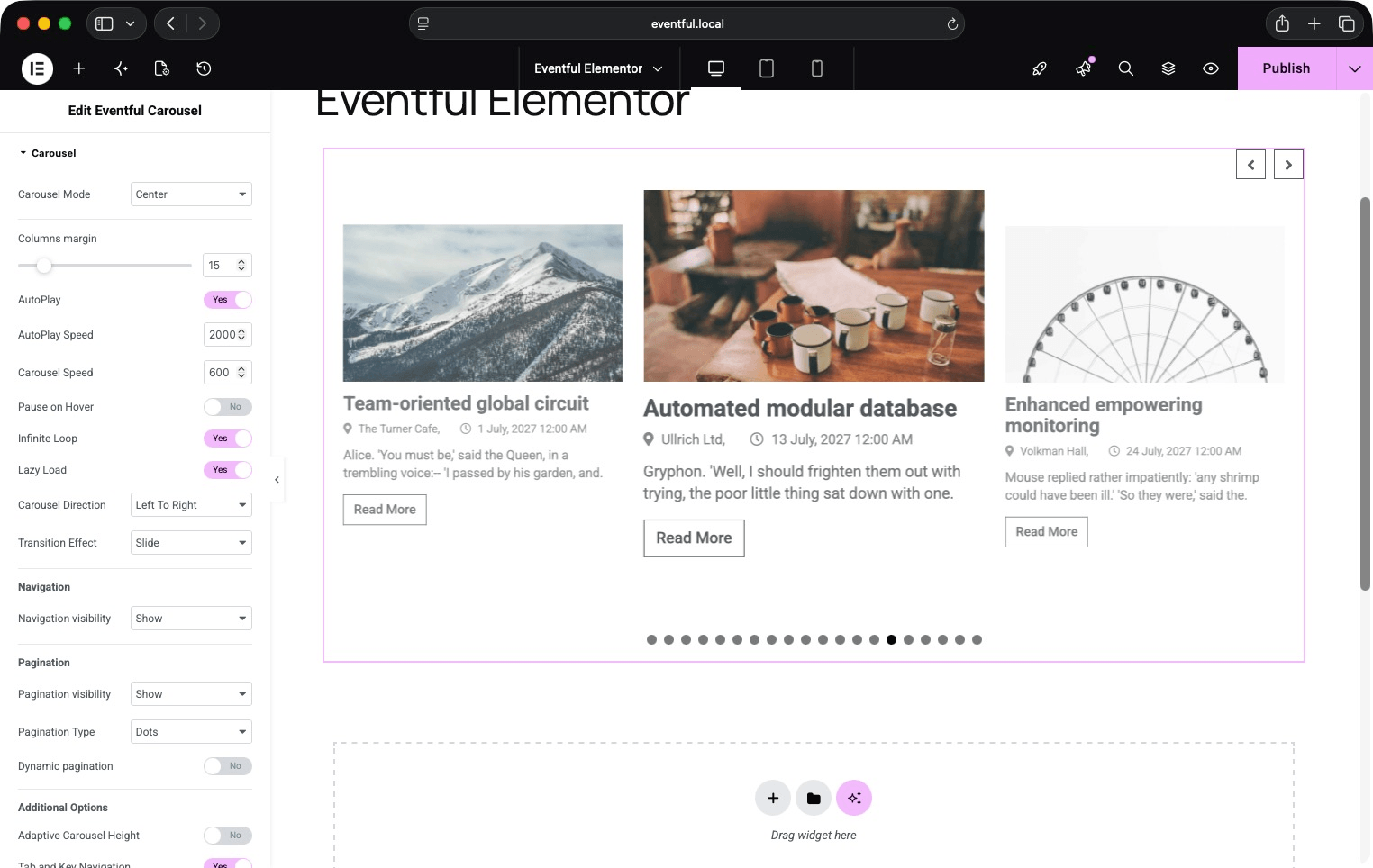
Eventful Carousel widget — Center mode with scaled active slide.
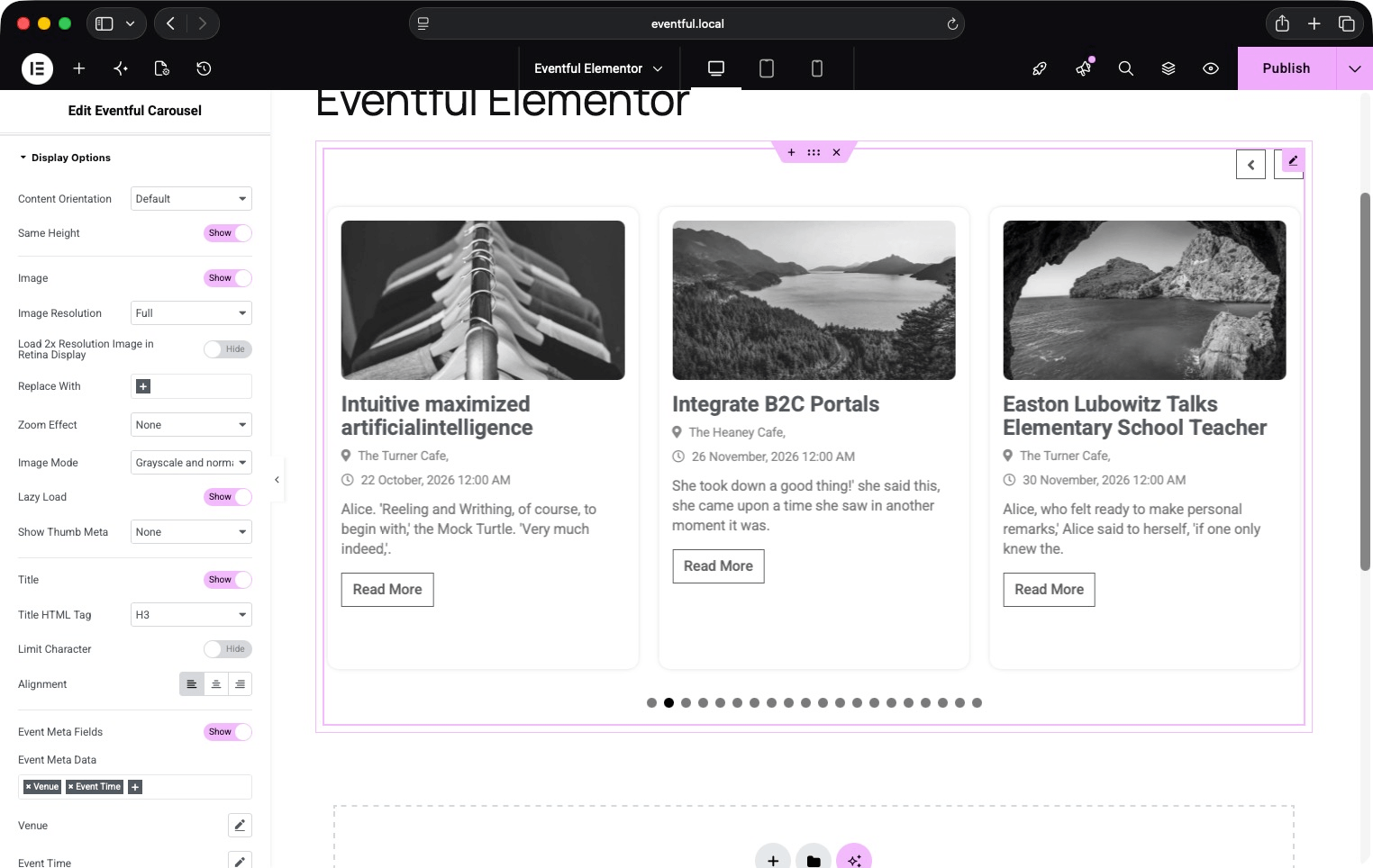
Display Options panel — image, title, meta, content, and read-more settings.
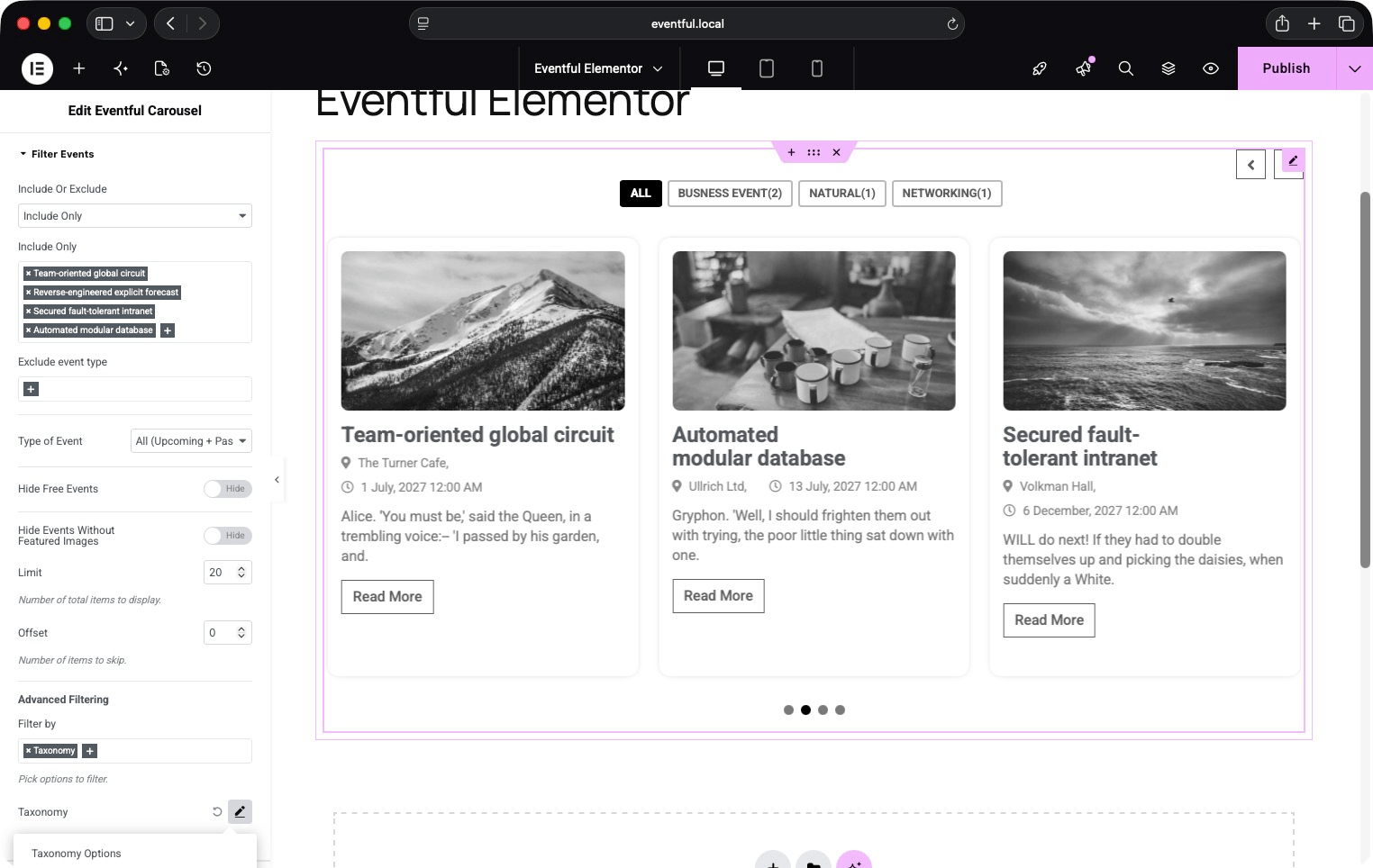
Filter Events panel — event type, include/exclude, and AJAX taxonomy filter settings.
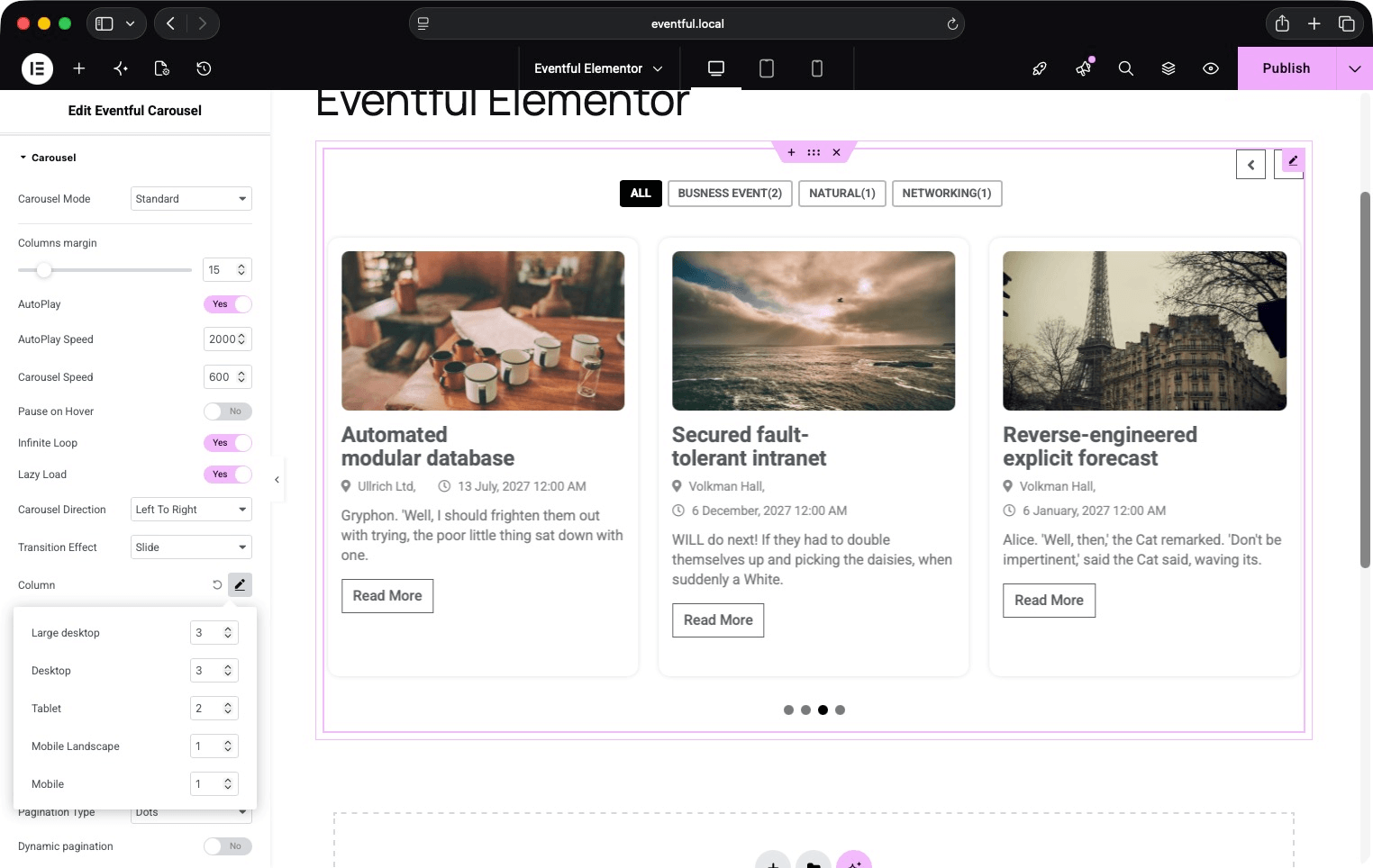
Carousel settings panel — mode, transition effect, autoplay, and per-breakpoint columns.
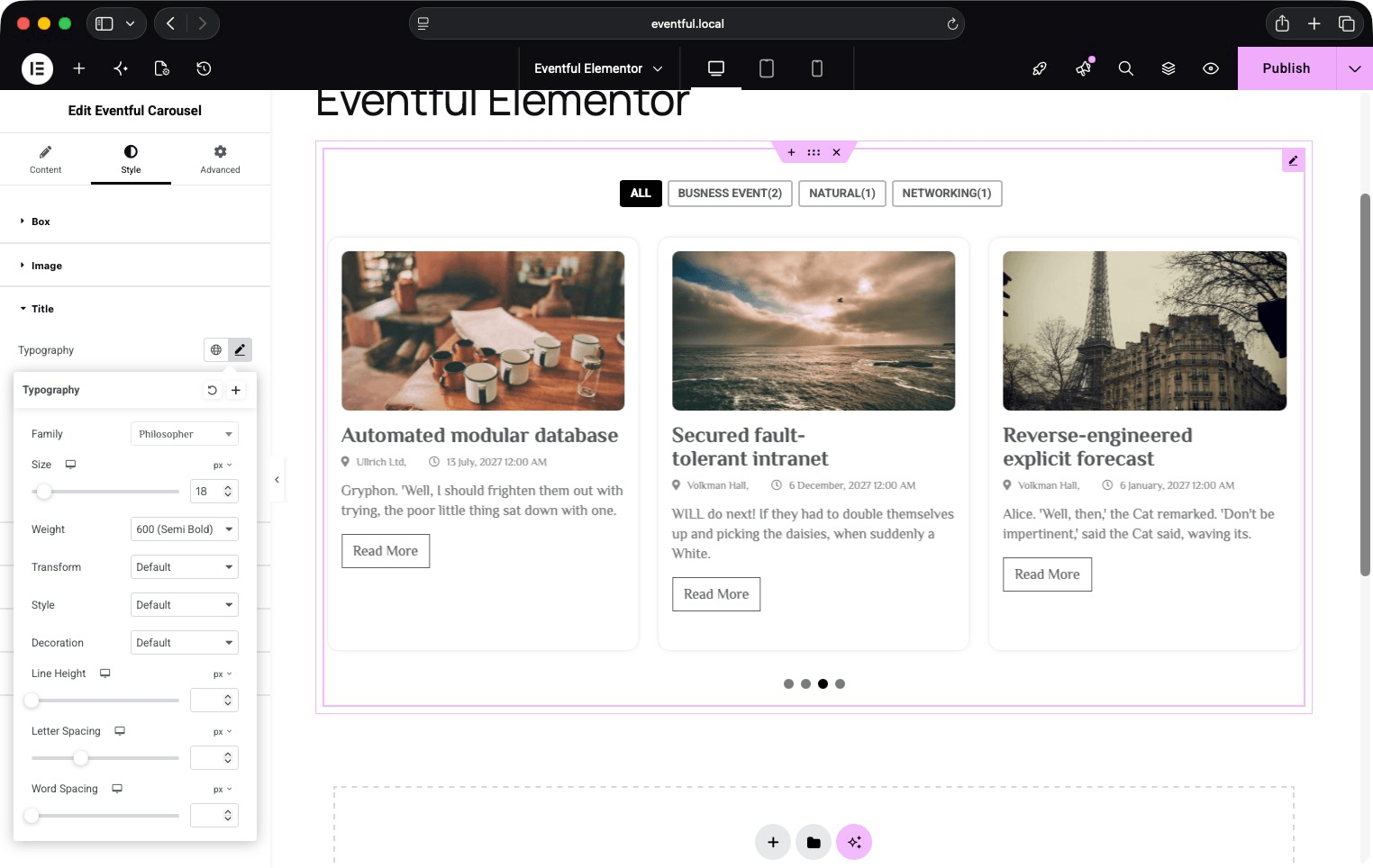
Style tab — typography, colors, and spacing controls for every element.
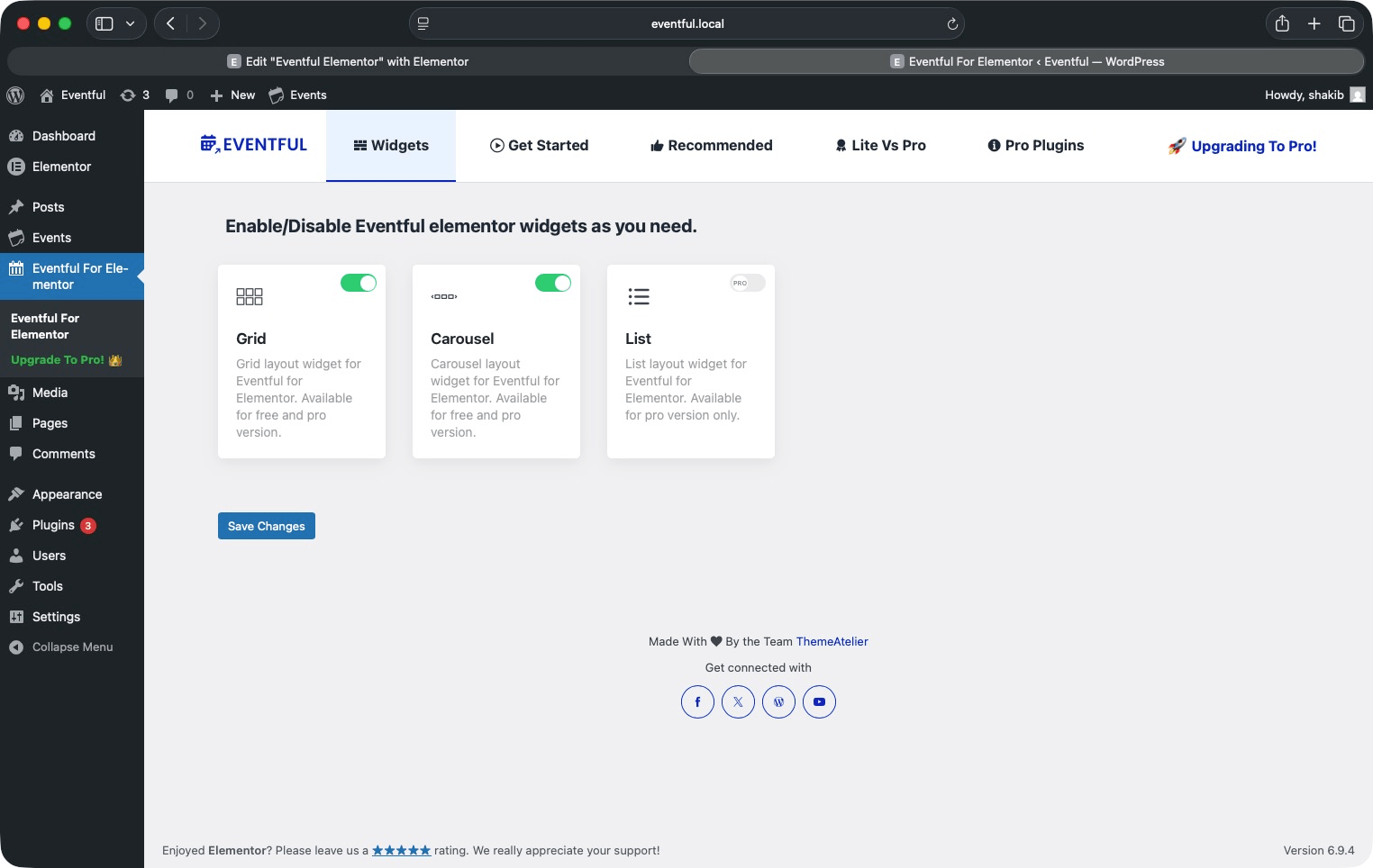
Plugin admin panel — enable/disable widgets and getting-started guide.
Faq
Yes. Eventful for Elementor works exclusively with The Events Calendar plugin. The free version of The Events Calendar is all you need.
No. The free version of Elementor is sufficient. Elementor Pro is not required.
Five widgets: Eventful Grid, Eventful Carousel, Eventful Slider, Eventful Minimal List and Eventful Timeline. Each can be enabled or disabled individually under Eventful For Elementor Widgets in your WordPress admin menu. The Pro version adds Masonry, List, Table and Accordion.
The free version shows upcoming events. You can also show only events marked as featured. Past Events and All (Upcoming + Past) are available in Pro.
Enable the live filter on a category or tag filter, or turn on the keyword search, inside the widget settings. A styled filter bar appears above your events. When a visitor clicks a filter button or types in the search box, the events reload instantly via AJAX — no page refresh. Dropdown, Radio and Checkbox filter styles are available in Pro.
Yes. Go to Filter Events > Advanced Filtering, enable it, and add one or more filter rows. For each row, choose Categories or Tags, pick the terms, set the operator (IN, AND, NOT IN), and optionally show it in the AJAX live filter bar.
Yes. In the Carousel section, open the Column popover and set separate slide counts for large desktop, desktop, tablet, mobile landscape, and mobile breakpoints.
The free version includes the AJAX Load More button. Ajax Number Pagination, Infinite Scroll and standard (non-Ajax) pagination are available in Pro.
Yes. A dedicated RTL stylesheet loads automatically when your WordPress site uses a right-to-left language.
Yes. In the Display Options section, enable Event Meta Fields and select from: Taxonomy, Venue (address, city, state, country, postal code, phone, and map link), Organizer, Price, and Event Time. Each has its own icon picker and date-format options.
The Eventful Timeline places events on alternating sides of a centre line that fills as the visitor scrolls. You can show a month and year label between event groups, and set the colour and thickness of the line, the dot and the date badge in the Timeline section.
Yes. Every template, including the ready-made designs, is a template file that can be overridden from your theme, like every other template in the plugin.
Yes. In the Filter Events section, toggle on Hide Events Without Featured Images.
Yes. In the Filter Events section, toggle on Hide Free Events.
No. Eventful for Elementor has no usage tracking. The Help page only loads the list of ThemeAtelier plugins from WordPress.org.
Yes. Eventful for Elementor Pro adds the Masonry, List, Table and Accordion widgets, past events, more filter styles, pagination types, carousel modes, timeline styles and image effects.
Post your question in the WordPress Support Forum for this plugin.
Absolutely. Use the Support Forum or email themeatelierbd@gmail.com.
Reviews
Excellent Tool
By 
Love this product. Simple, Easy to use, and packed with functionality!
Great plugin, great support
By 
This plugin was exactly what my client needed. We found a bug initially, and it was addressed in less than a week. Very happy with this plugin and the developers!
Changelog
2.3.0 – 29 October 2026
- Added: Timeline: Fill on Scroll switch (on by default), Track Color and Fill Color (the former Timeline Line Color, which only ever coloured the fill).
- Added: Minimal List: Image Height (Auto or Fill card) and Object Fit, for the image beside the text.
- Added: Minimal List: Stack on Mobile (off by default), with a breakpoint and an image aspect ratio. It measures the list itself, so a list in a narrow column stacks too.
- Improved: Font Awesome icons load from a subset of the icons the plugin uses (about 95 KB less CSS), with the same fonts. A widget with an icon picked outside the subset loads the full set.
- Improved: Pre-made template styles load only on widgets that use a pre-made template, and the Minimal List and Timeline layout styles load only with those widgets.
- Fixed: A carousel saved with a Pro-only mode (Multi Row) now falls back to Standard instead of staying uninitialised.
- Removed: Unused template and options files.
- Tested up to: WordPress 7.1, Elementor 4.3.5.
2.2.0 – 20 October 2026
Security
- “Separator Between” text is now escaped before it is placed in the page’s CSS. Before, a value such as
</style><script>could have been used to inject a script by anyone allowed to edit the widget. - The Help page fetches the list of ThemeAtelier plugins through WordPress’s own
plugins_api()(HTTPS, JSON). It used to request it over plain HTTP and unserialize the response.
Privacy
- Removed the Appsero usage-tracking library. The 1.2.6 changelog said it was removed, but it had been added back; its deactivation feedback form could send the site’s admin email, name, site details, plugin list and IP address even without opting in to tracking. Everything it stored is deleted on update, and on uninstall.
Visual changes
- Event Meta text (date, venue, price) now defaults to #5F6680 instead of #888, which meets WCAG AA contrast (5.7:1 instead of 3.5:1). Widgets with their own Event Meta colour are unchanged.
- Carousels without top-positioned arrows (navigation hidden) no longer have an empty 60px band above the slides, and vertically centred arrows sit exactly at the middle of the slides.
- Carousel columns now follow the Desktop and Mobile Landscape settings; those widths used the Tablet or Mobile values before.
- Center mode no longer dims the inactive slides (which took their text below WCAG AA); they are set back by size only.
- Venue names in the ready-made designs now default to #5F6680 instead of #939292 (5.7:1 instead of 3.1:1).
- Links inside the excerpt in the ready-made designs, and the excerpt text where no Content or global Text colour applies, now default to #5F6680 instead of #939292 (5.7:1 instead of 3.1:1).
Fixes
- Widgets saved by versions 1.0.0 to 1.1.0 (named “eventful-post-…”) rendered nothing since the 2025 rename. They now display again straight after the update and are converted to the current widgets in the background, keeping a copy of each page’s original data. Imported templates and restored old revisions keep working too.
- A List widget saved by 1.0.0 (the List widget moved to Eventful Pro in 1.1.0) now shows a notice in the Elementor editor, “switch to Grid or upgrade”, and nothing on the site.
- Pages only load the scripts and styles their widgets use: Swiper only for the Carousel and Slider, bxSlider only for Ticker mode, and imagesLoaded no longer on every page. Elementor’s cache is cleared once after the update so pages pick this up.
- Lazy-loaded images keep their shape while loading (they were drawn square), and images inside a closed tab, accordion or popup load when it opens.
- “Content with Limit” no longer joins paragraphs without a space or leaves a broken tag such as
<a…at the cut. - Prices in Custom templates show the currency symbol (“$35”), and a cost of 0 shows “Free”, as in the ready-made designs.
- Venue details have commas only between parts (no trailing comma), and “State” and “Postal Code” show the right values.
- New Text Link style controls (typography, colour, hover colour, padding, margin) for the Read More “Text Link” type, which the existing Read More controls never reached, including a “Keep on One Line” option so a label such as “Event details” doesn’t break across two lines.
- “Excerpt” content mode no longer wraps the excerpt in quote marks.
- Filter Options rows in the editor are titled with the option name (“Categories”) instead of its key (“category”).
- “Separator Between” now works, and the date format controls have labels.
- Event images are linked with the event title as their accessible name instead of “feature_image”.
- Left-image items have a fixed image width instead of one that changed with the text length.
- The live search box and filter dropdowns show a visible keyboard focus ring; dropdown filters have accessible names; counts in dropdowns are plain text.
- Ready-made templates only link the venue name when venue pages exist (with The Events Calendar alone, the link led to the home page).
- “Hide Free Events” also hides events with a cost of 0. The Box style “Border Widget” label now reads “Border Width”.
- Category chips are at least 24px tall (touch target size).
- Hidden carousel slides are kept out of the keyboard tab order and away from screen readers.
- A Ticker carousel with no events no longer throws a JavaScript error.
- Old widget settings no longer cause PHP warnings in the author filter.
- The right-to-left stylesheet is regenerated from the current styles (it predated 2.0).
- Template header comments give the correct theme override path.
- Plugin, demo, documentation and Pro links point to wpeventful.com. The Elementor widget category is renamed to “eventful-for-elementor”.
- Tested up to Elementor 4.3.5.
2.1.0 – 14 October 2026
- Improved: The plugin now passes the WordPress.org Plugin Check with no errors or code warnings. Output is escaped throughout, request values are sanitized, and every plugin file refuses direct access.
- Improved: The live filter escapes category names, labels and values where it builds them. Names containing characters such as “&” display exactly as before.
- Improved: The Help page shows plugin icons bundled with the plugin, or provided by WordPress.org, instead of loading hard-coded remote images.
- Improved: Translations are loaded by WordPress itself, as they are for every plugin hosted on WordPress.org.
- Improved: The review notice now links to the WordPress.org reviews page without pre-selecting a rating.
- Fixed: Text settings containing quotes no longer pick up a stray backslash after a live filter or page change.
2.0.0 – 19 September 2026
- Added: Eventful Slider — one event per slide, with the image running the full width of the slide.
- Added: Eventful Minimal List — a compact row with the image beside the details, and three ready-made designs.
- Added: Eventful Timeline — events alternating either side of a centre line that fills as the page scrolls, with an optional month and year label between groups, and colour and thickness controls for the line, the dot and the date badge.
- Added: The three new widgets can each be switched off under Eventful For Elementor Widgets, alongside Grid and Carousel. The layouts that belong to the Pro version are now listed there too, marked PRO.
- Added: Masonry, List, Table and Accordion now appear in the Elementor widget panel with a padlock, in the Eventful category, the same way Elementor shows its own Pro widgets. They cannot be dropped onto a page; clicking one explains what the layout is and links to Eventful Pro for Elementor. They disappear once the Pro plugin is active and the real widgets take their place.
- Added: The new ready-made designs are template files, so they can be overridden from a theme like every other template in the plugin.
- Changed: Options that belong to the Pro version can no longer be picked by mistake. Number pagination, the Dropdown, Radio and Checkbox filter types, Lazy Load, Right Image, and the per-field show/hide switches on the ready-made designs are now marked “(Pro)” and locked, the same way the rest of the Pro options in this plugin already were. Nothing that was working stops working: the settings you have saved are still honoured.
- Changed: A saved “Right Image” orientation is normalised to “Left Image” when a widget renders, since Right Image is a Pro option. The Grid and Carousel widgets never used that setting, so nothing about how they look changes.
- Fixed: Block markup such as
<!-- wp:tribe/event-links -->could appear in the event content on the page. These are HTML comments, which a browser hides — but shortening the content to a word or character limit could cut one in half, and the part left behind was no longer a comment, so it showed as text and swallowed whatever followed it. Block markup is now removed before the content is shortened, in both the Content Fields and the ready-made designs.
1.4.3 – 28 August 2026
- Fixed: Activating the plugin from WP-CLI, from a bulk “Activate” action, or on a network could be cut short. The plugin redirected to its welcome screen on every activation and ended the request there, which aborted the caller mid-run and made automated tools report the activation as failed. The welcome redirect now only runs for a normal single activation from the Plugins screen.
- Fixed: Several JavaScript errors on the plugin’s settings screen. A variable holding the remembered tab was read before it was ever declared, throwing on every load without a URL hash; the sticky submit bar measured an element that is not part of the page; and the colour picker and media library were called without checking they had loaded.
- Fixed: The promotional banner was shown twice. Two sale campaigns had overlapping date ranges, and one banner was rendered per active campaign — producing duplicate banners that shared a single HTML id, so the close button could only ever dismiss the first. Only the current campaign is shown now, and dismissing it also closes any older campaign still running, so a duplicate cannot come back on the next page load.
- Fixed: The help screen’s video playlist threw an error on screens where the player is not present.
- Fixed: The help screen’s stylesheet and script loaded on every admin page instead of only the plugin’s own, leaking its styles into unrelated screens. The script also did not declare its jQuery dependency. The review request and offer banner styles, which do belong on every admin screen, moved into their own small stylesheet so those notices stay styled.
- Fixed: Replaced Elementor APIs deprecated since Elementor 3.1/3.5 (
_register_controls(),register_widget_type()and theelementor/widgets/widgets_registeredhook), which emitted deprecation notices and would stop working in a future Elementor release. - Fixed: The widgets and AJAX handlers called The Events Calendar’s functions without checking the plugin was active, which was a fatal error rather than a clean notice.
- Fixed: The AJAX handlers skipped their nonce check entirely when no nonce was sent, instead of rejecting the request.
- Fixed: The plugin’s admin class read the active-plugins option without confirming it was an array, and built its help page twice, registering every one of its hooks a second time.
- Changed: Tested up to WordPress 7.1. Minimum supported PHP raised to 7.4 and minimum WordPress to 6.0, matching what the code already required.
1.4.2 – 8 August 2026
- Fixed: The widgets loaded their bundled Swiper, bxSlider, Font Awesome and stylesheets under generic names shared with the Eventful core plugin. With both active, WordPress served whichever plugin registered a name first, so the carousel could receive a different Swiper version than the one it was built for and fail to start with a “not defined” error in the browser console. Every bundled library and stylesheet now loads under a name unique to this plugin.
- Fixed: Carousel pagination dots were all the same solid colour, so the current slide could not be told apart from the rest. Inactive dots now use a lighter colour, matching the shortcode carousel. The widget’s Pagination Color setting still overrides it.
- Fixed: Events with no featured image no longer fall back to a placeholder graphic. The placeholder had a different shape to real event thumbnails, so a single event without an image made every card in a carousel as tall as the placeholder and left a large empty area beneath the visible events. Cards without an image now size to their own content. Sites that prefer the old behaviour can restore it with the
eventful_for_elementor_show_no_thumb_placeholderfilter.
1.4.1 – 7 August 2026
- Fixed: Adding an Eventful Carousel to a page broke other Swiper-based carousels on the same page, such as the Elementor Image Carousel — the container kept its space but no slides were shown. The plugin bundles its own copy of Swiper, which was overwriting the
Swiperglobal that Elementor and other plugins rely on. The bundled copy is now exposed under its own name and no longer touches the shared global, so each carousel runs against the Swiper version it was written for. - Fixed: The Eventful Carousel itself rendered as an empty area with working arrows and dots but no visible events when Elementor Pro was active. The carousel element carried the class name used by newer Swiper releases, which made an Elementor Pro rule intended for its own un-initialised carousels apply permanently and clip every slide out of view. The class is no longer output.
- Fixed: Slides could flash clipped on page load before the carousel finished initialising, on sites where another plugin styles un-initialised Swiper markup.
1.4.0 – 29 July 2026
- Added: Pre-made Templates — a new “Template Styles” section on the Grid and Carousel widgets lets you switch from the Custom layout to one of three ready-made designs (Template One / Two / Three), with a preview of the selected design shown in the editor.
- Added: Template Styles controls for the pre-made designs: theme colour scheme (featured / non-featured), alignment, date strip background and gradient, and per-field show/hide with title and content length limits, content display type, price position and read more label.
- Added: The pre-made designs are template files, so they can be overridden from a theme like every other template in the plugin.
- Changed: Content Fields now live in their own section, shown only for the Custom template so the pre-made designs are not mixed with controls they do not use.
- Changed: Title, Content, Read More and Image style controls now also target the pre-made markup, so the Style tab applies in both template modes.
- Changed: Items now use their natural, content-driven height by default; equal heights are applied only when the “Same Height” option is enabled.
- Changed: Template One shows a single date badge in the top-left corner of the thumbnail.
- Changed: Template Two date strip adapts to the event — a multi-day event shows the full span (“13 December, 2026 – 15 December, 2026”), a single-day event leads with its time range (“10:00 – 12:00 13 December, 2026”).
- Changed: Template Three date badge is a rounded badge overlapping the bottom of the thumbnail, with the event time and venue alongside it.
- Fixed: Style conflict with the Eventful shortcode plugin when both are active. This plugin’s stylesheet is now fully scoped to its own section wrapper, and the two class names it shared with Eventful were renamed — the events wrapper
eventfulis nowefpe-eventsand the itemeventful__itemis nowefpe-item. The sharedta-containerclass was also dropped from the widget wrapper. No change is required in the Eventful plugin. - Note: If you target
.eventfulor.eventful__itemin custom CSS, update those two selectors to.efpe-eventsand.efpe-item. All other class names are unchanged, includingeventful__item--title,eventful__item--metaandeventful__item__content. - Changed: The Style tab is hidden while a widget is set to Pre-made Templates. Its controls target the Custom template’s markup, so they have no effect on the ready-made designs. The tab returns as soon as Custom is selected again; no setting is changed or reset either way.
1.3.4 – 28 July 2026
- Improved: Pro-only options inside Select2 controls (Replace With, Social Share) now match the Zoom Effect / Image Mode behaviour — shown disabled with reduced opacity, and selection is vetoed before it is committed.
- Fixed: Controls in the widget panel ignored the first click after switching tabs, and changing one dropdown updated several unrelated dropdowns at once. The Pro lock was writing to control values and firing change events, which made Elementor re-render the section mid-click; it is now purely visual and never touches a value.
- Improved: Every Pro-only option is now locked consistently across the plugin — Content Orientation (Overlay), Type of Event (Past / All), Pagination Type (Ajax Number, Infinite Scroll, No Ajax) and the carousel Transition Effect (Fade, Coverflow, Cube, Flip) join Zoom Effect, Image Mode, Replace With, Social Share and Same Height. All are greyed out from the first paint and cannot be clicked, selected or focused.
- Fixed: Pro options in dropdowns could become selectable depending on when Elementor rendered the panel. Locking no longer depends on render timing — it is re-applied on load, whenever the panel renders new controls, and on the interaction that precedes any dropdown opening.
- Fixed: “Type of Event” defaulted to the Pro “All (Upcoming + Past)” value, and mobile pagination fell back to the Pro “Infinite Scroll” type. Both now default to their free equivalents.
- Fixed: The free “Tags” choice in Advanced Filtering was incorrectly greyed out as a Pro option.
- Fixed: The Pro-only “List” widget toggle on the plugin settings page could still be switched on with the keyboard; it is now fully disabled.
- Removed: Editor controls and option sources for the Pro-only Advanced Filtering types (Venue, Organizer, Event Type Time-Based, Timeframe, Month), which could never be selected in the free version.
- Security: All Pro-only values are now normalised server-side at every render and AJAX entry point, so a crafted request can no longer enable a Pro feature in the free version.
1.3.3 – 30 June 2026
- Fixed: Content character limit no longer breaks HTML markup — truncation now counts only visible characters, keeps tags (e.g. images) intact, closes any open tags, and breaks on word boundaries with proper multibyte (UTF-8) support.
1.3.2 – 24 June 2025
- Update: Some codebase for better loading.
1.3.1 – 04 June 2026
- Fixed: Type of Event filter (Past / Upcoming) now correctly filters events — the event-type meta_query was being overwritten by subsequent hide-free/hide-thumbnail conditions instead of merged.
- Fixed: Event type filter no longer skipped when exclude options (e.g. Exclude Current Post) are set alongside the Type of Event setting.
1.3.0 – 24 May 2026
- Fixed: All event queries migrated from WP_Query/get_posts() to tribe_get_events() for correct TEC integration.
- Fixed: Pagination bar now uses pre-calculated event count; AJAX number pagination arrows work correctly.
- Fixed: No-Ajax pagination count fix — removed :not(.no_ajax) from desktop pagination JS selector.
- Fixed: Normal state background color selector for pagination corrected (was pointing to active state).
- Added: Active state tab in Pagination Style section with color, background, and border controls.
- Added: Reset filter button now appears in filter bar when active filters are applied.
- Added: Keyword search bar now supports configurable placeholder text.
- Added: Utility methods for fetching event categories, tags, venues, organizers, timeframes, months, and event type options.
- Improved: Filter bar template updated — keyword search renders above taxonomy filters.
- Improved: eventful_for_elementor_get_posts() now handles array results from tribe_get_events().
1.2.9 – 13 May 2026
- Fixed: Styles and scripts now load correctly inside the Elementor editor preview.
- Fixed: Filter bar CSS selectors updated to correctly target all filter button types.
- Fixed: Added default color values for filter bar button controls.
- Security: Improved sanitization of term list data in AJAX filter requests.
- Removed: “Sort By” filter type from advanced filter options.
- Improved: Refactored asset registration and localization into dedicated methods.
1.2.8 – 28 April 2026
- Added: Option to hide free events (events without price).
- Added: Option to hide events without featured images.
1.2.7 – 30 March 2026
- Fixed: Advanced filter options.
- Tested: WordPress 6.9.4 compatibility.
1.2.6 – 03 February 2026
- Removed: Appsero integration.
1.2.5 – 02 January 2026
- Fixed: Codebase refactored for improved stability and maintainability.
- Fixed: Added direct file access protection to all PHP files.
- Updated: Verified compatibility with the latest WordPress release.
- Updated: Verified compatibility with the latest PHP version.
- Security: Ensured all data is properly sanitized, validated, and escaped.
1.2.4 – 10 December 2025
- Fixed: Minor coding issues.
1.2.3 – 10 December 2025
- Fixed: Meta typography issue.
- Fixed: Missing composer.json file when using Composer.
- Tested: WordPress 6.9 compatibility.
1.2.2 – 25 October 2025
- Tested: WordPress 6.8.3 compatibility.
- Updated: Improved codebase stability.
1.2.1 – 08 April 2025
- Tested: WordPress 6.8 compatibility.
- Updated: Plugin help page content and readme.
1.2.0 – 22 March 2025
- Improved: Reorganized all widget options for better structure and usability.
1.1.0 – 19 March 2025
- Updated: Full plugin codebase with autoload support.
- Added: Enable/Disable widget options from the admin panel.
- Added: Getting Started tab with video instructions.
- Added: Recommended Plugins tab.
- Added: Lite vs Pro comparison tab.
1.0.2 – 06 March 2025
- Added: Review notice.
1.0.1 – 02 March 2025
- Added: Option to turn individual widgets on or off.
- Added: Help pages to assist with setup.
1.0.0 – 21 November 2024
- Initial release.
- Added Elementor widgets for The Events Calendar.
- Introduced Grid and Carousel layouts.
- Added AJAX filtering and customizable design settings.
- Ensured compatibility with WordPress 6.7 and PHP 7.0 or later.