Exit Popup Survey

Exit Popup Survey
Description
The Exit Popup Survey plugin enables you to create and display customized exit surveys on specific pages of your WordPress site. Gather user insights and enhance engagement effortlessly with this intuitive tool.
Installation
- Upload the plugin folder to the ‘/wp-content/plugins/’ directory
- Activate the plugin through the ‘Plugins’ menu in WordPress admin
- Configure the Survey
- Open the page where you want to enable the survey and edit it.
- Locate the ‘Survey Options’ metabox on the editing screen.
- Set “Enable Exit Popup” to “Yes.”
- Enter your Survey Prompt Text to display the message you want users to see.
- Add survey options by clicking the ‘Add Options’ button.
- Save the changes, and test it by trying to access any external link from the page.
Screenshots
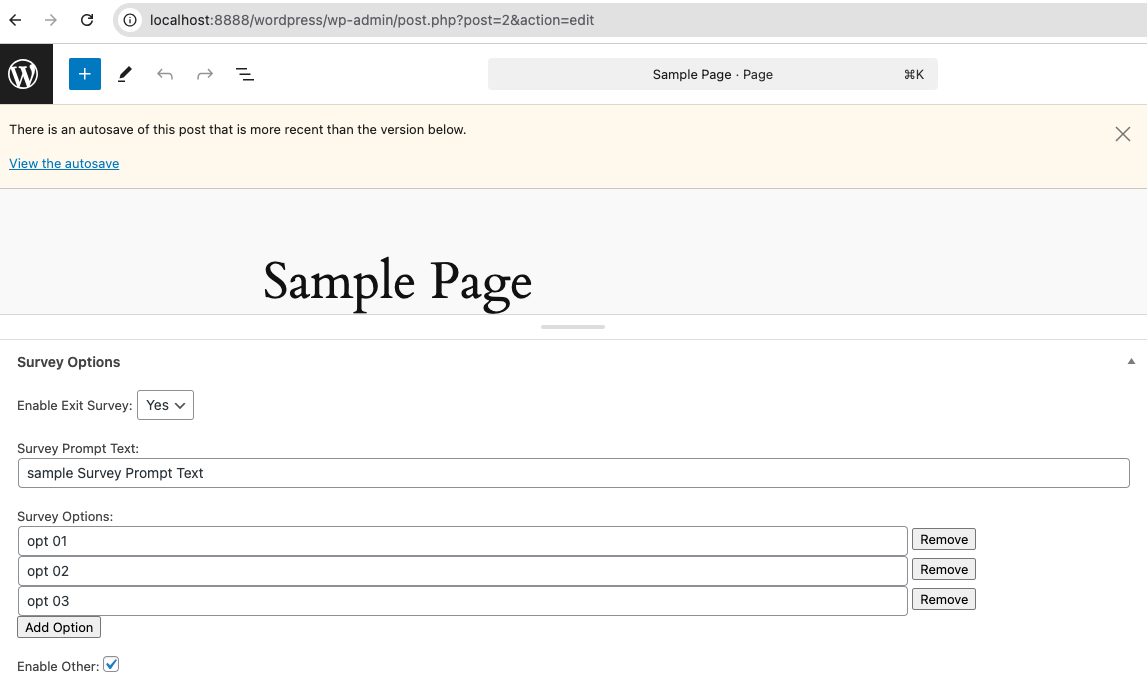

Faq
You can access the plugin configurations by editing any page on your site. Look for the ‘Survey Options’ metabox on the page editing screen.
At the bottom of the ‘Survey Options’ metabox, you will see a table labeled ‘Exit Survey Results,’ where all collected responses are displayed.
This option is not available at the moment. Our team is working on it, and it will be included in the next release.
Reviews
Changelog
1.0.0
- Initial version