Export Plugins and Templates

Plugin Banner

Export Plugins and Templates

by Mohammad I. Okfie

Download
Description

In this plugin you will be able to export your plugins and templates by easy way so, the file after export it will be zip file you can upload zip file to another sites if you want that’s.

Features

  • Export Your Plugins.
  • Export Your Templates.

Usage

Export Plugins

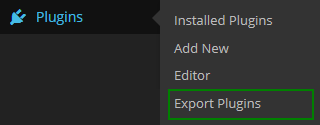
  • After installing the plugin, you need to go to the “Export Plugins” subsection in the “Plugins” menu.
    Just select the plugin you want and then click in the “Export Plugin Now” button. You will get a .zip file to download.

Export Templates

  • After installing the plugin, you need to go to the “Export Templates” subsection in the “Appearence” menu.
    Just select the template you want and then click in the “Export Template Now” button. You will get a .zip file to download.

Installation Automatically

  1. Click Plugins in the menu dashboard.
  2. Click Add New.
  3. Upload and choose “export-plugins-and-templates.zip” file and activate directly.
  4. After activated plugin you can see export plugin in “Plugins” menu and export templets in “Appearance” menu.

Installation Manually

  1. Download the plugin to your computer.
  2. Unzip the file and upload it to the “/wp-content/plugins/” from FTP or Cpanel.
  3. Activate the plugin through the ‘Plugins’ menu in WordPress dashboard.
  4. After activated plugin you can see export plugin in “Plugins” menu and export templets in “Appearance” menu.
  1. Option of "Export plugins"  in the "Plugins" menu.

    Option of "Export plugins" in the "Plugins" menu.

  2. Export plugins page.

    Export plugins page.

  3. Option of "Export Templates"  in the "Appearence" menu.

    Option of "Export Templates" in the "Appearence" menu.

  4. Export Templates page.

    Export Templates page.

It Works, But It's Useless

By toolsavvy on January 19, 2019

All this plugin does is export plugin or theme folder contents. It does not export SQL data base data for the plugin or theme so essentially this plugin is useless since you can achieve the same exact thing using FTP or the file manager in your hosting account. What wordpress needs is a plugin that exports (and imports) plugin data, not just the files, so you can easily move a plugin and it's data/settings from one site to another. As it stands, this plugin just takes up space. The less plugins you have installed, the better, because wordpress gets really slow the larger the database is. So don't bother installing this plugin. I gave this plugin 2 stars instead of 1 because I realize maybe there are cases where it may be useful (although I can't think of one).

Great - but no longer supported?

By yairisan on January 17, 2019

This does a greaaat job of making plugin export a doddle. Upon install, the plugin adds an 'Export' option below Plugins in the dashboard, from which you can display a dropdown list of all the plugins you have installed. Select one, click download et voila. Very clean, simple, and effective.

works very well

By frktprk on December 16, 2018

I couldn't get FTP access from the previous developer.. By this plugin, I downloaded all plugins and template. Thank you

Awesome plugin

By Mohammad Khalaf (mak3000) on November 10, 2017

Awesome and perfect plugin. It is doing what you need exactly. Thank you.

Perfect

By Juan Pablo (jupa8) on May 11, 2017

Perfect. Thanks

AWESOME!

By lajit1 on December 23, 2016

It works! Need I say more????

It doesn't work

By ricardopoa on September 20, 2016

I couldn't even try it. When I choosed to export plugin the list of plugins just don't show up.

very good

By yassen (yassenalshaar) on September 12, 2016

very good Thank you for this wonderful work

saved me when there is no ftp

By wassem mansour (was955) on September 3, 2016

thank your very much for this useful plugin.

Great Plugin

By Alobaidi on September 3, 2016

Thanks Mr.Mohammed.

1.3

  • Update Zip Module to 2.8.4.
  • Some minor fixes.
  • Tested with WP 6.6.X

1.2

  • Fix some bugs and test in 4.6 WP.

1.1

  • Fix some bugs.

1.0

  • First released version.
Back to top