Export Post Info

Export Post Info
Description
Installation
- First you will have to upload the plugin to the
/wp-content/plugins/folder. - Then activate the plugin in the plugin panel.
- Go to SETTINGS / EXPORT POST INFO.
- Save a random string to make it harder for somebody to access your exported data.
- Download your CSV file.
Screenshots

Plugin settings after install: No random string saved so no export CSV is generated.
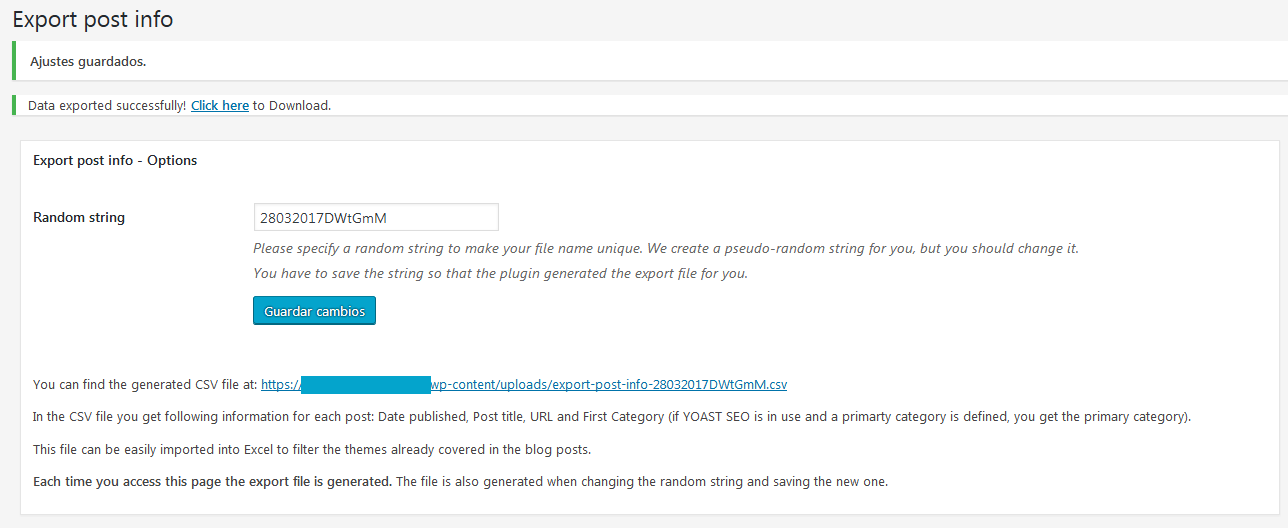
Plugin settings after saving random string. String is set and export file is created.

Plugin settings when you access and the file is created.
Faq
We couldn’t find a plugin that would give us the functionality we were looking for:
1) Export publish date.
2) Export word count.
3) Easy translation of the plugin into other languages. So far English and Spanish translations are included.
Other plugins always export the file with the same name and in the same folder so it’s easy to access this file. We don’t want that this file can be easily found, so we decided to let you setup a random string to make the file name harder to guess.
Yes. It created an entry in the options table where the random string is stored.
Install and activate. Go to settings / Export Post Info. Save random string. And download CSV file.
You can simply activate, deactivate or delete it in your plugin management section.
This plugin has been tested and works with PHP versions 5.5 and greater. WordPress itself recommends using PHP version 7.3 or greater. If you’re using a PHP version lower than 5.5 please upgrade your PHP version or contact your Server administrator.
Yes. On a multi-language site the export will not work correctly.
Yes, but only the posts of the main language are exported. Post in secondary languages are not exported at this moment. We are working on this because we would like to have this feature but for us it isn’t easy to code.
Yes. The plugin requires a PHP version 5.5 or higher and we recommend using PHP version 7.3 or higher.
Of course we do. That’s why we created it. 😉
Reviews
Life saver plugin!
By 
It's a shame that you have to create a plugin for such a simple operation, but this is entirely due to the lack of WordPress. Thank you for saving lives. We need people like you!
Just Perfect!
By 
Excellent plugin! Made my life easier! Highly recommended and thank you for this plugin <3
Great Simple Tool no fuss
By 
Must say works great- better then over complicated those big plugins.
Simple but fast and reliable
By 
Thank you very much to the developers of this plugin.I got an output of all my 1600 blog posts very easily and quickly.
Super simple plugin and neccessery one
By 
Excellent plugin. Exactly what I needed. Thanks to the author for Awesome plugin.
Brilliant!!! (+TIP inside)
By 
Works as anticipated
By 
Perfect
By 
Simple & Effective
By 
Time saver, works just fine
By 
Changelog
1.3.0 (19/Sep/2022)
- FIX: Remove
screen_iconfunction call which is deprecated.
1.2.1 (19/Sep/2022)
- Security update: Please update your plugin. We escaped data to increase your security.
1.2.0 (06/Sep/2022)
- Security update: Please update your plugin. We escaped data to increase your security.
- Corrected PHP notices when debug was active.
1.1.0 (25/Aug/2019)
- Now posts with status published, future and private are exported. Until now only posts with status published were exported.
- Added post status column to the export file.
- PHP version must be 5.6 or higher. Recommended PHP version: 7.3.
1.0.4 (08/Abr/2017)
- Cleaned up code + Changed functions name to be unique and avoid conflicts with other plugins or themes.
1.0.3 (07/Abr/2017)
- Added check for PHP version when activating the plugin. PHP version must be 5.5 o greater.
1.0.2 (07/Abr/2017)
- Solved error in Word Count with words containing UTF-8 characters.
1.0.1 (07/Abr/2017)
- Word count would not count all words of a post if a tag was present.
1.0.0 (07/Abr/2017)
- First official release.