Export WordPress Pages to Static HTML & PDF — Static Site Export

Export WordPress Pages to Static HTML & PDF — Static Site Export
Description
Export WordPress Pages to Static HTML & PDF lets you convert WordPress pages, posts, and custom post types into clean static HTML files you can host anywhere. Generate portable static versions of your WordPress content for faster performance, improved security, and easy sharing.
Choose exactly what you want to export — a single post, selected pages, or specific custom post types. Each export produces a standalone HTML package with organized assets, making it easy for developers, clients, or teams to use the files without a WordPress installation.
Perfect for creating static versions of WordPress pages, archiving content, delivering client-ready HTML pages, or generating portable website packages.
Common use cases
- Deliver client-ready static HTML pages without giving WordPress access
- Archive marketing or campaign landing pages
- Create lightweight static versions of WordPress pages
- Generate offline backups of important content
- Share portable HTML packages with developers or teams
- Export content for static hosting platforms
The plugin focuses on precision exporting, allowing you to control exactly which content is exported, how assets are collected, and how the final static package is structured.
PDF export support is also planned, allowing you to generate print-ready documents directly from WordPress content.
Features
- Export WordPress pages to static HTML — Export individual pages, posts, or custom post types as clean standalone HTML files.
- Selective content export — Export a single item or hand-pick exactly which pages, posts, or custom post types you want to include.
- Free export limit — Free version allows exporting up to 5 posts or pages per run (upgrade to Pro for unlimited exports).
- All WordPress post statuses — Export Published, Draft, Private, Pending, or Scheduled content.
- Role-based page rendering — Export pages as viewed by a specific WordPress user role (useful for membership or gated content previews).
- Developer-friendly asset structure — Exported packages organize assets into
/images,/css, and/jsdirectories. - Flatten parent URLs — Option to export parent posts directly as
postname.htmlat the root of the export package. - Preview and download exports — Browse generated static HTML files inside WordPress before downloading them as a ZIP archive.
- Direct FTP / SFTP deployment — Upload exported static files directly to a remote server from the export panel.
- Reliable background exports — Export jobs run in the background with pause, resume, cancel, and retry controls.
- Smart asset collection modes — Choose Strict, Hybrid (recommended), or Full asset discovery for exporting site resources.
- System Status diagnostics — Built-in environment checks (PHP version, permissions, REST API) help detect issues before exporting.
- Export buttons via shortcodes — Add export buttons to posts or pages using simple shortcodes.
- Translation ready — Fully internationalized and ready for localization.
- PDF export (returning soon) — Optional PDF generation with customizable templates (headers, footers, fonts) planned for a future release.
Pro Features
- All Pages / All Posts export — Bulk export every page or post in one run
- Full Site export — Complete WordPress-to-static-HTML conversion (URL discovery & crawling)
- External Site Export — Mirror and export any external URL as a clean static package
- AWS S3 deployment — Upload exports directly to S3 buckets
- Priority support & updates
Your First Export
- Tools Export WP Pages to Static HTML
- Choose Export Scope (Custom up to 5 items free; Pro: All Pages / All Posts / Full Site / External Site)
- Select items, choose Post Status and Role (optional), pick Asset Mode
- Start Export Preview Download ZIP or Upload to remote
Shortcodes
[export_html_button] : Inserts an “Export to HTML” button (visible to allowed roles)
[generate_pdf_button] : Inserts a “Generate PDF” button (PDF feature planned to return)
Installation
Automatic Installation
- Dashboard Plugins Add New
- Search for “Export WP Pages to Static HTML & PDF”
- Install and Activate
- Go to Tools Export WP Pages to Static HTML to begin
Manual Installation
- Download the plugin ZIP from WordPress.org or your account
- Dashboard Plugins Add New Upload Plugin
- Upload, Install Now, then Activate
Screenshots
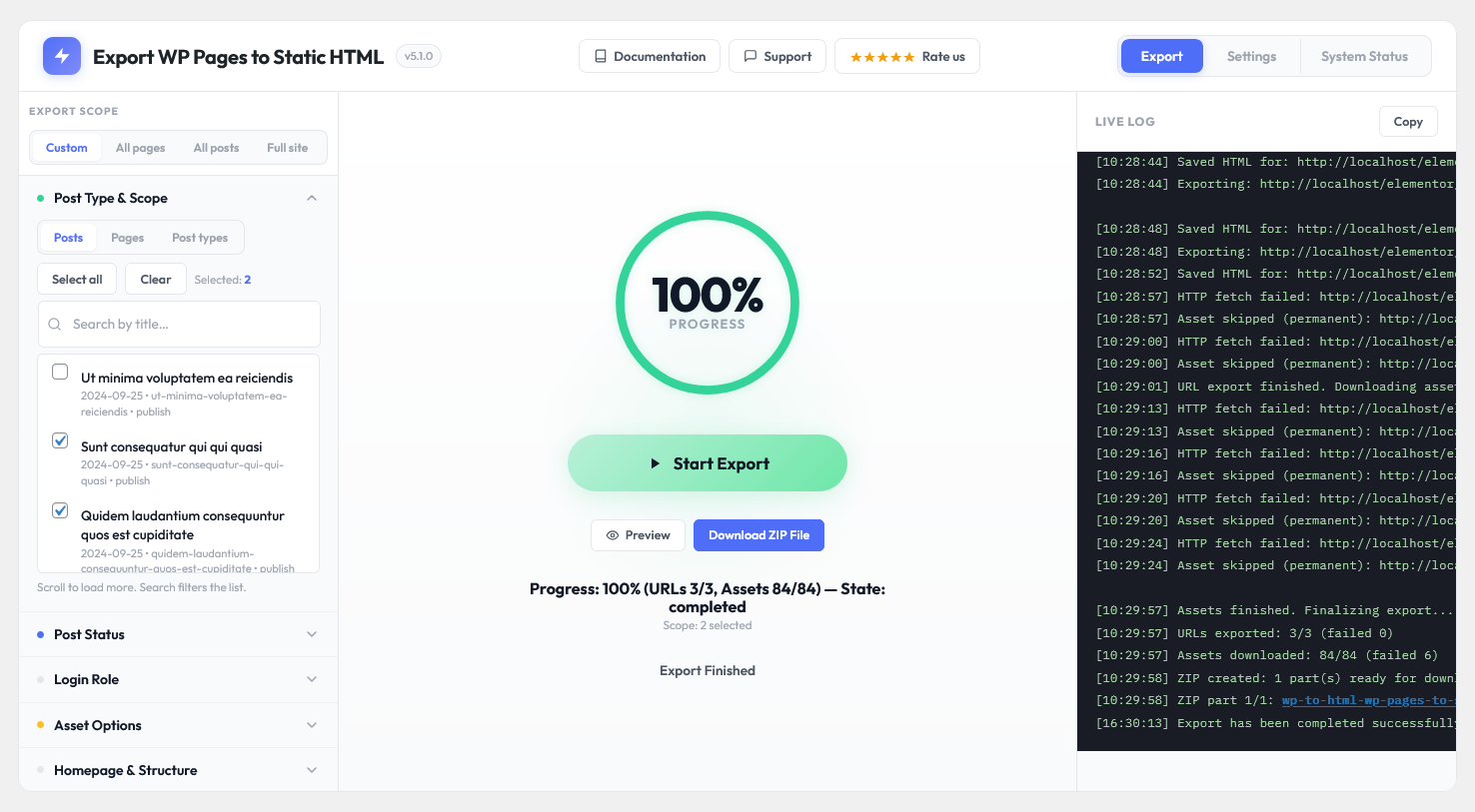
Export Panel — Select posts, pages, or CPT items, choose scope, and start export
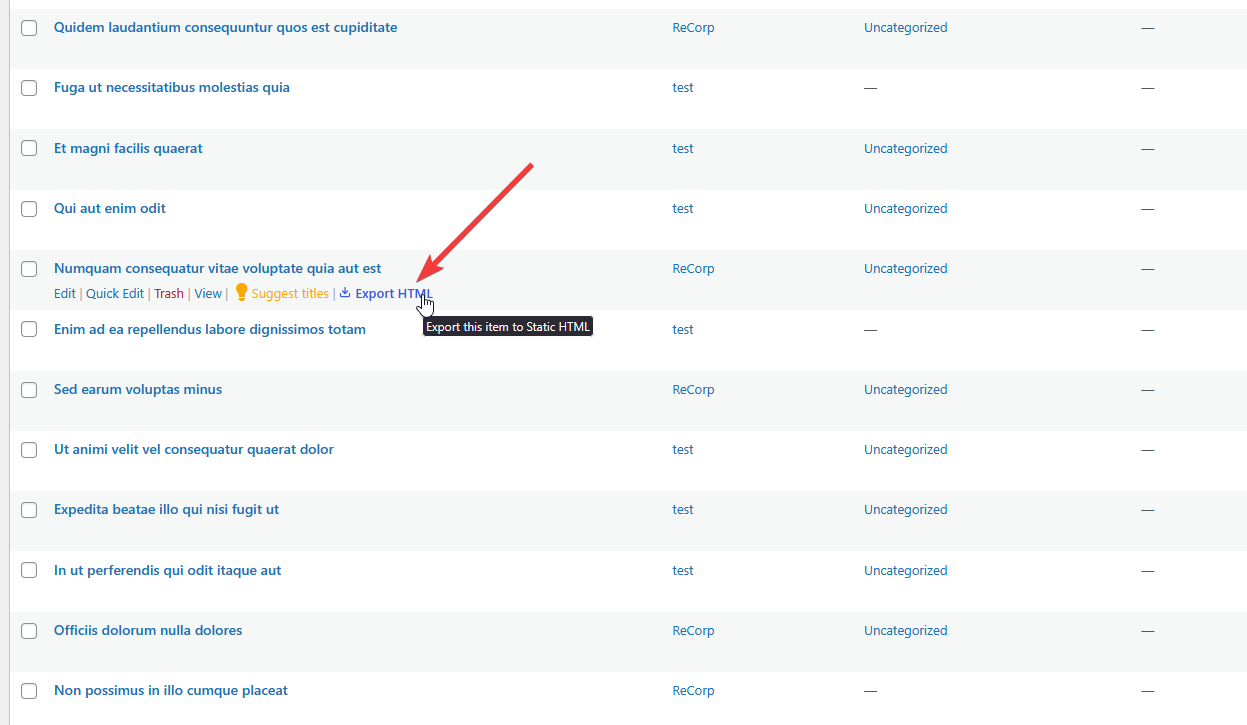
Export Action in Posts/Pages listings — Quick Export to HTML button in row
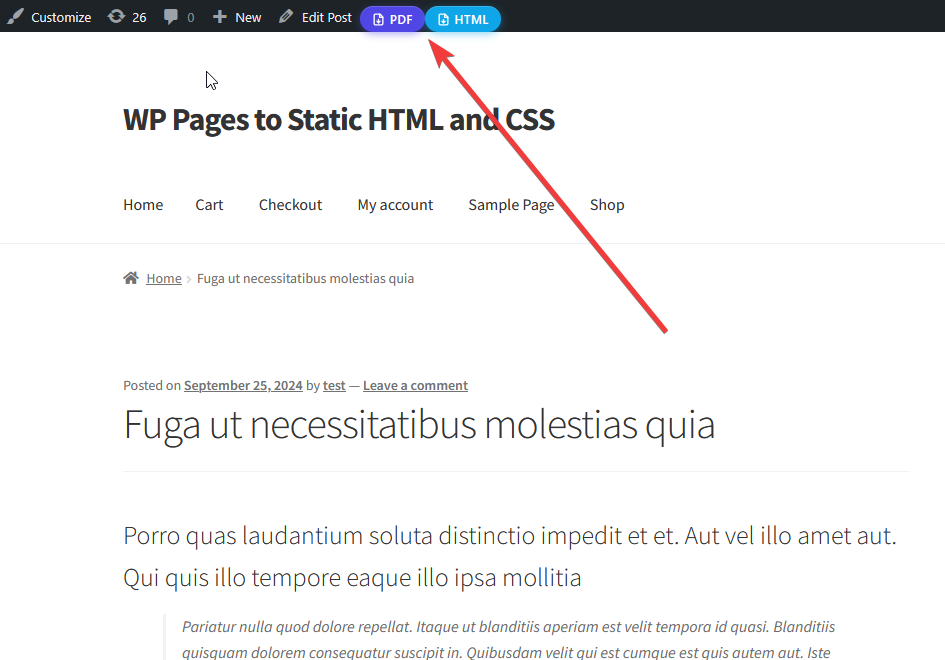
Export Buttons in Admin Toolbar1. Export Panel — Select posts, pages, or CPT items, choose scope, and start your export
Faq
Yes. The core plugin is free and allows exporting up to 5 posts/pages per run. Pro removes the limit and adds bulk/full-site features.
This plugin focuses on selective, role-aware exports — you pick exactly which posts, pages, or CPT items to export, rather than always converting the entire site.
Yes. The plugin supports Publish, Draft, Private, Pending, and Scheduled statuses.
Yes. Exports capture rendered front-end HTML so Elementor, Divi, Beaver Builder, Bricks, and Gutenberg layouts are preserved.
Yes. Failed URLs are tracked with error messages and retry counts. Use the “Re-run failed” action to retry failures without restarting the whole export.
Exports are written to a separate directory (default: /wp-content/wp-to-html-exports/) so your live site remains unchanged.
PDF export tooling will return in an upcoming release. When enabled, it will support templates, headers/footers, and shortcodes to place PDF buttons.
Reviews
Thank You for the Plugin!
By 
I just wanted to reach out and say how thrilled I am to have found your "Export WP Pages to HTML & PDF – Simply Create a Static Website" plugin. This is exactly what I was looking for!
I often create landing pages in WordPress, and there are times when my clients request an HTML version of their landing pages. Previously, converting WordPress pages to HTML was a time-consuming process, but your plugin has made it incredibly easy and efficient.
Honestly, I wish I had discovered this tool sooner. It’s already saving me a lot of time and effort.
Thank you for developing such a practical solution for WordPress users like me!
stucks at 33%
By 
exactly stucks at 33% at time of Creating CSS directory.
I tried with hosted (live) and also localhost install
Its stuck at 33%
By 
not working
Plugin Export WP Page to Static HTML & PDF is number 1
By 
The Export WP Page to Static HTML & PDF plugin is awesome,
It helps me export my website to HTML exactly as it is running,
This is the best plugin to export my website to html.
The author (software developer) is very dedicated and guides me in detail.
This is the best software I have ever seen, you should buy it.
Useless
By 
free version has no sense
Great tool!
By 
This plugin provides great flexibility for development workflows!
Best static converter plugin for elementor WordPress sites
By 
Wp static is a real game changer and a great plugin for converting static. worked so perfectly. we're super happy. it can save thousands on custom coding.
error web
By 
error web
An excellent plugin.
By 
An excellent plugin. I found it after 2 days of various attempts, to transform a page created in WordPress, with Flatsome theme, into html & CSS & …. And it did exactly what I needed. The resulting html page, looks perfect.
Thank you.
Radovan D.
BIt sad, great product, now dead
By 
Was probably a great plugin when it started up, which created perfect .html pages, but no longer works.
The generated html pages are now just garbage (On a lightspeed server)
Changelog
6.0.8.0
- Improved: “Group assets by type” is now available to all users (previously Pro only) and enabled by default — exports organise /images, /css, and /js automatically.
- Fixed: “Parent posts in root dir” now works correctly on subdirectory WordPress installations, saving top-level pages as postname.html at the export root.
6.0.7.0
- Fixed: Clicking Stop now immediately halts background export processing.
- Improved: Export log now records when an export is paused, resumed, or stopped by the user.
- Improved: Internal code improvements for better reliability and stability.
6.0.6.0
- Added PDF exporting functionality.
- Enhanced exporting experience.
- Made the layout easier to understand.
6.0.5.8
- Improved reliability: enhanced retry logic and watchdog repairs
- Improved background processing and error reporting
- Small UX and stability fixes
6.0.5.7
- Added: External Site Export — fetch and mirror any external URL as static HTML (Pro only).
- Added: Quick Export button on posts, pages, and custom post type listing rows — export any single item instantly from the admin list.
6.0.5.5
- Minor fixes and stability improvements.
6.0.5.2
- Fixed: Tables creating error on plugin update.
6.0.0
- Refactored the core export engine for improved stability and performance.
- Improved: Watchdog now automatically detects and repairs stalled export processes.
- Improved: Enhanced failed URL tracking with per-URL retry counts and detailed error reporting.
- Improved: Re-run only failed URLs without restarting the entire export process.
- Improved: Implemented exponential backoff for asset retries to reduce server load.
- Improved: Asset collection mode (Strict / Hybrid / Full) is now saved and respected across cron runs.
- Fixed: Export context is now correctly propagated to background workers during server cron execution.
- Added:
single_root_indexandroot_parent_htmloptions are now persisted within the export context. - Improved: More user-friendly interface and overall UX enhancements.
- Removed: PDF Exporting option removed temporarily.
5.0.1 – 2 February 2026
- FIXED – A minor issue.
5.0.0 – 1 November 2025
- FIXED – A critical issue has been fixed.
4.3.4 – 20 October 2025
- ADDED: Email notification system when export completed.
4.3.3 – 8 September 2025
- FIXED: Skip assets not working issue.
- FIXED: Some other issues.
- ADDED: Increase 3 pages limitation to 6 pages.
4.3.2 – 8 September 2025
- UPDATED: little thing.
4.3.1 – 8 September 2025
- UPDATED: little thing.
4.2.9 – 7 September 2025
- ADDED: info icons and tooltip on each settings label.
4.2.8 – 7 September 2025
- Updated little thing.
4.2.7 – 6 September 2025
- Updated the export page interface.
= 4.2.3 – 31 August 2025=
* Test
= 4.2.2 – 30 August 2025=
* FIXED: Fixed table column issue.
= 4.2.1 – 29 August 2025=
* FIXED: Fixed little issue;
= 4.2.0 – 26 August 2025=
* UPDATED: Whole exporting system. Now export wp pages to static html and css plugin can export almost every site.
= 4.1.0 – 29 July 2025=
* ADDED: Review section.
= 4.0.1 – 30 April 2025=
* UPDATED: Some PDF making js codes to generate pdf file smoothly.
4.0.0
- New: PDF export feature with
[generate_pdf_button]shortcode - New: Role-Based Access Control for export buttons
- New: Daily PDF export limits (2/day) with notifications
- New: Background/asynchronous export jobs with progress bar
- FIXED: Table creating issue while plugin activate.
3.0.0 – 9 July 2024
- Fixed lots of tweaks.
2.2.3 – 1 July 2024
- Fixed safe redirection
2.2.2 – 16 March 2024
- Fixed assets naming issues.
- Added php zip extension not installed notice.
2.2.1 – 30 November 2023
- Added webp image extension. Now this extension images will export also.
2.2.0 – 28 November 2023
- Made compatible with php version 8.2.
- Added “User roles can access” settings.
- Fixed very little security issue.
- Made some polishing.
- Fixed post searching issue.
- Fixed some more minor issues.
2.1.8 – 31 July 2023
- Fixed some minor issues.
2.1.7 – 28 June 2023
- Added review notice with “having problem” button.
- Added “Successfully exported” toast notification.
2.1.6 – 28 May 2023
- Fixed main site address still appearing issue in everywhere.
2.1.5 – 21 May 2023
- Fixed pro version direct installing issue.
2.1.4 – 23 December 2022
- Fixed a minor issue.
2.1.3 – 1 November 2022
- Fixed a major issue.
2.1.2 – 1 November 2022
- Fixed a minor issue.
2.1.1 – 12 August 2022
- Fixed some major issues.
2.1.0 – 23 June 2022
- Added html icon to the menu.
- Added documents exporting system.
- Added audios exporting system.
- Added linked videos exporting system.
- Fast exporting technique has been utilized.
- Fixed images, audios and documents url not exporting issue.
2.0.3 – 30 Septembar 2021
- Fixed one little issue.
2.0.2 – 14 Septembar 2021
- Make plugin compatible with PHP 7.3
- Reduce minimumInputLength to 1 for posts search
2.0.1 – 10 Septembar 2021
- Fixed little issues.
2.0.0 – 9 September 2021
- Added “Advanced Settings” Tab.
- Added checkbox “Create index.html on single page exporting”.
- Added checkbox “Save all assets files to the specific directory (css, js, images, fonts)”.
- Added textarea “Add contents to the header”.
- Added textarea “Add contents to the footer”.
- Added button “View Last Exported File”.
- Added logs percentage system.
- Hide details logs system by default.
- Added skip assets functionalities.
- Fixed unlimited loading issue.
- Fixed minor issues.
1.0.3 – 22 April 2021
- Fixed little issues.
1.0.2 – 13 March 2021
- Fixed some major issues.
1.0.1 – 28 Jan 2021
- Fixed http site data getting issue.
- Fixed same filename conflict issue.
- Fixed single quotation in filename issue.
- increase posts per page to infinite.
- Added homepage option in the page select box.
1.0.0 – 22 May 2020
- Initialize the plugin