Extonify Address Book for WooCommerce

Extonify Address Book for WooCommerce
Description
Extonify Address Book for WooCommerce is a modern address book for WooCommerce stores. Customers keep more than one billing and shipping address on file, give each a nickname, pick a default, and reuse them — in My Account, at the Classic Checkout, in the Checkout Block, and on admin order screens. Shop staff manage the same address book from the user profile and drop a saved address into any order with one click.
Everything runs on your own site. There are no external services, no API keys, and no telemetry — all data stays in your WordPress database.
Learn more at https://extonify.com/product/address-book-for-woocommerce/.
Free admin address management (the headline)
The full address book is manageable from wp-admin at no cost:
- User-profile CRUD — add, edit, and delete a customer’s saved billing and shipping addresses directly on their WordPress user-profile screen, with the normal WooCommerce country/state fields.
- Order-editor picker — on any order (HPOS or legacy), pick one of the customer’s saved addresses and apply it to the order’s billing address or shipping address fields, and copy an order’s address back into the customer’s book with a nickname.
What works where
- Save / edit / delete addresses in My Account — WooCommerce 8.9+
- Select a saved address at Classic Checkout (recalculates shipping + tax) — WooCommerce 8.9+
- Save a new or edited address from Classic Checkout — WooCommerce 8.9+
- Select a saved address in the Checkout Block — WooCommerce 8.9+
- Save a new or edited address from the Checkout Block — WooCommerce 9.9+ (auto-activates)
- Admin user-profile management + order-editor picker — WooCommerce 8.9+
- HPOS (High-Performance Order Storage) — fully compatible
Selecting saved addresses in the Checkout Block works from WooCommerce 8.9. Saving a new or edited address from the Block switches itself on automatically on WooCommerce 9.9 and newer — that is the first version where the public Checkout Block API the save flow needs actually exists, so on 9.9+ it just starts working with no setting to flip.
Address checks and formatting
The plugin performs local address checks and formatting — required-field and format checks and consistent formatting of what customers enter. It does not contact any external address service and does not check addresses against any postal or courier database; the checks are local only.
Privacy
All address data is stored only in your site’s database. The plugin makes no external requests. It integrates with WordPress core privacy tools: a customer’s saved addresses are included in the personal-data exporter and removed by the personal-data eraser. Our privacy policy is at https://extonify.com/privacy-policy/.
Support
Questions or problems: use the WordPress.org support forum for this plugin, or contact us at https://extonify.com/support/.
Multisite
This version supports per-site activation only. Activate it on each individual site that needs the address book; it intentionally does nothing (behind an explanatory notice) if network-activated, so nothing is ever half-configured.
Human-readable source
The four front-end/admin JavaScript bundles in build/ are compiled with @wordpress/scripts. Their readable sources are bundled under src-js/, and exact build instructions are in BUILD.md inside the plugin.
Configuration
All settings are at WooCommerce Settings Advanced Address book: turn the billing and shipping address books on or off independently (a disabled type is hidden everywhere and the server rejects changes to it); allow or block saving a new address and updating an existing saved address from the Classic and Block checkouts; set a maximum number of saved addresses per customer per type (0 = unlimited); show or hide the customer CSV export button (admin exports from a user profile are unaffected); and choose whether to delete all plugin data on uninstall — off by default, and only a site administrator can change it.
Installation
- Make sure WooCommerce is installed and active — this plugin requires it (WooCommerce 8.9 or newer) and will not run without it.
- Upload the plugin folder to
/wp-content/plugins/, or install the zip through Plugins Add New Upload Plugin. - Activate the plugin through the Plugins screen. On Multisite, activate it per site, not network-wide.
- Settings live at WooCommerce Settings Advanced Address book. The plugin’s row on the Plugins screen also has a direct Settings link.
- Customers immediately get an Addresses area in My Account, where they can store multiple addresses of each type; no further setup is required.
Screenshots
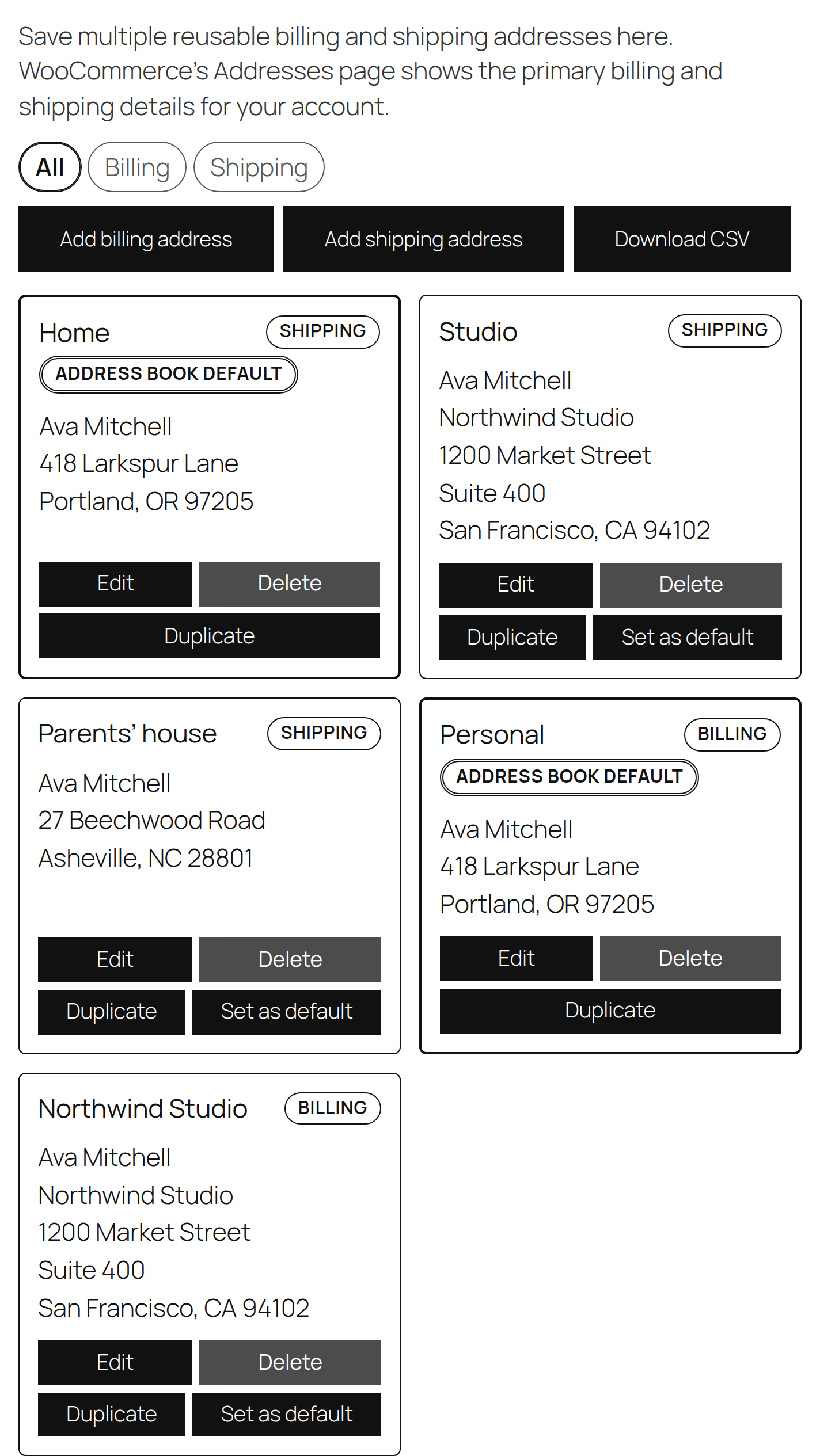
Address book in My Account — saved billing and shipping addresses shown as cards with nicknames and a default badge.
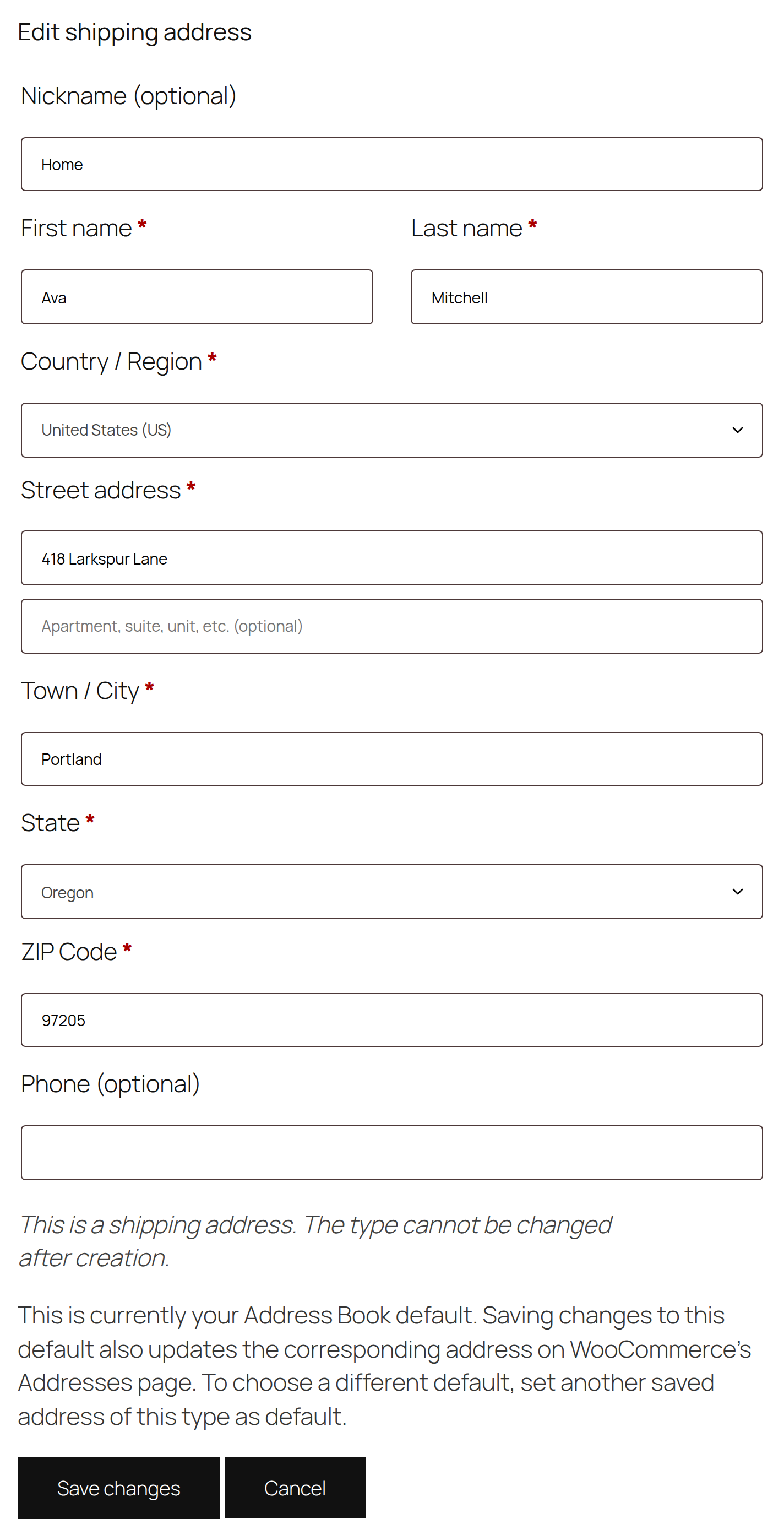
The add / edit address form with WooCommerce country and state fields.
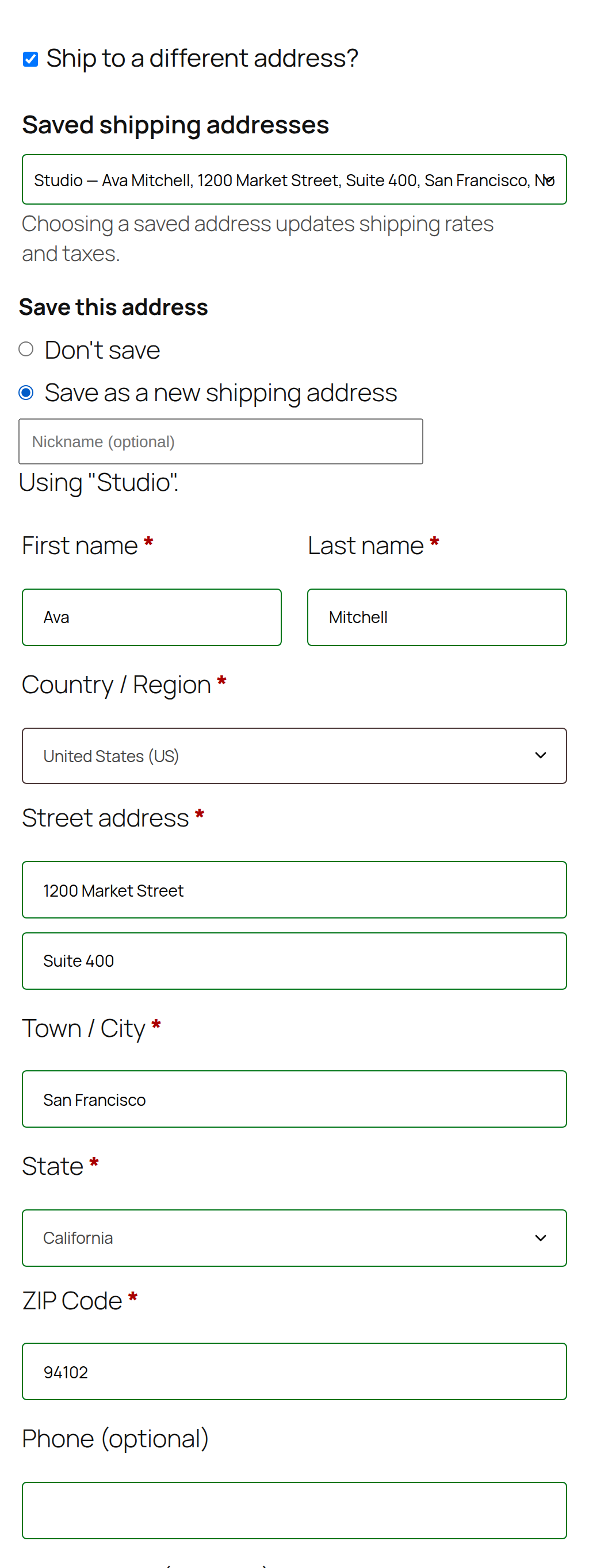
Classic Checkout — choosing a saved address, plus the option to save a new or edited address.
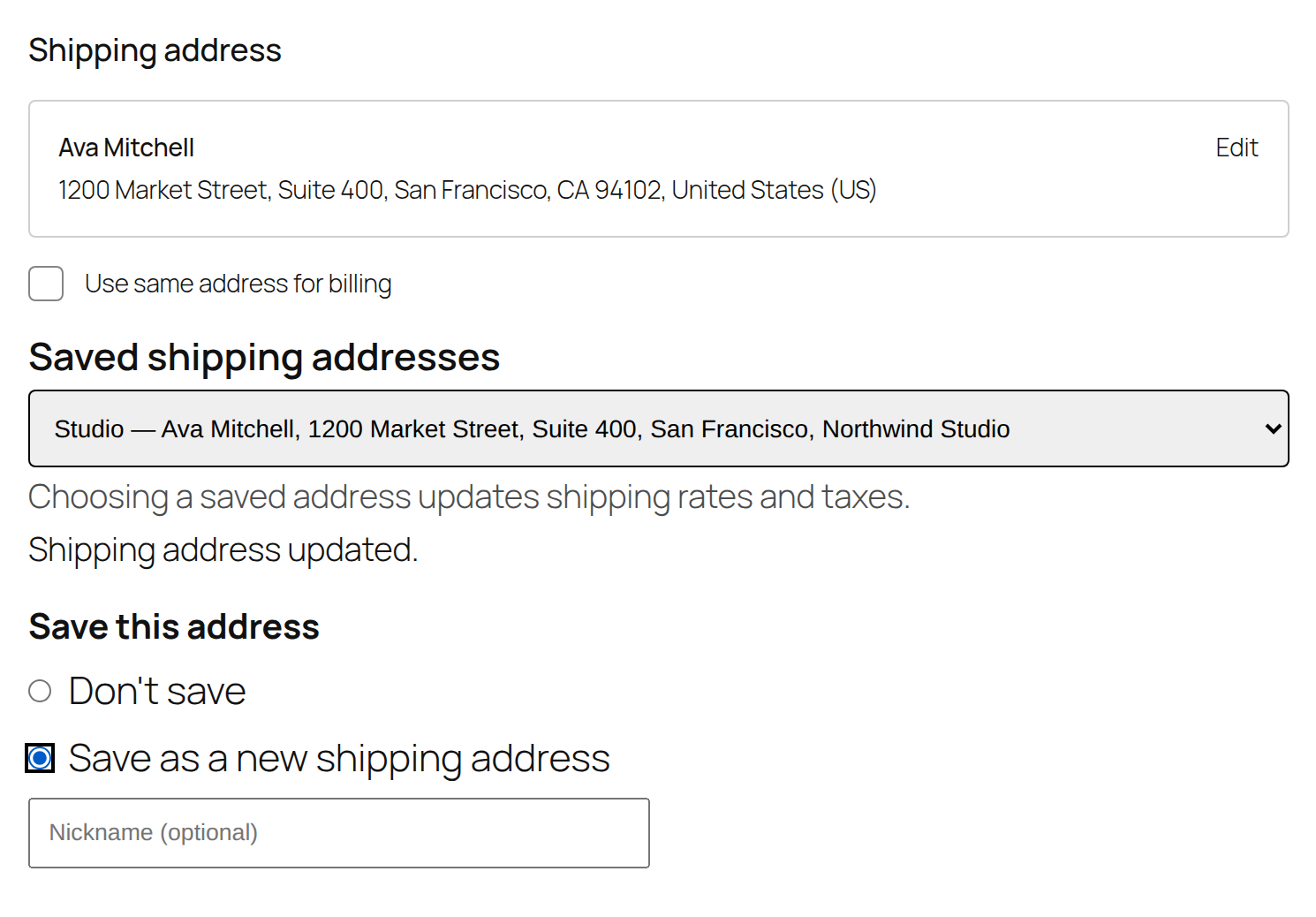
Checkout Block — selecting a saved address inside the shipping-address block.
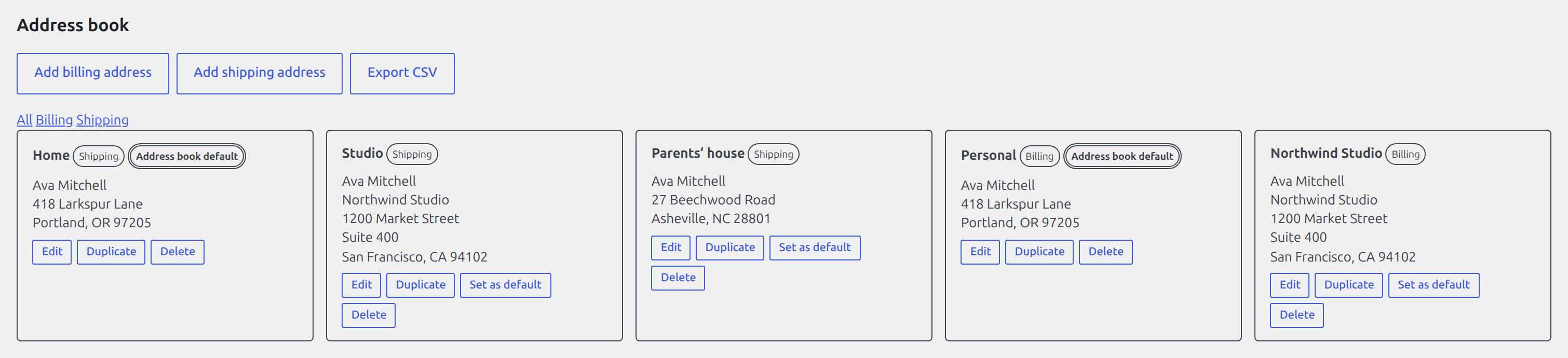
Admin user-profile management — a customer's saved addresses managed from the WordPress user profile.
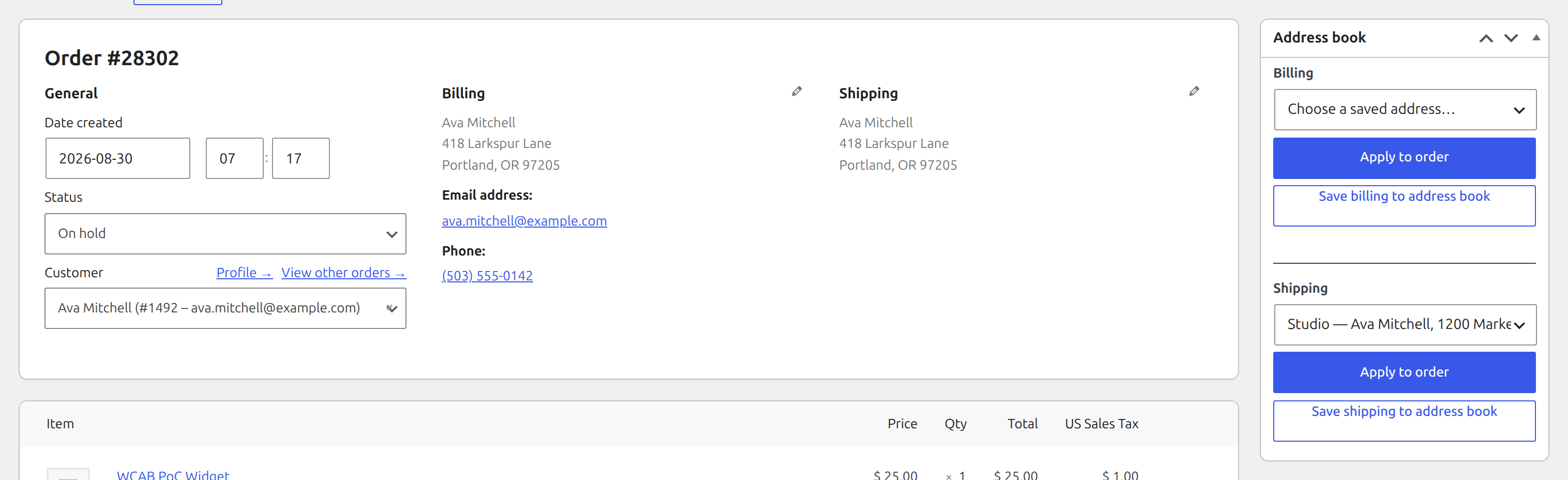
Order-editor address picker — applying a saved address to an order.
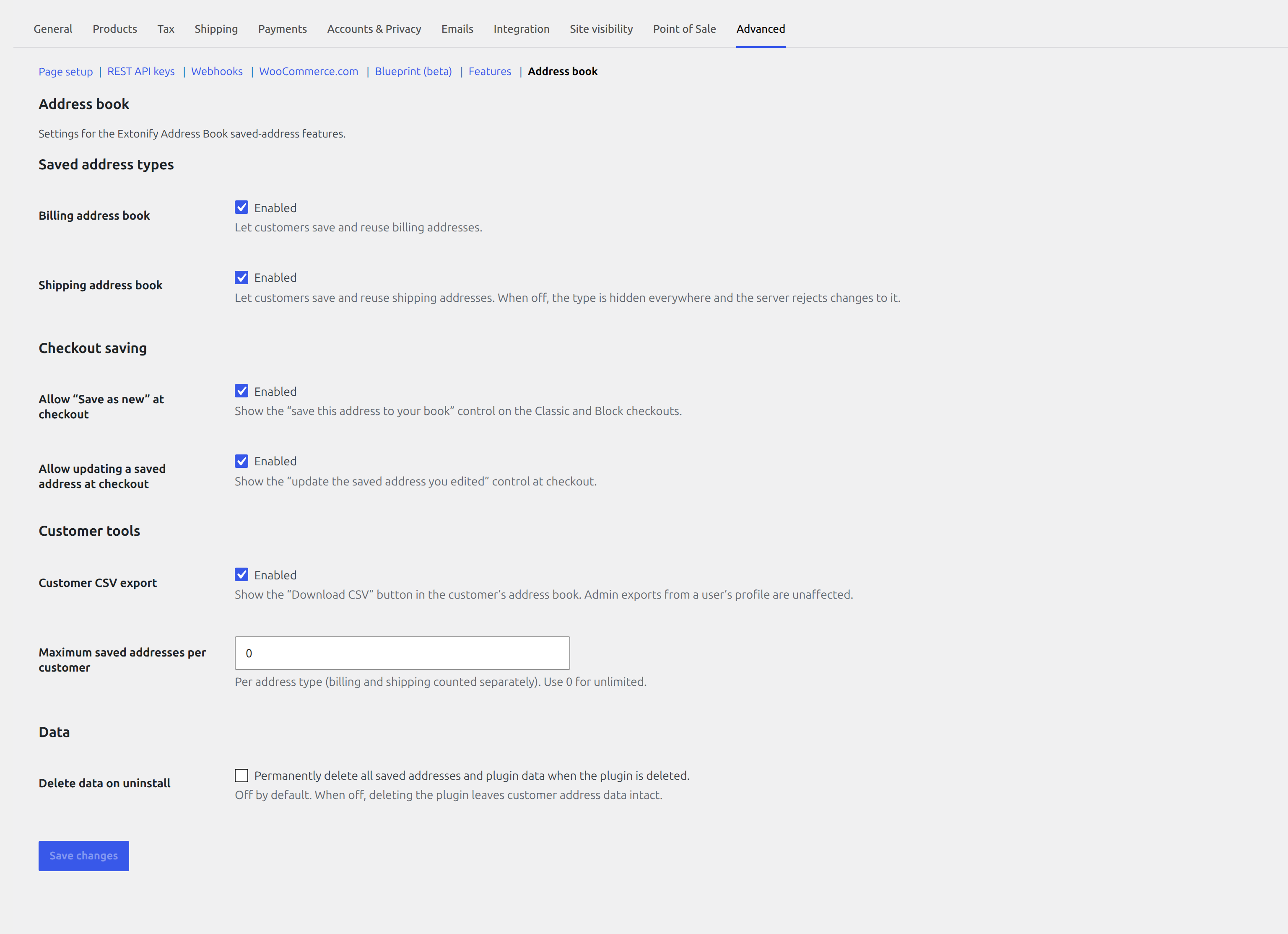
Settings screen — feature toggles, per-user address limit, and the uninstall-cleanup option.
Faq
The first address you save of a type (billing or shipping) automatically becomes your Address Book default for that type. Saving edits to your current default also updates the corresponding address on your WooCommerce Addresses page; simply selecting a saved address at checkout never does. To change which address is the default, set another saved address of the same type as default.
Yes. Selecting a saved address in the Checkout Block works from WooCommerce 8.9. Saving a new or edited address from the Block auto-activates on WooCommerce 9.9+, because that is the first release exposing the public Checkout Block API the save flow requires; before that, selection works and the save controls are simply not shown.
No. It performs local address checks and formatting only — required-field and format checks plus consistent formatting of what a customer enters. It does not check addresses against any postal or courier database, and it never sends addresses to any external service.
Everything is stored locally in your WordPress database. Nothing is sent anywhere — no external services, no API keys, no telemetry. Saved addresses are included in WordPress’s personal-data exporter and eraser.
Yes, with per-site activation. Activate it on each site that needs it. If it is network-activated it deliberately does nothing (and shows a notice) rather than half-activate.
Yes. All order reads and writes go through the WooCommerce order CRUD API, so the plugin is fully HPOS-compatible and also works on the legacy (post-based) order store.
Nothing is deleted on uninstall unless you opt in. There is an admin-only setting, Delete data on uninstall, which is off by default; only when it is enabled does uninstalling drop the plugin’s table and options. Otherwise your saved addresses are kept.
Reviews
Changelog
1.0.0
- Initial release.
- Save, label, set a default, and reuse multiple billing and shipping addresses in My Account.
- Select saved addresses at Classic Checkout and in the Checkout Block (WooCommerce 8.9+), with shipping and tax recalculated on selection; Block saving auto-activates on WooCommerce 9.9+.
- Free admin address management: user-profile CRUD and an order-editor picker, HPOS- and legacy-order compatible.
- Local address checks and formatting only; no external services; WordPress privacy exporter and eraser supported.