File Manager Pro – Filester

File Manager Pro – Filester
Description
Filester is a WP File Manager Pro plugin, but you can download and use it completely for free. It comes with all the premium features of other WordPress advanced file manager plugins out there.
Filester helps you manage WordPress file directory and edit your website’s base configuration details, while FileBird allows you to manage/upload/download media library folders.
With this File Manager Pro, you can copy, paste, create an archive, download, upload, edit, delete, preview, duplicate, and get info of the WordPress configuration and directory files without FTP access.
This file manager plugin is dedicated to boosting your productivity in managing WordPress. All necessary file operations are fully provided and tested on a variety of servers and browsers.
Another thing you will appreciate about it is the clean and compact UI/UX, which makes editing and transferring directory files and folders extra fast.
Did you know?
More than 700,000 WordPress websites were attacked during September 2020.
Malicious bots are looking to exploit vulnerable versions of WP file manager plugins.
Fortunately, Filester comes with this vulnerability fixed!
Filester poses no risk to you, so rest assured! 🤗
⚡️ FEATURES
- Drag & drop interface: Easily move and arrange files
- Smart context menu: Right-click on any files to make operations
- Manage files and folders: Copy, move, upload, create folder/file, rename, duplicate, etc.
- Built-in advanced code editor: Integrated development environment ACE Editor, CodeMirror, CKEditor, TinyMCE, and others
- Flexible configuration: Access rights, uploadable file types/extensions, maximum file size limit, and more
- Create/extract archives: .zip, .rar, .xz, .tar, .gzip
- Great UI/UX design: Clean, high-quality & productivity-driven
- User authority settings: File extensions to be locked, file visibility, root path access, .htaccess file
- Edit media files: Using Photopea & TUI Image Editor
- Multiple languages supported: English, German, Spanish, Italian, French, Japanese, etc.
- RTL supported: Hebrew, Arabic, Persian, Kurdish, etc.
🙌 OTHER FEATURES
- Local file system
- Simple client-server API based on JSON
- List and icon view
- Multi-root support
- Hidden files/folders options
- Set hidden files for other users
- Root path for each user role
- Easy to navigate
- 6 themes for your preferred interface
🔑 HOW IT WORKS
Filester plugin helps you easily manage WordPress files so that you don’t have to access directories via FTP or cPanel.
This plugin creates a new menu File Manager in your WordPress dashboard. From then on, you can view all server files, configuration, and media files on your current WordPress website.
You can edit, copy, upload/download files/folders to your server from File Manager section. This toolbar is similar to the settings in an FTP client. It allows you to preview, edit, upload, download, duplicate and delete files or folders.
With Filester, it’s easy to modify the auto-update mechanism with each new version of WordPress. You can quickly search for specific text or code within your WordPress files and replace it efficiently.
With built-in code editors, you can edit code files with syntax highlighting and code completion features for themes, plugins, and custom code snippets. It takes one click to download a plugin’s ZIP file to your local storage. It helps track changes made to files and revert to previous versions if needed.
All webmasters can also download WordPress media library using Filester download options as well. Yet the media files are organized in month- and year-based folders.
🎏 COMPATIBILITY
Filester works seamlessly with all major WordPress themes, page builders, and website builders.
💙 Like Filester? Write us a review here ✨
👉 Explore recommended plugins and themes:
- Brandy – WooCommerce theme, sales-first design.
- Shadcn – Minimal. Clean code. Beautiful blocks. Zero clutter.
- YaySMTP – Clean & lightweight WordPress SMTP plugin.
CREDIT
Big thanks to elFinder – Open-source file manager for web.
Installation
Manual installation is easy and takes less than one minute.
- Download the plugin from wordpress.org, unpack it and upload the [Filester] folder to your wp-content/plugins/ directory.
- Activate the plugin through the ‘Plugins‘ menu in WordPress.
- Go to your main WordPress menu > File Manager to use.
You’re done. Enjoy.
Screenshots
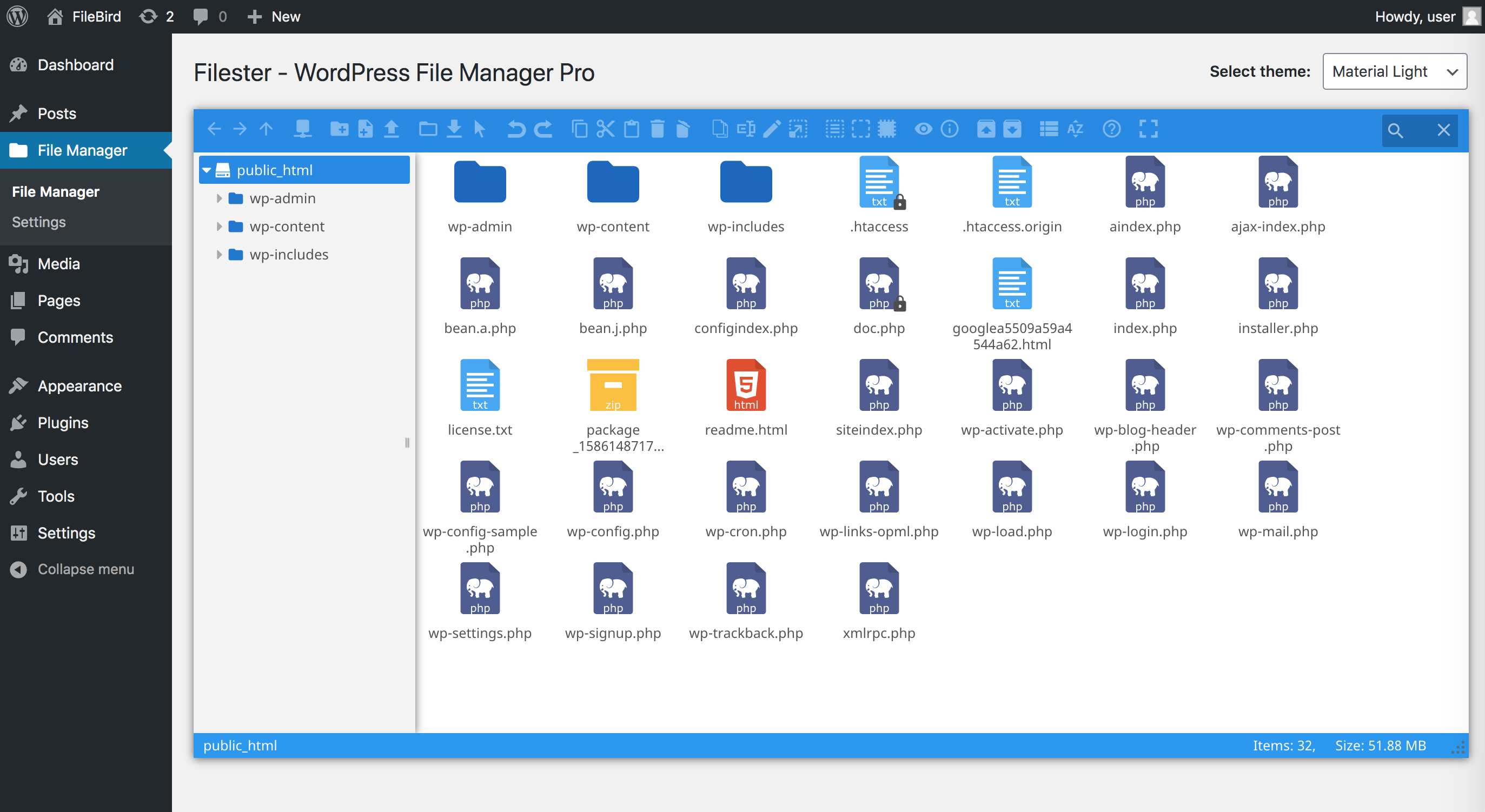
WP file manager for WordPress directory
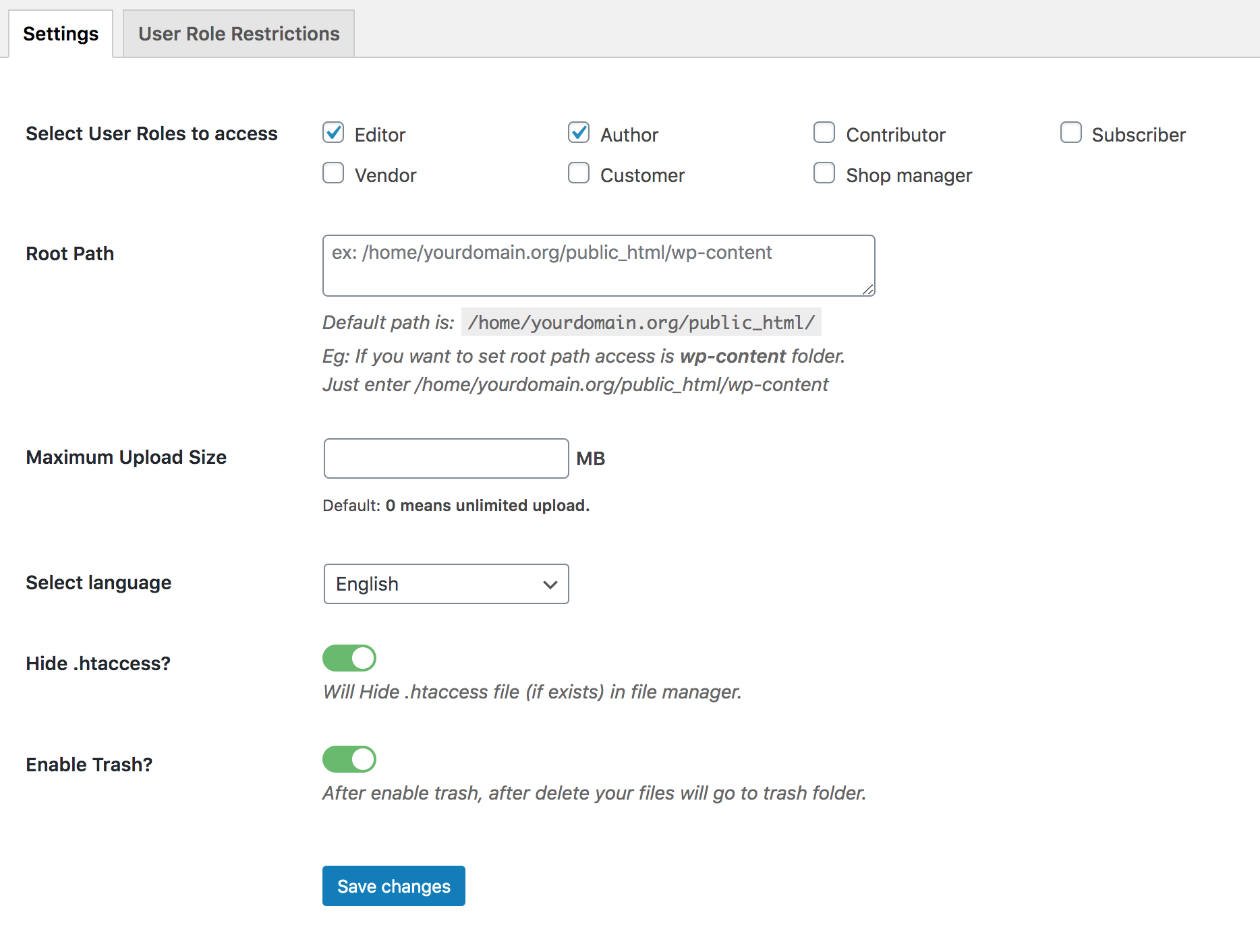
Filester general settings
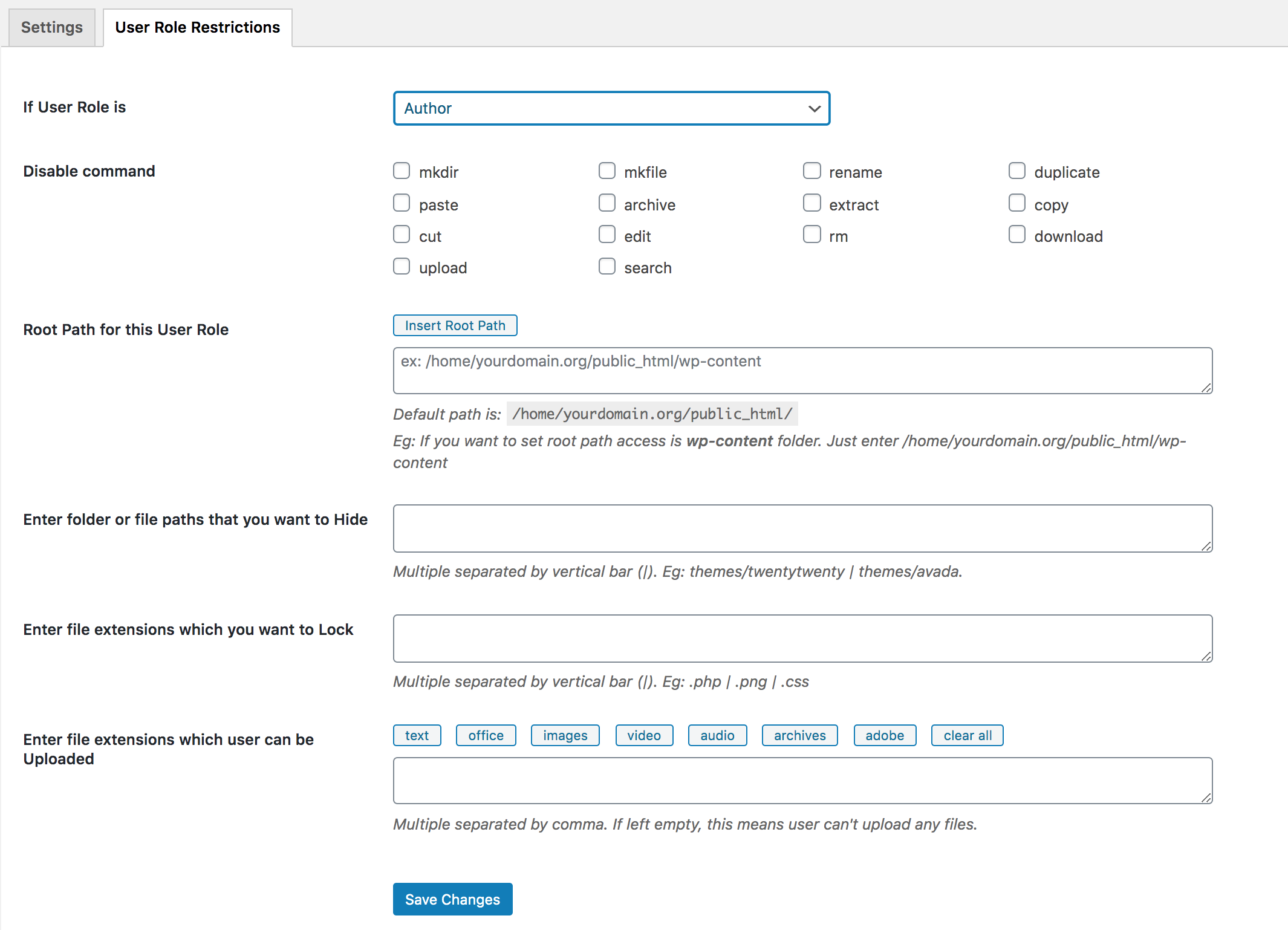
Filester user role restriction settings
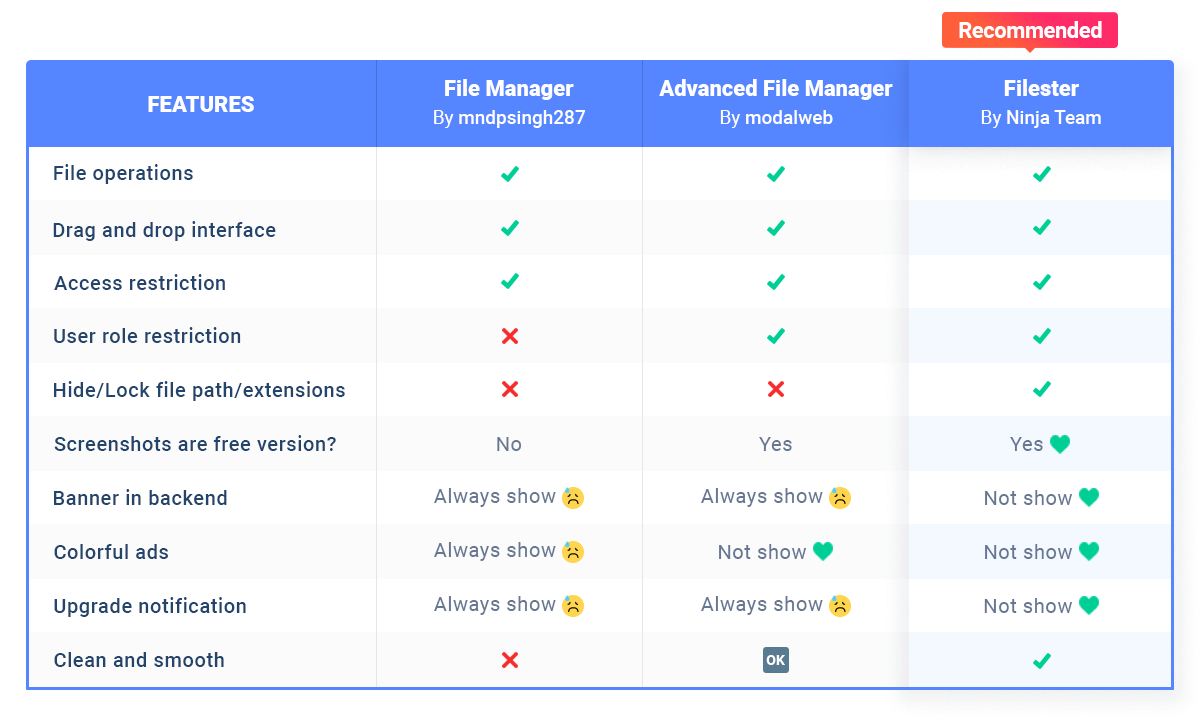
Top free file manager plugins comparison chart
Faq
Reviews
Best file manager out there... could be better
By 
This is the best file manager plugin I could find.
However, it could be better. Better UI, UX, and ability to add more file types, like .htaccess.
Cool file explorer
By 
A file explorer for WordPress having multiple features, support dark/light theme, and inbuilt editor.
me ayuda a estructurar mi web
By 
me ayuda a controlar la estructura de mi web de forma facil y ordenada, hace lo que debe de hacer que es dar acceso a las carpetas y eso esta NICE!
A very practical file manager
By 
A highly practical file manager with a fast and efficient support team.
MUY BUEN PLUGIN. GRAN HERRAMIENTA, LO RECOMIENDO!
By 
Lo uso varias veces al año y además de que funciona bien me resulta muy amigable la interfaz
FILESTER REVIEW
By 
For me is a very useful plugin to access and manage the WORDPRESS files
.
By 
.
То что надо
By 
Так как я занимаюсь поддержкой сайта и вход на хостинг затруднителен - надо ждать смс владельцу, работа с файлами сайта из админки - отличное решение. Спасибо за удобство
Essential File Manager for Serious WordPress Work
By 
Filester has become one of the few plugins I install almost by default. It provides a full graphical file management interface right inside the WordPress dashboard, so I can work with my site’s files without needing FTP, cPanel, or an external file manager. The interface is clean, responsive, and intuitive, and everyday tasks like creating, renaming, moving, uploading, downloading, editing, and deleting files and folders feel natural and efficient.
One of the most valuable capabilities for me is the built‑in archive handling. Being able to create and extract archives (.zip, .rar, .xz, .tar, .gzip) directly from within WordPress lets me work around PHP or web server upload limitations when installing or updating plugins and themes. I can upload a compressed archive by whatever method works, then unzip it in place, or quickly zip up a plugin directory for backup, migration, or debugging.
Beyond the core functionality, thoughtful touches like flexible configuration, user permissions, and multiple code editor options make it suitable for both solo site owners and more complex environments where different roles need different levels of access. For anyone who regularly manages WordPress infrastructure, Filester turns the dashboard into a practical operations console instead of just an admin panel. I’m happy to recommend it to other site owners, developers, and admins who want more direct, reliable control over their WordPress files.
It just works 😌
By 
It has all the features you'd come to expect from a premium file manager and, guess what? Without a paywall! Kudos to the developers for empowering open source 👏
Changelog
Sep 16, 2026 – Version 2.1.4
- Improved: Recommendations layout
Sep 7, 2026 – Version 2.1.3
- Fixed: Issue with origin check bypass in the file browser
Jul 15, 2026 – Version 2.1.2
- Fixed: Private-folder fail-open issue.
May 23, 2026 – Version 2.1.1
- Fixed: OS command injection issue
Apr 20, 2026 – Version 2.1.0
- Added: Recommended plugins
- Improved: Error logs
Dec 17, 2025 – Version 2.0.2
- Added: Implement validation and auto-correction for the root folder path and URL
- Fixed: Occasionally, “/s/” is included in the link path on the file info
Oct 29, 2025 – Version 2.0.1
- Fixed: Display notice
- Fixed: Miss Themes folder
Sep 12, 2025 – Version 2.0
- Updated: Elfinder library ver 2.1.66
- Added: Icon Refresh folder
Jun 28, 2025 – Version 1.9
- Fixed: Authenticated (Subscriber+) Directory Traversal to Arbitrary File Deletion
Jun 11, 2025 – Version 1.8.9
- Fixed: Patchstack security report
May 15, 2025 – Version 1.8.8
- Improved: Prevent abuse via modified .htaccess file
- Fixed: A vulnerability due to missing file type validation
Dec 17, 2024 – Version 1.8.7
- Fixed: Security (CVE ID: CVE-2024-8066)
Nov 25, 2024 – Version 1.8.6
- Fixed: Security
Nov 12, 2024 – Version 1.8.5
- Fixed: Security
Aug 7, 2024 – Version 1.8.4
- Fixed: Plugin missing .js / 403 error query
Aug 1, 2024 – Version 1.8.3
- Fixed: Unauthorized modification of data due to a missing capability check
Dec 18, 2023 – Version 1.8.2
- Updated: Elfinder library to version 2.1.62
Sep 12, 2023 – Version 1.8.1
- Fixed: Security for multisite
Sep 8, 2023 – Version 1.8
- Fixed: Security issue
Jun 27, 2022 – Version 1.7.6
- Added: Recommend plugins
Jun 20, 2022 – Version 1.7.5
- Added: Recommend plugins
Dec 2, 2021 – Version 1.7.4
- Fixed: Conflict with plugin Nested Pages
Jul 8, 2021 – Version 1.7.3
- Fixed: User role restrictions
- Fixed: Image notification
Mar 25, 2021 – Version 1.7.2
- Fixed: Small bug
Mar 25, 2021 – Version 1.7.1
- Fixed: Small bug
Mar 25, 2021 – Version 1.7
- Improved: UI
- Fixed: Small bug
Mar 15, 2021 – Version 1.6.1
- Fixed: Small bug
Feb 3, 2021 – Version 1.6
- Added: MIME type logic for user roles
- Added: URL field
- Fixed: Image and PDF preview
- Fixed: Some small bugs
Jan 11, 2021 – Version 1.5.2
- Added: MIME type support for .xlsb and .xlsm files
- Fixed: Compatibility with older WordPress versions
- Fixed: CSV file upload
Dec 17, 2020 – Version 1.5.1
- Updated: jQuery UI to latest version
Dec 10, 2020 – Version 1.5
- Updated: Elfinder to latest version
- Improved: Compatibility with WordPress 5.6
Aug 7, 2020 – Version 1.4.1
- Fixed: Display issue in WordPress multisite menu
- Fixed: Windows 10 theme not working on Linux servers
Jul 2, 2020 – Version 1.4
- Improved: Double-click to open or preview file
- Fixed: Some small bugs
Jun 24, 2020 – Version 1.3
- Improved: Icon styling
- Fixed: Language selection
- Fixed: Private CSS/JS handling
- Fixed: Some small bugs
Jun 16, 2020 – Version 1.2
- Fixed: Trash issue
- Fixed: Some small bugs
May 29, 2020 – Version 1.1
- Fixed: Some small bugs
- Improved: UI
May 8, 2020 – Version 1.0
- Initial release