Filter Gallery

Filter Gallery
Description
The Filter Gallery plugin makes it simple to create beautiful, organized image displays on your WordPress site. Whether you need a professional portfolio showcase, a product catalog, or a creative photography album, this tool lets you sort content dynamically without page reloads.
Check Free Version Demo: Filter Gallery
Check Pro Version Demo: Filter Gallery Pro
More About Pro: Filter Gallery Pro Features
Where To Buy: Buy Filter Gallery Pro
Video Tutorials
We designed this plugin to be intuitive and lightweight. You can upload images, assign them to categories (filters), and let your visitors browse your work seamlessly. The gallery automatically adapts to desktops, tablets, and mobile screens, ensuring a perfect viewing experience everywhere.
Key Features
- Unlimited Galleries & Shortcodes: Create as many galleries as needed, using
[filter-gallery]or[ufg]shortcodes. - Responsive Columns & Masonry Layouts: Adapts grid and display columns automatically to device viewports with Masonry support.
- Easy Drag-and-Drop Management: Simple interface for ordering images (ID and manual sorting).
- Standard Lightbox Overlay: Includes a built-in lightbox with title overlays.
- Category Filtering & Controls: Set default loaded category, configure “All” button visibility, customize label, or assign custom icons.
- Media Styling & Customizer: Adjust grid padding, border spacing, customize image titles and descriptions (with length limits) inside settings.
- Speed Optimized: No frontend bloat, enqueued scripts without Bootstrap or FontAwesome.
- Import/Export Dashboard: Migrate gallery layout configurations to other setups effortlessly.
Pro Version Features
Unlock the full potential of your portfolios with the Pro Version:
- Deep Hierarchical Nested Filters: Create multi-level filter nesting categories (up to 5 levels).
- Custom Redirect Links: Link gallery images directly to external or internal URLs with “Read More” button customizer.
- Searchable Icons Picker: Assign FontAwesome icons easily to filter tags using a searchable selection picker.
- Dynamic AJAX Loading: Speed up large portfolios with AJAX Asynchronous Pagination, AJAX Load More, and CSS preloaders.
- Advanced Columns & Layouts: Fully customize grid columns (1 to 6) and enable Justified Grid layout options.
- Category Styling & Colors: Dedicated level-by-level color pickers for category text, background, hovers, and active states.
- Advanced Image Sorting: Sort images by Random shuffle, Title, ID, or manual drag-and-drop.
- Customizable Lightbox: Show full media descriptions and slide index numbering in the modal.
- 15+ Hover Animations: Select from a premium list of hover transitions and zoom overlays.
- Premium Utility Tools: Duplicate filters, bulk delete media, and priority customer support desk assistance.
Installation
- Upload the
filter-galleryfolder to the/wp-content/plugins/directory. - Activate the plugin through the ‘Plugins’ menu in WordPress.
- Navigate to the “Filter Gallery” menu to create your first gallery.
- Add filters (categories) and upload your images.
- Copy the generated shortcode and paste it into any Post or Page.
Screenshots

Sports Gallery Preview
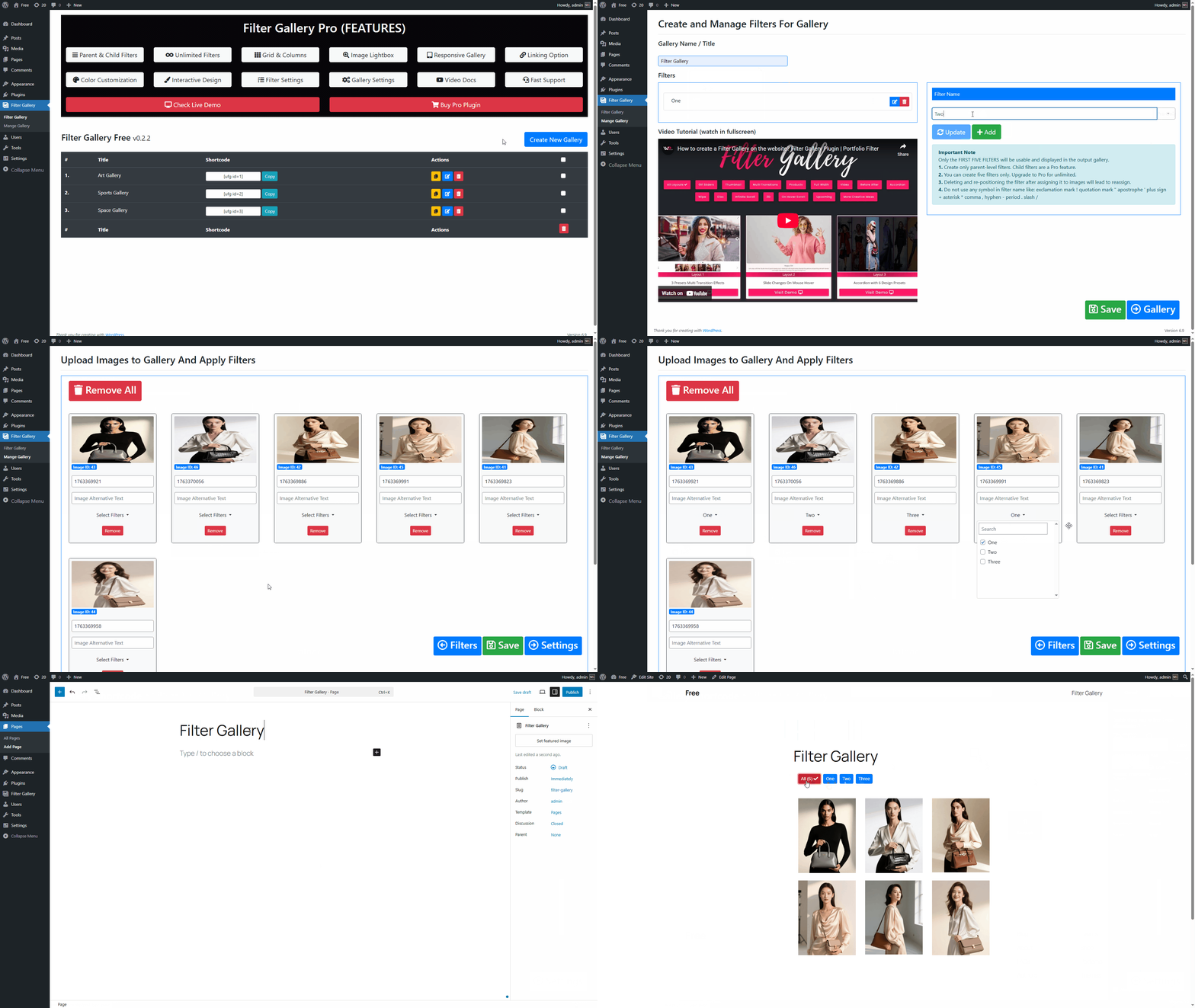
How to create a filter gallery?**
Faq
Go to the gallery edit page. You will see a “Filters” section where you can add new filter names. Once added, you can assign these filters to your uploaded images.
Yes, the gallery grid is fully responsive and will adjust the number of columns based on the viewing device (mobile, tablet, or desktop).
In the free version, images open in a lightbox. The Pro version allows you to link images to custom external or internal URLs.
No, this plugin works independently of your theme. It uses its own styles and scripts which are loaded only when the shortcode is used.
No, you can add only one gallery to a single page or post.
Absolutely! Since the gallery uses shortcodes, you can easily paste the shortcode into any “Shortcode” or “Text” widget within your favorite page builder.
The plugin features a simple drag-and-drop interface. Just drag your images into your preferred order in the admin panel and save.
You can visit our website at wpfrank.com to purchase the Pro version.
Reviews
Nice Tool
By 
Does what it should. Support works fine. 🙂
Great Product
By 
I have been using Filter Gallery Pro for a few months now. Excellent product that does what it says on the tin!
Found a bug in the software, contacted Faraz, who responded quickly and wrote a fix within a few hours..
All good now. Great service. Would highly recommend!
Great plugin and support
By 
Plugin has been very helpful for my needs, and the support team has been really great with fixing up any issues I've had and quick replies.
Great plugin and great support
By 
Very good plugin, easy to use, intuitive and the pro version is excellent value, also very good support! Would recommend.
Fast Support, Really Good Plugin
By 
Fast Support, Really Good Plugin
Dynamic plugin!
By 
We searched high and low for the perfect plugin for our gallery on our shareables page at Happy Democrats org! Frank's Btw Filter-Gallery Pro version checked all of our required boxes. It included pagination, search functionality, sift/filter options, lightweight code, super easy navigation and setup, and most importantly, it was lightning fast! Thank you, Frank!
Sincerely,
Team Happy Democrats
Best projects gallery plugin
By 
Initially, the basic functionality of my theme didn't provide the necessary features to showcase my projects in a comfortable and minimalist manner. Consequently, I began searching for a solution to present my various projects effectively, and the Gallery Grid with toggle buttons emerged as the perfect choice. Despite trying several plugins, none integrated seamlessly with my theme until I came across this one. It effortlessly blended with my theme's design, offering a visually appealing interface while keeping the code lightweight. Moreover, the support from the creators during the setup process was prompt and efficient, ensuring a smooth experience. I wholeheartedly recommend this plugin!
Great plugin, even better support
By 
This plugin had *almost* all things I looked for. Asked the developer about a few things, and they answered quickly and was really helpful!
So this is really a great plugin, and the support is really top 🙂
Junk plugin
By 
Junk plugin you get no settings they are premium. All you can do is create a gallery and add image you can not do anything else this is the most pointless plugin I have ever seen.
Best plugin and the best support
By 
I asked for some things that would fit my site I'm building Excellent consideration and quick response to every email Everything I needed was arranged for me Highly recommend purchasing the plugin
Changelog
1.1.4
- Handled empty/blank filters dynamically to exclude them from the frontend output gallery, edit image popup, and batch tagging selector.
- Added filter icons to the batch tagging buttons and edit image checkbox list to make unlabeled filters identifiable.
- Implemented state persistence for the admin dashboard’s active edit tab across page refreshes.
- Enqueued Google Font stylesheets via WordPress standard
wp_enqueue_stylerather than hardcoding HTML<link>tags. - Wrapped untranslated menu titles in localization functions and corrected incorrect text domains (
filter-gallery-pro->filter-gallery). - Generated JED translation files for all 15 supported languages (including Hindi, French, German, Spanish, Arabic, Japanese, Chinese, Russian, Italian, etc.) to make the JavaScript/React dashboard fully translatable.
1.1.3
- Defaulted button padding size to ‘small’ (8px 16px) globally and for migrations.
- Clamped migrated columns settings to maximum Free limits (Tablet & Mobile Landscape max 3, Mobile Portrait max 2) to prevent locked PRO status on Free version.
- Ensured Image Title is enabled and Image Description is disabled by default for migrated galleries.
- Improved frontend fallback to default WordPress media titles when custom image titles are empty, and prevented empty title/description boxes.
- Set default hover text color of Level 1 (Parent) buttons to ‘#000000’ (black) globally.
- Fixed incorrect redirect to ‘filter-gallery-pro’ page on multiple gallery deletions.
1.1.2
- Implemented automatic data migration and settings normalization for legacy v0.2.3 galleries.
- Added responsive, large tab navigation controls and shortcode copy badge scaling.
- Resolved tab buttons and main header layout container overlapping on mobile screens by implementing a custom sticky floating-pill design.
- Prevented layout cuts on mobile screen widths (< 640px) by hiding tab navigation text and separators.
- Improved filters manager layout on mobile screens by allowing horizontal scrolling and wrapping.
- Optimized the “Confirm & Deploy Changes” save button to fit as a sleek single-line pill on mobile.
- Solved jQuery selector crash on frontend digit-starting DOM IDs and added defensive array checks.
- Fixed output escaping for UFG_VERSION, admin_url(), $indent, $prefix, and $get_count_html for security compliance.
- Added input sanitization for $_POST[‘ufg_gallery_id’] on direct assignment.
- Resolved various PHPCS and security guidelines warnings across all files.
1.1.1
- Restricted column layout selections to standard limits in Free version.
- Limited sorting options to ID-based ascending/descending and None/Manual.
- Fixed React rendering crash in the admin panel.
1.1.0
- Replaced legacy PHP admin templates with a modern React-based interface.
- Removed bundled third-party libraries (Bootstrap, Font Awesome) for 2026 guideline compliance.
- Implemented non-destructive data migration system for backward compatibility.
- Improved security with better sanitization and nonce verification.
- Updated minimum requirements to WordPress 6.0 and PHP 7.4.
1.0.0
- Initial alignment with modern architecture patterns.
0.2.3
- Fixed Requires PHP header mismatch between readme and plugin file
- Added proper input sanitization for POST data
- Added object caching for database queries
- Code improvements to meet WordPress coding standards
0.2.2
- Security patches implemented
- Updated plugin guidelines compliance
0.2.1
- Renamed plugin to comply with trademark policy
- Tested with WordPress 6.8.1
0.2.0
- New translations added:
- Arabic (ar)
- Chinese (zh_CN)
- Finnish (fi)
- French (fr_FR)
- German (de_DE)
- Hindi (hi_IN)
- Hungarian (hu_HU)
0.1.9
- Fixed: Filters not showing on front end
- Fixed: WP Debug issue
0.1.8
- Fixed: Lightbox functionality issues