Firebase Authentication

Firebase Authentication
Description
WordPress Firebase Authentication Plugin allows you to login to WordPress sites using your Firebase user login credentials or via Social Login.
WordPress Firebase Authentication works using the default WordPress login page. We support Firebase WooCommerce Integration and other third-party login pages along with custom login forms.
Features
- WordPress Firebase Authentication : WordPress login using Firebase authentication user login credentials
-
Auto Create Users : After login using Firebase login credentials, new user automatically gets created in WordPress
-
Configurable login options :
Provide option to login with,
a) Only Firebase credentials
b) Only WordPress credentials
c) Both Firebase and WordPress credentials -
Auto Register WooCommerce Users to Firebase : Provide an option to sync a WordPress user to Firebase whenever an end-user registers into the WordPress site via the WooCommerce registration form. User is created in Firebase with only an email address and password.
-
Support for Firebase Phone Authentication method : Users will be asked to enter OTP provided via Firebase to login into WordPress (Passwordless login). This works for WooCommerce as well.
-
Support for Firebase Social Login : With Firebase authentication, users will be provided an option to login in to WordPress using selected social login providers
Providers supported are: -
Firebase WooCommerce Integration : Integrate WooCommerce with the WordPress Firebase Authentication plugin and allow users to log in to your WooCommerce site using firebase login credentials on WooCommerce Checkout and My account page.
- WordPress Firestore Integration: Sync WordPress User Meta to Cloud Firestore Collections, WooCommerce products, orders, subscription sync to Firebase database.
-
Support for Social Login buttons Shortcode : Use a shortcode to place Firebase social login buttons anywhere in your Theme or Plugin
-
Sync Firebase UID to WordPress : Users can map email, Firebase user-id to their WordPress user profile using this WordPress Firebase Authentication feature.
-
Custom Redirect Login and Logout URL : Automatically Redirect users after successful login/logout. This works for WooCommerce as well.
-
Support for Firebase Login and Registration form Shortcode : Using login form shortcode, users can enter their Firebase credentials to login into the WP site, and using the registration form shortcode, users can register into the WordPress site, and that user is also auto created in Firebase with an email address and password.
-
WP Hooks for Different Events : WordPress Firebase authentication provides support for different hooks for user defined functions.
-
WordPress login with Firebase JWT: WordPress login with Firebase JWT allows you to create a user login session on a WordPress site using their Firebase JWT token, eliminating the need to enter their login credentials again. This is highly recommended when there are multiple websites/applications and the user is already logged in to any of them.
Installation
- Visit
Plugins > Add New - Search for
firebase authentication. Find and InstallFirebase Authenticationplugin by miniOrange - Activate the plugin
Screenshots

Configure Firebase Authentication plugin
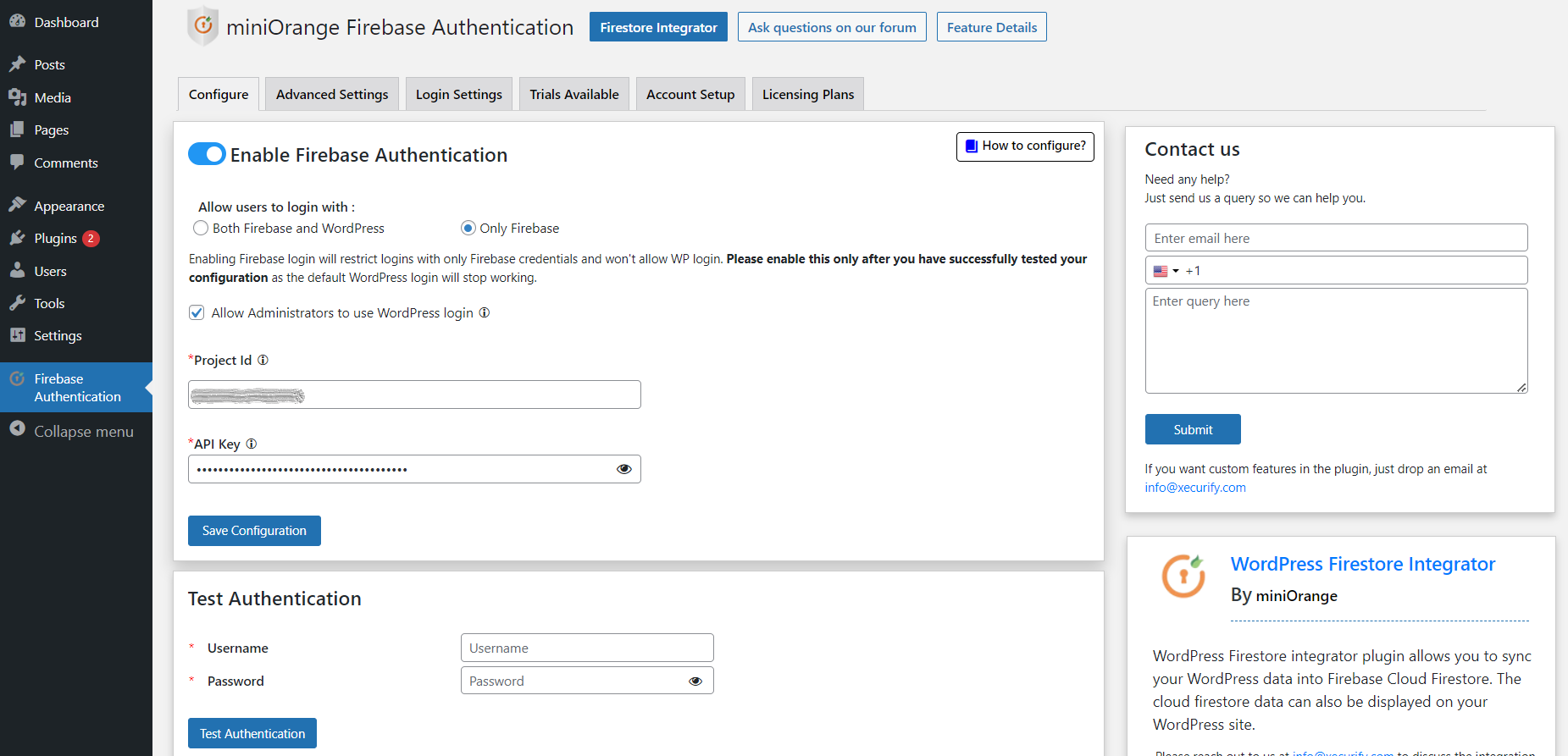
Option to allow WP Administrators to login

The result after successful Test Authentication
Faq
Please email us at info@xecurify.com or Contact us. You can also submit your query from the plugin’s configuration page.
Firstly, please check if the user you are trying to login with exists in your WordPress. To unlock yourself, rename the firebase-authentication plugin name. You will be able to login with your WordPress credentials. After logging in, rename the plugin back to firebase-authentication. If the problem persists, activate, deactivate, and again activate the plugin.
Please email us at info@xecurify.com or Contact us.
Reviews
This plugin make my life easy to deal with Firebase on WP
By 
It's so much easier to connect with Firebase with this plugin, thanks.
mini orange plugins waste of time
By 
this is one of mini orange plugins which is enough useless unless you pay, don't waste your time trying it
Tried some miniOrange plugins
By 
It's just stupid to install the plugin as it ALWAYS asks you to pay before using it. I will not use any of the plugins by mini orange.
Perfect solution to connect Woo and Firebase
By 
This plugin allows you to easily and quickly connect your store with WooCommerce and Firebase in no time.
The people on the team are super available to help and respond in a very short time. Highly recommended in every way!
Great Support + speedy Customisation
By 
Such great support. Purchased the premium plugin and the team spent over and hour on a call to help discuss my specific use case. Ended up needing a small customisation - which was fast, smooth and affordable. Would highly recommend!
Works as expected, hassle free and great support
By 
As being quite new to Firestore/Firebase I was initially a little unsure about purchasing this plugin, but from the very start the plugin was easy enough to use and the support that these guys provide allowed me to accomplish exactly what I wanted.
I sent a few emails back and forth to the support team who were always quick to respond, and even get on a video call with me to help me set-up everything.
I ended up combining this with the Firestore integrator plugin, which is equally straightforward and very well supported.
For Firestore/Firebase integration I highly recommend this plugin. You won't regret it.
Best Support
By 
Ashish Gaikwad Many Thanks for your efforts and support.
The best support team in the business
By 
Great support, useful plugin
By 
Not working and scam
By 
Changelog
1.6.8
- Added compatibility with WP 6.8
- URL migration
1.6.7
- UI Improvements
- Added compatibility with WP 6.7
1.6.6
- UI Improvements
- Added support of sandbox portal for demo of premium plugins.
- Fixed the login issues with firebase
- Added compatibility with WP 6.5
1.6.5
- License portal update
1.6.4
- UI Improvements
- Added compatibility with WP 6.3
1.6.3
- UI Improvements
- Added FAQ and feature documentation links
1.6.2
- Added compatibility with WP 6.2
- Automatic demo setup support for Firestore Integration
1.6.1
- Minor Bug fixes
1.6.0
- Security fixes
- Minor UI changes
1.5.9
- Added compatibility with WP 6.1
- UI changes
1.5.8
- Added support for automatic demo setup
1.5.7
- Advertised Role Mapping feature
- Minor readme changes
1.5.6
- Added compatibility with WP 6.0
- Added Security Fixes
1.5.5
- Added documentation and setup guide links
1.5.4
- Added compatibility with WP 5.9
- UI changes and minor bug fixes
1.5.3
- Added functionality for requesting the demo
1.5.2
- Readme changes
- Minor updates in pricing plans
1.5.1
- Minor Security Fixes
1.5.0
- Improvements in the flow of wp-login with firebase credentials
- Minor UI changes
1.4.8
- Added compatibility with WP 5.8
- Minor UI changes
1.4.7
- Minor UI changes
- Readme changes
1.4.5
- Readme changes
1.4.4
- Added compatibility with WP 5.7
1.4.3
- UI changes
1.4.2
- Minor bug fixes
- Small UI changes
1.4.1
- Minor changes
1.4.0
- Added compatibility with WP 5.6
- UI changes
- SEO changes
1.3.7
- Readme changes
1.3.6
- Added compatibility with WP 5.5
1.3.5
- Some bug fixes
1.3.4
- Some bug fixes
1.3.3
- Readme changes
1.3.2
- UI changes
- Pricing Plan updates
1.3.1
- Bug Fixes
1.3.0
- Added Licensing plans
- Added registration
1.2.0
- Advertised features on UI
- Added Bug Fixes
1.1.4
- Added compatibility with WordPress 5.4
1.1.3
- Added step by step guide link
1.1.2
- Plugin deactivation form
1.1.1
- Configurable option to allow WP login only to Administrators
1.0.0
- Initial release