fitness calculators

fitness calculators
Description
Plugin for calculating Water intake, BMI calculator, protein Intake for the fitness freaks.
-
Water Intake calculator
This calculator will ask you about Age, Gender, height, weight,Activity level and weather of your area.
After calculating the given data, this calculator will show you the exact water intake one should have to take.Shortcode : [fcp-water-intake-calculator] -
Protein Intake calculator
This calculator will ask you about Age, Gender, height, weight,Activity level and you goal.
After calculating the given data, this calculator will show you the exact protein intake one should have to take.Shortcode : [fcp-protein-intake-calculator] -
BMI (Body Mass Index) calculator
This calculator will ask you about height and weight.
After calculating the given data, this calculator will show you your BMI value with different classifications according to the BMI.Shortcode : [fcp-bmi-calculator] -
BFP (Body Fat Percentage) calculator
This calculator will ask you to add height,weight and age.
After calculating the given data, this calculator will show you your BFP value with different classifications according to the BMP.Shortcode : [fcp-bfc-calculator] -
CC (Carbohydrate) calculator
This calculator will ask you to add height,weight and age.
After calculating the given data, this calculator will show you your Carb value with different classifications according to the BMR.Shortcode : [fcp-cc-calculator]
- Every calculator could be used as a widgets in WordPress also.
Installation
- WordPress 5.5.1 or greater.
- PHP version 5.2.4 or greater.
- MySQL version 5.0 or greater.
Automatic installation
Automatiic installation is the easiest option as WordPress handles the file transfers itself and you don’t need to leave your web browser. To do an automatic install of Fitness Calculator Plugin, log in to your WordPress dashboard, navigate to the Plugins menu and click Add New.
In the search field type Fitness Calculator Plugin and click Search Plugins. Once you’ve found our Fitness Calculator Plugin you can view details about it such as the point release, rating and description. Most importantly of course, you can install it by simply clicking “Install Now”.
Manual installation
The manual installation method involves downloading our Fitness Calculator Plugin and uploading it to your webserver via your favourite FTP application. The WordPress codex contains instructions on how to do this here.
Updating
Automatic updates should work like a charm; as always though, ensure you backup your site just in case.
Screenshots
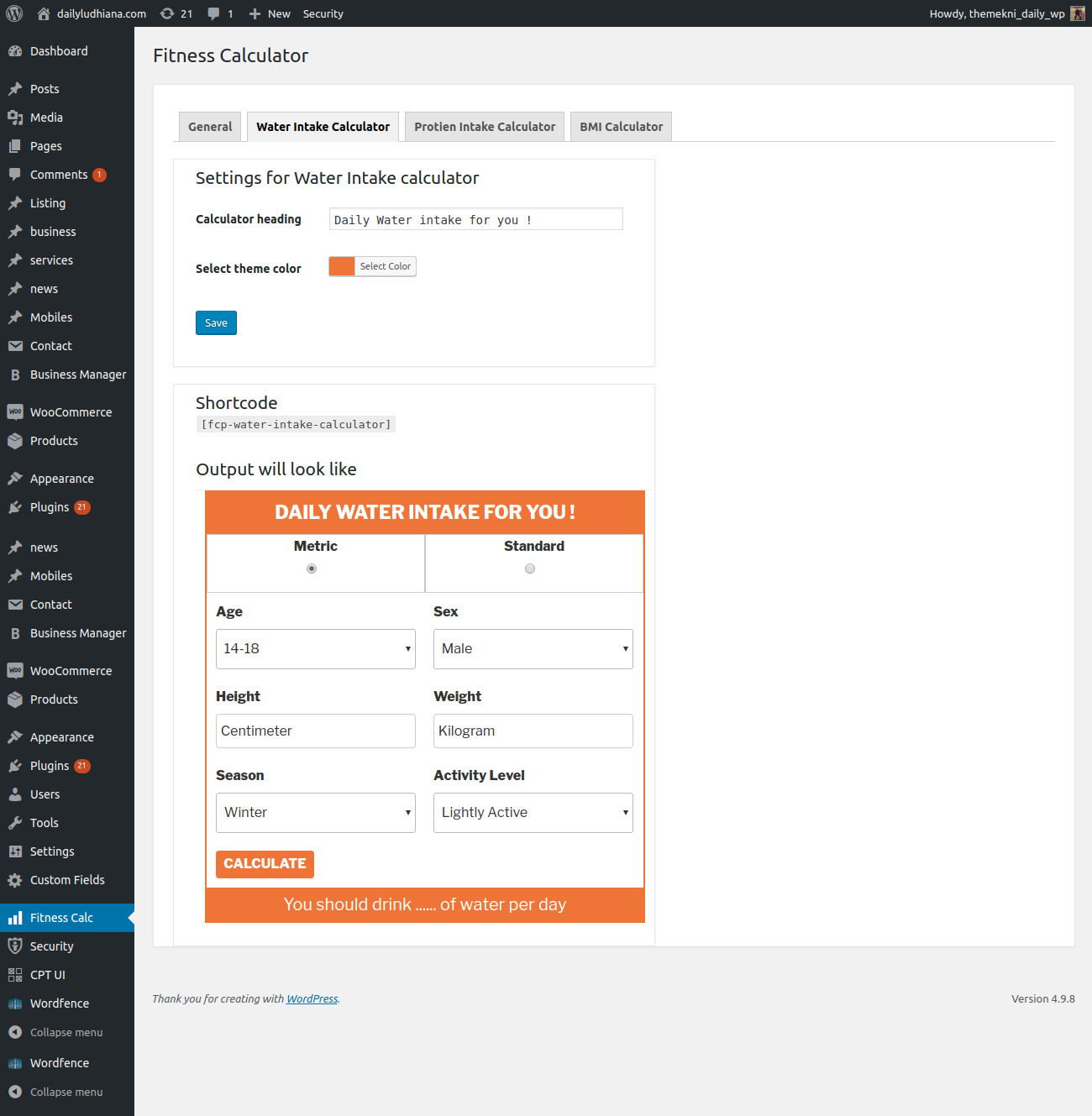
screnshort-1.png shows Water intake calculator.

screnshort-2.png shows Protein intake calculator.
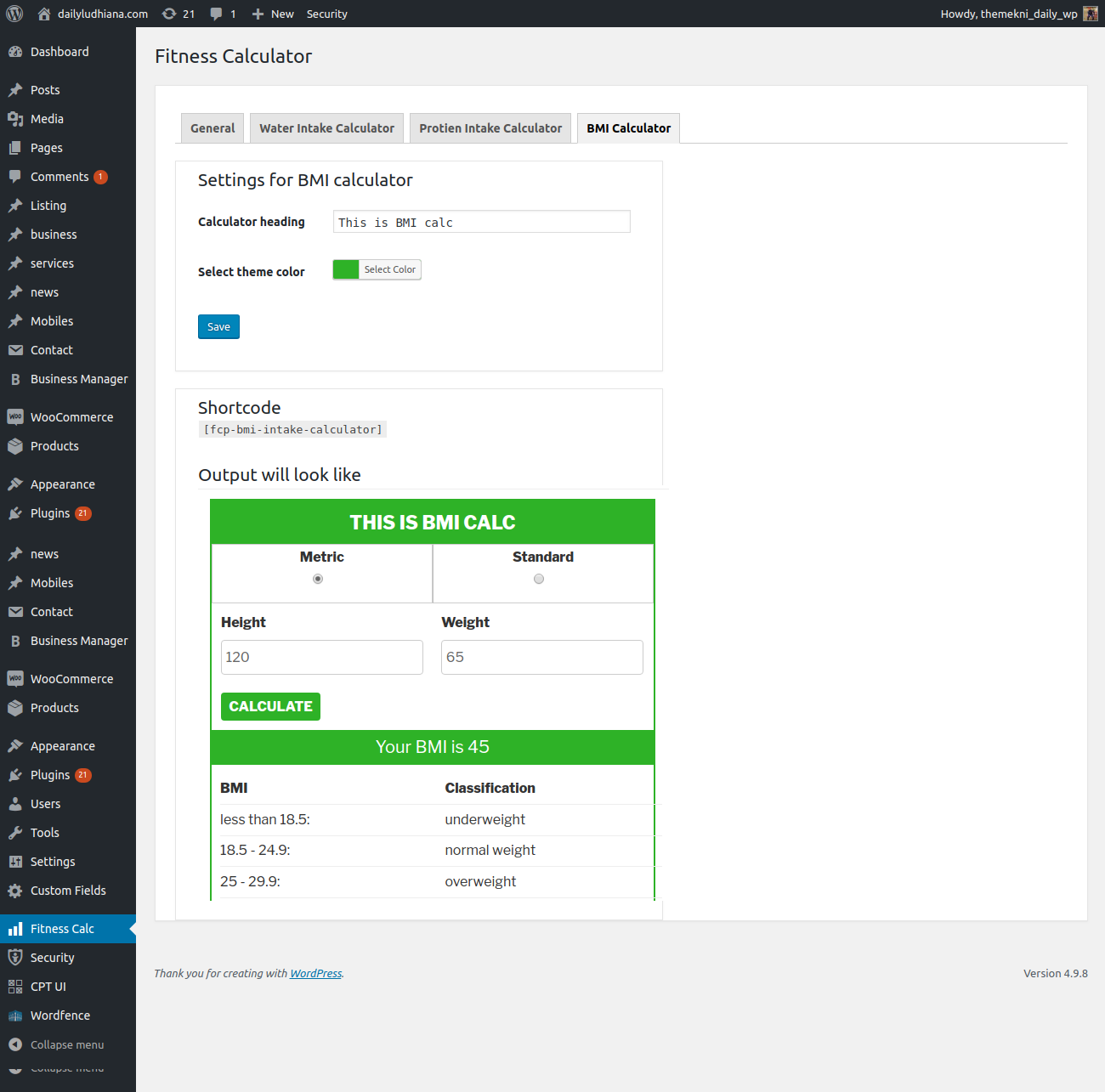
screnshort-3.png shows BMI calculator.

screnshort-4.png shows BFP calculator.
Reviews
Site's Ui breaks due to modified global container and row classes
By 
Plugin is good and works fine but UI breaks the site design due to modified global bootstrap classes like 'container' and 'row' classes in plugin's CSS. You must specify these global classes within plugin's class or id so that it doesn't affect site's design.
How can you directly overwrite the bootstrap classes?
.container {
max-width: 800px;
margin: 0 auto;
padding: 20px;
}

.header {
text-align: center;
margin-bottom: 40px;
}

h1 {
font-size: 24px;
}

.fcp-btn {
background-color: #004d99;
color: #fff;
text-transform: uppercase;
border-radius: 4px;
font-size: 17px;
padding: 2%;
border: solid 2px #004d99;
}

.hide_result {
display: none;
}

.w-25{width:25%!important}.w-50{width:50%!important}.w-75{width:75%!important}.w-100{width:100%!important}

.form-container {
background-color: #f5f5f5;
padding: 20px;
border-radius: 4px;
}

.row {
display: flex;
justify-content: space-between;
flex-wrap: wrap;
margin-bottom: 20px;
}

.col {
width: 48%;
box-sizing: border-box;
}

label {
display: block;
margin-bottom: 5px;
}

input[type="text"],
input[type="email"],
select,
textarea {
width: 100%;
padding: 10px;
border: 1px solid #ccc;
border-radius: 4px;
font-size: 14px;
box-sizing: border-box;
}
.fcp-btn {
cursor: pointer;
}

.btn-submit {
background-color: #5cb85c;
color: white;
border: none;
padding: 10px 20px;
border-radius: 4px;
cursor: pointer;
width: 100%;
display: block;
}
.btn-submit:hover {
background-color: #449d44;
}
.column.full {
width: 100%;
}

/* Media query for screen widths less than 768px */
@media (max-width: 768px) {
.row {
flex-direction: column;
}
.col {
width: 100%;
box-sizing: border-box;
}
.column {
width: 100%;
margin-bottom: 20px;
}
}

.fcp-error{display: none;color: red;font-size: 12px;margin: 0px;padding: 0px;width: 100%;}
select {
background-color: #fff;
}
Contribution by me
By 
you have issue in shortcodes
"I resolved the issue with the shortcodes, and it's now working perfectly across my 9 clients' sites! Feel free to contact me for the updated code.
Email: ahsanhussainofficial@gmail.com
Cell: +923429821712"
Update question
By 
Hello,
Do you plan on updating this plugin in the futute?
I will download it if you do.
Best regards
Transulation not working
By 
Hard to translate in backend
By 
Good Little Plugin
By 
it works
By 
Funciona bien
By 
Changelog
1.0
- No change since the launch.
1.1
- Added BFP calculator.
1.2
- Updated readme file.
1.3
- Added widgets for each calculator.
1.4
- Added option to show/hide
statictype calculator. - Fixed positioning for
radiobuttons.
1.5
- Fixed positioning of calculate button.
1.6
- Fixed positioning of calculate button for all calculators.
- Fixed auto select option for meteric value for BMI and FAT calculators.
1.6
- Fixed BMI calculator default placeholder for height and weight.
1.8
- Fixed Water : 50+ Male 180cm 75kg Summer Lightly active -> 3.7 ml Should be Liters
1.9
- Fixed “The text result “Your BMI is24” does not have space between is & 24.”
- Fixed “Lastly when you get your result, anyway it also says which part you fall into. For instance, the result text should read like this “Your BMI is 24 (Normal weight)””
- Center aligned the submit button
1.9.1
- Fixed Error in displaying the bmi output
1.9.2
- Fixed UI styling for BMI calculator
1.9.3
- Fixed BODY FAT calculator
1.9.4
- Fixed BMI styling issue
1.9.5
- Fixed Water intake calculator styling issue
1.9.5
- Fixed security issue
1.9.6
- Compatible with 5.8.3 WP
1.9.8
- Added feature to select calculator type for Water calc (Metric, Standard or Both)
1.9.9
- Added translations for words handled in JS
2.0.0
- Fixed the syntax error
2.0.1
- Updated translations for JS based strings
2.0.2
- Updated translations for JS based strings
- Fixed default selection of water intake calculator type option
2.0.3
- Added Carb Calculator
2.0.4
- Fixed container of the layout, tested with WP 6.0
2.0.5
- Fixed admin UI
2.0.6
- Added default title for each calculator
2.0.7
- Copy to clipboard feature added
2.0.8
- Fixed protein calculator console error
2.0.10
- Removed calculator radio type from settings page