FluentSMTP – WP Mail SMTP Plugin with Amazon SES, SendGrid, Mailgun, Postmark, Cloudflare, toSend, Gmail and Any SMTP
FluentSMTP – WP Mail SMTP Plugin with Amazon SES, SendGrid, Mailgun, Postmark, Cloudflare, toSend, Gmail and Any SMTP
Description
WP Mail SMTP Plugin for Any Email Service Provider
Are your WordPress emails not sending, landing in spam, or failing silently? FluentSMTP is a free WordPress SMTP plugin that fixes email deliverability by routing every wp_mail() call through the email service you choose: Gmail, Google Workspace, Amazon SES, SendGrid, Mailgun, Cloudflare Email, toSend, Postmark, Brevo (Sendinblue), SparkPost, Netcore, Elastic Email, SMTP2GO, Outlook / Office 365, Zoho, or any SMTP host.
FluentSMTP talks to each provider’s own API rather than only SMTP, so your transactional and marketing email goes out quickly and lands in the inbox. Set your From name and email, turn on email logging, add failure alerts, and route different senders to different providers, all from one screen.
Connect as many email services as you want, and FluentSMTP routes each email to the right one based on its From address.
💚 100% Free Forever — No Pro Version, No Upsells, No Paywalls 💚
FluentSMTP is 100% free and open source, and it always will be. There is no “pro” version, no premium add-ons, no locked features, no email capture wall, no nagging upgrade prompts, no feature limits, and no paid tier. Every integration listed here, from Amazon SES, Gmail and Outlook to SendGrid, Mailgun, Cloudflare, toSend, Postmark, Brevo and SparkPost, is fully available at no cost.
You will never have to pay a cent to use any feature of FluentSMTP. We have pledged this as part of our “Five for the Future” participation, an initiative started by the WordPress Foundation.
Our parent company WPManageNinja LLC builds commercial products for WordPress businesses and runs a stable, profitable business on those, which means FluentSMTP is our way of giving back to the WordPress community, not a funnel. 👉 Read why it’s 100% free (always) 👈
🎉 Supported Email Service Providers and SMTP Connections
- Amazon SES (API)
- Gmail (OAuth API)
- Google Workspace (OAuth API)
- Outlook / Office 365 / Microsoft 365 (OAuth API)
- SendGrid (API)
- Mailgun (API)
- Cloudflare Email Sending (API)
- toSend (API)
- Brevo, formerly Sendinblue (API)
- Netcore, formerly Pepipost (API)
- Postmark (API)
- SparkPost (API)
- SMTP2GO (API)
- Elastic Email (API)
- Zoho Mail (SMTP)
- PHP mail()
- Any SMTP server: your web host, Gmail SMTP, Yahoo, Outlook.com, Yandex and more
- More native integrations coming soon
🎉 FluentSMTP Features
FluentSMTP is built for speed, reliability and scale.
- Real-time email delivery over each provider’s API
- Email routing across multiple email connections
- Connect any email service provider or SMTP server
- Fallback email connection when the primary one fails
- Email logging with full headers, body and server response
- Resend any logged email to any recipient
- Detailed email reporting and charts
- Daily connection health monitoring
- Failure alerts via Telegram, Slack, Discord and Pushover
- WP-CLI support
- A fast, modern admin with a dark theme
Most importantly, this plugin is free and will always be free.
👉 Read why it’s 100% free (always) 👈
How does FluentSMTP work?
Like any WP mail SMTP plugin, FluentSMTP replaces the WordPress wp_mail() function and hands every email to the service you connected, using that service’s own API where one exists, or the SMTP host, port and credentials you gave it for a plain SMTP connection. Every plugin and theme that sends email through wp_mail() is covered, with nothing to change on their side.
Email Logging and Debugging
FluentSMTP logs every email your WordPress site sends, so you can check at any time what went out, what did not, and what the mail server said about it. Failed emails can be retried, and any logged email can be resent.
🎉 Amazon SES (Native API Connection)
The Amazon SES connection sends your WordPress email through Amazon’s low-cost, high-deliverability infrastructure, set up in a couple of minutes. It uses Amazon’s current SES API and supports every SES region, including the EU Sovereign Cloud.
The SES client reuses its cURL connection across sends, so a burst of emails does not pay for a new handshake each time.
🎉 Gmail or Google Workspace (Native API Connection)
Connect your Gmail or Google Workspace account and send WordPress email over Google’s API rather than Gmail SMTP. The connection uses OAuth, so there is no app password to create or store.
🎉 SendGrid API Connection
SendGrid runs a globally distributed sending platform, and the SendGrid API connection takes about a minute to set up.
Read the SendGrid connection documentation
🎉 Mailgun Email API Connection
Mailgun is a leading email sending service trusted by 225,000+ businesses. You can rely on their globally distributed, cloud-based architecture for sending your WordPress emails.
The Mailgun connection takes about a minute to set up, and it uses their API rather than SMTP.
Read the Mailgun connection documentation
🎉 Brevo (formerly Sendinblue) API Connection
Brevo is a platform for growing businesses with a strong transactional email service. They serve more than 80,000 companies around the world and send millions of emails every day.
If you use Brevo, FluentSMTP connects to its API and sends your WordPress email through it.
Read the Brevo connection documentation
🎉 Netcore (formerly Pepipost) Email API Connection
Netcore is a complete email sending partner with a user-friendly dashboard, statistics and real-time delivery information.
The Netcore connection takes about a minute to set up, and it uses their API rather than SMTP.
Read the Netcore API connection documentation
🎉 SparkPost Email API Connection
SparkPost is a reliable email sending service with detailed analytics. The SparkPost connection takes about a minute to set up.
Read the SparkPost connection documentation
🎉 Postmark API Connection
Postmark is a highly reliable transactional email service, known for fast delivery and top-tier inbox placement. FluentSMTP connects to Postmark’s Server API directly: paste your Server Token, pick a Message Stream, and your transactional email goes through Postmark, with attachments, CC/BCC, Reply-To and custom headers all carried across.
Read the Postmark connection documentation
🎉 Elastic Email API Connection
Elastic Email handles both transactional and marketing mail, with per-message statistics in its dashboard. FluentSMTP uses their official API.
🎉 Outlook / Office 365 / Microsoft 365 API Connection
Connect your Outlook.com, Office 365 or Microsoft 365 account and send WordPress email over Microsoft’s Graph API. The connection uses OAuth2, so no password is stored on your site, and single-tenant Entra app registrations are supported.
Read the documentation for connecting Office 365 email with WordPress
🎉 SMTP2GO Email API Connection
SMTP2GO handles both transactional and marketing mail, with per-message statistics in its dashboard. FluentSMTP uses their official API.
🎉 Cloudflare Email API Connection
Send WordPress emails through Cloudflare Email Sending using their native REST API. If your domain is already on Cloudflare, you can send transactional email directly from Cloudflare’s edge network, fast, reliable, and with built-in SPF/DKIM/DMARC. FluentSMTP handles the full request shape, including attachments, CC/BCC, Reply-To, and custom headers. The API token is checked when you save it and again on the connection screen, so a bad token is reported before an email needs it.
🎉 toSend Email Sending Provider
toSend is a modern transactional email service with a simple API, per-domain analytics, and fast delivery. FluentSMTP ships a native toSend integration: paste your API key, set a verified From address, and you’re sending in under a minute. Failed sends are logged with full payloads so you can resend or debug without leaving WordPress.
Read the toSend WordPress setup guide
🎉 Any SMTP Server
FluentSMTP works with any service that offers an SMTP connection, including your web host’s mail server, Gmail SMTP, Yahoo, Outlook.com, Zoho Mail and Yandex Mail.
You can set the following options:
- Specify an SMTP host.
- Specify an SMTP port.
- Choose the encryption (SSL or TLS).
- Choose whether to use SMTP authentication.
- Specify the SMTP username and password.
- That’s it 💯
Read the SMTP connection documentation
🚀 A Fast, Modern Admin 🚀
- Built with Vue 3 as a single-page application, with a light and a dark theme.
- A lean interface that needs no learning curve.
- A dashboard with charts and stats showing how your email is doing.
🚀 Automatic Email Routing 🚀
Add as many email connections as you want. FluentSMTP routes each email to the right one based on its From address.
Route your transactional emails through one connection and your marketing emails through another, or set a fallback connection that takes over when the primary one fails.
🚀 Email Logs and Reporting 🚀
Want to know how much mail your site is sending, and what it is? The email log lists every email, with charts of the daily totals, and you can resend any of them at any time. It is useful for keeping a record, auditing what goes out, and debugging while you build.
You can turn logging off, in which case only failed emails are recorded. Logs live in their own database table, so your WordPress tables stay as they are.
🚀 Connection Health Monitoring 🚀
An expired OAuth token or a removed API key stays invisible until the first email that needed it fails. FluentSMTP checks every connection once a day, shows failures on the dashboard, and notifies you over your configured notification channels the moment a connection starts failing. Only newly broken connections notify, so a known issue will not nag you every day.
🚀 WP-CLI Support 🚀
Manage FluentSMTP from the terminal, which matters most when the emails you need are the ones getting you into the admin:
wp fluent-smtp test– send a test email through any connectionwp fluent-smtp health– check every connectionwp fluent-smtp stats– sent and failed countswp fluent-smtp prune-logs– clean up old email logs
🚀 Real-time Notifications on Email Failures via Telegram, Slack, Discord and Pushover 🚀
Connect Telegram, Slack, Discord or Pushover, as many as you want at once, and FluentSMTP messages you there the moment an email fails to send, so you find out before your customers do.
🚀 Security 🚀
FluentSMTP is built with security and scale in mind, and gives you several ways to keep your credentials and your sending safe.
- Store your SMTP and API credentials in wp-config.php instead of the database.
- Credentials kept in the database are encrypted.
- Auto-delete old email logs after the number of days you choose.
- Connections use each provider’s API directly, over OAuth where the provider offers it, so no password needs to be stored where a token will do.
🚀 Plain-Text Version of HTML Email 🚀
FluentSMTP can convert your HTML email to plain text as it sends, and deliver both parts as a multipart message. This helps deliverability and your spam score. Turn it on in the settings.
👉 Credits 👈
FluentSMTP is built by WPManageNinja LLC, the team behind Fluent Forms, FluentCRM and Ninja Tables.
FluentSMTP is free and open source, and we will never release a pro version. That is not a feature gap: everything the plugin does is in the free version. We wrote an article about why we made it and where we are taking it.
The full source code is on GitHub, and contributions are welcome.
👉 View on GitHub 👈
Compatible With
- Fluent Forms – The Fastest Form Builder Plugin
- FluentCRM – Email Marketing Automation, Email Newsletter and CRM Plugin for WordPress
- WooCommerce
- Elementor Forms
- Contact Form 7
- Gravity Forms
- WPForms Lite and WPForms Pro
- Forminator – Contact Form
- Ninja Forms Contact Form
- Form Maker by 10Web
- Formidable Form Builder
- GiveWP – Donation Plugin
- Fast Secure Contact Form
- Visual Forms Builder
- Contact Form Builder
- PlanSo Forms
- SendPress Newsletters
- WP HTML Mail
- Email Templates
- … and every other plugin that sends mail through the WordPress wp_mail() function.
Easy Migration from WP Mail SMTP by WPForms
Moving from WP Mail SMTP by WPForms takes a few seconds.
- Install and activate FluentSMTP on your site.
- Go to Settings -> FluentSMTP.
- It will automatically detect your existing configuration from “WP Mail SMTP by WPForms”.
- Click the “Import From WP Mail SMTP” button and that’s it.
- Deactivate “WP Mail SMTP by WPForms” and enjoy FluentSMTP.
One Click Migration from Easy WP SMTP
Moving from Easy WP SMTP takes a few seconds.
- Install and activate FluentSMTP on your site.
- Go to Settings -> FluentSMTP.
- It will automatically detect your existing configuration from “Easy WP SMTP”.
- Click the “Import From Easy WP SMTP” button and that’s it.
- Deactivate “Easy WP SMTP” and enjoy FluentSMTP.
What’s Next
If you like this plugin, then consider checking out our other plugins:
- FluentCRM – Email Marketing Automation and CRM Plugin for WordPress
- Fluent Forms – Fastest WordPress Form Builder Plugin
- Fluent Support – WordPress Helpdesk and Customer Support Ticket Plugin
- Ninja Tables – Best WP DataTables Plugin for WordPress
- Ninja Charts – Best WP Charts Plugin for WordPress
- Paymattic – Simple Payment Donations & Subscriptions Plugin
Installation
- Install FluentSMTP either via the WordPress.org plugin repository or by uploading the files to your server.
- Activate FluentSMTP.
- Go to Settings -> FluentSMTP in the WordPress admin.
- Choose your email service provider (Amazon SES, Gmail, Outlook, SendGrid, Mailgun, Postmark, Cloudflare or any SMTP server) and follow the instructions to connect it.
- Send a test email from the Settings screen to confirm it works.
- Need more help? Get support from WPManageNinja Support.
Screenshots
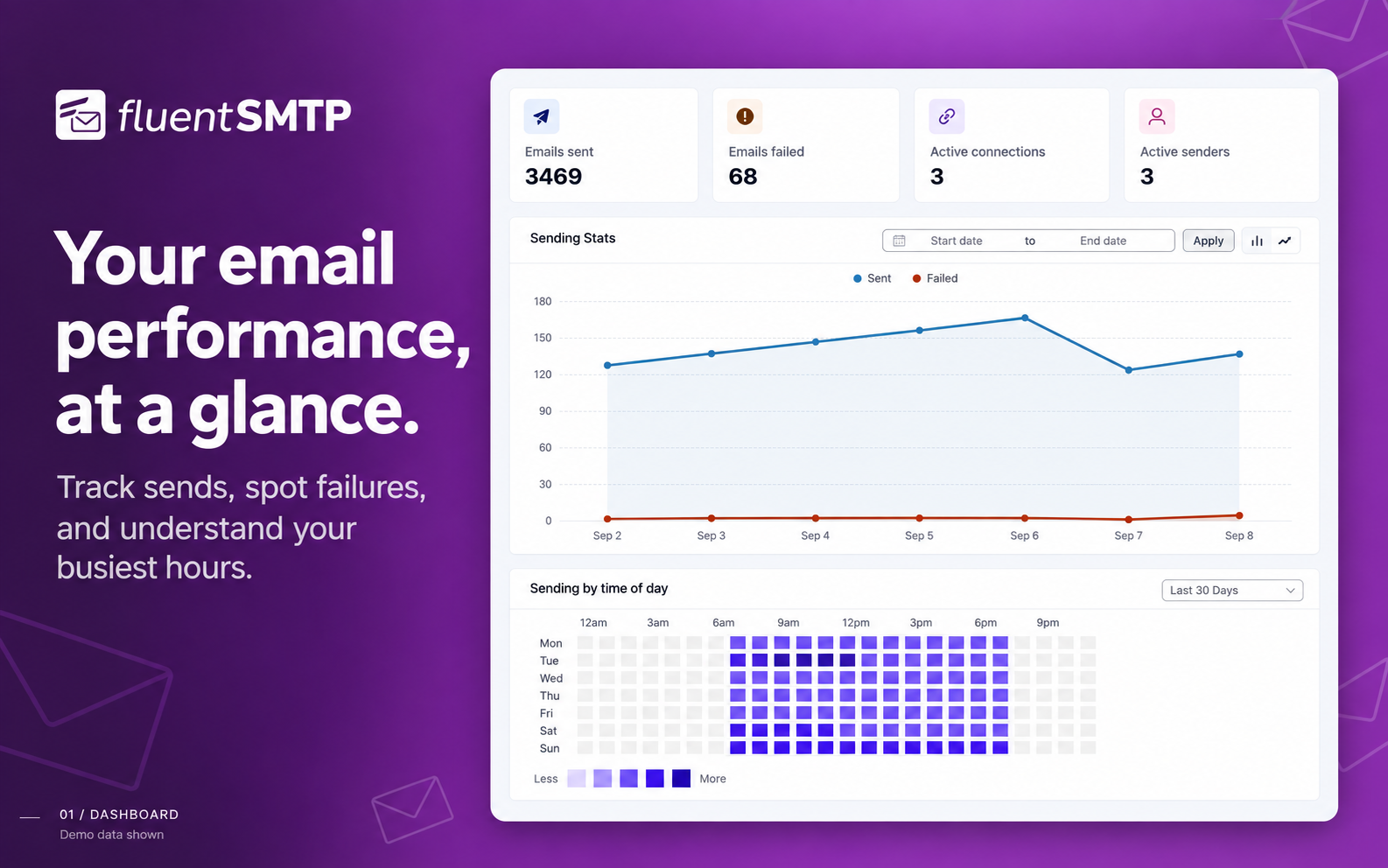
FluentSMTP Dashboard
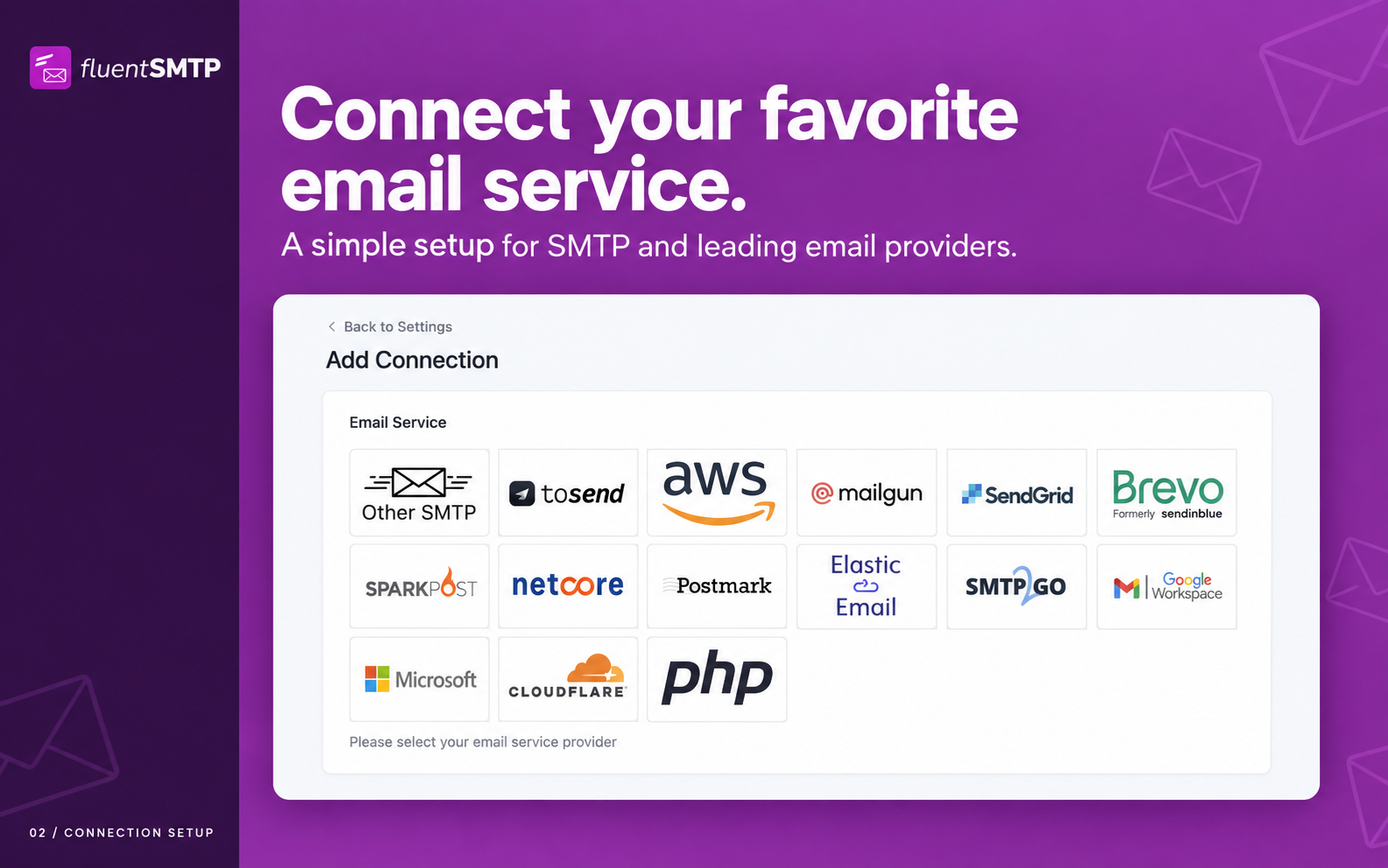
Setting up a connection
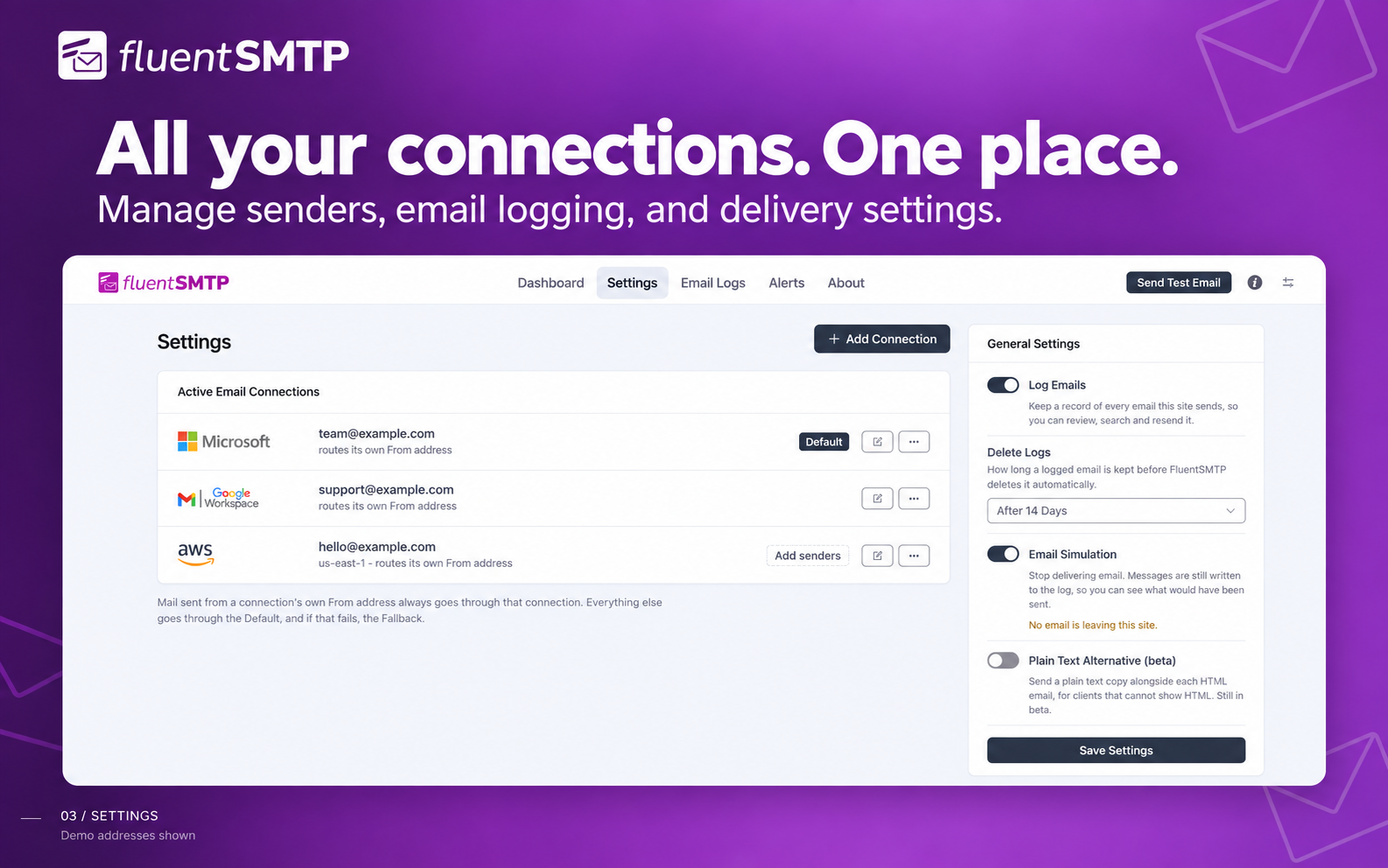
Settings Overview
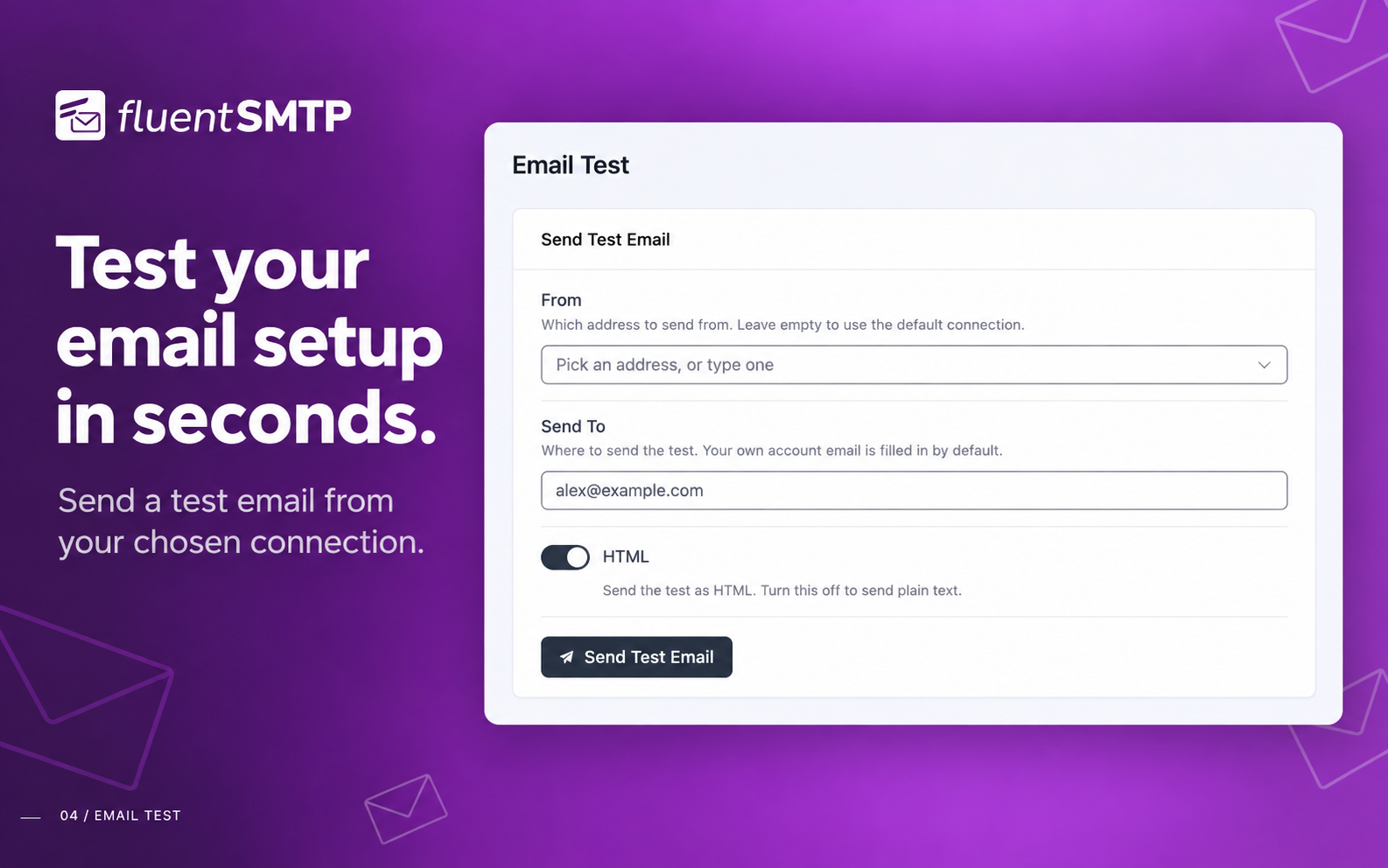
Sending a test email
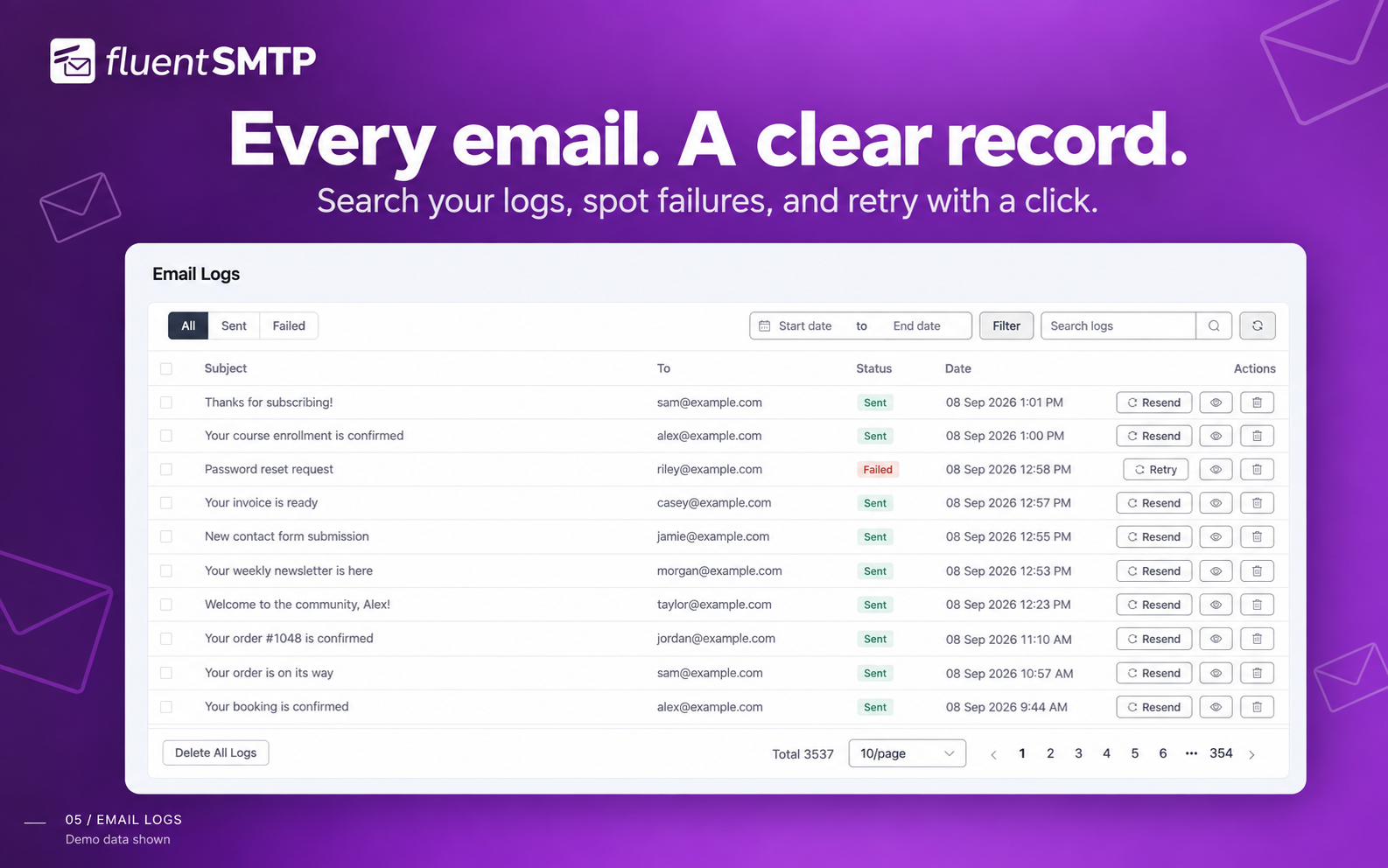
Email Logs
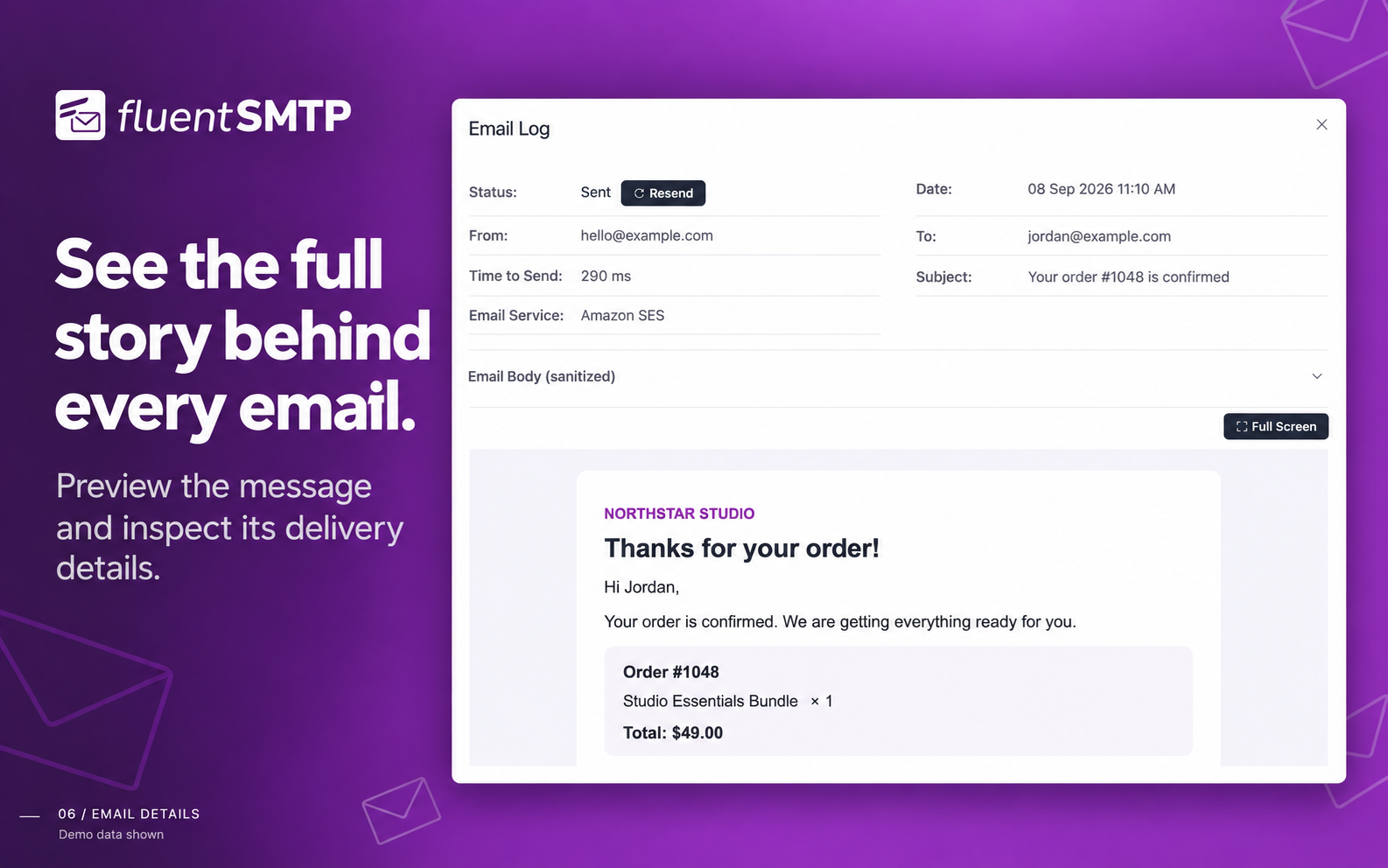
View Email from Log
Faq
By default WordPress sends email with the PHP mail() function on your web server, which is often unauthenticated, rate limited, or blocked outright by the host. Mailbox providers then reject or junk it. FluentSMTP sends your email through a proper email service or SMTP server instead, authenticated with your own domain, so it is delivered and lands in the inbox.
Yes. That is what the plugin is for: it takes over wp_mail() and sends through the SMTP server or email service you connect.
Yes. There is no pro version, no paid add-on and no feature limit. Every provider and every feature is in the free plugin, and it will stay that way.
Yes. Add your SES access key and secret key, and FluentSMTP sends through the Amazon SES API rather than SMTP.
Yes. Connect your Google account with OAuth and FluentSMTP sends through the Gmail API. You can also use Gmail’s SMTP server with an app password if you prefer.
Yes. Connect your Microsoft account with OAuth2 and FluentSMTP sends through Microsoft’s Graph API. Single-tenant Entra app registrations are supported.
Yes. When you create a connection you choose where its credentials are kept: in the database, or in your wp-config.php file, which is what we recommend.
Yes. FluentSMTP connects to SendGrid over their API, which is faster than their SMTP endpoint. If you would rather use SMTP, you can set that up instead.
Yes. FluentSMTP connects to Mailgun with an API key, which is faster than their SMTP endpoint. If you would rather use SMTP, you can set that up instead.
Yes. FluentSMTP connects to Brevo (formerly Sendinblue) with an API key. If you would rather use SMTP, you can set that up instead.
Yes. FluentSMTP connects to SparkPost with an API key.
Yes. FluentSMTP connects to Netcore (formerly Pepipost) with an API key.
Yes. FluentSMTP ships a native Cloudflare Email Sending integration. Add your Cloudflare Account ID and an API token with Email Sending permissions, and the plugin will send through Cloudflare’s REST API (including attachments, CC/BCC, Reply-To, and custom headers). The sending domain must be on Cloudflare with Email Sending enabled (SPF/DKIM/DMARC published).
Yes. FluentSMTP has a native toSend integration. Create an API key in the toSend dashboard, add your verified sending domain, paste the key into FluentSMTP, and your WordPress emails will be delivered through toSend.
FluentSMTP checks every connection once a day. If one starts failing, from an expired OAuth token or a revoked API key, it is flagged on the dashboard and sent to your configured notification channels (Telegram, Slack, Discord or Pushover). You can also run wp fluent-smtp health from the command line at any time.
Yes. wp fluent-smtp test sends a test email, wp fluent-smtp health checks your connections, wp fluent-smtp stats shows sent and failed counts, and wp fluent-smtp prune-logs deletes old logs.
Please check our GitHub repository. Pull requests are welcome.
Please submit an issue in our support portal. If you are a developer, please create a GitHub issue.
We use Patchstack to manage security reports. Please report it on our Patchstack page.
Reviews
Fluent support - Fluent SMTP
By 
I had a nearly telepathic experience with Fluent support. First of all the response was...fluent :). Before I got to read the response with my eyes, I started fiddling with my Gmail settings and once I read it, everything clicked into its place.
Fluent is Not Just a Name
By 
Fluent SMTP is not just a name. It is actually VERY easy to use and comes with features that "Pro" versions of other SMTP plugins demand you pay to receive. I like that most of my custom work on WP flows with Fluent very easily and is very compatible with all my work. The email log is an awesome addition and is not locked behind a paywall. I appreciate that Fluent has been recommended by my peers as well. Simply the best and most capable plugin for SMTP to date!
Works!
By 
Works, it's free, and it's open source. Cannot complain about that.
Simple, performant et GRATUIT
By 
Un seul mot : MERCI
Super plug-in de gestion SMTP simple et complet et tout cela gratuitement que demander de plus !
I love this plugin. Thank you.
By 
It works really well and I love that it offers email logs. That is extremely helpful. Thanks for the great plugin.
Great
By 
After struggling for some time to get WP to send emails from forms, I came across FluentSMTP - and it just works. So simple to set up. Thanks
Very Nice
By 
Very very good plugins, thanks for the support.
It just works
By 
I've been running this plugin for about a year now and it just worked immediately with our transactional email sender. Thanks!
Solid!
By 
Continuously improved and updated. Highly recommended!
Excellent!
By 
Great plugin, works flawlessly. You can send emails through all sorts of services, but I highly recommend looking at the same developer's service, Tosend. Zero issues there too after many months.
Changelog
2.4.0 (Date: Sep 08, 2026)
- Redesigned the whole admin on the shared Fluent design system and rebuilt it on Vue 3, Element Plus and Vite
- Added a dark theme, shared with FluentCart so choosing it in one plugin chooses it in both
- Simplified the navigation to Dashboard, Settings, Email Logs, Alerts and About, with Settings and Alerts rebuilt as at-a-glance lists
- Improved the dashboard with sent, failed, connections and senders at the top, a Recent Activity panel and an Alerts & Notifications summary
- Improved the email log: one-line rows, a toolbar with all filters together, and fixes for the failed-count link, Prev/Next in the viewer, filtering on a later page and pagination on phones
- Fixed Bcc recipients never receiving an email sent over the Outlook / Office 365 connection
- Requires WordPress 6.5 or newer (was 5.5)
2.3.1 (Date: Aug 13, 2026)
- Added an optional Directory (tenant) ID for Outlook / Office 365, for single-tenant Entra app registrations that cannot accept personal Microsoft accounts
- Fixed “Could not instantiate mail function.” on the PHP mail() connection when a host or plugin selects its own transport from the
phpmailer_inithook - Fixed mail routed outside FluentSMTP being sent through the site’s own SMTP relay when a bulk sending session held a connection open
2.3.0 (Date: Aug 05, 2026)
- Added Cloudflare Email Sending Provider
- Added Recipient Picker and Resend History for Email Logs (props @faisalahammad)
- Added Daily Connection Health Check with dashboard alerts and failure notifications
- Added WP-CLI commands for test email, connection health, stats and log pruning
- Added Amazon SES EU Sovereign Cloud region (Germany, Brandenburg)
- Added send time tracking on every email log
- Added
fluent_mail/manage_capabilityfilter to change the required admin capability - Added inline image embedding for SMTP connections via the
wp_mail_embed_argsfilter - Added inline setup guides for Cloudflare and toSend
- Improved sending speed with connection reuse for Amazon SES, toSend and FluentCRM bulk sending
- Improved Email Log performance with a new database index and batched pruning
- Updated the
wp_mail()replacement to match WordPress 7.0 core - Fix: List-Unsubscribe one-click headers were encoded and ignored by mailbox providers on Amazon SES, Gmail and Outlook (props @rogerjudd)
- Fix: Ampersands in the site title showing as HTML entities in the From Name, subject and email logs (props @ikamal7)
- Fix: Outlook failures reporting a generic “Unauthorized” instead of the reason Microsoft gave (props @reikjarloekl)
- Fix: From Name losing its last character when written without a space before the angle bracket
- Fix: Weekly and monthly reports merging data across different years
- Fix: toSend Reply-To formatting and sender validation messages
- Fix: Nested array sanitization in email logs
- Security hardening across the plugin, plus UI and translation improvements
2.2.95 (Date: Dec 28, 2025)
- Added Multiple Notification Channels for Email Failure Notification
- Added Pushover Notification Support
- Added toSend Email Sending Provider
- Added Option to disable API Keys Encryption
- Fixed PHP 8.4 Compatibility Issues
2.2.92 (Date: Aug 27, 2025)
- Fixed attachment handling issue with Elastic Email.
- Resolved import statement issue for SMTP2GO.
- Added PHP 8.4 support for FluentMail\App\Services\Mailer\Manager.
- Added new Amazon SES region: ap-northeast-3 (Asia Pacific – Osaka).
- Improved error handling in BaseHandler.
- Updated fallback email handling to return true on success.
- General bug fixes and performance improvements.
- Fix: Logger Resend Email respects Content-Type for HTML emails
- Styling Improvements
- Fix: Prevent redundant navigation error in Logs screen when refreshing
- Fix: Ensure Content-Type header is always logged for accurate email resends
2.2.90 (Date: Feb 07, 2025)
- Added SMTP2GO Provider
- Improved Translations
- Added name attribute to attachment files
- Security: Updated Google SDK Library to the latest version & updated JS DomPurify Library
- Fixed: Email Failed Notification Issue with Slack
- Styling Improvements
2.2.83 (Date: Nov 22, 2024)
- Fix unserialize parameter issue
2.2.82 (Date: Nov 22, 2024)
- Security: Data Un-serialization issue fixed
- Sparkpost Recipient Issue fixed
2.2.81 (Date: Oct 20, 2024)
- Security: Nonce Verification fixed for slack REQUEST (props to patchstack)
- Fixed WooCommerce Emailing Issue fixed when enabled text mode
- Fixed Translation issues
- Custom Header support for Postmark
2.2.80 (Date: July 02, 2024)
- Added Plain Text Support: Convert HTML Emails to Plain Text and send as multi-part email
- Improved Translations
- Improved Internal Code Base
2.2.73 (Date: Apr 25, 2024)
- Compatibility with PHP 8.X
- Added Day of the time sending chart
2.2.72 (Date: Mar 16, 2024)
- Compatibility with PHP 8.4
- Fix Slack Notification Issue
2.2.71 (Date: Jan 01, 2024
- Hot Fix: Fixing the issue with Input Fields
2.2.7 (Date: Jan 01, 2024)
- Added RealTime Email Failure Notification via Telegram / Slack / Discord
- Added Option to add additional email addresses for Amazon SES
- UI Improvements
2.2.6 (Date: Oct 01, 2023)
- Enable Encryption for All SMTP Connections Keys
- Migrate SendInBlue API to Brevo API
- Improved Plugin Conflict Detection and auto fix
- Fixed UI conflict with Other Plugins
2.2.5 (Date: Jul 06, 2023)
- (Security Fix) Email subject is now sanitized and escaped when preview
- Showing Server Response by default on log
- Fix http_build_query issue for latest version of PHP
- Improved UI & UX for email preview
2.2.4 (Date: Feb 04, 2023)
- Email preview is now sanitized
- you can now define
FLUENTMAIL_SIMULATE_EMAILSto simulate emails programmatically - Fixed outlook API connection issues
- Fixed inline documentation links
- UX improvements
2.2.2 (Date: Nov 11, 2022)
- Fix vendor Conflict for Google/Gmail Connection
- UI Improvement on Connection Wizard
2.2.1 (Date: Nov 08, 2022)
- Refactored Google API integration
- Fix encoding issues for Outlook API connection
- ElasticEmail Attachment issues fixed
- Fixed digest email esc_* issues
- Added contributors to the plugin’s about page.
- UI&UX Improvements
2.2.0 (Date: Aug 21, 2022)
- Added Elastic Mail API
- PHP 8.0 & 8.1 compatibility
- UI Improvements
2.1.2 (Date: July 05, 2022)
- Google/Gmail API Upgrade
- UI Improvements
2.1.1 (Date: March 12, 2022)
- Improved Email Logging Screen
- Improved UI and Settings
- Fixed auto-delete old email logs
2.1.0 (Date: October 24, 2021)
- Fix Cron Issues
- PHP 8.0 Compatibility issue fixed
- Multiple Connection UX improvement
- Ability to remove from email and name hook via filter
2.0.2 (Date: September 21, 2021)
- Fixed Scheduled Database Cleanup
- Improvement on wp_mail loading and sending emails
- Pepipost Driver Improvement
- SendGrid Driver Improvement
- SendinBlue Drive Improvement
2.0.1 (Date: July 28, 2021)
- Added Postmark API Connection
- Fix Dashboard Stat Number
- Fix Sanitization Issue
2.0.0 (Date: July 27, 2021)
- Added Outlook / Office 365 API Connection
- Improvements of Amazon SES Connection
- Ability to disable force From Email for supported connections
- Added Fallback Connection feature
- Added One-Click migration from WP Mail SMTP Plugin
- Added One-Click migration from WP Easy SMTP Plugin
- UI Improvements
- Added nonce and sanitization for connection inputs
1.2.0 (Date: May 26, 2021)
- Added Gmail and Google Workspace API Connection
- Added Built-in Docs
- UI Improvements
- PHP 8 compatibility issue fixed
- Bulk Send Emails from logs
- Added Email Simulator
- Amazon API Fix
1.1.1 (Date: April 26, 2021)
- Database Warning Issue Fixed
1.1.0 (Date: April 25, 2021)
- Fix Error Handling Issues
- DataBase Query Optimizations
- Amazon SES Connection Optimization
- UI Improvement
- VueJS loading improvements
1.0.1 (Date: January 24, 2021)
- Fix UTF-8 issues
- Sendinblue wp-config constant issue fixed
- Fallback from name issue fixed
- Search for Email Logs has been fixed
1.0.0 (Date: January 18, 2021)
- Initial Launch
- 349 git commits so far
- 698 cup of coffee (Just kidding, We lost count)
- Work of 3 Months
- Let’s Make Email Sending Easier!