Football Pool

Football Pool
Description
This plugin adds a fantasy sports pool to your blog. Visitors of your website can predict outcomes of matches and earn extra points with bonus questions. Every player can view scores and charts of the other pool contenders.
The plugin installs some custom tables in the database and includes match information for the UEFA 2024 Championship, but it can be easily updated with match info for other championships or sports. Note: deactivating the plugin may delete all plugin data from your database. To avoid this, make sure the “keep data on uninstall” option is enabled in the settings (it’s on by default since version 2.3.1).
I originally coded this pool in PHP as a standalone website for the UEFA 2000 championship and rewrote it several times for every European Championship and World Cup since. I kept adding features every year. In 2012, I turned it into a WordPress plugin and uploaded it to the plugin directory. I hope you enjoy it.
A special thank you to everyone who donated, helped translate, reported bugs, or contributed in any other way to improving the plugin!
Features
- Users can predict match outcomes.
- Automatic calculation of the pool ranking, or define a custom ranking for a group of matches.
- You can add bonus questions for extra fun (single answer and multiple choice).
- Add your own teams and match data for other competitions.
- Import or export game schedules.
- Automatically calculate championship standings.
- Flexible scoring options.
- Built-in pages and shortcodes to display the pool on your blog.
- Optional user leagues.
- Score charts showing player progress and comparisons (requires separate Highcharts API download).
- Widgets and shortcodes to display match and pool info.
- Extra info pages for venues and teams.
- Add custom functionality with filters and actions.
- WP-CLI support for ranking calculations (faster than admin-side calculations).
- WP-CLI support for importing match results from a CSV file.
Documentation
The plugin includes a detailed help file in the admin panel. For a step-by-step tutorial, check out the guide by Janek from WP Simple Hacks. He even made a video explaining how to set up the plugin.
Other Notes
- Requires WordPress 5.3+, PHP 7.4+, and jQuery 1.4.3+.
- For charts, download the Highcharts API (see the installation instructions or the help page in the admin).
If you find bugs, please report them in the support forum. If you like the plugin, a rating on WordPress.org would be much appreciated!
Localizations
If you’d like to help translate the plugin into another language or keep existing translations up to date, head over to the plugin’s page on translate.wordpress.org.
Be sure to read the After your contribution guide to understand how translations get reviewed and approved.
A big shout-out to all the translation contributors and editors who’ve helped out so far — thank you!
For using custom translations, check the FAQ section. The plugin also includes a .pot file as a starting point for building your own translation files.
Shortcodes
The plugin provides the following shortcodes. For detailed usage instructions, see the Help page in the WordPress admin.
fp-predictionsfp-predictionformfp-matchesfp-match-scoresfp-question-scoresfp-next-matchesfp-last-matchesfp-user-scorefp-user-rankingfp-rankingfp-countdownfp-groupfp-linkfp-registerfp-totopointsfp-fullpointsfp-goalpointsfp-diffpointsfp-jokermultiplierfp-plugin-optionfp-league-infofp-chart-settings/fp-stats-settingsfp-user-listfp-money-in-the-potfp-last-calc-datefp-next-match-form
Incompatible Plugins & Themes
The following plugins have been reported as incompatible with Football Pool. If you’re the author and have a fix — or if you know a workaround — please get in touch.
If you encounter issues with another plugin not listed here, let me know so I can investigate.
Most caching solutions should be tested carefully.
- DB Cache Reloaded Fix (v2.3)
- Cimy User Extra Fields (v2.6.1) when using the email confirmation feature
- Easy Timer (in Football Pool versions 2.3.8 and below)
- Theme Gadgetry (ThemeFuse framework)
- memcached
Some themes may also interfere with the plugin’s display. See this forum post for a potential fix.
Installation
To use a custom translation, see the FAQ for more info.
- Upload
football-pool.zipvia the plugin panel, or unzip and upload thefootball-poolfolder to your/wp-content/plugins/directory. - Activate the plugin in the Plugins panel.
- Configure the plugin via the admin menu.
- Optional: Add pool pages to your menu or link to them manually.
- Optional: Add Football Pool widgets to your sidebar.
- Optional: Add bonus questions.
- Optional: Upgrade existing site users to pool players.
- To use the chart feature, download the Highcharts API and place the
highcharts.jsfile in/wp-content/plugins/highcharts-js/highcharts.js. Use the classic JS file with styling. If using the theme-less version, include the Highcharts CSS in your theme.
Once everything’s set up, just keep an eye on user signups and update match scores and bonus question answers.
Screenshots
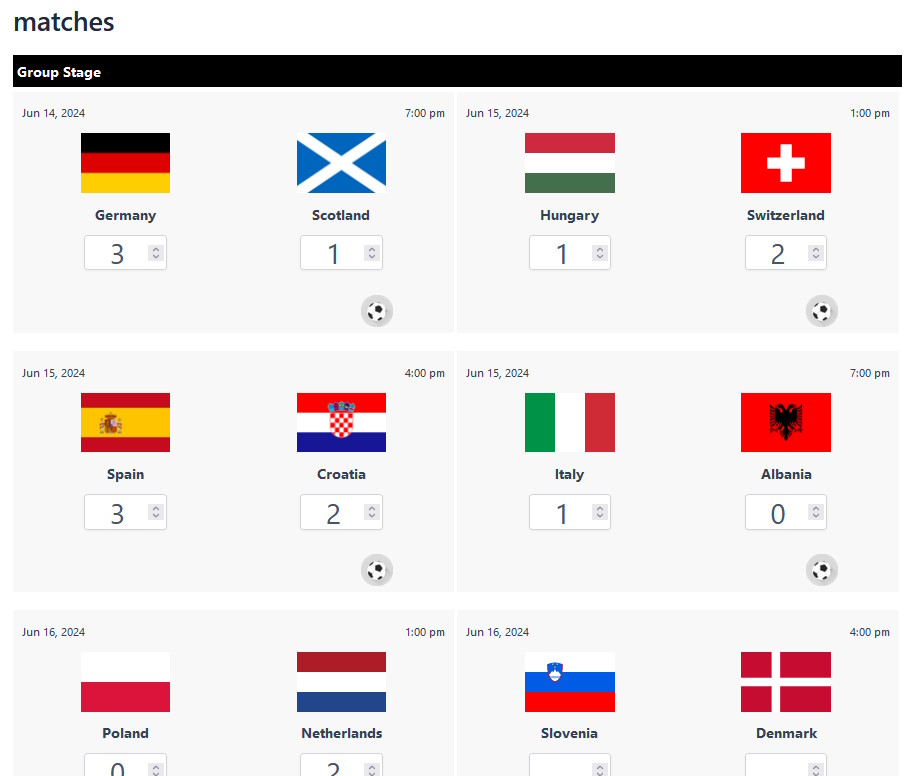
Predict matches via a form in your WordPress site

Score charts comparing multiple players

Match predictions and scores per user

Group rankings overview

Overall user ranking

Football Pool comes with several useful widgets

Admin screen: plugin options

Admin screen: edit match outcomes

Admin screen: insert shortcode using the classic editor
Faq
You can, but it’s not required. The plugin works just fine with the default settings. Feel free to explore and tweak the options before kicking off your pool.
The time estimate is based on how long a single calculation step takes, multiplied by the total number of remaining steps. If the early steps are slower (especially if step sizes are set large in wp-config.php), the initial estimate might seem way too long.
Or… you might just have a huge database with tons of users, matches, and rankings. In that case, the estimate could be accurate. For reference: with 2,000 users, 50 matches, a few bonus questions, and 3 custom rankings, a full calculation took around 45 minutes on my laptop (using default step sizes). Running the same job via WP-CLI took under 10 minutes.
Nope. I’m a developer, not a designer — so I haven’t created a theme.
Since version 2.0.0, matches aren’t added automatically. But there’s a sample schedule (CSV file) bundled with the plugin. Just go to the Matches admin page and use the “Import matches” option to load it.
Technically, yes. The plugin uses this page to display user predictions. So don’t delete it. However, if you don’t want it in your site’s menu, simply remove it via Appearance » Menus.
Some themes automatically add all top-level pages to the menu. Check your theme’s documentation to see how to exclude pages or build a custom menu.
Absolutely. You’ve got two options:
- Upload a match schedule CSV in the admin. You’ll find an example in
/data/schedulesin the plugin folder. - Use the admin screens to manually add all the teams, groups, match types, and matches.
Also, consider using a theme that fits your competition, or tweak one yourself.
Due to WordPress plugin license rules, the required charting library had to be removed. If you want charts back, check the Help page in the admin for how to manually install the required library.
Also, make sure you haven’t enabled the “simple calculation method” in the plugin settings. That mode skips historical data — it’s faster, but charts won’t work.
Go to WordPress Admin » Football Pool » Users and check if those users are assigned to a league (if you’re using leagues). New users are added automatically, but existing ones must be added manually.
To make someone a player: assign them to a league and save. If you delete a league, you’ll need to reassign those users. Not using leagues? Just make sure users haven’t been removed from the pool via the Users screen.
Yes! Check this page for available language packs.
To create your own translation:
- Visit translate.wordpress.org
- Or use a tool like Poedit
- Upload your translation to the site, and contact a PTE to approve it
- Or apply to become a PTE yourself
Check the First Steps guide for more info.
To use a custom translation, place your translation files in wp-content/uploads/football-pool/languages and use this extension plugin to load them.
The default content for the rules page is stored in rules-page-content-*locale*.txt (e.g., rules-page-content-nl_NL.txt) — this isn’t managed by the Polyglot system. If you translate it and send it to me, I’ll add it to the plugin (with credit, of course).
That’s expected. The plugin includes basic layout styles, but it won’t change your site’s entire look. You’ll need to customize the styles yourself to make everything fit your design.
Use your theme’s CSS or a custom CSS plugin to override styles. Don’t edit the plugin’s CSS files directly — your changes will be lost when you update the plugin.
Reviews
ES IMPRESIONANTE
By 
Felicidades...es un GRANDISIMO PROGRAMA..muy buen codigo..eres un CRACK
Great Effort
By 
"This plugin sounds like an incredible addition for any sports fan running a blog! The ability to create a fantasy sports pool where visitors can predict outcomes and track their progress adds a fun, interactive element to your site. It reminds me of how a pool builder customizes each project to fit the client's needs—this plugin does the same by allowing users to tailor it for different sports and championships. Kudos to the developer for continually updating and enhancing the plugin over the years. The attention to detail, from custom rankings to user charts, really shows the passion behind this project. If anyone's using this plugin, I’d love to hear how it’s working for you!"
Genial!
By 
Lo use en toda America para la COPA AMERICA 2024 y estuvo genial
Great plugin!
By 
Great plugin! Fun to play with friends and see who gets the most results right. the creator AntoineH always available on the blog for consultations and/or additional plugins to do specific things. Excellent.
Images too large and out of place
By 
Its a nice plugin but I have an issue. The team flags are too large and out of place when viewed in the matches page.. pls how to do I fix this
Great Plugin!
By 
Great plugin with a lof of features for match predictions. The creator is also very helpful for his users.
Amazing Plug-In!
By 
So easy to use and implement. Antoine is amazing and supportive. Favorite plugin for WordPress!
Excellent - Excelente
By 
Awesome plugin with super awesome support.
Complemento impresionante con soporte súper increíble.
Awesome
By 
Thank you! Awesome!
By 
Changelog
2.13.1
- Bug fix: Fix for XSS vulnerability (admin interface only).
2.13.0
- New: Added an option to edit matches in your local time zone (based on your WP setting).
- New: Added support for a new meta header for the CSV to define a time zone offset for the times in the file. This makes it possible to import files in a different/local time and adjust accordingly.
- Update: Changed the minimum required WP version to 5.3.
- Update: Made changes to the countdown shortcode javascript function. If you are using this in your own code, make sure you change the initiation of the countdown by passing the arguments as an object.
- Tweak: Made some changes in the date handling in some parts of the plugin.
- Tweak: Fixed some display issues in the shortcode MCE dialog and added titles to the labels.
- Bug fix: Made the XSS prevention in all shortcode functions more strict.
2.12.6
- Tweak: Some refactoring of the Widget classes.
- Bug fix: Activate function throws an “Uncaught TypeError” on activation when activating via WP CLI.
- Bug fix: Fix for XSS vulnerability in some shortcode functions.
2.12.5
- Tweak: Some updates to the help page.
- Bug fix: Fix for XSS vulnerability (admin interface only).
2.12.4
- Bug fix: Moved translation strings inside classes to prevent early loading of textdomain.
2.12.3
- Bug fix: Fix for CSRF vulnerability.
2.12.2
- Bug fix: some parts of the code did not cast the league to int when passing it to the get_pool_ranking_limited() function. Thanks to Colin for reporting.
2.12.1
- Bug fix: Accidentally removed tags around title for the widgets. This has been restored. Thanks to @spaniole for reporting this.
2.12.0
- New: Goal difference bonus now has a setting that defines on which scores the bonus applies (existing installs will keep using the old rules until you change the setting).
- New: Match predictions view on the statistics page now has some extra CSS classes on the table row to show how the score was build up (e.g. toto score plus goal bonus).
- New: Added a print stylesheet for the audit log to remove some clutter from the print of the page.
- New: Extra option to enable or disable showing the admin answer for closed bonus questions on the prediction form.
- New: Added option to send an email notification when a new shoutbox message was saved. Uses the default wp_mail() function.
- Update: Changed the maximum amount of characters for the shoutbox messages to 65,535 (but default setting is still a max of 150 chars).
- Update: When a shoutbox message save fails, it will show a message for the user and keep their text in the input field to try again.
- Update: Also added the
todayCSS class to the matches view. - Tweak: Some clean-up in the widget classes.
- Tweak: Fixed some deprecation warnings (explode(): Passing null to parameter #2).
- Tweak: Added some wp_doing_cron() checks.
- Tweak: Some code reformatting.
- Bug fix: In rare occasions the first chart for the statistics page was defined as a line chart, where it should have been a column chart. Thanks to @pekos for reporting the bug.
- Bug fix: Removed a XSS vulnerability in the bonus questions admin.
- Bug fix: Removed a XSS vulnerability from the teams page and matches page.
2.11.10
- Bug fix: Removed a XSS vulnerability in the bonus questions admin.
2.11.9
- Update: Added the Copa América 2024 championship schedule.
- Bug fix: Removed a bug in the CSV importer.
2.11.8
- Bug fix: Removed some PHP8 language constructs that caused a critical error on PHP7 installs. Thanks to @batigol09 and @ryan944 for reporting.
2.11.7
- Update: Also the Football Pool admin roles (football pool admin, match editor and question editor) get the WP toolbar when logged in. The users can set their personal preference (show or hide) in their profile.
- Update: Added some extra classes to the match cards on the prediction form:
no-predictionfor matches with no prediction,todayfor matches that are on the current day. - Bug fix: Fixed an “Undefined index” notice in the CLI command for creating test users when there are no matches.
2.11.6
- Update: Fixed the venues for the final rounds in the UEFA EURO 2024 championship schedule.
2.11.5
- Update: Added the UEFA EURO 2024 championship schedule.
- Bug fix: Shortcode [fp-countdown] now exits gracefully when it is set to countdown to a match, but no first or next match is found. Thanks Frans Jansen for reporting this error.
2.11.4
- New: [fp-next-match-form] shortcode to show a form of only the next match(es).
- Tweak: Small change in the test data CLI method.
- Tweak: Bumped the jQuery version for the TinyMCE dialog to 3.7.1.
- Bug fix: Removed a XSS vulnerability from some shortcodes (low priority).
2.11.3
- Update: Removed admin icon from plugin assets and added SVG base64 URI in menu definition.
- Tweak: Removed deprecated warning for dynamic property in Football_Pool_Pool class.
- Tweak: Some refactoring of code.
- Tweak: Stop loading of plugin when doing cron actions (only needed if I ever decide to add cron actions).
- Bug fix: In some edge cases the setting “Fix incomplete predictions” could cause points to be awarded when both scores for a match are missing. Thanks fimo66 and Markus Höcker for reporting the bug.
2.11.2
- Tweak: Some refactoring of code.
- Update: Changed the required PHP version to 7.4.
- Bug fix: League dropdown in the user admin caused a fatal error in certain cases. Thanks Ron Robinson for reporting the issue.
2.11.1
- Bug fix: fp-matches caused a fatal error for empty parameters. Thanks @wongjowo for reporting the issue.
2.11.0
- New: Audit log in the admin for the administrator to view all saves that users did in their predictions.
- New: Added cache group to WP object cache calls to be able to exclude it from persistent caching plugins.
- New: Option to consider a null value for an incomplete prediction (e.g. only home score entered) as valid and default the missing value to 0.
- New: Shortcode [fp-last-matches] that displays the last started matches before a certain date. Similar parameters as [fp-next-matches].
- New: Added parameters to the [fp-user-list] to limit the output with the ‘num’ parameter and to display only the latest registrations (based on and ordered by the WP_User’s user_registered field) with the ‘latest’ parameter.
- New: Added ‘is_favorite’ parameter to teams. This parameter is used to add an extra CSS class to matches.
- Update: AJAX saves on the frontend are now disabled by default and I made it a setting in the options screen (but it can also still be changed via the FOOTBALLPOOL_FRONTEND_AJAX constant in the wp-config).
- Update: Changed the required PHP version to 7.3.
- Update: Removed deprecated code for loading custom MO files. This should be done via the ‘override_load_textdomain’ filter. See FAQ for more info.
- Update: Removed league ID from the sorting of the ranking.
- Tweak: Added different admin screen option ‘items per page’ settings for bonus questions and user answers.
- Tweak: Removed the old wp_enqueue_media check for WP versions lower than 3.5 (this is no longer needed).
- Tweak: Fixed some deprecated warnings (tested in PHP 8.1).
- Tweak: Toast on the prediction form now has a default z-index of 10.
- Tweak: Minor changes to the bonus question CSS.
- Bug fix: The countdown shortcode for the first match removed one element of the matches array and this caused trouble for other elements in the plugin that use the same array reference. Thanks @angelo079 for reporting and @shuhads for helping to sort this out.
- Bug fix: Removed duplicate calculation buttons when removing multiple match types at once.
- Bug fix: Fixed the Bonus question pie chart. Thanks @fimo66 for reporting the issue.
earlier versions
- Full changelog can be found here.