Form Finder for Ninja Forms
Form Finder for Ninja Forms
Description
Form Finder for Ninja Forms scans every public post type to locate Ninja Forms shortcodes, blocks, and popular page-builder widgets, then presents the results in an accessible WordPress admin screen. The interface follows WordPress design guidance, uses proper escaping, and caches scan results to keep your dashboard fast.
Highlights
- Discovers embeds created via shortcodes, Gutenberg blocks, Elementor, Divi, Beaver Builder, and more.
- Groups results by page so site owners immediately see which content references each form.
- One-click rescan with nonce protection, capability checks, and object caching to keep things secure and performant.
- Follows WordPress coding standards, internationalization best practices, and ships with a ready-to-translate POT file.
💼 Hire Me
👋 Hi, I’m Faisal Ahammad, a WordPress Technical Support Engineer. I’ve worked for several popular WordPress-based companies such as Ninja Forms, Divi, WPML, and SiteCare as a Support Engineer. If you’re looking for fresh talent on your team, I’d love to hear your offer!
Disclaimer
Hey friend! 💛
This plugin is totally free and made with lots of love just for the WordPress community. If you run into any issues or things don’t work as expected, please don’t be quick to leave a bad rating. That can really bring down a free project like this. 😞
Instead, please reach out and report the problem first. I truly appreciate all your feedback and will do my best to fix things fast. Your kind words, support, and encouragement mean the world and keep this plugin growing stronger every day. 🌱💪💖
Accessibility
The admin table uses semantic markup, keyboard focus styles, and accessible colour contrast so all administrators can work comfortably.
Translations
This plugin is translation-ready. Place your .po/.mo files in the languages directory. Text domain: form-finder-for-ninja-forms.
Installation
- Upload the plugin files to the
/wp-content/plugins/form-finder-for-ninja-formsdirectory, or install the plugin through the WordPress plugins screen directly. - Activate the plugin through the ‘Plugins’ screen in WordPress.
- Go to ‘Ninja Forms > Form Finder’ to view form usage locations.
Screenshots
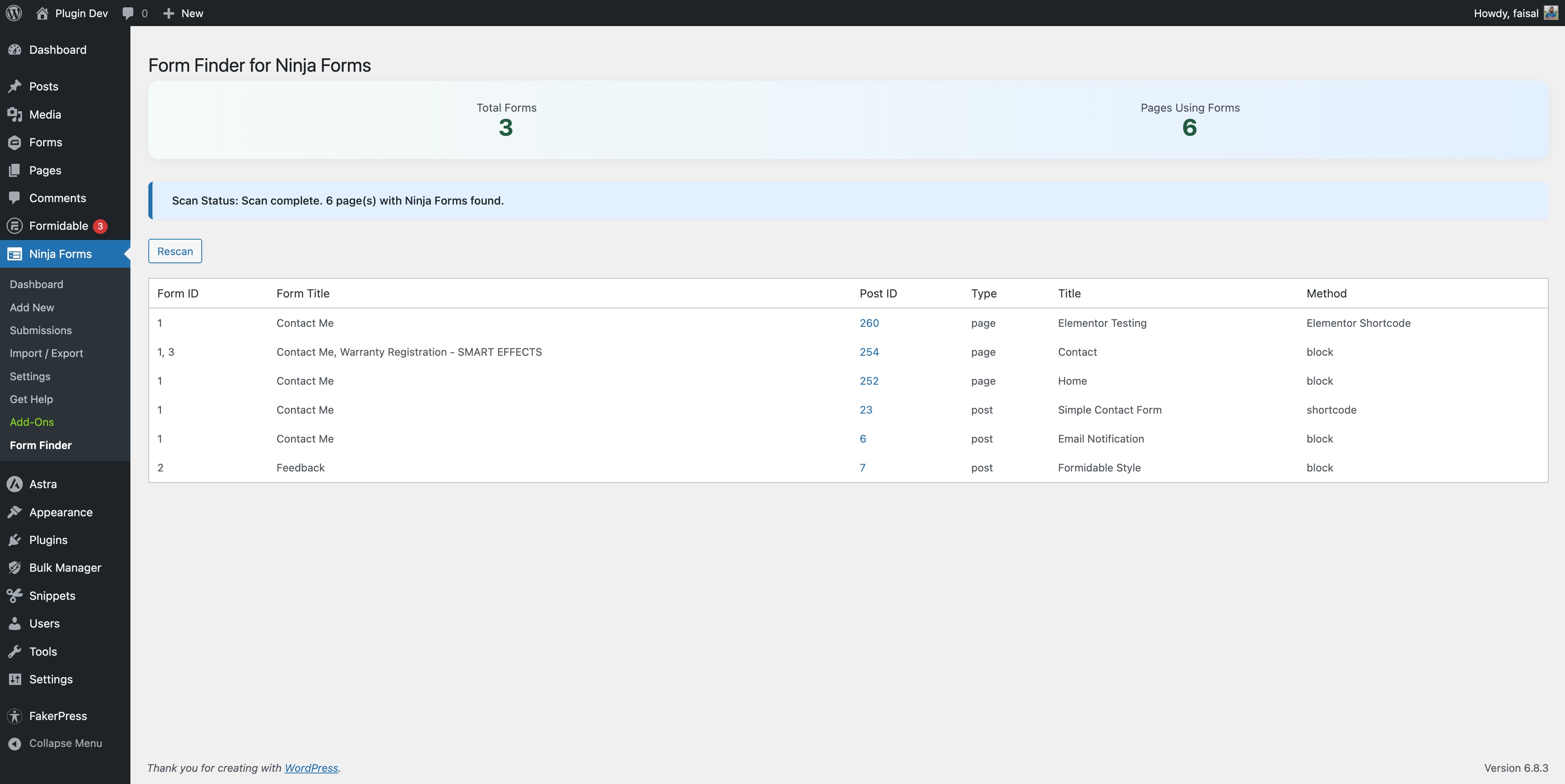
Admin UI showing form usage table and summary stats.
Faq
It supports the most popular ones (Elementor, Divi, Bricks, Oxygen, WPBakery). Others may work if they store shortcodes or block data in post meta.
No, all scanning and UI are admin-only.
Reviews
Does Exactly What it Says
By 
We needed to find all the pages with our Ninja Forms as we were having some spam issues, it did this perfectly and included the ID and links to the pages. Nice job!
Changelog
1.3.1
- Fix: detect shortcodes with quoted form IDs inside page-builder JSON (Elementor, Bricks, Oxygen), where quotes are stored escaped as
id=\"3\" - Fix: results cache is now cleared when posts are deleted or trashed by WP-CLI, cron, or other non-interactive requests
- Skip cache invalidation for revisions to avoid needless rescans
- Scan loop no longer modifies the global
$post - Use a proper singular/plural string for the scan status message
- Add PHPUnit tests for the scan matchers
- Update development dependencies (WordPress Coding Standards 3.4, @wordpress/eslint-plugin 27, ESLint 10 flat config)
- Bump “Tested up to” to WordPress 7.1
1.3.0
- Link the results table “Title” column to the front-end page so you can view the embedded form live, in addition to the existing Post ID edit-screen link
- Use the preview URL for draft, pending, and scheduled posts so the link resolves correctly for administrators
1.2.0
- Fix N+1 post meta queries by priming meta cache before scan loop (up to ~6x fewer DB queries on large sites)
- Cache Ninja Forms list in object cache to avoid repeated DB hits on admin page load
- Add explicit
load_plugin_textdomain()call for non-.org distribution channels - Modernize admin JavaScript:
const/letovervar, arrow functions, Promise-based.done()/.fail()AJAX chaining - Fix redundant
printfwrapper in admin notice for cleaner output - Memoize post type filter options to avoid duplicate
get_post_types()calls per page render - Bump “Tested up to” to WordPress 7.0
1.1.0
- Add AJAX-powered rescan with loading animation and status indicator
- Add extensibility hooks:
ffnf_scan_post_typesfilter,ffnf_builder_meta_keysfilter,ffnf_scan_cache_durationfilter,ffnf_scan_completeaction - Add client-side search and post type filtering for results table
- Add responsive styles for mobile devices
- Improve admin UI with pulsing scan status and smoother interactions
1.0.0
- Initial release.