Francesco Guarino Booking Calendar for Tarot Readers

Francesco Guarino Booking Calendar for Tarot Readers
Description
There’s no shortage of appointment plugins out there. What’s rare is one actually built by someone who works inside this exact world.
Available in English, Italian, Spanish and German.
I’m Francesco Guarino: tarot author and researcher, founder of Scuola di Tarocchi (scuolatdm.com), editor of tarocchi.blog (Italy’s #1 tarot blog), producer of tarot documentaries, and CEO of clickTarot.net, a booking platform used by working tarot readers, astrologers and holistic practitioners. I still give readings myself, and I built this plugin for my own paid, one-on-one consultations first, not as a generic SaaS bolted onto a niche.
Turn your site into an always-open consultation studio, without endless back-and-forth messages to lock in a time slot.
Free vs Premium
This is the free version: a real, permanently free calendar, not a time-limited trial. It includes unlimited calendars and bookings, PayPal payments, coupons, order bumps and everything else listed below, except where marked “Premium”.
Upgrade to Premium anytime to add Stripe (credit card) payments, prepaid packages, CSV export, Free Tarot Readings, evening/Sunday/holiday surcharges and revenue statistics. Upgrading never breaks anything you’ve already set up: your existing calendars, bookings and settings all carry over as-is.
Founding members offer: the first 20 people who upgrade with the code FOUNDING100 get the first year of the annual Professional plan for free. It then renews at the regular price, and you can cancel anytime before. Valid until December 31, 2026.
What’s included
- Visual monthly calendar: the customer books on their own, no back-and-forth needed.
- Flexible availability management: block whole days or individual time slots.
- Built-in payments: PayPal.
- Automatic confirmation and reminder emails: fully customizable text.
- Automatic invoice data collection: tax ID, address.
- Multiple calendars for different services: each with its own price and duration.
- Duration/price variants: offer the same service in multiple durations (e.g. 30 and 60 minutes) on the same calendar, no need for a separate one for each and no risk of overlapping double bookings.
- Dedicated booking link: ready for your Instagram or TikTok bio, no landing page needed.
- Customizable color: the calendar matches your site’s look in one click.
- One or two columns: a compact form for sidebars and narrow pages, or a two-column layout for wide pages (calendar on the left, details and payment on the right), with layout=”wide” in the shortcode. On phones it always goes back to one column.
- Order bump: offer a paid add-on right in the booking form (e.g. “Voice recording of the reading”, +€5), the customer adds it with one click.
- Discount coupons: create promo codes for your customers, with expiry and usage limits.
- Self-service rescheduling and cancellation: the customer moves or cancels the appointment on their own from the email link, without writing to you. You choose until when this is allowed (24 hours before the appointment by default), so nobody can cancel at the last minute.
- Multilingual plugin: booking form, emails and admin panel translated into English, Spanish and German, in addition to Italian.
- Billing for international customers: a Country selector on the form automatically shows the right fields for your client’s own country, VAT number/Tax ID, postal code and state/province, wherever they’re based.
- Add to calendar: automatic link in the confirmation email to add the appointment to Apple Calendar, Outlook or Google Calendar.
- Block a date range for holidays: block a whole period in one click, instead of day by day.
- Cross-calendar overlap protection: with multiple calendars, a booking on one of them automatically blocks the same time slot on the others too, no more overlapping double bookings on different services.
- Global or per-calendar blocks: from Booking Calendar -> Availability, the “All calendars” option blocks a date or time slot everywhere in one click, or stays limited to a single calendar if you only want to close one of them.
- Block same-day bookings: a per-calendar option that always excludes the current day from booking, a real date boundary independent of the hours-based minimum notice.
- Guided setup: no technical skills required.
Who it’s for
Tarot readers, astrologers, psychics, holistic counselors and personal growth professionals who want to manage online or in-person consultations without losing time to messages and appointments to confirm by hand.
Want the full story of why I built this? Read it here.
Installation
- Upload the plugin to the
/wp-content/plugins/folder, or install it directly from WordPress by uploading the ZIP under “Plugins Add New Upload Plugin”. - Activate the plugin from the WordPress “Plugins” menu.
- Go to Booking Calendar Calendars and create your first booking calendar.
- Copy the shortcode (or the dedicated public link) onto the page of your site where you want the form to appear.
- If the calendar is paid, connect PayPal (and Stripe, on Premium) from Booking Calendar Payments.
You’ll find a complete step-by-step guide right inside the plugin, under Booking Calendar Guide.
Screenshots
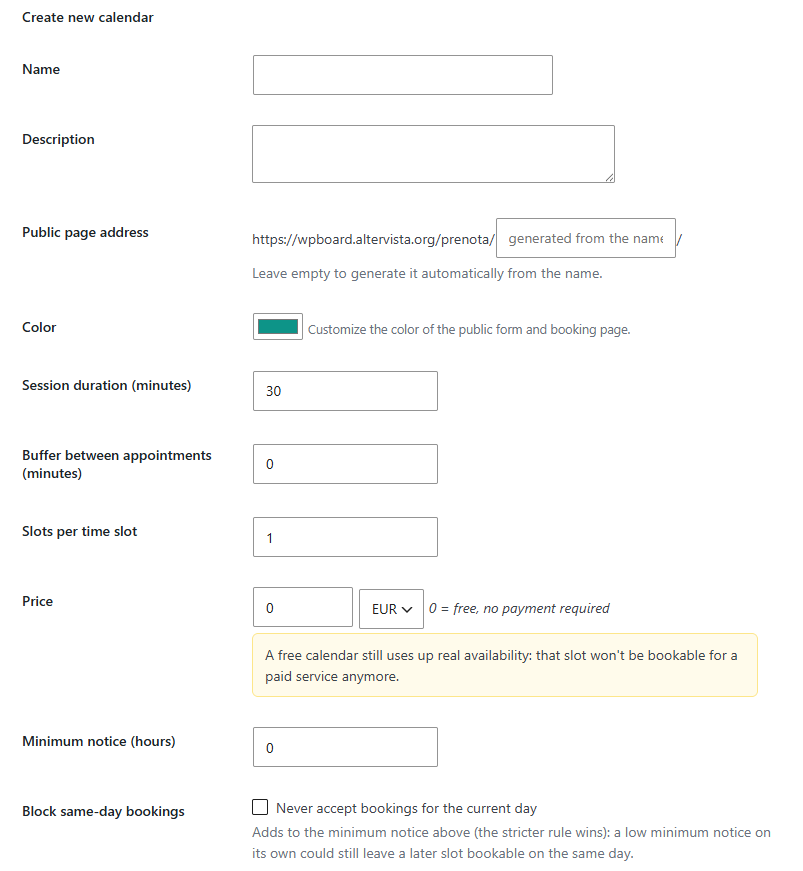
Create a new calendar: set duration, price and public link in one form.
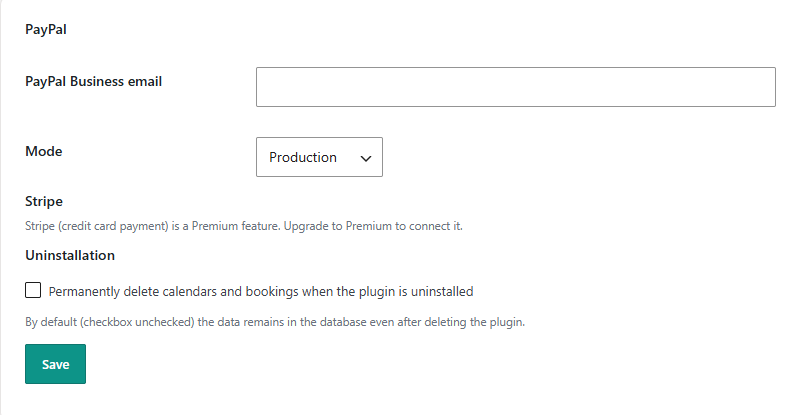
Payments settings: connect PayPal (and Stripe on Premium).
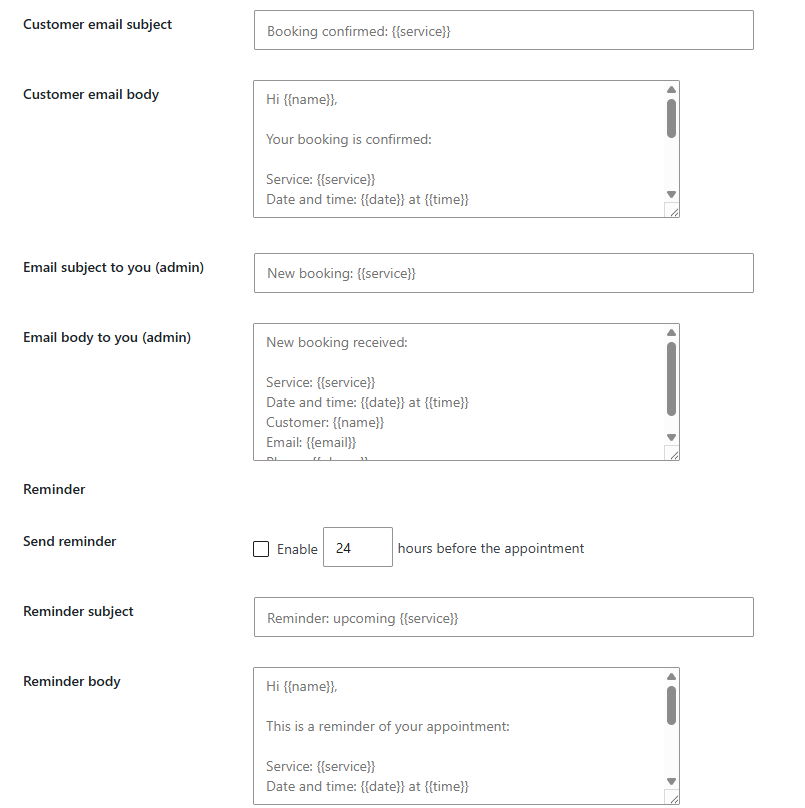
Customizable confirmation, admin and reminder emails.
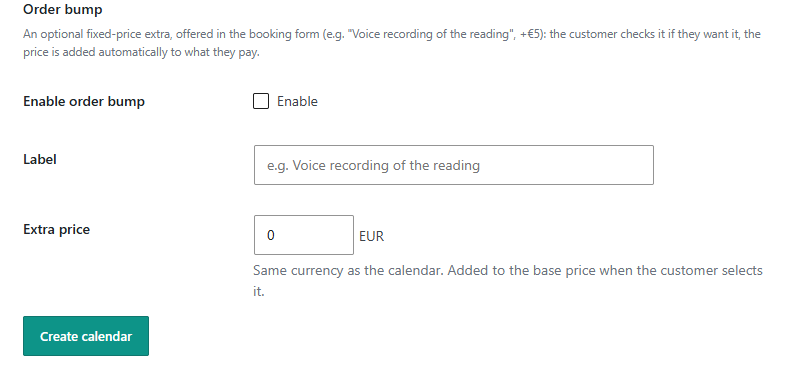
Order bump: offer a paid add-on right in the booking form.
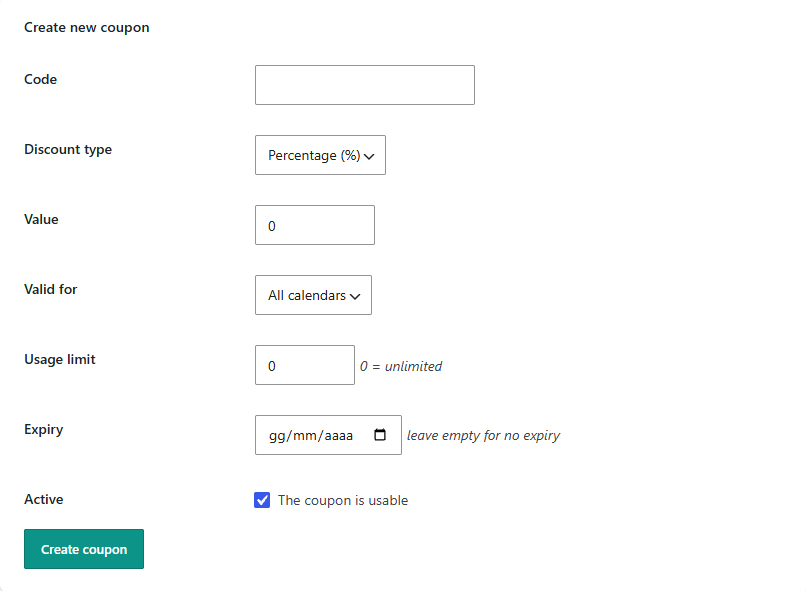
Discount coupons for your customers.
Faq
Yes. It’s not a time-limited trial: there’s no expiry date and no credit card required. It stays a fully working booking calendar with unlimited calendars and bookings, and PayPal payments, for as long as you use it.
Premium is a separate version of the plugin, called “Professional”, so this free version has no license field. Open the purchase email from Freemius, download the Professional version, then go to Plugins -> Add New Plugin -> Upload Plugin, upload the .zip file and activate it. The free version is deactivated automatically and your calendars, bookings and settings stay as they are. Professional then asks for the license key: paste the one from the purchase email. Step-by-step instructions are also in the plugin, under Booking Calendar -> Guide.
No, installation and setup are designed for people with no technical skills: just a few clicks.
Yes: copy the “Two columns (wide pages)” shortcode from Booking Calendar -> Calendars, e.g. [ctcal_booking calendar=”1″ layout=”wide”]. The form is shown in two columns, centered on the page. Where there isn’t enough room (phones, narrow columns) it automatically goes back to a single column.
Yes, you can create a calendar for each service, each with its own duration, price and working hours.
Through PayPal (and Stripe on Premium), connected directly to your own account: the money goes straight to you, the plugin never touches or holds it.
Yes: everything stays saved only on your own WordPress site, and is never shared with third parties.
Reviews
Changelog
1.0.26
- New (for developers):
ctcal_booking_paidaction, fired once when PayPal or Stripe confirms the payment of a booking, with the booking ID and calendar ID. Useful for server-side tracking (e.g. Meta Conversions API) or a CRM.
1.0.25
- Improved: an unpaid booking now holds the time for 30 minutes at most (it used to be up to two hours), and if the client cancels on PayPal or Stripe the time is freed right away: they come back to the form with their details already filled in and a message.
- New: if a PayPal payment arrives after the booking expired and the time was taken in the meantime, you get an email to contact the client.
- New: on each calendar you can stop asking for the phone number and the billing details (e.g. on a calendar you only use to set appointments with people whose details you already have). First name, last name and email are always asked.
1.0.24
- New: email placeholders {{variant}} (the variant the client chose, e.g. “60 minutes”), {{duration}} (e.g. “60 min”) and {{price}} (amount paid, surcharges and extras included).
- Improved: on calendars with variants, emails that don’t use {{variant}} or {{duration}} get an automatic “Duration” line next to the amount, so the client and you always see which duration was booked.
- Improved: the list of placeholders under the email fields of each calendar is now complete.
1.0.23
- Maintenance release: no changes for free users.
1.0.22
- New: “Copy to the other days” button next to Monday in the working hours: copies its start and end time to all the other days, without changing which days are open.
1.0.21
- Fixed: the calendar text could turn invisible (white on white) when the shortcode sits in a page builder text block with a light text color, e.g. on dark OptimizePress sections. The booking form now always keeps its own text color.
1.0.20
- Improved: in Booking Calendar -> Calendars each calendar now shows both shortcodes ready to copy, “One column” and “Two columns (wide pages)”, so you don’t need to remember the layout=”wide” option.
1.0.19
- New: two-column booking form for wide pages, with layout=”wide” in the shortcode (e.g. [ctcal_booking calendar=”1″ layout=”wide”]): calendar and times on the left, customer details and payment on the right. On phones and in narrow columns it goes back to a single column on its own.
- Fixed: the month name above the calendar could become invisible with themes or page builders that color bold text (e.g. white in OptimizePress).
1.0.18
- Fixed: apostrophes and quotes in texts saved from forms no longer get backslashes in front, which multiplied at each save, in email templates, names and addresses. Texts already saved are cleaned up automatically after the update.
1.0.17
- New: on each calendar you choose until when clients can cancel or reschedule online (24 hours before the appointment by default, also on existing calendars). After that, the “manage your booking” page asks them to contact you, so nobody can cancel a few minutes before. The deadline is shown in the emails right below the link.
- Improved: the “manage your booking” page now uses the plugin style, with clearer buttons.
- Fixed: booking and payment statuses are now translated (“Confirmed”, “Paid”…) in the manage page, in the bookings list and in the CSV export.
1.0.16
- Maintenance release: no changes for free users.
1.0.15
- Maintenance release: no changes for free users.
1.0.14
- New: Founding members offer, the first year of the annual Professional plan free with the code FOUNDING100 (first 20 people, until December 31, 2026). Shown once in the plugin pages, you can hide it with one click.
1.0.13
- New: after you receive your first few confirmed bookings, a small notice in the plugin pages invites you to leave a review on WordPress.org. You can postpone it or hide it for good with one click.
1.0.12
- Fixed: with themes that add padding to every button, the days of the booking calendar could overflow the box (the Sunday column ended up outside it). The calendar now always fits.
- Improved: the Country drop-down in the billing details now has the same style as the other fields.
1.0.11
- Fixed: with block themes (like the default WordPress themes since 2022), the booking, booking management and package pages were shown with a generic header and footer instead of your theme’s own, and without your site’s menu. They now use your theme’s header and footer.
1.0.10
- Fixed: activating the Professional version while the free version was still active caused a fatal error (“Cannot redeclare”). Now the free version is deactivated automatically, as intended, and all your data stay as they are.
- Improved: the “How to upload and activate?” link in the upgrade instructions now opens the step-by-step guide on clicktarotcalendar.com, instead of a generic external video.
1.0.8
- Added: step-by-step instructions to activate Premium after buying it, in the built-in guide (Booking Calendar -> Guide) and in the FAQ.
1.0.7
- Fixed: the numbering of the “Frequently asked questions” section in the built-in guide.
1.0.6
- English is now the plugin’s source language (previously Italian), with full Italian, Spanish and German translations kept in sync.
- Rewrote the plugin description on WordPress.org with the real story behind the plugin, translated into all 4 languages.
1.0.5
- Renamed to “Francesco Guarino Booking Calendar for Tarot Readers”, and the admin menu inside WordPress is now labelled “Booking Calendar”, for the WordPress.org listing.
1.0.4
- Renamed to “Francesco Guarino Booking Calendar for Tarot Readers” for the WordPress.org listing, to avoid confusion with an unrelated existing trademark.
- Fixed: inline PayPal redirect script and per-calendar brand color CSS now use the standard WordPress enqueue APIs instead of hand-written tags.
- Fixed: form data is now sanitized before being temporarily stored to repopulate a form after a validation error.
1.0.3
- First public release of the free version: booking calendar with unlimited calendars and bookings, PayPal payments, discount coupons, order bumps, automatic confirmation/reminder emails and availability management.