FraudLabs Pro for WooCommerce

FraudLabs Pro for WooCommerce
Description
The Fraud Prevention Plugin is designed to help merchants detect and prevent fraud orders. It performs a comprehensive check on all elements (data points) within an order to accurately detect fraudulent patterns in a fraction of a second. The check includes geolocation, proxy, email, shipping address, credit card, transaction velocity, and more. The plugin also checks against our real-time blacklist data, contributed by our global merchant network, to gauge the fraud risk associated with the order. This plugin works well with all types of the payment method, and it’s absolutely free for 500 orders validation per month or sales less than 25K USD per month.
Why FraudLabs Pro?
Flexibility
We offer you a flexible solution to identify a fraud order. You can use our FraudLabs Pro score to determine a fraud order or customize your own validation rules to target a specific case, or a combination of both.
Free
We are not offering you a trial version, but a free version to start protecting your online business. It’s absolutely free for 500 validation per month or sales less than 25K USD per month. There is no upfront credit card information needed, commitment, hidden cost and whatsoever!
Easy to setup
The setup is simple and only takes a few minutes. You just need to install the free FraudLabs Pro plugin, enter the API key and configure the settings.
Trustworthy
We have been in the fraud prevention industry for more than 10 years. Thousands of our clients are currently using our FraudLabs Pro solution. This WooCommerce plugin is one of 22 ready plugins for major shopping cart platforms. Please check out our website https://www.fraudlabspro.com for details.
Key Features
Below are the key features of FraudLabs Pro plugin for WooCommerce:
- Fraud analysis and scoring
- IP address geolocation validation
- Anonymous proxy validation
- Credit card validation
- Email address validation
- Transaction velocity validation
- Device transaction validation
- Blacklist validation
- Export controlled country validation
- Malware exploit validation
- Custom validation rules
- FraudLabs Pro Merchant Network
- Email notification of fraud orders
- Mobile App (Android & iOS) notification of fraud orders
- Allow merchant to validate the order before or after checkout process
- Support SMS Verification to further validate the fraudulent order
Start protecting your business now for free:
Sign up for a Free
Advanced Features (Paid Plans)
Secure your business with our advanced features such as:
- Comprehensive fraud reports
- Automated email whitelist
- Advanced blacklist validation
- IP and Ship Location Anomaly detection
- Hourly Sales Anomaly Detection
- IP usage type validation
- and more..
Strengthen your store protection with advanced features:
Unlock advanced features.
How to Get Started
1: Install the Plugin
Install the FraudLabs Pro Fraud Prevention plugin from the WordPress admin area and activate it.
2: Sign Up for a Free Account
Create a free account at https://www.fraudlabspro.com/sign-up to get your API key.
3: Configure the Plugin
Go to the FraudLabs Pro plugin tab, paste in your API key and review other settings.
4: Start Screening Orders Automatically
Once set up, all new orders will be automatically screened and scored by our fraud detection engine.
Resources
For detailed guides and tutorials, please visit our resources below:
* Knowledge Base Articles
* Tutorial Videos on YouTube
Installation
Install The FraudLabs Pro Plugin via The Admin Area
- Go to Plugins > Add Plugin.
- Search for “FraudLabs Pro for WooCommerce”.
- Click on the Install Now button for FraudLabs Pro for WooCommerce plugin.
- Click on the Activate button.
- Done.
Manual Installation (Use this method only if you are unable to install the plugin via the admin area)
- Download the plugin zip file.
- Unzip and upload the
fraudlabs-profolder to the/wp-content/plugins/directory. - Activate the plugin through the ‘Plugins’ menu in WordPress.
- Enter the License Key at the ‘Settings’ section. You can sign up for a free API key at https://www.fraudlabspro.com/sign-up .
How to enable the FraudLabs Pro feature
- Click on the FraudLabs Pro menu page.
- Check the Enabled check box to enable it.
- Enter your FraudLabs Pro API Key. You can sign up for a free API key at https://www.fraudlabspro.com/sign-up.
- Click on the Save Settings button.
For more information, please visit https://www.fraudlabspro.com/supported-platforms/woocommerce
Screenshots
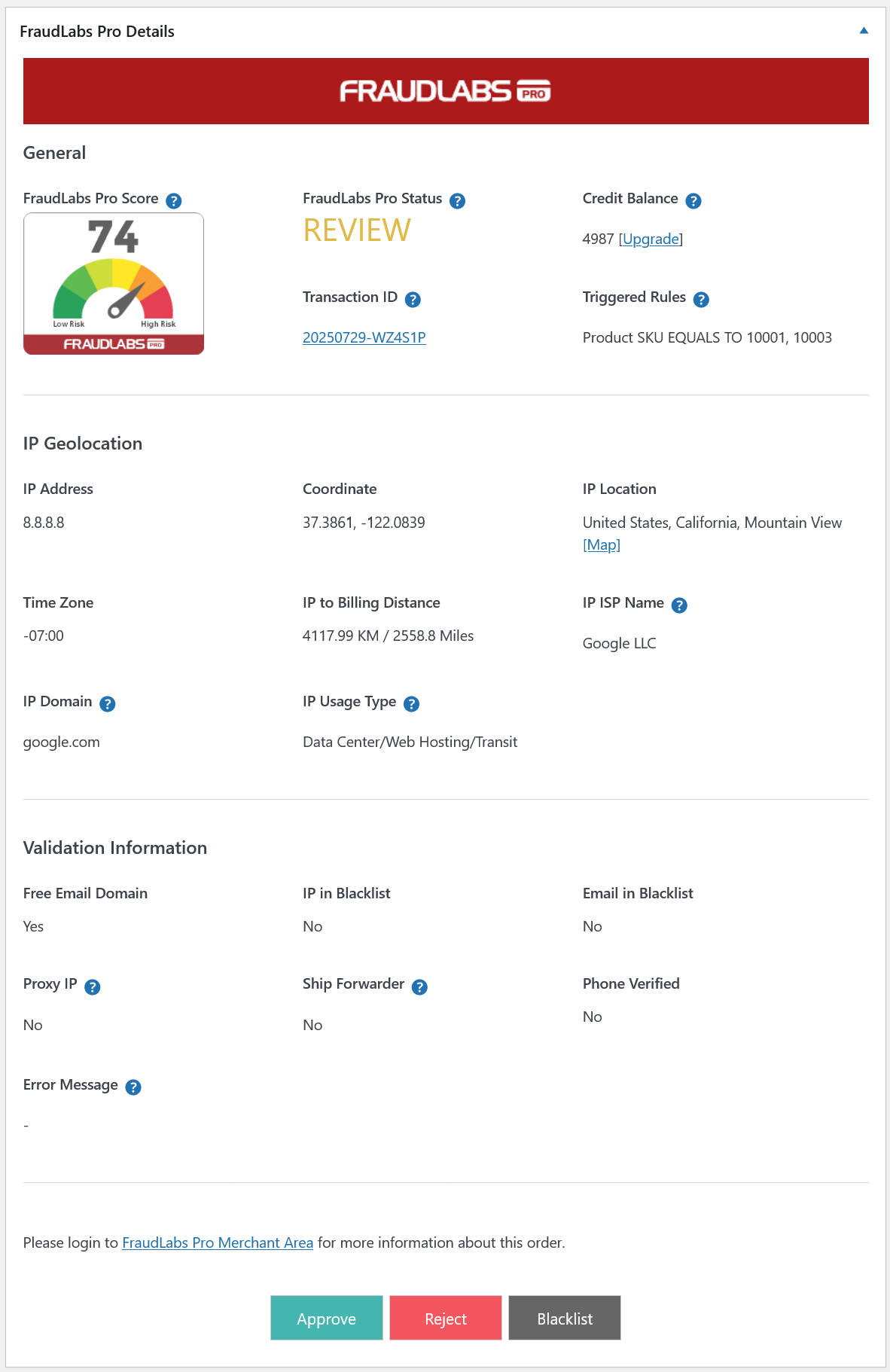
Fraud result - Fraud result of the order validation.
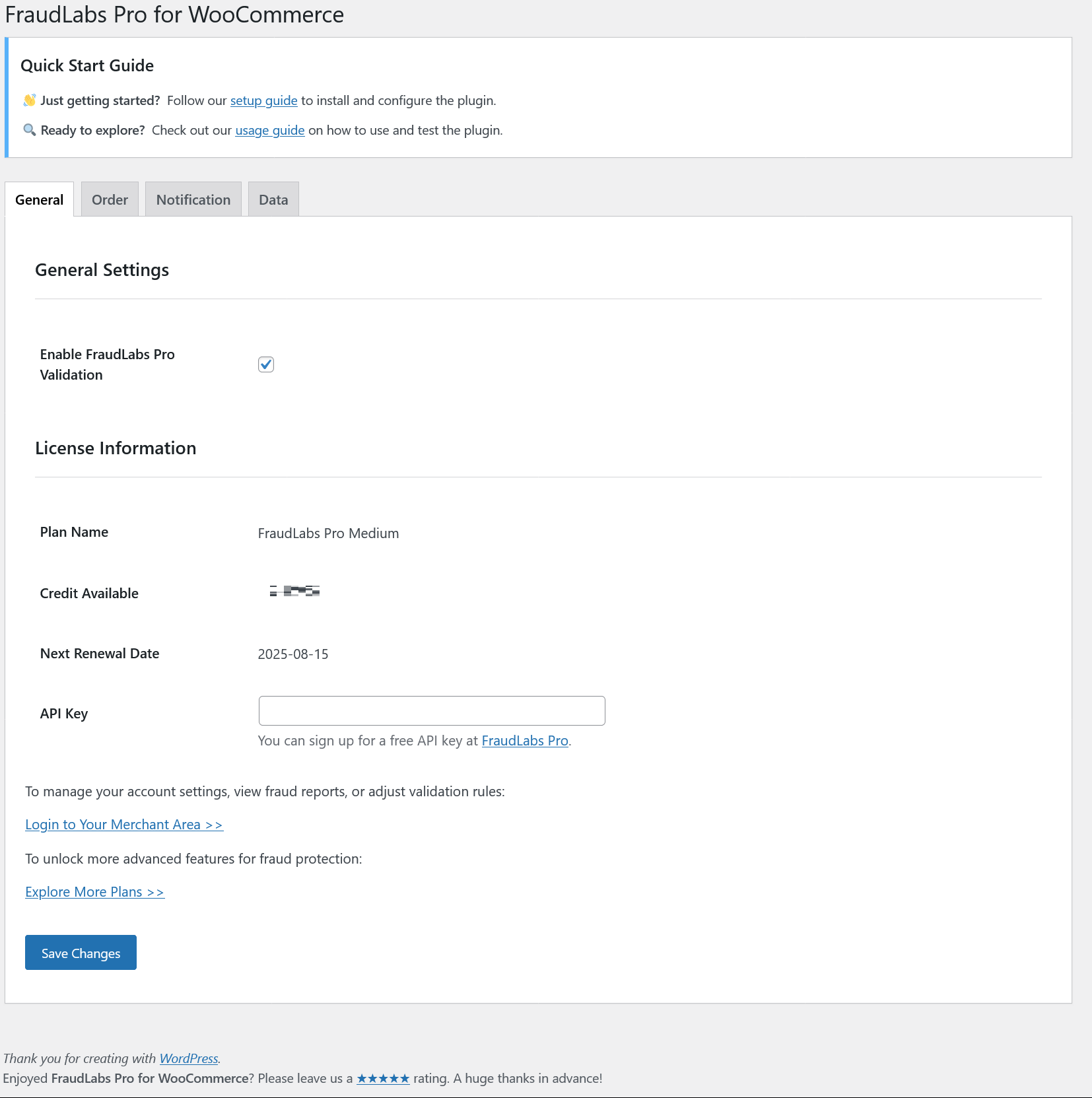
Settings page - FraudLabs Pro for WooCommerce Settings page General Tab.
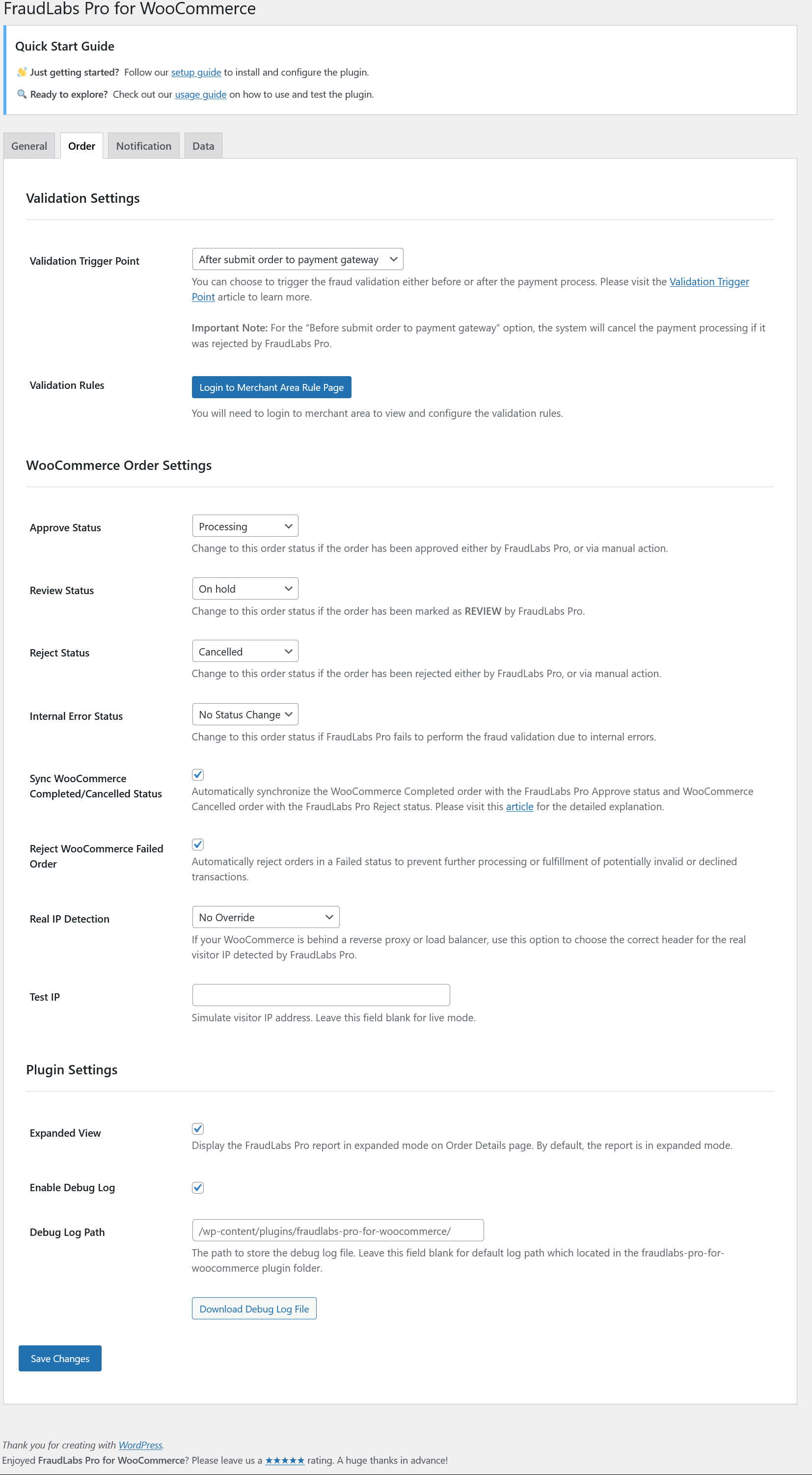
Settings page - FraudLabs Pro for WooCommerce Settings page Order Tab.
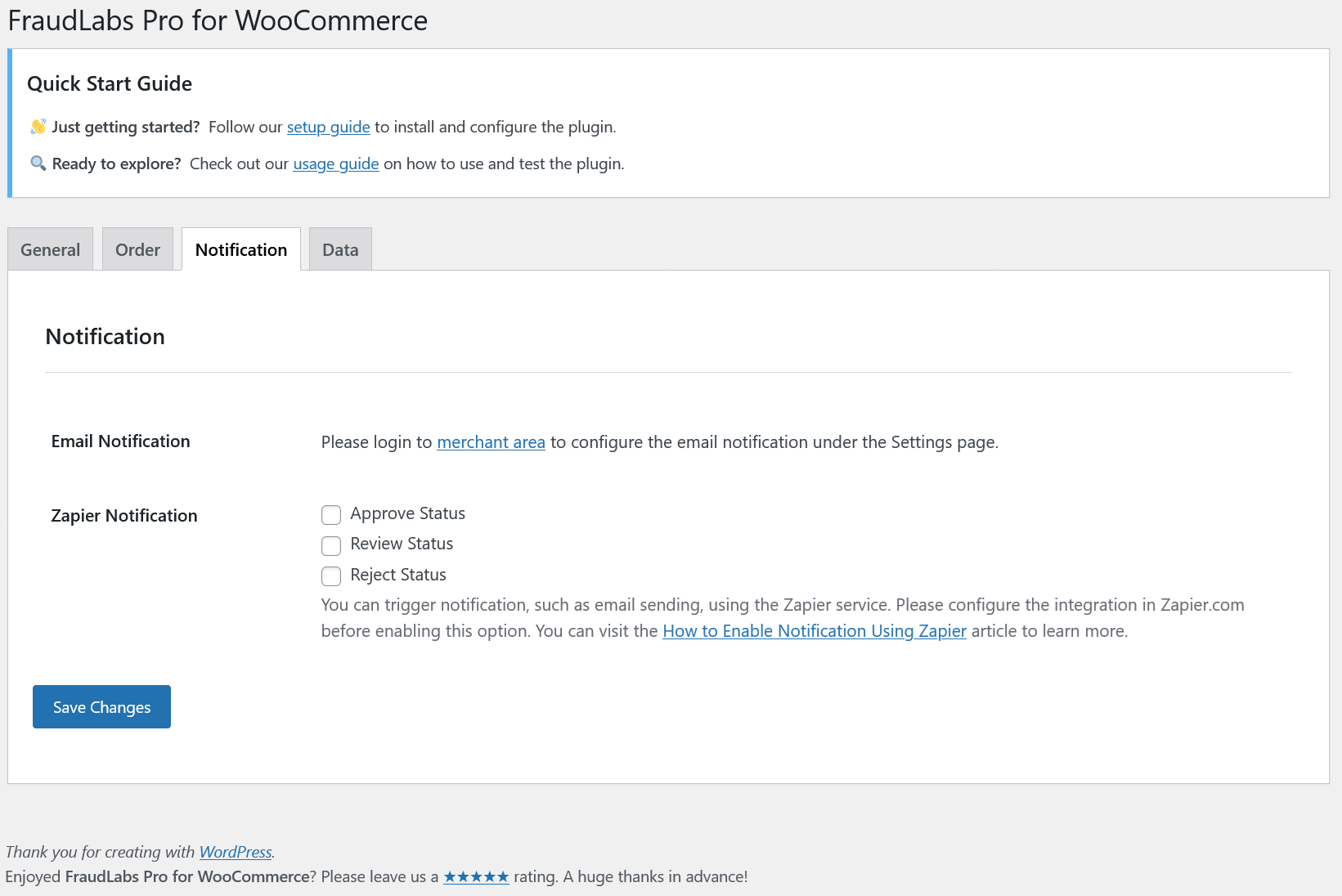
Settings page - FraudLabs Pro for WooCommerce Settings page Notification Tab.
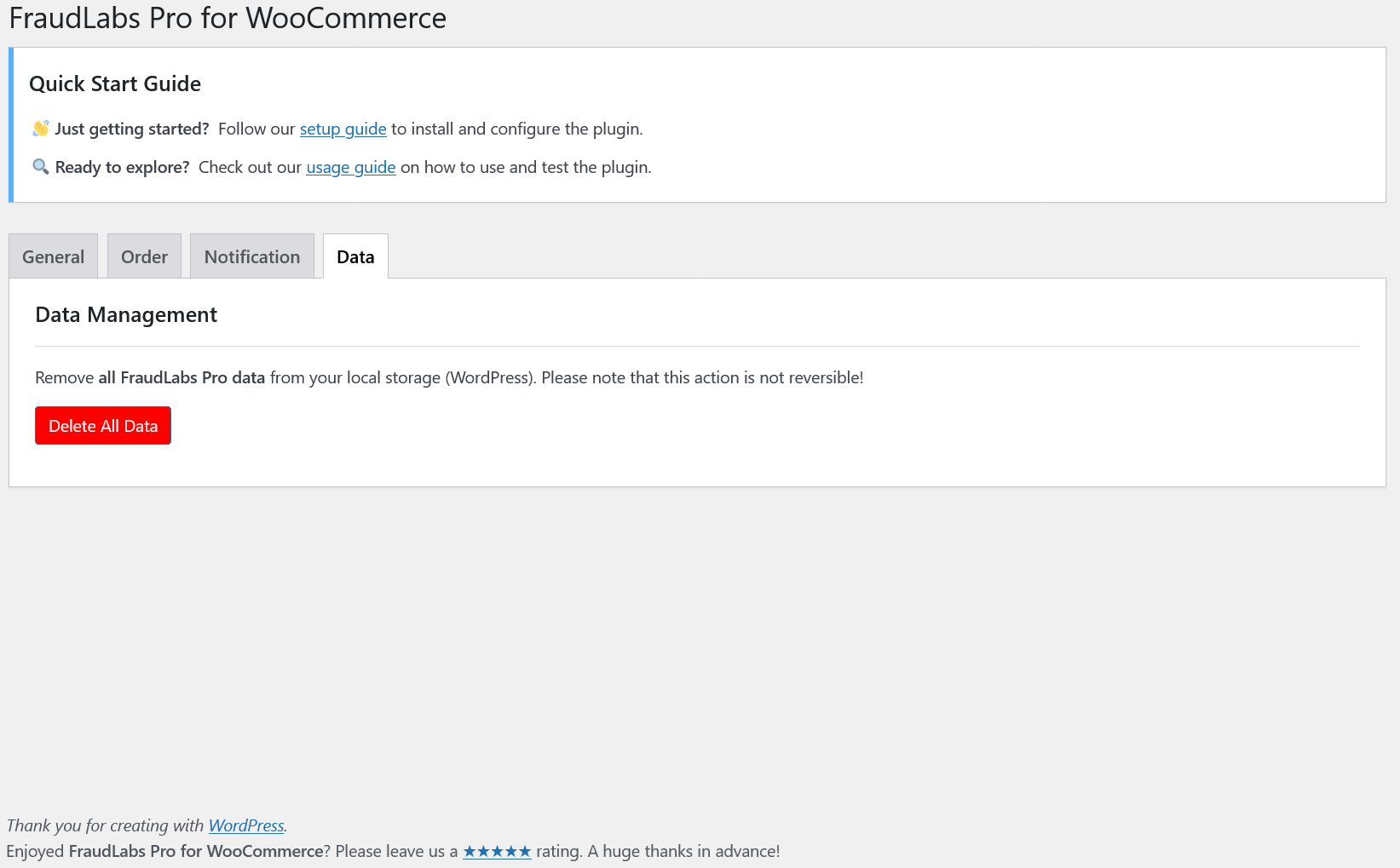
Settings page - FraudLabs Pro for WooCommerce Settings page Data Tab.

Order listing - Order listing summary page.
Reviews
GREAT PLUGIN
By 
and really helps stop fraudulent PayPal card testing attempts. If you’re dealing with fake or risky orders, this is definitely worth using. The pricing is flexible based on usage, and the Free Plan is more than enough for many small to medium shops."
Blocking fraudulent paypal orders
By 
We offer paypal and stripe methods on our website and fraudlabs pro has been doing it's job in flagging, based on our rules, orders we want to check before proceeding. The SMS extension of fraudlabs pro is pretty clunky and has confused our customers so we've turned that off, but fraudlabs pro is solid and the plugin seems to be getting better over time too.
Avoid PayPal Abuse
By 
Excellent plugin for reducing fraudulent checkouts in Woo. We also use this plugin to prevent "scammers" from testing cards at PayPal.
If you are getting fake orders we recommend trying this plugin!
They have a usage-based pricing system, the Free Plan works fine for a lot of our Woo retailers.
The plugin stopped working with HPOS Update.
By 
Hello, i just want to inform you that your plugin is not showing anydata after the WPOS update.
Review after 4 years of paid version
By 
False sense of security
By 
Very helpful
By 
Easy to use, works perfectly!
By 
5 stars Plugin
By 
Not as good as it used to be
By 
Changelog
- 2.23.4 Fixed Before Payment Validation not working issue.
- 2.23.3 Updated Before Payment Validation.
- 2.23.2 Removed legacy order properties.
- 2.23.1 Updated hash function.
- 2.23.0 Enhanced Settings page and Fraud result.
- 2.22.15 Updated database queries.
- 2.22.14 Fixed link expired issue.
- 2.22.13 Fixed vulnerability issue.
- 2.22.12 Enhanced nonce check in callback.
- 2.22.11 Added nonce check in callback.
- 2.22.10 Updated validation_sequence variable type.
- 2.22.9 Added escape check.
- 2.22.8 Added nonce check.
- 2.22.7 Fixed incorrect BIN number detection.
- 2.22.6 Updated all FraudLabs Pro API to v2.
- 2.22.5 Fixed CSRF vulnerability in settings page.
- 2.22.4 Fixed PHP deprecated error.
- 2.22.3 Fixed SQL syntax error.
- 2.22.2 Updated Review Status change settings.
- 2.22.1 Added option to Reject WooCommerce Failed Order.
- 2.22.0 Supported WooCommerce Failed status in fraud validation.
- 2.21.1 Fixed BIN number retrieval issue.
- 2.21.0 Added real IP header detection.
- 2.20.3 Added Requires Plugins.
- 2.20.2 Improved debugging log for API call.
- 2.20.1 Updated payment mode categorization.
- 2.20.0 Supported WooCommerce HPOS.
- 2.19.3 Added debug log for API call.
- 2.19.2 Fixed uncaught TypeError.
- 2.19.1 Fixed uncaught error.
- 2.19.0 Updated to FraudLabs Pro API v2.
- 2.18.5 Updated settings page to allow Approve Status changes for all Validation Trigger Point.
- 2.18.4 Fixed missing risk score column in orders page for HPOS.
- 2.18.3 Fixed fraud report display issue for HPOS.
- 2.18.2 Fixed undefined array key warning.
- 2.18.1 Renamed Automated Order Approval/Rejection to Sync WooCommerce Completed/Cancelled Status option in settings page and improved logging.
- 2.18.0 Added Automated Order Approval/Rejection option in settings page.
- 2.17.8 Updated debug log.
- 2.17.7 Updated “Requires at least” information.
- 2.17.6 Supported item type classification.
- 2.17.5 Fixed uncaught TypeError.
- 2.17.4 Fixed missing device information issue.
- 2.17.3 Fixed undefined array key for auto complete and cancel order.
- 2.17.2 Removed old Agent JavaScript.
- 2.17.1 Added payment gateway information for screen/order API.
- 2.17.0 Added new Agent JavaScript.
- 2.16.19 Updated timeout value.
- 2.16.18 Converted private IP address.
- 2.16.17 Improved BIN number retrieval.
- 2.16.16 Improved settings page and fixed fraud message issue.
- 2.16.15 Improved settings page and enhanced checking.
- 2.16.14 Fixed invalid quantity issue.
- 2.16.13 Updated UI and notes display.
- 2.16.12 Improved settings page.
- 2.16.11 Added debug log path configuration in settings page.
- 2.16.10 Updated order feedback fields.
- 2.16.9 Fixed AVS and CVV result verification issue.
- 2.16.8 Enhanced settings page.
- 2.16.7 Fixed missing Device ID issue.
- 2.16.6 Updated settings page.
- 2.16.5 Added Wizard form dismiss and advanced velocity.
- 2.16.4 Added Wizard form upon plugin activation.
- 2.16.3 Added Expand Fraud Report option in settings page.
- 2.16.2 Fixed activation issue.
- 2.16.1 Improved settings page.
- 2.16.0 Updated file structures to use composer for FraudLabs Pro PHP SDK.
- 2.15.0 Support Zapier notification based on fraud status.
- 2.14.11 Fixed billing and shipping country invalid issue.
- 2.14.10 Added checking for bitpay.
- 2.14.9 Fixed order status changed for complete order.
- 2.14.8 Code fixes.
- 2.14.7 Update field name and notification.
- 2.14.6 Added new checking param.
- 2.14.5 Code fixes.
- 2.14.4 Update order status list and added status for internal errors.
- 2.14.3 Fixed undefined index issue.
- 2.14.2 Fixed undefined property issue.
- 2.14.1 Fixed license information update issue.
- 2.14.0 Add Triggered Rules into report page.
- 2.13.10 Fixed order status changed issue.
- 2.13.9 Fixes for callback function.
- 2.13.8 Added checking for cybersource_credit_card.
- 2.13.7 Added new paymentmode checking.
- 2.13.6 Added checking for paypal_express.
- 2.13.5 Update data checking.
- 2.13.4 Fixes for WordPress coding standards.
- 2.13.3 Fixed status not change in settings page.
- 2.13.2 Added feedback request.
- 2.13.1 Bug fixes.
- 2.13.0 Support notification based on fraud status using Zapier.
- 2.12.6 Update Paymitco checking.
- 2.12.5 Fixed IP checking issue.
- 2.12.4 Update info display.
- 2.12.3 Added checking for ppec_paypal.
- 2.12.2 Placed agent javascript in checkout page.
- 2.12.1 Fixed SKU checking issue.
- 2.12.0 Supported product SKU validation.
- 2.11.11 Added new paymentmode checking.
- 2.11.10 Fixed IP error for order screen.
- 2.11.9 Added new paymentmode checking.
- 2.11.8 Added new paymentmode checking.
- 2.11.7 Update settings page.
- 2.11.6 Added is_phone_verified field.
- 2.11.5 Minor fixes.
- 2.11.4 Minor fixes and added callback code.
- 2.11.3 Update debug log contents.
- 2.11.2 Fixed country matching issue.
- 2.11.1 Minor fixes.
- 2.11.0 Added option to delete all plugin data.
- 2.10.14 Minor fixes.
- 2.10.13 Added debug log.
- 2.10.12 Fixed loopback request error.
- 2.10.11 Updated default timeout value.
- 2.10.10 Removed retry limit.
- 2.10.9 Fixed order page issue.
- 2.10.8 Minor fixes.
- 2.10.7 Fixed SVG error.
- 2.10.6 Fixed IP address validation issue.
- 2.10.5 Added ip fields for order/screen API.
- 2.10.4 Reorganized and updated Settings page.
- 2.10.3 Fixed display and IP address validation issues.
- 2.10.2 Minor changes.
- 2.10.1 Added new fields for order/screen API.
- 2.10.0 Improved fraud verification to stop transaction from submitted to payment gateway if verification failed.
- 2.9.3 Fixed sync issue when user click on “Approve” or “Reject” button.
- 2.9.2 Removed On-Hold and Cancel Score.
- 2.9.1 Fixed issue when user click on “Approve” or “Reject” button.
- 2.9.0 Removed SMS verification feature.
- 2.8.17 Fixed compatible issue with WooCommerce 3.
- 2.8.16 Added “Blacklist” button.
- 2.8.15 Added fields for order screens.
- 2.8.14 Fixed minor bugs.
- 2.8.13 Fixed email formatting issues.
- 2.8.12 Removed fraud screening on failed order which causing false positive result.
- 2.8.11 Fixed wrong order ID when using third party plugins.
- 2.8.10 Added fraud screening on failed order.
- 2.8.9 Fixed close admin notice issue.
- 2.8.8 Added option to enable/disable fraud report email.
- 2.8.7 Fixed issue order status changed to blank when review action is not selected.
- 2.8.6 Fixed warning message in debug log.
- 2.8.5 Fixed warning messages when WP debug mode enabled.
- 2.8.4 Minor changes.
- 2.8.3 Fixed errors with WordPress 4.5.
- 2.8.2 Custom approve and reject status based FraudLabs Pro result is now available.
- 2.8.1 Fixed SMS settings bugs causing SMS verification to appear when it is not enabled.
- 2.8.0 Added Javascript agent to detect device information.
- 2.7.0 Added SMS verification feature during checkout.
- 2.6.1 Tested with WordPress 4.4.
- 2.6.0 Added additional retries when API gateway is timed out.
- 2.5.4 Minor fixes.
- 2.5.3 Added order note when user click on the “Approve” or “Reject” button (for no-status-change case).
- 2.5.2 Added order note when user click on the “Approve” or “Reject” button.
- 2.5.1 Added custom actions for “Approve” and “Reject” button.
- 2.5.0 Fixed order status not changing after pressing “Approve” or “Reject” button.
Added risk score column in orders list for easier reference. - 2.4.2 Fixed the issue of undefined function for get_address in order object.
- 2.4.1 Use customer IP address for fraud check instead of checkout IP.
- 2.4.0 Customer no longer see their order being rejected or review.
Fixed issue when submitting order to payment gateway.
Added detailed notes of fraud the progress. - 2.3.0 Your order will now on-hold or cancelled based on FraudLabs Pro result.
- 2.2.4 Fixed missing billing address and other some minor changes.
- 2.2.3 Added responsive fraud result and minor tuning.
- 2.2.2 Added links to documentation and API key.
- 2.2.1 Stop detecting client IP using X_FORWARDED_FOR header.
- 2.2.0 Added email notification with fraud result to store owner.
- 2.1.1 Detect client IP correctly if WordPress installed behind load balancer or proxy.
- 2.1.0 Fixed issue cannot read API key value.
- 2.0.0 Fully integrated into WooCommerce.
- 1.1 Fixed to match WooCommerce standards.
- 1.0 First release.