Free PDF to Flipbook

Free PDF to Flipbook
Description
Free PDF to Flipbook lets you quickly transform PDF files into realistic, interactive flipbooks directly inside WordPress.
The plugin is useful for catalogs, brochures, magazines, eBooks, portfolios, restaurant menus, product sheets and online documents. You can upload a PDF from your computer, select a PDF from the WordPress Media Library, generate a shortcode and place the flipbook inside any page or post.
The flipbook is rendered locally on your WordPress site using the bundled PDF.js and Turn.js libraries. No external conversion service or third-party API is required.
Main Features
- Convert PDF files into interactive flipbooks
- Upload PDFs from your computer
- Select existing PDFs from the WordPress Media Library
- Simple shortcode embed
- One-click Copy Shortcode button in admin
- Responsive layout for desktop, tablet and mobile
- Automatic single-page mode on mobile
- Choose single-page or double-page view on desktop
- Solid color background customization
- Automatic PDF hyperlink detection
- Clickable internal and external PDF links
- Smooth page-turn animation
- Zoom and drag support
- Previous and next navigation arrows
- Page counter and quick page jump
- Support for multiple flipbooks on the same page
- Works with most WordPress themes
- No external services required
- Local rendering for better privacy
Admin Options
- Modern admin interface
- Upload PDF from local computer
- Select PDF from Media Library
- Manage created flipbooks in a clean table
- Copy shortcode quickly
- Customize flipbook background color
- Choose desktop page mode
- Choose navigation arrow style
Premium Options
Premium options are available for users who want more control over the appearance and branding of their flipbooks.
- Remove the Free PDF to Flipbook watermark
- Upload a custom logo
- Use image backgrounds
- Customize navigation arrow color
- Enable advanced page counter and quick page jump tools
- Automatic clickable hyperlink detection inside PDF pages
Shortcode
Use this shortcode to display a flipbook:
[fptf-flipbook pdf="https://yoursite.com/file.pdf"]
You can place the shortcode inside posts, pages, custom post types or page builders that support shortcodes.
Plugin Sources
This plugin uses the following open-source libraries:
- PDF.js – Apache 2.0
https://github.com/mozilla/pdf.js
Included files: js/pdf.js, js/pdf.worker.js
- Turn.js – GPL
https://www.turnjs.com/
Included file: js/turnV5.js
All libraries are bundled with the plugin and used according to their licenses.
Installation
- Upload the plugin ZIP file via Plugins > Add New > Upload Plugin
- Activate the plugin
- Open the PDF TO FLIPBOOK menu in your WordPress dashboard
- Upload a PDF or select one from the Media Library
- Copy the generated shortcode
- Paste the shortcode into any page or post
Screenshots
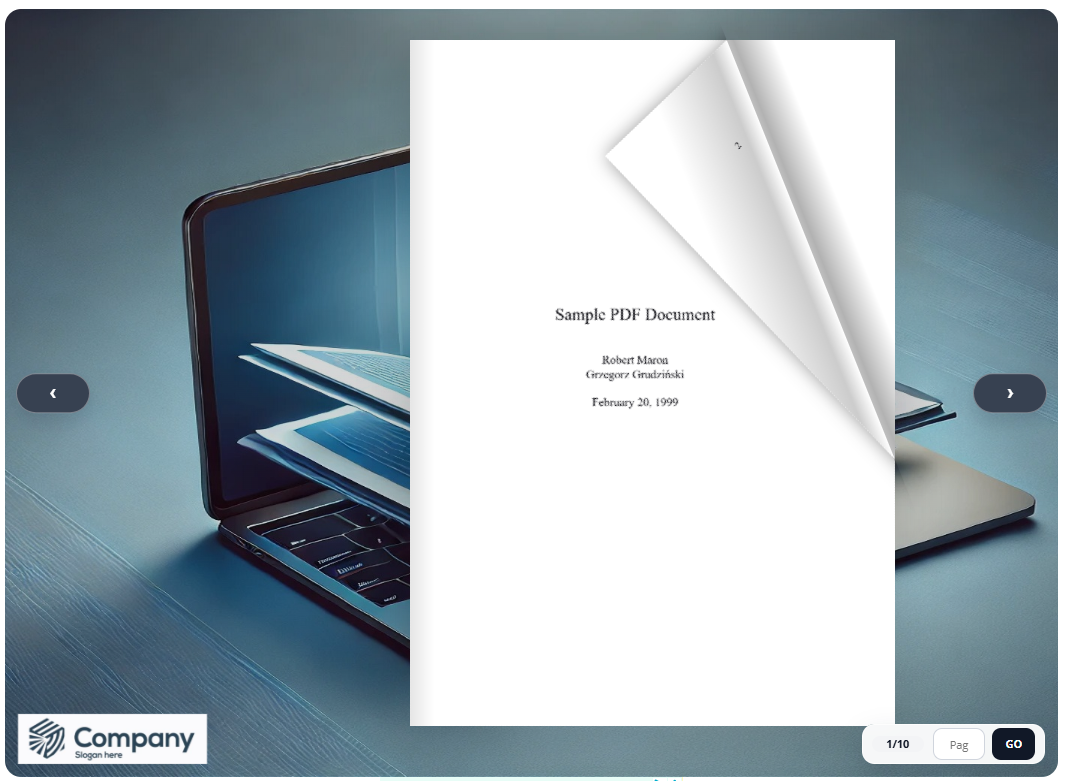
Flipbook embedded on a WordPress page
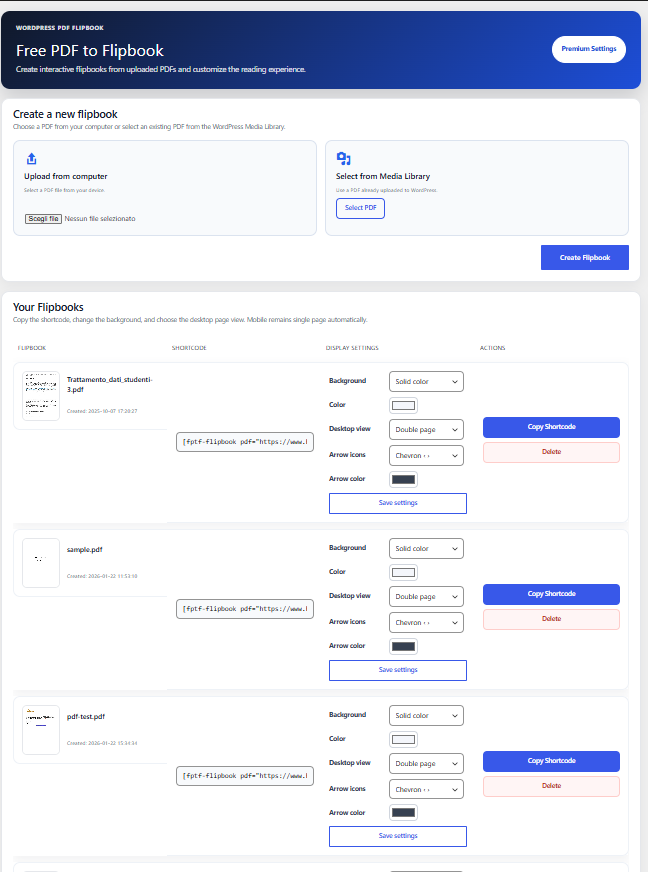
Admin page with PDF upload options
Faq
Upload your PDF from the plugin admin page, copy the generated shortcode and paste it into any WordPress page or post.
Yes. You can upload a new PDF from your computer or select an existing PDF from the WordPress Media Library.
Yes. The plugin supports multiple flipbooks on the same page or post.
Yes. Flipbooks are responsive and mobile-friendly. On mobile devices, the plugin automatically uses single-page view for better readability.
Yes. You can choose the desktop view mode from the plugin admin area. Mobile view remains single-page automatically.
Yes. PDF hyperlinks are automatically detected. Internal page links and external URLs can be opened directly from the flipbook.
No. PDF rendering happens locally in your WordPress site using bundled JavaScript libraries.
Yes. The free version supports solid color backgrounds. Premium users can also use image backgrounds.
The free version displays the Free PDF to Flipbook watermark. Premium users can remove it or replace it with a custom logo.
Yes. You can use the shortcode with most page builders that support WordPress shortcodes.
Reviews
The flipbook that doesn’t waste your time
By 
Install, upload your PDF, add the shortcode—two minutes later you’ve got a responsive flipbook with page-flip animation and zoom. No weird dependencies, no endless configuration. Premium options make sense (branding with your logo, remove watermark, page counter + jump) and they don’t slow down the front end.
Single page on mobile makes reading comfortable; on larger screens the double-page spread looks great. Perfect for product catalogs, price lists, and manuals. A must if you want quality and simplicity together.
Changing review
By 
My first review was that the plugin had some errors in my opinion.
The developer of Free PDF to Flipbook responded very quickly and within 1 hour and 50 minutes the plugin was almost rewritten into a very awesome plugin that quickly and easily converts a PDF file into a Flipbook.
Thanks to the developer of Free PDF to Flipbook.
successful
By 
A simple and successful plugin that does its job properly.
Easy WordPress Flipbook Maker
By 
Choose a PDF and create a shortcut code to add in a post or page. The PDF is magically displayed as a flipbook and automatically adjusts to the page width. Excellent plugin.
Changelog
1.7
- Improved admin interface
- Added upload from computer and Media Library selection
- Added cleaner flipbook management table
- Added background color customization
- Added desktop single-page / double-page mode option
- Added automatic single-page mode on mobile
- Added navigation arrow style selection
- Added improved page counter and quick page jump design
- Added support for multiple flipbooks on the same page
- Improved PDF rendering for non-standard PDF sizes
- Improved clickable PDF link detection
- Improved watermark visibility
- Added Premium options for custom logo, image background, watermark removal and arrow color customization
- Fixed layout issues on first and last pages
- Fixed link positioning when multiple flipbooks are used on the same page
1.6
- Added clickable PDF links support
- Improved rendering accuracy
- UI improvements
1.4
- Added upload from Media Library
1.3
- Performance optimizations
1.2
- Added custom post type support
1.1
- Added shadow gradient
1.0
- Initial release