Frontend Dashboard

Frontend Dashboard
Description
Frontend Dashboard — Built for Modern WordPress Portals
Frontend Dashboard provides a complete frontend portal for WordPress sites with modular controls for user management, post publishing, custom menus, and branding.
Take full control of the user experience by allowing members, authors, and customers to manage their profiles, submit posts, and navigate custom dashboards directly on the frontend — without ever accessing the wp-admin dashboard.
Key Features
- Modern App Shell & Responsive Layout: Clean, fast frontend dashboard interface powered by Tailwind CSS with responsive slide-over navigation.
- Modern Rich Text & Block Editors: Choose between Editor.js (block editor with headers, images, quotes, lists, tables), TipTap (WYSIWYG modern editor), or the classic WordPress Editor for frontend post publishing.
- Custom Authentication Flow: Custom Login, Registration, and Forgot Password pages with custom redirects before/after login, register, and logout.
- WP Admin Restriction: Restrict access to the WordPress backend (
/wp-admin/) and admin toolbar based on user roles. - Custom User Roles: Create, manage, and assign custom user roles with specific dashboard capabilities.
- Custom Profile & Post Fields: Create unlimited custom fields for user profiles and post types with role-based visibility and permissions.
- Built-in Templates & Page Mappings: Built-in modern dashboard templates, extra form fields, and page loaders merged directly into Core.
- File Upload Controls: Role-based permissions to allow or restrict media uploads in the frontend dashboard.
- Frontend Post & Taxonomy Management: Add, edit, and delete posts or custom post types and taxonomies with role permissions.
- Add-ons & Extensions Hub: Browse, install, and activate official Frontend Dashboard add-ons with 1-click management and real-time catalog updates.
- System Status & Diagnostics: Built-in system environment diagnostic tools, database health checks, and activity logging.
- Theme Matching & Custom Styling: Customize dashboard theme colors and UI options to seamlessly match your site design.
Official Add-ons & Extensions
- Custom Post and Taxonomies (Free)
- Notification (Free)
- Captcha (Free)
- Social Chat (Free)
- Frontend Dashboard for WooCommerce (Free)
- Membership (Pro)
- Pay Per Post (Pro)
- User Management (Pro)
- Social Connect (Pro)
Note: Frontend Dashboard Templates, Extra, and Pages have been merged directly into Core in v3.0.0.
Installation
- Upload the
frontend-dashboarddirectory to your/wp-content/plugins/directory, or uploadfrontend-dashboard.zipvia WordPress Admin Plugins Add New Upload Plugin. - Activate the plugin through the Plugins menu in WordPress.
- Navigate to Frontend Dashboard Settings to configure your login, registration, and dashboard pages.
- Save settings and assign your custom dashboard pages.
Screenshots
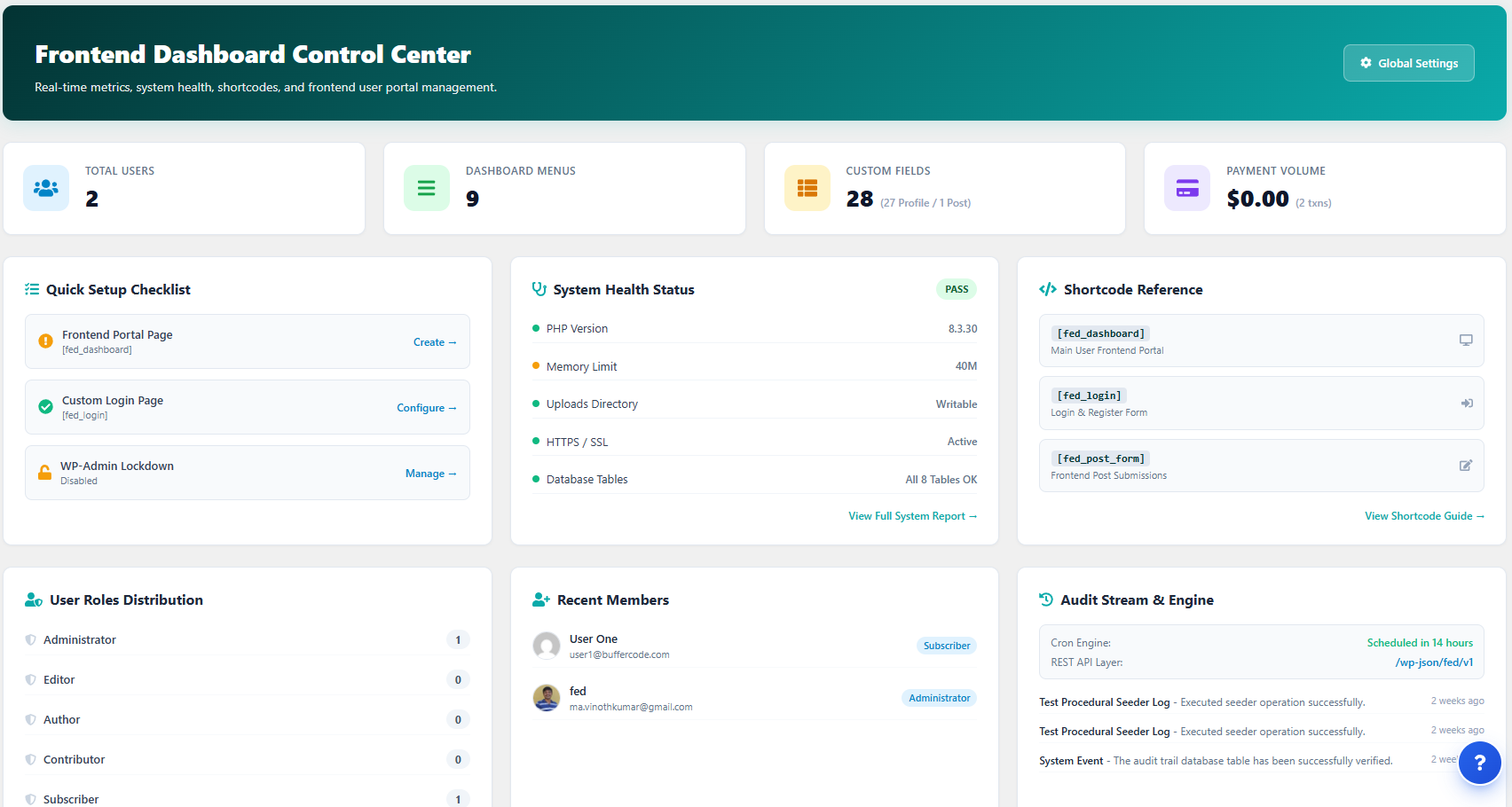
Frontend Dashboard Control Center.
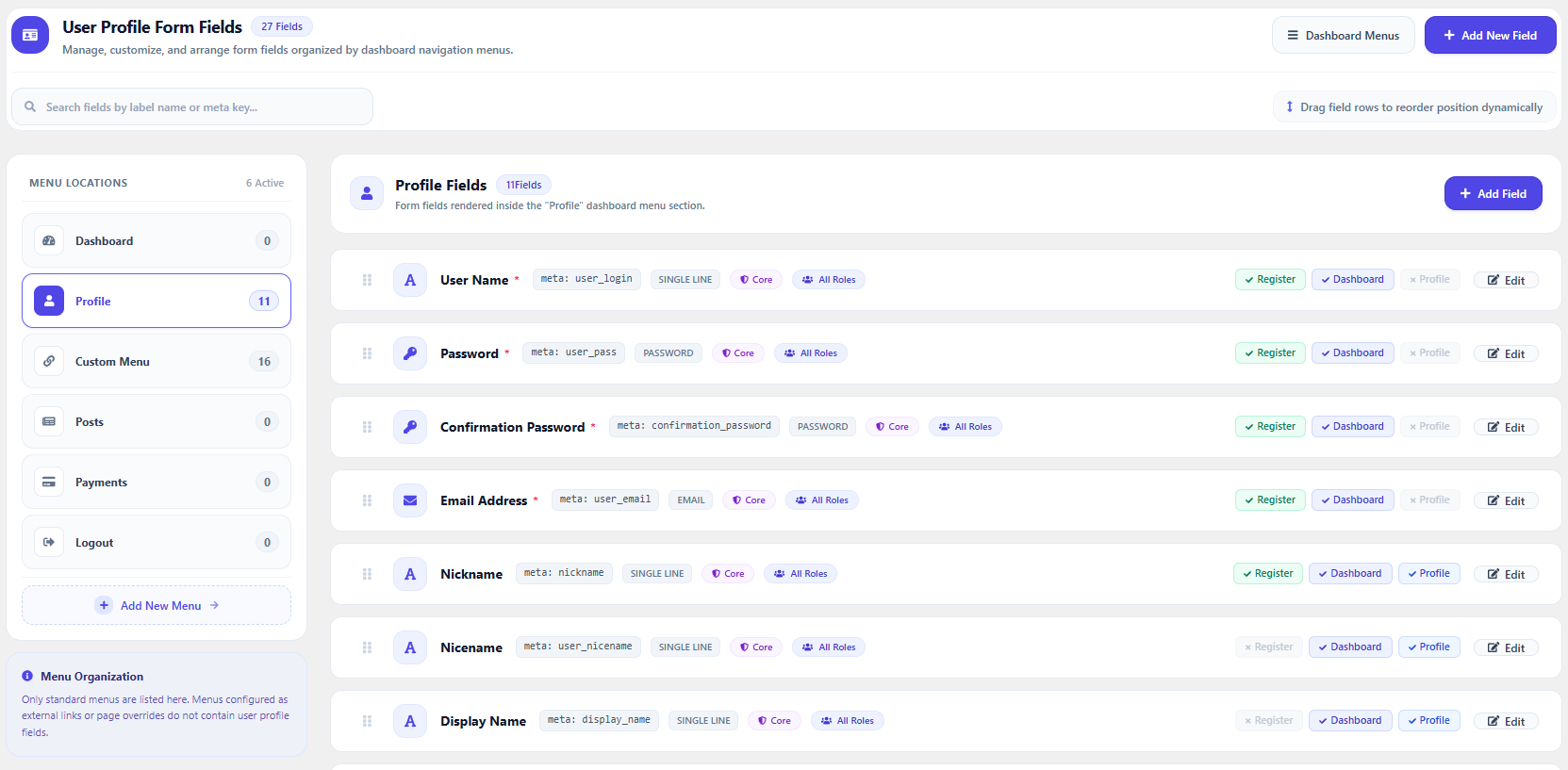
User Profile fields
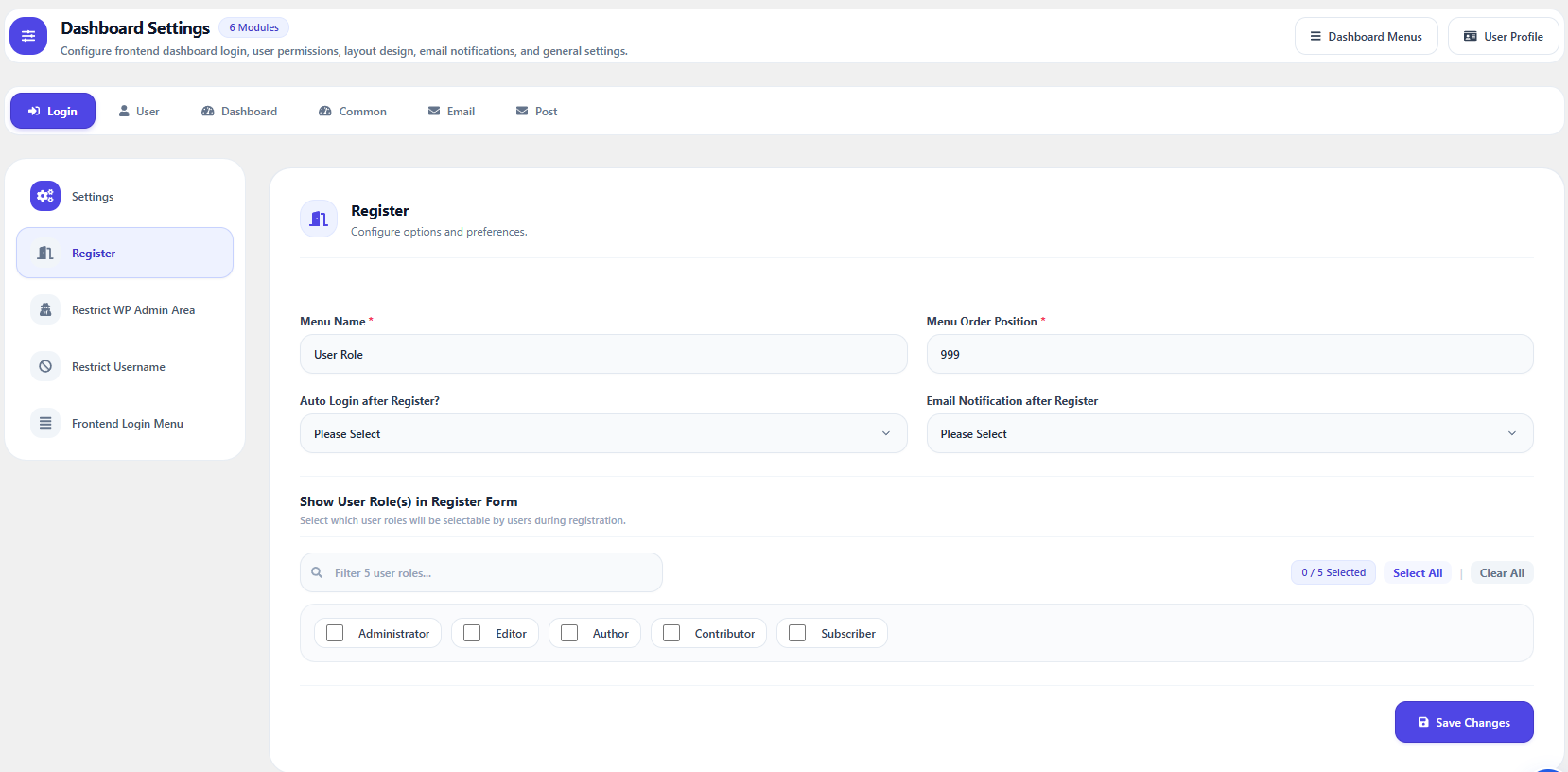
Frontend Dashboard Settings — Register
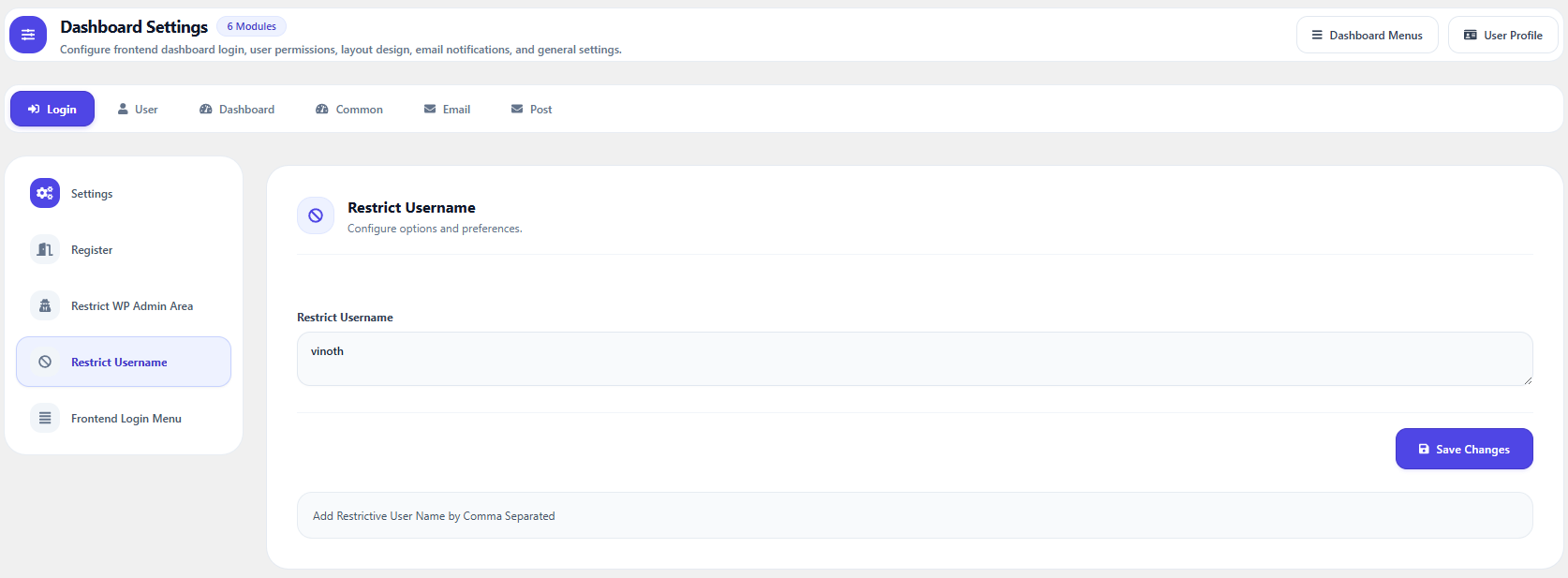
Frontend Dashboard Settings — Restrict Username
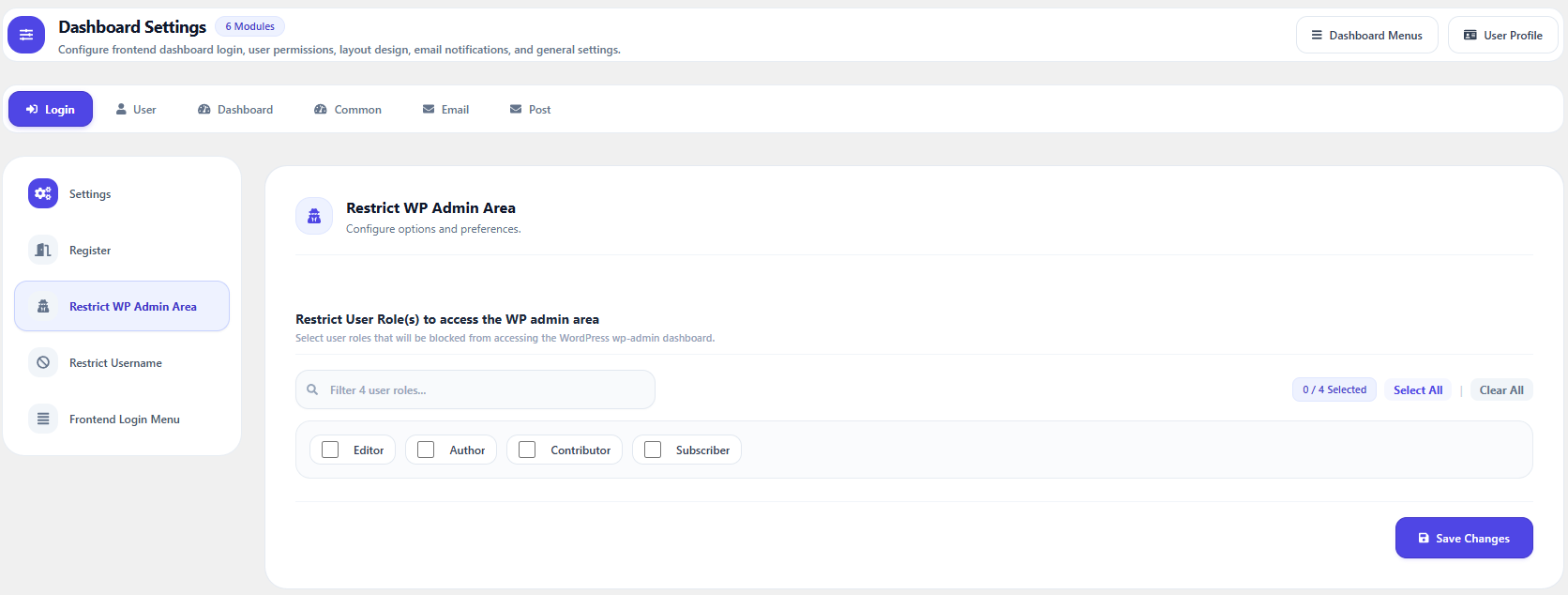
Frontend Dashboard Settings — Restrict WP Admin area
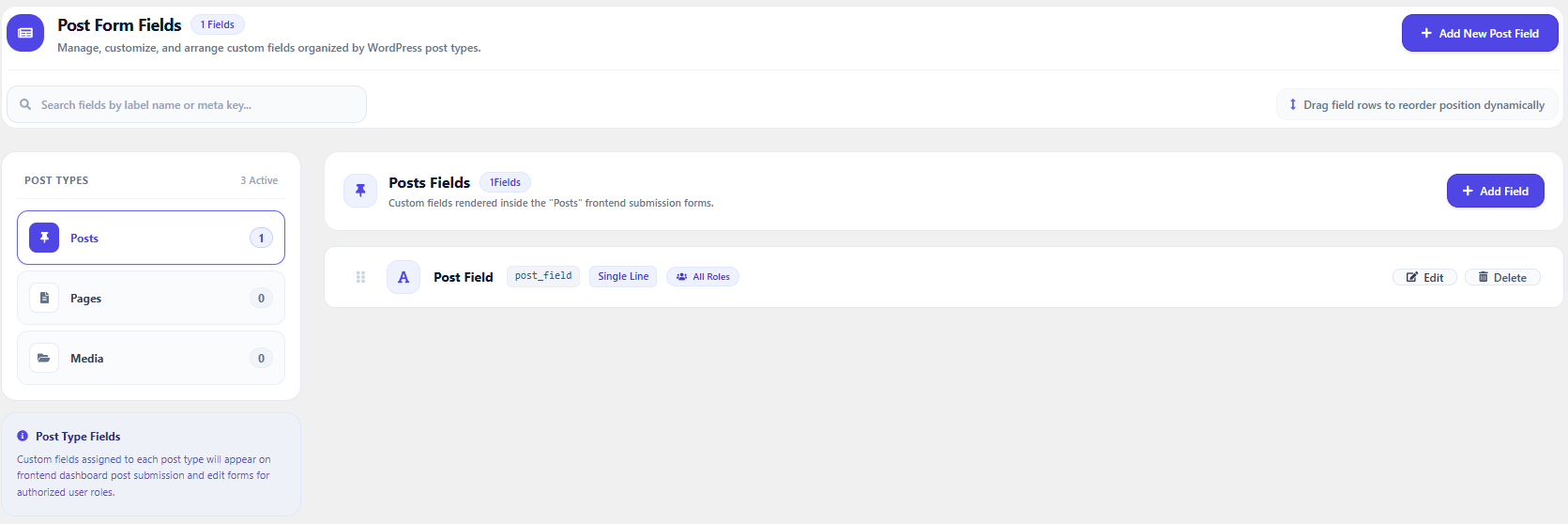
Post Form fields
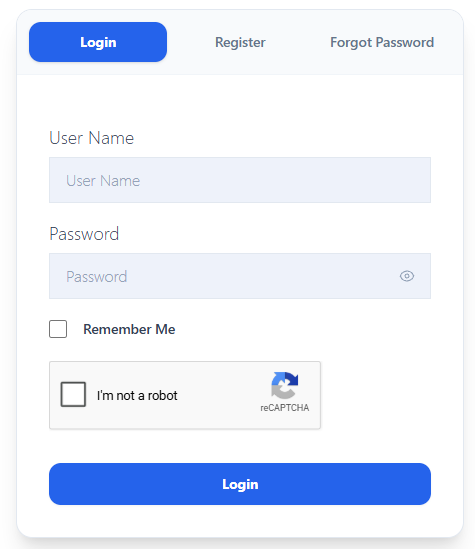
Login, Register page
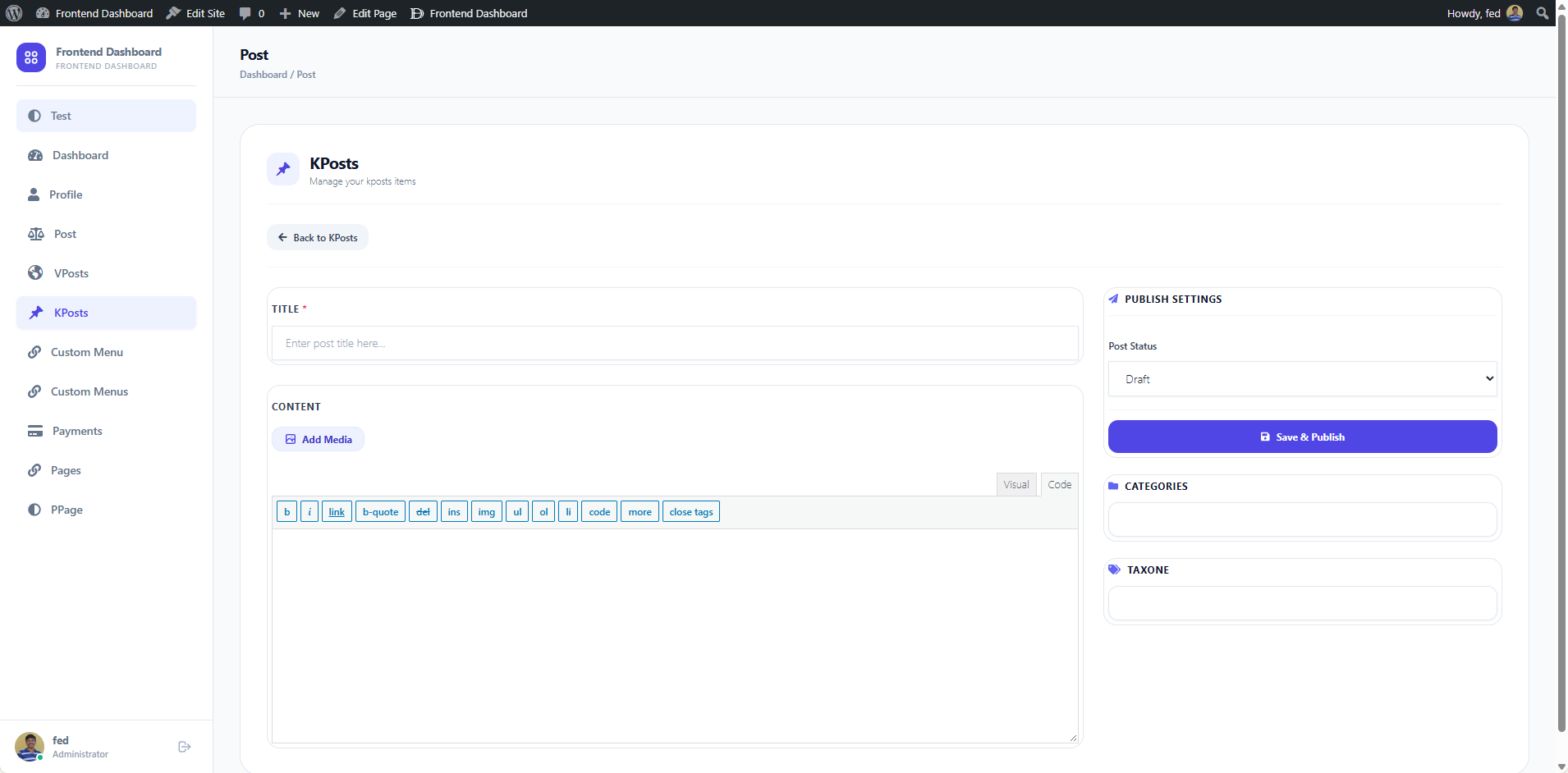
Frontend Dashboard
Faq
- Go to Admin Dashboard Pages Add New.
- Title the page (e.g., “Login”).
- Add the shortcode
[fed_login]into the page content. - Set the Page Template to FED Login (in the right-hand Page Attributes panel).
- Publish the page.
- Navigate to Frontend Dashboard Settings Login Settings and select your newly created page as the Login Page URL.
- Save your settings.
Yes! Create individual pages and use dedicated shortcodes:
* Login only: [fed_login_only]
* Register only: [fed_register_only]
* Forgot Password only: [fed_forgot_password_only]
- Go to Admin Dashboard Pages Add New.
- Enter a title (e.g., “User Dashboard”).
- Add the shortcode
[fed_dashboard]into the page content. - Set the Page Template to FED Dashboard under Page Attributes.
- Publish the page.
- Go to Frontend Dashboard Settings Login Settings and set the “Redirect After Logged in URL” or dashboard page.
Frontend Dashboard v3 supports:
* Editor.js: A modern block-based editor supporting headings, images, lists, quotes, and tables.
* TipTap: A fast, extensible WYSIWYG rich text editor with interactive bubble menus.
* Classic WP Editor: The familiar WordPress TinyMCE visual/text editor.
You can configure editor preferences under Frontend Dashboard Settings Post Settings.
- Go to Frontend Dashboard User Profile.
- Click Add New Extra User Profile Field.
- Select the desired field type from the dropdown (text, textarea, select, checkbox, radio, date, etc.).
- Configure the field label, meta key, and role permissions.
- Click Save.
- Go to Frontend Dashboard Post Fields.
- Click Add New Extra User Post Field.
- Select the input type, enter field settings, and specify which post types and user roles can view or edit the field.
- Click Save.
- Go to Frontend Dashboard Dashboard Menu.
- Click Add New Menu.
- Configure the menu title, icon, URL, and user roles permitted to access it.
- Click Add New Menu.
- To retrieve user custom fields:
$user_meta = get_user_meta( $user_id, ‘your_custom_field_key’, true ); - To retrieve post custom fields:
$post_meta = get_post_meta( $post_id, ‘your_custom_field_key’, true );
Payment Gateways, Invoices & Billing profiles, and Transaction Ledgers are now dedicatedly powered and managed by the GateFuz plugin. The legacy Payments menu in Frontend Dashboard has been deprecated and centralized into GateFuz (under GateFuz > Gateways and GateFuz > Invoices). All existing company invoice settings (fed_invoice_settings) and transaction tables are automatically preserved and loaded by GateFuz with zero data loss.
[fed_login]— Complete authentication portal (login, registration, password reset).[fed_login_only]— Standalone login form.[fed_register_only]— Standalone registration form.[fed_forgot_password_only]— Standalone password recovery form.[fed_dashboard]— Main frontend user dashboard portal.[fed_user role="user_role"]— Role-specific user directory / profile page.[fed_transactions]— Frontend user transaction and payment history.[fed_list_taxonomy taxonomy="category"]— Displays taxonomy terms in a list layout.
For more documentation and FAQs, visit https://faq.frontenddashboard.com.
Reviews
Great and quick support
By 
Great quick support and prompt support
Clean profesional plugin
By 
this plugin is clean and easy to use, issues/bugs are fixed regularly.
Plugin not working
By 
Need update
By 
Best plugin to use guys.
By 
NICE PLUGIN! GOOD FEATURES!
By 
Best plugin for frontend
By 
Image upload not working
By 
Waste of time
By 
Great Plugin and Excellent Support ...
By 
Changelog
3.0.20 (2026-10-21)
- Feature: Add-ons Marketplace Pro Extension Catalog: Extended the official Add-ons & Extensions marketplace (
WP-Admin > Frontend Dashboard > Add-ons) to display official BufferCode Pro extensions (Membership, Pay Per Post, User Management, and Social Connect) alongside free extensions directly from the BufferCode API. - Enhancement: Add-ons Marketplace Category Navigation: Added dedicated category tabs for “Monetization” and “User Management” to the Add-ons marketplace filter bar for instant category browsing.
- Enhancement: Add-on Version & Status Detection: Improved local version detection across varied constant naming patterns (
_PLUGIN_FILE,_PLUGIN,_VERSION) and plugin file headers, with cross-platform directory normalization.
3.0.19 (2026-10-19)
- Feature: Centralized Pro Licensing & Automated Updates Engine: Integrated automated package delivery and version metadata inspection connecting Frontend Dashboard Core directly with the Buffercode API (
https://buffercode.com/api/v2/plugin/update/) via WordPress coreplugins_apiandpre_set_site_transient_update_pluginspipelines for active Pro extensions. - Fix: Direct Renew URL: Updated Centralized License Hub to route addon renewals directly to the Buffercode Downloads dashboard (
https://buffercode.com/dashboard/dashboard/downloads). - Enhancement: Pro Add-on Registry: Coordinated unified license registration across official Pro extensions (Membership, Pay Per Post, User Management, and Social Connect).
- Fix: Mobile Logout Access: Added a dedicated 1-tap sign-out button directly to the mobile top navigation header (
.fed_mobile_header) next to the user avatar, and added safe area inset padding (env(safe-area-inset-bottom)) to the off-canvas drawer footer to ensure logout remains visible and accessible across all mobile viewports. - Fix: Registration Field Access: Ensured admin-only edit restrictions (
disable_user_access) apply strictly to post-registration profile updates, preventing enabled registration fields (such as email) from being rendered as disabled or uneditable during user sign-up. - Enhancement: Protected Non-Editable Profile Fields: Extended user profile model validation to automatically enforce and protect fields filtered through
fed_no_update_fieldsagainst unauthorized updates by non-admin users. - Enhancement: Profile Metadata Customization: Introduced
fed_show_profile_member_sincefilter hook and.fed_profile_member_sinceCSS class to allow toggling or styling the “Member Since” badge in the profile header banner. - Enhancement: Brand Subtitle Customization: Introduced
fed_show_sidebar_brand_subtitlefilter hook to allow toggling the “Frontend Dashboard” subtitle text in the sidebar brand header when no custom logo is uploaded.
3.0.18 (2026-10-19)
- Feature: Universal Client-Side PDF First-Page Preview Rendering. When WordPress core does not generate thumbnail images for PDF attachments (such as hosting and local environments without Ghostscript or ImageMagick), Frontend Dashboard custom media picker asynchronously renders a crisp first-page thumbnail in the browser using Mozilla PDF.js. Displays document cover previews across media grid cards, single attachment inspection details, and multi-selection trays with an overlay badge.
- Fix: Enhanced
MediaController.phpattachment formatting with multi-tier fallback to resolve generated preview images from attachment metadata sizes,wp_prepare_attachment_for_js(), or post thumbnail IDs. - Feature: Post Submission Workflow: Automatically redirect frontend authors and users directly to the post list view upon successful post submission or review request.
- Compatibility: Fully compatible with Frontend Dashboard Custom Post and Taxonomies v3.0.6, GateFuz v1.1.3, and Frontend Dashboard Pay Per Post v3.0.0.
3.0.17 (2026-10-19)
- Fix: Resolved PDF Embedder preview thumbnail display in the custom media picker. When WordPress or plugins generate image previews for PDF documents, the custom media picker now retrieves and displays the rendered preview image consistently with the WordPress core Media Library instead of falling back to a generic document placeholder icon.
- Fix: Resolved PHP warning
Undefined variable $hasFullQueryinDashboardRoutes.phpby properly defining$has_full_queryfor menu request validation and applying defensive parameter sanitization across fallback dashboard routes. - Fix: Resolved PDF Embedder compatibility regression where inserting a PDF via Frontend Dashboard custom media picker was inserting a plain file link instead of the
[pdf-embedder url="..."]shortcode. Ensuredwindow.frontend_dashboardis localized on the enqueued Vite bundle, synchronized media configuration and nonces across Classic Visual (TinyMCE) and Code (Quicktags/Textarea) modes, added a fail-safe server-side shortcode fallback when PDF Embedder is active, and automatically normalized raw viewer wrapper HTML back to shortcode syntax to prevent attribute stripping on save. - Enhancement: Added
fed_is_system_menufilter and locked system menu protection in Dashboard Menu manager (?page=fed_dashboard_menu), ensuring extension modules like Frontend Dashboard Pay Per Post (“My Submissions”) and Frontend Dashboard Membership (“My Membership”) are locked against accidental deletion while remaining fully customizable for title/label, icon, drag-and-drop order sorting, and role permissions. - Fix: Resolved menu label spacing in Dashboard Menu manager, ensuring menu names with spaces (e.g. “My Membership”, “Custom Menus”, “My Submissions”) preserve user-entered spacing without being trimmed or combined into single words.
- Fix: Prevented modal closing (Close ‘X’ button, Cancel button, backdrop click, Escape key) while save or update is in progress, adding in-modal spinner and loading state.
- Enhancement: Persisted success toast notifications across page reloads via session storage so confirmation messages display reliably after updating menu details.
- Enhancement: Added fallback support for
menu_tabparameter in dashboard URL router (DashboardRoutes.php). - Fix: Enhanced
PaymentGatewayManager::getEnabledGateways()to verify gateway configuration state (isConfigured()) alongside enabled status (isEnabled()), ensuring unconfigured or inactive payment gateways are excluded from frontend checkout screens. - Compatibility: Fully compatible with GateFuz v1.1.3 and Frontend Dashboard Pay Per Post v3.0.0.
3.0.16 (2026-10-17)
- Fix: Corrected mobile top navigation header alignment where the hamburger menu toggle and dashboard brand title were pushed into the center of the mobile screen due to WordPress
wpautopinjecting phantom paragraph tags into flex containers; enforced strict left-aligned flex containers, auto margins, and automatic tag pruning. - Fix: Resolved vertical spacing distortion and gap in the mobile drawer brand header between the Dashboard title and subtitle caused by rogue
<br>and<p>tags injected by WordPresswpautop; enforced rigid text resets, whitespace pruning, and scoped paragraph margin resets. - Fix: Corrected frontend login, logout, and registration notification modal layout, centering icon badges defensively and preventing external addon styles or theme flex-shrink rules from misaligning the icon to the left.
- Enhancement: Modernized notification modal appearance with soft ambient icon halo rings, polished typography hierarchy, and an integrated progress bar track for automated redirects.
- Enhancement: Centralized Payment Gateways & Invoices into GateFuz: Deprecated the legacy built-in Payments menu in Frontend Dashboard in favor of the dedicated GateFuz payment gateway engine. When GateFuz is active, legacy Payments submenus are suppressed and bookmarks to
?page=fed_paymentsseamlessly redirect to GateFuz Invoices (?page=gate-fuz-invoices). All existing company billing profiles and invoice settings remain fully preserved.
3.0.15 (2026-10-16)
- Fix: Resolved header breadcrumb text unexpectedly displaying centered in the dashboard canvas by neutralizing rogue empty paragraph tags generated by WordPress
wpautop, enforcing strict left-aligned flex containers, and removing conflicting spacing classes. - Fix: Corrected vertical misalignment in the sidebar brand header between the dashboard icon and site title text, adding defensive vertical centering and typography resets against theme style conflicts.
- Enhancement: Connected the Dashboard Brand Logo (configured under Frontend Dashboard > Settings > Dashboard > Settings) to display automatically centered above all frontend authentication forms (
[fed_login],[fed_login_only],[fed_register_only], and[fed_forgot_password_only]), with smart fallback to theme custom logo and developer filters (fed_brand_logo_url,fed_brand_logo_html). - Fix: Restored full compatibility with PDF Embedder plugin, routing custom media modal insertion through WordPress native
media_send_to_editorpipeline. - Enhancement: Introduced extensible media picker developer API (
window.FedMedia,fed_send_media_to_editor,fed_media_format_attachment, and toolbar action hooks) for seamless third-party plugin integrations.
3.0.14 (2026-10-15)
- Fix: Resolved category and hierarchical taxonomy selection not updating when creating or editing posts from Frontend Dashboard view.
- Fix: Preserved associative array term IDs in select field options builder, ensuring taxonomy term IDs are saved instead of term names.
- Fix: Guaranteed taxonomy term assignment across user roles (Subscribers, Authors, Contributors) by ensuring terms in tax_input are explicitly set after post insertion.
3.0.13 (2026-10-14)
- Fix: Resolved
Unauthorized class executionerror on Payments Dashboard (?page=fed_payments&menu=dashboard) by registering payment controller methods in the authorized action hooks map. - Fix: Eliminated raw
// phpcs:ignorecomment leak in payment layout output and cleaned embedded comments inside database query strings. - Enhancement: Removed legacy Membership Pro admin menu (
?page=fed_membership_pro) and deprecated mock upsell teaser classes to streamline admin navigation.
3.0.12 (2026-10-11)
- Fix: Resolved syntax error (
Uncaught SyntaxError: Invalid or unexpected token) caused by WordPresswptexturizeformatting ampersands in inline script tags, by moving all mobile drawer controllers to the external enqueued frontend script. - Fix: Prevented mobile hamburger header from appearing on desktop viewports (>= 1024px) by enforcing strict scoped desktop display rules.
- Fix: Resolved mobile drawer click collision and double-toggle race condition with debounce throttling and native event delegation.
- Enhancement: Optimized responsive layout for ultra-small mobile screens (320px width), fixing avatar sizing and enabling responsive stacking for the profile identity card to prevent horizontal text clipping.
- Enhancement: Added defensive left-alignment CSS resets to prevent parent theme styles from centering dashboard breadcrumbs, titles, and headers.
3.0.11 (2026-10-10)
- Fix: Resolved mobile layout display regression on mobile viewports (< 1024px) where the desktop sidebar width was forcing side-by-side horizontal compression.
- Feature: Added responsive mobile navigation top bar with hamburger menu toggle, off-canvas slide-over drawer navigation, and dismissible backdrop.
- Enhancement: Optimized mobile viewport padding across main dashboard cards, ensuring clean full-width content rendering across all mobile phone and tablet screen sizes.
- Fix: Resolved a JavaScript reference error (
emptyStatevariable) in the media modal that prevented the single-item Attachment Details sidebar from displaying the Alt Text, Title, Caption, and Description fields. - Enhancement: Multi-select thumbnail badges now display clean document indicators, and selecting a single item reliably populates all metadata and display settings with live auto-saving.
3.0.9 (2026-10-09)
- Enhancement: Upgraded upload queue with individual animated progress bars, live transfer percentages, file badges, and concurrent upload tracking (Thanks to Muhammad Umer).
- Enhancement: Added full Attachment Details sidebar enabling live editing of Alt Text, Title, Caption, Description, Alignment (none/left/center/right), Link To (none/file/page/custom URL), and Size (full/large/medium/thumbnail) before inserting into the editor.
- Fix: Resolved filter dropdown performance and media filtering: enforced strict client-side type isolation so PDFs are completely excluded when the Images filter is active, added AbortController request cancellation, and bypassed disk I/O with cached metadata.
- Fix: Resolved media library empty state overlapping the dropzone on the Upload tab, and prevented initial modal open from flashing “No media files found” while loading.
- Enhancement: Enhanced “Load More Media” pagination with inline loading indicators and item deduplication without blanking out the grid.
- Enhancement: Enabled automatic AJAX persistence for attachment Alt text, Title, Caption, and Description edits in the media modal.
3.0.8
- Security: Enforced strict capability and authorization checks across all AJAX, admin-post, and API request dispatchers.
- Security: Replaced generic prefix callable matching with strict allowlists mapped to required capabilities (
manage_options,edit_posts, etc.). - Security: Hardened user registration against privilege escalation by preventing elevated role assignments and enforcing WordPress
users_can_registeroption. - Security: Added explicit capability checks across all admin setting handlers, invoice operations, and role management functions (Thanks to Đỗ Trung Kiên – patchstack.com).
- Fix: Modernized Classic Editor media modal with support for multi-upload, multi-select media insertion, and non-image previews (PDFs, docs, audio, and video) (Thanks to Muhammad Umer – https://github.com/mavinothkumar/frontend-dashboard/issues/16).
- Fix: Prevented smart quote (
”) conversion and attribute corruption during post publishing and updates, keeping image tags and attributes fully preserved across save and reload cycles.
3.0.7
- Fix: Resolved “Sorry, you are not allowed to access this page” permission error by correcting Add-ons marketplace URL to
fed_plugin_pagesin compatibility notices. - Enhancement: Registered
fed_addonsas a fallback submenu alias to guarantee seamless access on legacy or bookmarked URLs. - Fix: Restricted frontend stylesheet and script loading strictly to Frontend Dashboard screens to prevent CSS collisions (including table.fixed overrides) on third-party pages.
3.0.6
- Security: Enforced strict capability and permission checks on REST API post creation, editing, and publishing endpoints (credit: Ali Hidayat).
3.0.5
- Security: Fixed user registration parameter handling to prevent unauthorized user updates and privilege escalation.
- Security: Hardened AJAX / Post API dispatch routing and function execution handlers with strict allowlist and capability checks.
3.0.4
- Feature: Introduced “More WordPress Plugins by BufferCode” section in Add-ons marketplace to showcase standalone ecosystem plugins (AdFuz & GateFuz).
- Feature: Added support for WordPress 6.5+ native plugin dependency declarations (
required_plugins) to dynamically separate official add-ons from standalone ecosystem plugins. - Enhancement: Streamlined Add-ons marketplace grid with unified 4-column responsive card layouts and dedicated ecosystem filter tab.
- Fix: Resolved “Class FEDInstallAddons does not exist” error during extension 1-click install and activation.
- Fix: Loaded missing module dependencies into core bootstrapper including orders, pro plugin placeholders, and standalone shortcodes.
- Enhancement: Hardened AJAX extension installer with explicit capability checks and clean JSON error response handling.
3.0.3
- Fix: WordPress.org plugin review standards and code quality compliance improvements.
- Fix: Addressed input unslashing, sanitization, and nonce verification checks across admin and frontend requests.
- Fix: Removed obsolete array_column polyfill and auto_update_plugin hook alteration.
- Enhancement: Added comprehensive
.gitignorerules for modern development workflows.
3.0.2
- Enhancement: Extended hook architecture to support modular extension registration, automated update checks, and decoupled addon management.
- Enhancement: Modernized Extensions Hub interface with smart section categorization, live search filtering, native confirmation dialogs, and real-time status feedback.
- Performance: Optimized admin menu filter pipeline and background cron worker workflows.
3.0.1
- Fix: WordPress.org plugin review and security compliance improvements.
3.0.0
- Major Release: Complete frontend architecture redesign with Tailwind CSS and modern App Shell layout.
- Feature: Integrated modern rich text editors — Editor.js (block editor) and TipTap (WYSIWYG editor) alongside classic WP Editor.
- Feature: Merged Templates, Extra Form Fields, and Custom Pages directly into Core.
- Feature: Brand new Add-ons & Extensions marketplace with 1-click install, activation, and real-time catalog caching.
- Feature: System Status & Diagnostic tools with Database health checks and comprehensive Activity/Audit Logging.
- Feature: Enhanced role-based admin bar controls, custom menu management, and advanced redirection settings.
- Enhancement: Streamlined responsive mobile navigation with slide-over drawer menus.
- Security: Comprehensive nonce validation, strict capability checks, and robust data sanitization across all AJAX endpoints.
- Compatibility: Fully tested and compatible with WordPress 6.7 and PHP 8.0 / 8.1 / 8.2 / 8.3.
More Changelogs:
https://faq.frontenddashboard.com/changelog/overview/