Frontend Product Editor for WooCommerce

Frontend Product Editor for WooCommerce
Description
Frontend Product Editor allows you to edit WooCommerce product data from the frontend quickly.
When you are logged in as admin and visit any WooCommerce product page, it adds a new option in the admin toolbar – Quick Product Edit.
Click on it, and it will open a flyout panel to edit product information quickly. You can also open the editor panel from the floating icon on the right edge of browser. You can edit WooCommerce products from either the Single product page or from product Archive pages (Shop page or Category archives)
WooCommerce Product Data that you can manage from frontend
- Product Name
- Product Description
- Product Short Description
- Catalog visibility
- Category & Tag
- SKU
- Pricing
- Schedule Sale
- Inventory/Stock options
- Tax Class & Tax status
- Catalog visibility
- Featured Product
- Shipping (Weight, Dimensions & Shipping class)
MORE FEATURES ON PREMIUM VERSION
Supported Product Types:
* Simple Products (including Downloadable and Virtual Products)
* Grouped Products
* External/Affiliate Products
*Variable Products (Coming Soon)
** Key Features **
* Role Manager
* Edit From Product Archive pages
* Manage Product Attributes
* Manage Linked Product (Upsell and Cross-Sell products)
* Manage Images (Product Images and Gallery images)
* Manage data for downloadable products – upload files
More options will be coming soon.
Why should you choose Frontend Product Editor?
Light Weight and Instant Loading
Code is optimized for fast loading and instant live editing with no extra resources.
Expert Support
We have a highly efficient support team who are always ready to help you. Ask your queries in Support Forum or Contact Us directly.
Regular Updates
Fully compatible with WordPress and WooCommerce latest versions.
🧑💻 Documentation and Support
- We have extensive Documentation for every feature and functionality.
- For any questions, you can contact us directly through our Contact Page.
- For more details, visit Frontend Product Editor
Other Plugins
✅ AnyWhere Elementor Pro: AnyWhere Elementor Pro comes with various creative dynamic content widgets that would enhance your Elementor Page Builder experience to build your dream website.
✅ WP Mail Log: WP Mail Log is a WordPress plugin that allows you to easily log and view all emails sent from your WordPress site. It saves all email interactions with the help of an easy-to-view dashboard interface, which will be beneficial for troubleshooting.
✅ Elementor Addon Elements: With the help of Elementor Addon Elements, you can use rich and stunning widgets to build your dream website with Elementor.
✅ Form Vibes: Frontend product editor can be a great addition to your WooCommerce websites since it allows you to modify the WooCommerce product information right from the front.
✅ Map Engine: An ultimate map builder plugin that meets all of your requirements. One-stop destination to create as many Google Maps and Open Street Maps as you want.
✅ Bricks Ultra: Bricks Ultra adds a host of new elements to help you build pages that look and feel amazing with Bricks Builder!
Installation
- Upload the plugin files to the
/wp-content/plugins/directory, or install the plugin through the WordPress plugins screen directly. - Activate the plugin through the ‘Plugins’ screen in WordPress.
Screenshots
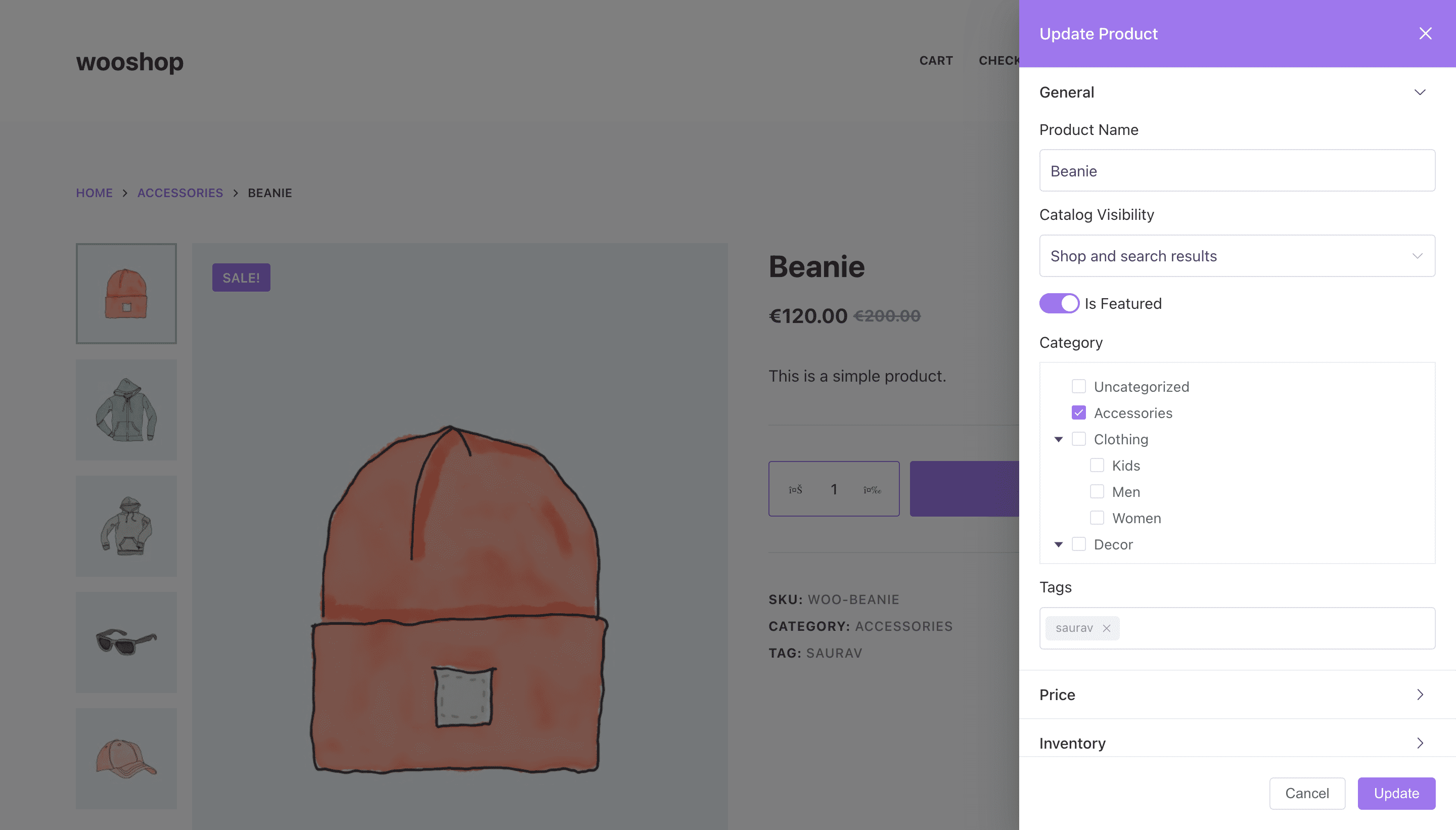
Update product info

Manage WooCommerce product pricing and schedule sales

Manage Inventory

Manage product shipping information

Faq
No Frontend Product Editor is an addon for WooCommerce, so it is mandatory to have WooCommerce activated on your site.
Yes, this plugin will work on all the themes that support WooCommerce functionality.
Absolutely not; it’s an easy-to-use plugin, so no coding knowledge is needed.
Reviews
helpful plugin.
By 
Helpful additional woo plugin with a fast support.
Really practical
By 
Great job!
super plugin
By 
Great plugin. It makes it very easy to edit products in the store. Big thanks to the author for this page
Very nice plugin
By 
Very happy with it, would just like to have all tabs closed when opening.
Make life easy of Woocommerce clients
By 
One of the unique plugin I found and very useful, I was looking for such plugin from long time, as we face some issues while editing products from admin side and using this plugin life becomes easy in case for editing/updating products, really recommend.
We thanks WPVibes team for their efforts and for thinking out of the box.
Much Needed Plugin
By 
This was a much needed plugin which is finally here. It makes small editing like updating stock so easy and saves time because websites are faster at frontend in comparison to admin section.
Must have plugin for woocommerce
By 
Amazing plugin makes editing products so much faster and efficient!
Love it keep up the great work.
Very useful, futur must have ?
By 
Works great ! No problem with Porto theme and the latest version. Keep going !
Very fast plugin
By 
Exactly what we need to edit quickly a product ! Thank you
Useful Plugin
By 
Changelog
1.2.1
- Compatibility test with latest version of WordPress & WooCommerce
1.2
- Improved code structure for better extensibility by adding hooks.
- Tested for compatibiltiy with latest version of WordPress & WooCommerce
1.1.1
- Improved code structure
- Tested for compatibiltiy with latest version of WooCommerce & WordPress
1.1
- Added support for Product Description & Short Description
- Added ability to resize editor panel by dragging from left edge.
1.0.3
- Fixed mobile screen compatiblity issues with Storefront theme.
1.0.2
- Fixed mobile usability issue happening after recent release.
1.0.1
- Fixed issue when manage stocks is disabled from Woo admin settings.
1.0
- Revamped UI – Frontend code restructured from scratch for much better performance.
- Add ability to edit more data including Category & Tag management.
0.0.4
- Fixed: JS error when admin bar is not visible
- Enhancement: Added editing support for SKU, Catalog visibility, Tax class, Tax status, featured product.
0.0.3
- Fixed: Fatal error when Manage Stocks is disabled from admin
0.0.2
- Enhancement: Added floating button to open edit panel. Very useful when admin bar is disabled on frontend.
- Fixed: Conflict with Variable products.
0.0.1
- Initial Launch