Frontype | Select a custom post type as a front page
Frontype | Select a custom post type as a front page
Description
It lets you set a custom post type as a front page.
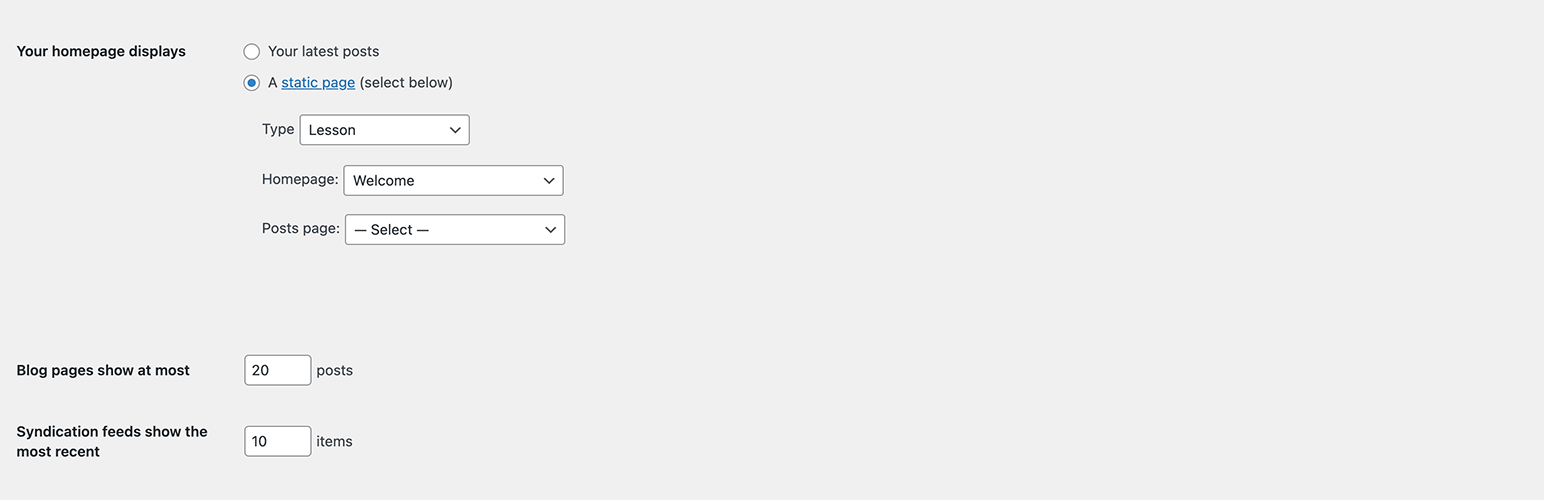
How to set a custom post type as a front page
- Install and activate the plugin Frontype
- Go to Settings => Reading
- Select the desired post type from the dropdown list “Type”
- Select “A static page” in “Your homepage displays”
- Select the desired single custom post in “Homepage”
Reviews
Wonderful simple plugin!
By 
After trying for years to be able to make the Homepage be a Post, I found this beautiful Plugin which does the trick as easily as it can be.
Doesnt work in my case
By 
Seems like a useful plugin, I set the page type other than regular pages, but in frontend it doesnt appear unfortunatelly. So, for me didnt work.
Incredibly Useful and Easy to Use!
By 
This plugin made setting a custom post type as my homepage effortless. Easy to use, lightweight, and works perfectly. Huge thanks to the developers for this practical solution! Highly recommend! 😊
Awesome! Works as expected
By 
I am very happy to see this plugin. It helped me to set a single product page as a homepage. Loved it!
Changelog
0.0.2
- Fix: missing page title
0.0.1
*Initial release