FV Player 8

FV Player 8
Description
FV Player is a free, easy-to-use, and complete solution for embedding MP4 or HLS videos into your posts or pages. With MP4 videos, FV Player offers 98% coverage even on mobile devices.
Features:
- Remembering video position for both guest users and members
- Chromecast and Airplay support
- Video playlists
- Automated checking of video encoding for logged in admins
- Totally Brandable. Stop selling YouTube and start selling yourself. Even design your own player
- Full support for Amazon S3
- YouTube support
- Integration with the Bunny Stream video encoding service
- Integration with the Coconut.co video encoding service – using a free addon plugin: https://foliovision.com/downloads/fv-player-coconut
- API for custom video fields
- iframe embed codes
- Ultra-efficient player: just 41.8kB of Javascript. Rest is loaded later when user is going to play the video
Video presentation options:
- Scroll autoplay with the sticky video option
- Sticky video playback
- Video lightbox (works for images and galleries too, using fancyBox 3)
- Video links to point to exact time in the video
Video tracking options:
- Built-in video play stats
- Google Analytics 4
- Matomo
Pro features using the commercial FV Player Pro:
- easy AB looped playback for your visitors (great for teaching sites)
- Encrypted video support
- DRM watermark
- Video Chapters
- Full-featured Vimeo embedding
- Support for URL tokens of different CDNs: Bunny CDN, CloudFront, StackPath and Universal CDN
- Support for other video services: Vimeo, OK.ru, Odysee, PeerTube (incuding support for your own instance)
- Autoplay video only once for each visitor
- Interactive video transcript
- Timeline previews
Other extensions:
- Alternative Sources plugin for backup CDN configuration
- Cloudflare Stream plugin
- JW Player platform plugin
- Pay Per View plugin for Easy Digital Downloads and WooCommerce
- VAST plugin
- Viloud Live Streaming platform support
- Video Bookmarks and User Playlists plugin
Back to school special 25% off pro licenses until end of September.
Additional Documentation at Foliovision.com
Support |
Change Log |
Installation|
User Guide |
Detailed FAQ
External Services
FV Player uses the following external services all of which are optional:
- FV Player Pro license checks via foliovision.com – only used if you click the button to install FV Player Pro extension
- AWS – if you setup Amazon S3 with FV Player
- DigitalOcean Spaces – if you setup DigitalOcean Spaces with FV Player
- Google API via googleapis.com and gdata.youtube.com – if you setup YouTube API key to be able to obtain video splash screens, video titles and duration information when inserting videos from YouTube
- Bunny Stream API via video.bunnycdn.com – only if you setup Bunny Stream
- FV Video Checker on video-checker.foliovision.com – when you install the plugin you are prompted if you allow access to your video files to check for video encoding issues. This can also be disabled using the “Disable Admin Video Checker” setting later.
- Wistia embed codes if you use post Wistia videos
Installation
There aren’t any special requirements for FV Player to work, and you don’t need to install any additional plugins.
Visit our site for a fully featured guide with screenshots and more!
Screenshots
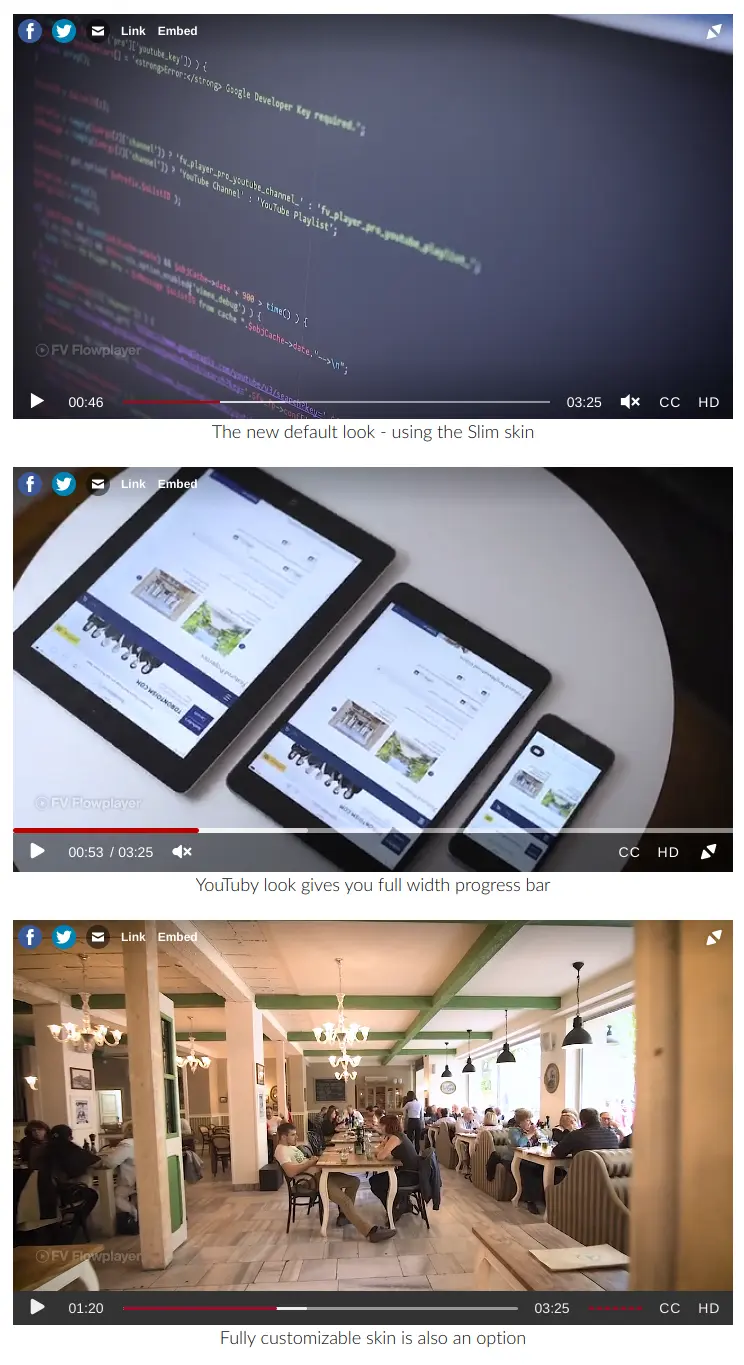
FV Player different skin options
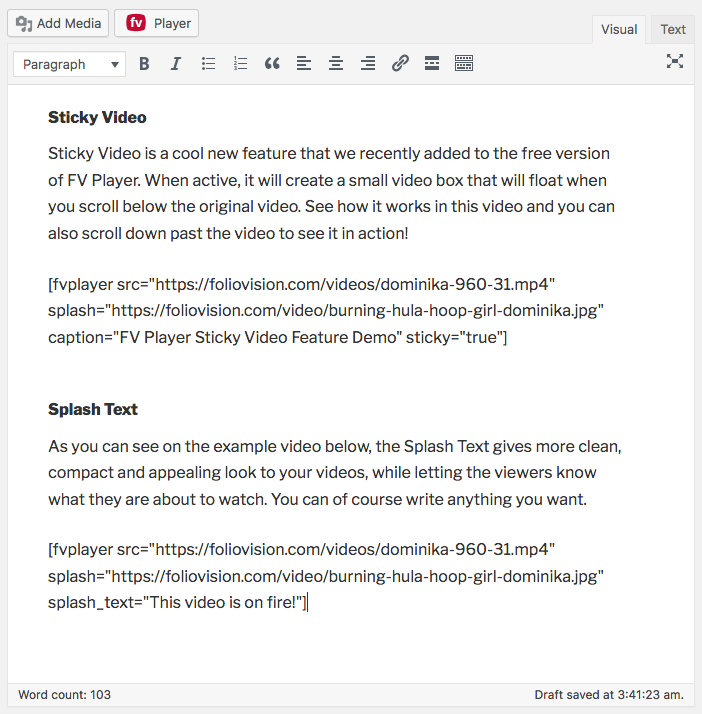
FV Player shortcode in post content
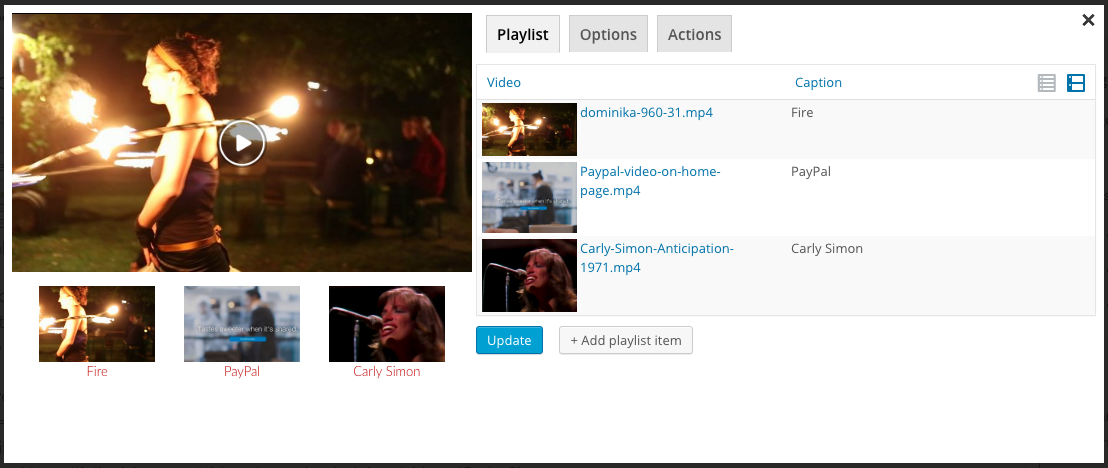
It's easy to use our shortcode editor to add videos
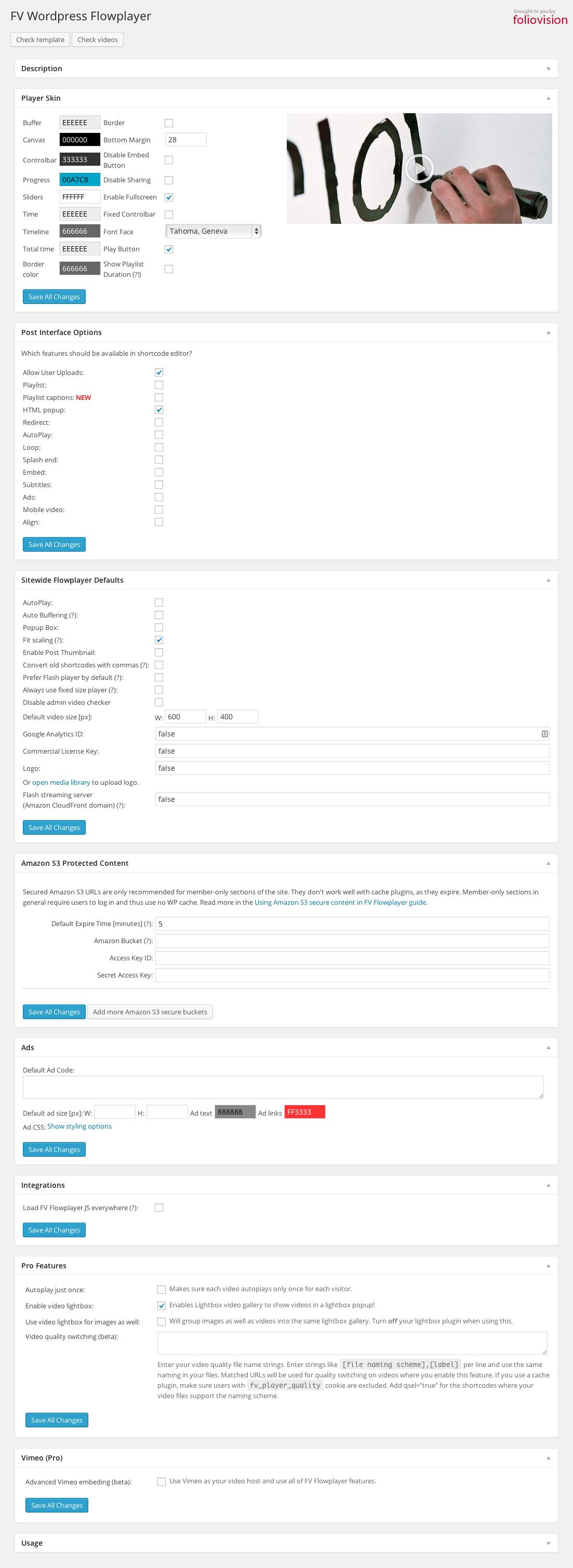
Plugin settings screen
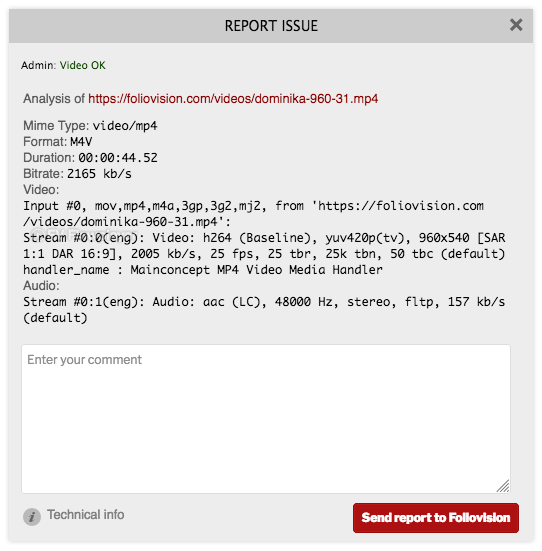
Video checker helps you find issues with your video encoding
Faq
Yes, the switch from FV Player 7 to FV Player 8 is easy. All the settings and videos will stay.
If you already have the FV Player Pro license with active support and updates, then you will get FV Player Pro 8 automatically.
The main changes in FV Player 8 are:
- new mobile controls
- new editor
- autoplay works with browser viewport
- storing user video positions in a separate database table
- security improvements
This should be related to your video format or mime type issues.
Each browser supports different video format, MP4 is the recommended format. In general, it’s recommended to use constant frame rate. Detailed instructions about video encoding for HTML 5.
Please note that MP4 is just a container, it might contain various streams for audio and video. You should check what audio and video stream are you using. Read next question to find out how.
The video checker works automatically when you’re logged in as admin. You’ll see a text in upper left corner of any video on your site. All the necessary info can be found in this guide.
1) This can happen if your site is at www.domain.com, but the CSS is loaded from your CDN at cdn.domain.com. Based on CSS3 and HTML5 specs not all the resources can be shared between domains.
So you need to set the following on your CDN for web fonts (woff, eot, ttf, svg):
Access-Control-Allow-Origin: *
Or you can allow your domain only (but in that case it might be good to also allow it with https):
Access-Control-Allow-Origin: http://www.domain.com
Or you can exclude wp-content/plugins/fv-wordpress-flowplayer/css/flowplayer.css from CDN.
2) Second cause might be that your webfonts are served with bad mimetype
AddType application/x-font-woff woff
AddType application/x-font-ttf ttf
AddType application/vnd.ms-fontobject eot
AddType image/svg+xml svg
This means that the video information (such as what codecs are used) is not stored at the beginning of the file. Over they years web browsers got better at playing MP4 videos with bad metadata position, but they can still fail on iPhones.
In general we recommend you to re-encode your video as per our instructions.
If you have Quick Time Pro, just open the video and in the Movie Properties -> Video Track -> Other Settings turn on the “Cache (hint)” – screenshot.

There are also server-side tools for fixing of this written in Python and there is even one for PHP, but it fails on videos bigger than the PHP memory limit.
If you are looking for fast and efficient workflow for getting videos up on your website properly encoded and delivered to your end users, we recommend FV Coconut which integrates DigitalOcean Spaces and Coconut.co video encoding into FV Player. The videos are uploaded right in your admin dashboard when posting your articles.
Please check with your technical support if your web server supports HTTP range requests. Most of the modern web servers support this feature (Apache, Nginx, Lighttpd, Litespeed…). It’s important for fast seeking in HTML5 video playback.
Other possible cause is that you are using some membership plugin to protect downloading of your videos (Premise and others). While this might seem like a good solution, we don’t recommend it as it increases the load of your server and it won’t allow seeking in the videos. You can use Amazon S3 with privacy settings, just hit the link to read our illustrated guide.
We heard about problems when using some fancy pro templates like OptimizePress (read below for fixing instructions) or Gantry framework. These templates often break the WordPress conventions (probably as they often try to add too many non-template functions, like video support built-in into the template). We can debug the issues for you, just head over to our website and order the pro support.
Full list of conflicting plugins is available here: https://foliovision.com/player/compatibility
Go to plugin Settings screen and hit “Check template” button. It will check if both jQuery library and FV Player JavaScript is loading properly.
Also, check “I’m using OptimizePress template” question above.
Please check if these issues also appear when using the default WordPress template. There seems to be some sort of conflict between the FV Player CSS and your theme CSS.
Are you using some old lightbox plugin like http://www.4mj.it/slimbox-wordpress-plugin/ ? Or are you putting the video into Iframe? Also, the video should not be placed in an HTML element with lowered z-index.
Just copy the plugin into wp-content/plugins and then activate it on each blog where you want to use it.
- Check your hosting for download speed.
- Check your video encoding to find ballance of video quality and bitrare.
- If you are looking for fast and efficient workflow for getting videos up on your website properly encoded and delivered to your end users, we recommend FV Coconut which integrates DigitalOcean Spaces and Coconut.co video encoding into FV Player. The videos are uploaded right in your admin dashboard when posting your articles.
Please check our Customizing Controls guide.
Read our guide Using FV Player with Minify Plugins. There you’ll find how to set up plugins such as Autoptimize or WP Rocket so they work properly with the FV Player.
Please contact us via support. We will help you to get FV Player 8 working in your environment.
FV Player Pro comes with a money back guarantee so you can even try the commercial no-branding version risk free. Or make it work first with the free versions.
The problem is probably in AdBlock. If it’s active, the overlay ads will be blocked. Once AdBlock is deactivated for the particular domain where the video is played, the overlay ads will be displayed (page refresh needed).
Reviews
Excellent Streaming Audio Player too
By 
I just started using FV Player 8 and using a lot of streaming audio, and the player works well in an audio configuration... hence the rename from 'FV Flowplayer Video Player' to 'FV Player' 8.
The tool is great but it doesn't protect videos LINKS !!
By 
You did a great job building the tool and then in the latest version there are
Two elements that are more than very annoying to users
First is the copy link button that gives you the video link I want to hide or disable
The other thing is the ability to click on the name of the video and it opens YouTube
I want to stop these two features and there are no features for them in the tool. Is it possible to do this or customize this in exchange for purchasing the paid version of it? Please respond because the player is great but these two icons and functions may make the tool not good at all
I tried to contact you via email to find a solution for it but I did not receive any response
I hope there are solutions for it
Changelog
8.1 – 2025-10-14
- Autoplay: Preload the next video
- LMS | Teaching – support for non-logged in users
- Performance: Fixes for JavaScript loading speed and rendering
- Remember audio track: Store in localStorage and in database for logged in users
- Bugfix: CSS: tagDiv theme fix for player loading, play and pause buttons
8.0.27 – 2025-09-19
- Bugfix: Analytics: Looping a video should not count as invidual plays
- Bugfix: Loop: Do not show the play/pause button animation
- Bugfix: Stats: Looping a video should not count as invidual plays
- Bugfix: Stats: Fix stats being disabled after changes in 8.0.26
- Bugfix: Stats: Fix “Track Guest Users” being always on
8.0.26 – 2025-09-17
- New Elementor Widget
- Deprecating the “Big Arrows” playlist style. If you are already using this style, it will be kept for now.
- Bugfix: Block editor spacing and alignment issues
- Bugfix: Video Stats: Exclude Administrators and Editors: Also exclude Contributors and Authors if they can edit the post
8.0.25 – 2025-08-30
- Bugfix: Fix video saving due to missing caption field. The issue would occur if user did not upgrade from FV Player 7. Reverting PHP warnings fix from 8.0.24.
8.0.24 – 2025-08-23
- HLS.js upgrade from 1.6.5 to 1.6.9
- Editor: Removing Post Interface Options for “Video Actions” and “Ads” as these always show
- Tracking: Adding subtitles as a new event
- YouTube: Compatibility fixes
- Bugfix: Editor PHP warnings for the caption field
8.0.23 – 2025-07-31
- Bugfix: Tutor LMS: Add missing models/tutor-lms.class.php file
8.0.22 – 2025-07-30
- DigitalOcean Spaces: Use expiration cycle for signature expiration time to get consistent signatures
- Security: Validate uploads for FV Player Coconut before uploading full file
- Tutor LMS: Avoid forced 16:9 apsect ratio
- Bugfix: Gutenberg: Fix for Site Editor
- Bugfix: Gutenberg: Fix “Select Media” button to show all video hostig tabs
- Bugfix: Lightbox not working when using blocks
8.0.21 – 2025-07-11
- HLS.js upgrade from 1.4.12 to 1.6.5
- Bugfix: Elementor fix for player loading and inserting
- Bugfix: Gutenberg: Fix for Site Editor
- Bugfix: Gutenberg: Fix FV Player 7 blocks not rendering in patterns
- Bugfix: SiteGround Security: Exclude coconut-ajax.php and stream-loader.php
8.0.20 – 2025-06-19
- Accessibility improvements
- Editor: Performance fixes for playlists, fixing issues with playlists of 100 or more videos
- Editor: Speed-up “Pick existing player”
- Editor: Limit video duration checks during import, otherwise the import might take too long
- Bunny Stream: Browser: Load up to 1000 videos
- Bunny Stream: Browser: Load up to 200 collections
- FV Player screen: Better table sizing, fixing layout shifts
- Bugfix: Analytics: Fix heartbeat for GA4
- Bugfix: Analytics: Stop using window unload event, using visibilitychange and pagehide instead
- Bugfix: Editor: End of Video Action: Fix disabling
- Bugfix: Editor: Fixed player duplication bug if you open a player for editing and then close it within half second
- Bugfix: Editor: Fixed player duplication bug if pick media from Media Library using “FV Player Editor” button in FV Player Gutenberg block
- Bugfix: Ensure player controlbar menus show on top of overlay ads
- Bugfix: Fix issues with touch events not being passive
- Bugfix: Playlist style Big arrows: Show only on hover
- Bugfix: Disable local storage setting should not affect default subtitles selected for videos
8.0.19 – 2025-04-24
- Audio Player: You can use type=”audio” in shortcode to force audio player for a HLS stream if the detection fails
- Security: Stats: Block direct access to temporary files with .htaccess
- Video stats: Send video playback duration every 5 minutes and not just when loading the page
- Bugfix: Airplay: Fix for multiple instances
- Bugfix: Gutenberg block: Fix conversion of video block to FV Player
- Bugfix: Incorrect MP3 duration calculation
- Bugfix: Lightbox: Avoid showing JavaScript as visible text when using FV Player Pro video ads in front of a video
- Bugfix: Lightbox: Fix bad image aspect ratio if using 100% player width and height in global settings
- Bugfix: Lightbox: Fix text link to video lightbox
- Bugfix: Sticky video: Avoid issues if theme uses z-index
- Bugfix: Sticky video: Fix disabling for individual players
- Bugfix: Video Stats: Fix admin screen performance
- Bugfix: Video Stats: Fix graph numbers for single players
- Bugfix: Video Stats: Fix performance issues if video is less than 4 seconds
- Bugfix: Video subtitles/chapters/transcript removed during background video duration checks if the initial duration check has failed
- Bugfix: YouTube: Fix live stream count-down not appearing for iOS
- Bugfix: YouTube: Fix repeated opening and closing when using Lightbox on mobile
8.0.18 – 2025-02-24
- HLS: Do not use HLS.js for Safari
- Schema.org: Use video file for contentURL if it’s MP4, HLS, WebM or OGV and does not require URL signature
- Video Stats: Exclude Administrators and Editors
- Bugfix: Amazon S3 signatures missing for subtitles
- Bugfix: CSS: Make sure theme does not add border for playing images
- Bugfix: YouTube: Fix video to have sound enabled right from the start without any lag
- Bugfix: YouTube: Lower the lag when unmuting the sound after autoplaying the video
8.0.17 – 2025-01-24
- YouTube: Support youtube.com/live/{video_id} links
- Bugfix: Editor saving of Pay Per View product ID
- Bugfix: Fix splash image switching for audio tracks when using retina image
- Bugfix: Simpler min.js to avoid issues with WP Rocket JS minification
8.0.16 – 2025-01-09
- Bugfix: Audio player: Fix appearance during page load if using “Optimize JavaScript loading”
- Bugfix: iOS: Fix live HLS stream playback is the “Live” flag is not set
- Bugfix: Lightbox: Avoid opening lightbox when trying to scroll down the page by starting the swipe gesture on the video, if using “Optimize JavaScript loading” setting
- Bugfix: Setting “Use Schema.org markup” overwritten by “Handle WordPress audio/video”, “Facebook Video Sharing” and vice versa
8.0.15 – 2024-12-18
- Support for FV Player CMS: New plugin which lets you embed a player without publishing it to the WordPress site.
- Bugfix: Fix control bar not showing for Vertical playlist if using “Always Visible” setting for Controls
8.0.14 – 2024-12-11
- Bugfix: Chromecast not working due to update it the Web Sender SDK, although we still have to fix the subtitles and multiple-audio tracks support
- Bugfix: FV Player Pro 7 detection, asking you to update to FV Player Pro 8
- Bugfix: iPhone HLS playback error detection: Fix for iOS 18
- Bugfix: PHP 7.2 fatal error
8.0.13 – 2024-11-26
- Bugfix: CSS: Video Link and Embed link styling inconsistency
- Bugfix: Gutenberg block: Fix loading of old FV Player 7 block for custom post types
- Bugfix: Iframe embed: Add allow=”autoplay” to fix issues with YouTube videos
- Bugfix: Iframe embed: Do not use fixed controls as these appear below the player and do not show in iframe
8.0.12 – 2024-11-21
- Bugfix: iOS 18: Playback failing if ‘Use native fullscreen on mobile’ setting is enabled and the video has subtitles
- Bugfix: iOS: Subtitles not visible when video is not in fullscreen if ‘Use native fullscreen on mobile’ setting is enabled
8.0.11 – 2024-11-19
- YouTube: Better error messages
- Bugfix: Editor: Fix disabling Autoplay for individual players
- Bugfix: Preload: Fix controls not appearing
- Bugfix: Position saving: Avoid autoplay when using Preload
- Bugfix: Video custom fields being preload in wp-admin where not needed
8.0.10 – 2024-11-14
- Tested up to WordPress 6.7
- Bugfix: Deactivate FV Player 7 during activation: Multisite fix
- Bugfix: Editor: “Playlist Auto Advance” saving disabled when editing existing playlist
- Bugfix: Editor: Screenshot feature fixes
- Bugfix: Media Library: S3 not showing images for private buckets
- Bugfix: YouTube JavaScript warnings
8.0.9 – 2024-11-11
- Bugfix: Gutenberg block: Avoid breaking video links with % encoding
- Bugfix: Gutenberg block: Avoid removing encrypted HLS decryption key
8.0.8 – 2024-11-08
- Airplay: Add setting to Skin -> Controls
- AWS: Adding missing regions
- CSS: Keeping your custom watermark over the video picture if the video aspect ratio does not match the screen
- CSS: Performance fixes
- CSS: Remove white bars when fullscreen on iPhone
- CSS: Responsive logo sizing
- Settings: Change “Disable” setting to “Enable” to not create checkboxes with reversed logic
- Settings: Move logo and control bar settings to Skin -> Logo and Skin -> Controls
- Settings: Removed “Player position”, “Bottom Margin”, “Buffer”, “Time” and “Canvas” color (always transparent)
- Uninstall: Do not warn user about loosing data when deleting plugin if ‘Remove all data’ setting is not on
- Video upload: Fix for WordPress Multisite Network Activated plugins
- YouTube: Load basic library locally to avoid conflicts with other plugins using YouTube Player API
- Bugfix: Audio player: Fix item number not appearing when playlist
- Bugfix: Editor: Fix broken display when deleting first playlist item
- Bugfix: Migration Wizard not showing preview of links being replaced
- Bugfix: Multi-playlist shortcode fix
- Bugfix: Overlay HTML code removed on save
- Bugfix: Popup HTML code removed on save
8.0.7 – 2024-10-02
- Deactivate FV Player 7 during activation
- Freedom Player: Fix timeline stuck in non-seekable state in rare cases
- Bugfix: Editor: Fix preview of playlist single item in Gutenberg
- Bugfix: Editor: Stop “Remember video position” in preview
- Bugfix: Popups: Do not show on pause before video finish
- Bugfix: Popups: Settings not saving
8.0.6 – 2024-09-12
- Editor: Show HLS stream options if HLS stream type detection fails. This often happens if a live stream is not yet live. Now you can safely mark it as a “Live stream” so when it goes live it will be presented properly.
- Editor: Do not try to detect audio-only HLS streams. This is tricky as not all the HLS streams contain information about video codecs or resolution. You have to select “Audio Stream” by hand instead.
- Bugfix: Prevent FV Player screen table layout breaking after player save
- Bugfix: Unable to disable “DVR Stream” and “Audio Stream” checkboxes for new videos once enabled
8.0.5 – 2024-09-11
- Editor: Support player meta fields
- Bugfix: Stats not showing properly for “Top 10 Post Video Plays”
- Bugfix: Video Encoder: Fix fv_player_encoding_category_id DB field missing
8.0.4 – 2024-08-27
- Editor: Notice when editing a duplicate player to warn user of a rare bug
- Upload: Support debug log of FV Player Coconut 8
8.0.3 – 2024-08-21
- YouTube: Facebook in-app browser fix for Android
- Bugfix: Playlist styles Sliderland and Sliderbar hover colors and item width
- Bugfix: Subtitles provided via subtitles=”…” shortcode arguments not working
- Bugfix: XML sitemap: Fix for URLs with &: Avoid PHP warnings
8.0.2 – 2024-08-16
- XML sitemap: Exclude Elementor templates
- Bugfix: Editor: Fix missing video screenshot filename
- Bugfix: Editor: Fix Media Library item selection if you do not pick any file and just close the library
8.0.1 – 2024-08-06
- Editor: Hide Title setting available for each video is “Advanced Settings” for video is on
- Optimization: Load responsive images if splash image is from WordPress Media Library
- Move settings our of wp-admin -> Settings -> FV Player to wp-admin -> FV Player -> Settings
- Preload: Add option to preload video
- Remove Top and Bottom Black Bars: Per video setting to remove black bars from top and bottom of video
- Security: Add missing output escaping
- Security: Sanitize input variables
- Security: Use nonces with increased lifetime for stats and user video position storing
- S3 Upload: Use custom Ajax endpoint to avoid conflicts with different AWS SDK and Guzzle HTTP versions
- Bugfix: Editor: avoid closing if still saving
- Bugfix: Editor: not saving new playlist styles properly
- Bugfix: Editor: not showing preview for selected video properly
8.0 – 2023-09-19
- Initial release of FV Player 8
- No longer showing watermark on free version
- Autoplay: can now only play a video that is visible. You can choose if it also becomes sticky if the user scrolls past the video.
- Database: Improved strucure
- Editor: New editor layout
- Lightbox: Loading JavaScript and CSS only when user actually clicks the video or image
- Mobile: controls now show/hide on single tap
- Playlists: Two New Playlist Styles: Sliderland and Sliderbar
- Position saving: use its own database table instead of user meta, conversion tool shows after plugin update
- Bugfix: Subtitles” fix for RTL languages when the line contains latin word – thanks to Olivier Legendre
Please refer to https://foliovision.com/player/developers/changelog for changelog prior to FV Player version 8.