FvAlex AI Alt Text for SEO and Accessibility

FvAlex AI Alt Text for SEO and Accessibility
Description
Are your images invisible to Google and to screen reader users?
Most WordPress sites publish images without alt text. As a result, image SEO suffers, and the site fails to meet digital accessibility requirements (WCAG, and regulations such as the EU’s European Accessibility Act, in force since June 2025).
FvAlex AI Alt Text automatically generates a relevant description for every image you upload to your site, using AI. It can also scan your existing media library to show you how many images are affected.
Plugin interface languages
The plugin’s own screens (not just the generated alt text) are available in 7 languages, selectable from Settings > FvAlex AI Alt Text, independently of your WordPress site’s language setting:
- English
- Français (French)
- Español (Spanish)
- Deutsch (German)
- Português (Portuguese)
- Italiano (Italian)
- Nederlands (Dutch)
Free features
- Automatic alt text generation on every new image upload
- Media library scan: find out how many images are missing alt text
- Bulk generation for your entire existing media library, in one click — counts toward the same 50/month limit as automatic generation, so a large backlog may take more than one month to fully process on the free plan
- 50 AI generations per month, for all your images (new and old), no API key or setup required
Pro features
- Unlimited generations
- Higher-quality AI model (more accurate, more detailed descriptions than the free tier)
- Priority support
External services
FvAlex AI Alt Text does not call any third-party AI provider directly, and never asks you for your own API key. All generation — free and Pro — is routed through FvAlex AI Alt Text’s own managed service at https://api.fvalex.com (hosted on Cloudflare Workers, operated by us), which forwards the request to OpenAI using our own pooled API key. You never need to obtain or configure an API key yourself.
What is sent, and when: each time an image is generated (on upload, on bulk generation, or on a media-library-scan generation), the plugin sends the image itself, the requested language, and an optional short text context (the surrounding post/page title) to our managed service. The image is read from your own server and included in the request, so that generation also works on sites that are not publicly reachable (local development, password-protected staging, maintenance mode). If the file cannot be read locally — for example when your media library is offloaded to a CDN or to object storage by another plugin — the image’s public URL is sent instead, and our service fetches the image from it. Nothing is sent in the background or outside of an actual generation request.
Identification: free-tier requests are identified by your site’s Freemius installation ID (no account or payment required); Pro requests are identified by your Freemius license key. Neither identifier is shared with the AI provider.
The AI provider used is currently OpenAI (https://openai.com) — Terms of Use, Privacy Policy. See our own Terms of Service and Privacy Policy for the managed service itself: https://alt-text.fvalex.com/en/privacy-managed-ai
No image or data is stored by the plugin or by our managed service beyond what is strictly needed to process each request; only a monthly generation count per site/license is retained, to enforce the plans described above.
Why alt text matters
- SEO: Google uses alt text to understand and index your images.
- Legal accessibility requirements: WCAG and regulations such as the EU’s European Accessibility Act (in force since June 2025) require meaningful alt text on informative images.
- User experience: screen reader users rely on alt text to understand visual content.
Installation
- Upload the
fvalex-ai-alt-textfolder to/wp-content/plugins/, or install directly from the WordPress Plugin Directory. - Activate the plugin from the “Plugins” menu.
- That’s it — alt text generation works immediately on your next image upload, no setup required. Go to Settings > FvAlex AI Alt Text only if you want to change the generation language or upgrade to Pro.
Screenshots
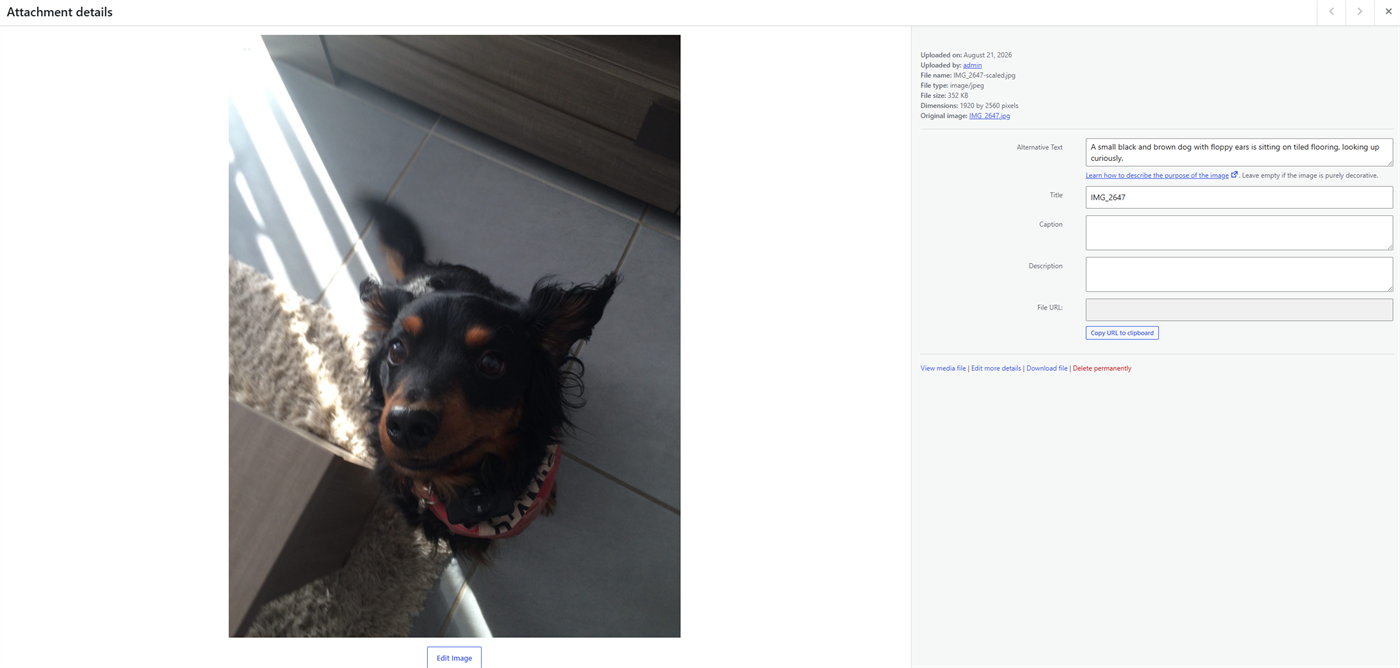
Alt text generated automatically for a newly uploaded image, right in the WordPress media library
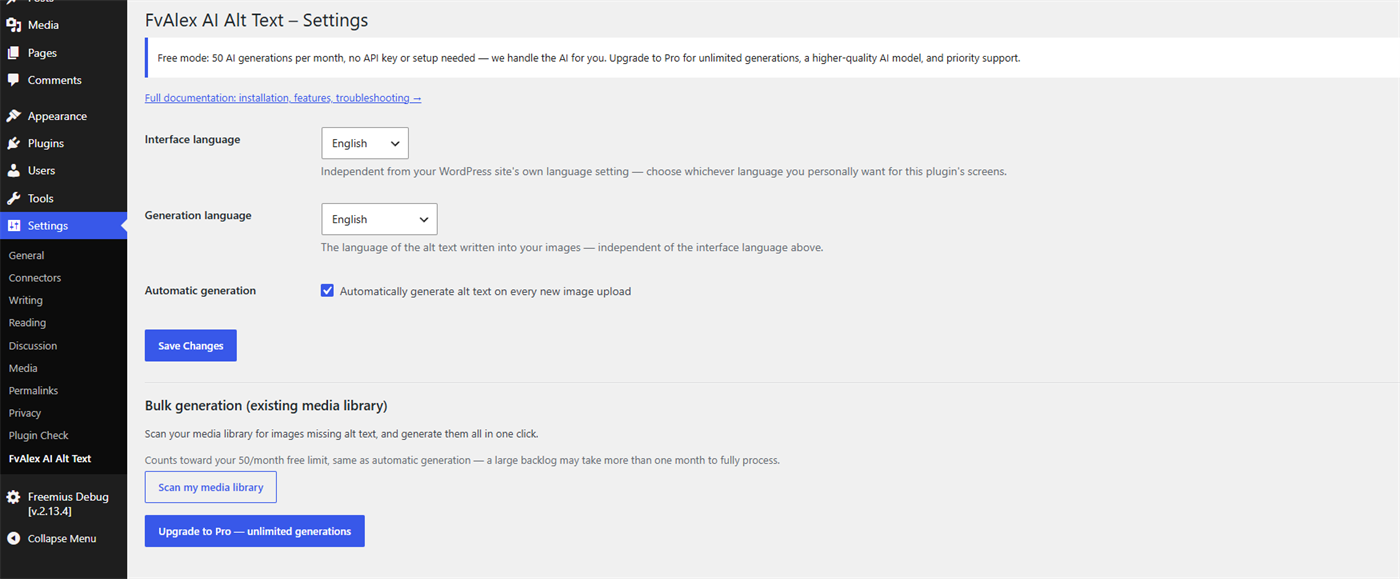
Plugin settings page
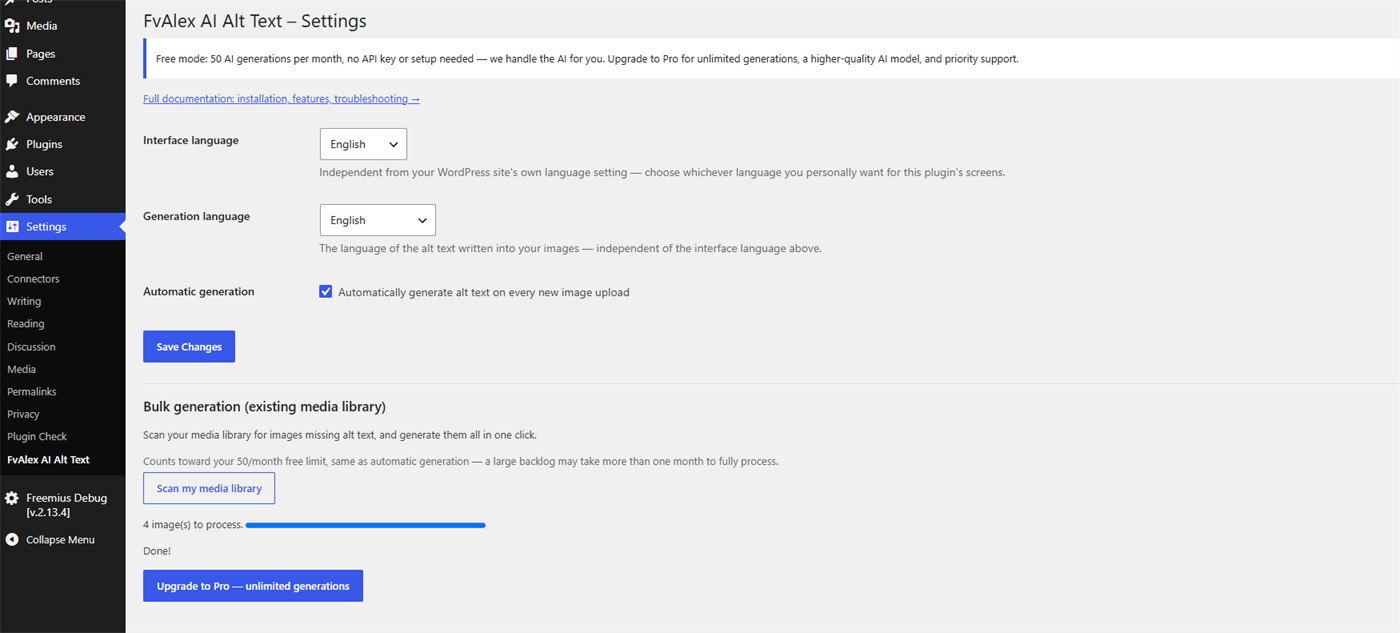
Media library scan and bulk generation
Faq
No. The free tier gives you 50 AI generations per month at no cost and with no setup — no API key to obtain, nothing to configure. The Pro version (unlimited generations, a higher-quality model, priority support) is optional.
Bulk generation and automatic generation share the same 50/month free allowance — there’s no separate, larger quota for bulk. If you have more than 50 images missing alt text, the free plan will process the first 50 and pick up the rest the following month (or you can upgrade to Pro for unlimited generations right away).
No, never. FvAlex AI Alt Text only generates text for images that don’t already have any.
Yes — every generation is processed through FvAlex AI Alt Text’s own managed service, which in turn calls OpenAI. See the “External services” section above for exactly what’s sent and when. FvAlex AI Alt Text itself does not store your images or generated text beyond what’s needed to process each request.
Earlier versions did (bring-your-own-key). We moved to a fully managed model so the plugin works out of the box for everyone, without requiring users to create a developer account with an AI provider just to get alt text on their images.
Reviews
Changelog
1.2.6
- Maintenance release: the plugin’s internal version constant is now kept in step with the plugin version, so browser caches reliably pick up admin script changes in future updates.
1.2.5
- The upgrade button now opens the pricing page directly inside your WordPress dashboard, instead of sending you to an external website.
1.2.4
- The managed AI service is now reached at https://api.fvalex.com, on the developer’s own domain, instead of a workers.dev subdomain. Existing installs keep working; the previous endpoint remains available.
1.2.3
- Moved the plugin website and the managed service documentation to the developer’s own domain, fvalex.com, so the plugin, its author and its website all resolve to the same verifiable owner.
- Plugin header description rewritten in English, and the privacy policy link now points to the English version of the page.
1.2.2
- Renamed the plugin to “FvAlex AI Alt Text for SEO and Accessibility”, with the slug and text domain fvalex-ai-alt-text, so the name carries a distinctive developer identifier and cannot be confused with similarly-named plugins or services.
1.2.0
- Removed the bring-your-own-API-key mode entirely. All generation — free and Pro — now runs through FvAlex AI Alt Text’s own managed AI service (see External services), which removes the setup friction of creating a developer account with an AI provider, and reflects real server-side value on both plans rather than a local feature unlock.
- Free tier: 50 generations/month via the managed service, no configuration needed, includes bulk generation on your existing media library.
- Pro tier: unlimited generations via the same managed service, with a higher-quality AI model and priority support.
- Clearer error message when the monthly free/Pro cap is reached, surfaced as an admin notice instead of failing silently.
- Generation now works on sites that are not publicly reachable from the internet — local development installs, password-protected staging sites, sites still in maintenance mode, and hosts that block hotlinking. The image is read from your own server and sent with the request, instead of relying on the AI service being able to download it from your site.
- Documented the managed AI service in full in the External Services section.
1.0.5
- Alt text generation now supports 27 languages (up from 7) — the interface language selector stays at 7 fully-translated languages, but the generation language dropdown is now much wider (Polish, Swedish, Danish, Norwegian, Finnish, Russian, Turkish, Japanese, Korean, Chinese, Arabic, Czech, Greek, Romanian, Hungarian, Ukrainian, Indonesian, Vietnamese, Thai, Hindi added).
- Free tier raised to 50 generations/month (from 10).
- Pro price lowered to 5.99€/month (from 8.99€).
1.0.4
- The alt text generation language is now a dropdown (7 languages) instead of free text, matching the interface language list.
1.0.3
- Added a plugin interface language selector (7 languages), independent of the WordPress site language setting.
1.0.2
- Lowered the free tier quota from 20 to 10 generations per month.
1.0.1
- English readme (required for WordPress.org submission).
- Replaced direct database query with WP_Query for the media library scan.
- Removed discouraged load_plugin_textdomain() call.
- Fixed plugin header (Plugin URI, Domain Path).
1.0.0
- Initial release.