Geo Targeting for Bricks Builder by Inspired Monks

Geo Targeting for Bricks Builder by Inspired Monks
Description
Geo Targeting for Bricks Builder by Inspired Monks adds a Visitor Country condition to any element in Bricks Builder, enabling geo-personalized visibility rules directly inside the builder.
Perfect for global websites, localized campaigns, and region-specific compliance content.
The visitor’s country is detected using the IPinfo Lite API (/lite/me), processed entirely on the server-side, ensuring privacy, accuracy, and SEO-friendliness.
Use Cases
✅ Show country-specific offers or banners
✅ Hide services unavailable in certain regions
✅ Create multi-regional landing pages
✅ Add localized legal or compliance messages
Core Features
– Add a Visitor Country condition (IN / NOT IN)
– Support for multiple countries
– Fallback Country if detection fails
– ✅ Always fresh location detection (no caching)
– ✅ Privacy-friendly (no cookies or tracking)
– ✅ SEO-safe (server-side rendering)
Bricks Builder Enhancements
– ✨ Copy/paste visibility rules between elements
– Inline condition badges inside the Bricks structure panel
– Settings integrated directly under Bricks Geo Rules
Built for performance. Made by Inspired Monks.
Disclaimer: This plugin is an independent product developed by Inspired Monks and is not affiliated with or endorsed by Bricks Builder or IPinfo.
External Services
This plugin connects to the IPinfo Lite API to detect the visitor’s country.
It sends the visitor’s IP address to the IPinfo Lite endpoint (https://api.ipinfo.io/lite) on:
– Each frontend page load where geo-conditions are used
– When the administrator uses the “Test Lookup” feature in settings
Purpose:
– To determine the visitor’s country and apply Bricks visibility conditions
Service Provider:
IPinfo — https://ipinfo.io/
Terms of Service:
https://ipinfo.io/terms-of-service
Privacy Policy:
https://ipinfo.io/privacy-policy
Credits
Developed by Inspired Monks
Installation
- Upload the plugin to
/wp-content/plugins/geo-targeting-for-bricks-builder/ - Activate the plugin through the Plugins menu in WordPress
- Go to Bricks Geo Rules
- Enter your free IPinfo Lite API token
- Add a “Visitor Country” condition to any Bricks element – done!
Screenshots

Geo Rules settings panel in admin
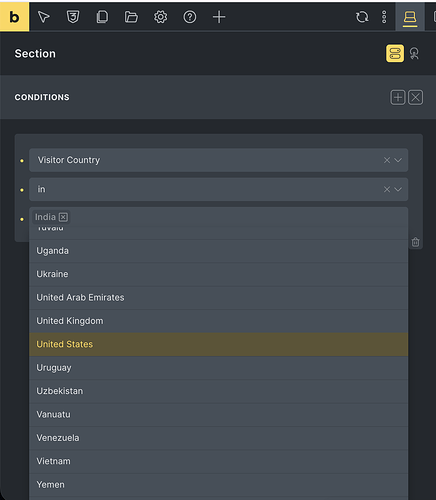
“Visitor Country” condition in Bricks UI
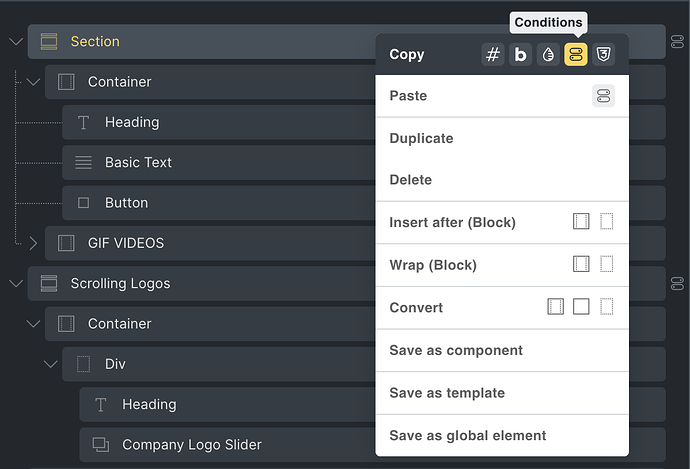
Copy/Paste rule UI inside the builder
Faq
No. It performs server-side detection and does not store any user data.
No. Visibility is handled before HTML output, so crawlers see the intended content.
In Bricks Builder select any element Conditions Visitor Country
Reviews
Changelog
1.5.1
- Added: Notice page for non-Bricks installations + auto-deactivate
- Improved: Better capability checks
- Improved: Admin UX consistency
- Fixed: Prevent “Sorry, you are not allowed to access this page” error
1.5.0
- Fix: Security warnings resolved (sanitization + nonce checks)
- Add: Rule copy/paste tools
- Add: Activation redirect + settings link
- Improve: UX polish across admin + builder
1.4.0
- New: Default fallback country setting
- Add: Copy/Paste geo conditions
1.3.0
- Change: Simplified condition UI to use Bricks native selector
- Improve: IP testing & error messages
1.2.0
- Remove: Auth method dropdown
- Add: Support for
/lite/ip&/lite/me
1.1.0
- Add: Admin settings page + API tester
1.0.0
- First release – core visibility rules for Bricks Builder