SEO Connector for Ghost.blog

SEO Connector for Ghost.blog
Description
When ghost.blog publishes an article to your WordPress site, this connector
writes the AI-generated SEO title, meta description, focus keyword, and Open
Graph image into whichever SEO plugin you use:
- Yoast SEO
- Rank Math
- All in One SEO (AIOSEO)
The plugin exposes two authenticated REST endpoints under /wp-json/ghost-blog/v1/:
GET /info— reports the connector version and which SEO plugin is active.POST /seo-meta— writes SEO fields to a post.
Both endpoints require a logged-in user with the edit_posts capability, using
the same application-password credentials you already configured in ghost.blog.
No data is sent anywhere except in response to these authenticated requests.
Installation
- In ghost.blog, open your WordPress integration settings and download the
connector ZIP. - In your WordPress admin, go to Plugins Add New Upload Plugin, choose the
ZIP, and click Install Now. - Activate “SEO Connector for Ghost.blog”.
- Back in ghost.blog, click “Re-detect” — your SEO plugin should now show as
connected.
Screenshots
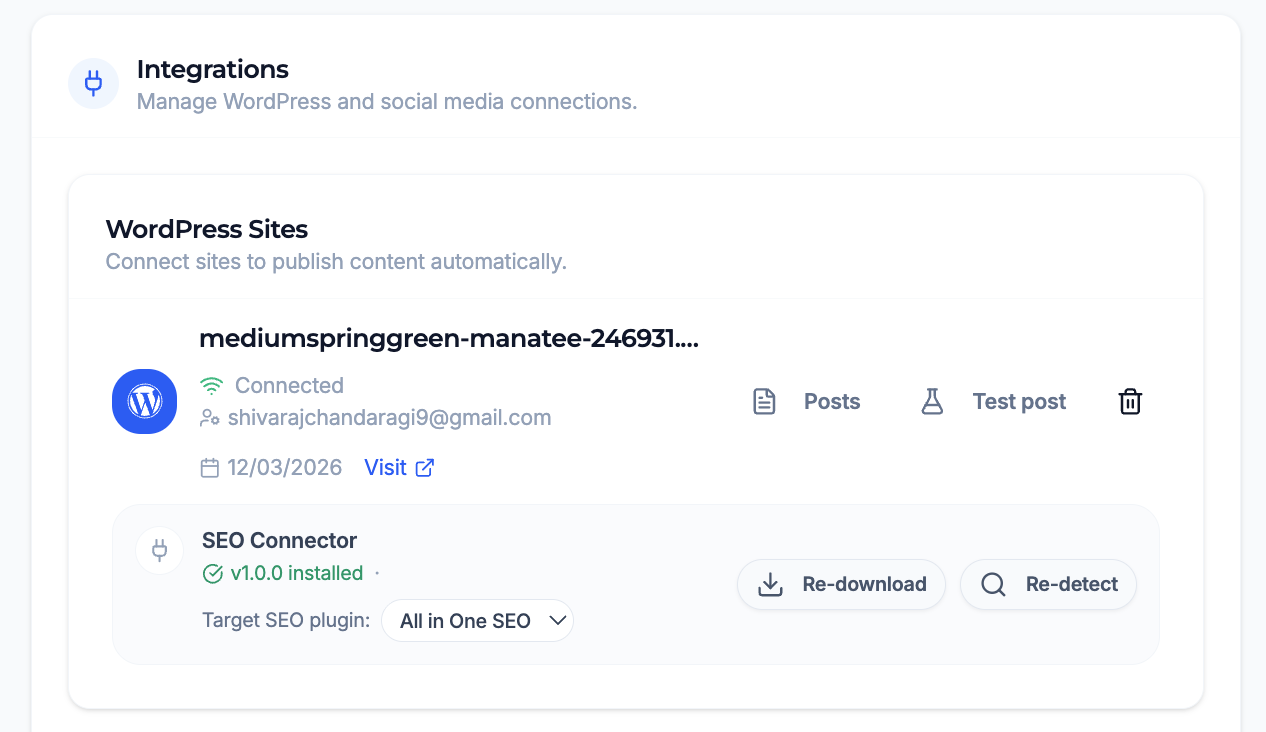
Managing the WordPress connection and SEO connector from the Ghost.blog dashboard — download the plugin, pick the target SEO plugin, and re-detect.
Faq
Yes. The connector writes into Yoast SEO, Rank Math, or All in One SEO. If none
of these is active, the GET /info endpoint will report that no supported SEO
plugin was detected and SEO metadata will not be written.
No. The plugin only responds to authenticated REST requests from ghost.blog. It
does not phone home or transmit any data on its own.
Requests use the WordPress application-password credentials you configure in the
ghost.blog WordPress integration. Every endpoint requires a user with the
edit_posts capability.
The connector resolves a single adapter in priority order (Yoast SEO, then Rank
Math, then All in One SEO) and writes to the first supported plugin it detects.
Reviews
Changelog
1.0.0
- Initial release. Yoast SEO, Rank Math, and AIOSEO support.