Giraforms – Contact Form, Booking Form, Survey & Custom Form Builder for Block Editor

Giraforms – Contact Form, Booking Form, Survey & Custom Form Builder for Block Editor
Description
Giraforms is a Gutenberg-native form builder for people who want full control inside WordPress.
Build and manage forms directly in the block editor, using real blocks instead of shortcode builders. You can create contact forms, booking forms, surveys, registrations, quote requests and more while keeping all data on your own server.
Try Demo | Upgrade to Pro | Documentation
Why Giraforms?
- Truly native Gutenberg workflow — Build forms where you already build pages
- Performance-focused — Frontend assets load only on pages that contain a form
- Privacy-first by default — Submissions stay in your WordPress database
- Built-in anti-spam stack — Honeypot, timestamp checks, Turnstile, reCAPTCHA, hCaptcha
- Flexible layouts — Use Columns, Groups, Headings and core blocks inside forms
- Ready in minutes — Start from 10 pre-built templates or create from scratch
Free Features
- 18 form field blocks
- 10 pre-built templates (contact, booking, survey, job application and more)
- AJAX form submission (with graceful non-JS fallback)
- Client-side and server-side validation
- Honeypot + timestamp anti-spam
- Captcha providers: Cloudflare Turnstile, reCAPTCHA v2/v3, hCaptcha
- Submissions dashboard in WordPress admin
- CSV export
- Admin email notifications + user confirmation emails
- Custom success message or redirect
- GDPR consent field
- Privacy options (disable IP and user-agent collection)
- Mobile-friendly and translation-ready
Free vs Pro (quick overview)
Free is ideal if you need:
– Contact/lead forms built in Gutenberg
– Local entry storage in WordPress
– CSV export and email notifications
– Strong anti-spam and GDPR-friendly options
Pro is ideal if you need:
– Payments with Stripe
– Advanced booking workflows and calendar export
– File uploads, signatures, ratings, geolocation, advanced phone
– Conditional logic and multi-step forms
– Webhooks, Brevo sync, statistics and custom email templates
Available Form Fields (Free)
- Text — Single line text input
- Number — Numeric input with min/max
- Email — With built-in validation
- Phone — Phone number input
- URL — Website URL input
- Textarea — Multi-line text area
- Select — Dropdown with custom options
- Checkbox — Multiple selections
- Radio — Single selection
- Date — Date picker
- Time — Time selection
- Password — Secure input
- Hidden — Hidden data field
- Range Slider — Visual numeric slider
- Color Picker — Color selection
- Consent — GDPR checkbox
- Submit Button — Customizable button
Pro Features
Unlock advanced capabilities with Giraforms Pro:
- File Upload — Accept file attachments in your forms
- Star Rating — Collect ratings with a star field
- Calendar — Inline calendar date picker
- Booking — Booking fields with time slots, admin calendar view and calendar export
- Phone (Advanced) — International phone input with country flags
- Signature — Digital signature pad
- Currency — Formatted currency input
- Geolocation — Location-aware field
- Stripe Payments — Collect payments directly inside your forms
- Conditional Logic — Show/hide fields based on user input
- Multi-step Forms — Split long forms into guided steps with progress bar
- Custom Styles — Control fonts, colors, borders and label position per form
- Access Restrictions — Limit forms to logged-in or logged-out users
- Form Scheduling — Open and close forms on specific dates
- Unique Entry Validation — Prevent duplicate submissions by email
- Submission Statuses — Track and update entry status from the admin
- Statistics Dashboard — View form performance and submission trends
- Custom Email Templates — Branded notification emails
- Webhooks — Send form data to external services via HTTP requests
- Brevo — Sync form submissions with your Brevo contact lists
Use Cases
Giraforms is ideal for:
- Contact forms
- Booking and reservation forms
- Survey and feedback forms
- Job application forms
- Event registration forms
- Quote and order request forms
- Newsletter subscription forms
- Support ticket forms
Who is it for?
- Freelancers and agencies building Gutenberg websites
- Local businesses that need booking and lead forms
- Teams that want data ownership and privacy-first form handling
- Site owners who want to avoid bulky shortcode-based form builders
Pre-built Templates
Get started in seconds with 10 ready-to-use templates:
- Contact Form
- Registration Form
- Newsletter Subscription
- Feedback Form
- Support Request
- Quote Request (multi-column)
- Event Registration (multi-column)
- Job Application (multi-column)
- Survey Form
- Booking Form (multi-column)
Installation
Automatic Installation
- Go to Plugins > Add New in your WordPress dashboard
- Search for “Giraforms”
- Click Install Now then Activate
- Create or edit a page
- Add the Form Container block and start building
Manual Installation
- Download the plugin ZIP file
- Go to Plugins > Add New > Upload Plugin
- Choose the ZIP file and click Install Now
- Activate the plugin
Getting Started
- Create or edit a page in the block editor
- Click (+) and search for “Form Container”
- Choose a template or start with a blank form
- Add and configure form fields
- Set up email notifications in the block sidebar
- Publish your page
- View submissions in Giraforms > Submissions
Screenshots

Form builder in the Gutenberg editor.

Flexible multi-column form layout.
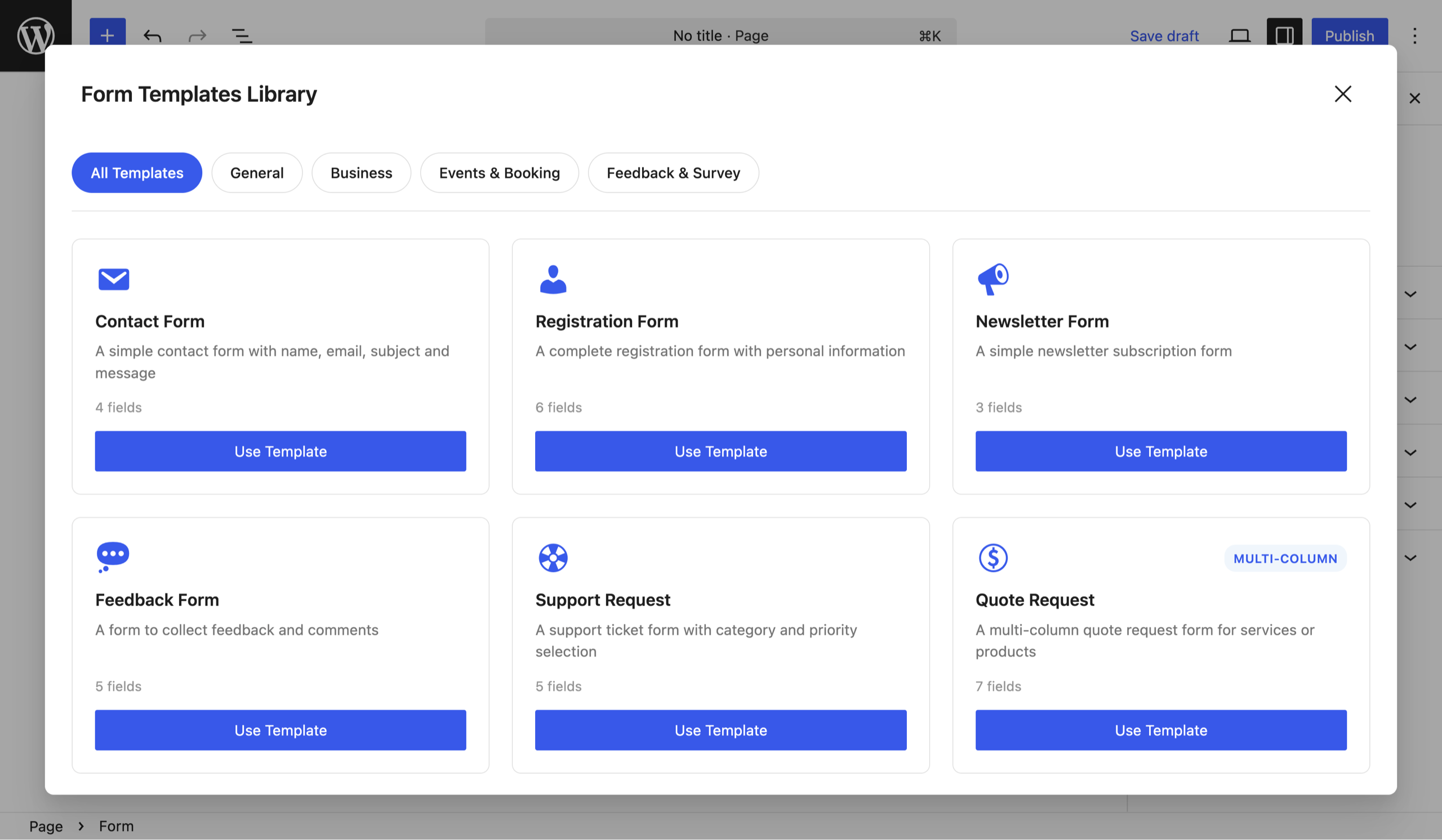
Template Library - Browse and insert ready-to-use form templates directly in the editor.

Form Builder - Build forms visually inside the Gutenberg editor with native blocks.

Styling Options - Customize form layout and design using the parent Group block and native Gutenberg controls.

Forms Dashboard - Manage your forms and view submission statistics at a glance.

Submissions List - View, filter, and export form submissions from the admin panel.

Submission Details - See all data from a submission in a clean and structured view.
Faq
No. Giraforms is 100% visual. You build forms by dragging and dropping blocks in the Gutenberg editor.
Yes. AJAX provides a smoother experience, but forms gracefully fall back to standard submission when JavaScript is disabled.
All submissions are stored locally in your WordPress database. No external service, no third-party server. You fully own your data.
Yes. Export to CSV at any time from the submissions dashboard.
Yes. Giraforms works with any WordPress theme that supports the block editor — classic themes, block themes, and Full Site Editing themes.
Giraforms is designed for the native WordPress block editor (Gutenberg). On sites using Elementor, Divi or other builders, you can still build forms in Gutenberg and use them on dedicated WordPress pages.
Yes. You can use core blocks like Columns, Groups, Headings, Spacers and more to create advanced multi-column layouts.
The free version includes honeypot, timestamp-based protection, and three CAPTCHA providers: Cloudflare Turnstile, Google reCAPTCHA (v2 checkbox & v3 invisible), and hCaptcha. Configure your preferred provider via Forms > Integrations.
Yes. Configure admin notification emails and user confirmation emails directly from the block sidebar.
Yes. Since forms are native Gutenberg blocks, you can duplicate them directly in the editor using copy and paste. You can also save any form as a reusable pattern to insert it on other pages with a single click.
Giraforms stores data locally on your server. A built-in Consent field lets you add GDPR checkboxes. You are responsible for your privacy policy compliance.
No. Giraforms uses minimal CSS/JS and only loads assets on pages that contain a form.
Yes. The free version covers all essential form-building needs with 18 fields, 3 captcha providers, and 10 templates. Giraforms Pro adds advanced fields (file upload, booking, signature, rating…), conditional logic, multi-step forms, custom styles and more.
Free users can use the WordPress.org support forum. Pro users get priority email support.
If Giraforms helps your site, leaving a review on WordPress.org is the best way to support the project and help other users discover it.
Reviews
Changelog
1.5.0
- New: Per-form notification email override. Set custom recipient emails directly from the form block sidebar, overriding the global settings.
- New: Form ID can now be manually edited from the block sidebar (locked by default, with reset support).
- Improved: Editor and frontend CSS cleanup — removed unused styles.
1.4.1
- Improved: Required validation now reliably checks interactive fields and shows an immediate error when no value is selected.
- Improved: Focus handling after validation errors now falls back to the field container when no focusable input is available.
- Improved: The honeypot field is now properly labelled and hidden from assistive technologies to avoid Lighthouse form label warnings.
- Improved: Cleanup and consistency improvements in editor and frontend styles.
1.4.0
- New: Google reCAPTCHA v2 (checkbox) and v3 (invisible score-based) support.
- New: hCaptcha support.
- New: Captcha block now supports multiple providers. Choose between Turnstile, reCAPTCHA v2, reCAPTCHA v3, or hCaptcha per form.
- Improved: Integrations page now includes dedicated cards for reCAPTCHA and hCaptcha with secret key visibility toggles.
- Improved: Captcha scripts are only loaded on pages that use them (per-provider conditional loading).
- Improved: Color picker, range slider and password fields converted from dynamic to static rendering.
- Improved: Select field now supports multiple selection.
- Improved: Time field now exposes min/max time constraints in the editor settings.
- Improved: Email validation on the frontend now mirrors WordPress is_email().
- Improved: Submit button now shows “Submitting…” text during AJAX submission.
- Improved: Focus is moved to the first invalid field after a failed form submission.
- Improved: Form validation errors are now announced to screen readers (role=”alert”, aria-invalid, aria-describedby).
- Improved: Required field validation now supports per-field custom error messages.
1.3.0
- Improved: Stabilized block validation for the form container.
- Improved: Replaced emoji icons with Dashicons across the plugin pages.
1.2.2
- Improved: Labels now inherit text color from parent blocks (Columns, Groups)
- Improved: Style options moved to dedicated Styles tab for better organization
- Fixed: Color inheritance now works correctly across nested blocks
1.2.1
- New: User agent now displayed in submission details
- New: Privacy option to disable user agent collection
- Improved: Technical information (IP and user agent) moved to a dedicated section at the bottom of submission details
- Improved: Settings page redesigned with tabbed interface for better organization
- Improved: Email notification addresses management with visual tags and easier add/remove
- Improved: Moved “Delete data on uninstall” option to Data Management tab
1.2.0
- New: Cloudflare Turnstile captcha
- New: Integrations page (Forms > Integrations) for Turnstile
- New: Privacy option to disable IP address collection (GDPR/RGPD compliance)
- Improved: Rate limiting is automatically disabled when IP collection is turned off
- Fixed: Added missing Help text option to the Phone field
1.1.0
- New: Form templates library with 10 pre-built templates
- New: Template picker placeholder shown directly in the block
- New: Full-screen template library modal with category filtering
- New: 6 new templates: Support Request, Quote Request, Event Registration, Job Application, Survey Form, Booking Form
- New: Multi-column form templates using core/columns blocks
- New: “Browse All Templates” and “Blank Form” quick actions
- Improved: Templates display with icons, descriptions and field count
1.0.0
- Initial public release
- 17 form field blocks
- Submissions management with CSV export
- Email notifications
- Client-side and server-side validation
- AJAX form submission
- Honeypot anti-spam protection