Github Embed

Github Embed
Description
Plugin that allows you to embed details from GitHub just by pasting in the URL as you would any other embed source. Currently supports:
- Repositories
- User profiles
- Project milestone summaries
- Project contributors
Coming soon:
- Gists…
The plugin provides very basic styling, but adds classes so you can style as you see fit. If anyone has some ideas for a better default stylesheet – pull requests welcome!
The main development is all going on on GitHub.
Treeware
You’re free to use this package for free, but if it makes it to your production environment please buy the world a tree.
Installation
- Upload the plugin to the
/wp-content/plugins/directory - Activate the plugin through the ‘Plugins’ menu in WordPress
- Paste a Github repo, or user URL into a post, or page
Screenshots
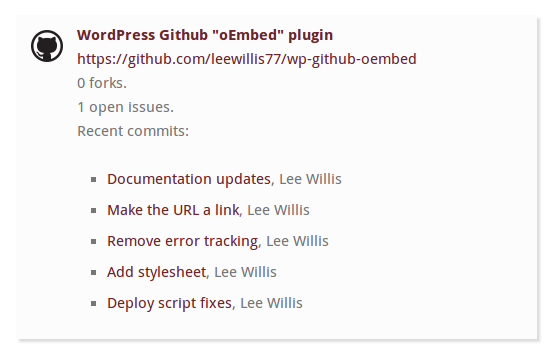
GitHub Repository

GitHub user profile
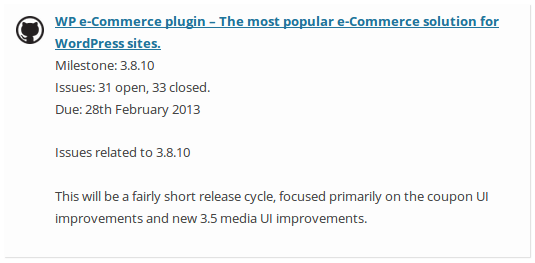
Project milestone summaries

Project contributors
Faq
Yes, you can override templates by copying the relevant template from the templates folder to a folder in your theme called wp-github-oembed/
Reviews
Does seem to work, with this 1 simple trick
By 
http instead of https.
Posting the URL (which should trigger an embed in Gutenberg) using https seems to be hit or miss, but using http worked for all URLs I tried.
Sadly not working
By 
Doesn't seem to work sadly. Trying to add my public repos to a page and they are not showing up like in the screenshots. I don't think I am doing anything wrong, but perhaps a bit of better documentation and screenshots on how to actually add stuff would resolve the confusion if it is actually working.
Not working at all for me
By 
Plugin is working perfectly for public repositories!
By 
this doesn't embed anything and is listed as the first embed plugin for github
By 
very nice plugin!
By 
Great job
By 
This is so cool it should be part of WordPress!
By 
Changelog
2.2.1
- No changes. Internal re-packaging.
2.2.0
- Fix issue where data was not pass to overridden templates, making templating possible.
2.1.0
- Wrap recent commits in a tag, expanded by default. Props ZjzMisaka on GitHub
- Wrap contributor details in a tag, expanded by default.
2.0.2
- Fix issue where GitHub serves incorrectly sized images for non-avatar users
2.0.1
- Suggest Treeware donations
2.0
- Support for authenticating using personal access tokens
1.9
- Remove unused code – thanks to https://github.com/pjaudiomv
1.8
- New: All responses are now templated thanks to https://github.com/Zebouski
1.7
- Include GitHub logo rather than hotlinking to (no-longer supported) repo for image
- Add wp_github_oembed_logo_class filter
1.6
- Internal code cleanups
- Remove unnecessary debug code
1.5
- Fixes for newer GitHub milestone URLs
1.4
- Fix PHP warning that could block contributor embeds.
- Fix Contributor embeds to use correct API call
- Pass correct initial value to credentials filters
1.3
- Expire the oEmbed cache daily
1.2
- Split API calls into separate class
- Implement milestone summaries
- Implement contributor lists
1.1
- Default CSS and more styling
1.0
- First release