Global Weather Pro: Accurate Local Forecasts

Global Weather Pro: Accurate Local Forecasts
Description
**Global Weather Pro is a powerful and easy-to-use WordPress plugin that delivers true hyper-local weather forecasts and critical weather alerts. Unlike other tools that default to the nearest city, Global Weather Pro uses the precise GPS coordinates of an address, providing a forecast and alerts for that exact location. To offer maximum flexibility, Global Weather Pro includes two distinct widgets optimized for different placements: a comprehensive header widget and a compact sidebar widget. Effortlessly display current conditions, detailed 7-day forecasts, and severe weather alerts to keep your visitors informed and engaged. Perfect for any website, Global Weather Pro offers precision and flexibility to ensure an enhanced user experience, now featuring stunning, AI-generated animated images for all 38 weather conditions in the widget’s header. All weather data and alerts are sourced from Weatherbit, a well-known and trusted weather provider, ensuring reliable and professional-grade forecasts you can count on. Global Weather Pro handles all API communications through our dedicated service, meaning you get reliable data from top providers like Weatherbit without needing to sign up for, manage, or pay for your own API keys.
Check out the live demos to see both widgets in action: Sidebar Demo
Header Demo
Features:
- Critical Weather Alerts: Keep your audience safe and informed with timely notifications for severe weather events, sourced directly from Weatherbit. Alerts are prominently displayed within the widget to ensure maximum visibility.
- True Hyper-Local Forecasts: Get weather for your actual address, not just the nearest city center. We use the precise GPS coordinates of your location to deliver a truly accurate forecast, powered by Geoapify geocoding.
- No API Keys Needed: Instantly set up and deliver weather forecasts without any third-party signups or costs. Global Weather Pro handles all API communications through our dedicated service.
- Dual Widget Design: Comes with two specialized widgets—one designed for prominent header placement and another optimized for sidebars, ensuring a perfect fit for your theme’s layout.
- Professional Dark & Light Themes: Choose between a rich, innovative Dark Mode featuring a slate-based palette with frosted glass effects and cyan accents, or a clean, polished Light Mode—both designed for a modern weather app aesthetic.
- AI-Generated Animations: Stunning AI-generated animated images for all 38 weather conditions are displayed in the header of the weather widget, creating a beautiful user experience.
- Accessibility Compliant (WCAG): Built with comprehensive ARIA attributes, semantic HTML, keyboard navigation support, and reduced motion preferences for an inclusive experience for all users.
- Detailed Hourly & Daily Forecasts: Provide a true, 24-hour, hour-by-hour forecast and a 7-day forecast. Display key metrics like temperature, chance of rain, humidity, UV index, and more.
- Shortcode Support: Includes separate, reliable shortcodes for both the header and sidebar widgets ([gwpro_header_weather] and [gwpro_sidebar_weather]) for easy embedding anywhere on your site.
- Flexible Placement (Widgets & Shortcodes): Seamlessly add widgets to your header, footer, or sidebar. You can also use the simple shortcodes ([gwpro_header_weather] and [gwpro_sidebar_weather]) to embed forecasts anywhere on your posts or pages.
- Font Customization: Personalize the widget’s appearance by choosing from 4 professional fonts, including Roboto, EB Garamond, Lato, and Source Sans Pro.
Whether you run a blog, business website, or community portal, Global Weather Pro makes it easy to share up-to-date weather insights with your audience.
Third-Party Services
Global Weather Pro API
-
Fetches weather data.
-
No personal data collected.
-
Accessed at:
-
Privacy Policy: https://globalweatherpro.com/gwpro-privacy-policy
Weatherbit API
- Provides weather forecasts.
- Location data (entered by site owner) sent; no personal data collected.
- Accessed at:
- Privacy Policy: https://www.weatherbit.io/privacy
Geoapify API
- Provides geolocation services.
- No personal data collected.
- Accessed at: https://api.geoapify.com/v1/geocode/search
- Privacy Policy: https://www.geoapify.com/privacy-policy/
Google Fonts API
– This service is used to load and display custom fonts, as selected in the widget settings.
– Personal Data: To serve fonts efficiently, Google may collect data such as IP addresses.
– Access: The API is accessed at https://fonts.googleapis.com.
– Privacy Policy: Refer to Google’s privacy policy here: https://policies.google.com/privacy.
Installation
- Upload the plugin files to
/wp-content/plugins/global-weather-proor install through the WordPress plugin screen. - Activate the plugin through the ‘Plugins’ menu.
- Navigate to “Appearance” > “Widgets” and add either the “Global Weather Pro Header” or “Global Weather Pro Sidebar” widget to your desired location.
- Alternatively, embed the widgets directly into posts and pages using a shortcode: Use [gwpro_header_weather] to display the header widget. Use [gwpro_sidebar_weather] to display the sidebar widget.
Screenshots

Desktop view of the header widget set to dark mode theme.

Mobile view of sidebar widget set to dark mode theme.
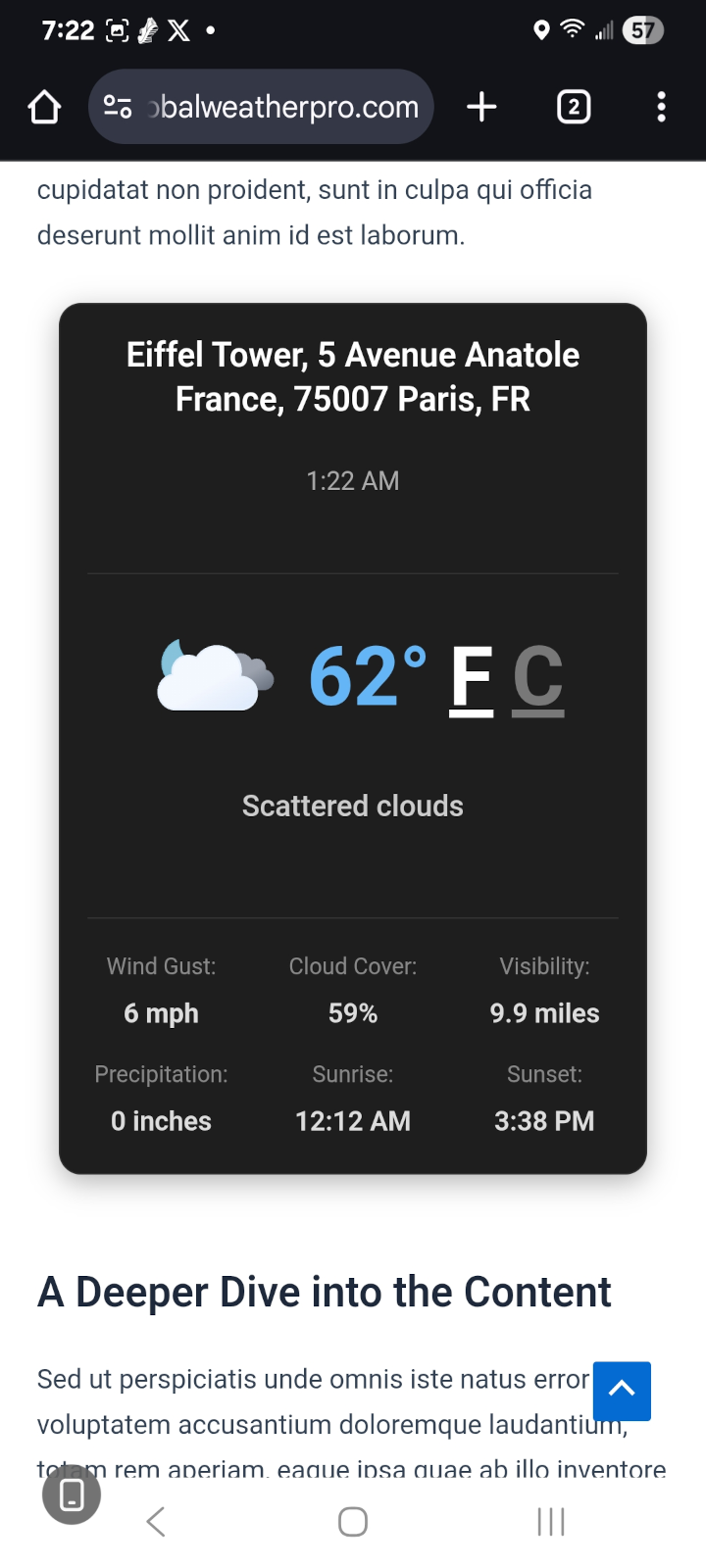
Mobile view embedded using shortcode set to light mode theme.
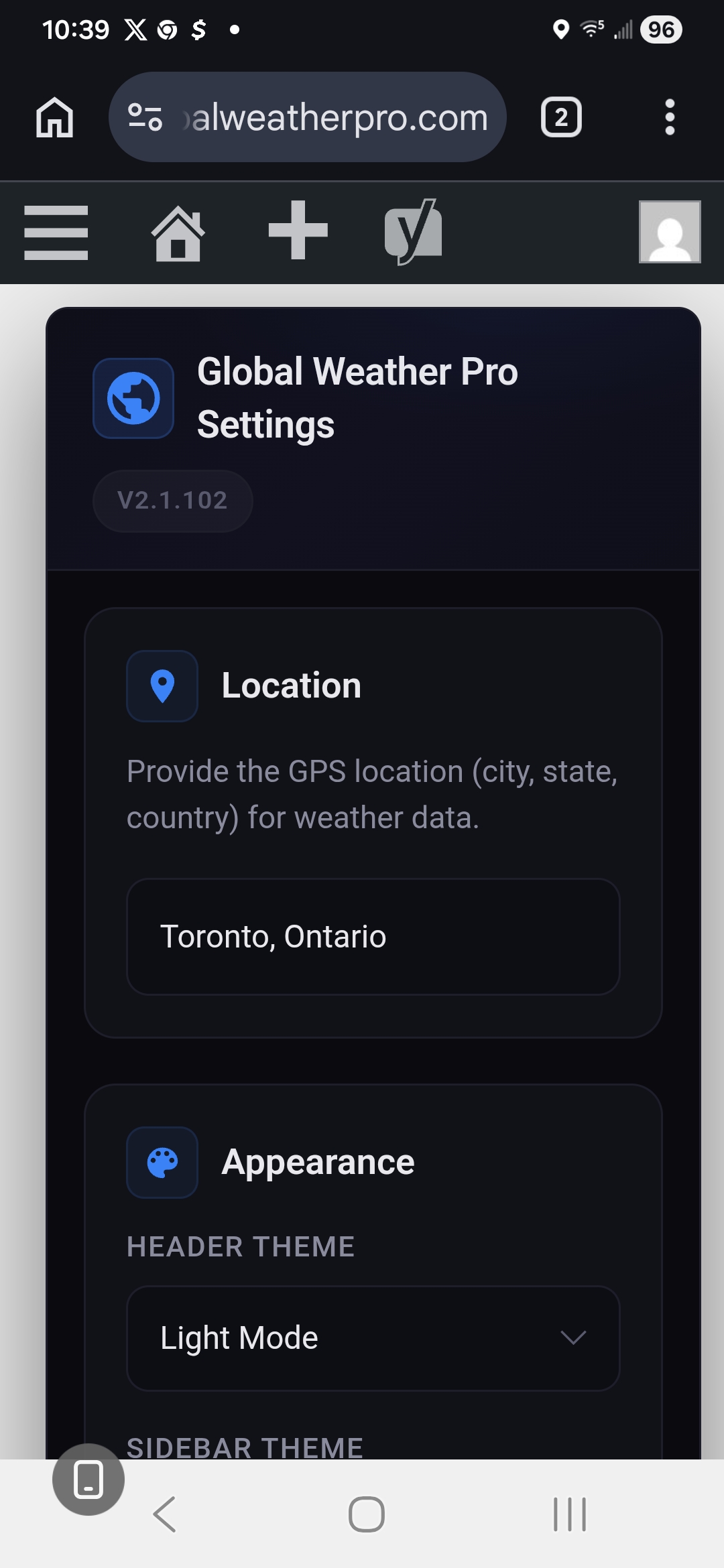
The admin settings page for entering a custom location.
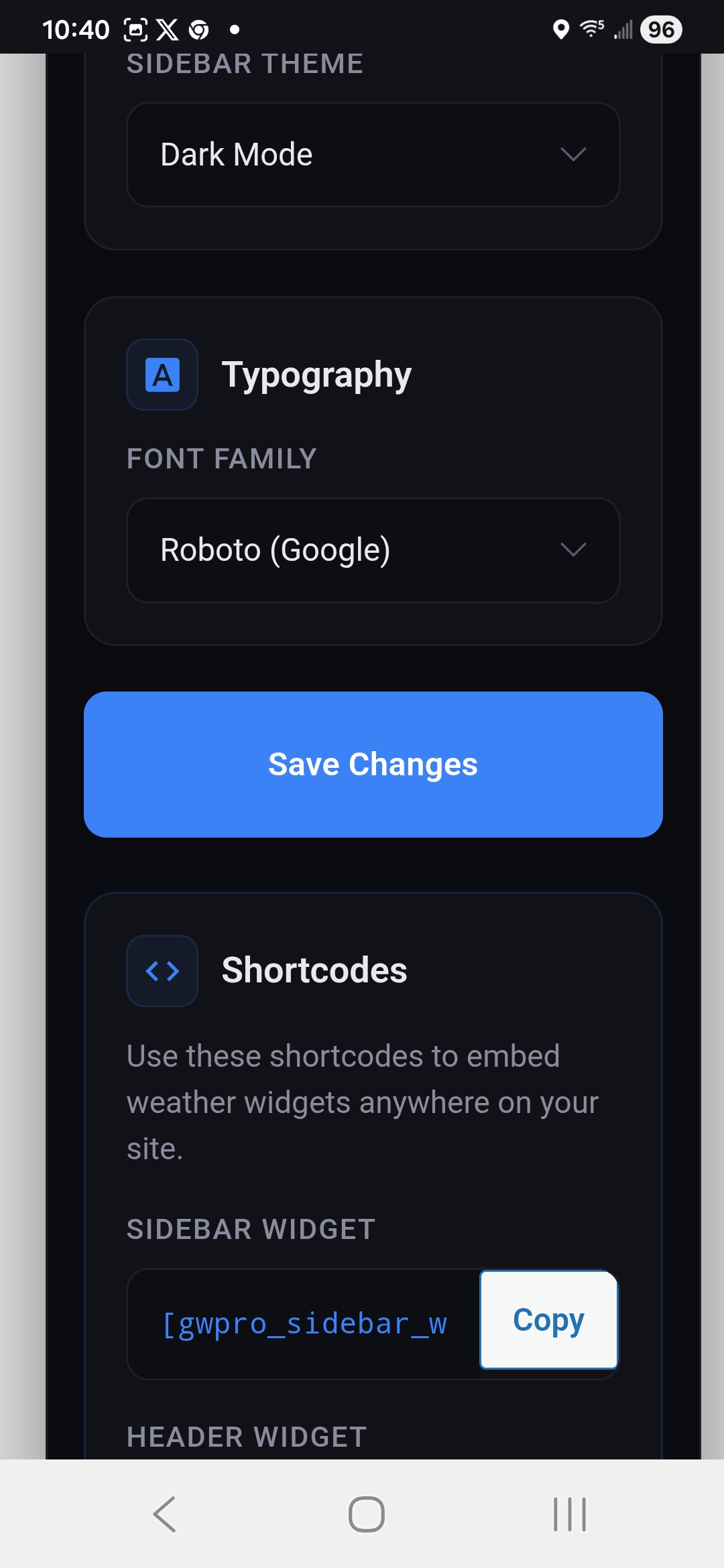
Shortcode section of the settings page with one-click copy buttons.
Faq
How do I display the widget?
To display the Global Weather Pro widget, you have a few options:
Widget Menu: Navigate to “Appearance” > “Widgets” in your WordPress admin panel. From there, you can add either the “Global Weather Pro Header” or “Global Weather Pro Sidebar” widget to your desired location, such as your header, footer, or sidebar.
Shortcodes: For more flexibility, you can embed the widgets directly into your posts and pages using shortcodes.
Use [gwpro_header_weather] to display the header widget.
Use [gwpro_sidebar_weather] to display the sidebar widget.
It is important to note that the original shortcode, [gwpro_global_weather_pro], now functions as an alias for the sidebar widget shortcode ([gwpro_sidebar_weather]) for backward compatibility. Therefore, any existing instances of the old shortcode will continue to work without issue.
Is the plugin compatible with all WordPress themes?
Global Weather Pro is designed to work with most WordPress themes. If you experience any issues, please create a topic on our official WordPress support forum so our team and the community can assist you: Official Plugin Support Page
Reviews
Changelog
2.2.0 – 2026-03-21
- New: Unified Theme System. Simplified the header widget theme options from four themes (Glossy Black, Midnight Graphite, Midnight Horizon, Light Mode) down to two polished options: Dark Mode and Light Mode. This creates a cleaner admin experience and ensures visual consistency.
- Enhancement: Professional Dark Theme Redesign. The header widget now features a rich, innovative dark theme with a slate-based color palette, frosted glass effects, subtle cyan/blue accents, and smooth transitions for a modern weather app aesthetic.
- Enhancement: Consistent Light Theme. The Light Mode theme has been completely redesigned to match the structure and polish of the new Dark Mode, ensuring a cohesive experience regardless of theme selection.
- Enhancement: Accessibility Improvements (WCAG Compliance). Added comprehensive ARIA attributes throughout the header widget including proper
role,aria-label,aria-labelledby,aria-pressed, andaria-selectedattributes. Changed interactive elements from anchor tags to semantic<button>elements for improved screen reader support. - Enhancement: Keyboard Navigation. Added visible focus states (
focus-visible) for all interactive elements to support keyboard-only users. - Enhancement: Glassmorphism Forecast Toggle Buttons. The Hourly/7-Day forecast toggle buttons now feature a distinctive high-tech glassmorphism design with multi-layer transparency, backdrop blur, inner highlights, animated shimmer effects on hover, and a subtle lift transform—giving them a premium, see-through glass appearance that stands out from other widget controls.
- Enhancement: Reduced Motion Support. Added
prefers-reduced-motionmedia query support to respect user system preferences by disabling animations when requested. - Dev: CSS Architecture Cleanup. Removed redundant legacy theme files (glossy-black.css, midnight-graphite.css, midnight-horizon.css, techwave-modern.css, techwave-sidebar.css, alert-icon-techwave.css) and consolidated styles into two unified theme files.
2.1.102 – 2026-02-21
- Fix: Resolved a critical bug where the “Leave a Review” admin notice never appeared for users who had the plugin installed before the review system was introduced in v2.1.88. The
register_activation_hookonly fires on initial activation, sogwpro_activation_datewas never set for existing installs, causing the display function to always bail out. Added anadmin_initfallback that seeds the activation date if missing. - Fix: Corrected a nonce mismatch on the “Maybe Later” review notice action. The delay URL was generated with the nonce action
gwpro_dismiss_notice_noncebut the handler verified againstgwpro_delay_notice_nonce, causing the click to silently fail and never actually postpone the notice. - Enhancement: Redesigned the admin settings page with a modern, rich-black high-tech aesthetic. The new layout features dark card-based sections with subtle accent glows, icon-labeled headers for Location, Appearance, Typography, and Shortcodes, a dedicated sidebar column for Review and Support actions, and fully custom-styled inputs, selects, and buttons for a polished, cohesive admin experience.
2.1.100 – 2026-01-22
- Enhancement: Weather alert modals now allow full text selection and copying. Users can highlight and copy alert titles and descriptions directly from the modal overlay, improving accessibility, usability, and information sharing—especially during severe weather events.
2.1.98 – 2026-01-15
- Enhancement: Repositioned the weather alert icon and forecast toggle buttons (Hourly/7 Day) to the bottom right corner of the header widget for improved layout and accessibility across all themes.
2.1.95 – 2025-10-28
- Change: Replaced “Daily Average Gusts” with “Current Gusts” in the header widget. This now reflects the most recent observed/analyzed gust at the location (more actionable for severe weather).
2.1.94 – 2025-10-08
- Fix: Resolved an issue where the Fahrenheit/Celsius unit toggle stopped working after pages were translated using Google Translate. Event listeners are now delegated to survive DOM replacements by translation plugins.
- Fix: Removed DOM re-insertion of the unit toggle links that caused them to lose their horizontal spacing when switching units.
- Enhancement: Added translation-safe attributes (
data-role="unit-toggle",translate="no") to both widgets, ensuring consistent behavior and preventing future breakage when the page is translated.
2.1.91 – 2025-10-02
- Enhancement: Centered the alert icon in the compact sidebar widget for improved visual balance and a cleaner layout across all screen sizes. This change ensures the critical weather alert indicator is now properly aligned when displayed in sidebar placements.
2.1.89 – 2025-09-17
- Enhancement: Expanded the Font Customization feature to include a total of four professional fonts. Users can now choose from Roboto, EB Garamond, Lato, and Source Sans Pro to personalize the widget’s appearance.
2.1.88 – 2025-09-03
- New: Added a new non-intrusive admin notice to encourage user reviews. The prompt appears on the main dashboard after a set period and includes options to leave a review, delay the notice (“Maybe Later”), or permanently dismiss it.
2.1.87 – 2025-09-02
- Fix: Corrected an issue where clicking on weather parameter tabs within the WordPress Playground live preview would erroneously open a new blank tab. Navigation within the live preview now functions as expected.
2.1.82 – 2025-08-27
New: Critical Alerts in Sidebar Widget. The compact sidebar widget now displays critical weather alerts sourced from Weatherbit. This extends the severe weather notification feature, ensuring important alerts are visible to users regardless of which widget is used.
2.0.71 – 2025-08-22
- Enhancement: The weather alert modal now displays all active alerts for a location, not just the first one. This ensures users have access to complete severe weather information in a single, scrollable view.
2.0.4 – 2025-08-16
- Fix: Resolved an issue where the weather alerts icon incorrectly appeared active when no alerts were present.
2.0.0 – 2025-08-16
- New: Critical Weather Alerts. Added a new feature to display critical weather alerts from Weatherbit. Alerts will now appear in the header widget to inform users of severe weather conditions.
1.1.20 – 2025-08-04
- Font Customization: Introduced new font style options in the widget settings, allowing users to personalize the appearance of the text.
1.1.14 – 2025-08-01
- New: Implemented theme-aware custom scrollbars for all scrollable content areas within the widget.
- Enhancement: The scrollbar’s appearance now automatically adapts to the currently selected theme (Glossy Black, Midnight Graphite, Midnight Horizon, and Light Mode), replacing the default browser scrollbar. This creates a more immersive and visually cohesive user experience, particularly for the horizontal forecast views.
- Enhancement: Improved scrollbar contrast and hover states for better usability and accessibility across all themes.
1.1.08 – 2025-07-29
- New: Added one-click “Copy” buttons for shortcodes. You can now easily copy the header and sidebar shortcodes directly from the admin settings page (“Settings” > “Global Weather Pro”).
1.1 – 2025-07-24
- New: Introduced two distinct shortcodes for improved reliability. To resolve issues with the WordPress Shortcode Block, the plugin now has two separate shortcodes:
[gwpro_header_weather]for the header widget and[gwpro_sidebar_weather]for the sidebar widget. - Tweak: Admin settings page updated for clarity. The settings page under “Settings > Global Weather Pro” has been updated to display the two new, separate shortcodes, making them easier to find, copy, and use.
- Tweak: Full backward compatibility for the original shortcode. The original
[gwpro_global_weather_pro]shortcode now automatically functions as an alias for[gwpro_sidebar_weather]. Your existing shortcodes will continue to work without any changes. - Dev: Major code refactor for maintainability. The internal PHP logic for rendering widgets and shortcodes has been significantly refactored. We’ve introduced reusable functions to reduce code duplication (DRY principle), making the plugin lighter and easier to update in the future.
1.0 – 2025-07-23
- Initial release