GlobalDev Broken Link Monitor

GlobalDev Broken Link Monitor
Description
GlobalDev Broken Link Monitor is a lightweight site-maintenance plugin that checks stored links in published WordPress content, blocks, page builders, templates, widgets and navigation menus.
The scanner runs in small batches from the WordPress dashboard, helping avoid long single requests on shared hosting. External URLs are checked with WordPress safe HTTP request functions, while links to the current site are checked directly.
Features
- Scan selected public post types.
- Scan WordPress classic navigation menus, including custom URLs, and saved block navigation/submenus.
- Scan links in page content, excerpts, standard HTML and published custom post types selected in settings.
- Scan Elementor elements and published templates.
- Scan WPBakery/Visual Composer shortcode buttons, encoded vc_link settings and raw HTML.
- Scan Divi Builder buttons, module destination links, and published Divi layouts.
- Scan saved link settings from Bricks, Beaver Builder, Breakdance, Oxygen, SiteOrigin, Themify Builder, Cornerstone, Zion, and other supported builders.
- Scan generic clickable shortcode links (such as Avada and Flatsome UX Builder buttons).
- Scan Gutenberg blocks, reusable blocks, block-theme navigation posts, site templates and navigation submenus.
- Scan active classic and block widgets.
- Scan URL/link-oriented custom fields, including WooCommerce external product links.
- Configure an exclusion list for historical importer metadata (by default
_gdmpi_*), without disabling regular custom-field scanning. - Label each report entry with its detected content source (Elementor, WPBakery, Divi, Bricks, Content, Menu, Widget, Custom fields, etc.).
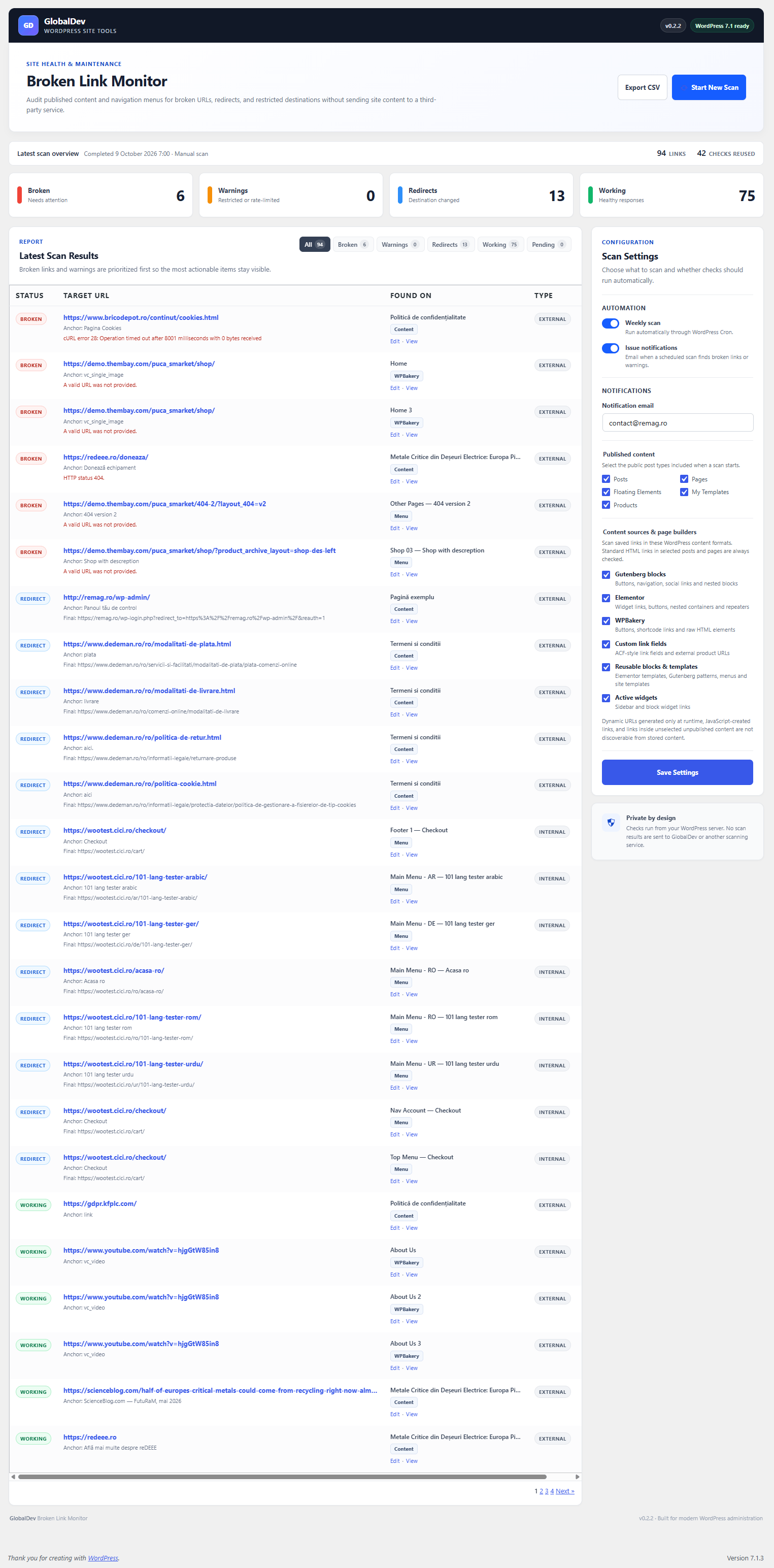
- Detect working links, redirects, broken responses, timeouts, and restricted responses.
- Separate internal and external links.
- Show the source page or menu item for each URL.
- Open the source editor directly from the report.
- Filter results by status or source location (menus, page/post/template content, widgets).
- Export the latest report to CSV.
- Optional weekly scans using WP-Cron.
- Optional email notification when a scheduled scan finds broken links or warnings.
- No third-party service and no external account required.
The plugin stores only the latest scan report in a custom database table.
Privacy
The plugin stores link URLs, source titles, source URLs, HTTP status information, and scan timestamps in the site’s WordPress database. It does not collect visitor data and does not send scan results to GlobalDev IT or another third-party service.
When a scan runs, the website server sends HTTP requests to the linked destinations. Those destinations may receive standard request information such as the server IP address and user agent.
Installation
- Upload the
globaldev-broken-link-monitorfolder to/wp-content/plugins/, or install the ZIP from Plugins > Add New > Upload Plugin. - Activate GlobalDev Broken Link Monitor.
- Go to Tools > Broken Link Monitor.
- Choose the public post types to scan and save the settings.
- Select Start New Scan.
Screenshots
Faq
No. The plugin performs HTTP requests from your WordPress server and does not use a third-party scanning API.
Some websites block automated HEAD or GET requests, require authentication, or apply rate limits. HTTP 401, 403, and 429 responses are classified as warnings to reduce false broken-link reports.
No. Scheduled scans use WP-Cron, which runs when the website receives traffic. Sites that disable WP-Cron should trigger wp-cron.php through a server cron job.
Version 0.3.2 reads saved clickable URLs from WordPress menus, Gutenberg navigation, Elementor JSON, WPBakery, Divi shortcodes, Bricks, Beaver Builder, Breakdance, Oxygen, SiteOrigin and supported builder metadata. It also reads published template layouts and recognized custom link fields. It does not render pages, execute shortcodes, run dynamic tags or JavaScript, or guarantee support for every third-party storage format. Some dynamic, conditional, unpublished or remote-generated links cannot be discovered. Large builder values above 4 MB are skipped to limit resource usage.
No. Fragment-only links and mailto:, tel:, sms:, javascript:, data:, and ftp: URLs are ignored.
The scan report is a snapshot of saved link fields. Changing WordPress permalink settings does not rewrite custom metadata such as _gdmpi_source_post_link. If those values record the original URL from an import rather than a link displayed on the site, exclude _gdmpi_* in the settings (the default in version 0.3.2) and start a new scan. Do not delete metadata without confirming that the importer/theme no longer uses it. If old published permalinks must remain accessible, add 301 redirects separately.
Reviews
Changelog
0.3.2
- Exclude historical migration metadata
_gdmpi_*from custom-field link checks by default, addressing false-positive broken links after permalink changes. - Add an editable custom-field metadata exclusion list supporting exact meta keys and trailing-asterisk prefixes.
- Keep checks for Elementor, WPBakery, Divi, menus, page HTML and other custom link fields unchanged.
- Exclusions apply to new scans; historical results are replaced when a new scan starts. No post metadata is deleted or modified.
0.3.1
- Corrected prepared SQL queries for the report’s status and source filters.
- Resolved Plugin Check warnings about dynamic WHERE clauses and mismatched SQL placeholders, while retaining report filtering and pagination.
0.3.0
- Added explicit navigation-menu scanning control, including classic custom menu links and Gutenberg navigation submenus.
- Added Divi module link extraction and published layout/template post types.
- Added targeted saved-data readers for Bricks, Beaver Builder, Breakdance, Oxygen, SiteOrigin, Themify, Cornerstone, Zion, Thrive and SeedProd.
- Added generic shortcode link extraction for additional builders such as Avada and Flatsome.
- Expanded template type scanning and custom URL field recognition.
- Improved link key filtering to exclude media assets and non-URL settings.
- Added a report source filter to focus on menu links, page content or widgets.
- Preserved existing reporting, CSV export, status classifications, scheduled scans and notification behavior.
0.2.2
- Added the required translator context for the widget title placeholder to meet WordPress i18n coding standards.
0.2.1
- Added Elementor widget, nested element and template link detection.
- Added WPBakery shortcode, encoded vc_link and raw HTML detection.
- Added Gutenberg link attributes, published reusable blocks, navigation posts and site templates.
- Added active widgets and link-oriented custom fields, including external WooCommerce product links.
- Added six configurable content-source toggles to the scan settings.
- Moved external WordPress/plugin admin notices outside the branded hero header.
- Added content-source labels to the report and CSV export; existing scan history is maintained through a non-destructive table upgrade.
0.2.0
- Updated compatibility metadata for WordPress 7.1, including WordPress 7.1.3.
- Redesigned the admin report with a GlobalDev branded header and modern dashboard layout.
- Improved report filters, scan progress feedback, responsive behavior, settings controls, and accessibility labels.
- Added clearer scan metadata and disabled CSV export when no report exists.
0.1.0
- Initial release.
- Added batched manual scanning for published content and navigation menus.
- Added weekly WP-Cron scans and optional issue notifications.
- Added status filters, source links, and CSV export.