GoFactoX: Facture électronique Factur-X for WooCommerce

GoFactoX: Facture électronique Factur-X for WooCommerce
Description
GoFactoX turns your WooCommerce orders into Factur-X invoices and credit notes (factures électroniques, avoirs), created automatically and for free, with the French legal mentions and B2B checkout fields (SIREN, SIRET, VAT number).
French e-invoicing reform (réforme de la facturation électronique): since 1 September 2026, every business subject to VAT must be able to receive e-invoices, and from 1 September 2027 small and medium businesses (PME, TPE) must issue them. GoFactoX produces the file and, with the Pro plan, deposits it on your own SUPER PDP account, a Plateforme Agréée that bills you directly: about €0.01 per invoice, €2 verification, €10 minimum per year (check superpdp.tech).
Free plan
- Automatic invoices: created when the order reaches the status you choose (Completed by default). You can also generate one by hand from the order screen, the orders list or an order action.
- Credit notes (avoirs): a Factur-X credit note (type 381) is created when you refund, or from the order screen, with its own numbering.
- E-mails and downloads: the invoice is attached to the processing, completed and payment request (formerly “customer invoice”) e-mails, the credit note to the refund e-mails. Customers also download them from My Account and the order confirmation page.
- B2B checkout fields: SIREN, SIRET, VAT number and purchase order reference, in the classic and block checkout.
- French legal mentions: late payment penalties, €40 recovery indemnity, article 293 B for sellers exempt from VAT (franchise en base).
- Continuous numbering without gaps, with the prefix and format you choose.
- Your logo, IBAN/BIC and payment terms: immediate, 15 to 60 days, 30 or 45 days end of month, or your own text.
- Preview: a specimen PDF built from your settings, without using an invoice number.
- Three formats: Factur-X (PDF/A-3 with the EN 16931 XML embedded), CII and UBL 2.1 (XML files).
- Setup guard: a 3-step checklist at the top of the settings; nothing is generated, and no number is consumed, while your company details are incomplete.
- Invoice language: French (the default), the site language, or the order language with WPML or Polylang.
- WooCommerce ready: HPOS, block checkout, Subscriptions billing periods, coupons as structured discounts, GDPR export and erase.
Pro plan
€9.99 per month or €99 per year, excl. VAT.
- Transmission to your Plateforme Agréée: each invoice and credit note is sent to your own SUPER PDP account, with lifecycle statuses (received, accepted, refused, paid…) in the order, a note at each change and alerts when a document fails. GoFactoX is a connector to your own Plateforme Agréée account and takes no commission.
- E-reporting scope: B2B invoices by default; sales to consumers (B2C) can be included in the transmission settings.
- Dashboard: net revenue (credit notes deducted), document list with “Never sent” and “Failed” filters, monthly ZIP for your accountant.
- Bulk and retroactive generation: bulk actions and ZIP export on the orders list, and a panel that generates the missing invoices and credit notes since a date you choose.
- REST API at /wp-json/gofactox/v1/ (invoices, credit notes, downloads).
- SEPA QR code (scan-to-pay) on EUR invoices and AVOIR watermark on credit note PDFs.
- Experimental AFNOR connector for another Plateforme Agréée that gives you access to the standard AFNOR API (XP Z12-013). Validated with SUPER PDP only.
- Priority e-mail support.
Business plan
€19.99 per month or €199 per year, excl. VAT. Everything in Pro, plus a license for 5 sites, the FEC export (Fichier des Écritures Comptables, article A47 A-1 LPF) and priority support within 24 hours. Compare the plans
For developers
- Filters:
gofactox_invoice_data,gofactox_xml_output,gofactox_pdf_template_path,gofactox_pdf_filename. - WooCommerce webhook topics:
gofactox.invoice.created,gofactox.document.pa_status_changedand others. - EN 16931 terms in the XML include BT-10 (purchase order), BT-34 and BT-49 (electronic addresses), BT-73 and BT-74 (billing period), BG-17 (credit transfer) and BG-20 (allowances).
- The XML is validated against the XSD schema when it is generated.
GoFactoX is an independent product, not affiliated with or endorsed by WooCommerce, Automattic or the French tax administration.
External Services
This plugin connects to external services: Freemius (licensing and updates, always), SUPER PDP (only when you enable the Plateforme Agréée transmission in the Pro plan and enter your own credentials), and, with the experimental AFNOR API connector, the Plateforme Agréée whose address you enter. The SUPER PDP and AFNOR connectors belong to the paid plans: the version published on WordPress.org does not contain their code.
Freemius
The plugin uses the Freemius SDK for licensing, updates of the paid plans and optional usage tracking. On activation you are asked whether to opt in; if you do, Freemius receives your site URL, WordPress and PHP versions, the plugin version, and the administrator e-mail. If you skip, only license checks for paid plans and update requests are sent. Purchases are processed by Freemius.
- Service: Freemius
- Terms of use: https://freemius.com/terms/
- Privacy policy: https://freemius.com/privacy/
SUPER PDP
SUPER PDP is a French Plateforme Agréée (PA, registered with the DGFiP) operated by SUPER G SAS. When the connector is configured, the plugin sends to SUPER PDP: the generated invoice or credit note file (Factur-X PDF/A-3, CII or UBL, which contains your company details, the customer’s billing details and the invoice lines), the document number, and lifecycle status messages (e.g. “paid”). It also reads back the transmission status of each document. The “Validate last document” tool sends the latest invoice file to the public SUPER PDP validator, without authentication. No data is sent unless you enable the connector and save your client ID and client secret; the secret is stored encrypted.
- Service: SUPER PDP
- API documentation: https://www.superpdp.tech/documentation
- Terms of use: https://www.superpdp.tech/conditions-generales
- Privacy policy: https://www.superpdp.tech/donnees-personnelles
Plateforme Agréée configured through the AFNOR API (experimental)
The experimental “AFNOR API” connector (Pro and Business plans) is only used when the site owner selects it in the transmission settings and enters the API URL, the OAuth token URL, a client ID and a client secret of their own Plateforme Agréée. The service contacted is therefore the platform chosen by the site owner, at the HTTPS addresses they enter. The plugin sends to it: the OAuth client credentials (to the token URL), the invoice or credit note file of French business customers (Factur-X PDF/A-3, CII or UBL, which contains your company details, the customer’s billing details and the invoice lines), the document number and its SHA-256 fingerprint. It then reads back the technical acknowledgement of each document, and may download a document it already holds to compare it with the local file before tracking it. Nothing is sent before the connector is configured and saved; the secret is stored encrypted and is deleted when the API or token host changes. The terms of use and privacy policy are those of the platform you configure: check them with your provider.
Installation
- Go to Plugins > Add New in your WordPress admin (WooCommerce must be installed and active).
- Search for GoFactoX, then click Install Now and Activate.
- Go to WooCommerce > Settings > GoFactoX (Factur-X).
- Fill in your company details (name, address, VAT number or the VAT exemption box, SIRET for French sellers); the checklist at the top of the settings guides you. Nothing is generated until they are complete.
- Click Preview an invoice to check the result, then complete an order: the invoice is generated automatically, or click Generate on the order.
Screenshots
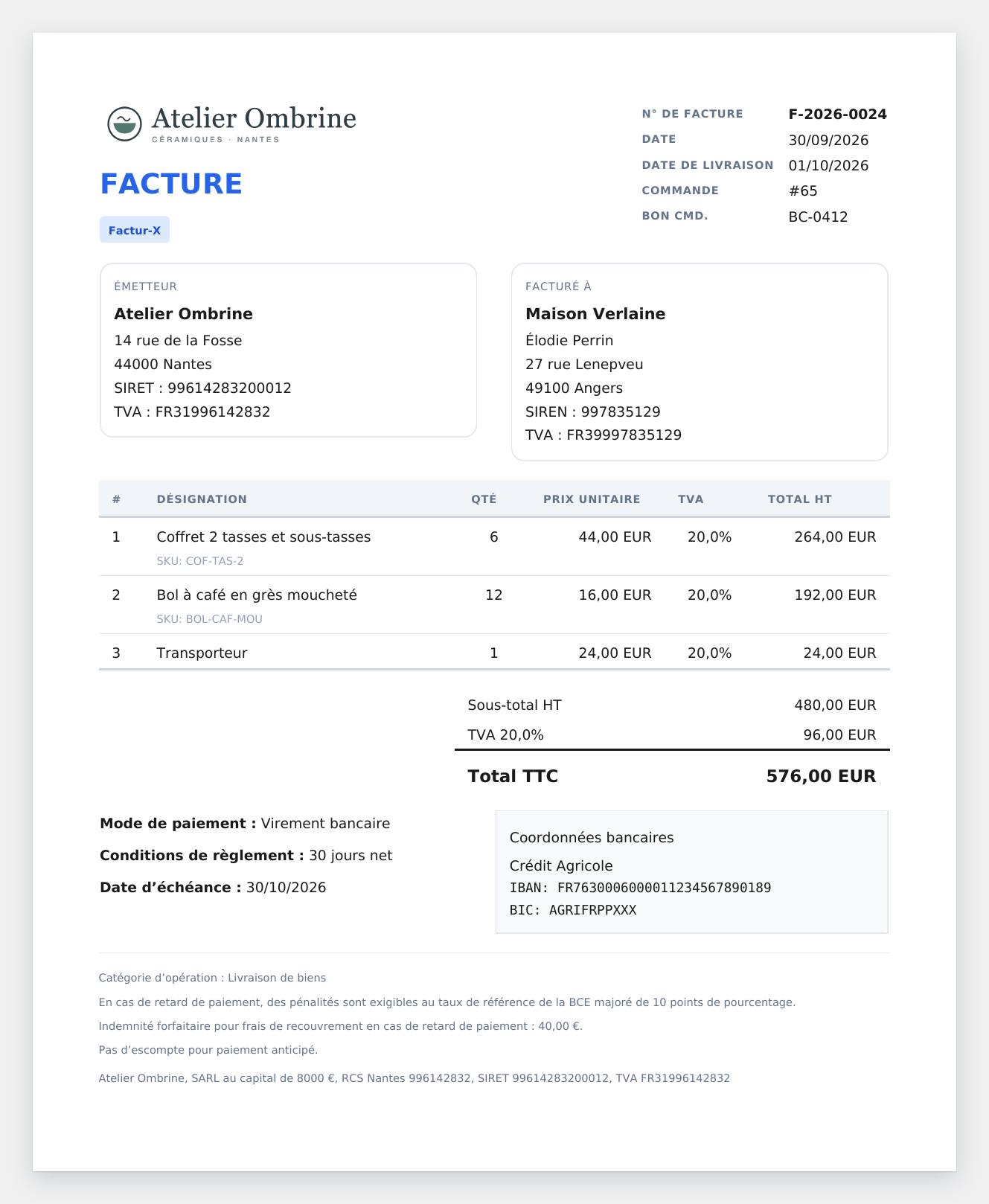
A Factur-X invoice: PDF with the French legal mentions, the customer's SIREN and VAT number, payment terms and IBAN, with the EN 16931 XML embedded
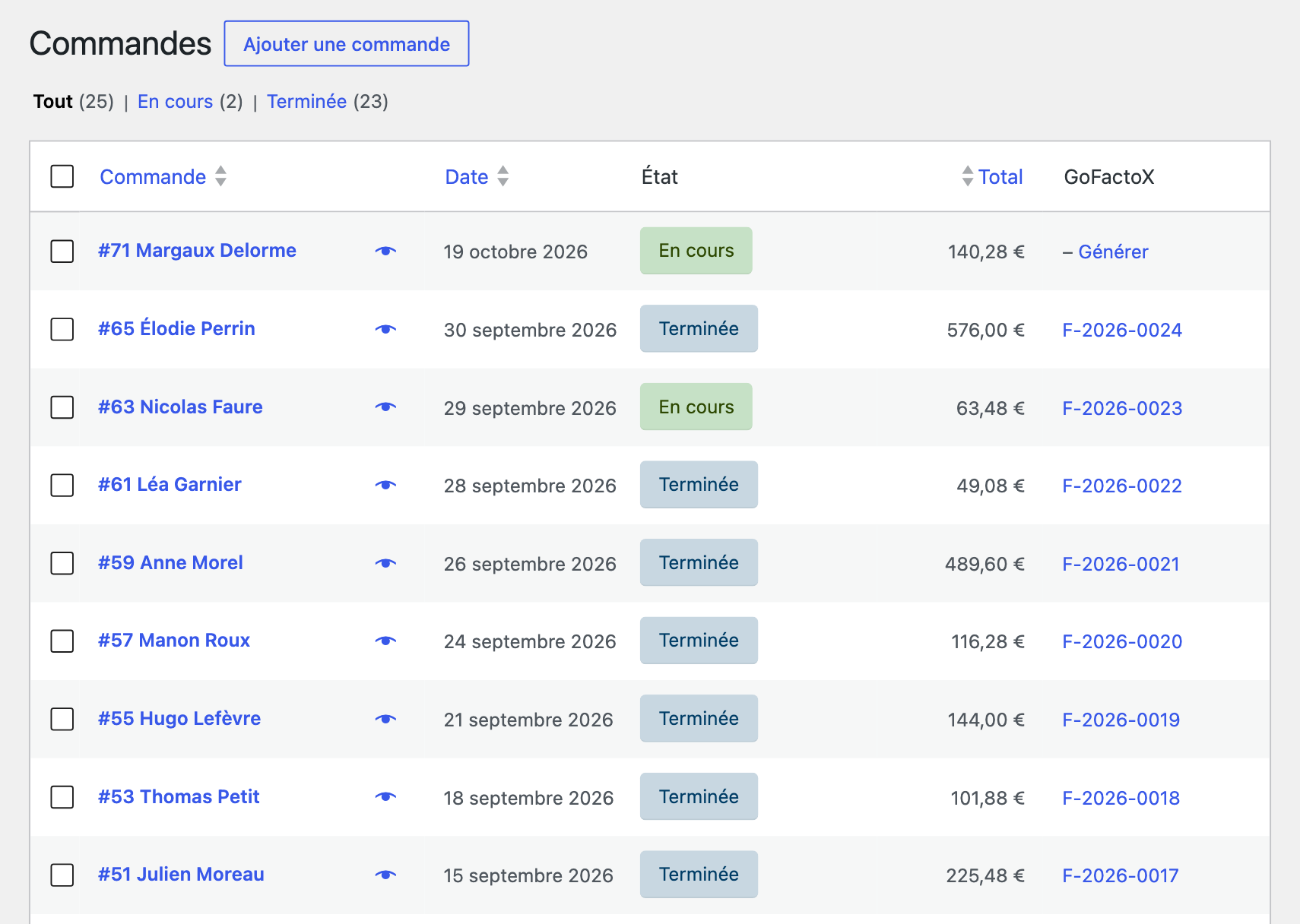
Generate an invoice in one click from the order screen or the orders list, or let GoFactoX create it when the order is completed
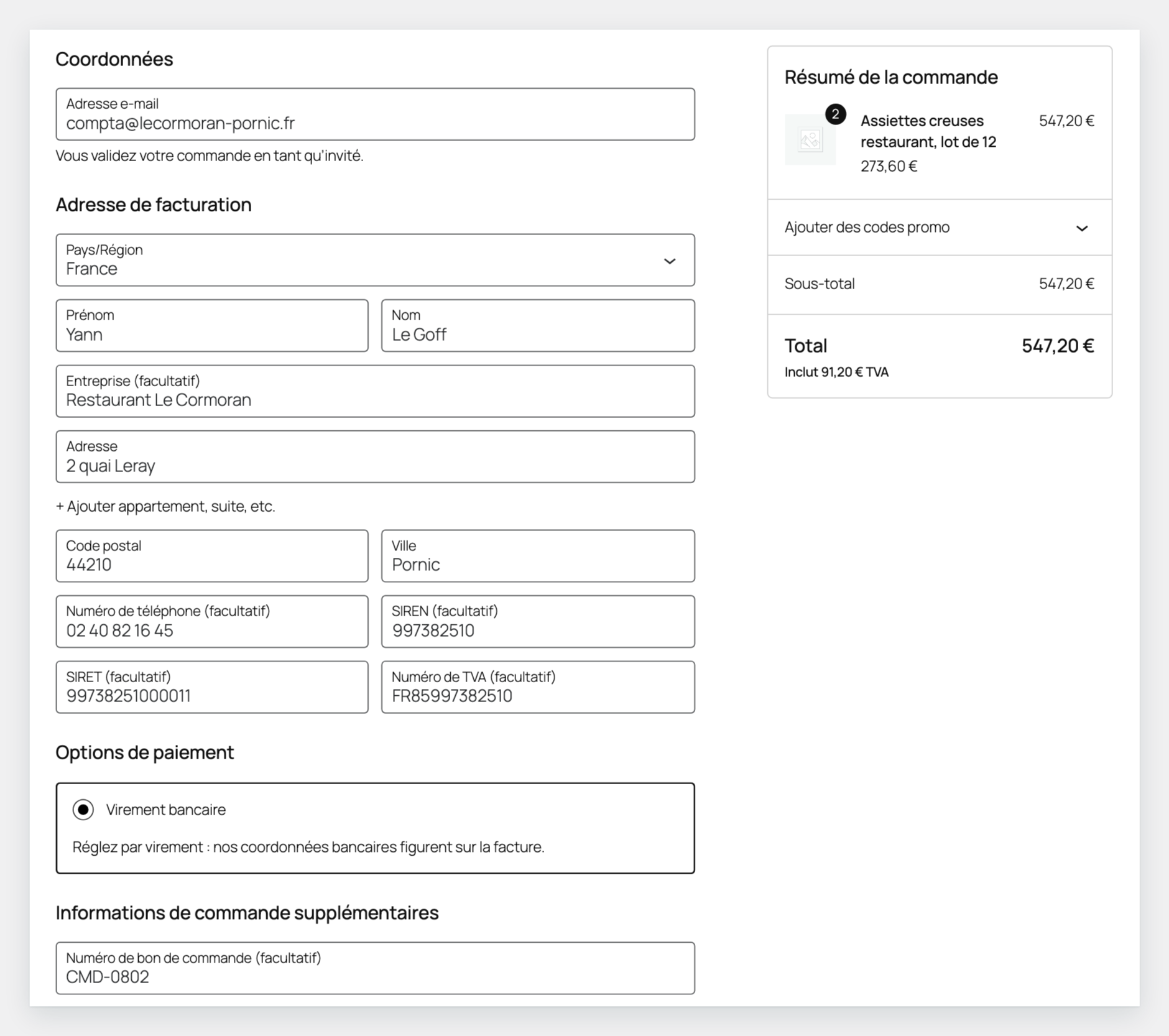
B2B checkout fields: SIREN, SIRET, VAT number and purchase order reference, in the classic and block checkout
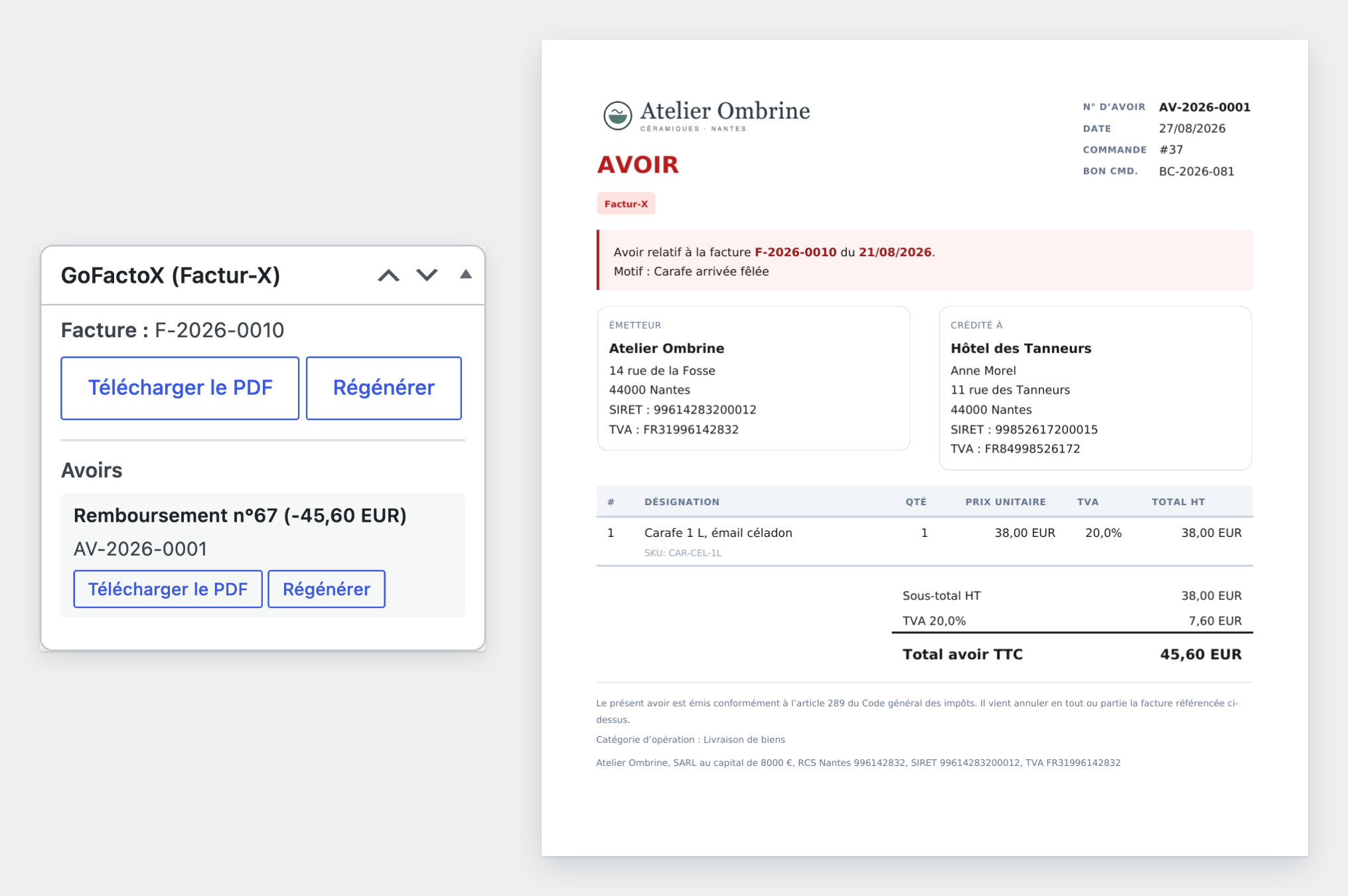
A credit note (avoir) generated from a WooCommerce refund
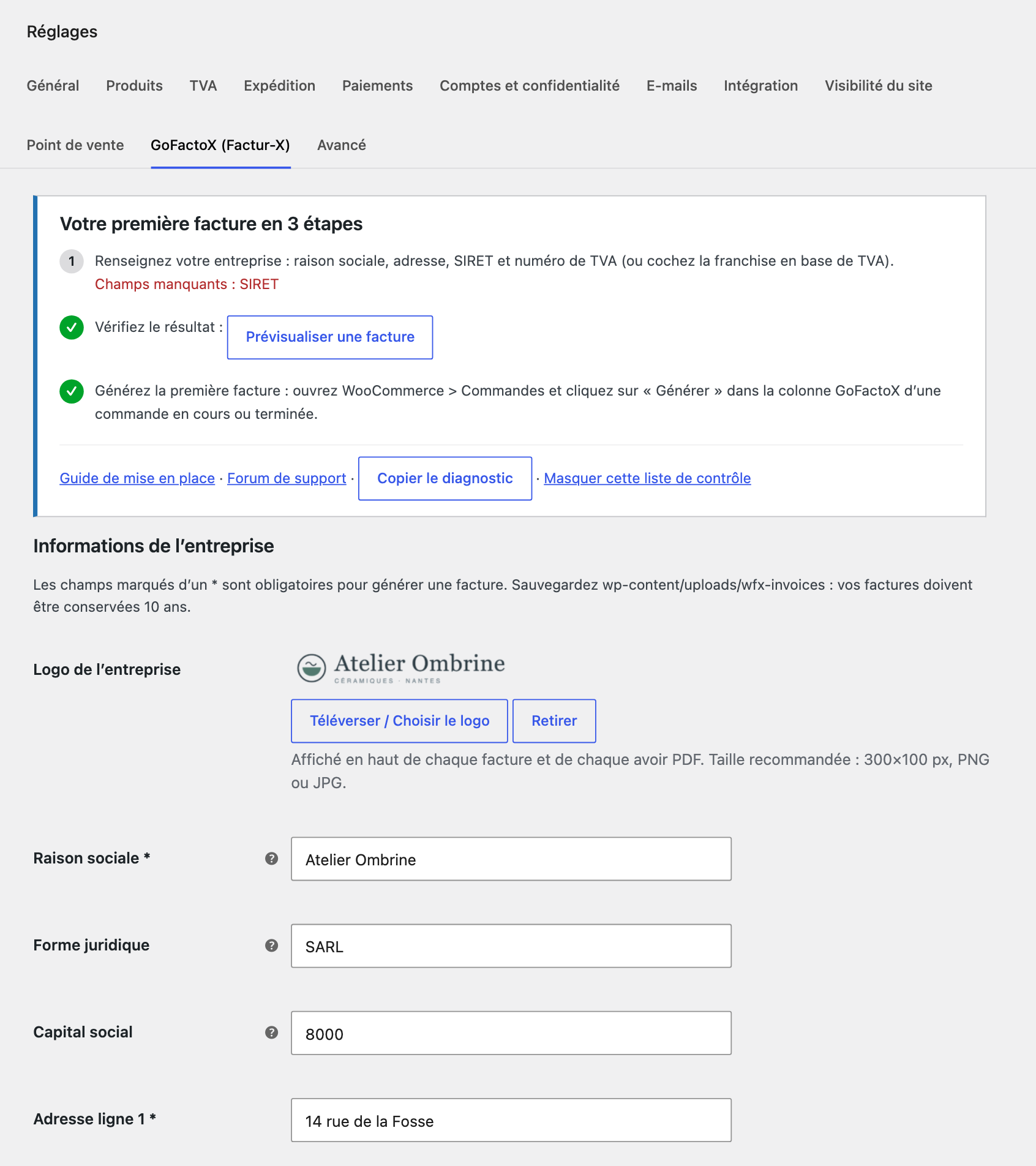
Settings: your first invoice in 3 steps, company details pre-filled from WooCommerce, numbering, formats and preview
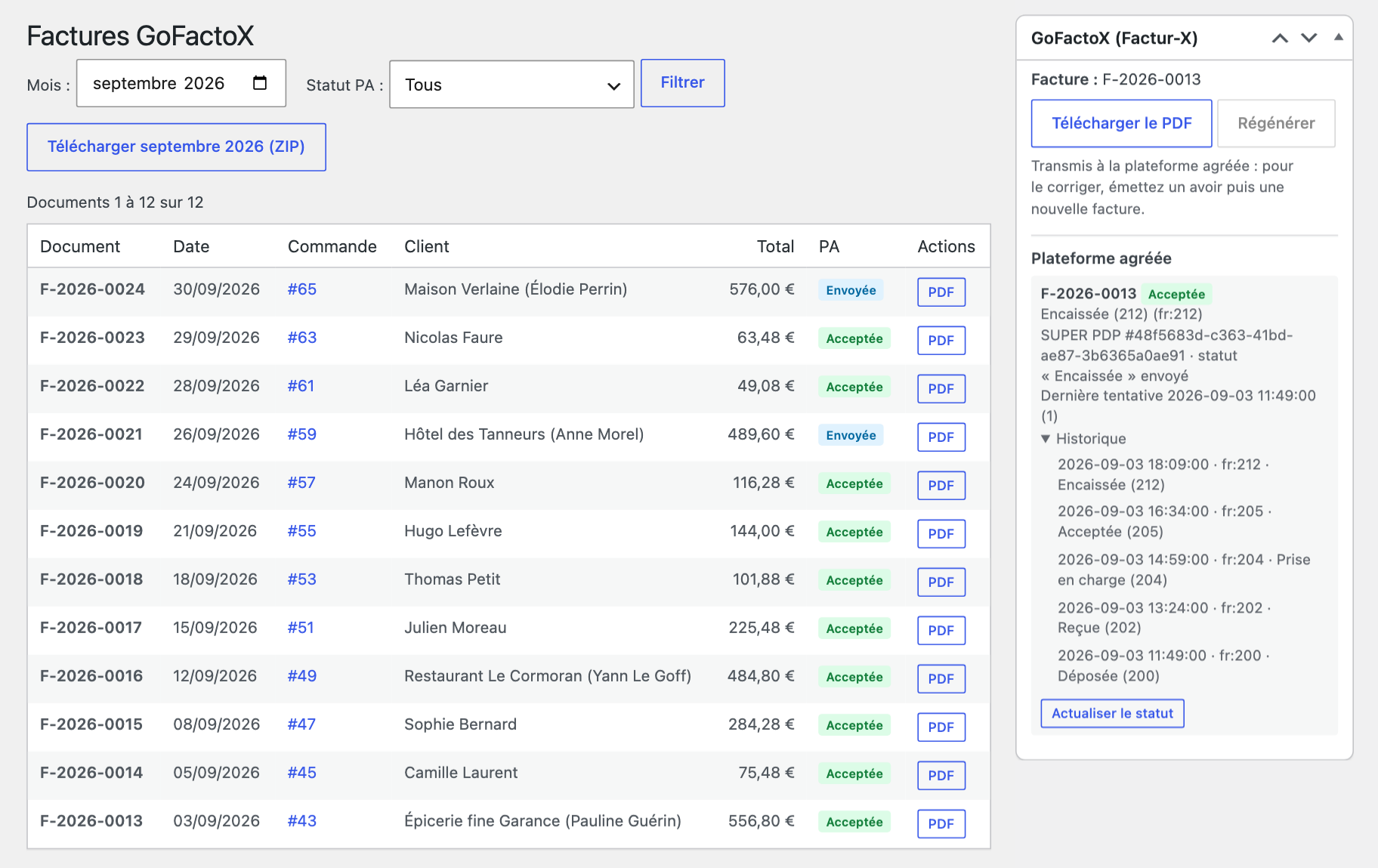
Pro plan: the status of each document on your Plateforme Agréée, from submitted to paid, in the order and in the dashboard
Faq
Yes, with no limit on documents: the Free plan creates invoices and credit notes automatically or by hand, attaches them to your e-mails and lets your customers download them. The Pro plan (€9.99 per month or €99 per year, excl. VAT) sends them to your Plateforme Agréée and adds the dashboard, bulk and retroactive generation, the REST API, the SEPA QR code and the AVOIR watermark. The Business plan (€19.99 per month or €199 per year, excl. VAT) adds 5 sites and the FEC export. The version from WordPress.org contains only the free features: after buying a plan, install the premium version offered in your Freemius account.
It produces your invoices and credit notes as Factur-X files, with the French legal mentions, your customer’s SIREN and the electronic addresses. Factur-X is a Franco-German standard: a readable PDF/A-3 invoice with an EN 16931 XML file embedded, so people and platforms read the same document. With Pro, GoFactoX is a connector to your own Plateforme Agréée account (SUPER PDP): it deposits each document there and brings its status back into WooCommerce. The choice of your platform and your declaration duties (e-reporting) remain yours.
To exchange e-invoices with other businesses, yes: you choose a Plateforme Agréée (PA), and the Portail Public de Facturation only acts as the central directory. GoFactoX does not sell one. With the Free plan you deposit the file on your PA yourself; with Pro, GoFactoX deposits it on your SUPER PDP account. SUPER PDP bills you directly (in September 2026: about €0.01 per invoice, €2 verification, €10 minimum per year; rates can change, check superpdp.tech); GoFactoX takes no commission. Your suppliers’ invoices are received in your PA account, not in WooCommerce.
Every plan creates an invoice for each order, consumers included. With Pro, the transmission to your Plateforme Agréée covers B2B invoices by default; sending your sales to consumers for e-reporting is an option you switch on in the transmission settings (“Documents to transmit”: All documents).
Automatically: when an order reaches the trigger status (Completed by default), GoFactoX creates the invoice, and a credit note when you refund. By hand: “Generate Invoice” on the order screen, the “Generate” link of the orders list, or the “Generate the Factur-X invoice” order action. Both automations can be switched off under WooCommerce > Settings > GoFactoX (Factur-X) > Automation. Invoice numbers follow their own continuous sequence, not the order number (Code de commerce).
Nothing is generated, and no invoice number is consumed, while the company information is incomplete (company name, address, postal code, city, VAT number unless you tick the VAT exemption, article 293 B, and SIRET for sellers established in France) or while WordPress cannot write to wp-content/uploads/wfx-invoices. An admin notice and the order screen list what is missing, and a failed automatic generation leaves a note on the order. Check also that “Auto-Generate Invoices” is ticked: orders completed before you installed GoFactoX are not generated automatically (use “Generate” on them). Step-by-step setup guide (in French)
Yes. On every plan, open the order and click “Generate Invoice”, or use the “Generate” link of the orders list. With Pro, the “Generate missing invoices” panel (WooCommerce > GoFactoX) creates, after you confirm, the invoices of every completed order since a date you choose, starting with the oldest, then the missing credit notes of their refunds. They are dated today (they count in this month’s revenue and in the current FEC), their numbers follow the order dates and cannot be taken back, and they are only transmitted to your Plateforme Agréée if you tick the box.
Yes, on every plan: the invoice on the Processing order, Completed order and Payment request e-mails (called “Customer invoice” before WooCommerce 11.2), the credit note on the refund e-mails (PDF, or XML with the CII and UBL formats). WooCommerce often sends these e-mails before the automatic generation runs, so GoFactoX generates the missing document just before the e-mail leaves, only while the order changes to the trigger status or the refund is created (an e-mail sent again later never creates an invoice). “Attach to Emails” (Automation section) turns it off. Customers can also download their documents from My Account and, once generated, from the order confirmation page.
With Pro: SUPER PDP (automatic transmission, statuses, e-reporting if you enable it) and, as an experimental option, any Plateforme Agréée that gives you access to the standard AFNOR XP Z12-013 API with OAuth credentials. The AFNOR option covers invoices and credit notes to French business customers, stops at the platform’s technical acknowledgement and does not send the “paid” status. Validated with SUPER PDP only. On any plan, you can deposit the generated file yourself on any Plateforme Agréée.
Yes: the B2B fields work in the classic and block checkout, HPOS is declared compatible, and the texts go through the text domain gofactox-e-invoicing-for-woocommerce, so WPML and Polylang pick them up. The “Invoice language” setting chooses the language of the PDF: French (the default on new installations and French sites), the site language, or with WPML or Polylang the language of the order.
Important legal note: for customers established in France, invoices must be in French (mandatory legal mentions, payment conditions). For customers established outside France, invoices can be issued in the customer’s language; the French version should be archived or made available to the tax administration on request.
Back up wp-content/uploads/wfx-invoices/ (invoices must be kept for 10 years); the database follows your usual backup. Apache is protected by the .htaccess the plugin writes; on nginx add location ~* /wp-content/uploads/wfx-invoices/ { deny all; } to your server block (“Copy diagnostic” reports whether the folder can be read from the web). On a staging site (WP_ENVIRONMENT_TYPE) or a clone whose URL changed, the transmission to your Plateforme Agréée is paused and a notice says why. Deleting the plugin removes the Plateforme Agréée credentials, cached tokens and scheduled tasks; invoices, credit notes, settings and numbering counters are kept, so a reinstall never reuses a number.
Ask in the support forum; Pro and Business customers also get priority support by e-mail. If GoFactoX saves you time, a short review helps other merchants find it.
Reviews
Changelog
1.6.2
- Free plan: invoices and credit notes are now generated automatically (invoice at the trigger status, credit note on refund) and attached to the WooCommerce e-mails; end-of-month and custom payment terms are free too. Pro keeps the transmission to your Plateforme Agréée, the dashboard, bulk and retroactive generation, the REST API, the SEPA QR code and the AVOIR watermark.
- New: a 3-step checklist at the top of the settings, company address pre-filled from WooCommerce, and a clearer VAT exemption (franchise en base) checkbox before the VAT number.
- New: WooCommerce > GoFactoX menu entry on every plan, “See plans” and help links (setup guide, support forum), and a dismissible invitation to leave a review after 5 invoices.
- Fixed: real VAT rates on shipping, fees and discounts in the XML (4.92 excl. VAT of shipping could show a 19.90% line instead of 20%).
- Fixed: XML totals of orders with a coupon (the discount was counted twice: line totals, allowances and VAT bases now match WooCommerce to the cent), coupons spanning several VAT rates, 100% discounts and amount-only credit notes. Documents already issued with a coupon keep their file; regenerate them from the order if your Plateforme Agréée refuses them.
- Fixed: the SIREN/SIRET check at checkout no longer blocks the order, and only applies to French billing addresses.
- Improved: short orders fit on a one-page invoice.
- Fixed: download links work again after deactivating and reactivating the plugin, and without pretty permalinks.
- Improved: file paths survive a migration or a restore, invoice file names (XML files included) can no longer be guessed, temporary files are named randomly and purged.
- Improved: “File missing” flag in the orders list (with a Regenerate link) and an admin notice; clear messages when the PHP GD extension or memory is missing.
- New: a notice when your Pro plan is no longer active while a Plateforme Agréée connector is selected.
- Fixed: translations load on WordPress 6.4 to 6.7.
- The free version from WordPress.org now contains only the free features; after buying Pro, install the premium version from your Freemius account (existing customers: once).
1.6.1
- Settings: the help of “Late Payment Interest Rate” now says what invoices state when the field is empty (the legal default rate: the ECB reference rate plus 10 percentage points). Invoices are unchanged.
- The Freemius opt-in screen shows the GoFactoX icon.
- Tested with WooCommerce 11.2; Freemius SDK updated.
1.6.0
- Nothing is generated, and no invoice number is consumed, while the company information is incomplete or the invoices folder cannot be written; an admin notice lists what is missing. New “Invoice language” setting (French on new installations and French sites).
- The “UBL” format now produces a real UBL 2.1 document; CII and UBL are downloaded and attached as .xml files.
- New for every plan: “Preview an invoice” button, “Generate” link and order action in the orders list, order notes, seller VAT number check, “Copy diagnostic” button.
- New (Pro): dashboard with net revenue and monthly ZIP, “Generate missing invoices” panel, “Never sent” filter and “Send to PA” action, credit notes attached to refund e-mails, experimental AFNOR connector.
- Fixed (Pro): saving the settings no longer erases your SUPER PDP client secret (check it after updating), and Plateforme Agréée status updates no longer stall.
Full history: changelog.txt in the plugin folder.