Simple Calendar – Google Calendar Plugin
Simple Calendar – Google Calendar Plugin
Description
Simple Calendar is the easiest way to add Google Calendar events to your WordPress site. Quick to setup. Fine tune to your needs. Mobile responsive. Beautifully designed.
Simple Calendar Features
- Display events from any public Google Calendar.
- Keep managing events in Google Calendar. No need to create events in WordPress.
- Out-of-the-box designs that match your theme’s look and feel.
- Fully responsive and mobile-friendly monthly grid and list views.
- Customize event content display using simple tags. No coding required.
- Combine multiple calendars into single displays explicitly or using categories.
- Intuitive, simple display configuration changes for fine tuning.
- Advanced settings to adjust time zones, date/time formats and start of the week.
- Integration with Event Calendar Newsletter for quickly turning your events into a newsletter-friendly format.
- Additional functionality offered with add-ons.
- Translations available with more being added on a regular basis. Translations welcome!
- Open source with code hosted on GitHub. Contributions welcome!
Love using Simple Calendar? Consider purchasing a Premium Add-on
FullCalendar Add-on Features
- Week and day views added alongside the month view.
- Display event titles and start times directly on your calendar.
- Faster load times when navigating through months, weeks or days.
- Configure header navigation buttons to allow site visitors to easily switch between views.
- Intuitive design for multi-day events.
- Customizable calendar heights with optional scroll bars.
- Set default start time for week and day views.
- Limit display times for week and day views.
- Works with our Google Calendar Pro add-on to display color-coded events within each view.
- Priority email support with a 24-hour response time during weekdays backed by a top-notch team.
Google Calendar Pro Add-on Features
- Display events from both private and public Google Calendars.
- Highlight events with colors that match assigned Google Calendar event colors.
- Display attendee names, avatars and RSVP status for any private or public event.
- Display event organizer information.
- Display a list of attachments with links to their original source.
- Secure connection established between your site and Google using the OAuth standard.
- Works with our FullCalendar add-on to display beautiful month, week and day views with color-coded events.
- Priority email support with a 24-hour response time during weekdays backed by a top-notch team.
Want to take Simple Calendar for a spin first? Try out a Live Demo
Installation
Plugin installation instructions
Setup guide and video at WP Beginner (updated March 14, 2016)
Screenshots

Basic Grid view

Basic List view
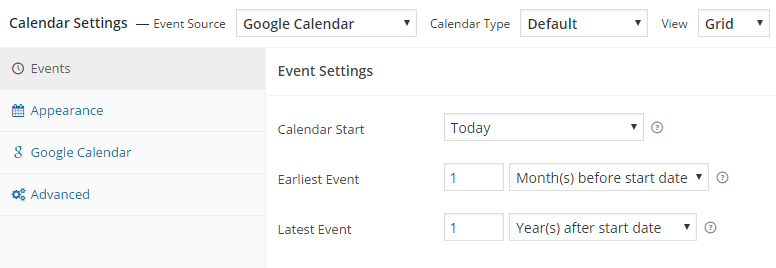
Calendar settings - Events

Calendar settings - Appearance

Calendar settings - Google Calendar

Calendar settings - Advanced

Add a calendar widget
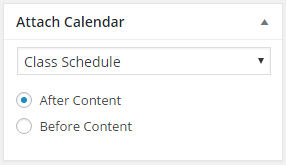
Attach a calendar to a post or page
Faq
Find our docs at docs.simplecalendar.io
Subscribe here to be notified by email of major features or updates.
We’d love your help! Here’s a few things you can do:
- Rate our plugin and help spread the word!
- Help answer questions in our community support forum.
- Report bugs (with steps to reproduce) or submit pull requests on GitHub.
- Help add or update a plugin translation.
Reviews
Lightweight & Responsive Calendar Integration
By 
Was looking for a solution to display a Google Calendar and this is the winner! Sure, you could use a Google Calendar iframe, but it looks terrible on mobile. Other plugins that could show a responsive calendar have way more features than I needed. Support staff were helpful and pleasant. Simple Calendar has just the right balance of features and ease of use.
Simple Calendar indeed
By 
I need a simple way to put a Google calendar on a page and got exactly that!
Awesome plugin
By 
Plugin worked as required with straight forward setup. I'm really pleased with how it is working. I did have a question for their support but they were quick to replay.
Great Plug-in & Support
By 
This a great plug-in, comprehensive yet simple interface. Support staff such as John Gachari has been super responsive and helpful in fixing display errors caused by integrations with the Oxygen Builder and JQuery Migrate settings.
Love This Plugin
By 
had a minor issue, support answered almost immediately! Helped me fix my issue right away.
Excellent
By 
Not sure about some of the bad reviews. This plugin (free version) has worked and is working flawlessly for me without any problems whatsoever. In addition, the markup it serves and the presentational (css) layer are well thought out. Beats another paid plugin I wont name hands down.
Great plugin to connect with Google Calendar
By 
Highly recommended plugin to connect your Google Calendar events with your WordPress site.
Did not work on my site
By 
Spent more than 2 hours to get it working. (Thanks to outdated info about Google API).
The result is not what it should be: it was a tiny grid with no readable info.
The plugin does not deserve "simple". It is not intuitive and clearly not plug and play.
So I keep using the simple but ugly Google Calendar iframe solution.
gemakkelijk, netjes, prima helpdesk
By 
Makkelijk te installeren en te gebruiken in Elementor. Het ziet er netjes uit op de website en is responsive. Aan te passen aan de huisstijl. De helpdesk reageert snel en vriendelijk via e-mail.
Great plugin and excellent support
By 
I use the plugin on a number of sites. It works well and I've found it easy to configure to get exactly what is wanted. A recent issue was resolved in 30 minutes with a patch and a full update within 24 hours. A happy customer!
Changelog
4.3.1
- Fix: Return Google Calendar event label colors with calendar events so labeled event colors display correctly.
- Fix: Calendar tooltips now use consistent viewport handling, regardless of calendar width, for more predictable positioning.
4.3.0
- Dev: Added custom “Event” post type—you can now create and display events directly on your site without using Google Calendar.
4.2.2
- Dev: Use the add-on’s version for cache busting.
4.2.1
- Fix: Resolved timezone handling issues for all-day events in ICS feeds.
4.2.0
- Dev: Add option to automatically display List View on mobile devices when the screen width is below 768px when Grid View is selected as the default view.
- Dev: Add an administrator and editor-only frontend notice when a calendar has no events or a feed error, with a link to Google Calendar privacy prerequisites.
- Fix: Events were displayed in the incorrect order in List View when “Expand Multi-day Events” was set to “No.”
- Fix: Event bubbles stopped working after cancelling the print action.
- Fix: TypeError in bulk actions when the ids parameter was passed as an array instead of a comma-separated string. Bulk actions now correctly support both formats.
- Fix: Missing fields in the Event Schema Markup to resolve search schema warnings.
- Fix: “Add to Google Calendar” link was broken when event details contained Cyrillic or other non-Latin characters.
- Fix: Accessibility to provide a more ADA-compliant experience.
4.1.0
- Dev: ICS Feed Upload: Added support for importing local
.icsfiles to import calendar events. - Dev: ICS Event Export: Added the ability to download/export calendar events as a static
.icsfile. - Fix: Print issue fixed: An issue where clicking the Print button on secondary calendar instances on the same page was unresponsive.
4.0.7
- Fix: Removed unnecessary Google API key/OAuth requirement when creating a Grouped Calendar.
4.0.6
- Fix: Optimize admin & fronend performance, throttle OAuth token checks, and reduce redundant API calls.
4.0.5
- Fix: Fixed a PHP 8.3 ValueError by replacing sprintf() with string concatenation to safely handle literal percent signs in translations.
4.0.4
- Fix: Fixed text domain loading by hooking into init.
- Dev: Added validation before unserialize() to prevent errors during OAuth failures.
4.0.3
- Dev: Ensured compatibility with WordPress 7.0.
- Fix: Trimmed historical changelog entries to resolve WordPress.org length warnings.
- Dev: Add an [if-event] conditional template tag
- Dev: Allow the url argument in the [link] template tag to override the event’s URL
- Dev: Store the grouped calendar order instead of always sorting alphabetically
4.0.2
- Dev: Added a new connect page in admin enhancing the onboarding experience.
- Dev: Redesigned settings and add-ons pages with a modern layout.
3.6.2
- Fix: Date format inconsistency in List View navigation bar now uses the calendar’s configured date format consistently.
3.6.1
- Fix: Make a new release to fix a “Class not found” error for GetUniverseDomainInterface.
3.6.0
- Dev: Breaking change: Support for PHP versions below 8.0 has been discontinued.
- Fix: An issue where the cover image was not displayed for Google Calendar events when using the OAuth Via Simple Calendar.
- Fix: An Insecure Direct Object Reference (IDOR) vulnerability.
- Dev: Added cache clearing on first plugin activation and during manual plugin updates.
3.5.9
- Fix: Resolved a critical issue where the recent update caused site breakage for users who are using various page builders.
- Dev: Users can now control Lazy Loading functionality via a dedicated toggle in the Advanced settings.
3.5.8
- Fix: Fixed issue where the calendar incorrectly calculated weekday offsets when the week start day was changed in advanced settings.
- Fix: Fixed asset loading for all registered shortcodes in page builders like Avada Live Builder.
3.5.7
- Fix: Assets (JS/CSS) now correctly load when a calendar widget is present.
3.5.6
- Fix: accessibility issue by adding descriptive text to calendar navigation buttons.
- Dev: admin notice to inform users about end of PHP 7 support after November.
- Dev: Optimized assets: JS and CSS now load only on calendar post type and pages with calendar shortcode.
3.5.5
- Fix: Network error when fetching calendars after authentication with Oauth via Simple Calendar on fresh installs.
- Fix: JS issue preventing custom CSS from applying to qTip tooltips in version 3.5.4.
3.5.4
- Fix: Fixed multi-day events incorrectly displaying on all days when the “No, display only on first day of event” option is enabled.
- Fix: Resolved issue where event details (qTip) were not showing in mobile portrait view.
- Fix: Fixed layout issues on the admin settings page for fresh installations.
3.5.3
- Fix: Even after upgrading to PHP 8.x, an admin notice still appears to upgrade to PHP8.
3.5.2
- Dev: Make compatible with WordPress v6.8.1.
- Dev: Added notice to update PHP version if version is less then 8.1.
3.5.1
- Fix: Event were not showing on page with shortcode when using OAuth via Xtendify.
3.5.0
- Dev: To make the first attachment appear as the cover, add a new shortcode [cover-image] for GCal-Pro Addon.
3.4.9
- Fix: Resolved the issue where multi-day events were not rendered correctly on the last day.
Thanks to MartinixH for the contribution!
3.4.8
- Dev: Added print calendar option on list view.
- Fix: Translation month name on first load.
3.4.7
- Fix: Compatibility warnings with PHP 8.
3.4.5
- Fix: UI gaps in the calendar CPT.
3.4.4
- Fix: Fixed deprecation notices and warnings to ensure compatibility with the latest WordPress updates.
- Fix: Resolved an issue where multi-day events were being rendered as double events on the same day.
- Fix: De Authentication issue fix.
3.4.3
- Fix: Event color not showing in Calendar when using OAuth via Xtendify.
- Fix: Date format inconsistencies when using shortcodes in certain conditions.
- Fix: Calendar start date issue in Grid View causing incorrect date display.
- Fix: Print calendar index not found issue.
- Fix: Cross-Site Scripting(XSS) vulnerability.
3.4.2
- Fix: Event rendering issue for public calendar while using Auth via Xtendify.
3.4.1
- Dev: Add OAuth helper functionality.
- Dev: Make OAuth helper option compatibble with Appointment add-on.
- Update: Update dependency prettier to v3.3.3.
3.4.0
- Dev: Added Print calendar feature.
- Dev: Make compatible with WordPress v6.5.5.
3.3.1
- Fix: Persistent update notification appearing for add-ons even after updating the plugin.
3.3.0
- Dev: Compatibility with the OAuth Helper plugin.
3.2.8
- Fix: Cross Site Scripting (XSS) vulnerability.
3.2.7
- Fix: Cross Site Scripting (XSS) vulnerability.
3.2.6
- Fix: CSRF vulnerability for bulk actions.
- Dev: Update dependencies Carbon, Dayjs and TailwindCSS.
3.2.5
- Fix: Possible CSRF vulnerability.
- Dev: Make compatible with Unyson plugin.
3.2.4
- Fix: Compatibility with WP 6.3.1.
3.2.3
- Fix: Add PHP polyfill to fix regression “Call to undefined function str_contains()” error.
3.2.2
- Dev: Update Google API client library to 2.13.1.
- Fix: ‘if-not-today’ shortcode with all day event display issue.
- Dev: Revamp admin setting page banner design.
3.2.1
- Dev: Revamp welcome page.
3.2.0
- Dev: Revamp admin setting page.
- Fix: ‘Simple Calendar Widget’ Calendar selection on block editor.
- Fix: ‘if-not-today’ and ‘add-to-gcal-link’ shortcode with all day event display issue.
3.1.47
- Dev: Added admin notice for plugin update.
- Fixed: Possible CSRF vulnerability.
3.1.43
- Fixed: Cross Site Request Forgery (CSRF) vulnerability.
3.1.42
- Dev: Testing with WordPress version 6.2.
3.1.41
- Fix: Event bubbles not working on mobile devices.
3.1.39
- Fix: ‘Class “Parsedown” not found’ by adding
erusev/parsedownvia PHP Scoper. - Fix: Replaced Moment with Dayjs, it helps with speed and addresses security issues with the Moment library.
- Chore: Data type check for loading scripts and styles.
- Chore: Upgraded NPM packages resolving security issues present with trim-newlines library.
- Fix: Include unmodified assets in the build for a better debugging experience.
- Fix: Multi-day events not showing properly. Shoutout to MartinixH.
3.1.38
- Fix: Add PHP polyfill to fix “Call to undefined function str_contains()” error.
- Fix: Update Google API client to v2.9.2.