Google Plus Favicon

Google Plus Favicon
Description
This plugin allows you to generate a Google+ favicon for your blog and admin logo included Apple touch icon. Activate the plugin, and it will add G+ photo to your blog template and admin panel automatically.
Installation
Support WordPress and WordPress Multisite
Standard Multisite Plugins installation.
- Upload
google-plus-favicon.phpto the/wp-content/mu-plugins/directory
Standard Plugins installation.
-
Upload
google-plus-favicon.phpto the/wp-content/plugins/directory. -
Activate the plugin through the
Pluginsmenu in WordPress -
Enter G+ account ID in
General Settings
Screenshots
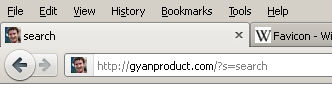
Web site icon in Admin Panel, Site and Address bar.

G+ setting option
Faq
Reviews
Changelog
3.0
- My fault, wrong icon’s size.
- Move Icon file to root
2.0
- Fixed IE favicon
1.0
- First release