GR Widget – Google Reviews Widget

GR Widget – Google Reviews Widget
Description
⭐ Show Google reviews on your WordPress site in minutes — no Google API keys, no Google sign-in, and no review data stored in your database.
GR Widget is a Google reviews embed plugin for WordPress: search for your business in wp-admin, pick a layout, and publish with a shortcode or Gutenberg block. Reviews stay fresh because they sync on the GR Widget platform.
No account is required to get started. Link a free GRWidget.com account from GR Widget Account (one click — no API key copy/paste) to unlock 3 widgets, 22 layouts, 10 reviews available, plus the hosted web builder. Paid plans add unlimited widgets. Sync is bi-weekly on Site and daily on Business and Agency.
🚀 Unlimited views on every plan — including free. Your widgets are not metered by page views.
Why site owners choose this Google reviews widget
- 🔑 No Google API keys — search by business name; we handle Google data on our servers
- 🧩 Shortcode + Gutenberg block —
[grwi_widget id="your-key"]or the GR Widget block to embed Google reviews - 🎨 34 layouts — 5 without an account, 22 with a free account, 31 on Site, and the full set on Business and Agency. Badges, feeds, sliders, stickers, quote layouts, and photo showcases.
- 👁️ Draft and Live preview — change a widget without affecting the live version until you publish
- 🎛️ Hosted builder — link a free account and customise plugin widgets in the full builder on GRWidget.com
- 🔄 Reviews stay fresh — synced on GRWidget.com (monthly on Free; bi-weekly on Site; daily on Business and Agency)
- 🛡️ No local review storage — your WordPress database stays clean
- ✨ Works standalone — create widgets without an account; link a free account when you need more
Free WordPress plugin (no account required)
- ✅ Up to 1 Google review widget per site (unlinked)
- ✅ 5 layouts (Rating Badge, Review request, List feed, Slider feed, Classic sticker)
- ✅ Up to 5 reviews available per business
- ✅ Monthly review sync
- ✅ Shortcode and Gutenberg block embeds
- ✅ Embed script loads only on pages that contain a widget
- ✅ Unlimited views — no view caps on free or paid
- ✅ No GR Widget branding on verified official WordPress installs
Link a free GRWidget.com account (still $0)
From GR Widget Account, click to create or link a free account. No card required. That unlocks:
- ✅ 3 widgets (instead of 1)
- ✅ 22 layouts (instead of 5) — Mini review slider, Classic Slider, Classic List, Classic Grid, compact badges, Quote thread, Signature showcase, Pocket proof, and more
- ✅ 10 reviews available per business (instead of 5)
- ✅ Hosted web builder on GRWidget.com, cloud backup, and the web dashboard
The free tier is a complete, ongoing product — not a time-limited trial. Existing widgets and shortcodes keep working if you hit the current widget limit.
What paid plans unlock 💎
When you need more than the linked free allowance, paid plans are domain-based (clear pricing — not charged per page view):
- ♾️ Unlimited widgets (Site and above)
- 📈 More reviews available — up to 30 on Site, unlimited on Business/Agency
- ⏱️ Daily sync on Business and Agency (Free is monthly; Site is bi-weekly)
- 🎨 31 layouts on Site, and all 34 on Business and Agency, including Avatar review badge, Carousel feed, Masonry feed, Review ribbon, Classic Carousel, Classic Masonry, Reputation snapshot, Photo spotlight, Review mosaic, and the paid stickers (Bold, Ribbon, and Pill) — Reviews button is included with a free account
- 🪄 Filters — highlight the reviews that matter
- 👤 Reviewer photos (and review photos on Business+)
- 🧠 AI review summary (Business+)
- 🔍 JSON-LD / review structured data for search engines on Business & Agency (eligibility for rich results is never guaranteed)
- 🏷️ Agency adds white-label, multi-client management, and 10 combined invited seats
- 🎛️ Full design customisation (Site+) — make every widget match your brand with colours, typography, spacing, borders, labels, element controls, and custom CSS (Free keeps light/dark theme + font family)
Compare plans at GRWidget.com.
How it works
- Install and activate GR Widget
- Open GR Widget in wp-admin and search for your business
- Pick a layout and create your Google review widget
- Paste the shortcode or insert the GR Widget block — done
- (Optional) Link a free GRWidget.com account from GR Widget Account to unlock 3 widgets, 22 layouts, 10 reviews, and the hosted builder
Widget HTML/CSS/JS is served by the hosted grwidget.js embed and the GRWidget.com API. This plugin is a thin, Plugin Check–friendly client.
You can see live examples of all the Google Reviews Widget layouts and styles available on our examples page.
Support
🛟 Something not working? Please ask — GR Widget is actively improving, and we address reported issues very quickly.
- 🐞 Report bug — open a widget in Customize, then click Report bug in the left rail (or top bar). That sends the issue to our team with useful context.
- 💬 Community (WordPress Plugin) — grwidget.com/community/c/wordpress-plugin for install, shortcode, block, and linking questions
- 📘 WordPress.org support forum — wordpress.org/support/plugin/gr-widget
- 💡 Feature requests — post ideas on the WordPress.org support forum for GR Widget. We continually explore improvements and consider all feature requests.
External services
This plugin relies on external services to work. By installing and activating it, you authorize the connections below (similar to Akismet or other SaaS-connected plugins — no separate opt-in checkbox is required because the plugin cannot function without GRWidget.com).
GRWidget.com
What it is: GRWidget.com (operated by EXTHUS LTD) hosts the Google review widget service — API, embed script, review sync, and wp-admin tools.
Used for: Site registration, business search, review sync, widget creation and configuration, plan limits, hosted previews, the style editor, the hosted builder (when you link an account), and serving live embeds on your public site.
When it is contacted:
- Plugin activation — registers your WordPress site and retrieves plan limits
- wp-admin (GR Widget) — business search, widget create/delete, account linking, plan refresh; layout cards use local miniature previews (no iframes); live preview loads
grw-preview.js; widget style editor runs entirely in wp-admin - Widget customisation — colours, fonts, and display options are edited on the native Customise screen in wp-admin (API-backed; no external tabs or iframes). After linking an account, you can also customise the same widgets in the full-featured web builder
- Public site — loads
grwidget.com/v1/grwidget.jsonly on pages that contain a GR Widget shortcode or block (not site-wide); the script fetches widget JSON to render review embeds - Background — plan limits may refresh twice daily via WordPress cron
Data sent to GRWidget.com:
- Site URL and hostname (sent at registration and with each API request, so widgets keep working if the site moves to a new address)
- Plugin version
- Site credentials issued at registration (stored locally in WordPress options)
- Business place IDs, names, addresses, ratings, and review counts you select in wp-admin
- Widget layout and style configuration choices
- API token (only when you choose to link a GRWidget.com account)
- Referrer hostname when a visitor loads a widget embed (to verify the widget is used on an allowed domain)
Data not sent by this plugin:
- WordPress user passwords or wp-admin login credentials
- Unrelated site content or visitor analytics
- Payment or billing details (checkout happens on GRWidget.com, not inside the plugin)
Terms and privacy:
- Service: https://grwidget.com
- Privacy policy: https://grwidget.com/privacy
- Terms of use: https://grwidget.com/terms
Google (business data and review links)
What it is: Google Maps / Google Business Profile — the source of business listings and public Google reviews displayed in widgets.
Used for: Business search results and review content are fetched by GRWidget.com from Google on your behalf. Widgets may also show links such as “View on Google” or “Write a review” that open Google in the visitor’s browser.
When it is involved:
- wp-admin — when you search for a business or trigger review sync, your search terms and selected place ID are sent to GRWidget.com, which queries Google server-side (your WordPress site never stores or sends Google API keys)
- Public site — review text, ratings, and business details are served from GRWidget.com (originally sourced from Google). Optional Google links appear in the widget UI; data is sent to Google only if a visitor clicks those links and leaves your site
Data sent:
- To GRWidget.com (then to Google server-side): business search queries, Google place IDs, and business metadata needed to sync reviews
- To Google directly from the visitor’s browser: only when a visitor clicks a Google link in a widget (standard browser navigation; may include referrer URL per the browser’s normal behaviour). The plugin does not call Google APIs from WordPress.
Terms and privacy:
- Google Terms of Service: https://policies.google.com/terms
- Google Privacy Policy: https://policies.google.com/privacy
Google Fonts (optional, visitor browsers)
What it is: Google’s hosted web font service (fonts.googleapis.com), used only when a widget is configured to use a Google Font rather than the site’s inherited/system font.
Used for: Loading the font files that style widget text on the public site.
When it is contacted: When a visitor views a page containing a widget whose style uses a Google Font preset — the hosted grwidget.js embed script injects a stylesheet request to Google Fonts.
Data sent: The visitor’s browser requests font CSS from Google; Google may log the request per its own policies (typically IP address and user-agent). No WordPress user or site-admin data is sent by the plugin for this purpose.
Terms and privacy:
- Google Fonts FAQ (privacy): https://developers.google.com/fonts/faq#what_does_using_the_google_fonts_api_mean_for_the_privacy_of_my_users
- Google Privacy Policy: https://policies.google.com/privacy
Other third parties
This plugin does not load third-party advertising or analytics trackers on your public site. Scripts and styles for wp-admin UI (except the GRWidget.com connections above) are bundled in the plugin. Upgrade and account links open GRWidget.com in your browser only when you click them.
Installation
For a full walkthrough, follow our guide to embed Google reviews in WordPress.
- Install GR Widget from Plugins Add New (search “GR Widget” or “Google reviews”), or upload the ZIP.
- Activate the plugin — it registers your site with GRWidget.com automatically.
- Go to GR Widget in the WordPress admin menu.
- Search for your business, choose a layout, and click Create widget.
- Copy
[grwi_widget id="your-embed-key"]into a page or post, or insert the GR Widget block. - Optional: open GR Widget Account and link a free GRWidget.com account (one click — no API token paste). That unlocks 3 widgets, 22 layouts, 10 reviews available, and the hosted builder.
The plugin loads the embed script automatically on pages that contain a widget — no manual <script> tag needed.
Screenshots

Search for your Google Business listing and choose a layout to create your Google reviews widget — no API keys
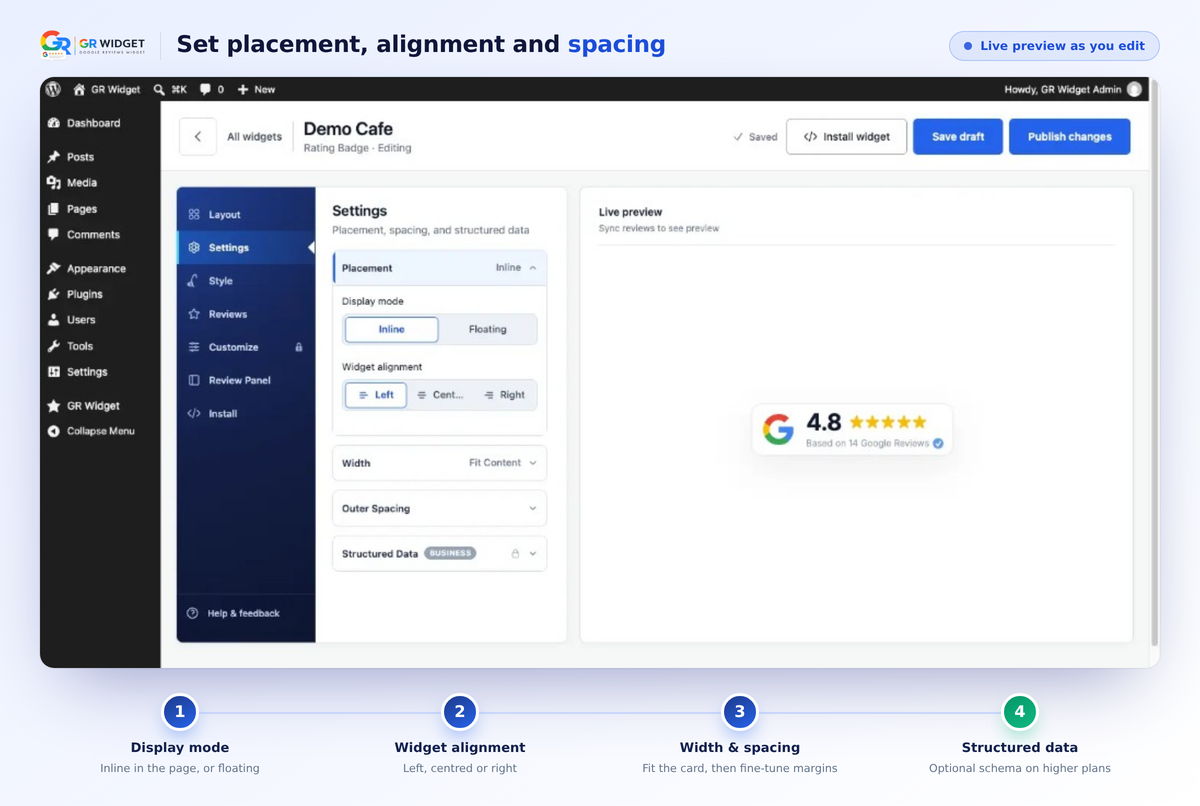
Settings tab — set display mode, alignment, width and spacing with a live preview
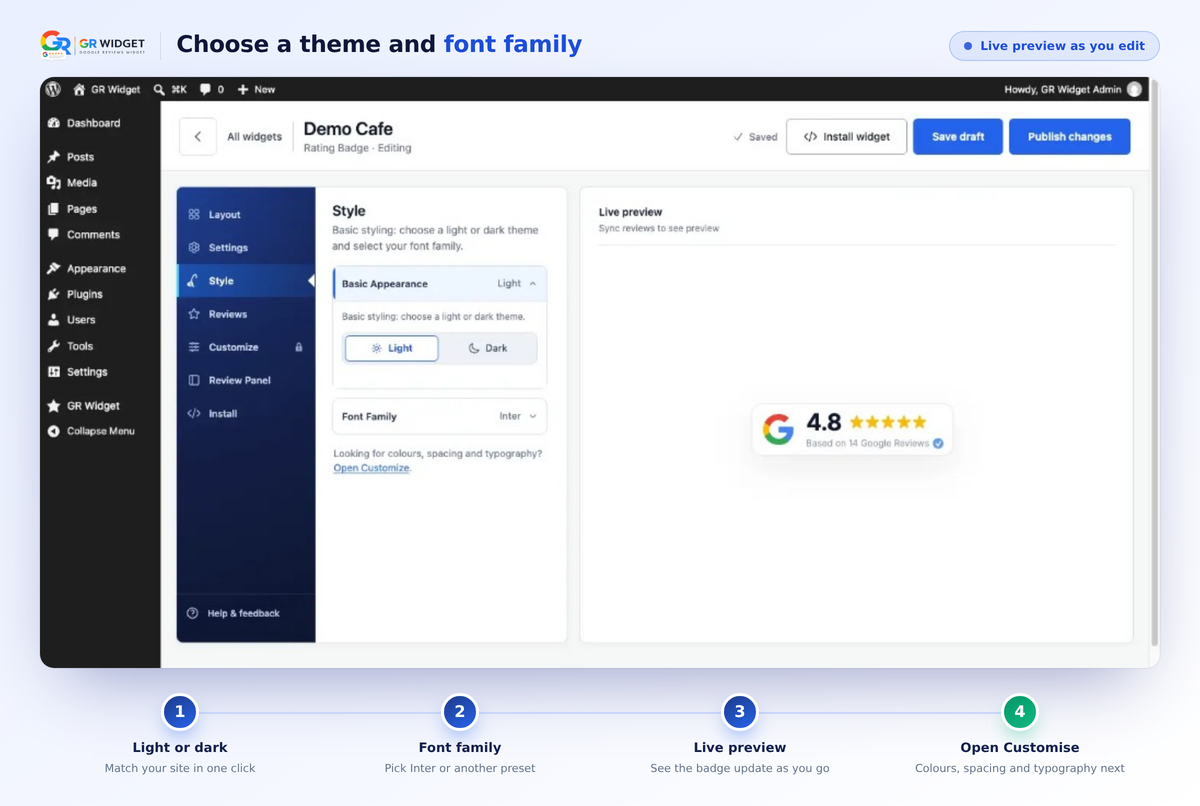
Style tab — choose a light or dark theme and font family while the live preview updates
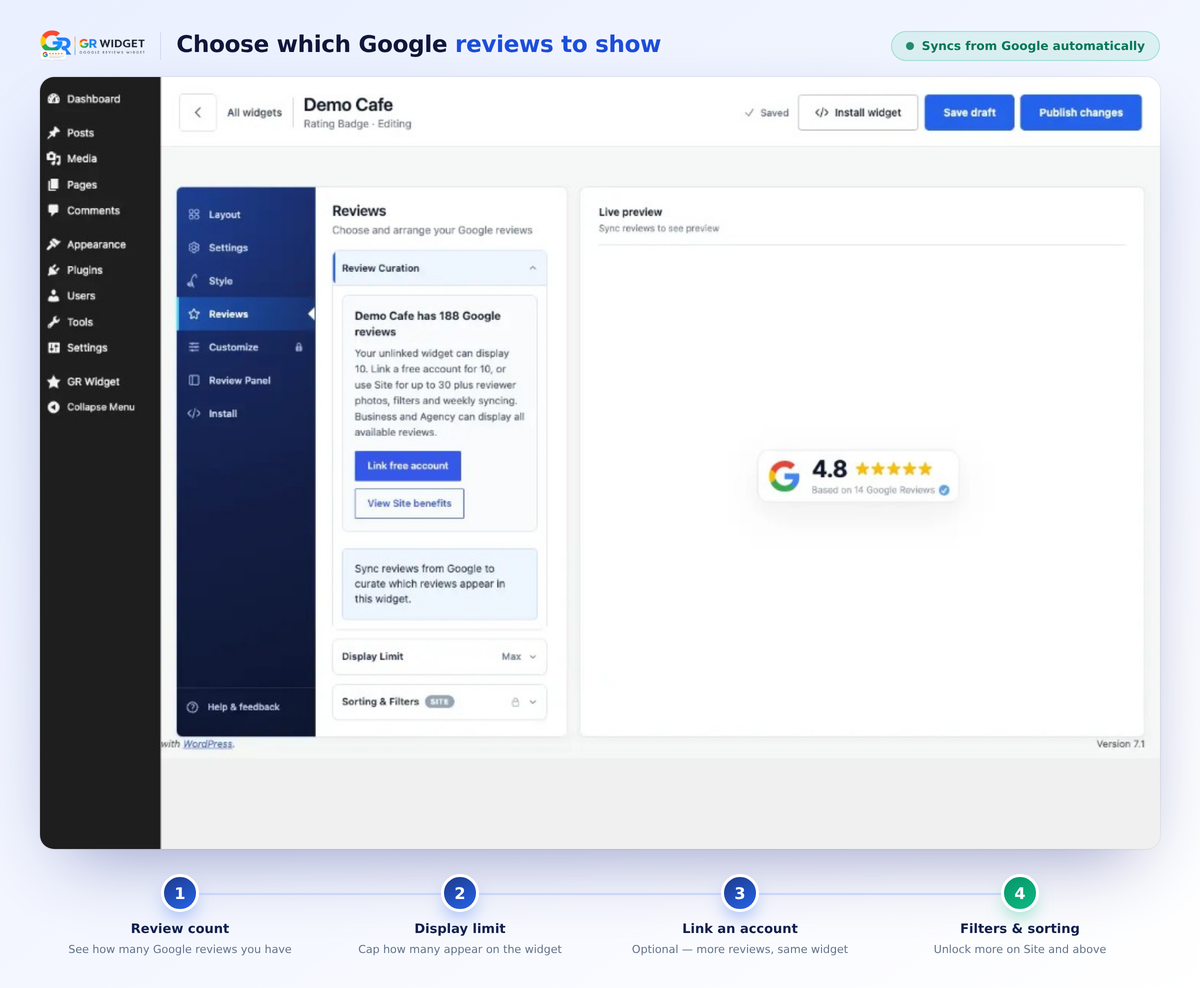
Reviews tab — choose how many Google reviews to show, then link an account for more
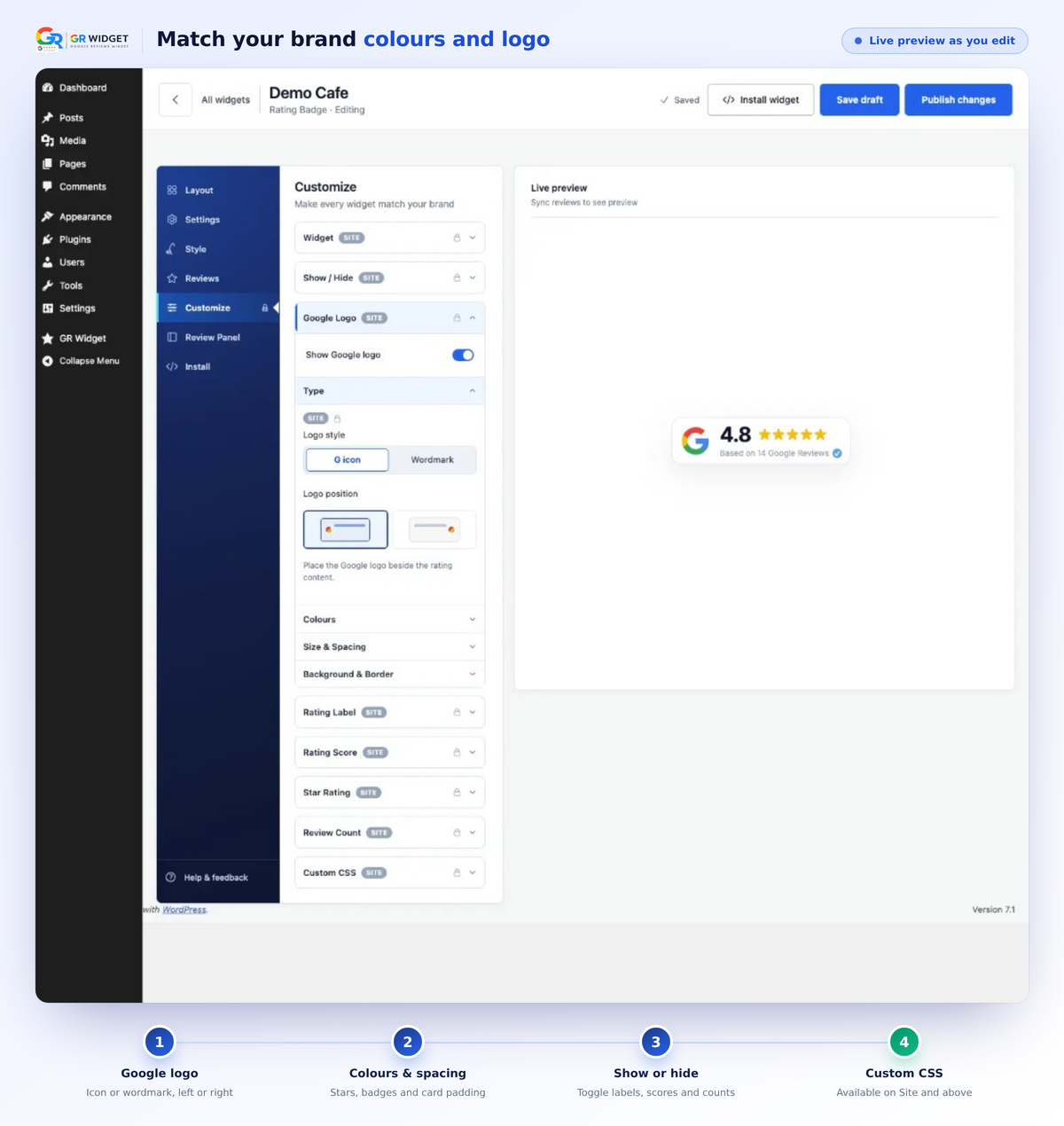
Customise tab — match your brand with colours, Google logo options, spacing and more

Install tab — copy the shortcode or HTML embed code to place the widget on your site
Faq
No. Unlinked installs include 1 widget, 5 layouts, 5 reviews available, and monthly sync. Link a free GRWidget.com account for 3 widgets, 22 layouts, and 10 reviews available — still free. Paid plans add unlimited widgets and the remaining layouts (31 on Site, all 34 on Business and Agency). Sync is bi-weekly on Site and daily on Business and Agency. Linking does not require a paid plan.
Open GR Widget Account and click to create or sign in. Linking is one click — you do not generate or paste an API token. That unlocks 3 widgets, 22 layouts, 10 reviews available, cloud backup, and the hosted builder, still at $0.
Yes. Link your WordPress site from GR Widget Account (one click), then open any widget in the hosted builder on GRWidget.com. The native Customise screen in wp-admin works without an account.
No. Search for your business by name in wp-admin. GR Widget handles Google data on our servers — your WordPress site never stores API keys.
No. Unlimited views on free and paid plans. Plans are based on domains and features — not page-view metering.
After creating a Google review widget, paste the shortcode into any page, post, or widget area, or insert the GR Widget Gutenberg block and pick one of this site’s widgets from the list (you can still enter a widget key manually). That is the simplest way to embed Google reviews on WordPress without writing code.
On GRWidget.com. The plugin does not download or store review content in WordPress.
Unlinked sites can create 1 widget. Linking a free GRWidget.com account raises that to 3. Paid plans (Site and above) have unlimited widgets. Existing widgets and shortcodes keep working if you hit the current limit — there is no trial expiry and no lockout of widgets you already created.
Unlinked installs include 5 layouts. Linking a free account unlocks 22. Site includes 31 layouts. Business and Agency include all 34. Locked layout cards in wp-admin are marketing previews only — they are not disabled plugin code. Upgrade and link-account links open GRWidget.com in your browser; no in-plugin payments are offered.
Open GR Widget Account. Link a free account first if you have not already (one click — no API token paste). For paid plans, use View plans in the plugin to compare Site, Business, and Agency on GRWidget.com. After checkout, your linked site picks up the new plan automatically.
Existing embeds on your public site continue to load from GRWidget.com when visitors view pages. wp-admin may show a connection notice until the service is reachable again. Cached plan limits are used when available.
Use Report bug in the widget Customize screen (left rail or top bar). For questions, post in the WordPress Plugin community or the WordPress.org support forum. We’re actively improving the plugin and respond quickly.
Post your idea on the WordPress.org support forum for GR Widget. We continually explore improvements and consider all feature requests.
In Elementor, the Shortcode or HTML widget may show [grwi_widget …] as plain text inside the editor. The reviews still render on preview and on the front end. That is expected.
Reviews
So much better than Elfsight for WordPress
By 
I've used Elfsight for Google reviews on WordPress before and honestly wish I'd found GR Widget earlier. The whole experience feels much more like a proper WordPress plugin rather than something built somewhere else that you then have to paste back into WordPress.
With GR Widget I installed the plugin, searched for the business, chose the widget I wanted and had it on the site very quickly. Being able to manage and customise the widgets directly from WordPress is a massive improvement for me.
The actual widget options are better too. There are the normal sliders, feeds and badges you'd expect, but also some genuinely different layouts like Photo Spotlight and the Review Ribbon that actually do something interesting with the reviews instead of every option just feeling like another variation of the same review cards. The amount of customisation is excellent as well, so it's much easier to make the widget look like it belongs on the website rather than something obviously embedded from a third party.
Another big plus compared with Elfsight is the pricing. I really dislike having to think about widget view limits and whether a site getting more traffic is suddenly going to push it onto a more expensive plan. GR Widget has unlimited views, including on the free WordPress version, which just makes far more sense to me.
If you're currently using Elfsight for Google reviews on a WordPress site, this is definitely worth trying. For me it's simpler inside WordPress, more customisable, has much more interesting layouts and is better value.
Great plugin
By 
Even the free version looks great
fantastic widget for google reviews, no need to login is great
By 
i was searching for a long time to find a plugin where i didn't need to login to the google business profile in order to get the reviews to load and this one does it perfectly, not just the 5 reviews from the basic crawl, but ALL reviews without having to sign in to google - fantastic, thnk you gr widget
Easy to use and good support
By 
Really easy to setup and works well. Had a small question about using it with Elementor and got a helpful answer straight away. Very happy with it so far.
Excellent Google Reviews Plugin
By 
Very easy to set up and works exactly as expected. The widget looks great, loads quickly, and the developer provides excellent support. Highly recommended!
Excellent customer service
By 
I wanted to make a change which wasn’t possible with the widget, but seemed like it would be an easy change. I reached out to support and they actually made the change for me! Great team, and the widget looks fab - thanks again!!!
Easy to connect and looks great
By 
Was super easy to connect and it looks great out of the box too, nicely done!
Finally something simple for Google reviews
By 
Needed to get our Google reviews onto a client’s WordPress site and didn’t want another plugin that makes you wrestle with API keys. Installed GR Widget, found the business, picked a badge layout, changed a couple of colours, put the shortcode on the homepage. Took maybe 10 minutes and it looked fine. Reviews stay updated on their own which is the main thing. Doing this for another site next week.
Looks AWESOME & gave me stars in search results!
By 
Ok, I love this! I wish there was a way to upload photos because you have to see how it looks on my site (you can find my site on my user profile). I have a feed showing the review cards about halfway down, and then a rating badge which stays in the footer. I was able to customise both of them enough so that they look like a genuine part of my site - love it. I also noticed that my website now shows the star rating underneath it in the organic results in Google, which is another fantastic bonus. Oooh, I should say, I did have to upgrade to the site plan to add the stars and customise the review card feed more thoroughly, but very happy with this. The developer was responsive in addressing a "bug" which wouldn't let show both reviews with photos and without photos, they provided a fix for me the same day - great team, great little plugin.
Finally, Google reviews without API keys
By 
Installed this yesterday for my client's site. Searched the business by name in wp-admin, picked a layout, done — no Google Cloud project, no OAuth dance, no handing over anyone's Google login. That alone saved me an afternoon. Free tier was enough to get a clean review strip on the homepage.
Changelog
1.2.1
Added
* Seventeen new layouts, so the gallery is now 34 designs. Mini review slider, Classic Carousel, Classic Slider, Classic List, Classic Grid, Classic Masonry, Inline rating & reviews, Essential rating, Text rating, Stacked rating, Micro rating strip, Quote thread, Signature showcase, Pocket proof, Reputation snapshot, Photo spotlight, and Review mosaic.
* Search with a Google Maps link. Paste a maps.app.goo.gl share link or a Google Maps place URL and GR Widget opens that business, just as it does for a name search.
Improved
* A free linked account now includes 22 layouts, up from 10. Site includes 31. Business and Agency include the full set of 34.
* Layout counts in the plugin, the upgrade notes, and this readme match the current catalog.
Fixed
* Minor bug fixes across business search and the layout picker.
1.2.0
Added
* A redesigned dashboard and widget builder.
* Draft and Live preview, so edits stay unpublished until you publish them.
* Review curation: choose which reviews appear, sort and filter them, and set how many to display.
* Review request, Reviews button, Review ribbon, and Avatar review badge layouts.
* A confirmation when you copy a shortcode.
* A new menu icon.
Improved
* The layout picker is clearer, and its previews match the layouts.
* Searching for your business on Google is easier.
* Margin controls in Customize are more compact.
* Layouts are grouped so badges, feeds, sliders, stickers, and review requests are easier to find.
Fixed
* The embed script is no longer held back by delay-JavaScript tools such as WP Meteor, so widgets keep loading on Elementor pages.
* Confirming Unlink account on the dashboard unlinks the site.
* Other fixes across the dashboard and builder.
1.1.2
- Preview every layout and styling option in the builder, including ones on a higher plan.
- Choosing a layout before a business now shows a notice in the plugin.
- Carousel feed and Slider feed names were swapped so they match the layouts. Existing widgets look the same.
- A default Free widget no longer asks you to upgrade for custom styling. Light theme, default font, full width, and empty spacing stay Free.
- Outer Spacing, theme, fonts, Display Limit, and basic Review Panel options are labelled Free.
- Switching feed layouts no longer turns on review photos. Photo settings only apply when that feed is selected.
- Display Limit updates as you type, including after changing tabs. You can preview a higher count than your plan publishes.
- WordPress widgets stay branding-free. Branding controls are removed from the plugin builder.
- Linked GRWidget.com accounts can list, open, preview, and save widgets, and search for a business in wp-admin again.
- If the widget list fails to load, you get a retry message instead of an empty screen.
1.1.1
- Improvements to make linking a free GR Widget account from the plugin simpler.
- Width controls in the WordPress Customise builder (same options as the web builder).
- Widgets you created on GRWidget.com now appear in the WordPress plugin automatically when your account is linked. No manual refresh.
- Stops loading the embed script twice on sites that also pasted the GR Widget script tag.
- Gutenberg block: pick one of this site’s widgets from a list instead of pasting the embed key. You can still enter a key manually.
- Feed layouts: mobile headers now wrap cleanly so the title, stars, and “Write a review” button no longer overlap or get cut off.
1.1.0
- Redesigned native Customize builder with more options and features.
- Link a GR Widget account with a click (sign in or create an account) — no API key copy/paste.
- Additional customisation controls in the builder.
- Change layout from inside the builder.
- Raise free plugin limits by linking a free GR Widget account.
- Other minor bug fixes and improvements.
1.0.3
- Customise Review Button / Footer Button on feed widgets (show/hide, colours, and typography).
- Style and Customize panels use closed-by-default accordions matching the web builder.
- AI Summary live preview works in the native builder when exploring locked plans.
1.0.2
- Report a bug is now visible in the Customize left rail (matching the web builder), and still available in the top bar.
- Linked GRWidget.com accounts can submit bug reports from the native builder (previously blocked when the site was linked).
1.0.1
- Updated the plugin display name to “GR Widget – Google Reviews Widget” for clearer directory search and discoverability (no functional changes; slug, settings, and shortcodes are unchanged).
1.0.0
- Initial public release on WordPress.org (first SVN / directory release).
- Embed Google reviews with a shortcode or Gutenberg block — no Google API keys or sign-in required.
- Search for your business in wp-admin, pick from five free layouts, and create up to three widgets per site.
- Local layout picker previews and live preview in wp-admin (no external iframes); native style editor with API-backed save.
- Reviews sync on GRWidget.com — your WordPress database does not store review content.
- Optional GRWidget.com account linking for paid plans, more widgets, and daily sync.
- Embed script loads only on pages that contain a widget (not site-wide).
- Plugin Check compliant: escaped output, nonces, uninstall cleanup, and contextual upgrade notices in wp-admin only.
- Prefix compliance — options, cron hooks, AJAX actions, script/style handles, and localized JS objects use
grwi_/GRWI_; legacygrw_*options migrate automatically on upgrade. - Tested up to WordPress 7.0; view-template and uninstall loop variables prefixed for Plugin Check; mock CSS enqueue versioned; core
sidebars_widgetsfilter usage documented.