GSheetConnector for Easy Digital Downloads

GSheetConnector for Easy Digital Downloads
Description
GSheetConnector for Easy Digital Downloads is an addon that connects your WordPress store running Easy Digital Downloads to Google Sheets.
Each time a customer buys a download, the order details go straight to your Google Sheet. You don’t need to export CSV files, copy and paste, or use Zapier. Your sales, customers and payment data stay up to date in a spreadsheet that you can share with your team, accountant or reporting tools.
Homepage | Documentation | Support | Demo | ✨ Upgrade to PRO
🛒 Easy Digital Downloads ➜ to 📊 Google Sheets
Store owners use this plugin to:
- Track every EDD sale in a live Google Sheet without manual exports.
- Keep separate tabs for Complete, Pending, Processing, On Hold, Refunded, Failed, Abandoned, Revoked and other order statuses.
- Share sales reports with partners, accountants or a fulfilment team without giving them WordPress admin access.
- Build dashboards and charts in Google Sheets or Looker Studio from live EDD order data.
- Keep a backup of your store’s purchase history in the cloud.
🚀 Key Features (Free)
- Real-time order sync: new EDD orders are sent to Google Sheets as soon as they are placed.
- Order-status tabs: each enabled order status gets its own sheet tab, and the plugin adds the headers for you.
- Status change tracking: when an order moves from one status to another (for example, Pending to Complete), the row moves to the matching tab.
- Deleted payment cleanup: when a payment is deleted in EDD, its row is removed from the sheet.
- Create or fetch spreadsheets: create a new Google Spreadsheet or load your existing ones from inside WordPress.
- Two Google sign-in methods: one-click Existing Client/Secret (Auto Setup), or Manual Client/Secret with your own Google API project.
- Dashboard: see the connection status, connected Google account and linked spreadsheet in one place.
- Role management: choose which WordPress user roles can open and manage the Google Sheet settings.
- Debug log and System Status: built-in error logs and an environment report make troubleshooting quick.
- Beta updates: opt in to try new features before they are released.
- Lightweight: uses the native WordPress HTTP API with Google Sheets API v4, with no large third-party SDK.
- Works with Easy Digital Downloads (Free) and Easy Digital Downloads Pro.
💎 PRO Features
Get more control over your EDD data with GSheetConnector for Easy Digital Downloads PRO:
- Select fields to sync: send only the order fields you need.
- Rename and reorder headers: turn headers on or off, rename them and drag and drop the column order.
- Bulk sync past orders: send all of your existing EDD orders, or a date range, to Google Sheets.
- Freeze and style headers: freeze the header row and set header and row colors, font size and font style.
- Sheet sorting: sort the sheet by any column in ascending or descending order.
- Custom and merge tags: add custom values to your sheet.
- Date/time format and time zone: control how dates are written to Google Sheets.
- Service Account authentication: connect with a Google Service Account.
- Spreadsheet download: download the connected spreadsheet as a file.
- Priority support from the GSheetConnector team.
⚡️ How to Connect Easy Digital Downloads to Google Sheets
-
Step 1: Connect your Google account
➜ In WordPress Admin, go to Downloads > Google Sheet > Integration.
➜ Choose an authentication method. Existing Client/Secret (Auto Setup) is recommended.
➜ Click Sign in with Google and select the Google account where your sheets are stored.
➜ Make sure you allow access to Google Drive and Google Sheets. The plugin needs both permissions. -
Step 2: Select or create a spreadsheet
➜ Go to Downloads > Google Sheet > EDD Data Settings.
➜ Click Fetch Sheets to load your spreadsheets, or click Create New Spreadsheet.
➜ Select the spreadsheet you want to use. -
Step 3: Choose order statuses
➜ Turn on the EDD order statuses you want to track. The plugin creates a tab with headers for each one.
➜ Save your settings. -
Step 4: Test it
➜ Place a test order and change its status (for example, Pending, Complete or Refunded). The order appears in the matching tab.
🔄 Upgrading from 1.6.x
Version 1.7.0 moves your existing Google connection, spreadsheet and order-status settings to the new storage automatically. You don’t need to set anything up again. We still recommend that you back up your site before you update.
🤝 More GSheetConnector Integrations
Connect your other WordPress forms and stores to Google Sheets:
- Contact Form 7 Google Sheets Connector
- WPForms Google Sheets Connector
- Gravity Forms Google Sheets Connector
- Ninja Forms Google Sheets Connector
- Fluent Forms Google Sheets Connector
- Elementor Forms Google Sheets Connector
- Forminator Google Sheets Connector
- Formidable Forms Google Sheets Connector
- JetFormBuilder Google Sheets Connector
- WooCommerce Google Sheets Connector
- Avada Forms Google Sheet Connector PRO
- Divi Forms Google Sheet Connector PRO
External services
This plugin connects Easy Digital Downloads with Google Sheets through Google APIs.
- Google Sheets API and Google Drive API
– Purpose: Create and list spreadsheets, add sheet tabs and headers, and add, move or remove EDD order rows.
– Data sent: Order data for the order statuses you turn on, such as order ID, customer name and email, products, amounts, payment status and date. Data is sent when an order is created, when its status changes or when it is deleted.
– Terms: https://policies.google.com/terms
– Privacy: https://policies.google.com/privacy
- Google OAuth 2.0
– Purpose: Sign in to Google securely and refresh or revoke access tokens.
– Data sent: Authentication requests and tokens. Tokens are stored only in your site’s database.
– Terms: https://developers.google.com/terms
– Privacy: https://policies.google.com/privacy
- GSheetConnector Auth Service (oauth.gsheetconnector.com)
– Purpose: Handles the Google OAuth connection for the Existing Client/Secret (Auto Setup) method.
– Data sent: Only the site URL and plugin ID during authentication. No order data is sent or stored.
– Terms: https://www.gsheetconnector.com/terms-condition
– Privacy: https://www.gsheetconnector.com/privacy-policy
- Freemius
– Purpose: Optional opt-in usage tracking, license handling and the upgrade to PRO.
– Data sent: Only if you opt in. Freemius may collect your site URL, WordPress and plugin versions, and your admin email.
– Terms: https://freemius.com/terms/
– Privacy: https://freemius.com/privacy/
Installation
- In WordPress Admin, go to Plugins > Add New, search for GSheetConnector for Easy Digital Downloads, then click Install Now. Or upload the
gsheetconnector-easy-digital-downloadsfolder to/wp-content/plugins/. - Activate the plugin from the Plugins screen. Easy Digital Downloads (Free or Pro) must be active.
- Go to Downloads > Google Sheet > Integration and click Sign in with Google to connect your account.
- Go to Downloads > Google Sheet > EDD Data Settings, select your spreadsheet, turn on the order statuses you want and save.
Screenshots

Google Sheets integration with authentication and the required permissions.
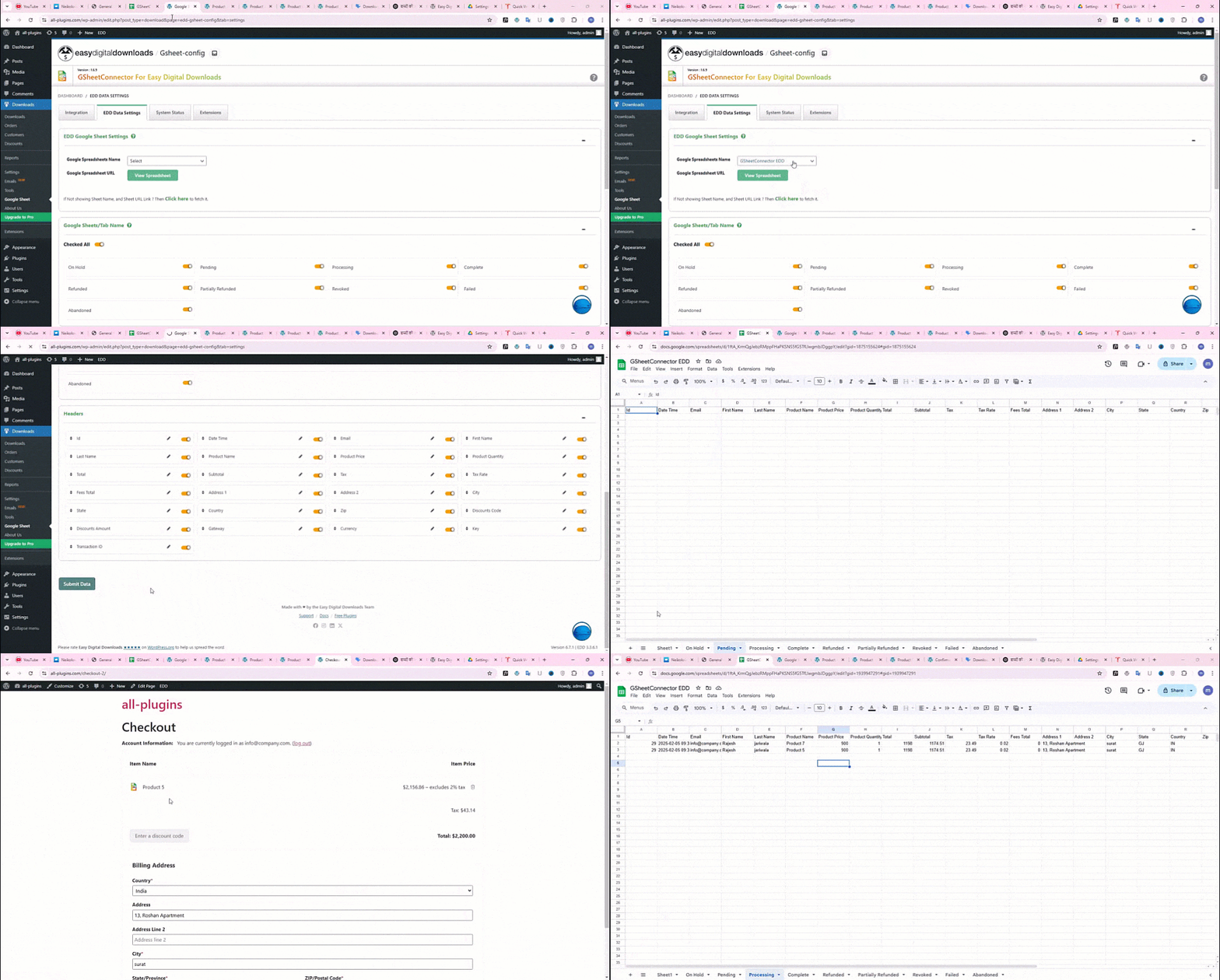
Google Sheet tabs created for each order status, with headers and synced EDD order data.

System Status.
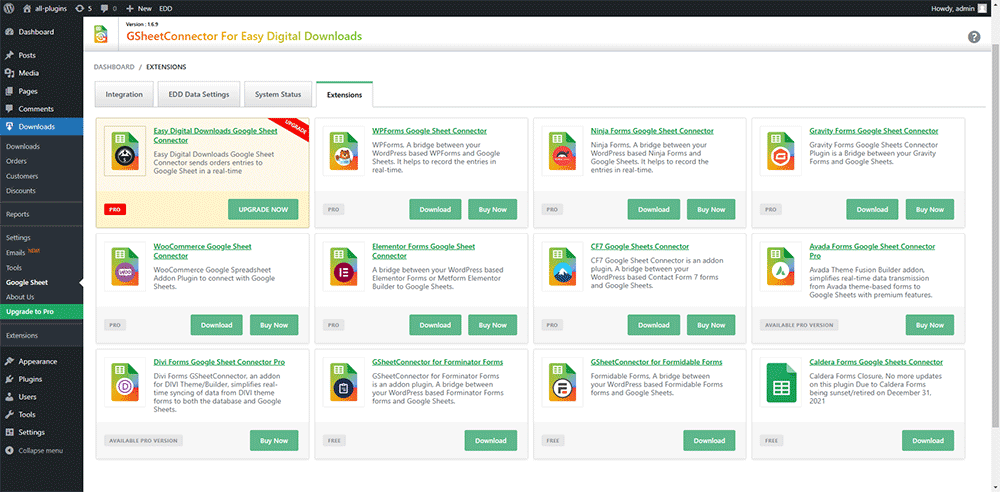
Extensions.
Faq
Yes. It works with both Easy Digital Downloads (Free) and Easy Digital Downloads Pro.
No. With the default Existing Client/Secret (Auto Setup) method, you only sign in with Google and grant access. If you prefer to use your own Google API project, choose Manual Client/Secret.
- Make sure you allowed both Google Drive and Google Sheets permissions when you signed in.
- Check that the correct spreadsheet is selected and the order status is turned on in EDD Data Settings.
- Open the Debug Log under the Integration tab or the System Status tab to see any errors.
- If the problem continues, disconnect and connect your Google account again.
Yes. Your Google connection, spreadsheet and order-status settings are moved to the new storage automatically the first time 1.7.0 loads.
Bulk syncing past orders, for all orders or a date range, is available in the PRO version.
When the status changes, the order row moves to the tab for the new status. When a payment is deleted in EDD, its row is removed from the sheet.
No. Order data is sent from your site to Google Sheets. Google tokens and plugin settings are stored only in your WordPress database. See the External Services section below.
Reviews
Perfect Plugin for EDD Google Integration
By 
Changelog
1.7.0 (17-10-2026)
- Improved: Redesigned the admin interface, including the Integration, EDD Data Settings, Settings, System Status and Extensions pages.
- Added: New Dashboard showing the Google connection status, connected account and linked spreadsheet.
- Added: Choice of Google authentication methods: Existing Client/Secret (Auto Setup) or Manual Client/Secret with your own Google API project.
- Added: Create a new Google Spreadsheet or fetch existing spreadsheets from inside EDD Data Settings.
- Added: Role Settings to control which WordPress user roles can access the Google Sheet settings.
- Added: General Settings with an option to choose whether plugin data is removed on uninstall.
- Added: Beta Version setting to opt in to early feature updates.
- Added: Custom database table for plugin settings, plus a dedicated error log table.
- Added: Automatic migration of existing tokens, spreadsheet and order-status settings from earlier versions to the new storage.
- Added: Improved Debug Log viewer on the Integration page.
- Improved: Removed the bundled Google API PHP client library. All Google Sheets and Drive requests now use the native WordPress HTTP API, which makes the plugin much smaller and faster.
- Improved: Google authentication now checks that both Google Drive and Google Sheets permissions were granted.
- Improved: Updated the Freemius SDK and moved it into the vendor directory.
- Improved: Added the
gshedd_prefix to all functions, options, classes and hooks to prevent conflicts with other plugins. - Improved: Updated the Extensions page with the latest GSheetConnector addons.
- Removed: Removed the outdated weekly token expiration cron event.
- Fixed: Resolved all errors and warnings reported by Plugin Check (PCP).
- Fixed: Applied WordPress coding standards, improved escaping and sanitization, and cleaned up code.
1.6.12 (08-09-2026)
- Fixed: The Google Sheet menu was not shown under the EDD (Downloads) menu. It now appears correctly.
1.6.11 (17-07-2025)
- Tested: Up to WordPress 6.8.1.
- Improved: Confirmed compatibility with the latest versions of Easy Digital Downloads (Free and Pro).
1.6.10 (06-02-2025)
- Fixed: Minor UI changes.
1.6.9 (04-01-2025)
- Fixed: UI changes for better responsiveness.
- Updated: Google API library updated to version 2.12.6.
- Fixed: Resolved conflicts with other GSheetConnector plugins.
- Added: On Hold sheet tab, and removed a duplicate column.
- Added: “Copy Log” button.
- Fixed: Undefined error when clicking the “Copy to Clipboard” button in the System Info tab.
- Fixed: Issue with the Debug Log view and its close button.
- Fixed: Improved the formatting of the dashboard widget.
1.6.8 (08-03-2024)
- Added: An alert message when a user authenticates without Google Drive and Google Sheets permissions.
- Added: System Status and Error Log for easier troubleshooting.
- Added: UI changes on the Integration page.
- Added: System Status tab.
- Added: Links to support, docs and upgrade to PRO.
- Fixed: The alert message was not shown correctly when the parent plugin was missing.
- Fixed: Plugin uninstallation.
- Fixed: Compatibility when moving from the Free version to the Pro version.
1.6.7 (06-03-2024)
- Changed: Plugin name updated to follow the guidelines for third-party extensions.
- Improved: Compatible with Easy Digital Downloads PRO.
1.6.6 (05-07-2023)
- Fixed: Resolved a vulnerability issue.
- Updated: Freemius SDK to version 2.5.10.
1.6.5 (16-05-2023)
- Fixed: Order status updates were not updating in Google Sheets.
1.6.4 (29-04-2023)
- Fixed: Resolved a vulnerability issue.
1.6.3 (10-12-2022)
- Fixed: Resolved a Freemius issue.
1.6.2 (09-12-2022)
- Fixed: Resolved a Freemius issue.
1.6.1 (09-12-2022)
- Fixed: Resolved a Freemius issue.
1.6 (09-12-2022)
- Fixed: Resolved a Freemius issue.
1.5 (09-12-2022)
- Updated: Freemius SDK to version 2.5.3.
1.4 (15-08-2022)
- Added: New Google integration method using a web app.
- Fixed: Resolved some issues with the authentication configuration.
- Improved: UI changes.
1.3 (31-03-2022)
- Updated: Freemius SDK to version 2.4.3.
1.2 (04-02-2022)
- Added: Compatibility with PHP 5.4 or higher and WordPress 4.4 or higher.
1.1 (13-01-2022)
- Added: Freemius integration.
1.0
- Initial release: sends Easy Digital Downloads payment entries to Google Sheets.