GSheetConnector – Gravity Forms Google Sheets Connector – Real-Time Sync

GSheetConnector – Gravity Forms Google Sheets Connector – Real-Time Sync
Description
GSheetConnector for Gravity Forms connects Gravity Forms to Google Sheets and automatically sends form entries to your selected Google Spreadsheet in real-time.
Every new Gravity Forms submission is added as a new row in Google Sheets, helping you manage leads, contact form data, registrations, surveys, payments, and other form entries directly from your spreadsheet.
If you want to connect Gravity Forms to Google Sheets, send Gravity Forms entries to a spreadsheet, or automate form submission syncing, GSheetConnector provides a simple and reliable Gravity Forms Google Sheets integration without manual CSV exports or copy-paste.
Built specifically for Gravity Forms, GSheetConnector provides real-time data synchronization with secure Google authentication. Connect your form to your preferred Google Sheet and keep your submission data organized automatically as new entries are received.
Homepage | Documentation | Support | Demo | Premium Version
Why Use a Google Sheets Connector for Gravity Forms?
✔ Send Gravity Forms entries to Google Sheets automatically
✔ Real-time Gravity Forms to Google Sheets sync
✔ Secure Google authentication
✔ Field-to-column mapping
✔ Lightweight and performance optimized
Perfect for agencies, developers, marketers, and businesses that need a reliable Gravity Forms Google Sheets integration.
How Gravity Forms to Google Sheets Sync Works
When a user submits a Gravity Form on your website, GSheetConnector automatically sends the form entry to Google Sheets in real-time.
Each submission is added as a new row in your selected Google Spreadsheet, with form field values matched to the corresponding column headers.
The submission date is captured automatically, with additional entry metadata options available in the Pro version.
Secure Google authentication provides a reliable connection between Gravity Forms and Google Sheets.
Core Features (Free Version)
Real-Time Gravity Forms to Google Sheets Sync
Automatically send new Gravity Forms submissions to Google Sheets as they are received.
One-Click Google Authentication
Connect your Google account once and enable continuous syncing.
Field & Column Mapping
Match Gravity Forms field labels with Google Sheet column headers for structured data organization.
Submission Date Capture
Automatically record the entry submission date in your spreadsheet.
View Connected Spreadsheet
Access and open your connected Google Sheet directly from the plugin settings.
Secure Google Authentication
Uses Google APIs to provide secure and reliable connectivity with Google Sheets.
Full Compatibility
Works with current versions of Gravity Forms, WordPress, and supported PHP environments.
🛠️ How to Send Gravity Forms Entries to Google Sheets
Follow these simple steps:
Step 1: Authenticate with Google
Navigate to Forms Google Sheet Integration tab and connect your Google account.
Step 2: Configure Sheet Details
Open your Gravity Form Settings Google Sheet.
Enter your Sheet Name, Sheet ID, Tab Name, and Tab ID.
Step 3: Match Column Headers
Ensure your Google Spreadsheet has column headers in the first row that match your Gravity Forms field labels.
Submit a test entry to verify that your Gravity Forms submission is successfully sent to Google Sheets.
🎥 Video Tutorial
Gravity Forms Google Sheets Connector Introduction:
🚀 Pro Features
Upgrade to GSheetConnector PRO for Gravity Forms for advanced Google Sheets automation, entry management, and additional integration features.
Automatic Sheet & Header Creation
Automatically fetch and connect Google Sheets using dropdown selection.
Synchronize Existing Entries
Bulk sync previously submitted Gravity Forms entries.
Advanced Field Management
Enable, disable, reorder, and rename fields before syncing.
Extended Entry Metadata
Capture IP address, browser information, and additional entry details.
Freeze Header Rows
Freeze header rows in Google Sheets for improved readability.
Header & Row Styling
Customize header colors and alternate row styling.
Manual API & Service Account Authentication
Supports manual Google API credentials and Service Account authentication for advanced setups.
Learn more about the PRO version:
https://www.gsheetconnector.com/gravity-forms-google-sheet-connector?wp-repo
Important Notes
Ensure your Sheet Name, Sheet ID, Tab Name, Tab ID, and column headers match exactly with the values entered in the plugin settings.
• Use exact Gravity Forms field labels as column headers
• Avoid special characters in header names
• Keep naming consistent between the form and spreadsheet
Incorrect configuration may prevent proper Gravity Forms to Google Sheets synchronization.
Installation
- Upload
gsheetconnector-gravity-formsto the/wp-content/plugins/directory or install it directly from the WordPress Plugins screen. - Activate the plugin.
- Navigate to Forms Google Sheet Integration tab.
- Authenticate your Google account and configure sheet details.
Your Gravity Forms submissions will now sync automatically to Google Sheets in real-time.
Screenshots
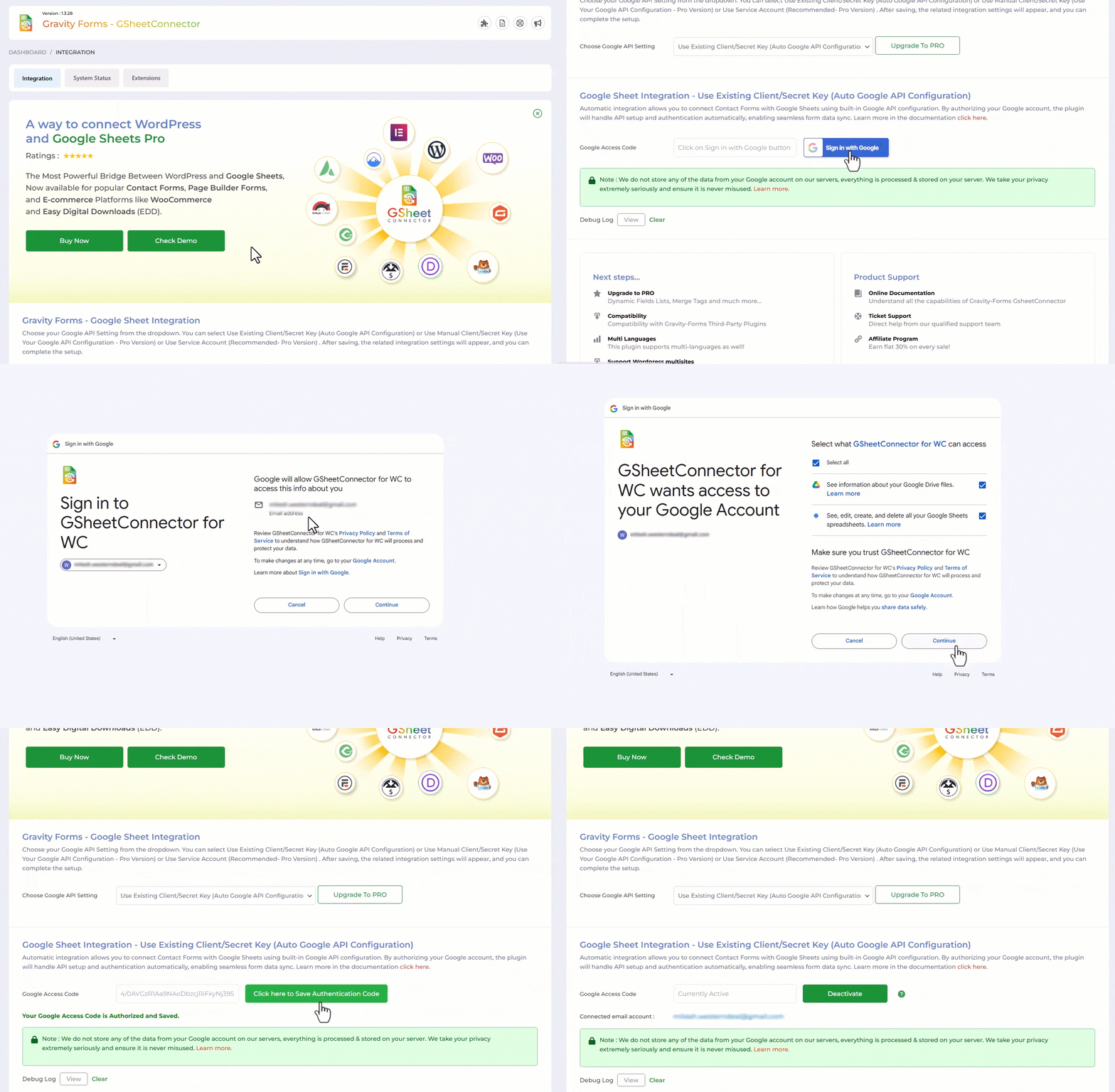
Google Sheet Authentication Screen
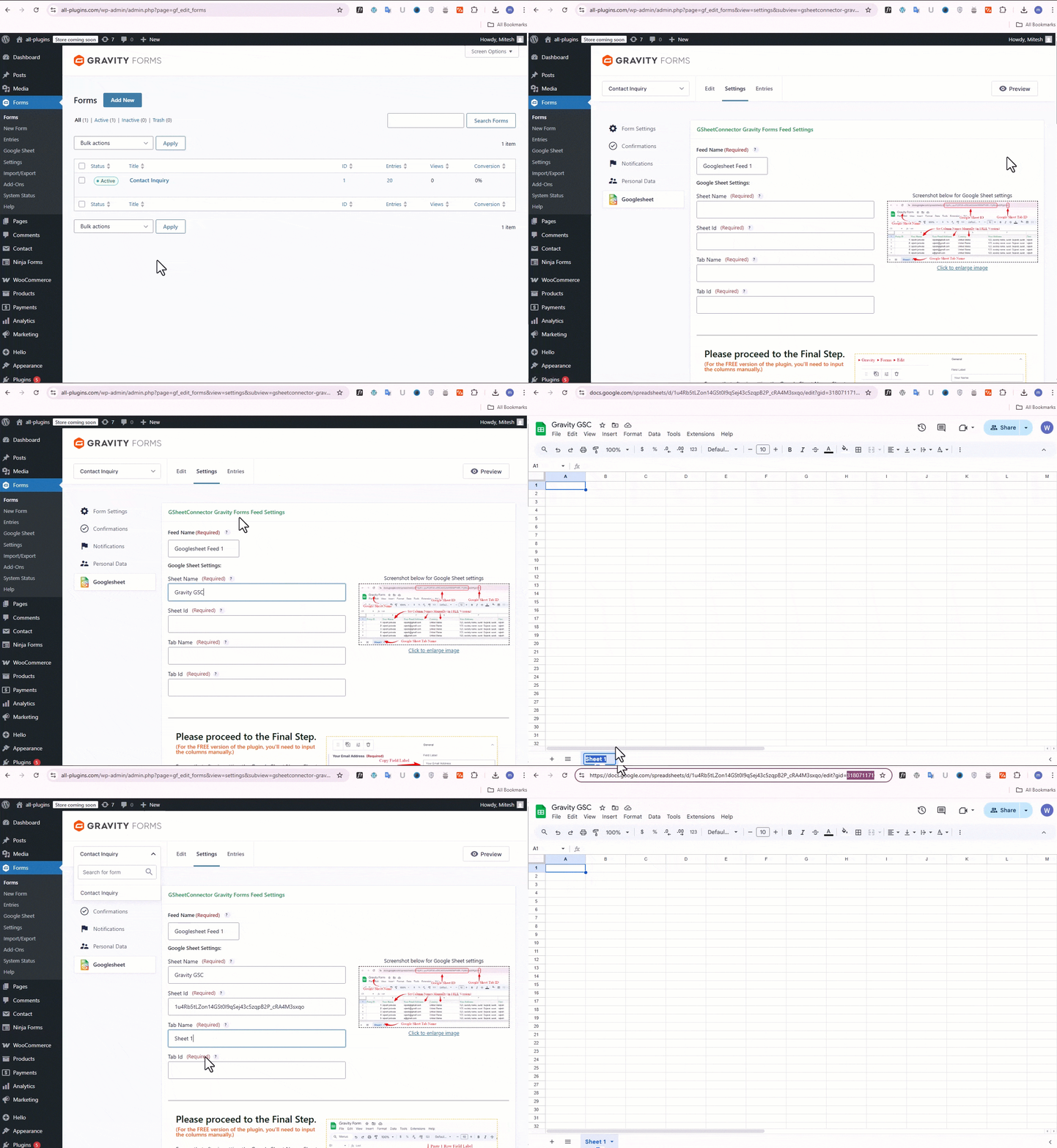
Gravity Form Settings
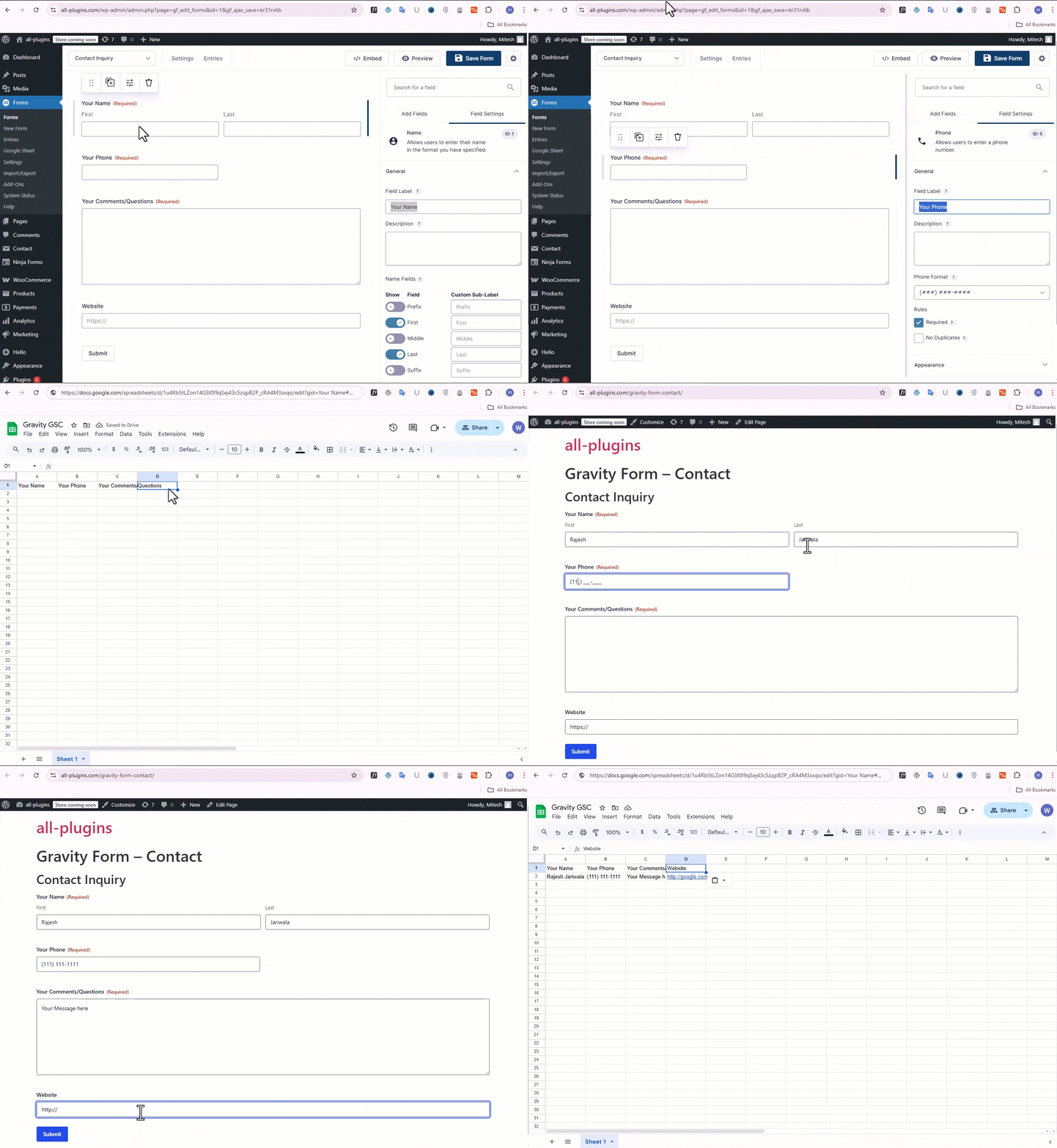
Feed Configuration
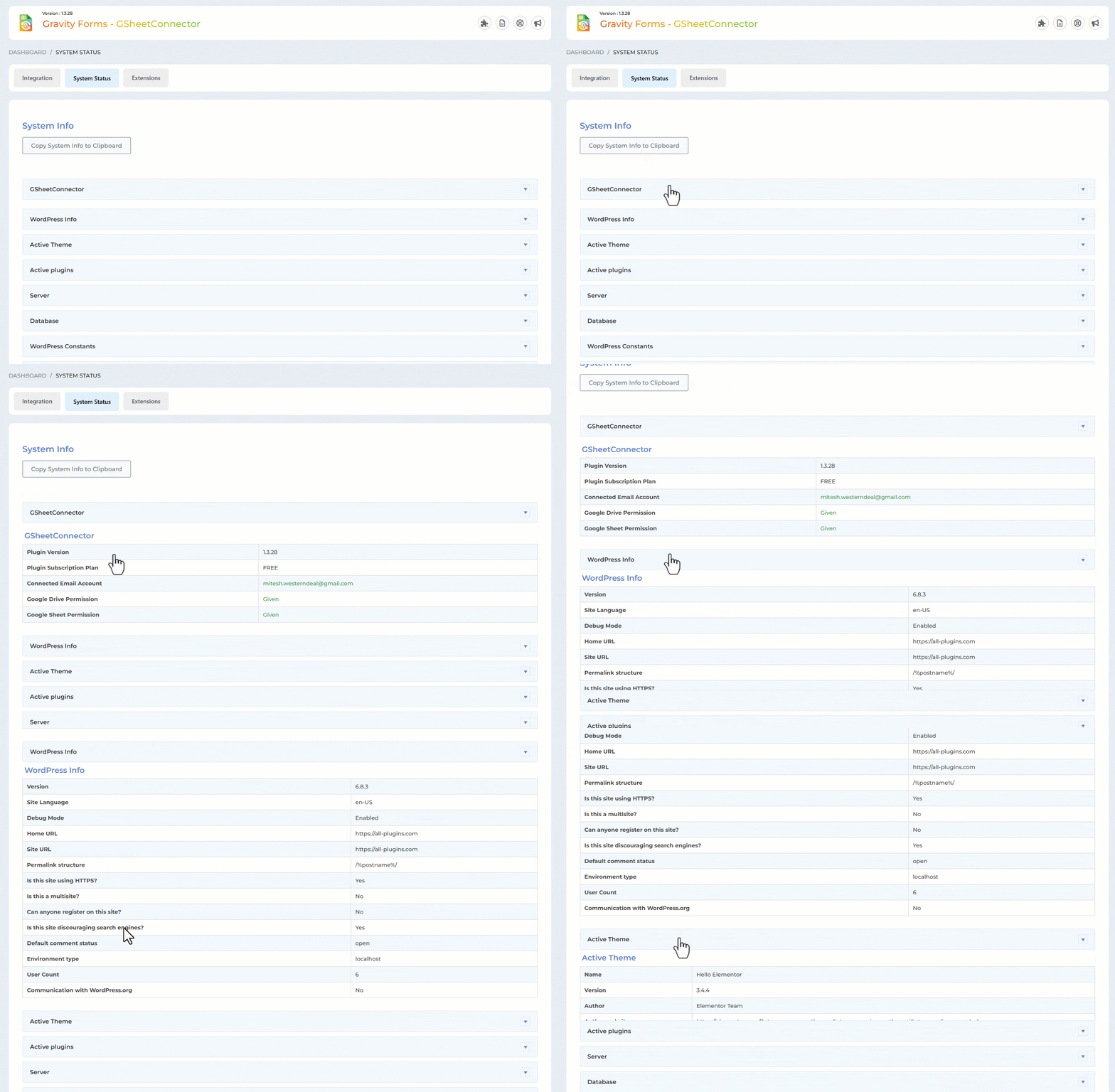
System Status
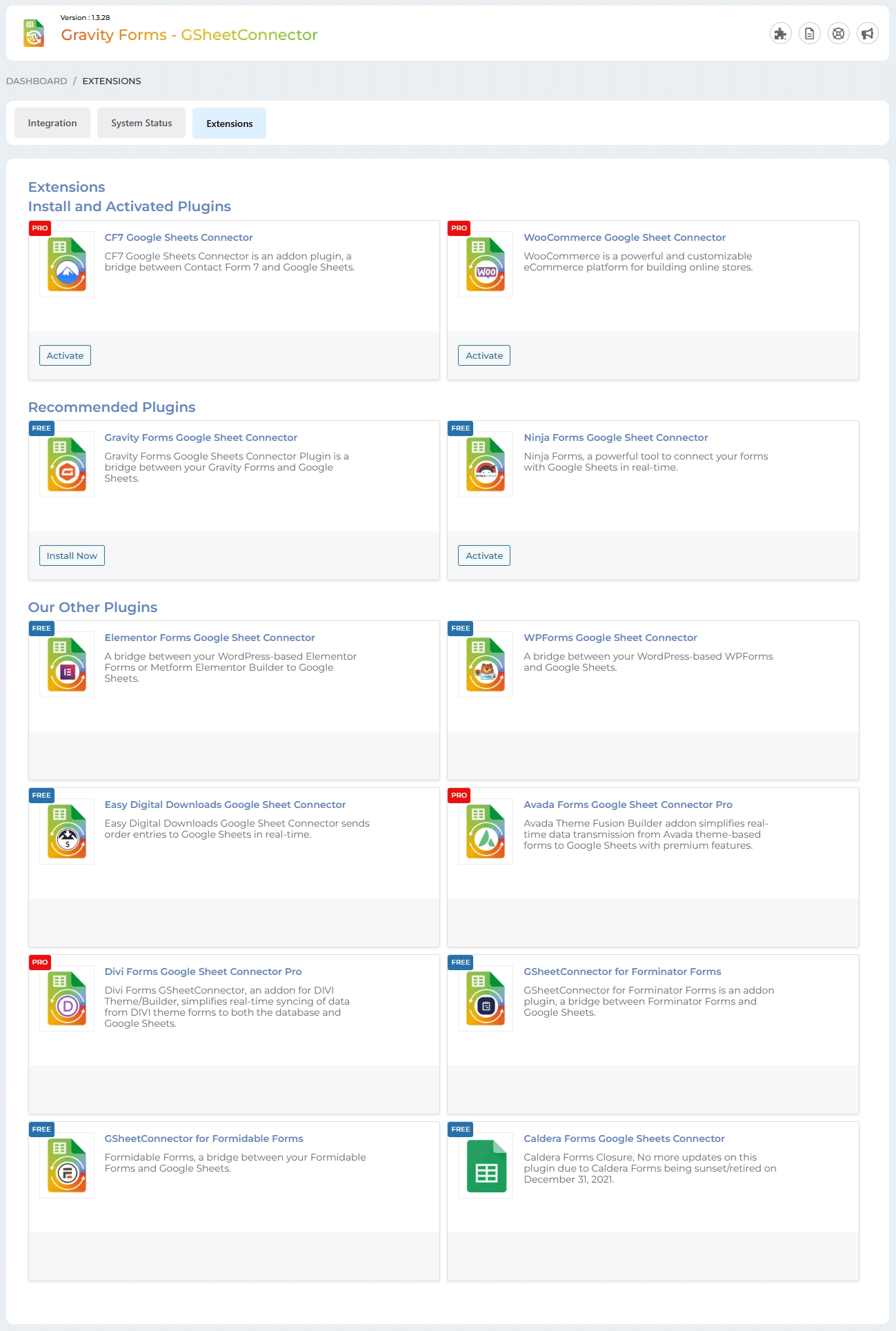
Extensions
Faq
A Gravity Forms Google Sheets connector automatically sends form submissions from Gravity Forms to Google Sheets. GSheetConnector adds each new Gravity Forms entry as a new row in your connected Google Spreadsheet.
Install and activate GSheetConnector, connect your Google account from the Integration tab, and configure the Google Sheet for your Gravity Form. Once connected, new Gravity Forms entries are automatically sent to Google Sheets.
Yes. GSheetConnector automatically sends new Gravity Forms entries to your connected Google Sheet when a form is submitted.
Check the Integration tab and review the Debug Log for error details.
Make sure:
- Your Google account is connected
- The Sheet Name, Sheet ID, Tab Name, and Tab ID are correct
- Your Google Sheet column headers match the Gravity Forms field labels
If the entries are still not appearing, reconnect your Google account and verify the sheet configuration.
Yes. Each Gravity Form can be connected to a different Google Spreadsheet. The Pro version also supports multiple Google Sheets feeds per form.
Yes, with GSheetConnector PRO. The Pro version can synchronize previously submitted Gravity Forms entries to Google Sheets in bulk.
No. The free version provides one-click Google authentication, so manual Google API configuration is not required. Manual API credentials and Service Account authentication are available in the Pro version.
Yes. New Gravity Forms submissions are automatically sent to the connected Google Sheet in real-time after the form is submitted.
Yes. GSheetConnector uses your Gravity Forms field labels and corresponding Google Sheet column headers to organize submitted form data in your spreadsheet.
This message may appear when using custom Google API credentials in the Pro version. The free version uses the built-in Google authentication method and does not require you to configure your own Google API credentials.
Reviews
Prompt customer service
By 
We experienced a problem where the plugin disconnected from our Google account and would not reconnect. After opening a support ticket our question was answered with in 24 hours and the issue was easily resolved.
Thanks for the prompt customer service and simple solution to fix out problem.
Gravity Forms GSheetConnector Issue and Fix
By 
I inherited a website and we needed to make very complicated forms that then connected to Google sheets, this plugin was PERFECT, there was an issue on the existing site that caused a blip but Jina and Abdullah were just amazing and hopped on and spent a long time tracking down and then fixing the issue! myself and my client are so impressed with their service, i can't recommend them enough! thanks guys
Necessary for our workflow
By 
We use the Google Sheet Connector plugin with all of our clients who have WordPress websites. Paired with another plugin that lets us see UTM parameters for people who fill out contact forms, we are able to quickly and easily track which of our marketing campaigns are working the most effectively.
Super plugin! Support is even better!!
By 
Great*
By 
Perfect - 3 minutes to setup
By 
Changelog
1.5.3 (09-10-2026)
- Updated: Updated Freemius integration code and related files.
1.5.2
(01-10-2026)
* Fixed: Resolved duplicate Sheet Details fields that caused Sheet Name, Sheet ID, Tab Name, and Tab ID values to be cleared when saving the settings.
1.5.1
(19-08-2026)
* Added: Support for exporting multiple checkbox options as separate columns in Google Sheets.
1.5.0
(05-08-2026)
* Added: Connected Sheet Details in the Dashboard tab.
* Fixed: Removed the unused lib directory from the plugin package.
* Fixed: Improved compatibility with third-party integrations.
1.4.3
(22-06-2026)
* Fixed: Security enhancements and fixes for improved protection and compatibility.
1.4.2
(13-06-2026)
* Added: UI for Dashboard Tab.
* Fixed: UI for Inner Feed Settings.
1.4.1
(13-05-2026)
* Added: Dashboard section.
* Added: Notification slider for admin notices.
* Added: Default headers such as Date, Entry Date, Submission Date, and Date Time.
* Fixed: Entry Date now follows the WordPress date and time format and prevents automatic formatting in Google Sheets.
* Fixed: Date and time are now inserted into Google Sheets using the WordPress site format.
* Fixed: Google authentication permission condition handling.
1.4.0
(18-04-2026)
* Improved: Enhanced backend UI for better usability and experience.
* Added: Option to delete plugin data upon uninstall.
* Added: Dedicated debug log table for improved error tracking and monitoring.
* Added: Display of existing authentication status badge in Integration tab.
* Fixed: Resolved entry date timezone issue in Google Sheets integration.
1.3.31
(01-01-2026)
* Fixed: Added compatibility with the Gravity Forms Webhooks plugin.
1.3.30
(18-11-2025)
* Added: Added new CSS and updated the UI.
1.3.29
(10-10-2025)
* Updated: Title and description design updates.
* Fixed: Fixed system status footer issue.
1.3.28
(01-09-2025)
* Fixed: Missing Authorization for authenticated users.
* Fixed: Cross-Site Request vulnerability.
1.3.27
(15-08-2025)
* Fixed: Undefined method error.
* Fixed: Compatibility issues with Pro version.
1.3.26
(12-08-2025)
* Added: Added new CSS and updated the UI.
1.3.25
(05-08-2025)
* Removed direct links to 5-star reviews to comply with WordPress plugin guidelines.
* Updated “Tested Up To” value to reflect compatibility with the latest WordPress version.
* Replaced static
1.3.23
(16-07-2025)
* Tested up to latest version of WordPress 6.8.1.
* Confirmed compatibility with the latest versions of Gravity forms pro.
1.3.22
(07-07-2025)
* Added: Uninstall Plugin Settings.
* Fixed: Resolved an issue where the system status was not working correctly.
1.3.21
(19-06-2025)
* Fixed: Resolved an issue where fields named “Product” were not syncing to Google Sheets on form submit.
1.3.20
(21-04-2025)
* Added: Moved saving of credentials to database for Auto API Integration.
1.3.19
(05-03-2025)
* Fixed: Address field data now correctly appears in the sheet, separated according to headers.
* Added: Included requires statements for the parent plugin.
* Added: Implemented a condition for upgrading to PRO.
* Added: Log error statements for detecting and handling Quota Limit issues.
* Added: Conditional Logic in Extension Tab: Integrated conditions based on plugin activation to optimize extension tab behavior.
1.3.18
(04-02-2025)
* Fixed: Minor UI changes.
1.3.17
(27-01-2025)
* Fixed: Minor UI changes.
1.3.16
(03-01-2025)
* Added: The “Copy Log” button has been added.
* Fixed: Undefined error when clicking the “Copy to Clipboard” button in the System Info tab.
* Fixed: The issue with the Debug Log view and the close button has been fixed.
* Fixed: Dashboard widget formatting has been improved.
1.3.14
(10-08-2024)
* Added: Display a notification when authentication expires.
1.3.13
(30-07-2024)
* Fixed: Google hasn’t verified this app error.
1.3.12
(19-04-2024)
* Added : UI Changes.
1.3.11
(11-03-2024)
* Added : Added links for support,docs,upgrade to pro.
= 1.3.10
* Fixed : Solved the problem with the consent form field not showing in sheet.
= 1.3.9
* Fixed : Resolved the problem with the Admin dashboard widget.
* Fixed : Resolved debugging view open and close problem.
= 1.3.8
* Google Api Client Library Updated With Version 2.12.6 With Guzzle Http Version 7.4.3 .
* System Status Integration by providing essential information, including version details and authentication status.
* Developed a streamlined mechanism to verify and communicate account connection status.
* Ensured secure access by hiding the button when users are not authenticated.
* Added Google Sheet Connector dashboard widget for quick access to the contact form connected with Google Sheet.
* Fixed : Debug log mechanism issues.
= 1.3.7
* Fixed : Solved Tab Id while adding tab id 0 by default.
* Fixed : Sheet URL and other links.
1.3.6
(08-08-2023)
* Fixed : Vulnerabilities issues.
1.3.5
(29-05-2023)
* Fixed : Vulnerabilities issues.
* Integraton : Conditions.(22-6-23)
* Fixed : Css Styles of integration.(22-6-23)
* Pro : Shows Pro Features.(22-6-23)
* System_Status_Added: (5-7-23)
* Logs_Func:(6-7-23)
1.3.4
(01-05-2023)
* Added : Remove access permission from google account while deactivating authentication.
* Fixed : Vulnerabilities issues.
1.3.3
(02-08-2022)
* Fixed “undefined function is_plugin_active()” issue.
1.3.2
(01-08-2022)
* New Google Integration method implemented using web app.
1.3.1
- Added Validation for “Google Sheet Settings” Form.
- Added “Open Sheet” Link and “Preview Sheet” Link under GSheetConnector feed settings page.
- Allow use to fetch “Entry Date” in Google Sheet.
- Displayed SpreadSheet Preview in under GSheetConnector feed settings page.
- Displayed message While added wrong Auth tokens.
1.3
- Compatible with Gravity Forms Version 2.5.8.2
- Solved Date issues – Passing in Google Sheet
- Solved Checkbox, Dropdown and other fields entries to Google Sheet
1.2
- Fixed fatal error.
1.1
- Fixed not saving of field type like checkbox, radio buttons, etc.
- Updated API Library.
1.0
- First public release
- Integrated Gravityforms with Google sheets.