HAPPY – Helpdesk Support Ticket System

HAPPY – Helpdesk Support Ticket System
Description
HAPPY – Helpdesk & Support Ticket System for WordPress and WooCommerce is a powerful solution built to track, organize, and resolve customer inquiries directly on your website. Whether you need a simple WooCommerce support ticket tool or a comprehensive WordPress helpdesk plugin, HAPPY centralizes all customer interactions to boost your support team’s productivity and improve response times.
Try the Demo | Documents | Facebook group
Install and Use HAPPY – Helpdesk Support Ticket System
Empower Your Support Team today!
A great customer support experience starts with the right tools. With this WordPress support ticket system, your team can organize tickets by category, create pre-written canned replies for fast troubleshooting, and build a beautiful Knowledge Base to let customers help themselves. Let’s make your support workflow faster and happier!
HAPPY – Helpdesk Support Ticket System for WordPress can:
Ticket system
Frontend ticket list with filters (status, category, problem/form, supporter for managers)
Active-ticket counters on filters (cached); hide zero-count options
Default list hides Closed/Resolved until filtered; sort by status priority then last update
Formatted ticket titles (padded ID + subject / custom placeholders)
Ticket detail with chat-style replies (customer left, supporter right)
Always-visible reply form; canned replies; file attachments (type/size limits)
Ticket statuses (name, icon, colors, priority) and status transitions on create/customer reply/agent reply/close
Categories with auto-assign rules (AND/OR conditions)
Assign supporters (managers); new tickets start unassigned
Bulk actions: status, assign, add/remove categories (admin + frontend for managers); delete tickets (admin list, support managers only)
Share ticket: Restricted / Shared link; view & reply without login (replies as ticket owner)
Guest access via secure _guest_token (email, thank-you page)
Pretty permalinks for tickets and author profiles
Pagination: tickets/replies per page; frontend per-page control
Overdue row CSS classes for unanswered / awaiting-customer tickets
“Back to Tickets” on create form; theme template overrides (happy-helpdesk-system/)
Ticket forms
Drag-and-drop form builder (sections, heading, gap, divider, text, textarea, number, select, checkbox, radio, upload, editor, categories, captcha, …)
Multiple forms / problem selection; per-form visibility (guest / logged-in / shortcode)
Terms & GDPR checkboxes; validation and upload messages
Optional Google reCAPTCHA on forms when Captcha is enabled
Roles & authentication
Helpdesk roles (support manager, supporter, customer, blocked, …)
Built-in login / register / lost password (or redirect to custom login)
Google reCAPTCHA v2/v3 on auth forms (server verify, fail-closed without secret)
Auth rate limiting
Email & notifications
Emails for create, reply, close (auto-close only for close email when enabled)
Separate admin/customer templates; HTML editor; BCC/CC; template colors; footer text
Dynamic placeholders (incl. guest token)
Unanswered-ticket alert to admin after N hours
Automation
Auto-close after N hours without customer reply (optional close message; 0 = off)
Configurable cron interval; WP-Cron + traffic fallback; deferred shutdown run
Working hours & holidays
Weekly working hours (quick-fill from Monday)
Unlimited holidays with message
Shortcodes for working hours / holiday message
Knowledge Base & FAQs
KB CPT, categories/tags, archive/single, views count
KB directory layout + live search shortcode
FAQs CPT; accordion layout by category + search
Editable archive slugs and subtitles
Admin & reporting
Admin tickets list: columns, Screen Options, sorting, supporter filter, Select All / Shift+click
Bulk assign / categories / status; “View ticket” frontend URL
Categories & statuses management; form builder admin
Reports: tickets by day/month/year with status & category charts
Dashboard widget: today’s tickets by form/category + completed
System Status page + support request to VillaTheme
Settings with field descriptions; import/export hardening
WooCommerce
My Account Tickets endpoint
Create form: order / order item fields (required when configured)
Order/item shown on ticket content; category rules can use order data
3rd party service
- This plugin relies on Google reCAPTCHA services to ensure ReCAPTCHA function work properly.
► Google reCAPTCHA
► Google reCAPTCHA License
MAY BE YOU NEED
9MAIL – WordPress Email Templates Designer
Abandoned Cart Recovery for WooCommerce
Advanced Product Information for WooCommerce
AFFI – Affiliate Marketing for WooCommerce
ALD – Dropshipping and Fulfillment for AliExpress and WooCommerce
Boost Sales for WooCommerce – Set up Up-Sells & Cross-Sells Popups & Auto Apply Coupon
Bopo – WooCommerce Product Bundle Builder
Bulky – Bulk Edit Products for WooCommerce
Cart All In One For WooCommerce
Catna – Woo Name Your Price and Offers
Checkout Upsell Funnel for WooCommerce
ChinaDS – Tmall-Taobao Dropshipping for WooCommerce
Clear Autoptimize Cache Automatically
COMPE – WooCommerce Compare Products
Coreem – Coupon Reminder for WooCommerce
CURCY – Multi Currency for WooCommerce – Smoothly on WooCommerce 9.x
Customer Coupons for WooCommerce
DEPART – Deposit and Part payment for Woo
Email Template Customizer for WooCommerce
EPOW – Custom Product Options for WooCommerce
EXMAGE – WordPress Image Links
Faview – Virtual Reviews for WooCommerce
FEWC – Extra Checkout Fields For WooCommerce
Free Shipping Bar for WooCommerce
GIFT4U – Gift Cards All in One for Woo
HANDMADE – Dropshipping for Etsy and WooCommerce
LookBook for WooCommerce – Shoppable with Product Tags
Lucky Wheel for WooCommerce – Spin a Sale
Notification for WooCommerce | Boost Your Sales – Recent Sales Popup – Live Feed Sales – Upsells
Orders Tracking for WooCommerce
Pofily – WooCommerce Product Filters
PRENA – Product Pre-Orders for WooCommerce
Product Builder for WooCommerce – Custom PC Builder
Product Size Chart For WooCommerce
Product Variations Swatches for WooCommerce
REDIS – WooCommerce Dynamic Pricing and Discounts
S2W – Import Shopify to WooCommerce
SUBRE – Product Subscription for WooCommerce – Recurring Payments
Suggestion Engine for WooCommerce
Thank You Page Customizer for WooCommerce – Increase Your Sales
TMDS – Dropshipping for TEMU and Woo
VARGAL – Additional Variation Gallery for WooCommerce
VIMA – Multi Customer Addresses for Woo
W2S – Migrate WooCommerce to Shopify
WebPOS – Point of Sale for WooCommerce
WPBulky – WordPress Bulk Edit Post Types
Documentation
Plugin Links
Installation
- Unzip the download package
- Upload
happy-helpdesk-support-ticket-systemto the/wp-content/plugins/directory - Activate the plugin through the ‘Plugins’ menu in WordPress
Screenshots
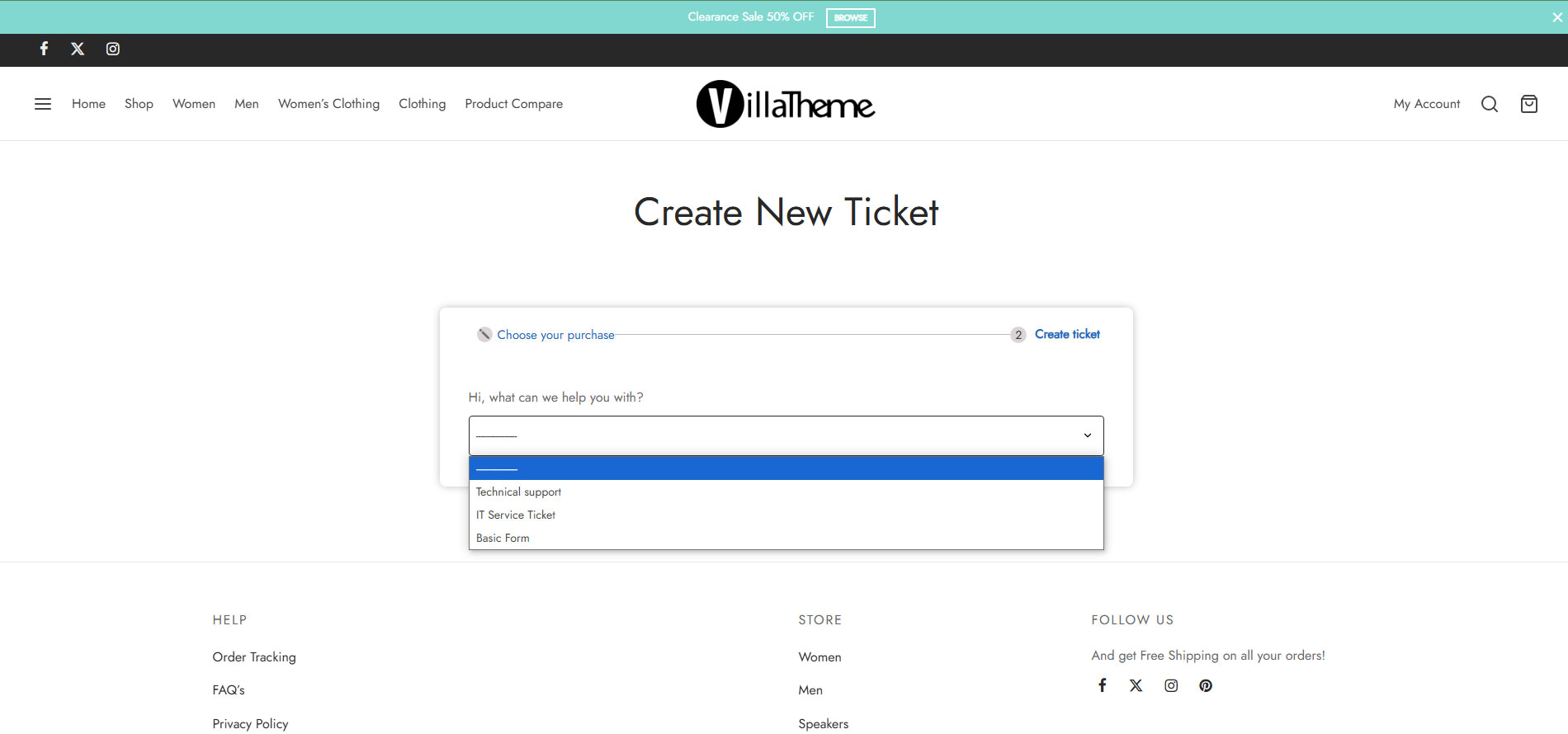
Choose Support Problem

Create Ticket

Create Ticket Form

List Ticket Page

Detail Ticket Page and Reply Form

Tickets on wordpress admin page
Reviews
Changelog
2026.09.05 – version 2.0.6
– Fixed: Closed tickets deny view for guest-token and share-link visitors; customers can still view (no reply); staff unchanged
– Added: Reply @kb: KB mention for staff — Visual + Text autocomplete inserts title permalink link
– Fixed: Reply Text (Quicktags) toolbar no longer throws when clicking buttons such as code
– Fixed: Quicktags toolbar hidden again on the Visual tab
– Fixed: Reply TinyMCE toolbar buttons work again; Text Visual switch no longer errors after HTML/<code> content
– Updated: Frontend and admin ticket screens enqueue the WordPress editor scripts for the reply form
– Updated: Email template appearance now includes a separate Heading text color setting; by default the heading text uses the same color as the email body text
2026.09.02 – version 2.0.5
– Fixed: Unanswered digest email subject no longer appends the HTML ticket list; subject stays plain text
– Fixed: Staff/admin replies email the ticket creator again (Enable defaults + requester email resolution)
– Updated: Frontend ticket list Last Replies column shows last-reply user name before the time
– Updated: Email template — less empty padding; heading shown when set
2026.08.29 – version 2.0.4
– Fixed: Ticket title no longer shows escaped quotes/backslashes (e.g. \\\"Data invalid\\\")
– Fixed: Reply editor — inline images by http(s) URL only; strip base64/blob on save; no convert
– Updated: Reply TinyMCE — disable paste data images; hide Image description / title fields
2026.08.28 – version 2.0.3
– Fixed: Reply TinyMCE no longer jumps scroll to the top while typing long content
– Fixed: Ticket status settings apply correctly on create, customer reply, supporter reply, and close (“Don’t change” leaves status unchanged)
2026.08.22 – version 2.0.2
– Fixed: Guest tickets using an email that already belongs to a WordPress user still receive staff-reply emails
– Fixed: Auto-close now writes Closed status in the database (verified after the notice reply) so tickets are not left as Pending
– Fixed: Auto-close / unanswered checks run at the shorter of the cron interval and the inactivity hours (Pending tickets waiting on the customer are not skipped until the next 12-hour cron)
– Added: New tickets auto-subscribe category Assign Supporter users and email them on create
– Fixed: [happy_working_hours] Your time clock works in widgets outside Happy pages
– Fixed: Email bodies keep line breaks; placeholders ({ticket_id}, {ticket_url}, {reply_content}, {all_field}) replace correctly
– Added: Settings Tickets — Detect visitor country on/off (default on)
– Added: Admin Happy List Tickets — delete tickets (row action + bulk, support managers only), with confirmation
– Added: Settings Pages Author slug (default author_) for author profile URLs; legacy happy_ URLs still work
– Updated: Happy author Save Canned clones unassigned shared replies for that supporter; personal copies are overwritten on save
– Added: Canned shortcodes {ticket_id} (padded), {cursor} (including when on its own line)
– Fixed: Canned replies preserve blank lines; ticket detail drawer responsive on tablet/mobile (≤1024px)
– Updated: My Account Tickets badge — staff: awaiting supporter reply; customers: awaiting customer reply; light-red circle badge
– Fixed: Closed tickets append [#CLOSED] to the title; customers cannot reply on closed tickets
– Fixed: New tickets no longer show as closed / block replies when Close status matches After ticket created
– Updated: System Status report — DB schema, emails, auto-close/unanswered, author slug/URL, canned counts, close status
– Fixed: PHP 8+ white screen risk — avoid $current_user->ID on null; hard-require KB/FAQ caps class; safer ticket list queries
– Fixed: reCAPTCHA v3 create-ticket form — no longer renders happy-recaptcha-align (removes empty gap; v3 stays invisible with hidden token only)
– Updated: Happy author ticket list keeps desktop one-row table layout (like list tickets; no narrow/card stack on profile sidebar width)
– Updated: Happy author “Your canned replies” only for supporters and support managers (own profile)
– Added: Supporters and support managers can edit Knowledge Base and FAQs in wp-admin (all posts; WooCommerce does not block admin)
– Updated: Happy author page ticket list matches the main list-ticket table (status, topic, bulk actions, etc.) without the right-hand filter panel
– Added: Ticket detail — reply author name links to the Happy author page when the viewer may open that profile
– Fixed: Working Hours shortcode — “Your time” clock loads on any page (dedicated working-hours CSS/JS enqueued from [happy_working_hours], not only Helpdesk pages)
2026.08.17 – version 2.0.1
– Fixed: Auto-close cron no longer posts inactivity reply on tickets already closed/resolved or with date_closed set (fresh status check + _happy_auto_closed guard)
– Fixed: Ticket detail — [#CLOSED#] only when status is the configured close status (int/string-safe); strip leftover marker from subject; close action sets status + date_closed and clears ticket cache
– Fixed: Reply ticket — hide canned response HTML list under the dropdown; tighten Quicktags toolbar button styles
– Fixed: Form builder — Cannot set properties of undefined (setting 'settings') when updating section/element editing state
– Fixed: Create ticket with reCAPTCHA enabled — v3 token on submit + hidden submit flag so tickets save; verify only when captcha widget can render
– Updated: WooCommerce My Account tickets badge loads lightweight wc-account-tickets-badge CSS instead of full frontend.css
– Updated: problem-form CSS/JS load only on create-ticket page or happy_forms / happy_single_form shortcodes (filter happy_should_load_problem_form_assets)
– Fixed: Form builder Add Element — restore column width picker (100%/50%/33%/25%) after choosing a field, including when adding on a new row/section
– Fixed: Form builder — cannot add field (elements.length on undefined section); normalize form sections/elements in admin localize
– Fixed: Create ticket form layout/CSS — body styles target form wrapper, scoped box-sizing, default field padding; no longer soft-404 for Woo order gate
– Fixed: Create New Ticket page soft-404 when WooCommerce “Order required” defaulted on or customer had no orders; Order required now defaults off; clearer notice instead of 404
– Fixed: WooCommerce Order required — administrators, support managers, and supporters can see/create tickets without having orders (filter happy_woo_skip_order_requirement)
– Fixed: PHP 8.1 compatibility — null-safe explode/trim/strtolower; guard get_userdata/get_user_by before property access
– Added: Global Enable email notifications switch (Settings Email); master off stops all plugin emails (enable_email_notifications, filter happy_emails_enabled)
– Added: Unanswered Ticket digest — one email per recipient with the full unanswered list ({unanswered_ticket_list}, {unanswered_ticket_count}); action happy_unanswered_tickets_digest_sent
– Added: Email settings — placeholder guide + clearer section/event descriptions
– Fixed: Email placeholders replace correctly ({ticket_url}, {reply_content}, {guest_token}, {subject}, …); guest/customer emails append guest access token to ticket URL
– Fixed: {ticket_url} no longer depends on Support page being set (uses happy_get_ticket_permalink fallback)
– Fixed: Admin bar “View list tickets” under Site Name — link missing when Support page was front page or had no valid permalink
– Updated: New install List Ticket page default slug is list-tickets (post_name)
– Added: Working Hours per-day “Day off” checkbox (Fill skips Day off days); Our/Your clocks + Official hour GMT use WordPress site timezone; Your time = browser/OS local
– Added: Appearance Widgets List Tickets area (top of tickets column; hidden when empty); registered early so it appears in block Widgets UI
– Updated: Shortcode [happy_working_hours] (replaced [happy_working_hour]); Holiday Start/End use Y-m-d date pickers; auto-delete expired holiday events (default on)
2026.08.05 – version 2.0.0
– Added: Auto-close cron interval setting (default 12 hours)
– Added: Secondary DB indexes; gated frontend assets; performance helpers for lists
– Updated: Defaults auto-close 72h / unanswered 24h; tickets_per_page from settings
– Fixed: Customer email content key migration; holiday shortcode; settings save pollution
– Added: Auto-close tickets after N hours without customer reply (with optional close reply message); 0 = disabled
– Added: Unanswered ticket alert — email admin after N hours without supporter reply; 0 = disabled (Email Unanswered Ticket)
– Added: Ticket list row classes for overdue no-response tickets (happy-ticket-overdue, happy-ticket-unanswered-overdue, happy-ticket-awaiting-customer-overdue)
– Added: Extensibility — lifecycle do_action / apply_filters across tickets, replies, email, cron, access, lists, settings, FAQ/KB (see docs/HOOKS.md)
– Added: WooCommerce create form — require order + order item when Order required; show Order / Order item on ticket content
– Fixed: Style settings (table header/footer + tickets/replies pagination colors, custom CSS) now apply on the frontend
– Fixed: Auto-close tickets — query now targets supporter last-replies, paginates safely, and runs via WP-Cron + traffic fallback (auto_close_cron_interval_hours)
– Fixed: Close Ticket email is only sent on auto-close (controlled by “Send email on auto-close”); manual status changes no longer send email
– Fixed: Frontend tickets-per-page (cookie/request) respected in AJAX list refresh
– Fixed: WooCommerce order/item values submit correctly when selects sit outside the form (form attribute); item dropdown JSON escape; fields stacked one per row
– Added: Reports admin page — tickets created by day/month/year with status and category charts
– Added: WordPress dashboard widget — today’s tickets by form/category and completed count
– Added: System Status admin page (WordPress, server, plugin tables, pages) with support request form emailed to support@villatheme.com
– Added: Ticket title display format settings (padded ID, custom placeholders) in Tickets settings
– Added: Category counters on ticket list filters (Pending + Processing + Urgent)
– Added: Problem counters on ticket list filters (Pending + Processing + Urgent)
– Added: Frontend ticket list — filter by supporter (support managers only) with active-ticket counters
– Added: Admin tickets list — Select All and Shift+click range selection
– Added: Admin tickets list — bulk Assign to supporters (multi-select)
– Added: Bulk actions — Add categories / Remove categories (admin list + frontend supporter list)
– Added: Frontend ticket list — Supporter column and bulk Assign supporters (support managers only)
– Added: Ticket information — assign supporters (support managers only); new tickets start unassigned
– Added: Share ticket — Restricted / Shared with unique share link; view and reply without login; replies attributed to ticket owner
– Added: Admin tickets list — filter by supporter
– Added: Admin tickets list — sortable columns and Screen Options for visible columns
– Added: Admin ticket detail — “View ticket” button opens the frontend ticket URL
– Added: Pretty permalinks for tickets (/{list-page}/{id}-{slug}/) and author profile (/{list-page}/happy_{username}/)
– Added: Theme template overrides via {theme}/happy-helpdesk-system/ (child parent plugin)
– Added: Guest ticket access via secure _guest_token links (email {guest_token}, thank-you page, view/reply without login)
– Added: Knowledge Base directory layout with live search ([happy_list_kb layout="directory"])
– Added: FAQs accordion layout grouped by category with search ([happy_list_faq layout="accordion"])
– Added: Descriptions for all settings fields and sections
– Added: Permalinks settings for Knowledge Base / FAQs base slugs (Settings Permalinks)
– Added: Editable Knowledge Base and FAQs archive subtitles in Page settings
– Updated: Ticket list title shows formatted ID + subject (e.g. #000001 Title); same on ticket detail
– Updated: Default ticket list hides Closed and Resolved tickets until filtered by status
– Updated: Ticket list default sort by status priority (Urgent Pending Processing Resolved Closed), then latest update
– Updated: Hide categories, problems, and supporters with zero active-ticket counters in list filters
– Updated: Removed ID column from ticket list; ID is shown in the Topic title
– Updated: Ticket list pagination — page counter and tickets-per-page on the same row; matched font sizes with reply editor
– Updated: Ticket replies (frontend + admin) — chat-style cards; customer left, supporter right with sky-blue border
– Updated: Frontend ticket reply — reply form always visible (removed show/hide reply toggles)
– Updated: Create ticket — “Back to Tickets” above the form (top-left), outside the form card
– Updated: Clearer Email and Page settings copy / shortcode help
– Updated: Removed [CANNED] label from replies when using a canned response
– Updated: Frontend ticket list (mobile ≤782px) — card layout for managers; status icon on same row as title
– Updated: Frontend ticket list (mobile) — Filter panel opens as left drawer with dark overlay
– Updated: Ticket detail (mobile, supporters) — Ticket information opens as right drawer with dark overlay
– Updated: Frontend bulk Assign / Categories selects (mobile) — multi-select expands and dropdown pushes content down
– Updated: List filter counters cached; admin/detail batch helpers; DataTables removed from frontend bundle
– Updated: Google reCAPTCHA v2/v3 (login/register/lost-password + create form when Captcha enabled); v3 score threshold
– Fixed: Administrator blocked from creating tickets by WooCommerce order check
– Fixed: Empty Problem column when ticket has no/invalid form ID
– Fixed: Bulk status change UI when selecting tickets
– Fixed: Knowledge Base / FAQ archive titles no longer show “Archives:” prefix
– Fixed: Single Knowledge Base — views count and linked categories display
– Fixed: reCAPTCHA verify scope, v2 onload timing, missing site key on create form
– Updated: [happy_working_hours] — Online/Offline outline badges, official hours, live clocks (no solid red fill)
– Added: WooCommerce My Account Tickets menu — red badge for Pending ticket count
– Added: Widget area “List Tickets” above the frontend ticket list (shortcodes supported)
2026.06.26 – version 1.0.12
– Updated: Compatible with WP 7.0
2026.03.07 – version 1.0.11
– Fixed: Fixed some error
2025.12.12 – version 1.0.10
– Fixed: Fixed security
– Updated: Compatible with WP 6.9
2025.11.26 – version 1.0.9
– Fixed: Fixed security
2025.10.15 – version 1.0.8
– Fixed: Fixed security
2025.08.02 – version 1.0.7
– Fixed: Fixed security
2025.07.26 – version 1.0.6
– Updated: Update support class
– Updated: Compatible with WP 6.8.2 and WC 10.0.3
2025.04.18 – version 1.0.5
– Updated: Update support class
– Updated: Compatible with WP 6.8 and WC 9.8
– Fixed: Fixed display FAQs list
2025.02.28 – version 1.0.4
– Updated: Min file
– Updated: Compatible with Wc 9.7 and WP 6.7.2
– Updated: Update support class
2025.01.03 – version 1.0.3
– Dev: Add filter hook ‘helpdesk_user_role_administrator’ , ‘helpdesk_get_users_role_administrator’
– Updated: Compatibility check with WP 6.7.1 and WC 9.5
2024.11.18 – version 1.0.2
– Added: Add more allowed file type
– Updated: Compatibility check with WP 6.7 and WC 9.4
– Updated: Update hook compatible with add ons for Envato
– Fixed: Resolved the issue where not all items in WooCommerce orders were displayed.
2024.08.28 – version 1.0.1
– Fixed: Fixed some error
2024.08.06 – version 1.0.0
~ The first released.