Hide Admin Bar Based on User Roles – Disable the WordPress Toolbar by Role or Capability
Hide Admin Bar Based on User Roles – Disable the WordPress Toolbar by Role or Capability
Description
Hide Admin Bar Based on User Roles lets you choose who sees the WordPress admin bar (the toolbar) on the front end of your site, and who can open the dashboard.
Remove the admin bar for subscribers, hide it from WooCommerce customers, turn it off for everyone, or target specific roles and capabilities. You can also keep chosen roles out of wp-admin, send each role to its own page after logging in, and tidy the admin menu, admin bar, notices and dashboard widgets for each role. All from one settings page, without writing code.
The plugin is lightweight and works as soon as you activate it. Trusted on 20,000+ active WordPress sites.
It’s completely free: no Pro version, no locked features, no upsells.
Simple but great plugin. 🙂
– wptoolsdevWorks flawlessly! 🙂
– thebrazeneye
Why hide the WordPress admin bar?
The black toolbar at the top of your site is useful for admins — but for everyone else it exposes backend links, breaks your design, and confuses non-technical users. Hiding it is essential for:
- Membership sites – give members a clean, frontend-only experience with no WordPress branding
- WooCommerce stores – stop showing the toolbar to customers after they log in
- LMS & course platforms – keep students focused on your content, not the WordPress UI
- Client websites – hand over polished sites where editors see only what they need
- Communities & directories – hide backend access hints from registered users
- Anyone who wants a cleaner frontend – remove the admin bar without touching functions.php
Features
- Hide for everyone: remove the admin bar from the front end for every logged-in user.
- Hide for logged-out visitors: make sure visitors never see it, even when a plugin such as BuddyPress shows it to them.
- Hide by role: pick roles such as Subscriber, Customer or Editor, including custom roles from other plugins.
- Hide by capability: hide it for anyone who has a capability, for example
edit_posts. - Nothing added to your site’s front end: no CSS, no JavaScript, no extra database queries.
Dashboard & login
Optional extras, each off until you switch it on:
- Dashboard access: keep subscribers, customers or any other role out of wp-admin and send them to a page you choose. Administrators always keep access, and the background requests that themes and plugins rely on keep working.
- Admin bar in the dashboard: hide the admin bar inside wp-admin for the roles you pick.
- Login redirect: choose where each role lands after logging in, such as the home page or a My Account page.
- Strict mode: keep the admin bar hidden when another plugin, such as BuddyPress, wpForo or WC Vendors, turns it back on.
- Switch to user: see your site exactly as one of your users does, then switch back in one click. Only administrators can switch, and only to users who can’t manage the site.
Admin cleanup
Give each role a tidier dashboard. Also off until you switch it on:
- Admin menu: hide the menu items a role doesn’t need, such as Tools, Comments or a plugin’s menu.
- Admin bar items: keep the admin bar but remove items such as the WordPress logo, Comments or + New.
- Admin notices: hide the notices at the top of dashboard screens for the roles you pick.
- Dashboard widgets: choose which boxes each role sees on the Dashboard home screen.
Works with your setup
Hide Admin Bar Based on User Roles works with any theme and any plugin that registers user roles — including WooCommerce (Customer role), membership plugins, LMS plugins, and custom roles. Fully compatible with Elementor, Divi, Beaver Builder, Bricks, and WordPress Multisite.
More from the makers of Hide Admin Bar
- Page Visit Counter – Privacy-first analytics inside WordPress. See visitors and page views in your dashboard, with no cookies and no external scripts.
- PushRow for Google Sheets – Keep Google Sheets in sync with WordPress. Send posts, users, form entries and WooCommerce orders to any spreadsheet.
- UltimaKit – Admin tools, security and performance in one plugin.
- Disable Block Editor FullScreen mode – Open the block editor without fullscreen mode.
- NoteFlow – Create, organize and manage notes in your WordPress dashboard.
- Like Dislike For WP – Add like and dislike buttons to your posts and pages, with vote stats.
Installation
- In your dashboard, go to Plugins Add New Plugin and search for Hide Admin Bar Based on User Roles. Or upload the plugin folder to
/wp-content/plugins/. - Activate the plugin.
- Go to Settings Hide Admin Bar Settings and choose who shouldn’t see the admin bar.
Screenshots
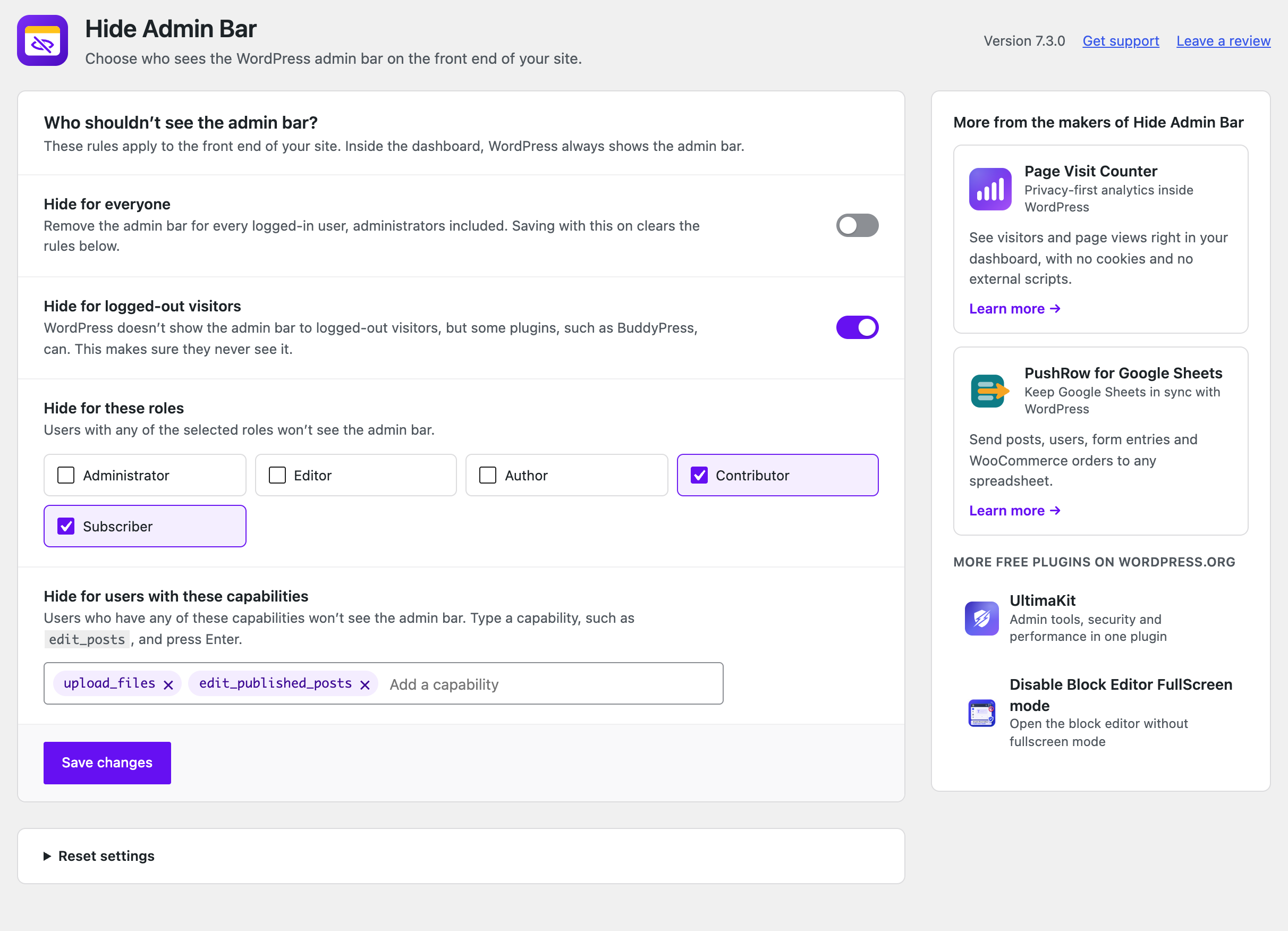
Choose who doesn't see the admin bar: everyone, logged-out visitors, specific roles, or users with certain capabilities.
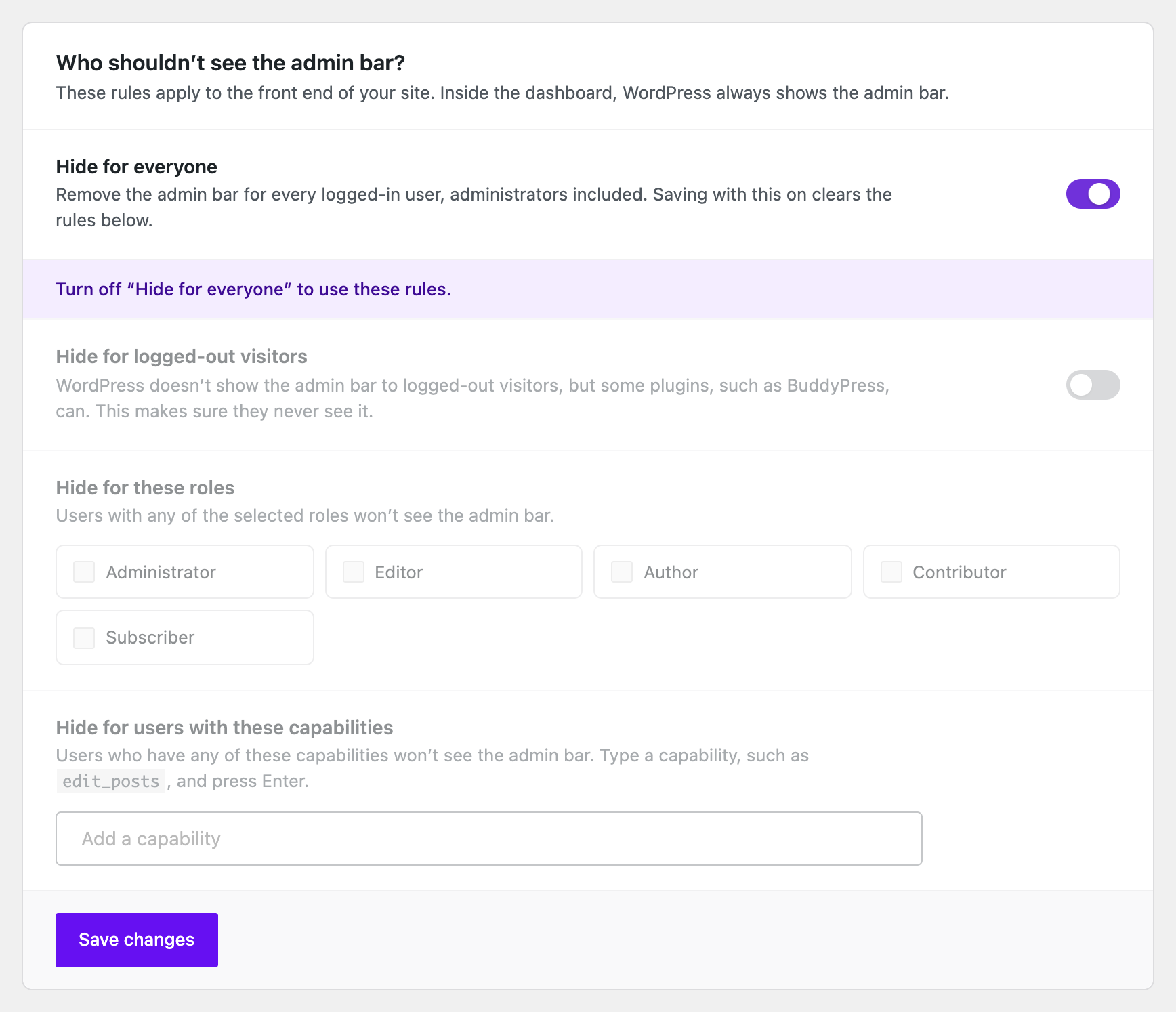
“Hide for everyone” removes the admin bar for every logged-in user.
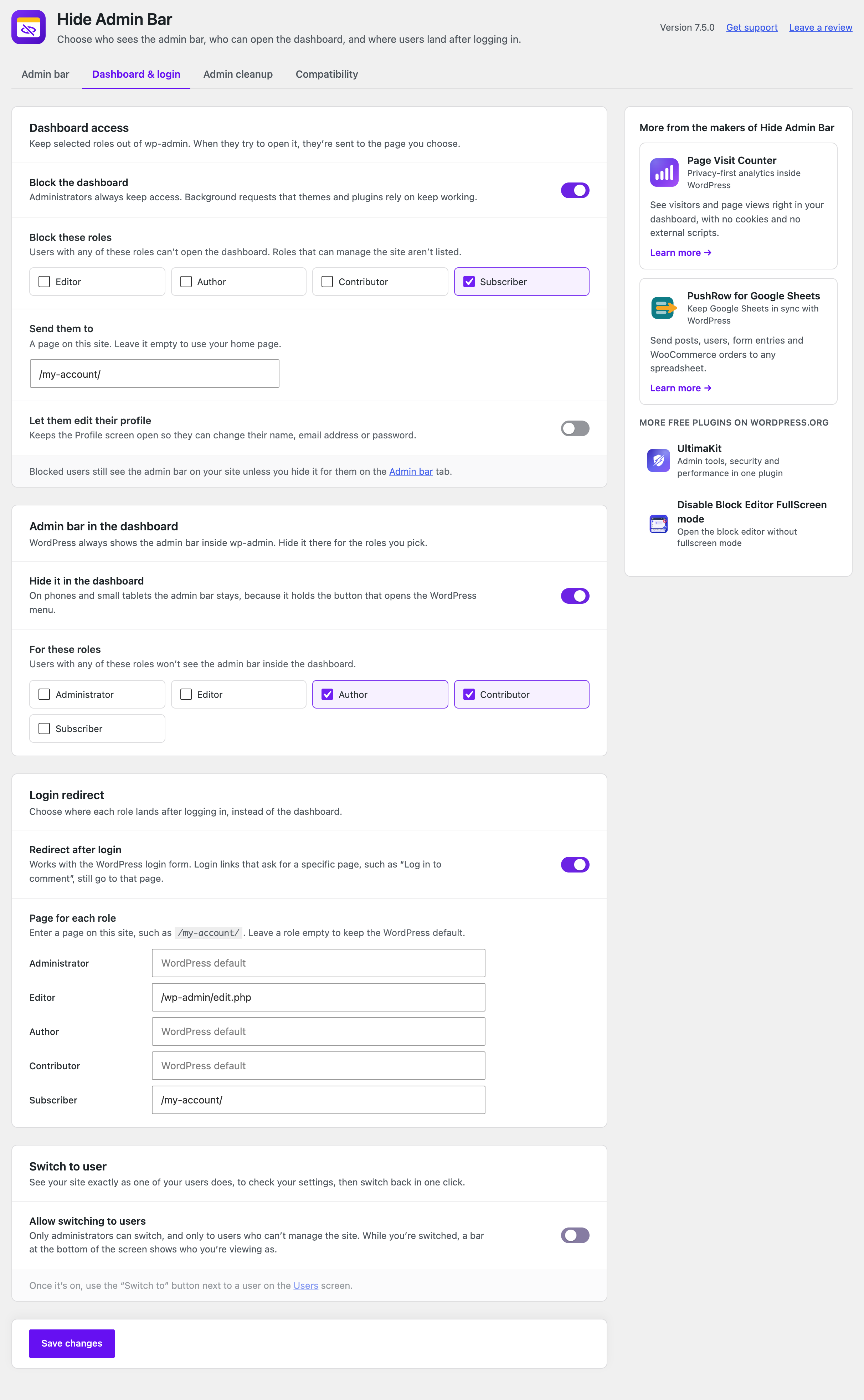
Dashboard & login: keep roles out of wp-admin, hide the admin bar inside the dashboard, and choose where each role lands after logging in.
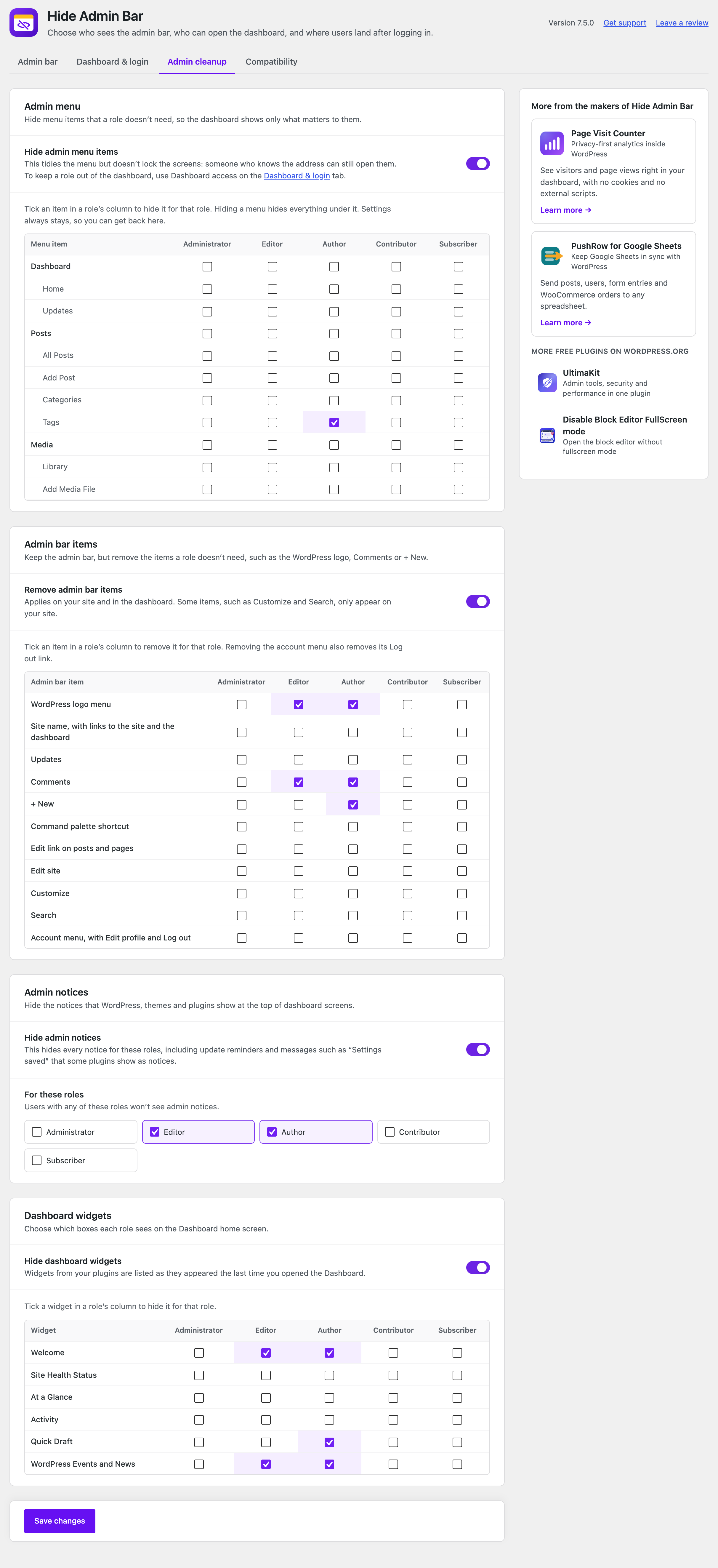
Admin cleanup: hide admin menu items, admin bar items, notices and dashboard widgets for each role.
Faq
Go to Settings Hide Admin Bar Settings and turn on “Hide for everyone”. The admin bar disappears from the front end for every logged-in user, administrators included.
Under “Hide for these roles”, select Subscriber or Customer and save. Administrators and any roles you leave unselected keep the admin bar. Custom roles from membership, LMS and other plugins appear in the list too.
Add a capability, such as edit_posts, and anyone who has it won’t see the admin bar. This helps when a membership or LMS plugin grants capabilities rather than roles.
Yes — that’s exactly what this plugin does. Instead of adding show_admin_bar snippets to functions.php (which are lost when you switch themes), you get a settings page with role, capability and guest rules.
Only if you choose to. Administrators keep the admin bar unless you turn on “Hide for everyone”, select the Administrator role, or add a capability they have.
The main rules control the admin bar on the front end of your site. To hide it inside the dashboard as well, go to the Dashboard & login tab, turn on “Hide it in the dashboard” and pick the roles. On phones and small tablets the admin bar stays, because it holds the button that opens the WordPress menu.
Yes. On the Dashboard & login tab, turn on “Block the dashboard”, pick the roles and, if you like, the page to send them to. Roles that can manage the site, such as Administrator, can’t be blocked. You can still let blocked users edit their profile.
Yes. On the Dashboard & login tab, turn on “Redirect after login” and enter a page for each role. It works with the WordPress login form. Login links that ask for a specific page, such as “Log in to comment”, still go to that page.
Some plugins, such as BuddyPress, wpForo or WC Vendors, turn the admin bar back on. Go to the Compatibility tab and turn on Strict mode. It applies your admin bar rules once more, after every other plugin.
Yes. On the Admin cleanup tab, turn on “Hide admin menu items” and tick the items to hide in each role’s column. Hiding a menu tidies it but doesn’t lock the screen; to keep a role out of wp-admin altogether, use Dashboard access. The Settings menu always stays, so you can get back to these settings.
Yes. On the Admin cleanup tab, turn on “Remove admin bar items” and, in each role’s column, tick items such as the WordPress logo, Comments or + New. It applies on your site and in the dashboard.
Yes. On the Admin cleanup tab, turn on “Hide admin notices” and pick the roles. It hides every notice for those roles, including update reminders, so keep it off for the people who look after the site.
On the Dashboard & login tab, turn on “Allow switching to users”. Then, on the Users screen, click the “Switch to” button next to a user. A bar at the bottom of the screen shows who you’re viewing as, with a link to switch back.
Add define( 'HAB_DISABLE_MODULES', true ); to wp-config.php. It switches off everything on the Dashboard & login, Admin cleanup and Compatibility tabs and keeps your settings. Your admin bar rules keep working. Remove the line once you’ve fixed the settings.
No. It adds no CSS or JavaScript to the front end, and the visibility check runs once per page, before the page is built.
Yes. It works with any theme and with page builders such as Elementor, Divi, Beaver Builder and Bricks.
Yes. The plugin supports WordPress Multisite networks.
No. Hide Admin Bar is completely free, with no locked features and no upsells.
Reviews
BEST OF THE BEST
By 
I LOVE IT
Hides the admin bar even when I'm an administrator
By 
Hides the admin bar for Administrator role, even though I've told it to allow Administrators to see the bar.
hide admin bar even though I’m admin
By 
hide admin bar even though I’m admin
It's working very well after update
By 
It's working very well after recent update.
After an update, the admin bar appeared for all users.
By 
AWESOME
By 
Hidden but not hidden
By 
Excellent plugin
By 
Works as Described
By 
thank you
By 
Changelog
7.5.0
- New: Admin cleanup tab. Hide admin menu items, admin bar items, admin notices and dashboard widgets for each role.
- New: Switch to user. See your site as one of your users, then switch back in one click.
- Every new feature is off until you switch it on. Your admin bar settings and how they work are unchanged.
7.4.0
- New: Dashboard access. Keep chosen roles out of wp-admin and send them to a page you pick. Administrators always keep access.
- New: Hide the admin bar inside the dashboard for chosen roles.
- New: Login redirect. Choose where each role lands after logging in.
- New: Strict mode keeps the admin bar hidden when another plugin, such as BuddyPress or wpForo, turns it back on.
- New: The settings page has tabs: Admin bar, Dashboard & login, and Compatibility.
- Every new feature is off until you switch it on. Your admin bar settings and how they work are unchanged.
7.3.0
- New: Redesigned settings page that looks and works like the rest of WordPress. Changes save without reloading the page.
- New: Add capabilities as tags. They are no longer cut off at 20 characters.
- Improved: The plugin no longer loads any CSS or JavaScript (including jQuery) on the front end of your site.
- Improved: The settings page loads one small stylesheet and script instead of Bootstrap and other libraries, making the plugin about 2 MB smaller.
- Improved: The plugin is now completely free. Upgrade prompts and ads for paid plans are gone.
- Updated: Freemius SDK 2.13.4.
7.2.5
- Fixed: Minor compatibility issues with the latest WordPress version.
7.2.4
- Fixed: Minor compatibility issues with the latest WordPress version.
7.2.3
- Fixed: Minor compatibility issues with the latest WordPress version.
7.2.1
- Fixed: Minor compatibility issues with the latest WordPress version.
7.2.0
- Improved: Admin settings UI refresh for better usability.
- Fixed: Minor compatibility issues with the latest WordPress version.
7.1.0
- Improved: Admin settings UI refresh for better usability.
- Improved: Code quality and inline documentation.
- Fixed: Minor compatibility issues with the latest WordPress version.
7.0.3 – 31-01-2026
- Fixed: Minor bugs and stability improvements.
7.0.1 – 25-11-2025
- Fixed: Minor bugs and stability improvements.
6.0.3 – 03-07-2025
Fixed some bugs and improvements.
6.0.2 – 03-06-2025
Fixed some bugs and improvements.
6.0.0 – 20-04-2025
- Major release: Pro version launched (optional, upgrade via Freemius)
- Added: Auto Hide Admin Bar (Pro)
- Added: Page-based, device-based, and time-based visibility modules (Pro)
- Added: Per-user override, redirect on hide, import/export
- Improved: Settings layout and compatibility with other plugins
- Refactored: Modular architecture for clean feature handling
5.2.0 – 02-04-2025
- I18N Issues Fixes
- Compatibility tested & Tested with the latest WordPress version.
5.0.0 – 16-02-2025
- Admin ui updated.
- Compatibility tested & Tested with the latest WordPress version.
4.1.0 – 28-12-2024
Compatibility tested & Tested with the latest WordPress version.
4.0.0 – 09-11-2024
Compatibility tested & Tested with the latest WordPress version.
3.9.1 – 30-10-2024
Compatibility tested & Tested with the latest WordPress version.
3.9.0 – 25-09-2024
Compatibility tested & Tested with the latest WordPress version.
3.8.3 – 13-08-2024
Compatibility tested & Tested with the latest WordPress version.
3.8.2 – 01-07-2024
Compatibility tested & Tested with the latest WordPress version.
3.8.1 – 24-05-2024
Compatibility tested & Tested with the latest WordPress version.
3.8.0 – 15-05-2024
Compatibility tested & Tested with the latest WordPress version & UltimaKit For WP support added.
3.7.2 – 03-03-2024
Compatibility tested & Tested with the latest WordPress version.
3.7.1 – 06-02-2024
Compatibility tested & Tested with the latest WordPress version.
3.7.0 – 01-01-2024
Compatibility tested & Tested with the latest WordPress version.
3.6.2 – 09-11-2023
Compatibility tested & Tested with the latest WordPress version.
3.6.1 – 01-10-2023
Compatibility tested & Tested with the latest WordPress version.
3.6.0 – 02-08-2023
Compatibility tested & Tested with the latest WordPress version.
3.5.6
Compatibility tested & Tested with the latest WordPress version.
3.5.5
Compatibility tested & Tested with the latest WordPress version.
3.5.4
Compatibility tested & Tested with the latest WordPress version.
3.5.3
Compatibility tested & Tested with the latest WordPress version.
3.5.2
Security Fixes and Improvements.
3.5.1
Security Fixes and Improvements.
3.5.0
Security Fixes and Improvements.
3.4.1
Security Fixes and Improvements.
3.4.0
Security Fixes and Improvements and multisite support reverted.
3.3.0
Security Fixes and Improvements and multisite support added.
3.2.0
Security Fixes and Improvements.
3.1.0
Security Fixes and Improvements.
3.0.0
Security Fixes and Improvements.
2.9.0
Improvements & Fixes
2.8.0
Improvements & Fixes
2.7.0
Improvements & Fixes
2.6.0
Improvements
2.5.0
Improvements
2.4.0
Improvements
2.3.0
Improvements
2.2.0
Improvements
2.1.0
Improvements
2.0.0
Bug Fixes & Improvements
1.8.0
Bug Fixes & Improvements
1.7.0
Bug Fixes & Improvements
1.6.1
Bug Fixes & Improvements
1.6
Bug Fixes & Improvements
1.5
Bug Fixes & Improvements
1.4
Code Improvements, GUI Updated, New Feature Integration.
1.3
Code Improvements, GUI Updated.
1.2
Fixed some bugs and improvements and new feature added -> Hide admin bar for all guest users.
1.1
Fixed some bugs and improvements.
1.0
First release