Hierarchical HTML Sitemap

Hierarchical HTML Sitemap
Description
Hierarchical HTML Sitemap offers visitors an easy and intuitive way to navigate your blog.
This plugin generates an HTML sitemap of your WordPress blog. It displays a list of posts grouped by hierarchically sorted categories. By using a shortcode, you can display it on a page or anywhere else that supports shortcodes, such as a widget.
The output does not include CSS or JavaScript files. It is pure HTML, ready to inherit or receive your theme’s styles.
Features
- Short and easy shortcode:
[htmlmap]. - Categories sorted hierarchically.
- Displays posts and/or pages.
- Can exclude specified posts, pages, or categories.
- Displays category navigation above the posts list.
- Displays post publication dates.
- Clean HTML without scripts.
- Does not enqueue unnecessary JavaScript or CSS files.
- No ads or author links in the output.
Usage and options
The [htmlmap] shortcode accepts these optional attributes:
exclude: post or page IDs to omit, for example[htmlmap exclude="445,446"].exclude_cat: category IDs to omit, for example[htmlmap exclude_cat="1,34"].showpages: display the list of pages, for example[htmlmap showpages].hidecloud: hide category navigation, for example[htmlmap hidecloud].showdescription: display category descriptions, for example[htmlmap showdescription].hidedate: hide post publication dates, for example[htmlmap hidedate].hidecount: hide post counts in category headings, for example[htmlmap hidecount].
You can combine attributes, for example:
[htmlmap exclude="3546,7398" exclude_cat="1,34" showpages hidecloud]
HTML structure and CSS classes
The shortcode preserves existing category heading IDs (cat_<term-id>), the
category navigation class (cat), and the empty-category class (null).
Additional classes are available for theme customisation:
htmlmap-post-list: each category’s post list.htmlmap-post: each post list item.htmlmap-children: the list item containing child categories.htmlmap-empty-category: added alongside the legacynullclass.htmlmap-category-description: a displayed category description.htmlmap-page-list: the optional pages list.htmlmap-page: each page list item.
Child categories are rendered after their parent category’s posts inside a
dedicated list item, rather than inside the final post item.
Extra
- GitHub repository for issues and contributions.
Installation
Automatic installation
- Log in to your WordPress admin interface.
- Go to Plugins Add New.
- Search for Hierarchical HTML Sitemap.
- Select Install Now, then activate the plugin.
Manual installation
- Download the plugin ZIP and unzip it.
- Upload the
hierarchical-sitemapfolder to/wp-content/plugins/. - In WordPress admin, go to Plugins Installed Plugins.
- Activate Hierarchical HTML Sitemap.
Usage
Classic Editor
- Create or edit a page named, for example, “Sitemap”.
- Add
[htmlmap]to the page content. - Publish or update the page, then view it to see your sitemap.
Block Editor
- Create or edit a page named, for example, “Sitemap”.
- Add a Shortcode block.
- Enter
[htmlmap]in the block. - Publish or update the page, then view it to see your sitemap.
Screenshots
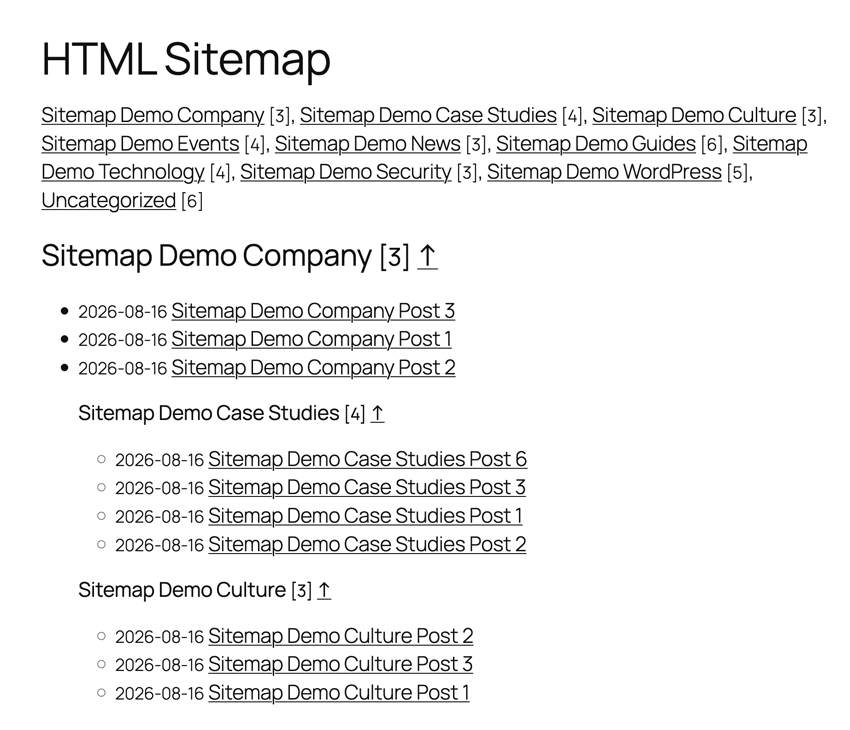
Example of a sitemap.
Reviews
Bravo !
By 
Отличная карта сайта
By 
FANTASTIC!
By 
Self explantion in use - good code output
By 
It tested WP Sitemap Page, WP SEO HTML Sitemap Plugin and HTML Page Sitemap. Hierachical html Sitemap is the best to youse of all of em. You can customize the output and it works. I tryed that in "HTML Page Sitemap" to but faild cause the output was limited to "pages" only.
Code is clean ul-li with h2, nice anchor links to get "up" again.
Easy to use and even a none programmer can customize the output.
Works with Wp 4.4
Thanks for this great plugin
By 
I'm not someone who leaves a comment here, but this plugin deserves that.
I have not found a single HTML sitemap plugin that has the option to exclude category - this has that option.
Thanks again!
Short, Sweet and Simple
By 
I don't always post comments here, but this was EXACTLY what I was looking for. I used a mobile responsive theme with both pages and posts, but only one menu. I still showed posts in the right column, but if the screen was narrow, they get pushed to the bottom. So I made one more page with this shortcode on it in about 30 seconds and added it to the end of my page menu. Problem Solved!
Changelog
1.4.0
- feat: add CSS classes for post, child-category, and page list elements.
- feat: add the
hierarchicalsitemap_shortcode_htmlfilter for the complete shortcode output. - fix: sanitize shortcode ID lists and escape generated titles, descriptions, and URLs.
- fix: correct invalid nested list markup when rendering child categories.
- fix: handle empty shortcode attributes and empty category results safely.
- chore: test plugin syntax with PHP 8.3.
- chore: test plugin integration against WordPress 7.1.
- chore: update documentation and metadata.
1.3
- chore: test up to WordPress 4.6.9.
- feature: add the
hidecountoption that disables post counts in category names. - feature: add filter hooks:
hierarchicalsitemap_category_title_htmlhierarchicalsitemap_posts_list_htmlhierarchicalsitemap_pages_list_html
1.2
- chore: test up to WordPress 4.7.
1.1
- fix: display empty categories that have non-empty child categories.
- feature: add
showdescription, which displays category descriptions. - feature: add
hidedate, which hides post publication dates.
1.0
- feature: initial release.