I Order Terms

I Order Terms
Description
Plugin can be used for reordering categories, tags and custom taxonomies. This plugin is primarily intended as an aid to theme developers.
Plugin supports multisite installation.
Requirements
The minimum requirement is that you have at least WordPress 3.5 installed.
Example usage
Fetching sorted terms from a custom taxonomy will be enabled by default:
$terms = get_terms( 'your-taxonomy-name' );
If you wish to sort by name (disable plugin’s custom sorting) you will have to set ‘i_order_terms’ to ‘false’:
$terms = get_terms( 'your-taxonomy-name', 'i_order_terms=0' );
Warning
Plugin adds a new column to the ‘term_taxonomy’ table, make sure to backup your database before installing. Column is removed when you delete the plugin.
Installation
- You can download and install “I Order Terms” plugin by using the built-in WordPress plugin installer. Or you can upload plugin folder “i-order-terms” manually to your “/wp-content/plugins/” directory.
- Activate the plugin through the “Plugins” menu in WordPress.
- You will need to enable plugin for taxonomy that you wish to sort.
Enabling plugin for taxonomy
You can use the settings page or add code in your function file. There are two options you can use to make taxonomy sortable:
1) You can enable sorting when registering taxonomy:
register_taxonomy( 'your-taxonomy-name', 'your-post-type', array(
    'label' => __('Category'),

    // this parameter is used to enable
    // sorting for taxonomy 'your-taxonomy-name'
    'i_order_terms' => true,
));
2) Other option is to pass an array of taxonomies (or tags/categories) via filter “i_order_terms_taxonomies” in your functions file like this:
function custom_i_order_terms_taxonomies($taxonomies) {
    $taxonomies = array_merge($taxonomies, array('taxonomy', 'category'));
    return $taxonomies;
}
add_filter('i_order_terms_taxonomies', 'custom_i_order_terms_taxonomies');
This will enable taxonomy sorting for ‘taxonomy’ and ‘category’ taxonomies.
Naturally, you will have to provide your taxonomy names.
Screenshots
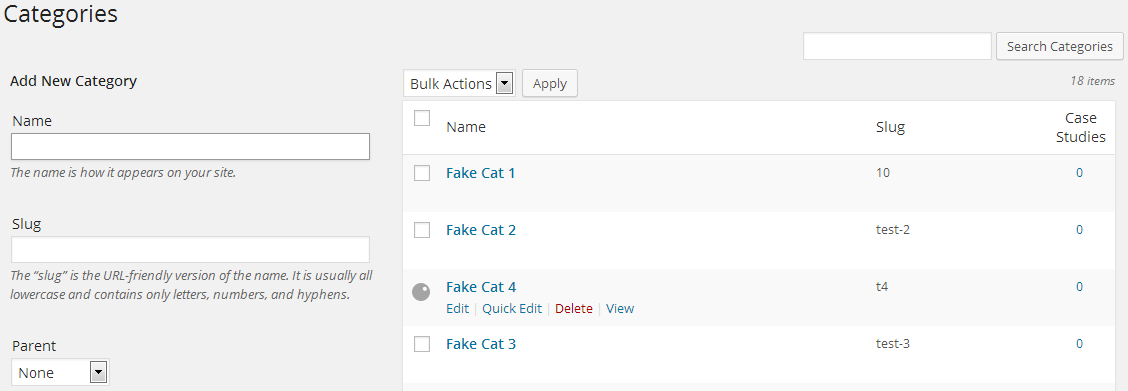
The screenshot of Category section after drag and drop reorder operation.
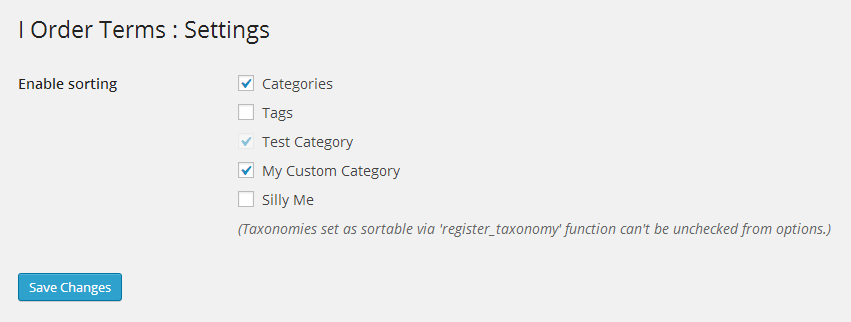
Settings section where you can select which taxonomy should be sortable.
Faq
Yes, it will work on multisite installation.
User needs to have “manage_categories” permission to be able to order terms.
You can report bugs from the contact form on my website at https://www.igorware.com/contact.
Please make sure to include plugin version when reporting bugs.
Reviews
Simple + Efficient = Brilliant
By 
Perfect!
By 
Excellent
By 
Did exactly what it was built to do. Easy and effective.
Just what I needed.
By 
Just what I needed to manually organize a group of tags that appear on the page. Thanks for making this 🙂
Changelog
1.5.2
- Fixed version label
1.5.1
- Add nonce for AJAX requests to prevent CSRF attacks
- Force AJAX message as text content
1.5.0
- Added check/uncheck all checkbox in options
1.4.0
- Minified CSS and JS assets
- Fixed text domain usage
1.3.1
- Shows taxonomy name next to taxonomy label in plugin settings. This should avoid confusion when there are several taxonomies with same label
1.3.0
- Sort (drag&drop) is now available right after you add new term, no need to refresh page like before
- Improved security by preventing directory browsing
- Removed screenshots from plugin folder, this should save you some bandwidth 🙂
1.2.0
- Added a link to settings on plugin page
- Settings page completely rewritten to use WordPress Settings API
- Drag & drop can now be done in different levels i.e. you can now change parent of dragged item
1.1.0
- Added settings page for plugin
- Removed limitation of accepting only one taxonomy when using functions like get_categories and get_terms
1.0.0
- Initial release