Icegram Engage – Popups, Welcome Bars, Optins, Slide-Ins & Lead Generation for WordPress

Icegram Engage – Popups, Welcome Bars, Optins, Slide-Ins & Lead Generation for WordPress
Description
Turn abandoning visitors into email subscribers, leads, and paying customers — with 12+ on-site message styles, unlimited campaigns, and zero SaaS impression caps.
Icegram Engage is the all-in-one WordPress popup builder, welcome bar, slide-in, and lead generation toolkit built for bloggers, agencies, and WooCommerce stores. Unlike popup-only plugins or expensive SaaS tools that throttle your monthly pageviews, Icegram Engage lets you combine multiple message formats inside a single targeted campaign — completely inside WordPress and without writing a single line of code.
- Explore Features: Icegram Engage Official Page
- Compare Plans: Icegram Engage Pricing (Free & Max)
- Browse Templates: Icegram Engage Template Gallery
- Read the Guides: Icegram Engage Documentation & Knowledge Base
Why Choose Icegram Engage Over Typical Popup Plugins?
Most WordPress popup plugins either restrict your free account to 500–1,000 monthly impressions, cap you at 3 free popups, or force “Powered by” branding onto your site. Icegram Engage gives you an unthrottled conversion engine free forever:
- Unlimited Campaigns & Unlimited Impressions: Create as many popups, action bars, and opt-ins as you want with zero monthly visitor or pageview limits.
- More Than Just Popups (4 Free + 8 Max Message Styles): Combine lightbox popups, floating header/footer bars (Hello Bars), slide-in messengers, and toast notifications in one multi-step campaign.
- No Forced Branding: Put your brand first — zero mandatory “Powered by” credit links on your frontend campaigns.
- 100% WordPress-Native & Cache-Friendly: Built-in Lazy Loading loads campaigns asynchronously after page render so your Core Web Vitals and caching plugins stay fast.
- Works With Any Form or Email Service: Embed forms from Icegram Express, Icegram Collect, Contact Form 7, WPForms, Gravity Forms, or any external ESP HTML form in one click.
Curious how Icegram Engage compares to other tools? Check out our detailed comparisons on Icegram Alternatives & Reviews, including Ninja Popups vs. Icegram Engage.
Every High-Converting Message Type at Your Fingertips
Don’t rely on intrusive popups alone. Icegram Engage lets you match the right message format to every stage of the visitor journey:
Included Free Forever:
* Lightbox & Opt-In Popups: Classic centered modals for newsletter signups, lead magnets, content upgrades, and discount offers.
* Action Bars (Header & Footer Hello Bars): Sticky or floating top and bottom notification bars for sitewide announcements, free shipping bars, and flash sales.
* Slide-In Messengers: Polite corner slide-in boxes that capture attention on scroll without blocking page content.
* Toast Notifications: Compact, OS-style alert notifications for social proof, urgent updates, and quick CTAs.
Unlocked in Icegram Engage Max:
* Full-Screen Overlays & Welcome Mats: Distraction-free, full-window takeovers that maximize email opt-in conversions.
* Inline Content Blocks & Opt-In Boxes: Embed conversion blocks seamlessly inside blog posts, landing pages, or sidebars.
* Sticky Notes, Ribbons & Corner Badges: Eye-catching visual callouts for seasonal promotions and coupon codes.
* Sidebars, Interstitials & Tab Triggers: Persistent two-step tab triggers and timed interstitial screens.
Everything You Get 100% Free — Forever
- Unlimited Popups, Action Bars, Slide-Ins & Toasts: Run unlimited simultaneous campaigns across your site.
- 50+ Mobile-Responsive Templates: Launch in seconds with conversion-tested designs from the Icegram Engage Gallery — including seasonal templates for Black Friday, Cyber Monday, Halloween, and Christmas.
- Multi-Message Campaign Sequencing: Group multiple message types inside a single campaign (for example, display an Action Bar at 0 seconds, a Slide-In Messenger at 5 seconds, and a Popup at 15 seconds).
- Smart Page, User & Device Targeting: Show or hide campaigns on specific pages, posts, custom post types, homepage, or wildcard URLs, and filter by logged-in/logged-out status, user roles, or device type (Desktop, Tablet, Mobile).
- Time Delay & On-Click Triggers: Trigger messages automatically after X seconds on page or when a visitor clicks a specific link or button.
- Session & Cookie Retargeting: Prevent popup fatigue by hiding messages for X days or for the rest of the session once shown or converted.
- One-Click Form Embed & Clean-Up: Paste raw HTML form code from any newsletter service using the Embed Form button (which automatically strips conflicting styles) or insert any WordPress form shortcode.
- Custom CSS, JS & Shortcode Support: Customize colors, fonts, and animations visually, or add custom CSS, JavaScript, and shortcodes directly inside any message.
- One-Click Campaign Duplication & Lazy Load: Clone winning campaigns in a click and enable asynchronous Lazy Loading for full page-caching compatibility.
Icegram Engage Max — Advanced Triggers, Split Testing & Revenue Optimization
When you are ready to recover abandoning visitors and optimize conversion rates scientifically, Icegram Engage Max unlocks:
- Exit-Intent Technology: Detect the exact millisecond a visitor is about to leave your site and trigger a targeted exit popup or discount offer.
- Advanced Behavioral Triggers: Trigger messages by scroll depth (middle or bottom of page), user inactivity, JavaScript events, two-step click opt-ins, or when a visitor arrives from a specific referring URL.
- A/B Split Testing: Test headlines, designs, CTA buttons, and message types head-to-head to see which variation wins.
- Conversion & Impression Analytics: Track views, conversions, and conversion rates per campaign and message directly inside WordPress.
- Countdown Timers (Static & Evergreen): Create urgency and FOMO for product launches, webinars, and seasonal sales.
- 100+ Max Templates & 10+ Entrance/Exit Animations: Access the complete template library and attention-grabbing transitions.
- Geo-Location Targeting & Content Locking: Personalize offers by visitor country/location and gate premium content behind an opt-in form.
- CTA Click Actions: Open another message, submit a form, or trigger AJAX actions when a visitor clicks your CTA button.
- Remote Campaigns on Non-WordPress Sites: Deploy your Icegram Engage campaigns on external HTML, Shopify, or non-WordPress landing pages via Icegram Engage Remote.
Built for WooCommerce & eCommerce Stores
- Reduce Cart & Checkout Abandonment (Max): Trigger exit-intent coupon popups when shoppers attempt to leave the cart or checkout page.
- Free Shipping & Promo Bars (Free & Max): Pin a sticky header Action Bar announcing free shipping thresholds or storewide coupon codes.
- Cross-Sell & Product Launch Callouts: Highlight featured products, seasonal bundles, and flash sales on specific WooCommerce product categories.
Seamless WordPress Ecosystem Integrations
Icegram Engage works out of the box with your favorite email marketing platforms, form builders, and page builders:
- Email Marketing & CRM Platforms: Icegram Express (Email Subscribers), Mailchimp, MailPoet, FluentCRM, ActiveCampaign, AWeber, ConvertKit (Kit), Constant Contact, GetResponse, Campaign Monitor, Brevo (Sendinblue), HubSpot, Drip, Infusionsoft (Keap), Emma, Amazon SES, SendGrid, and SparkPost.
- WordPress Form Plugins: Icegram Collect, Contact Form 7 (CF7), WPForms, Gravity Forms, Ninja Forms, Forminator, Elementor Pro Forms, Formidable Forms, Fluent Forms, and Mailchimp for WordPress (MC4WP).
- eCommerce, Page Builders & Multilingual: WooCommerce, Easy Digital Downloads (EDD), Gutenberg Block Editor, Classic Editor, Elementor, Divi, Beaver Builder, WPBakery / Visual Composer, Avada, Wishlist Member, and WPML.
Why Site Owners Switch to Icegram Engage
“5X More Engagement than OptinMonster! Explored all the popup plugins out there & this is the best WordPress popup plugin I have ever used. Plus it is easy to use and the free themes are fun to help fit our messages as we need them.” – mimdoc
“I really love this plugin. It’s one of the best popup plugins I have ever used. I have tried other prominent plugins, but none has provided such top-notch performance. It’s definitely worth buying compared to other high-priced plugins with fewer functionalities.” – liltrucks
“Five years of phenomenal results, satisfaction and counting! Icegram Engage has never let me down. It’s an incredible popup plugin & still the best!” – Markarayner
“We’ve been using Icegram Engage as well as the compatible Email and Newsletter plugin from Icegram for blog subscription and lead generation forms. It’s easy to set up and it does what it’s supposed to do.” – IrinaT
“We needed a simple to use plugin that would allow us to publish a news bulletin popup, and Icegram exceeded expectations. Plus, it’s versatile for campaigns and scheduled notices. Impressive!” – malcstewart
Other Popular Plugins from the Icegram Team
- Icegram Express – Complete self-hosted email marketing, newsletters, post notifications, and WooCommerce automation.
- Icegram Mailer – Reliable email deliverability, no-code SMTP replacement, and email logs for WordPress.
- Icegram Collect – Simple lead capture, contact forms, and subscription forms with built-in CRM/webhook sync.
- Temporary Login Without Password – Create self-expiring admin login links for developers and support teams.
- Smart Manager – Bulk edit and manage WooCommerce products, orders, coupons, and WordPress posts in an Excel-like spreadsheet.
External Services
Icegram Engage connects to Icegram services for gallery items and optional user feedback:
- Template Gallery (icegram.com/gallery): Fetches ready-made campaign templates when browsing or importing designs in the admin dashboard.
- Feedback API (
api.icegram.com): Sends user-submitted feedback and optional diagnostic details only when explicitly submitted by the site administrator.
Data is transmitted only when these admin features are used and is handled in accordance with the Icegram Privacy Policy.
Installation
Option 1: Install Directly from Your WordPress Dashboard (Recommended)
- Log in to your WordPress Admin Dashboard and navigate to Plugins > Add New.
- Search for Icegram Engage.
- Click Install Now next to Icegram Engage – Popups, Welcome Bars, Optins, Slide-Ins & Lead Generation for WordPress, then click Activate.
- Click Icegram Engage in your WordPress admin sidebar to customize your first ready-made campaign or import a design from the Template Gallery.
Option 2: Manual ZIP Upload
- Download the
icegram.ziparchive from the WordPress.org plugin page. - In your WordPress Admin Dashboard, go to Plugins > Add New > Upload Plugin, select
icegram.zip, click Install Now, and click Activate Plugin.
Screenshots

Multiple Message Types – Combine lightbox popups, sticky header/footer action bars, slide-in messengers, and toast notifications.
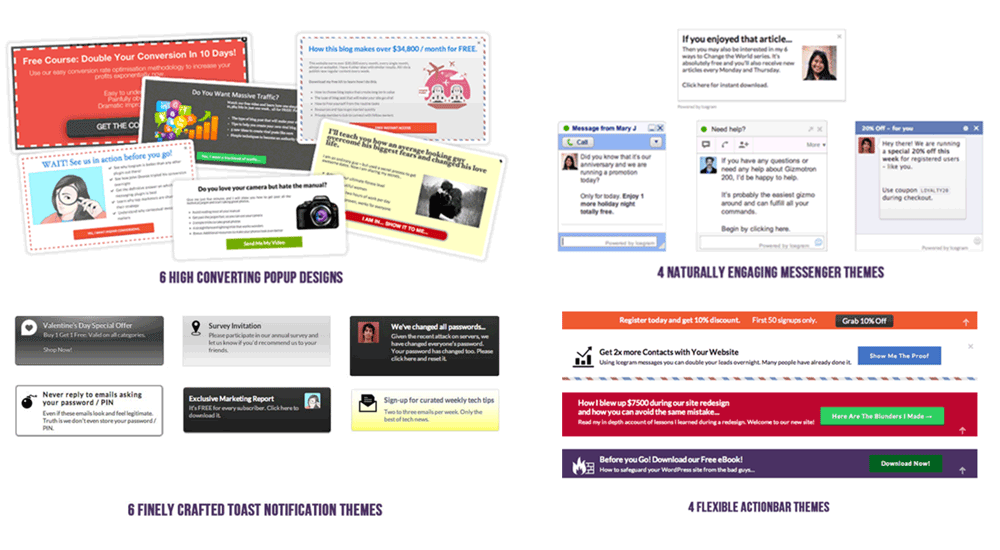
High-Converting Template Gallery – 50+ free and 100+ Max mobile-responsive templates for lead generation, sales, and announcements.
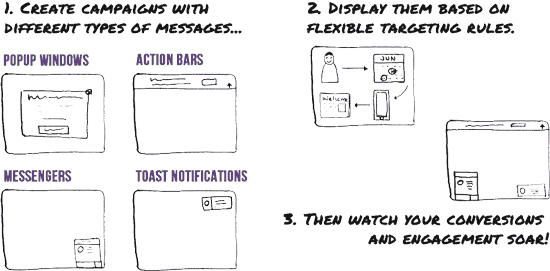
Simple 3-Step Campaign Workflow – Create, design, and target campaigns in minutes without coding.
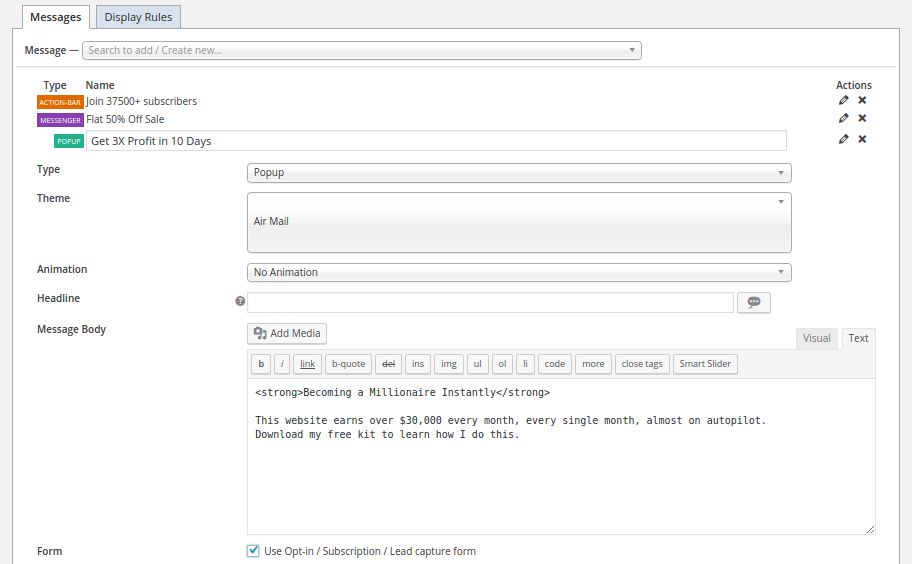
Intuitive Campaign & Multi-Message Editor – Edit headlines, CTA buttons, colors, forms, animations, and custom HTML/CSS in one screen.
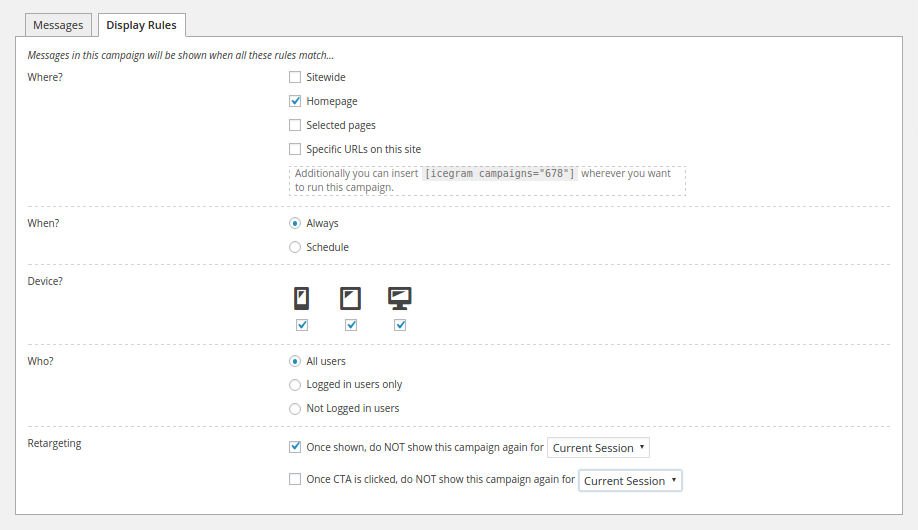
Precision Display & Targeting Rules – Control where, when, to whom, and on which devices your messages appear, plus cookie retargeting.
Faq
No. Unlike SaaS popup tools that cap your free account at 500–1,000 monthly views or freemium plugins that limit you to 3 popups, Icegram Engage lets you create unlimited campaigns, popups, action bars, slide-ins, and toast notifications with unlimited impressions and no forced branding.
OptinMonster requires an external SaaS subscription after 500 impressions, Hustle caps free users at 3 popups and 3 slide-ins, and Popup Maker focuses solely on modal popups. Icegram Engage is 100% WordPress-native, offers 4 distinct message types in the free version (Popups, Action Bars/Hello Bars, Slide-In Messengers, and Toast Notifications) with unlimited campaigns, and unlocks 8 more formats plus Exit-Intent, A/B testing, and Analytics in Icegram Engage Max.
No. Icegram Engage is lightweight and includes a built-in Lazy Load setting (Icegram Engage > Settings) that loads campaign assets asynchronously after your page finishes rendering, ensuring fast page speeds and compatibility with WP Rocket, LiteSpeed Cache, W3 Total Cache, and Cloudflare.
Icegram Engage includes mobile-responsive templates and device-specific targeting rules so you can show non-intrusive Action Bars, Slide-Ins, or timed messages on mobile devices while reserving full popups for desktop visitors—protecting your mobile UX and Google search rankings.
You can embed forms in three ways:
1. Select an Icegram Express or Icegram Collect form directly inside the campaign editor.
2. Paste any shortcode from Contact Form 7, WPForms, Gravity Forms, Ninja Forms, or Forminator into the message body.
3. Click the Embed Form button above the message editor and paste raw HTML form code from Mailchimp, AWeber, ActiveCampaign, ConvertKit, or any ESP—Icegram Engage automatically cleans up the HTML to fit your popup theme.
Yes. Both message headlines and body content support WordPress shortcodes, allowing you to embed forms, WooCommerce product blocks, videos, or dynamic content inside any popup, action bar, or slide-in.
Refreshing the frontend browser tab directly may serve a cached preview. Always click the Preview button inside the Icegram Engage campaign editor screen to load your most recent unsaved changes.
Extra paragraphs are usually caused by blank lines in raw HTML or theme CSS conflicts. Switch the message editor to Text/HTML mode and remove blank lines between HTML tags. You can also add custom CSS directly in the message or your theme customizer.
In your campaign’s Display Rules > Retargeting section, configure cookie rules to hide the campaign for X days (or for the current session) once the message has been shown or once the visitor clicks the CTA / submits the form.
You can include <style> or <script> tags directly inside the message HTML editor (in Text mode), and Icegram Engage will preserve and execute them when that specific message renders.
Visit our Icegram Engage Knowledge Base, post in the WordPress.org Support Forum, or reach out via the Icegram Contact Page with details of your setup.
Reviews
Easily accessible
By 
Very good back-up and easily accessible with real people
simples e tem data de desativação
By 
Atendeu bem o que eu precisava: um banner informativo com data de ativação e desativação, funcionou muito bem.
Ótimo Plugin!
By 
Excelente plugin. Fácil de usar e eficaz, com bons recursos.
Excellent Product and Service
By 
Easy to use and integrate into WordPress and more importantly excellent support!
Excellent !
By 
Worked as expected first time - very little learning curve - thanks
Great plugin and very nice support !
By 
Super team and support.
Great plugin and support
By 
I need a good popup/ engagement plugin and your is quick to set up. I was having a issue on my site and the support team at Icegram have been so helpful to me.
Does what it says, better than what it says
By 
I only needed a quick and fast alert banner for a CTA and Icegram came recommended.
It installed easily and I was able to quickly add a CTA banner and a pop up verification.
There are so many other features available on the Pro version I did not know I needed and will be exploring those to increase the functionality of my basic site.
So useful + outstanding support
By 
Fixed my issue AND improved my post notification system
Externally useful and simple plugin
By 
It exceeded my expectations
Changelog
3.1.46 (26.10.2026)
- Fix: Fixed deprecation warnings in PHP 8.2 and above
- Fix: Resolved a conflict causing “Invalid action URL is detected” error when rendering Contact Form 7 forms
3.1.45 (05.10.2026)
- Fix: Resolved deprecation warnings in PHP 8+
3.1.44 (24.09.2026)
- Improvements: Pricing page UI improvements
- Update: Tested up to WordPress 7.1
- Fix: PHP object injection vulnerability
3.1.43 (30.07.2026)
- Update: WordPress 7.0 compatibility check
3.1.42 (14.04.2026)
- Fix: Small bug fix
3.1.41 (06.04.2026)
- Fix: “Specific URLs on this site” field is not getting saved properly
3.1.40 (27.03.2026)
- Fix: CTA action URL is not getting saved
3.1.39 (24.02.2026)
- Update: WordPress 6.9 compatibility check
3.1.38 (08.01.2026)
- Fix: Add new Campaign button not working in some cases
3.1.37 (18.12.2025)
- Fix: Improved security related to XSS [Thanks to Patchstack team]
3.1.36 (09.12.2025)
- Update: WordPress 6.8 compatibility check
3.1.35 (10.11.2025)
- Update: UI improvements
3.1.34 (19.06.2025)
- Update: UI improvements
3.1.33 (29.05.2025)
- Fix: Caching disabled when Icegram Engage Max active