Image Projector

Image Projector
Description
Image Projector – a unique image viewer that provides a responsive full-window view and slider for images in posts or pages, including galleries and carousels. Flexible options will let you present a minimal or rich interface to the visitor.
Features
- Plug and Play, no editing of theme code or other code needed
- Tolerant to markup variations, suitable for block themes and classic themes
- Modify strings – translate front end to targeted language region, RTL support
- Visitor can switch view style and background
- Supports zoom, flip image, grayscale view
- Optional thumbstrip when relevant
- Optional display of image exposure settings
- Supports modern image formats WebP and AVIF when browser supports it
- Humble, responsive and quiet appearance
Demo
For examples on general use, please visit image-projector.com. Here you will also find an overview of all the admin options as well as other information.
Used on an archive page when ‘Collect post images’ behaviour is chosen, it will limit the collection to the first or featured image in queried posts.
Privacy Notice
This plugin does not track users. It does not store any data to the database other than plugin settings, neither does it send any data to any server.
Last used view style and background style is stored in a cookie on visitor’s device and applied if visitor returns.
Installation
New installation:
1. Install it by using the “Add Plugin” function of WordPress or download and unzip the plugin to your WordPress plugin directory.
2. Activate the plugin at the plugin administration page.
3. Modify the plugin settings as needed and save changes.
Update existing installation:
Press the Update button for the plugin or follow these steps:
- Download zip file from WordPress plugin directory.
- Deactivate the plugin.
- Unzip the downloaded file to the plugin folder.
- Activate the plugin.
- If any new options are added, check the settings pages and adjust settings as needed.
Screenshots
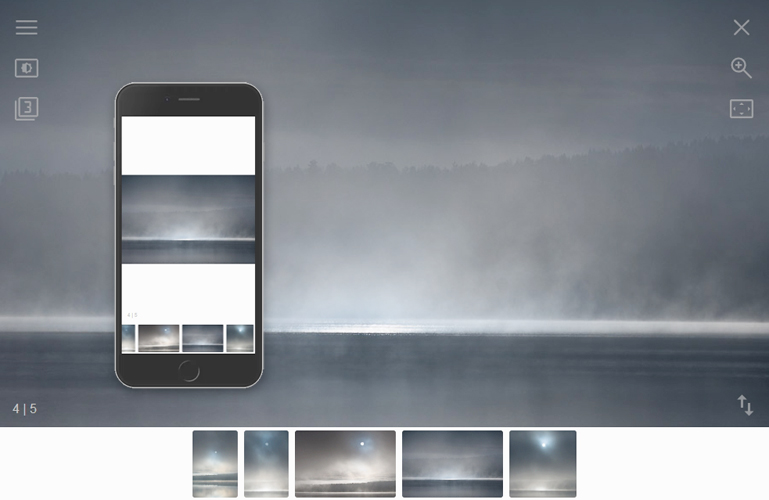
Example view with thumbstrip.
Faq
For NextGEN, select None for Lightbox effects in the Other options page of NextGEN gallery plugin.
Other plugins may have a different approach, this should normally be described in the plugin documentation. Please leave a support message if you are not able to make it work as expected.
Probably due to that the the gallery or carousel wrapper is not detected. Please specify the parent element for the gallery or carousel elements. If in doubt, do not hesitate to register a support case.
Yes. This can be specified in the plugin settings page.
Please have a look into the plugin settings page for various options affecting element styles. If there are certain elements you would like to have more control of, please file a support case.
Reviews
bad
By 
breaking my side design
Best lightbox plugin
By 
The only plugin that truly works with webp images, simple to use and with excellent support.
Excellent Image Viewer for Images Photo/Document
By 
I needed a way to render images of varied original quality (historical records scanned by a third party) so users could clearly focus on text and read. I tried numerous lightbox, gallery, photo plugins and none accomplished this - magnification / zooming was too limited or resulted in image distortion or loss of responsiveness. What I really wanted was flexible magnification and panning while maintaining clarity and responsiveness. Image Projector does exactly this and doesn't come with excess features/bloat.
When I look for a plugin I read the reviews, I look at whether or not it's being maintained. Ordinarily, I might have overlooked this one given its age and low number of downloads, but it had been recently updated and was a great fit for my needs. After installing, it didn't work. Typically, I walk away and simply use something else, but I'd already tried the other options. This time, I went to the support forum. And viola! I have an updated version (5.3) installed and all is great!
So, a huge applause for the developer who was responsive and expedient with the needed fix. It is completely compatible with WordPress 6.2.2 and twenty twenty-three.
Image Projector is the best I have come across for responsive detailed image viewing with just the right number of customizing options!
Great plugin
By 
Thank you very much for this plugin, I have tested many but this one answers everything I was looking for!!
Great lightbox plugin
By 
Such great options!
By 
Useful and unique plugin.
By 
very helpful
By 
Absolutely the best
By 
Very nice plugin
By 
Changelog
6.5.2
- Bugfix, console error appeared if feature to view exposure settings was not activated.
- General improvements.
6.5.1
- Re-submission of 6.5
6.5
- Added option in Exposure to control date and time visibility for visitors not logged in.
- Square thumbwrappers in thumbstrip – option did not have effect and thumbs with original aspect ratio were shown. Corrected.
- Minor improvements.
6.4.2
- Bugfix related to detection of captions.
6.4.1
- Bugfix related to viewing of exposure settings.
6.4
- Added option to show camera exposure settings if available in image file. Display is controlled from menu or key ‘I’ and may be restricted to logged in visitors only. See Exposure section in plugin admin page.
- General improvements.
6.3.4
- Bugfix
6.3.3
- Eliminated issues that triggered warning messages when checking plugin by the WordPress.org Plugin Check plugin.
- Extended options in Post images section to control use of featured image.
6.3.2
- Plugin admin interface – included update to avoid dynamic property creation. This was deprecated in PHP 8.2.
6.3.1
- Hidden images were included in collection of images. Images are now disregarded if display:none.
- Now ignoring image elements with src attribute pointing to something else than an image.
6.3
- Added options in Appearance:
- specify width of frame for view style 2.
- control whether viewer shall start in fullscreen mode for small devices.
- control whether full screen mode shall remain if active when closing viewer.
- Plugin admin page – fixed admin script enqueueing error revealed in WP_DEBUG mode. Error did not have any impact on the plugin behaviour.
6.2.1
- Fixed layout issue for view style 2 that could show up on block themes.
- Removed a system default image group wrapper class that caused unrelated images to be included in image collection for block themes.
6.2
- Removed obsolete call to load_plugin_textdomain().
- Fixed minor issues.
- Tested for WordPress 6.8.
6.1
- Minor adjustments to thumbstrip feature. Option to choose whether the indicator for current thumb shall be shown is addded.
6.0
- Improvements to the thumbstrip including new options in Features to choose thumb style, height of thumbstrip and margins.
- General improvements.