Indetpha Data Health

Indetpha Data Health
Description
Know what is happening inside your WordPress database — and what to do about it.
Slow queries, bloated options, expired transients and neglected tables can quietly accumulate. Indetpha Data Health brings your database into focus with visual health checks, practical maintenance tools, table inspection, security guidance and straightforward exports — all inside WordPress.
No command line. No hunting through database utilities. Just a clearer picture of your site’s data and the tools to act on it.
See problems before they grow
The colour-coded Database Health dashboard highlights issues worth investigating:
- Autoload bloat — spot oversized autoloaded options that may affect performance.
- Expired transients — find temporary records that are no longer needed.
- Table overhead — identify space that may be recoverable.
- Orphaned post meta — uncover metadata left behind by deleted posts.
- MyISAM tables — identify older table engines.
- Missing indexes — flag potential indexing issues for further review.
Explore your tables
Browse WordPress Core, Plugin and Other tables in a visual overview. Check size, row counts and storage engines, then inspect table contents and column structures without leaving the dashboard.
Clean up with confidence
Repair tables, review autoloaded options and purge expired transients using the Optimise panel. Understand what you are changing before making database maintenance decisions.
Export your database
Export your WordPress database in SQL, ZIP or GZ format. Download a copy or email an export to yourself. Review export history to see what was created and when.
Check your site’s security environment
Run a 10-point environment scan with explanations and practical fix guidance. Potentially risky changes are clearly marked so you know when to make a backup first.
Tailor the dashboard
Adjust health thresholds, export preferences, browsing limits and scan settings. Preview how threshold changes affect health results before saving.
Go further with Pro
- Export selected tables instead of the entire database.
- Send exports to Dropbox; Google Drive and Amazon S3 integrations are planned.
- Schedule daily, weekly or monthly exports with retention controls.
- Act on security findings: see which plugin owns each item and exactly what matched, trust what is yours until it changes, and have changed plugin files checked against the official WordPress.org release.
- Bulk-optimise tables and clean orphaned post metadata.
- Generate PDF security, database overview and export receipt reports.
- Receive email alerts about database health and security changes.
Privacy by design: Database analysis and maintenance run locally on your WordPress installation. Indetpha does not transmit site data externally unless you explicitly configure an external export destination.
Important: Database exports do not include themes, plugins, uploads or WordPress core files. Keep separate backups of your site files.
Free Feature Summary
- Visual database health checks and issue indicators.
- Table browser with structure and row inspection.
- Expired transient cleanup, table repair and options inspection.
- Full database export in SQL, ZIP and GZ formats, including email delivery.
- Security environment checks with guidance.
- Configurable thresholds, export settings and scan preferences.
Pro Feature Summary
- Selective exports, Dropbox delivery and scheduled exports.
- Security findings you can act on (ownership, matched text, Trust, WordPress.org file checks), bulk optimisation and orphan cleanup.
- PDF reporting and email alerts.
- Google Drive and Amazon S3 export integrations are planned, not currently available.
Uninstall
When you delete Indetpha Data Health from the Plugins screen, the uninstall script automatically removes all plugin data stored in your WordPress database, including:
- Licence key and validation data
- Export history log
- All plugin settings (health thresholds, export format, cloud destination settings)
- Dropbox access token and path
- Developer licence and authentication records (if present)
- Cached health check and authentication transients
The uninstall script does not delete:
- Export files you have already downloaded to your computer
- Any site content (posts, pages, users, WooCommerce data, etc.)
- Any files stored in Dropbox — remove these manually if needed
Indetpha Data Health does not create custom database tables; all plugin data is stored in wp_options and is fully cleaned up on uninstall.
Disclaimer
Indetpha Data Health exports your WordPress database only. It does not back up WordPress core files, themes, plugins, or uploaded media. A database export can be used to restore your data but cannot restore a full WordPress site on its own. Always maintain independent backups of your site files.
Indetpha Data Health is provided as-is, without warranty of any kind. Rob Snow / Rob Art | Illustration accepts no responsibility or liability for data loss, site downtime, failed exports, or any damage arising from the use of this plugin. You are solely responsible for maintaining adequate backups and verifying that any database operation is appropriate for your environment before executing it.
The Security panel performs a configuration check only. It is not a full security audit, penetration test, or malware scan.
External Services
The free version of Indetpha Data Health is fully self-contained: it performs all
database health checks, table inspection, cleanup, optimisation and export locally
on your own server and does not send your data anywhere.
The only outbound connection the free version can make is a link you click yourself:
Lemon Squeezy (checkout — link only)
The “Upgrade to Pro” / “Get Pro” buttons link to the plugin’s checkout page hosted
by Lemon Squeezy (rob-art-plugs-books.lemonsqueezy.com). Nothing is sent
automatically; the link opens in your browser only when you choose to click it.
Lemon Squeezy is the payment processor for the Pro upgrade.
Terms: https://www.lemonsqueezy.com/terms · Privacy: https://www.lemonsqueezy.com/privacy
The following services are used ONLY by the separate Pro add-on (not included in
this free download) and only when you configure or activate them:
Rob Art licence server (Pro only)
When you activate or deactivate a Pro licence, the Pro add-on contacts the Rob Art
licence server at https://robart-illustration.eu to verify your licence key. Only your licence
key, plugin slug and site URL are transmitted — no visitor data, site content or
database information. This happens only on manual activation/deactivation and a
periodic validity re-check.
Terms & Privacy: https://robart-illustration.eu/privacy-policy/
WordPress.org plugin checksums (Pro only)
When the security scan finds recently changed plugin files, the Pro add-on downloads the
official checksum list for that plugin version from https://downloads.wordpress.org to
confirm the files match the released plugin. Only the plugin’s slug and version number are
requested; nothing about your site is sent. Each list is cached, so it is fetched once per
plugin version.
Privacy: https://wordpress.org/about/privacy/
Dropbox (Pro only, optional)
If you connect Dropbox in the Pro add-on, your database exports are uploaded
directly to your own Dropbox account using your authenticated connection.
Privacy: https://www.dropbox.com/privacy · Terms: https://www.dropbox.com/terms
Support
For documentation, guides, and FAQs visit the Help & Documentation page.
For bug reports or feature requests, please use the support forum on the plugin page or contact us via the Indetpha Data Health plugin page.
Installation
- Download the Indetpha Data Health plugin zip file.
- In your WordPress admin, go to Plugins > Add New > Upload Plugin.
- Choose the downloaded zip file and click Install Now.
- Once installed, click Activate Plugin.
- Indetpha Data Health will appear as Indetpha Data Health in the WordPress admin sidebar. Click it to open the dashboard.
Alternatively, you can install via FTP by uploading the indetpha-data-health folder to /wp-content/plugins/ and activating from the Plugins screen.
Screenshots
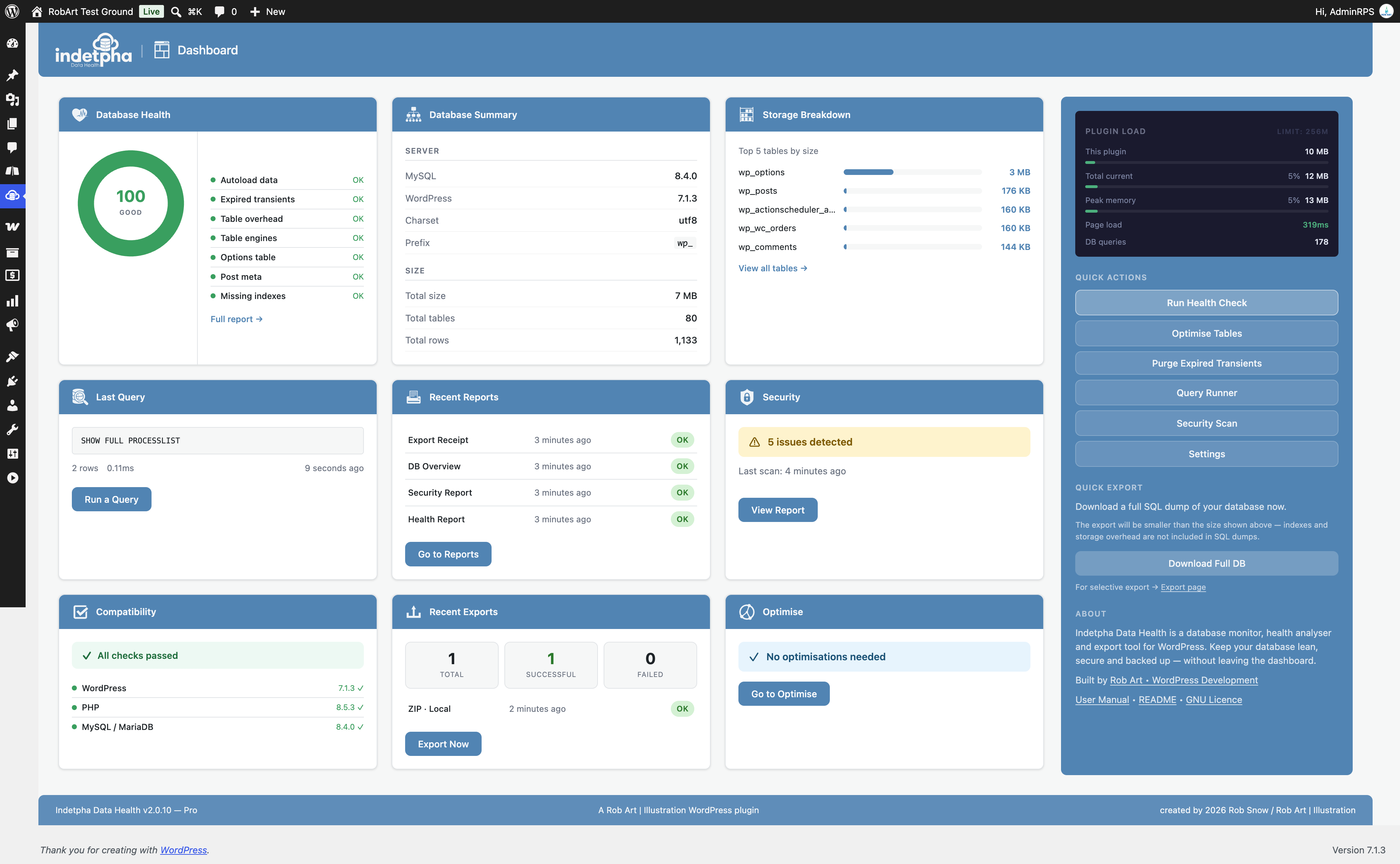
Dashboard — recent exports, health summary, security score, and table count at a glance.
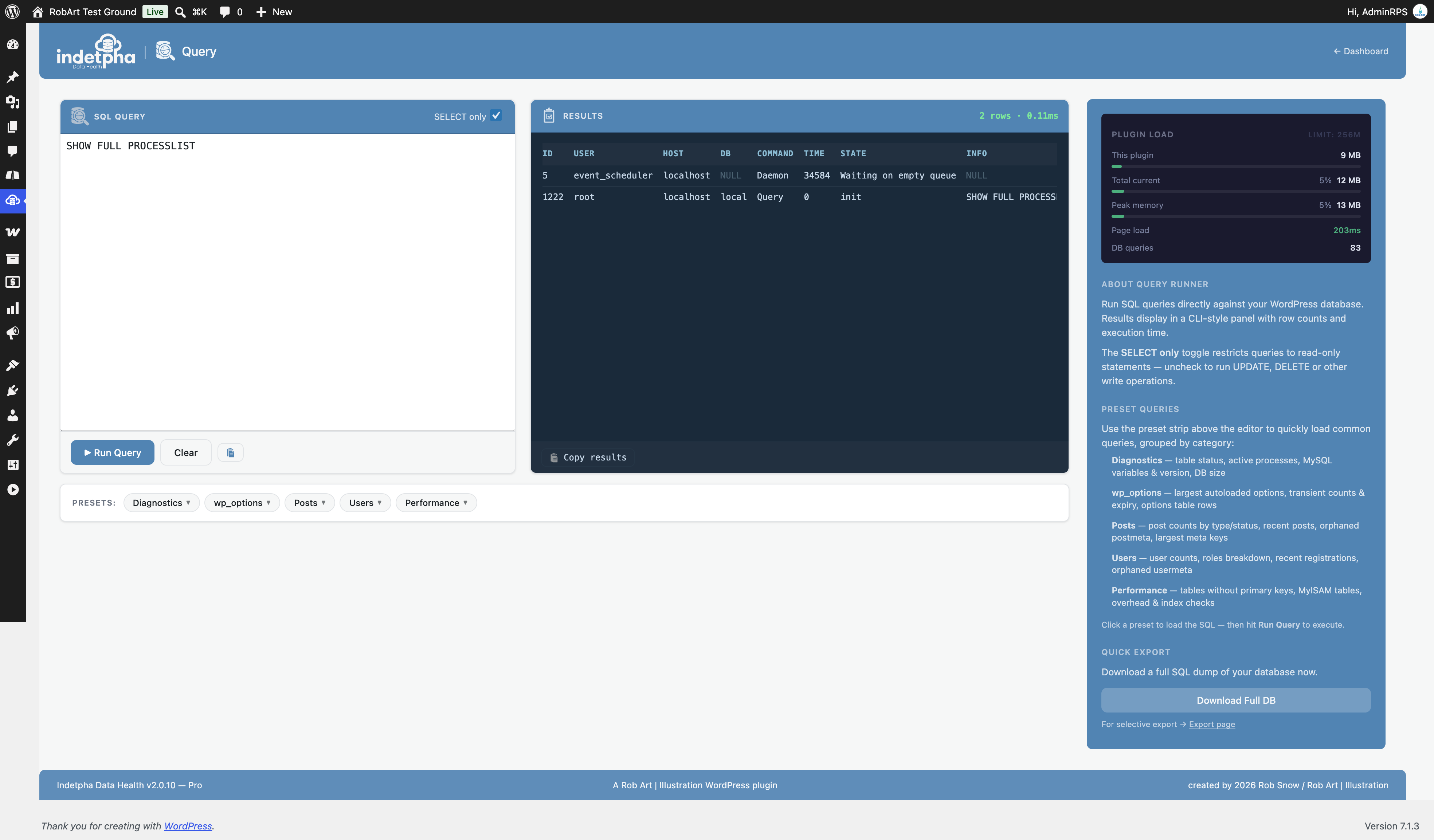
Query — live SQL query runner with results table and query history.

Security — 10-point environment scan with pass/fail indicators and fix guides.
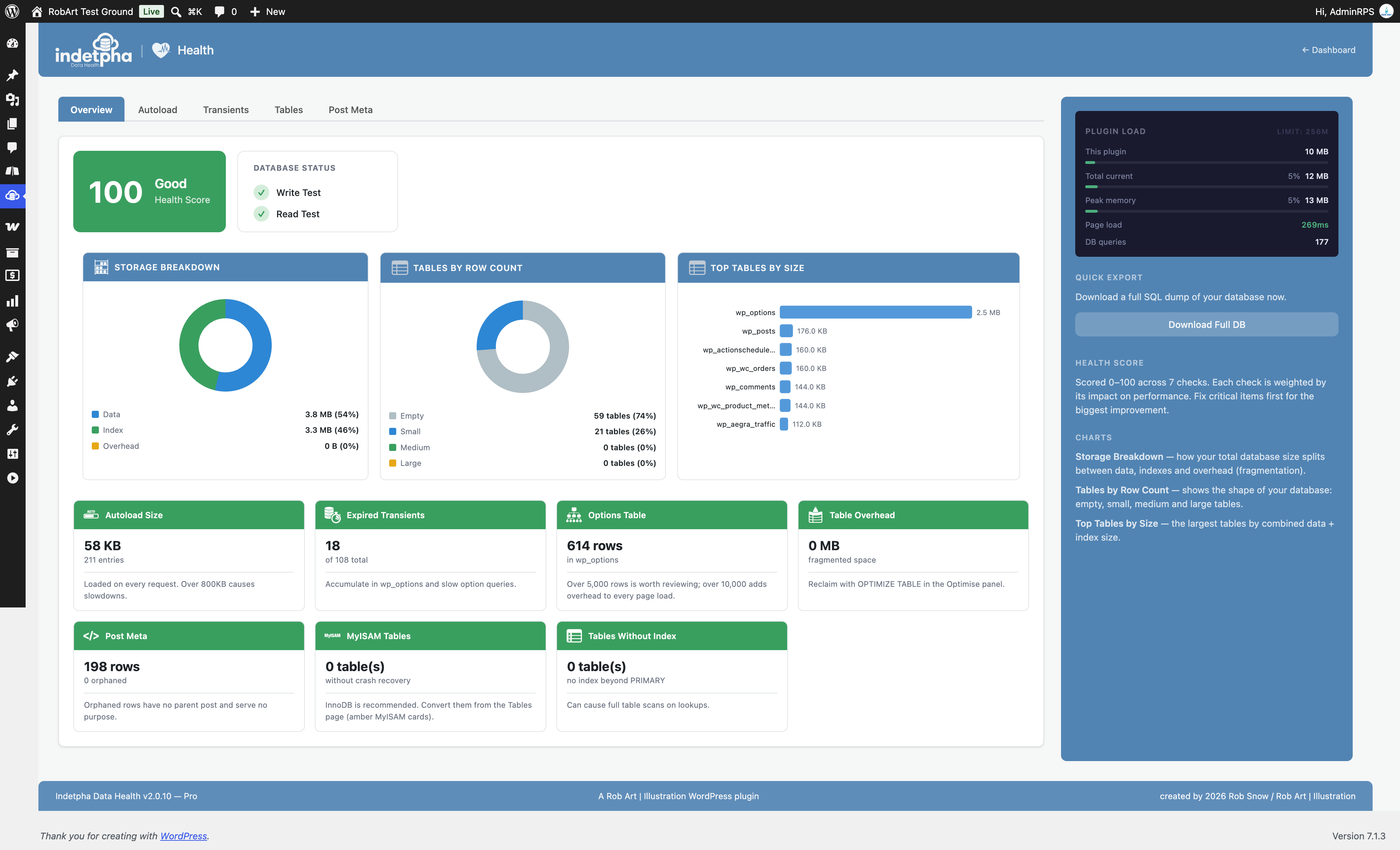
Health — colour-coded check results with fix guides and info buttons.
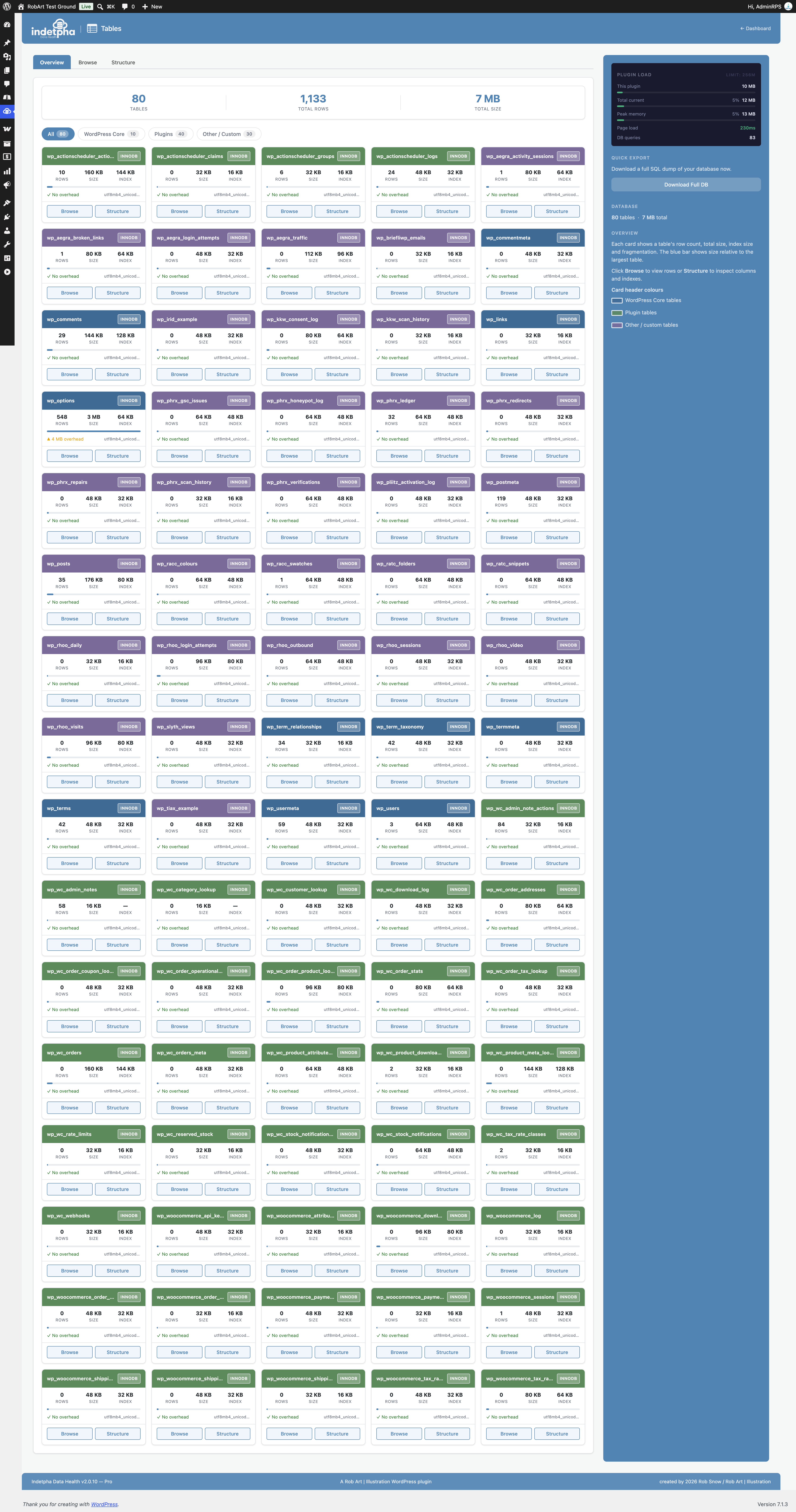
Tables — categorised table overview with engine badges and size indicators.

Export — format selection, scheduled export toggle, and export history log.
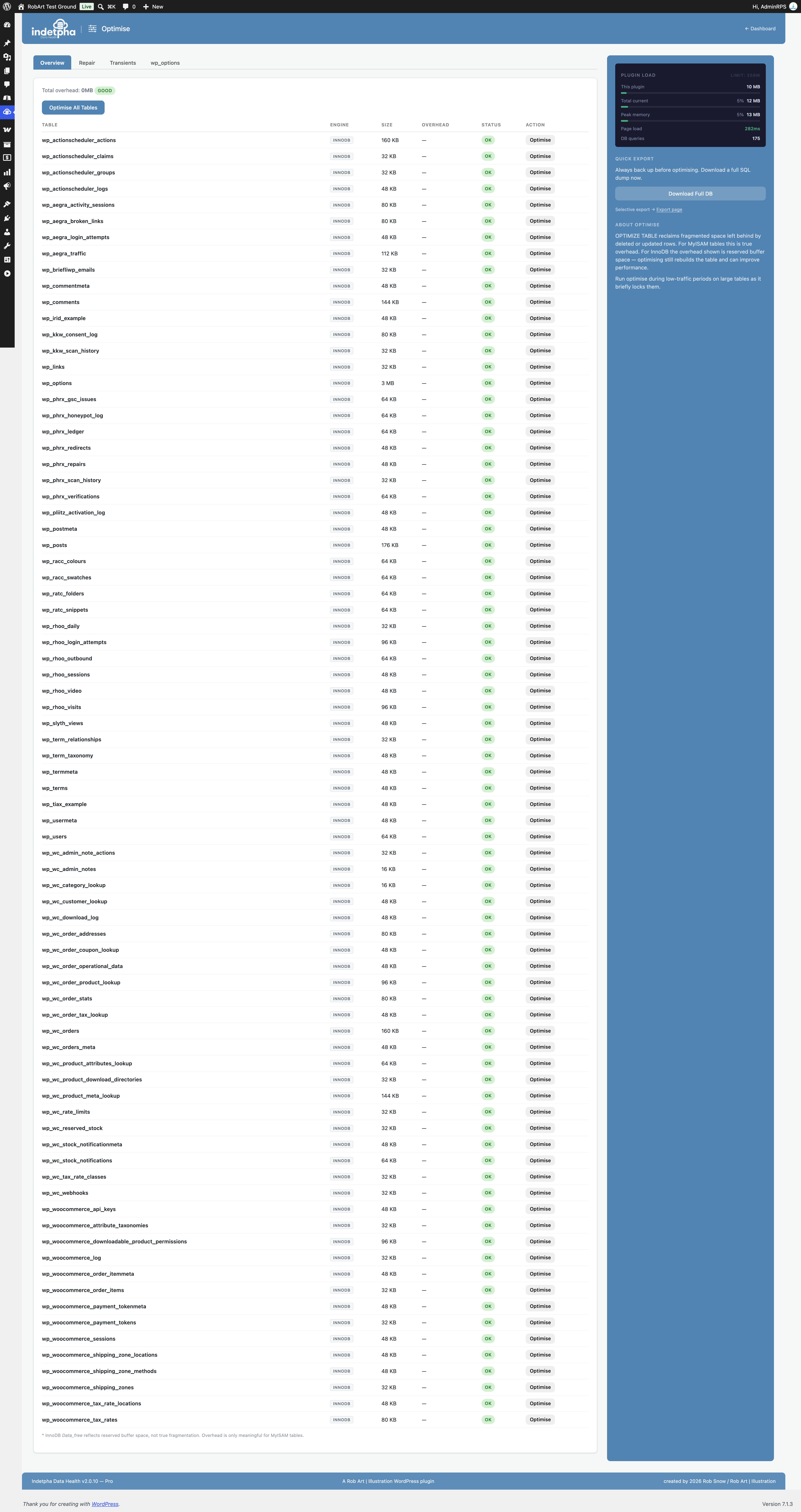
Optimise — transient list with status badges, orphaned data cleanup, and repair controls.

Reports — exportable database health and security summaries with history log.
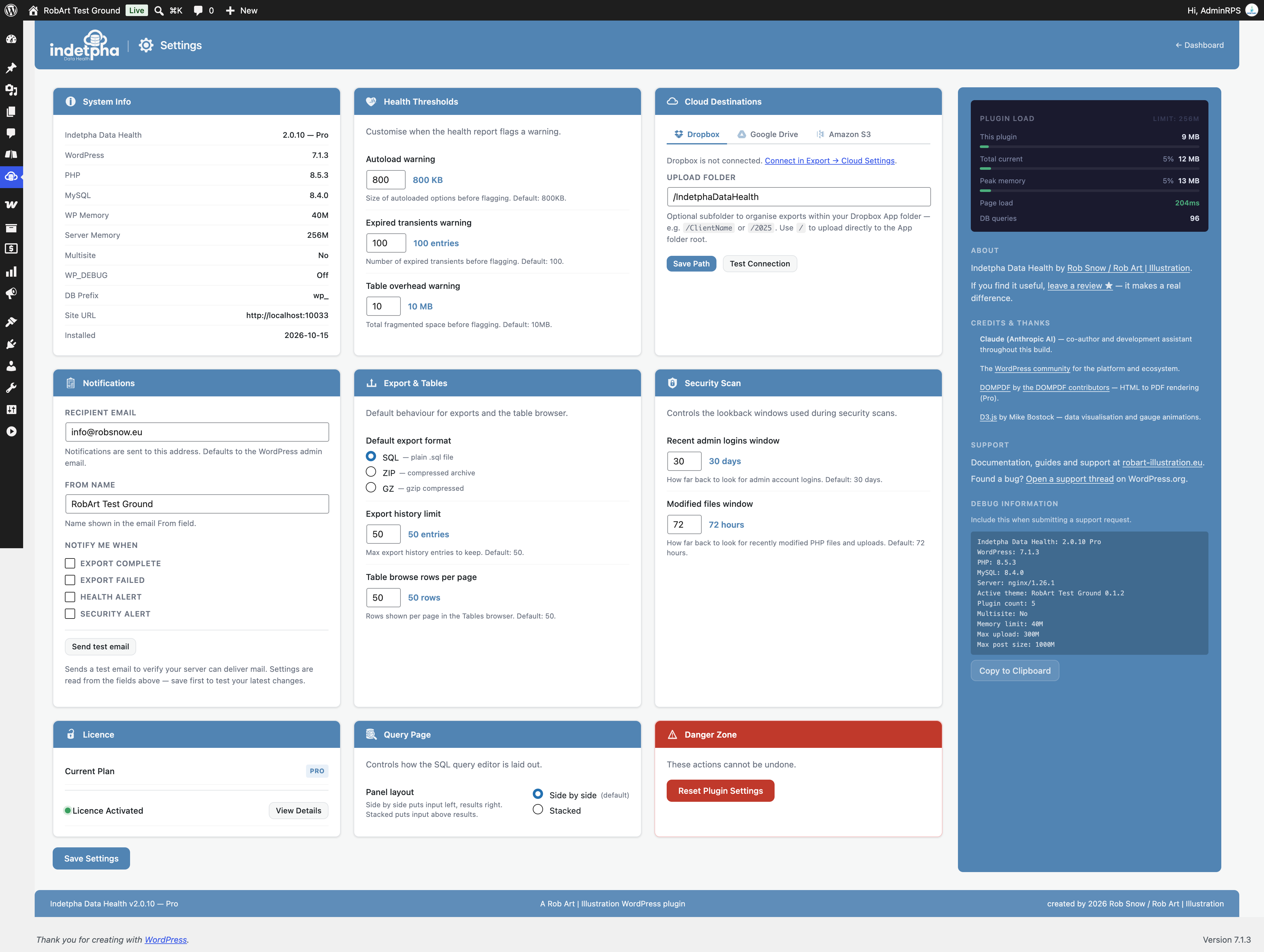
Settings — health thresholds with live preview, export defaults, and licence management.
Faq
Yes. The core plugin is free and includes full database export (SQL, ZIP and GZ), email export, health checks, the tables panel, the optimise panel, and the security scan. Pro features — including selective table export, Dropbox export (Google Drive and Amazon S3 are planned), scheduled exports, full security scan details, bulk optimise and PDF reports — are available with a Pro licence. See the Licence tab in Settings for full details.
Indetpha Data Health requires WordPress 6.0 or later and PHP 8.0 or later. It is compatible with all standard WordPress hosting environments. It has been tested on shared hosting, VPS, and managed WordPress platforms. It works with MySQL and MariaDB databases.
Indetpha Data Health is a read-first tool. Health checks, table browsing, and structure views are entirely non-destructive. The Optimise panel can repair tables and purge expired transients — both are safe, standard database operations. The Security scan only reads your environment; it never makes changes automatically. Any changes prompted by the security fix guides are made manually by you.
An SQL export is a plain-text file containing all the SQL statements needed to recreate your database. It is universally compatible and can be imported by phpMyAdmin, WP-CLI, and most hosts. A ZIP export wraps the SQL file in a standard zip archive, making it smaller and easier to store or email. A GZ export uses gzip compression, which typically produces the smallest file size and is well-suited for large databases or slow connections. All three formats are free.
Yes. The repair and transient purge operations in the Optimise panel are standard database maintenance tasks. Repairing a table fixes minor corruption and defragments storage — it does not delete data. Purging expired transients removes cache entries that WordPress itself would have deleted eventually. As with any database operation, taking a fresh backup beforehand is good practice.
The security scan inspects your WordPress environment across ten areas: whether your WordPress version is current, whether debug mode is enabled, whether file editing is enabled in the admin, whether you are using the default wp_ table prefix, whether security keys and salts are configured, whether WP-Cron is running externally, root directory permissions, wp-config.php permissions, whether readme.html or license.txt are publicly accessible, and whether user enumeration is possible. Each failed check includes a plain-English explanation and a fix guide.
Yes, with a Pro licence. The selective export option lets you tick individual tables before exporting. This is useful when migrating a single plugin’s data, debugging a specific feature, or creating a targeted backup before making changes.
Reviews
Changelog
2.1.0
- New (Pro): Security scan findings now come with a Trust button. Trust anything you recognise and it stays out of future scans until it changes; if it changes, it comes back marked “changed since you trusted it”. Trusted items are listed (and can be untrusted) under the scan.
- New (Pro): a Details button on every finding shows which plugin or theme it belongs to, the exact text that matched with its context, and any risky code lines with line numbers.
- New (Pro): recently changed plugin files are checked against the official WordPress.org release for the installed version, and every plugin or theme update is recorded, so files changed by an update are explained instead of flagged.
- Improved (Pro): the scan no longer flags Media Library files, the small guard files plugins put in their folders, or known plugin folders (such as WooCommerce logs and shared GeoLite databases). Warnings on a card disappear once it reaches zero.
- Fixed: the FAQ no longer lists Google Drive and Amazon S3 as available; they are planned.
2.0.10
- Security: internal hardening.
2.0.9
- New: MyISAM tables get a “Convert to InnoDB” button on the Tables page. It asks first, keeps the data and indexes, and refuses a table whose full-text index the database server could not keep under InnoDB.
- Fixed: the Security checklist showed XML-RPC as Enabled on sites that block xmlrpc.php at the server, for example with the .htaccess rule Indetpha suggests. It now tests whether xmlrpc.php really answers and shows “Disabled or blocked”.
- Changed: the Options Table check warns at 5,000 rows instead of 1,000. A row count alone says little; the autoloaded size check, which is what slows a site, is unchanged.
2.0.8
- Fixed: connecting Dropbox failed with “Invalid redirect_uri”. The authorisation step pointed at an address that no longer resolved, so the connection could never complete. Dropbox now connects normally.
- Existing Dropbox connections are unaffected and do not need to be re-authorised.
2.0.7
- Hardened the built-in README viewer: all text is HTML-escaped before formatting and links are passed through esc_url(), so the bundled documentation cannot introduce unsafe markup. Defensive hardening — the viewer only ever renders the plugin’s own README.
2.0.6
- Purging expired transients now updates the Transients panel immediately — the Total and Expired counts and the list refresh on completion, so the result is visible right away
- Confirmed compatible with the current version of WordPress
2.0.5
- Selective (table-specific) export is now available to everyone — the export engine already supported it, so it is no longer presented as a paid-only feature
- The database Query tool now runs read-only queries (SELECT, SHOW, DESCRIBE, EXPLAIN) in the free version; running data-changing queries is a Pro feature
- Every Export tab (including Scheduled and Cloud) is now visible to all users, with a clear note on which actions require Pro — no features are hidden behind the licence
- Renamed an internal script data object to use the plugin’s own prefix, avoiding any clash with other plugins
- Hardening and code-quality improvements to the export and query screens
2.0.4
- Updated the Pro upgrade/checkout link to the new Indetpha Data Health product page
2.0.3
- Fixed the Health screen’s table optimise buttons: they ran the optimise but left the row’s status pill unchanged. The row now refreshes correctly, and InnoDB tables are no longer mislabelled as “Fragmented” (their reserved space is normal, not fragmentation)
2.0.2
- Renamed admin menu page slugs to the idph- prefix (idph-dashboard, idph-splash) so all registered names use the plugin’s declared prefix, per WordPress.org guidelines
2.0.1
- Fixed invisible (blue-on-blue) button text on the Welcome screen — the “Get Pro” and “Go to Settings” buttons now show white labels correctly
2.0.0
- Renamed the plugin to Indetpha Data Health — the name now reflects its focus on giving you a clear, visual view of your database’s health, not just backups
- New text domain, plugin slug, and menu location; all internal identifiers updated to match
- Added a one-time, automatic migration that carries your existing settings and history across to the new version — no reconfiguration needed
- Refreshed the plugin description and positioning around database health signals, table inspection, environment checks, cleanup, optimisation, and exports
- No change to backup, export, health, optimise, table-browser, or security-scan behaviour
1.3.26
- Security hardening for WordPress.org compliance: all database queries that reference a table now use prepared statements with an identifier placeholder
- Raised the minimum WordPress version to 6.2 (required for the identifier placeholder)
- No change to backup, export, health, optimise or table-browser behaviour
1.3.24
- Moved all admin CSS and JavaScript into properly enqueued asset files — no inline script or style tags
- Restructured the welcome screen: the free version shows an upgrade advert instead of a licence-key form (key entry is handled in Settings)
- Updated the in-plugin user manual and translation template to the new plugin name and the correct free/Pro feature split
1.3.23
- Updated readme: plugin title now matches the header name (resolves the name/restricted-term review warnings)
- Corrected the free/Pro feature lists — SQL, ZIP, GZ and email export are free; selective export and cloud destinations are Pro
1.3.22
- Renamed the plugin to “DBDump Database Backup” so the name describes its purpose and drops the restricted “WP” term
- Separated all Pro features into a dedicated package — the free version no longer contains premium feature code or licence machinery
- Free database export (SQL / ZIP / GZ), the Query tools, Tables browser, integrity scan counts, environment checks and table optimise remain free
- Pro upgrade prompts are now plain adverts that link to the product page — no locked controls in the free version
- Security scan: the free version reports counts only; full scan details (exact strings, file paths, usernames) are a Pro feature
- Bulk “Optimise All” and orphaned-meta cleanup moved to Pro; individual table optimise stays free
- Reports: the Health PDF stays free; Security, Database Overview and Export Receipt reports are shown as Pro adverts
- Cloud destinations (Dropbox) configuration and scheduled-export settings are now Pro-only and injected by the Pro package
- Added a “Get Pro” link on the Plugins screen, a dashboard-widget upsell, and subtle upgrade panels in the sidebar
- Fixed admin styles not loading on sub-pages after the menu was renamed
- Fixed WordPress 7.0 dropdown arrows overlapping select text
- Fixed scan and report descriptions that showed literal HTML tags
- Uninstall now removes every option, transient, scheduled event, and the scheduled-backup folder the plugin created
- The menu icon degrades gracefully if its asset is missing (no more PHP warning)
1.3.2
- WordPress 7.0 compatibility — restored familiar form, button, checkbox and radio styling that WP 7.0 changed
1.3.0
- Added Scheduled Exports (Pro) — daily, weekly, or monthly exports to local uploads folder and/or Dropbox with configurable retention
- Added WP-Cron heartbeat REST endpoint for reliable scheduling on low-traffic sites via external ping services
- Added Email export destination — send SQL/ZIP/GZ dumps up to 10 MB directly to any email address (free tier)
- Export destination order updated to Local | Email | Dropbox
- Added Optimise persistence — recently optimised tables show ✓ OK after tab switches using a 1-hour transient
- Added ANALYZE TABLE after OPTIMIZE TABLE to flush MySQL stats immediately
- Added Scheduled export notifications in Settings — “Export complete” and “Export failed” triggers under a dedicated Scheduled Exports column
- Fixed security scan issue count on dashboard card — now counts flagged categories not individual flags
- Fixed Optimise All column shift — corrected cell index mapping in updateOptimiseRow()
- Added table card colour key in Tables sidebar — blue = WordPress Core, green = Plugin, purple = Other/Custom
- Removed DejaVu font files from dompdf (7 MB saving)
1.2.6
- Added Cloud Destinations tab in Export panel — Dropbox active, Google Drive and Amazon S3 displayed as coming soon
- Added Export and Tables settings card with default format, history limit, and browse rows-per-page options
- Added Security Scan settings card with configurable admin login days and modified files hours thresholds
- Added danger banners on high-risk security fix guides (table prefix change, salts regeneration, file permission changes) prompting users to back up before proceeding
- Added full transient list in Optimise panel with Expired / Active / No Expiry status badges and per-transient details
- Improved Dropbox connection status badge and Test Connection button UX
1.1.2
- Added dashboard overview cards for Recent Exports, Health, Security, Optimise, and Tables
- Overhauled Settings panel with live threshold previews for autoload and overhead values
- Added table category filter (WordPress Core / Plugins / Other) to Tables panel
- Added Health check icon set for clearer pass/warning/fail status at a glance
1.0.0
- Initial release