Indicate External Links

Indicate External Links
Description
A simple and lightweight plugin to indicate external http and https links in posts, pages and custom content by appending a small diagonal arrow icon to the link.
No configuration is required just install and activate.
Installation
- Upload the plugin folder to the ‘/wp-content/plugins/’ directory
- Activate the plugin through the ‘Plugins’ menu in WordPress
Screenshots
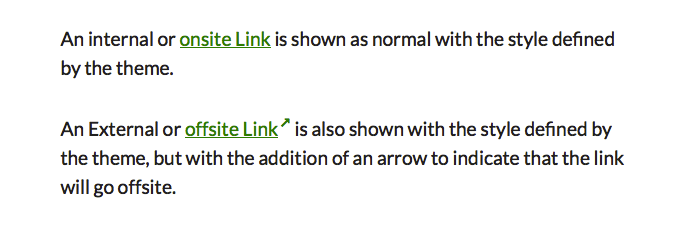
Links
Faq
This plugin does not have any options, so there is no admin page.
Yes
Yes you can add some CSS to your child theme
.nav-menu .extlink sup {
color:’#bada55′;
}
For maximum flexibility you can copy the plugins styles to you child theme’s stylesheet and make changes to that if you also prevent the default styles from loading.
You can add CSS rules to enable you to use a glyph from a custom icon font.
To deactivate the default CSS, add the following line to your child theme’s functions.php file:
<?php remove_action('wp_head', 'cc_extlink_style'); ?>
Linked images will not have the arrows added.
Text links inside image captions will not have the arrows added, but custom CSS can be used to override this.
External links inside WordPress custom menus will not have the arrow added by default. Again, custom CSS can be used to override this.
Yes, add a CSS rule to your child theme.
Target the links you don’t want affected with greater specificity to override the default CSS of the plugin.
Example
    .myclass .extlink sup:after {
        content:'';
    }
This plugin works as intended on the sites it was tested it on whilst it was being developed. If you have a problem getting it to work on your site, first read the documentation and check the plugin’s support forum to see whether your issue has been previously resolved. If you do not find an answer, please ask for help on the forum giving as much information as possible so I can try to guide you through some troubleshooting steps to help you to fix your issue. If you have a problem, please do not post a review before asking for help.
You can donate via my donation page. If you find the plugin useful I would also appreciate a review (five stars would be nice) on the [plugin review page](https://wordpress.org/support/view/plugin-reviews/indicate-external-links “Indicate External Links plugin review page”
Reviews
Thanks!
By 
This plugin just keeps on working
By 
Excellent
By 
COOL!
By 
Elegant, intuitive... really beautiful pl to show external links in professional mode.
Marco
Changelog
1.1.0
- Code tidy
- Remove version detect function
1.0.1
- Improved CSS for iPad compatibility
1.0.0
- Initial Version