Insert PHP Code Snippet

Insert PHP Code Snippet
Description
A quicklook into Insert PHP Code Snippet
★ Convert PHP snippets to shortcodes
★ Insert PHP code easily using shortcode
★ Support for PHP snippet shortcodes in widgets
★ Dropdown menu in TinyMCE editor to pick snippet shortcodes easily
Features in Detail
Insert PHP Code Snippet allows you to create shortcodes corresponding to PHP code snippets. You can create a shortcode corresponding to any random PHP code such as ad codes, login validation etc. and use the same in your posts, pages or widgets.
The shortcodes generated using the plugin are easily available as a dropdown in the standard wordpress content editor as well as in widget settings, thereby giving you ease of integrating your PHP snippets with your posts and pages.
About
Insert PHP Code Snippet is developed and maintained by XYZScripts. For any support, you may contact us.
★ Insert PHP Code Snippet User Guide
★ Insert PHP Code Snippet FAQ
More Information
★ Insert PHP Code Snippet User Guide
★ Insert PHP Code Snippet FAQ
Troubleshooting
Please read the FAQ first if you are having problems.
Requirements
WordPress 5.0+
PHP 7+
Feedback
We would like to receive your feedback and suggestions. You may submit them at our support desk.
Installation
★ Insert PHP Code Snippet User Guide
★ Insert PHP Code Snippet FAQ
- Extract
insert-php-code-snippet.zipto your/wp-content/plugins/directory. - In the admin panel under plugins activate Insert PHP Code Snippet.
If you need any further help, you may contact our support desk.
Screenshots
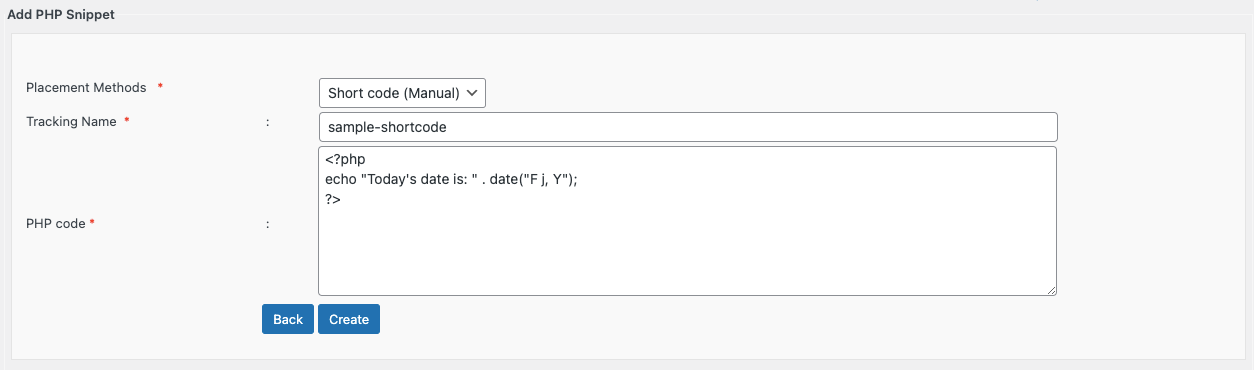
This is the shortcode generator page
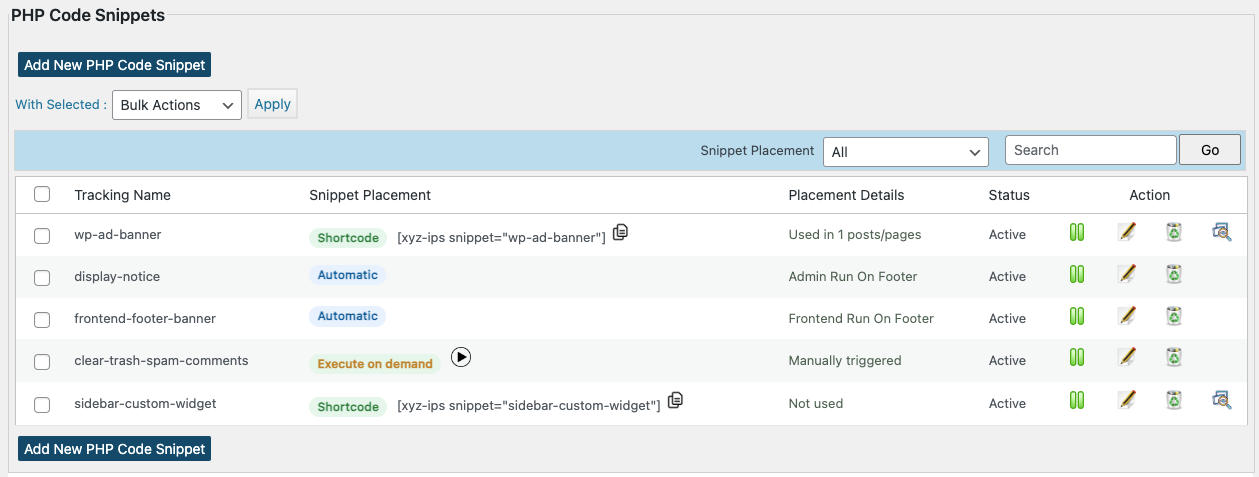
This is page where you can manage all your snippets
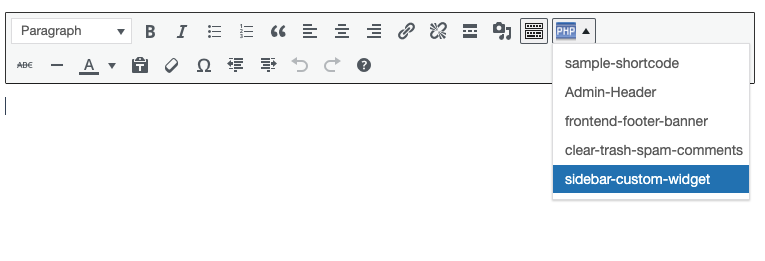
The shortcodes are easily accessible in the content editor
Faq
★ Insert PHP Code Snippet User Guide
★ Insert PHP Code Snippet FAQ
Please check the wordpress version you are using. Make sure it meets the minimum version recommended by us. Make sure all files of the insert php code snippet plugin uploaded to the folder wp-content/plugins/
Please use a whitespace to separate 2 shortcodes.
More questions ? Drop a mail and we shall get back to you with the answers.
Reviews
Great product to solve problems
By 
I use it to allow me to select between two different forms (short codes) based of the month of the date. Also allows me to pass data from the body of one page to another page to be displayed in the body of that page. Gets around WP not letting you create any part of a page except the body.
One other thing, it works for me on WP V7.0
Great Plugin
By 
Great Plugin
Perfect plugin
By 
Really useful plugin that works perfectly.
It does exactly what I xas looking for.
Highly recommended.
Très efficace
By 
Fait le job sans problèmes.
今までの中で一番良いです
By 
何種類か 同様エディター使いましたが 安定していて 一番良いです
On-Demand Execution seems to throw a json error on line 0
By 
This is a great plugin when you don't have errors in php. Just don't re-use functions with the same name on the same page with menus / widgets that use the snippet or it will throw a broken site error.
Minus 1 star on the latest version as when I try to run a snippet on demand I get a json error (but am not using json), regardless of whether or not that code is already being used somewhere else successfully in snipet form.
What's really cool is you can use a post's custom fields to control variables in php snippets via:$var = get_post_meta(#_of_post,'name_of_custom_field',true);
And then $someothervar = $$var to access the custom field's raw value to make custom variables a snap without having to write an admin interface in the dashboard for custom variables.
Insert PHP Code Snippet saved me
By 
I also use a different php snippet program that suddenly had several of my snippets fail. I loaded this snippet program; and, using the exact same snippet code, it worked fine.
Simple and works well
By 
I wrote some custom code to query an API and display a map of the results. This plugin is a simple and fuss-free way to add this to a specific web page using a shortcode. In due course we'll probably pay for the version that supports JS as well.
Fantastic
By 
Love it 🥰
truly first-class
By 
It simply does what it is supposed to do. And it does it very well, reliably and easily. That's how you imagine a helpful plugin to be. Perfect.
Changelog
1.4.7
- PHP 8.3 compatibility improvements.
- Minor code hardening and stability fixes.
1.4.6
- Fixed duplicate “Snippet Preview” pages issue in WordPress Multisite environments
- Added a setting for manual shortcode usage display and tracking
- Minor bug fixes
1.4.5
- Improved snippet list UI and placement clarity
- Added usage details for snippets used via shortcode
- Minor bug fixes
1.4.4
- Added snippet description field
- Fixed a security issue
- Minor bug fixes and compatibility updates
- CSS & JS files now versioned to fix caching
1.4.3
- Added a warning note that plugin data will be lost if the plugin is deleted
- Updated redirects to use wp_safe_redirect() for improved security
- Updated a few SQL queries to follow secure practices
1.4.2
- Added version check to trigger DB updates and clear cache on updates
- Minor bug fixes and performance improvements
1.4.1
- Fixed image size issue reported
- Updated snippet dropdown in editor to allow only shortcodes in Manual Placement mode
- Fixed minor bugs and optimized performance
1.4
- Added new Snippet Placement Methods: Automatic, Execute on Demand, and Shortcode (Manual) for more flexible snippet placement options.
- Added Snippet Placement filter on the Manage Snippets page
- Improved compatibility with the latest WordPress versions
- Fixed minor bugs and optimized performance.
1.3.8
- Added “Execute shortcodes in editors” setting for Elementor and other editor compatibility
- Updated about page with new premium feature details, including automatic placement locations
1.3.7
- Updated nonce verification for bulk actions to prevent CSRF attacks
- Compatibility with WordPress 6.6.1
1.3.6
- Exception handling updated
- Minor bugs fixed
1.3.5
- Patch security vulnerability
- Compatibility with latest version of WordPress
1.3.4
- Minor bugs fixed
- Compatibility with latest version of WordPress
1.3.3
- Minor bugs fixed
- Option to send exception report to email
1.3.2
- Option to enable exception handling
- Option to preview snippet
- Database collation issue fixed
- Minor bugs fixed
1.3.1
- Notice errors fixed
1.3
- Snippet selection support in classic editor block of Gutenberg
- Support for Search Snippet by name
- Navigation Improvements
1.2.6
- Support for Bulk Actions(activate,deactivate,delete)
1.2.5
- Added fix for output buffering issue
1.2.4
- Removed deprecated widget initializing function
1.2.3
- Option to enable auto insert of php opening tags added.
1.2.2
- Automatic detection and correction of php opening and closing tags in snippet
- Updated nonces and validations
- Premium version details and comparison added
1.2.1
- Nonces Added
- A few bug fixes
1.2
- Compatibility with wordpress 4.3
- Added options to sort snippets in admin area by id and title
- Removed redirection after snippet edit
1.1
- Snippet chooser TinyMCE plugin modified
- Compatibility with wordpress 3.9
- A few bug fixes
1.0
- First official launch