WPZOOM Social Feed Widget & Block
WPZOOM Social Feed Widget & Block
Description
Instagram Feed Plugin for WordPress – Easy & Powerful
The best Instagram widget plugin for WordPress. Display your Instagram feed, photos, videos, and reels in beautiful galleries. Works with Gutenberg blocks, widgets, shortcodes, and Elementor.
Create stunning Instagram galleries and Instagram sliders anywhere on your WordPress site. Perfect for showcasing your Instagram content, growing followers, and adding social proof to your website.
⭐️ Get Instagram Widget PRO — Unlock Stories, Analytics, Carousel & More! ⭐️
View Live Demo | Documentation
Why Choose WPZOOM Social Feed Widget?
Quick & Easy Setup – Connect your Instagram account and display feeds in just 3 steps
Fully Responsive – Looks perfect on desktop, tablet, and mobile devices
Multiple Embed Options – Gutenberg Block, Shortcode, Widget, and Elementor support
Lightweight & Fast – Optimized for performance with lazy loading
Regular Updates – Fully compatible with the latest Instagram API
“Finally, an Instagram plugin that just works!” – Join thousands of satisfied users
📸 FREE FEATURES
- Create Unlimited Instagram Feeds – Display as many feeds as you need
- Gutenberg Block – Native WordPress block editor support
- Shortcode Support – Embed feeds in Elementor, Beaver Builder, Divi, and any page builder
- Multiple Layouts – Grid and other layout options to match your design
- Lightbox Gallery – View photos and videos in a beautiful popup
- Custom Header – Add your own avatar and bio text
- Lazy Loading – Improves page speed and performance
- AJAX Initial Load – Load feed content asynchronously for faster initial page loads
- Responsive Design – Mobile-friendly out of the box
⭐️ PRO FEATURES
Upgrade to Instagram Widget PRO for powerful features:
- 🛍️ WooCommerce Product Tagging 🆕 – Turn your Instagram feed into a shoppable gallery by linking posts to WooCommerce products
- 🛡️ Feed Moderation 🆕 – Hide or show individual posts from your feed without deleting them from Instagram
- 📊 Instagram Insights & Analytics – Track follower growth, reach, impressions, engagement, and individual post performance with beautiful charts
- Display Instagram Stories – Show your Instagram Stories directly on your website
- Display Follower Count – Show your real-time follower count in the feed header
- Multi-Account Feed – Combine posts from multiple Instagram accounts into a single unified feed
- Masonry Layout – Pinterest-style grid for a modern look
- Carousel/Slider – Showcase your photos in an interactive slider
- Responsive Column Control – Set different columns for desktop, tablet, and mobile
- Load More Button – Let visitors load additional posts without page refresh
- Advanced Color Customization – Full control over colors and styling
- Connect Multiple Accounts – Display feeds from different Instagram accounts
- Priority Support – Get help when you need it
⭐️ Upgrade to PRO Today! ⭐️
📊 NEW: Instagram Insights & Analytics (PRO)
Track your Instagram performance directly from your WordPress dashboard:
- Follower Growth: Monitor new followers, lost followers, and net growth over time
- Reach & Impressions: See how many accounts your content is reaching
- Engagement Metrics: Track accounts engaged and total interactions
- Post Performance: Analyze likes, comments, saves, and reach for each post
- Interactive Charts: Beautiful visualizations of your Instagram data
- Multiple Date Ranges: View data for 7, 14, 30, or 90 days
🛍️ NEW: Shoppable Instagram Feed with WooCommerce (PRO)
Turn your Instagram feed into a sales channel by tagging posts with WooCommerce products:
- Link Products to Posts: Assign one or more WooCommerce products to any Instagram post directly from the feed editor
- Album Support: Tag different products on each image in carousel/album posts
- Flexible Display: Choose between a subtle shopping icon with product popover or a prominent “Buy Now” button
- Customizable Styling: Control colors, positioning, and appearance of product tags
- Seamless Shopping: Visitors can discover and buy products without leaving your site
🛡️ NEW: Feed Moderation (PRO)
Take full control of which Instagram posts appear in your feed:
- Hide Individual Posts: Remove specific posts from your feed with a single click
- Non-Destructive: Hidden posts stay on Instagram — only removed from your website display
- Easy Toggle: Use the eye icon in the Moderate tab to show or hide any post
- Instant Preview: See your moderated feed in real-time before publishing
Works With Your Favorite Tools
- Gutenberg / Block Editor
- Elementor
- Beaver Builder
- Divi Builder
- WPBakery Page Builder
- Any theme or page builder with shortcode support
Smash Balloon Alternative
Looking for a lightweight Instagram feed plugin? WPZOOM Social Feed is a fast, easy-to-use alternative to heavier Instagram plugins. Get all the essential features without the bloat:
- Smaller file size = faster loading
- Clean, minimal code
- No unnecessary features slowing down your site
- Same Instagram API support
- Regular updates and responsive support
Get Involved
Looking to contribute? Fork the repository on GitHub and help make this plugin even better!
Installation
Quick Start (3 Easy Steps)
Step 1: Install and activate the plugin via Plugins Add New and search for “WPZOOM Social Feed Widget & Block”
Step 2: Go to Instagram Widget Connect and connect your Instagram account
Step 3: Create a new feed in Instagram Widget Feeds and embed it using the Gutenberg block or shortcode
Detailed Installation
- Upload the plugin folder to
/wp-content/plugins/or install via the WordPress plugin installer - Activate the plugin through the Plugins menu
- Navigate to Instagram Widget in your WordPress dashboard
- Click Connect and follow the prompts to connect your Instagram account
- Create your first feed and customize it to match your website design
- Embed the feed using the Gutenberg block, shortcode, or widget
Screenshots

Creating a new feed
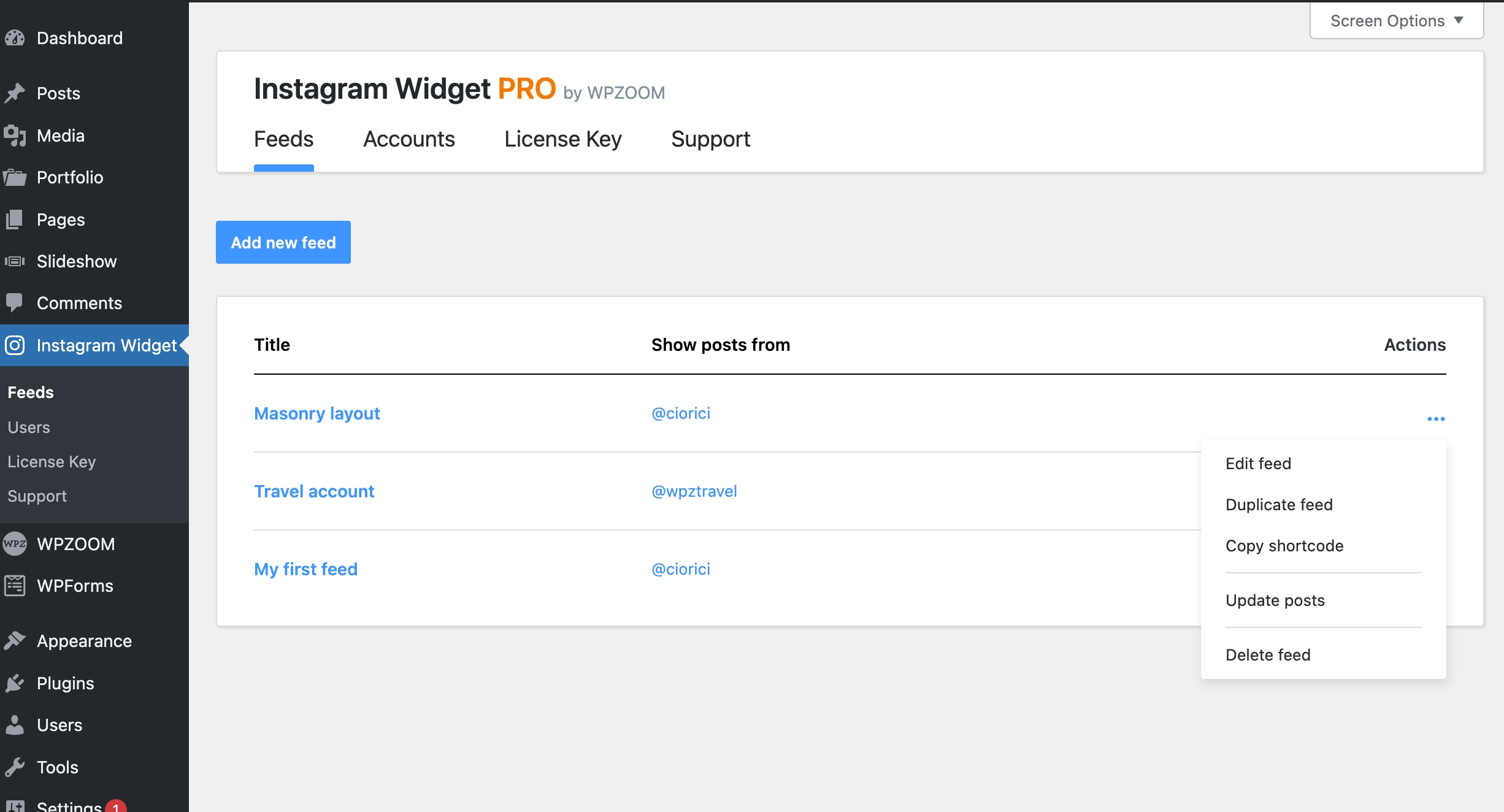
Manage feeds
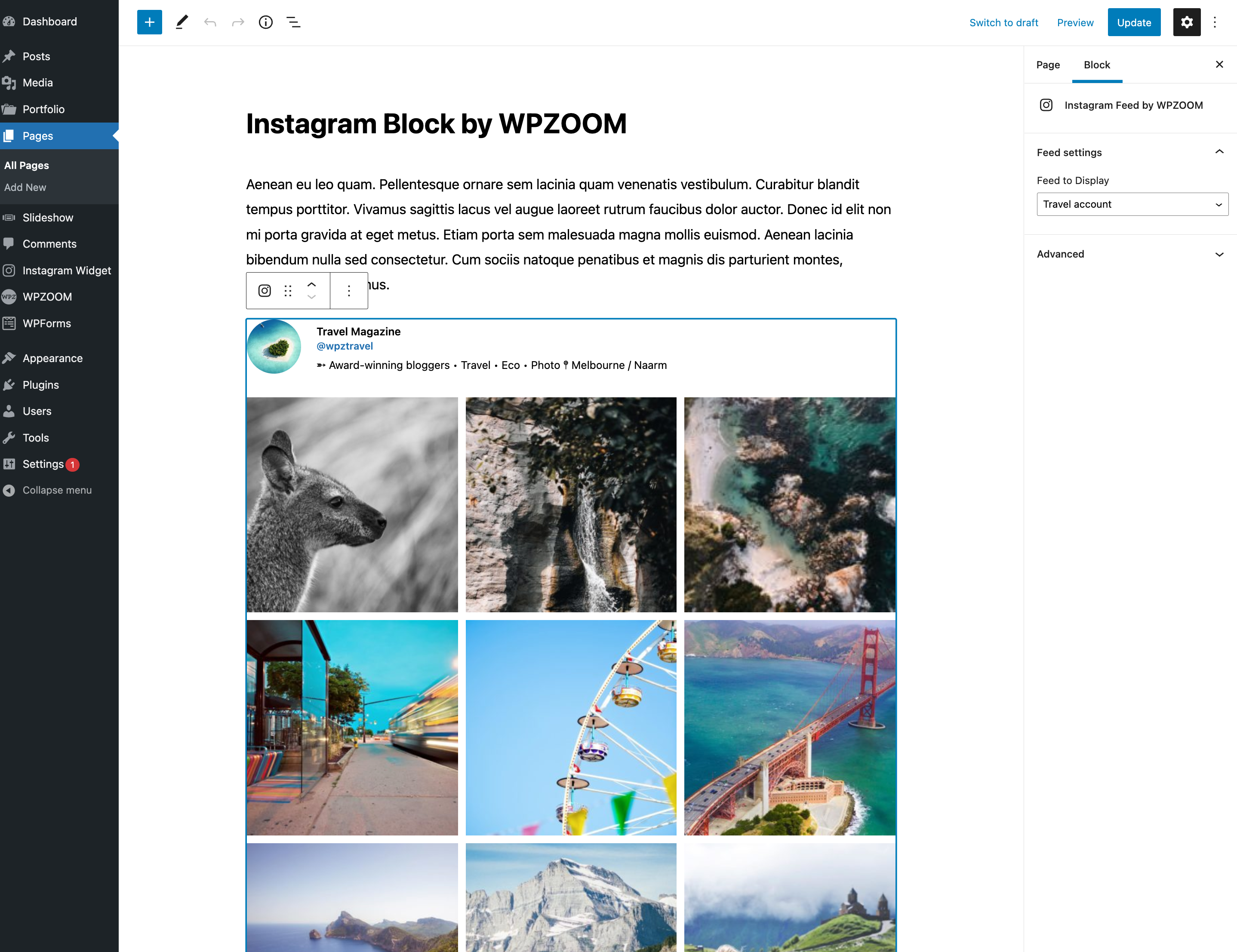
Instagram Block for Gutenberg

Customize

Embed the shortcode in Elementor
Faq
Creating an Instagram feed is easy:
1. Go to Instagram Widget Connect in your WordPress dashboard
2. Connect your Instagram Business or Creator account
3. Go to Instagram Widget Feeds and click “Add New”
4. Customize your feed settings and save
5. Copy the shortcode or use the Gutenberg block to embed your feed
Due to Instagram API requirements, you need an Instagram Business or Creator account to connect. Personal Instagram accounts are no longer supported by Instagram’s API. Converting to a Business or Creator account is free and takes just a few minutes in the Instagram app.
You can display your Instagram feed in Elementor in two ways:
1. Use the dedicated WPZOOM Instagram Elementor widget
2. Use a Shortcode widget and paste your feed’s shortcode
Yes! With the PRO version, you can connect multiple Instagram accounts and display feeds from different accounts anywhere on your site. You can also combine posts from multiple accounts into a single unified feed – perfect for brands with multiple Instagram profiles.
Enable the AJAX Initial Load option in your feed settings. This loads the Instagram feed content asynchronously after your page renders, dramatically improving initial page load time. Visitors will see an elegant skeleton placeholder with a shimmer animation while the feed loads in the background.
Instagram Insights is a PRO feature that lets you track your Instagram performance directly from WordPress. You can monitor follower growth, reach, impressions, engagement, and individual post performance with interactive charts. To use Insights, you need a Business or Creator account connected via Facebook.
Yes, the plugin works well with popular caching plugins like WP Rocket, W3 Total Cache, and LiteSpeed Cache. Instagram data is cached to improve performance and reduce API calls.
Yes! We have comprehensive documentation with step-by-step guides:
- Free users: WordPress.org Support Forum
- PRO users: Priority Support
You can report security bugs through the Patchstack Vulnerability Disclosure Program. The Patchstack team helps validate, triage, and handle any security vulnerabilities. Report a security vulnerability.
Reviews
Beautiful plug-in!
By 
Beautiful plug-in, that automatically shows Instagram's latest photos on a website. Very valuable and useful!
Great plugin
By 
No problems with this plugin. It does what is says, totally recommend.
Solid Instagram widget
By 
Been using it for a while. The feed loads consistently and the design fits most themes without much tweaking. Recommended if you just want a simple Instagram widget.
Amazing plugin
By 
Works perfectly and updates constantly!
Great Instagram Widget!
By 
I’ve tried a few Instagram plugins before, but this one is by far the easiest to use. Setup took just a couple of minutes, and it looks great on both desktop and mobile! Thanks 🙂
WPZOOM
By 
Very good plugin! Easy to use and looks nice on my website. I like it a lot. Thank you WPZOOM!
Works very well
By 
Just what we needed. Clean. Simple. Lightbox. Grid. Plays videos. Feed updates. Stylish.
Had a bug, submitted it on github, it was fixed and ready to go in a few days.
Thanks
Deleted the plugin it deleted all media files
By 
The plugin destroyed my site after removed it.
Very cool tool
By 
Very useful tool for adding your Instagram feed on your WP website. I found it very easy to setup.
Nice widget!
By 
The widget does its job exactly as intended, it's a great solution if you're looking to display an up-to-date Instagram feed of your posts on the website. It blends in nicely with the website design and it's super easy to set up and configure. A simple and great product all around!
Changelog
2.3.4
- New: Refresh button for Instagram widget preview
- Improved: Design options now applied via postMessage instead of URL reload for faster preview
- Improved: API item fetching optimized with over-fetching for hidden/moderated posts
- Improved: Cache-based loading for AJAX Load More functionality
- Improved: Album (carousel) images fetched via direct API call by media ID
- Fixed: Elementor integration now loads on
plugins_loadedhook instead of immediately
2.3.3
- Minor bug fixes
2.3.2
- New: Feed HTML caching for faster AJAX initial load – cached feed output is now served instantly
- Fixed: AJAX initial load now works correctly with page caching plugins (WP Rocket, LiteSpeed, etc.)
- Fixed: Nonce verification issues when pages are served from cache
2.3.1
- Minor bug fixes
2.3.0
- New: AJAX Initial Load option – dramatically improves page load speed by loading feed content asynchronously after the page renders
- New: Skeleton placeholder with shimmer animation during AJAX feed loading
- New: Likes and comments counts now displayed in the lightbox view
- New: Batch API calls for account stats (3 API calls reduced to 1) for better performance
- New: PRO – Multi-Account Feed feature – combine posts from multiple Instagram accounts into a single feed
- Improved: Email notification system for expiring access tokens now works correctly
- Fixed: “Load CSS and JS on all pages” setting now works correctly
- Fixed: Cache clearing when creating new feeds no longer affects other feeds
- Fixed: Various security improvements with proper input sanitization and output escaping
- Fixed: Wrong text domain in some error messages
2.2.12
- Minor bug fixes
2.2.11
- Minor bug fixes
2.2.10
- Minor bug fixes
2.2.9
- Minor fixes
2.2.8
- Improvements to the plugin performance
- New option: Image Aspect Ratio (new 3:4 ratio)
- New option to choose which post types to display in a feed.
2.2.7
- Minor bug fixes
2.2.6
- Minor bug fixes
2.2.5
- Minor bug fixes
- Added an Elementor widget to display the Instagram feed.
2.2.4
- Added the ability to manually update the Instagram Business API token.
2.2.3
- Minor bug fixes
2.2.2
- Bug fix with emojis in bio and name
2.2.1
- Multiple improvements
2.2.0
- New: Major API changes to work with upcoming changes from Instagram.
- New: Connect your Instagram account via your Facebook account.
- Important: Due to API limitations, you can no longer connect your Personal Instagram account and feeds with accounts connected before this update will stop working on December 4, 2024. The new Facebook/Instagram API supports only Creator and Business Instagram accounts. Please reconnect your account before December 2024 after updating to version 2.2 or higher. Learn More.