Instantio — Side Cart & One-Page Checkout for WooCommerce
Instantio — Side Cart & One-Page Checkout for WooCommerce
Description
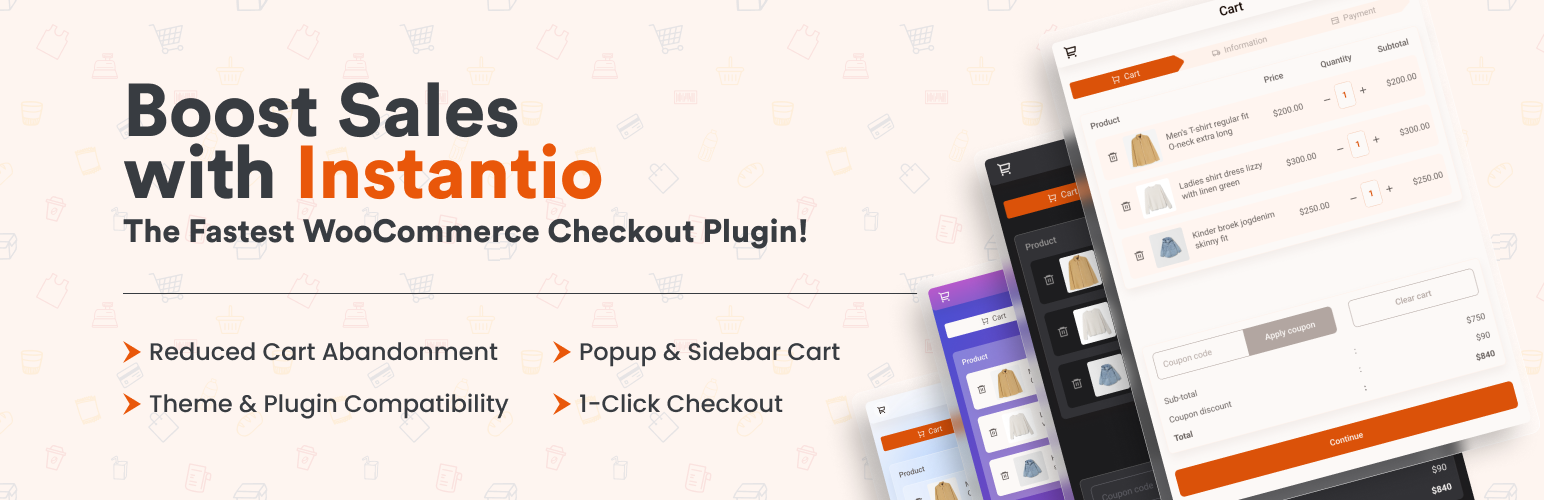
Instantio adds side cart, popup cart, floating button, and one-page checkout layouts to WooCommerce for a faster, more convenient shopping and checkout experience.
Instantio for WooCommerce — Side Cart, Popup Cart, and One-Page Checkout in One Plugin
👉 Our Official Website: Click Here
👉 Live Demo Link: See the Checkout systems below
👉 Explore Backend: Play with Backend Options
👉 Unlock all features: Click Here
👉 Video Guide on Youtube
👉 Our Documentation
👉 Get Support: Click Here
👉 Join Our Facebook Group
**Instantio has 8 Different WooCommerce Single Page Checkout systems: **
👉 Popup Cart
👉 Side Cart
👉 Floating / Direct Checkout Button
👉 Side Checkout – Multi Step (Pro)
👉 Side Checkout – Single Step (Pro)
👉 Popup Checkout – Multi Step (Pro)
👉 Popup Checkout – Single Step (Pro)
👉 Right to Left / Arabic Checkout
👉 Mini Cart
**Each above system comes with 4 Different Mode/Theme: **
👉 Lite Mode
👉 Dark Mode
👉 Glass Morphism Mode
👉 Gradient Mode
**Woocommerce Checkout Field Editor: **
Instantio improve the WooCommerce checkout experience by offering a floating cart drawer that allows customers to skip the default cart page and move directly to checkout. This reduces the number of steps in the purchasing process, helping users complete their orders more efficiently.
When a customer adds a product to the cart, a cart drawer appears with a checkout button. From there, shoppers can complete the entire process on a single page, providing a faster and more convenient checkout experience for WooCommerce stores.
Simplify the WooCommerce Checkout Process with Instantio
Instantio provides a one-page checkout system for WooCommerce that simplifies the standard checkout flow. It enables customers to review their cart and complete the purchase within a single interface, creating a faster and more convenient experience.
Key Features
- Quick & Simplified WooCommerce checkout process converting WooCommerce multistep checkout into Same Page Instant Checkout
- WooCommerce Ajax Cart that includes Side Cart & Popup Cart
- Ajax Add to Cart feature on every page including single product page
- Add to cart fly animation (Icons or product featured image)
- Ajax based auto increment/decrement cart items
- Ajax based empty cart button
- Ajax based variable product view & add to cart from any page
- 8 Different WooCommerce Checkout systems
- Use a shortcode to display the mini cart drawer
- 4 Different Mode/Theme
- 4 different Progress bar
- Upsell & Cross Sell feature
- Quick Setup Guide
- Optimized Assets
- Smooth Animation
- Payment Method Compatibility
- User-friendly dashboard layout
- Easy to use Settings panel
- Design Panel
- Icon Library
- Custom CSS
- Responsive Layout
- 15+ Popular theme Compatibility
- RTL Support
- WooCommerce Field Editor
**Demo Link **
Check out the demo to see it in action!
How to setup a Fast WooCommerce Checkout Process with Instantio:
How to add a Popup Cart & Popup Checkout in WooCommerce:
How to add a Sliding Side Cart & Checkout in WooCommerce:
** Instantio Pro **
The free version of Instantio includes key checkout and cart features suitable for WooCommerce stores. The Pro version adds additional options such as same-page checkout without page reloads, editable checkout fields, and flexible layout styles and many more. These features help create a faster and more efficient checkout flow within WooCommerce.
Instantio Free Features
Preview Styles / Cart Options
Instantio (Free) comes up with 3 different Preview Styles:
-
WooCommerce Popup Cart: When a customer adds an item to the cart, a cart popup appears displaying a cart summary, coupon application option, and buttons for the cart and checkout. Each button directs the user to the appropriate cart or checkout page.
-
WooCommerce Side Cart: Upon adding an item to the cart, a side drawer emerges, offering similar features: cart summary, coupon application, and navigation buttons for cart and checkout.
-
WooCommerce Direct Checkout Button: If a customer selects an item, a direct-to-checkout side button appears. This button leads to the checkout page. Direct Checkout for WooCommerce reduces the steps in the default WooCommerce Checkout page. This option helps store owners boost their sales by redirecting customers directly to the Checkout page. On average, the checkout process would take only 15 seconds.
Multiple Themes
- Lite Mode: Choose a pristine white theme that works seamlessly with all the above-mentioned options.
- Dark Mode: Opt for a sleek dark mode, also compatible with all the settings listed.
- Glassmorphism Mode: Experience Glassmorphism, a trending design style that we’ve incorporated into the latest version of Instantio.
- Gradient Mode: Select a vibrant multi-colored gradient theme that integrates well with all existing options.
Layout Animation
Instantio has couple of layout animation: 1) Default Animation 2) Fade In Animation
Woocommerce Checkout Field Editor
Instantio allows you to customize the checkout page of your WooCommerce store. With this feature, you can edit, or remove fields in the checkout form, enabling you to tailor the checkout experience to meet both your business requirements and your customers’ needs. It includes modifying any existing fields like name and address, and arranging the order of all fields to streamline the checkout process.
Complete Design Panel
Instantio has all the design options you need:
- Change WooCommerce Cart Icon Style
- Option to upload cart icons or select from existing Icon library
- Set icon Position (Right Top, Right Middle, Right Bottom, Left Top, Left Middle, Left Bottom)
- Set Cart Icon & Cart Total Icon Size
- Color change option for all the items (including Regular and Hover color)
- Complete Cart Panel Design option
- Quick View Design option
- Custom CSS option
Ajax Floating Cart on Single Product
With Ajax Add to Cart, customers can add products to the cart without any page reload. They can do this from single-product, variable, grouped, and even virtual product pages.
Quick view on variable product with Ajax Add to Cart
Our Quick View feature allows customers to choose variations of variable products directly from the Shop page and then add the product to the cart instantly.
Option & Style Panel
Instantio has a built-in, easy-to-use options panel. You can add or remove any options from this panel. It also has a built-in color-style panel. The colors and icons’ background can be easily edited from this panel.
Popular Page Builder Support
Instantio is fully compatible with popular page builders like Elementor and can also be used with WP Bakery, DIVI, Beaver, etc.
Other Features:
- Auto Open Toggle Panel
- Hide Toggle when No Cart Item
- Cart Fly Animation
- Editing Cart Button Text and URL
- Editing Checkout Button Text and URL
- Instantio is RTL compatible.
- Compatible with All Modern Browsers
- Fully Responsive
Instantio Pro Features
There is also a of this plugin. You will get more features and advantages with the Pro Version. Here are the features of the Pro Version:
Instantio Pro Version is available with additional features and customization options. Below is a summary of the features included in the Pro version:
All Free Features
Instantio Pro includes all the features available on the Free Version and more. See below.
Preview / Checkout Styles
Instantio Pro offers four additional preview styles:
-
Side Checkout – Multi Step: When a customer adds an item to the cart, a side drawer appears, displaying a cart summary, coupon application option, and a proceed-to-checkout button. Clicking this button directs you to the checkout options within the same drawer. No page reload is necessary, allowing the customer to complete checkout within 10-15 seconds!
-
Side Checkout – Single Step: This process is similar to the one above, but features a single-step checkout, combining both cart and checkout in the same window.
-
Popup Checkout – Multi Step: When a customer adds an item to the cart, a popup appears that also displays a cart summary, coupon application option, and a proceed-to-checkout button. Clicking this button directs you to the checkout options within the same popup. Again, no page reload is necessary, allowing the customer to complete checkout within 10-15 seconds!
-
Popup Checkout – Single Step : This process is similar to the above one but also features a single-step checkout, combining both cart and checkout in the same window.
Woocommerce Checkout Field Editor
Along with the features of the free version, the pro version allows you to add new fields on the checkout page based on your business needs.
Upsell
Instantio offers a powerful Upsell feature that allows you to increase your sales and revenue by offering additional products during the checkout process. See it in action in this Preview Demo.
Cross Sell
Instantio offers a powerful Cross-Sell feature that allows you to increase your sales and revenue by offering additional products during the checkout process. See it in action in this Preview Demo.
Dedicated Mobile Version
Although Instantio is fully responsive by default, Instantio Pro offers a dedicated mobile version for mobile users.
Same Page Instant Checkout
As described in the options above, Instantio Pro offers a unique Same Page Checkout process that allows customers to checkout and order products instantly from the same page. With this plugin, the entire WooCommerce checkout process can be reduced to just 10-15 seconds.
No Page Reload
There will be no page reload! A cart drawer will appear on the same page, allowing customers to enjoy a hassle-free, instant, one-page checkout process.
Progress Bar
The Pro Version comes with four different progress bars to choose from.
Disable Instantio Icon
You can disable the Instantio icon on particular pages.
Ajax Side Cart
Instantio Pro offers a side cart that allows users to access cart items from anywhere on your site. When a visitor adds a product to the cart, Instantio’s off-canvas cart page slides in to provide a one-click & express checkout system for WooCommerce. Visitors can easily add or remove product quantities in the side cart.
Disable Quick View & Ajax Add to Cart
You can disable the Quick View option and the Ajax Add to Cart option.
Optimization
You have the option to enable or disable JS minification for Instantio.
Join our Community to stay updated
Join our Facebook group to stay informed with the latest news and updates about Instantio.
Our Support
We provide full support on the WordPress.org forums & Our Website. Check our Support Policy.
Privacy Policy
Instantio uses Appsero SDK to collect some telemetry data. Appsero SDK does not gather any data by default. The SDK only starts gathering basic telemetry data when a user allows it via the admin notice. Appsero SDK DOES NOT IMMEDIATELY start gathering data, without confirmation from users in any case. We use this data to troubleshoot problems faster, make product improvements & ensure user experience for all our users.
How can I report security bugs?
You can report security bugs through the Patchstack Vulnerability Disclosure Program. The Patchstack team helps validate, triage and handle any security vulnerabilities. Report a security vulnerability.
Credits
The icon used on this plugin is taken from Iconfinder.
Our Plugins
- Ultimate Before After Image Slider & Gallery – BEAF
- Ultimate Addons For Contact Form 7
- Tourfic – Ultimate Hotel Booking, Travel Booking & Apartment Booking WordPress Plugin
- Hydra Booking – All in One Appointment Scheduling and Booking Calendar Solution
Our Themes
Installation
- Download and unzip the plugin. Upload the unzipped folder to the wp-contents/plugins folder of your WordPress installation.
- Active the plugin from the WordPress Plugins administration page OR, Go to WP admin panel, click ‘Plugins’ -> ‘Add new’. In the search input box, type ‘Instantio’.
- Install and activate the plugin.
- Go through the Quick setup wizard for the basic setup.
- Check our Documentation & YouTube videos for further instruction.
Screenshots
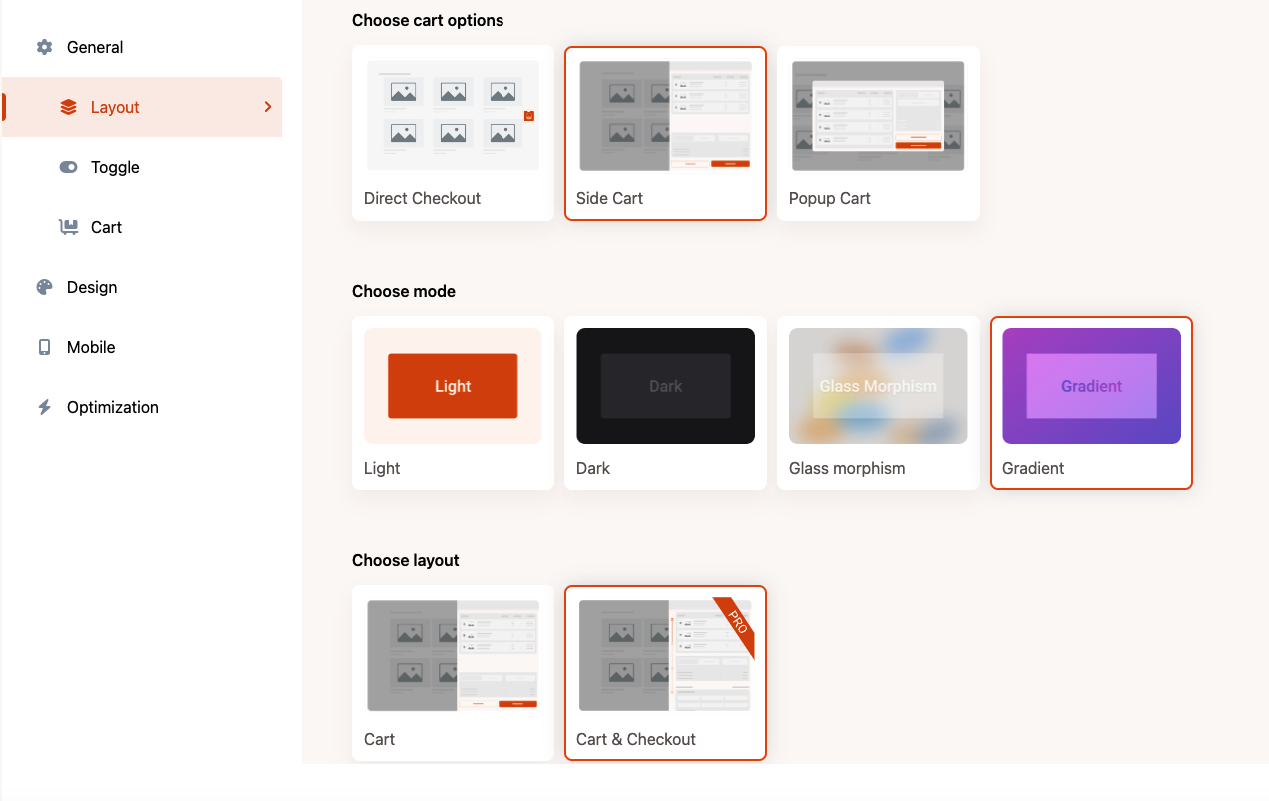
Layout and settings panel - Organised and Optimised Control.
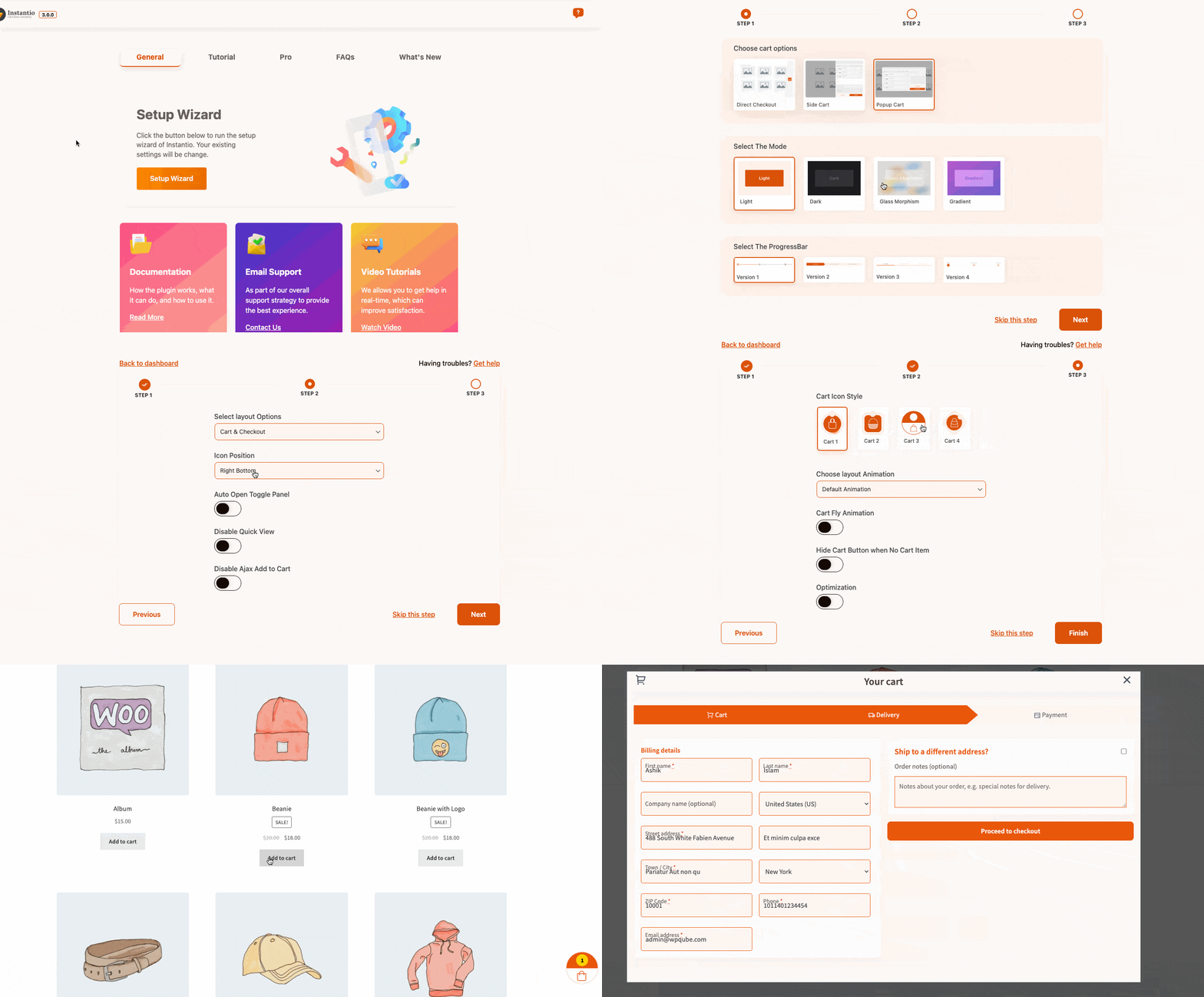
Quick setup - You can set up your on-page checkout quickly and effortlessly.
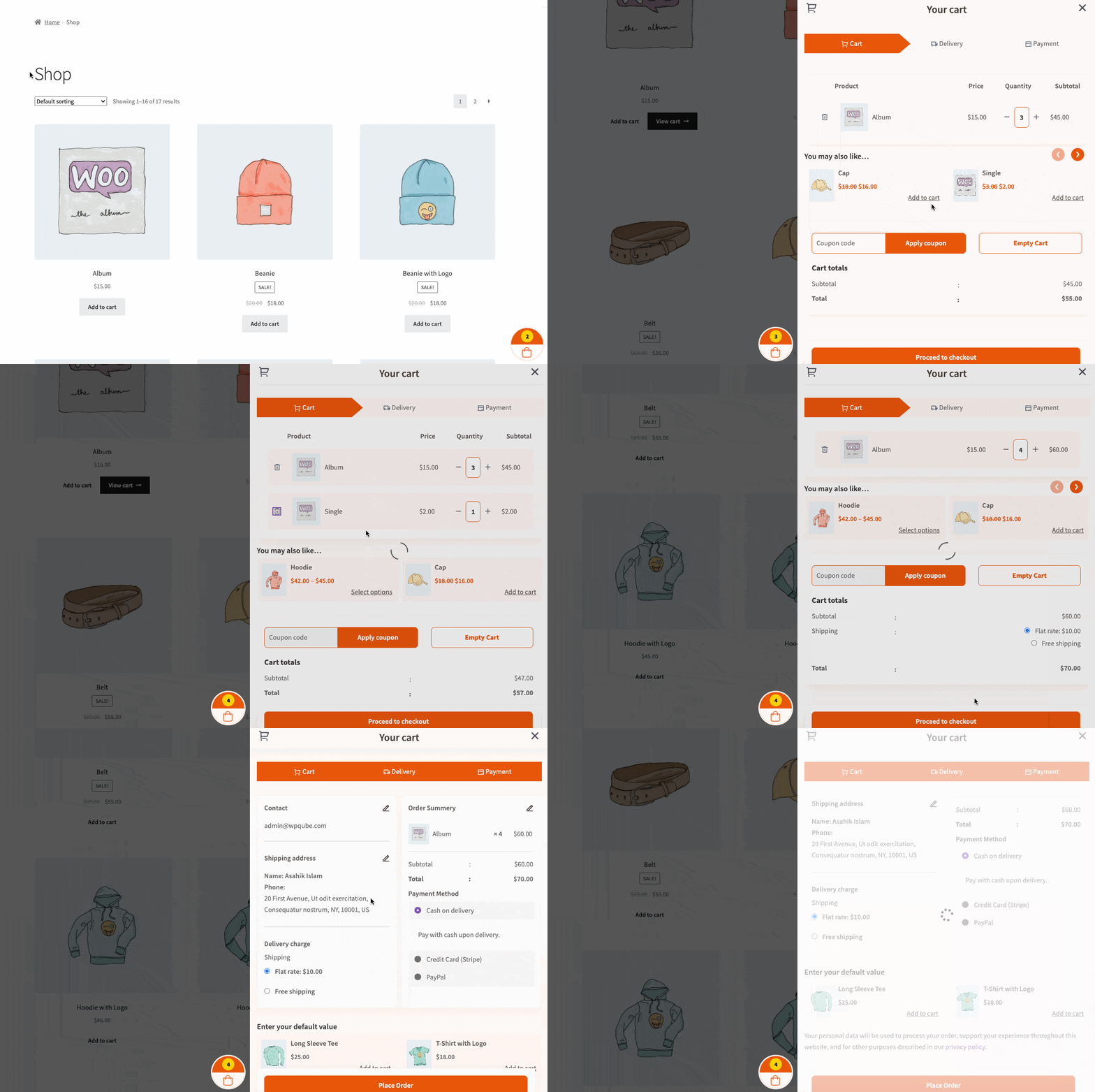
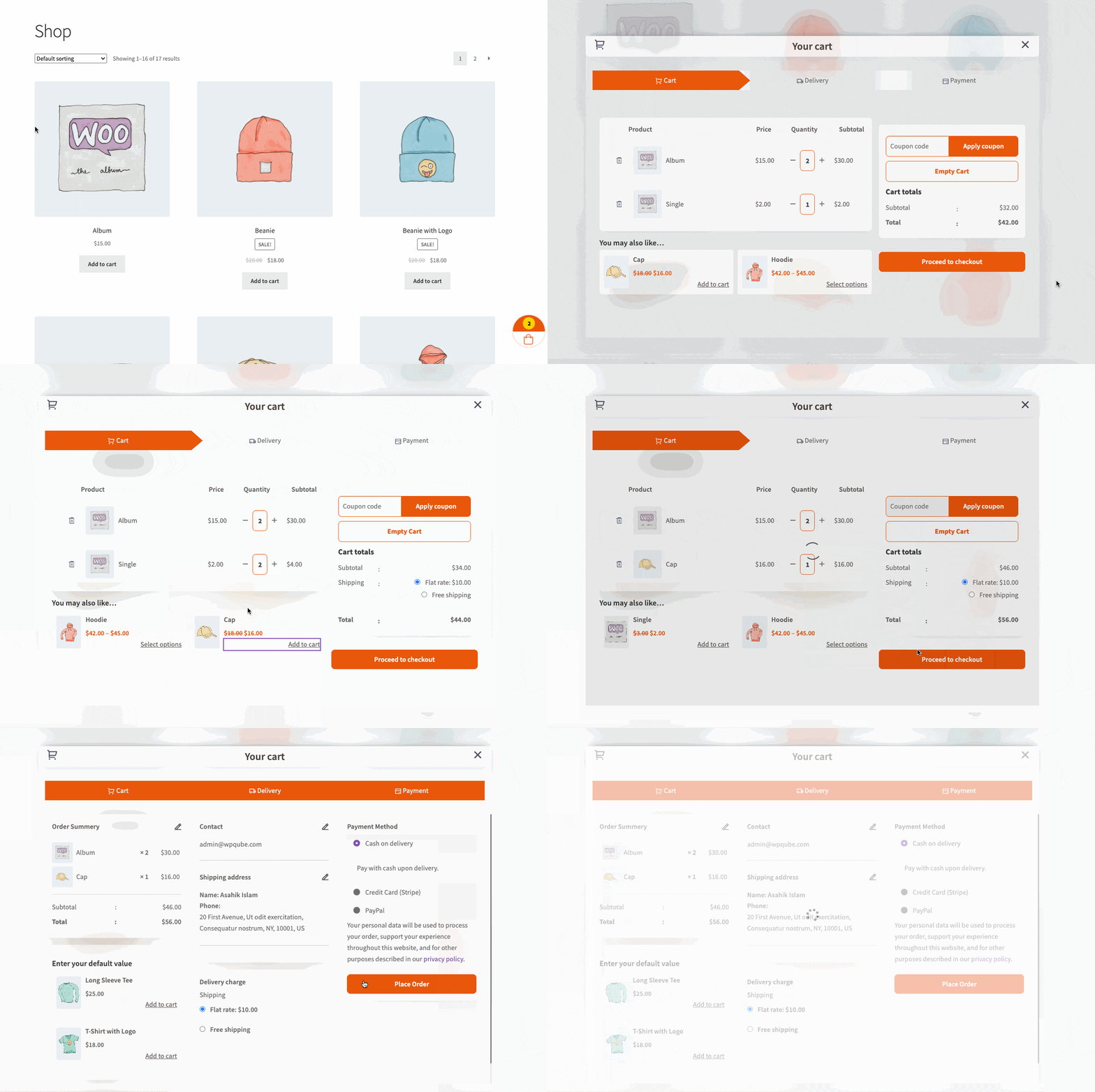
SideCart layout - The SideCart feature in instantio enables you to display the shopping cart from a side view.
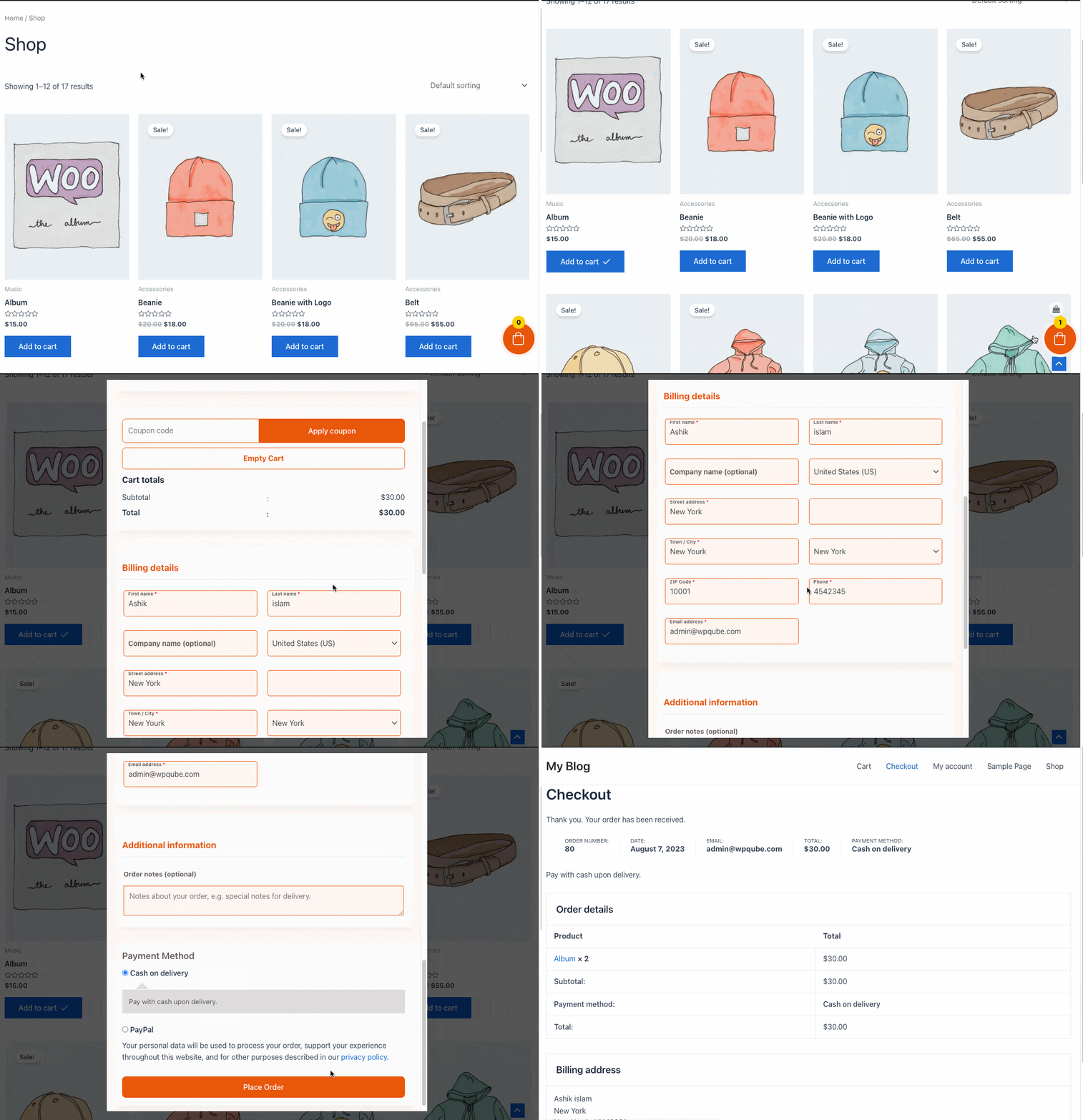
Popup cart layout - The Popup Cart feature display the cart contents in a popup window.
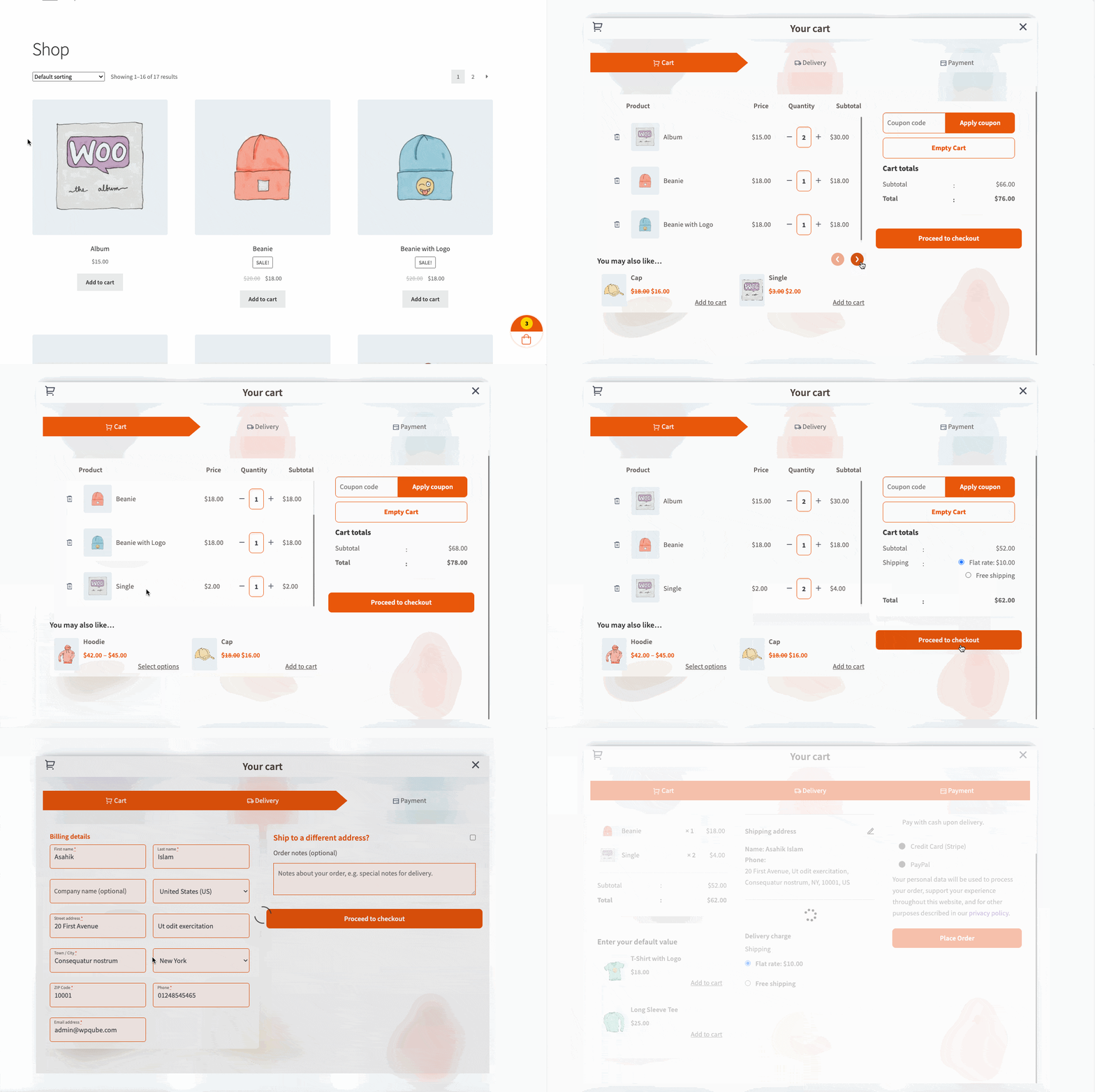
Single Step Checkout - Single Step Checkout in instantio enables the checkout process in One Step
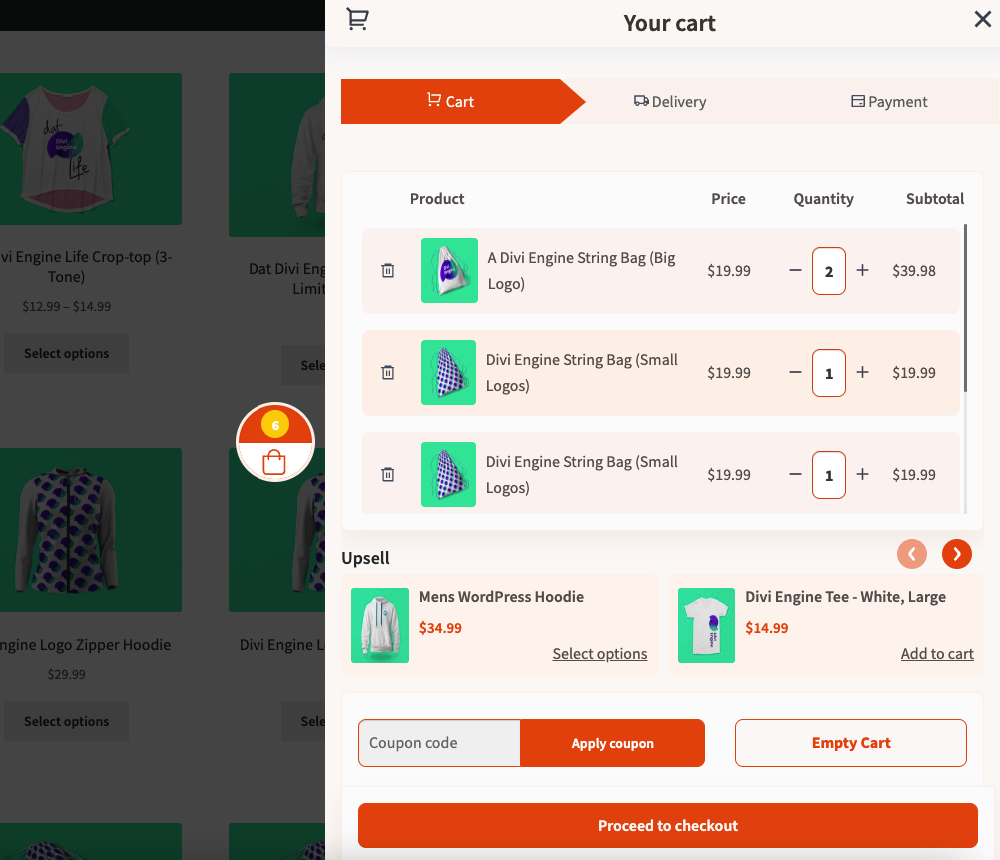
UpSell and cross-sell - You can setup UpSell and cross-sell to boost your sales during the checkout process. (Pro)
Lite theme - It Enables a lightweight and minimalistic, clean, and minimalist look.
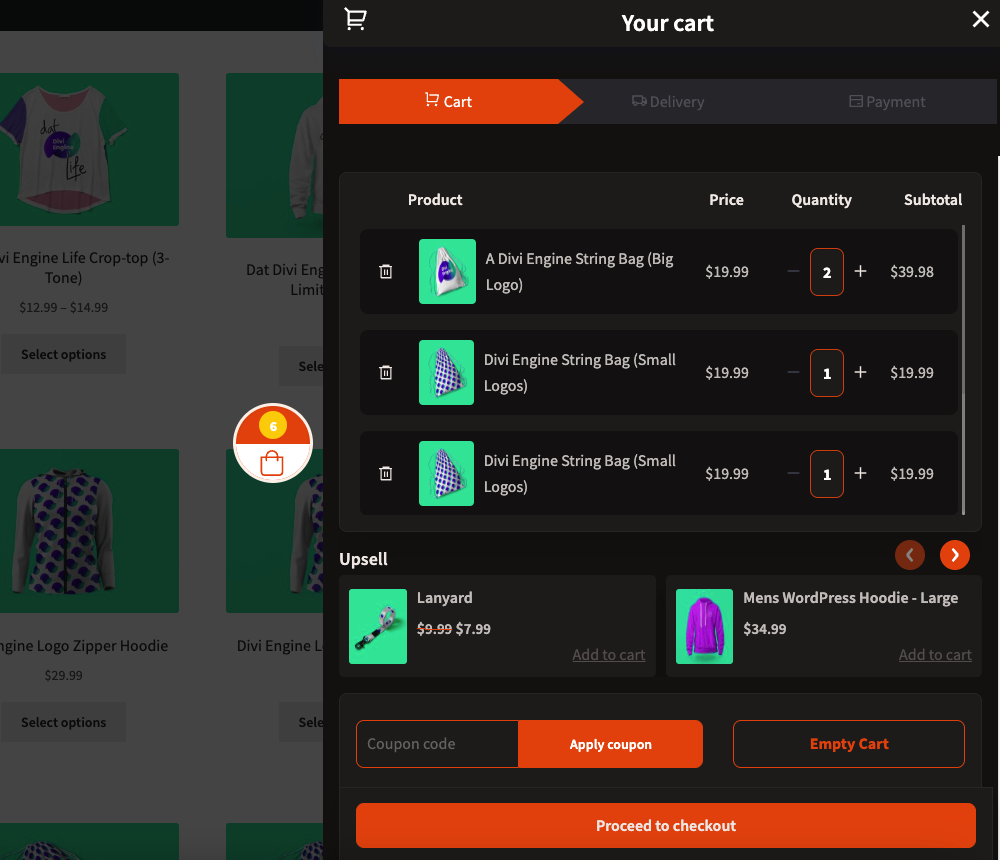
Dark theme - The Dark theme is a sleek and sophisticated color theme with a black color palette.
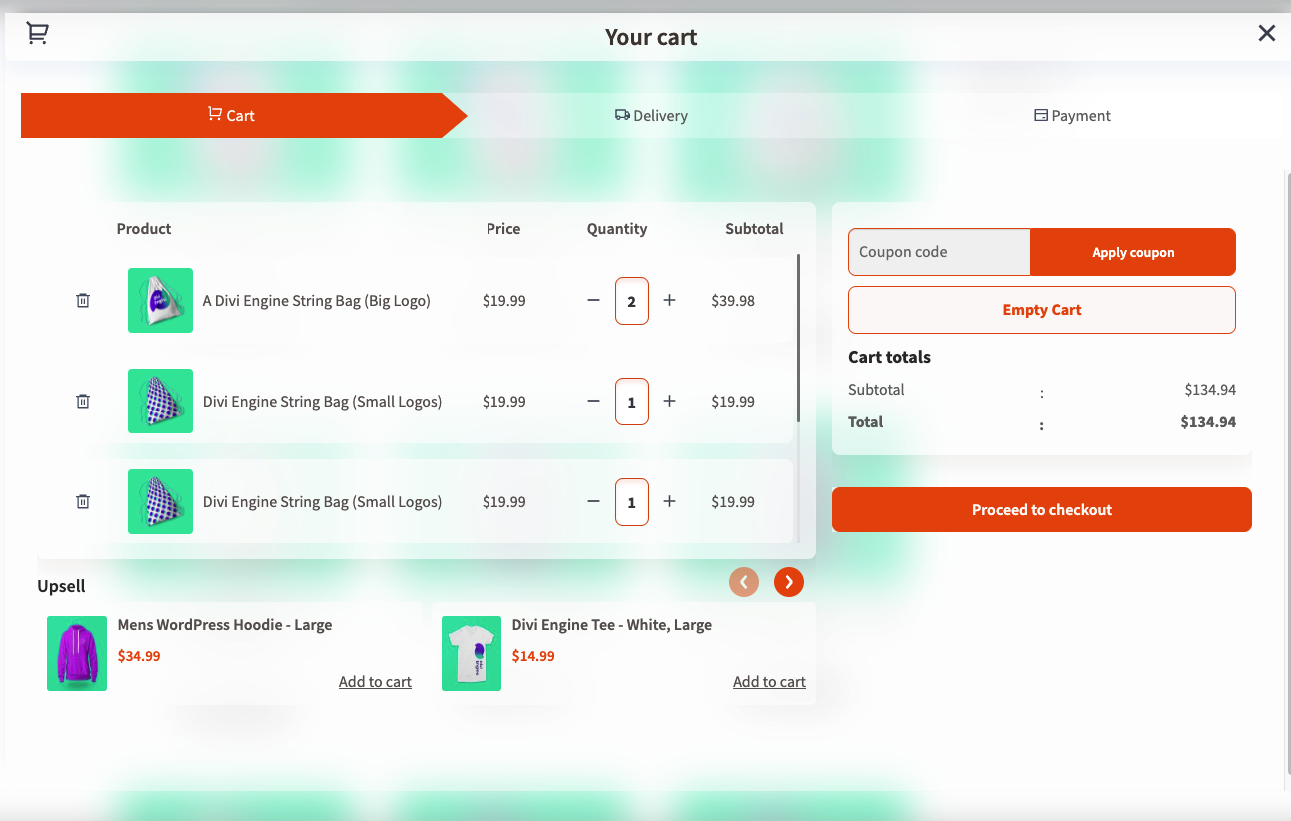
Glassmorphism theme - You can use the popular glass effect in the design.
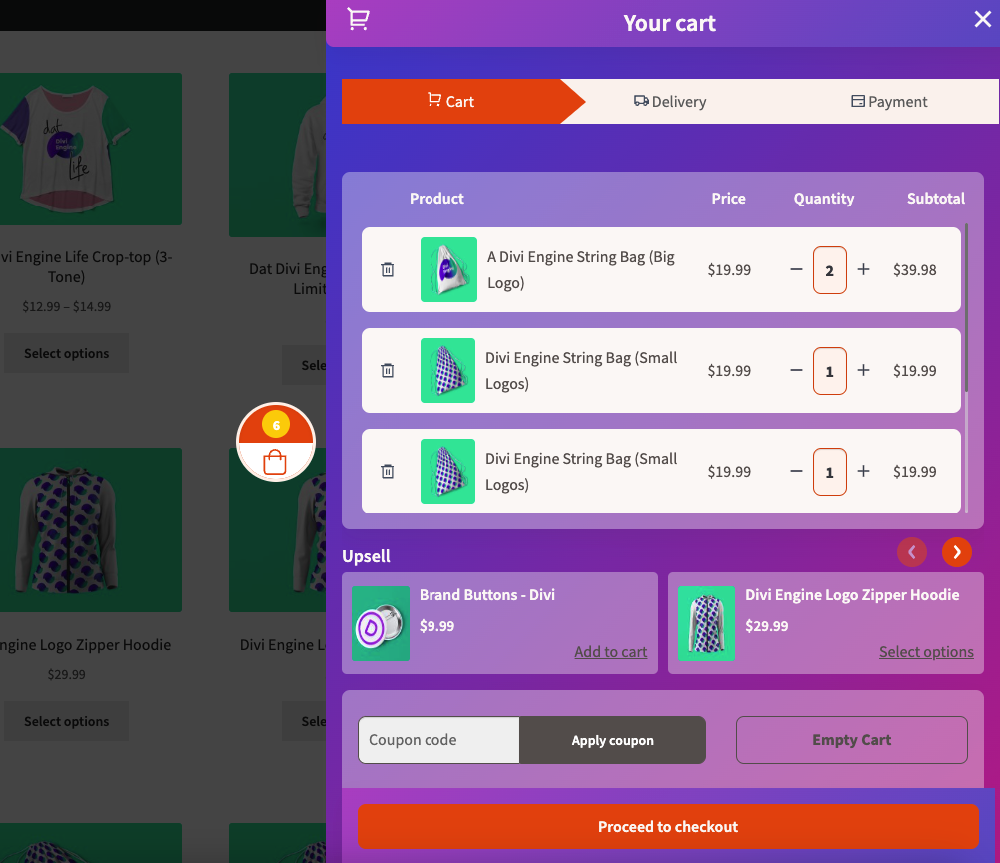
Gradient theme - It uses the smooth Gradient color effect to the instantio.
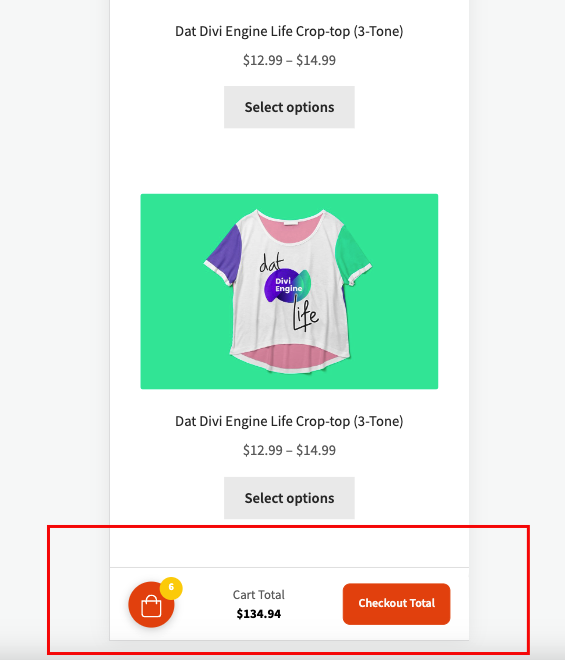
Dedicated mobile layout - You can set a dedicated and optimized layout for mobile devices. (Pro)
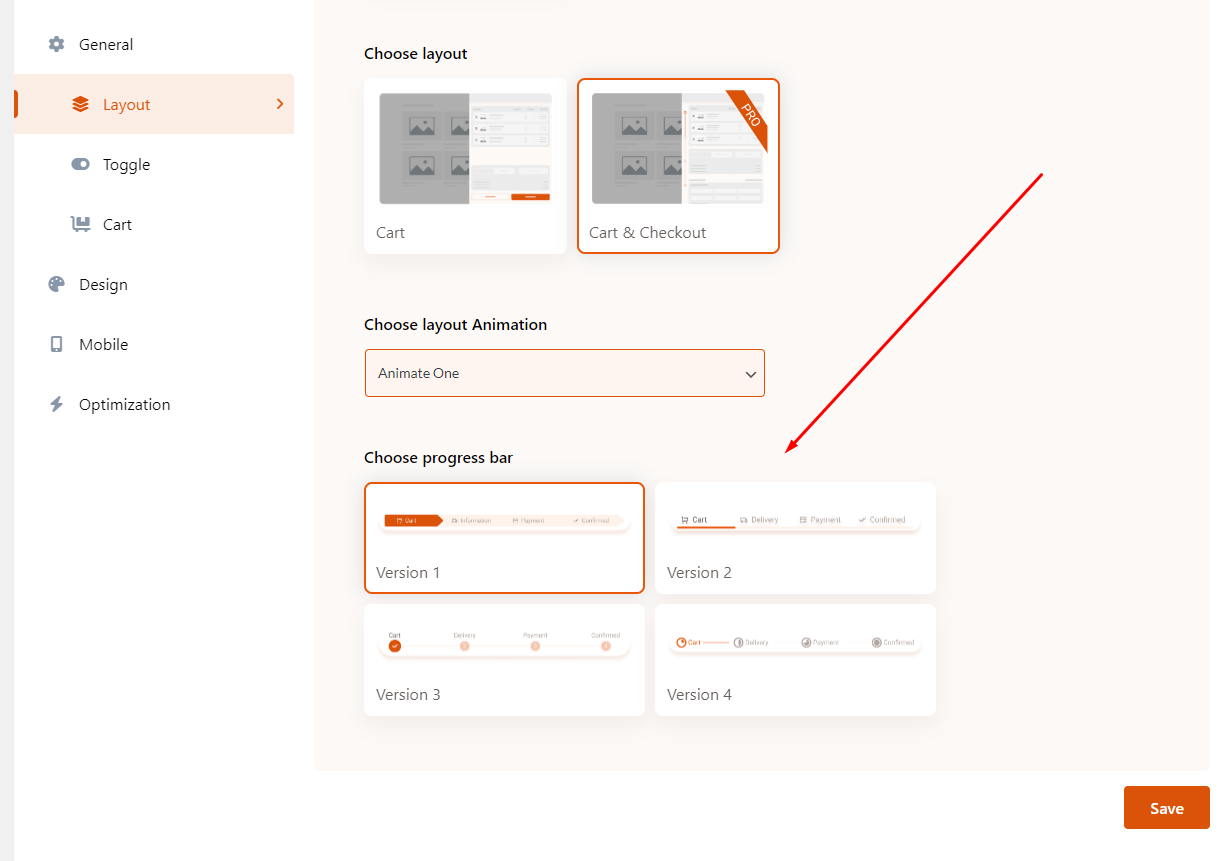
Progress bar - You can choose a different progress-bar style for on-page checkout. (Pro)
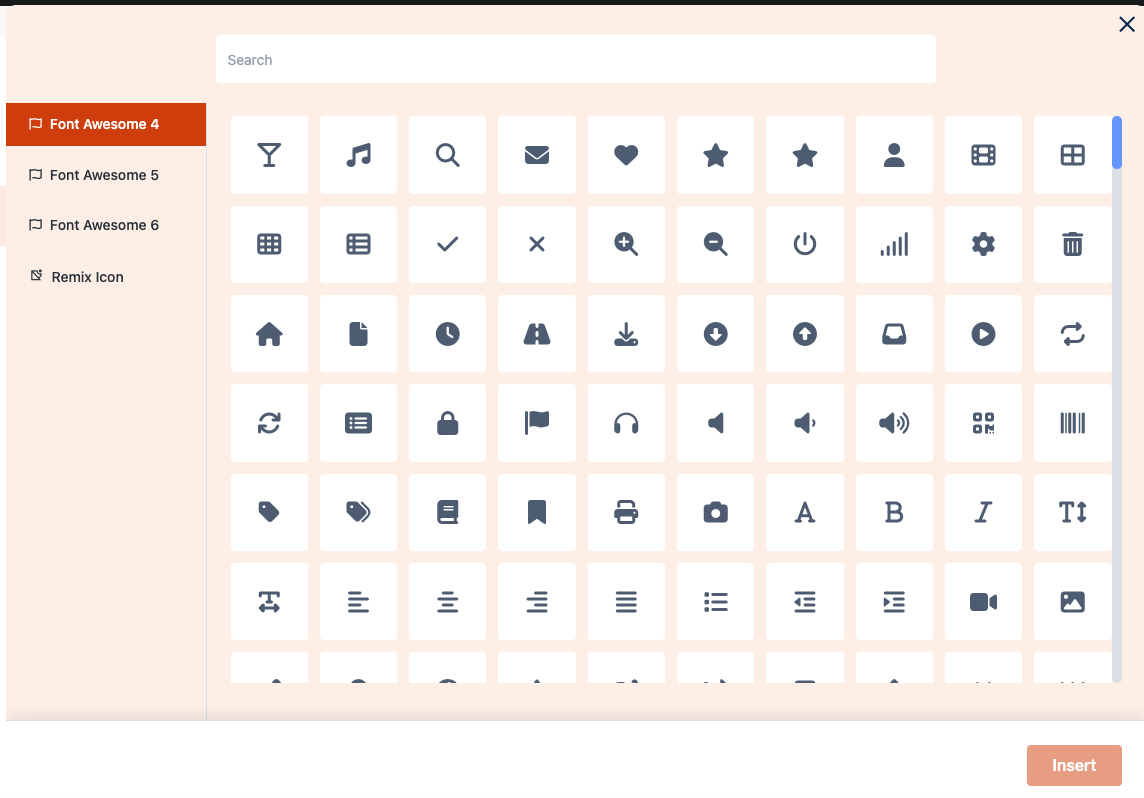
Icons and custom icon upload - You can add fontawesome and remix icons, also you can upload any custom icon. (Pro)
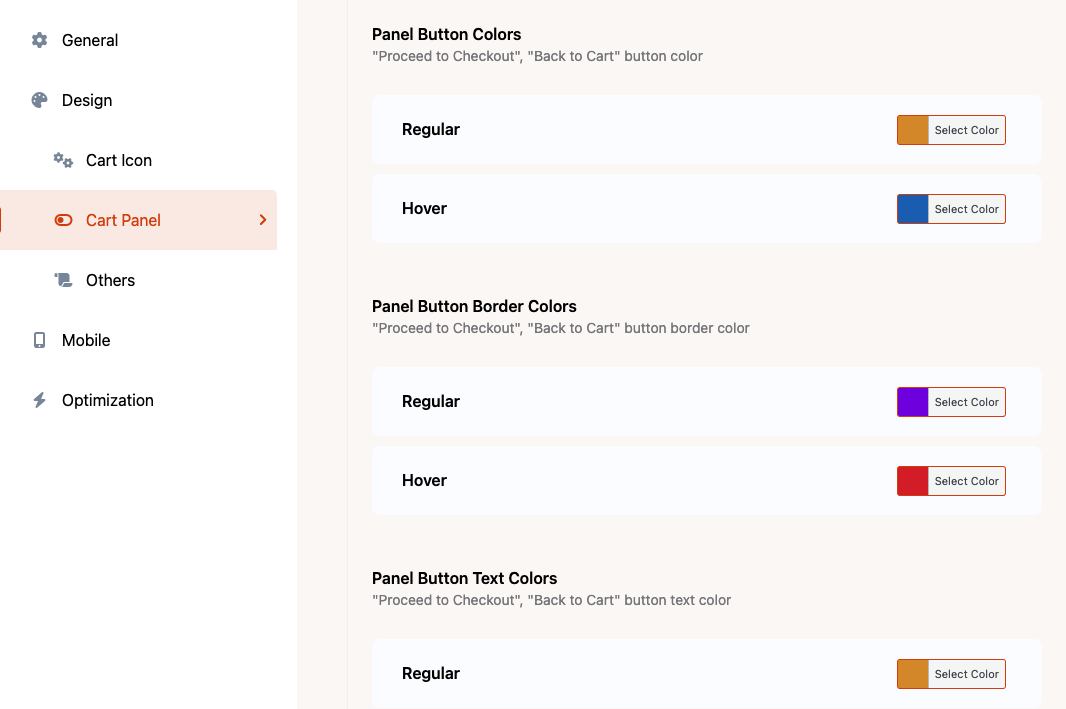
Design panel - You can change any color and style in the instantio.
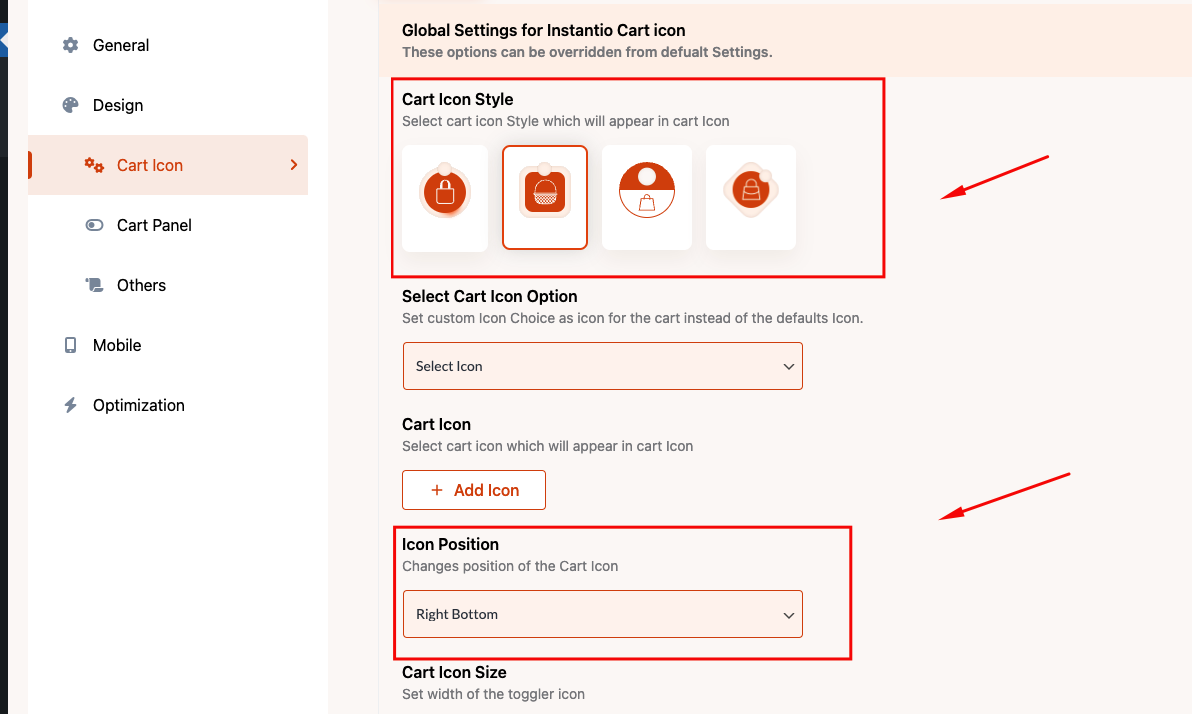
Cart icon selection - You can set different cart Toggle styles and Cart positions.
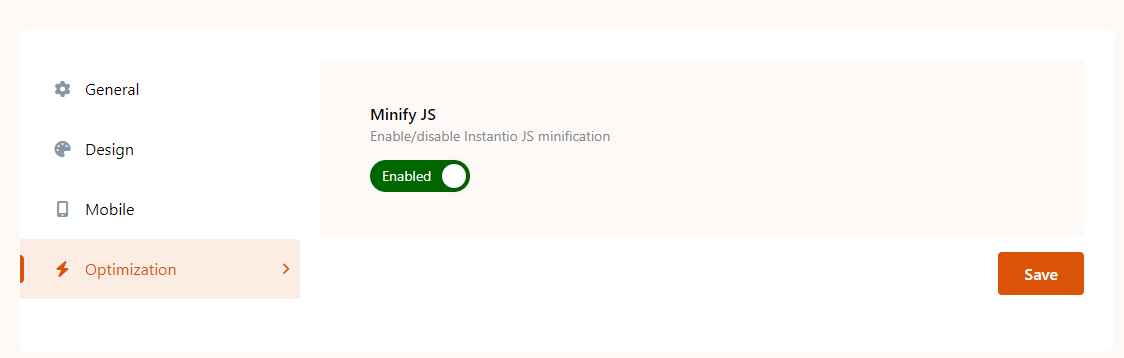
Optimized assets - You can enable optimized settings to load optimized scripts
Faq
One page checkout for WooCommerce streamlines the typical multi-step process into a single page. Instantio specializes in offering this functionality.
WooCommerce Direct Checkout simplifies the buyer’s journey by eliminating the cart page, thus reducing cart abandonment. This is another feature available in Instantio.
Instantio is a WooCommerce checkout plugin that converts the multi-page checkout process into a single, same page instant checkout. When customers add items to their cart, a floating cart / side cart / popup cart drawer appears, allowing them to proceed directly to checkout in just 15-25 seconds.
- Download and unzip the plugin. Upload the unzipped folder to the wp-contents/plugins folder of your WordPress installation.
- Active the plugin from the WordPress Plugins administration page OR, Go to WP admin panel, click ‘Plugins’ -> ‘Add new’. In the search input box, type ‘Instantio’.
- Install and activate the plugin.
- Go through the Quick setup wizard for the basic setup.
- Check our Documentation & YouTube videos for further instruction.
Instantio is entirely free and available on WordPress.org, ensuring the free version remains accessible at no cost. Additionally, a Pro version, enriched with advanced features, is available for purchase through our official website.
Instantio enables customization of the WooCommerce checkout page, allowing a direct route from shopping to payment.
Absolutely, Instantio turns the standard WooCommerce checkout into a one-click experience.
Yes, Instantio seamlessly converts WooCommerce cart into a same page side cart functionality to enable a faster checkout process.
Instantio enhances the WooCommerce popup cart by enabling a one-click checkout feature through a popup interface.
Instantio transforms the WooCommerce checkout into a quicker, more user-friendly Popup Checkout process and users can checkout instantly from the same page.
Instantio turns the standard WooCommerce checkout into a one-click express checkout.
Yes, Instantio provides the feature to bypass the default multistep checkout page, taking customers directly to checkout.
Certainly, Instantio offers a quick checkout alternative to the default WooCommerce process.
Yes, Instantio allows for an express checkout experience within WooCommerce.
Certainly, Instantio offers customizable checkout options for WooCommerce.
If speed is a priority, Instantio offers a fast checkout solution for WooCommerce. A faster option is available in our Pro Version.
For those seeking simplicity, Instantio provides a simplified WooCommerce checkout process. An even simpler version is available in our Pro Version.
Reviews
Broke my site & lost me sales
By 
This plugin broke my shopping cart and my customers couldn't make sales. The is my second plugin from the same team which also does not work (TourFic). I do not recommend anything from the team. The support is also terrible.
Amazing Plugin with Excellent Support
By 
This is an excellent plugin that works flawlessly and offers plenty of customization options. I must also commend the support team for their quick response to my request. They replied promptly, provided clear guidance, and shared helpful suggestions. Kudos to the team—highly recommended!
It's Workable
By 
While support isn't the best, keep in mind that the pro version is significantly cheaper and personally we have purchased the lifetime plan which was very useful when we deployed it for our clients.
Might not be suited for beginners, as there were custom codes that we had to write it ourselves (we don't usually rely on support anyway).
To the developer, whatever you do, do not remove the lifetime package. This review was submitted to let you know that there are still people who appreciate what you do and depend heavily on it; despite the recent negative review.
Support is horrible
By 
Great plugin to choose if you enjoy having to fight for multiple days across multiple communication channels to get a refund or support. Their support staff is fully prepared to have conversations with you, such as "I understand your problem" and nothing else as a reply to an e-mail with multiple concerns and calls to action. Their communication skills are only rivaled by the first generation of Google Translate from 2000.
Paid for the pro version. Immediately, license wouldn't activate. E-mailed support and told them I need this resolved very quickly (48 hours) for a website launch date. They replied that they needed admin credentials to log into my site to fix it, with no other troubleshooting steps offered. I told them I was uncomfortable with that, they responded a full 24 hours later with another license key, but no other troubleshooting steps or anything else such as a new copy of the pro version plugin zip file. Their support policy states that pro customers will get responses within 1-2 hours while they're online, and these emails were sent during their office hours. I tried the key, didn't work, e-mailed them back. Another full 24 hours later, they replied again to say that they needed admin credentials to solve this, no other options. I reluctantly gave them the credentials, and a full 24 hours after that, they had neither logged into my site nor replied to my e-mail. I revoked the access at that point and used the website's form to request a refund. Suddenly, a support agent e-mails me back outside of office hours, telling me in a panic that the credentials don't work and begging me to fix it so they can solve the problem (aka circumvent having to refund me). I told them too late, I'm not dealing with a checkout/cart plugin where support 1) doesn't respond in a timely manner (could have been 3+ days of lost sales!) 2) clearly can't communicate enough to troubleshoot 3) just asks for back-end access without fully understanding your problem, basically guaranteeing they're going to muck something else up and then tell you "sorry, we don't support that plugin."
Little did I know that would kick off another two days of having to constantly pester them through all communication channels to get them to respond to the refund request. Their response to my e-mail saying they'd lost my business and I wanted a refund was literally just "I understand your concern," nothing else, no refund notification e-mail. I e-mailed them multiple times during their office hours, when they should have been replying within 1-2 hours per their own policy, and they ignored my e-mails. When I went to the live chat on the site, ironically, the exact guy who said "I understand your concern" and then proceeded to ignore multiple emails WAS ANSWERING THE LIVE CHAT! When I called him out on that and told him I'd be calling my bank in the morning to have the charges reversed and the merchant labeled as a scammer, he suddenly was able to reply to my e-mails, and suddenly the "refund team" (which was probably also just him) was working on it immediately, and magically I got the refund e-mail right after that. If I wasn't as aggressive as I was, they were absolutely planning to just wait out the 30-day refund period so they could say "sorry, too late, no money back."
In short, there's a reason this plugin offers so much and the paid version is so cheap compared to competitors. Your support staff is less than half a dozen dudes in Bangladesh who clearly can't grasp a complex thought in English and seem unaware of the many translation technologies they could be leveraging. They can't troubleshoot, so they just want full access to do whatever they please on your website backend....after at least 3 days of pestering them about it. I hope this has underscored how bad service can ruin a good plugin. Use the free version, but don't make the mistake of thinking "this works great, pro will too."
Exceptional Service & Stellar Product!
By 
I recently had the pleasure of working with the Themefic team for my WordPress development needs and their Instatio Pro plugin. From the onset, it was clear that they are deeply committed to customer satisfaction and excellence.
Not only did they address all of my immediate concerns with the plugin, but they also went the extra mile to answer additional questions I had. Their responses were prompt, comprehensive, and they truly made me feel valued as a customer.
The Instatio Pro plugin itself has been a game-changer for my website. It's efficient, user-friendly, and backed by a team that genuinely cares about their users.
In an age where good customer service can be hard to come by, Themefic stands out as a beacon of excellence. I highly recommend them and their products to anyone in need of top-tier WordPress solutions.
Thank you, Themefic, for your outstanding service!
good
By 
useful and easy to use
Top support and great plugin
By 
I had problems with the cart plugin I use. After installing Instantio and help from support for the right settings, everything works fine now. Very happy with this plugin!
Đẹp, mượt, dê sử dụng.
By 
plugin đang để tải cho các trang bán hàng.
Awesome
By 
This plugin is great!
By 
Changelog
3.3.28 – November 10, 2025
- Updated: Information in readme.txt file.
- Improved: Compatibility with WooCommerce v10.3.
3.3.27 – November 09, 2025
- Updated: Information in readme.txt file.
- Improved: System stability and performance.
- Improved: Compatibility with Elementor v3.32.
3.3.26 – October 16, 2025
- Compatibility: Compatible with WordPress 6.8.3.
- Improved: System stability improved.
3.3.25 – August 27, 2025
- Updated readme.txt file info.
3.3.24 – August 27, 2025
- Compatibility: Now compatible with WooCommerce v10.0.
- Improved: System stability has been improved.
3.3.23 – August 22, 2025
- Updated: Stripe compatible issue has been resolved.
- Updated: PayPal compatible issue has been resolved.
- Improved: System stability has been enhanced.
3.3.22 – July 09, 2025
- Updated: Plugin title has been updated.
- Compatibility: Now compatible with WooCommerce v9.9.
3.3.21 – June 18, 2025
- Improved: Compatibility issue with the Tourfic plugin.
- Improved: System stability has been enhanced.
3.3.20 – June 15, 2025
- Improvement: Security has been enhanced to address vulnerabilities.
3.3.19 – May 21, 2025
- Added: Settings sidebar banner has been introduced for Info.
- Improvement: System stability improved.
3.3.18 – May 12, 2025
- Improvement: System stability improved.
3.3.17 – April 28, 2025
- Improved: Security has been enhanced to address vulnerabilities.
3.3.16 – April 16, 2025
- Compatibility: Fully compatible with WordPress version 6.8.
3.3.15 – April 10, 2025
- Updated: POT file for translation.
- Compatibility: Compatible with WooCommerce 9.8.
3.3.14 – March 23, 2025
- Compatibility: Compatible with WooCommerce 9.7.
- Improvement: System stability improved.
3.3.13 – February 02, 2025
- Fixed: Minor bugs and issues resolved.
- Improved: System stability enhanced.
3.3.12 – January 22, 2025
- Compatibility: Compatible with WooCommerce 9.6.
- Improvement: System stability improved.
3.3.11 – December 31, 2024
- Updated: Updated the readme.txt file and plugin information.
- Compatibility: Added compatibility with Dokan Pro Stripe payments.
Old Changelog can be found here.
1.0
( Jan 25, 2021 )
– Initial release